Hello @montey11,
If you don’t want evaluate the equations dynamically, only after pressing the “calculate” button, simply, follow the steps below:
1. Insert a button field in the form, and select the “calculate” option as the button type.
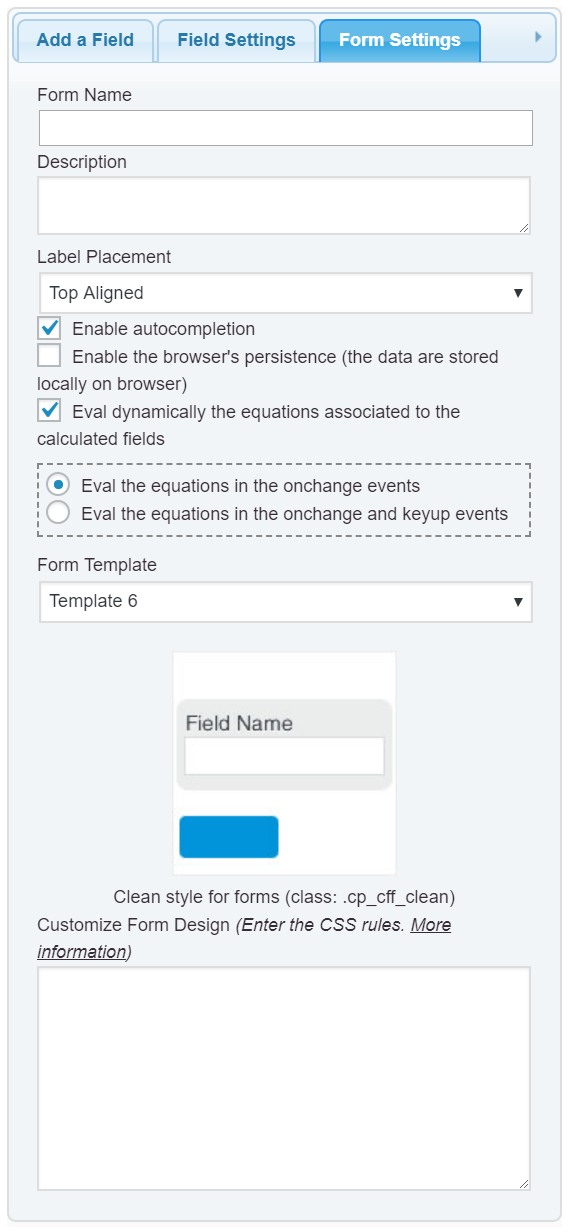
2. And then, untick the checkbox: “Eval dynamically the equations associated to the calculated fields” in the “Form Settings” tab (https://cff.dwbooster.com/images/documentation/form-settings-tab.png)
and that’s all.
Best regards.
Thank you. This worked for me.
Can I show my calculated fields only after the submit button has be clicked ?
Hello @shelroy,
Yes that’s possible, but not ticking the checkbox for hiding the field from the public form, because in this case the plugin use input tags with type=”hidden” and wouldn’t way to display them. The alternative would be:
1. Select the calculated fields and assign to them the special class name: hide
Note: The class names are assigned to the fields through their attributes: “Add CSS Layout Keywords” on their settings.
2. Second, enter the following piece of code as the onclick event of the calculate button:
jQuery('.hide').removeClass('hide');
and that’s all.
Best regards.