
Description
Zadex is a visual, live page builder for WordPress. You edit the real page: click any text to type, drop widgets where you want them, split sections into columns with one click and see every change instantly. The HTML it produces is clean (one element per widget, no wrapper soup) and the CSS is generated once when you save, so pages stay fast.
Editor
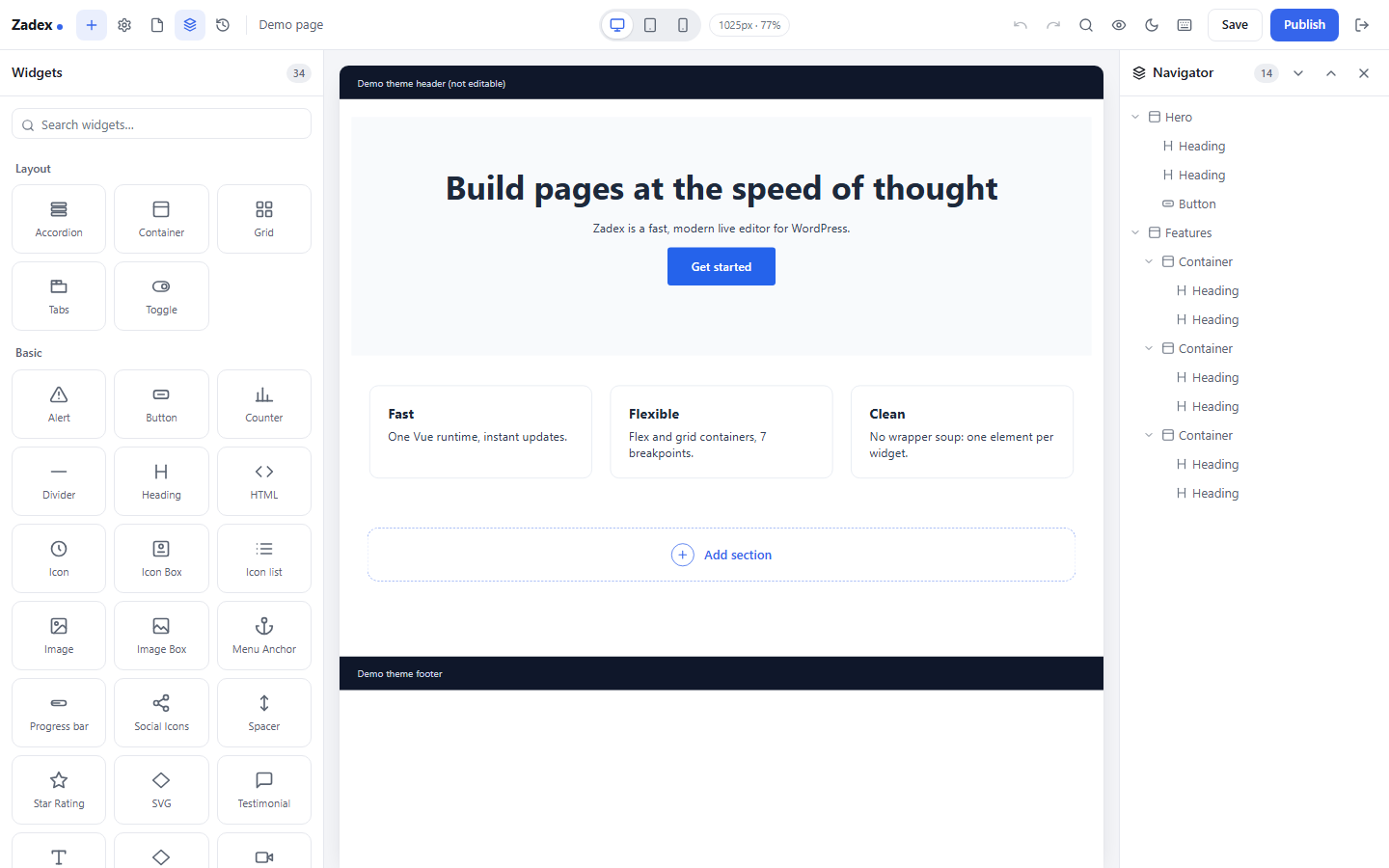
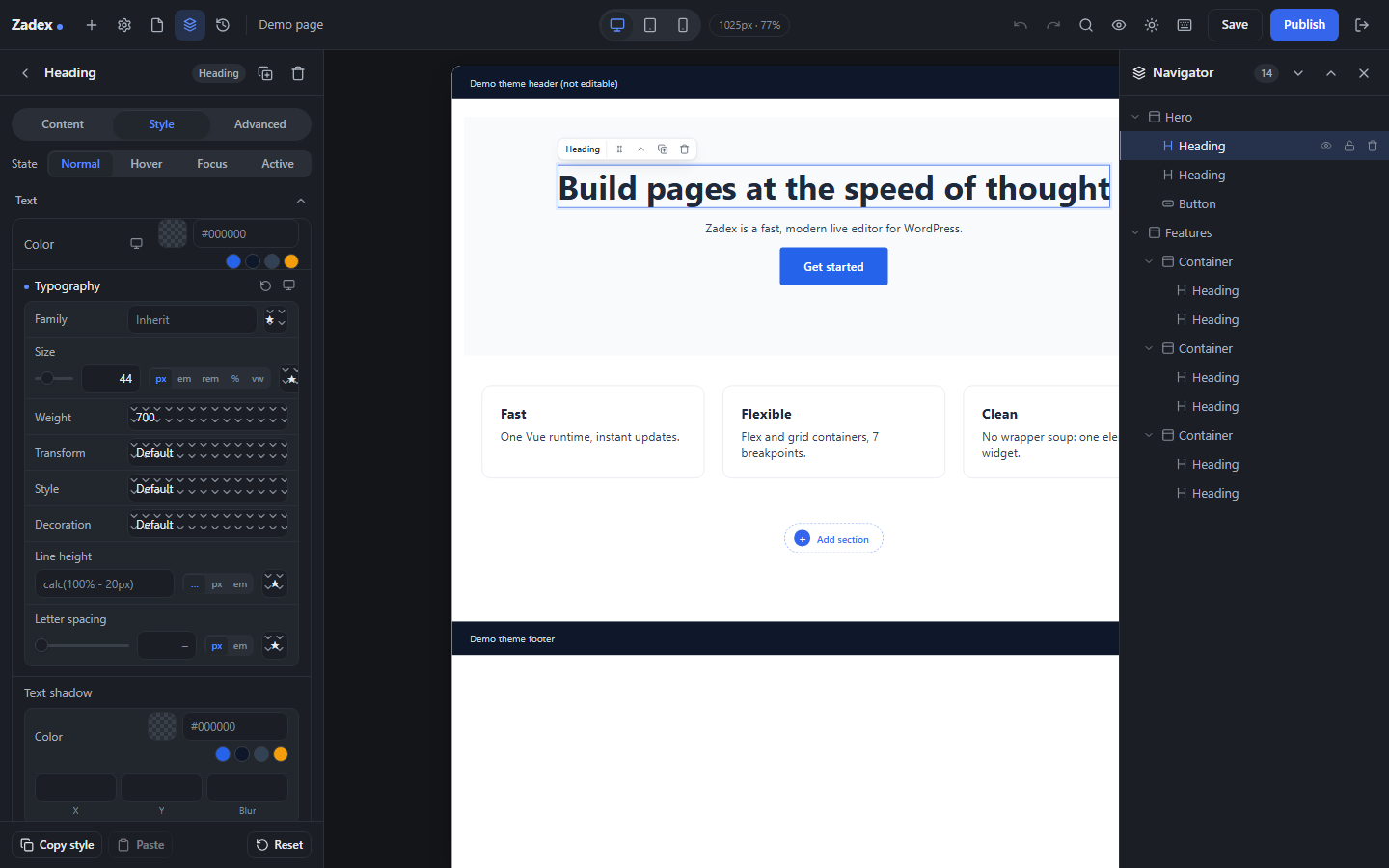
- Live editing on the real page with your theme around it, inline text editing and a navigator tree.
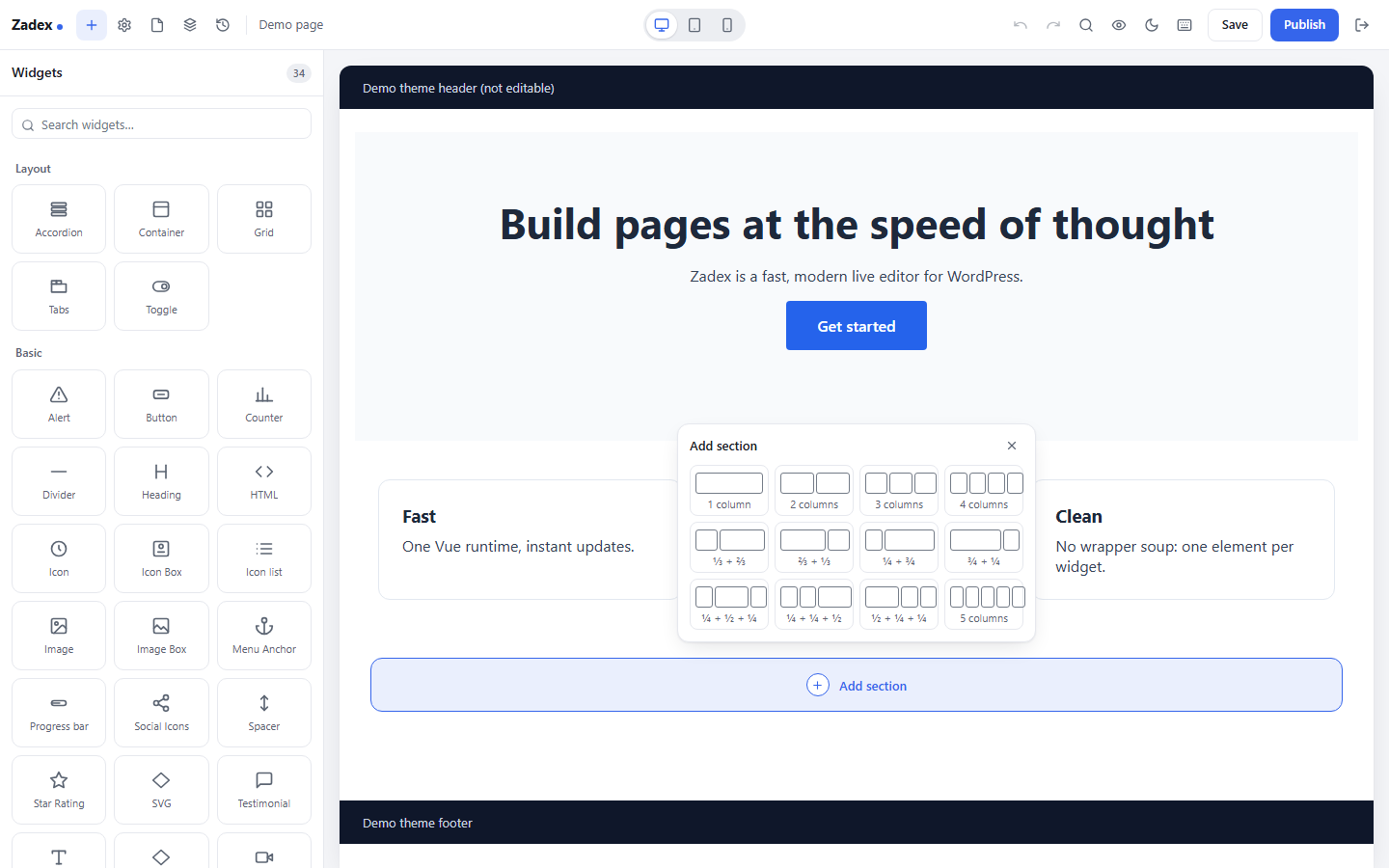
- “+” between sections with a column-structure picker; re-split an existing section without losing its content.
- Flex and CSS grid containers, nested columns, boxed or full-width sections.
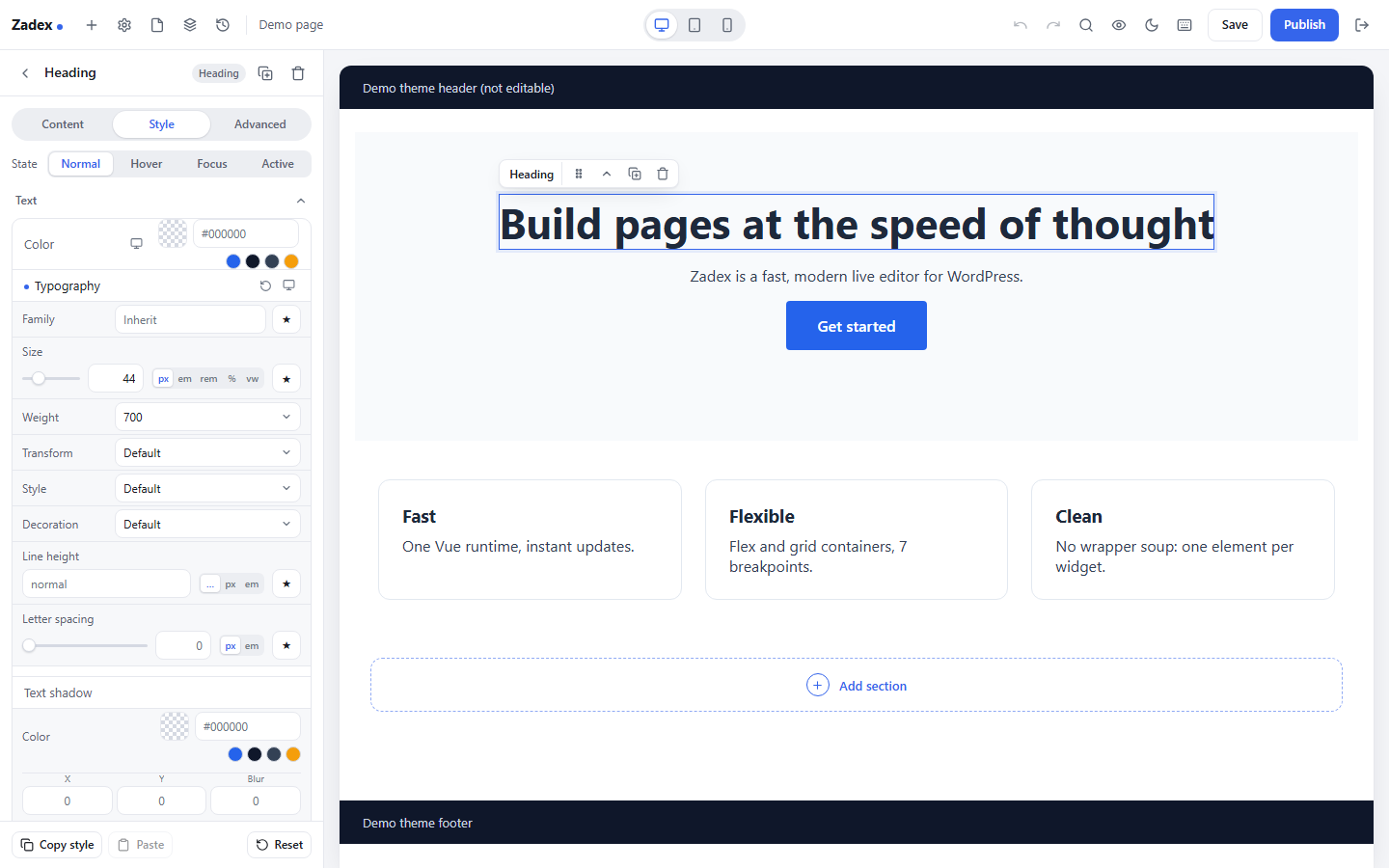
- Responsive editing for up to seven breakpoints, hover and other states, undo/redo, revisions, copy/paste style.
- Global colors, fonts, spacing variables and reusable classes.
- Components and global widgets: save a block once, reuse it everywhere, edit it in one place.
- Template library with starter sections, saved templates and page/site-kit export and import.
- Arabic translation and full right-to-left support; dark mode for the editor.
Widgets
Headings, text, images, buttons, icons, icon lists, image and icon boxes, videos, galleries, carousels, tabs, accordions, toggles, counters, progress bars, testimonials, star ratings, maps, social icons, forms, price tables and lists, countdowns, slides, flip boxes, call to action, animated headlines, table of contents, share buttons, code highlight, Lottie animations, hotspots, video playlists, login, instant search and more.
Theme builder
Design the header, footer, single post, archive, search results and 404 templates, with display conditions. Theme widgets (site logo, navigation menu, mega menu, post title/content/info, breadcrumbs, archive posts, search form), dynamic content from posts, the site, users and custom fields (ACF, Pods, Toolset and Meta Box when installed), and a loop builder with filters.
Marketing
- Popups with triggers (page load, scroll, click, inactivity, exit intent), targeting rules and animations.
- A form builder with multi-step forms, file uploads, spam protection, email notifications and a submissions screen with CSV export; optional integrations with webhooks and email marketing services.
- Maintenance and coming-soon mode, floating contact buttons, page transitions and motion effects.
WooCommerce
When WooCommerce is active: single-product and shop templates and widgets for product title, images, price, add to cart, cart, checkout, my account, mini cart and products grids.
Source code
All JavaScript and CSS in the build/ folder is generated from the human-readable sources that ship inside the plugin, and the build output itself is not minified.
src/editor/(TypeScript and Vue 3) – the live editor:build/assets/editor-*.jsandbuild/assets/editor-*.css, plus the lazily loaded editor chunks inbuild/assets/.src/frontend/(TypeScript and CSS) – the scripts and styles loaded on the public site:build/assets/frontend-*,motion-*,popup-*,interactions-*,transitions-*,floating-*and the other entry files listed invite.config.ts.widgets/<widget>/Preview.vue,widgets/<widget>/*.tsandwidgets/<widget>/style.css– each widget’s editor preview, front-end behaviour and styles:build/assets/widgets/<widget>/*.js(and the shared widget CSS inbuild/assets/frontend-*.css).- Bundled libraries (Vue, Pinia, VueUse, nanoid, Font Awesome Free) come from npm; their versions are pinned in
package.jsonandpackage-lock.json.
To rebuild build/ from the sources: install Node.js 20 or later, then run npm ci and npm run build in the plugin folder. vite.config.ts lists every entry point; build/manifest.json maps each generated file back to its source file.
External services
Zadex does not track visitors or site owners and never sends data to the plugin authors. It connects to the third-party services below only when you add the related widget or turn on the related option. For each service: what it is used for, what data is sent, when, and the service’s terms and privacy policy.
YouTube (Google)
What it is used for: playing YouTube videos in the Video, Video Playlist and Media Carousel widgets and in video backgrounds, when you enter a YouTube link.
What is sent and when: when a page with such a video is viewed, the visitor’s browser loads the player from www.youtube-nocookie.com or www.youtube.com and the preview image from i.ytimg.com. Google receives the video id, the visitor’s IP address and browser information. When the Video widget has a poster image, nothing is loaded from YouTube until the visitor clicks play.
Terms of service: https://www.youtube.com/t/terms
Privacy policy: https://policies.google.com/privacy
Vimeo
What it is used for: playing Vimeo videos in the Video, Video Playlist and Media Carousel widgets, when you enter a Vimeo link.
What is sent and when: when a page with such a video is viewed, the visitor’s browser loads the player from player.vimeo.com. Vimeo receives the video id, the visitor’s IP address and browser information.
Terms of service: https://vimeo.com/terms
Privacy policy: https://vimeo.com/privacy
SoundCloud
What it is used for: the SoundCloud widget, which embeds a SoundCloud track or playlist.
What is sent and when: when a page with the widget is viewed, the visitor’s browser loads the player from w.soundcloud.com with the track URL you entered. SoundCloud receives the track URL, the visitor’s IP address and browser information.
Terms of service: https://soundcloud.com/terms-of-use
Privacy policy: https://soundcloud.com/pages/privacy
Google Maps
What it is used for: the Google Maps widget, which embeds a map.
What is sent and when: when a page with the widget is viewed, the visitor’s browser loads the map from maps.google.com with the address you entered. Google receives the address, the visitor’s IP address and browser information.
Terms of service: https://maps.google.com/help/terms_maps/
Privacy policy: https://policies.google.com/privacy
Google reCAPTCHA
What it is used for: optional spam protection of the Form widget. It is off by default; it is used only after you enter reCAPTCHA keys under Zadex > Settings and enable reCAPTCHA on a form.
What is sent and when: on pages with such a form, the visitor’s browser loads the script from www.google.com (www.google.com/recaptcha/api.js). When the form is submitted, your server sends the reCAPTCHA response token, your secret key and the visitor’s IP address to www.google.com/recaptcha/api/siteverify.
Terms of service: https://policies.google.com/terms
Privacy policy: https://policies.google.com/privacy
Facebook (Meta)
What it is used for: the Facebook widget (page plugin, comments, embedded post or video, like/share button).
What is sent and when: on pages with the widget, the visitor’s browser loads the Facebook SDK from connect.facebook.net when the widget scrolls into view (or when it is clicked, depending on the widget setting). Meta receives the page URL, the visitor’s IP address, browser information and its own cookies.
Terms of service: https://www.facebook.com/terms.php
Privacy policy: https://www.facebook.com/privacy/policy/
Adobe Fonts
What it is used for: optional use of your Adobe Fonts (Typekit) web project. It is used only after you enter an Adobe Fonts project id under Zadex > Custom Fonts.
What is sent and when: on every page, the visitor’s browser loads your project stylesheet from use.typekit.net (Adobe receives the project id, the visitor’s IP address and browser information). When you click “Refresh” on the Custom Fonts screen, your server requests the project’s font list from typekit.com with the project id.
Terms of service: https://www.adobe.com/legal/terms.html
Privacy policy: https://www.adobe.com/privacy/policy.html
Mailchimp
What it is used for: the optional “Mailchimp” after-submit action of the Form widget, which adds the person who submitted the form to your Mailchimp audience.
What is sent and when: when a form with this action is submitted, your server sends the mapped fields (email address and the fields you map, such as name), the tags you set and your API key to your account’s Mailchimp API host (.api.mailchimp.com). When you edit the form, your server requests your audience list with your API key.
Terms of service: https://mailchimp.com/legal/terms/
Privacy policy: https://www.intuit.com/privacy/statement/
ActiveCampaign
What it is used for: the optional “ActiveCampaign” after-submit action of the Form widget (adds a contact to a list and tags it).
What is sent and when: when a form with this action is submitted, your server sends the mapped fields (email address, name and the fields you map), the list and tags you set and your API key to your ActiveCampaign account API URL (your-account.api-us1.com). When you edit the form, your server requests your lists.
Terms of service: https://www.activecampaign.com/legal/terms-of-service
Privacy policy: https://www.activecampaign.com/legal/privacy-policy
GetResponse
What it is used for: the optional “GetResponse” after-submit action of the Form widget (adds a contact to a list/campaign).
What is sent and when: when a form with this action is submitted, your server sends the email address, name, the selected list and your API key to api.getresponse.com. When you edit the form, your server requests your lists.
Terms of service: https://www.getresponse.com/legal
Privacy policy: https://www.getresponse.com/legal/privacy
Kit (ConvertKit)
What it is used for: the optional “Kit (ConvertKit)” after-submit action of the Form widget (subscribes the person to a form or tag).
What is sent and when: when a form with this action is submitted, your server sends the email address, first name, the selected form/tags and your API key to api.convertkit.com. When you edit the form, your server requests your forms.
Terms of service: https://kit.com/terms
Privacy policy: https://kit.com/privacy
MailerLite
What it is used for: the optional “MailerLite” after-submit action of the Form widget (adds a subscriber to a group).
What is sent and when: when a form with this action is submitted, your server sends the email address, name, the selected group and your API token to connect.mailerlite.com. When you edit the form, your server requests your groups.
Terms of service: https://www.mailerlite.com/legal/terms-of-service
Privacy policy: https://www.mailerlite.com/legal/privacy-policy
Drip
What it is used for: the optional “Drip” after-submit action of the Form widget (creates or updates a subscriber and applies tags).
What is sent and when: when a form with this action is submitted, your server sends the email address, the fields you map, the tags you set, your account id and your API token to api.getdrip.com.
Terms of service: https://www.drip.com/terms
Privacy policy: https://www.drip.com/privacy
Slack
What it is used for: the optional “Slack” after-submit action of the Form widget, which posts a notification to a Slack channel.
What is sent and when: when a form with this action is submitted, your server sends a message containing the submitted fields (as set in the message template) to the Slack incoming-webhook URL you entered (hooks.slack.com).
Terms of service: https://slack.com/terms-of-service
Privacy policy: https://slack.com/trust/privacy/privacy-policy
Discord
What it is used for: the optional “Discord” after-submit action of the Form widget, which posts a notification to a Discord channel.
What is sent and when: when a form with this action is submitted, your server sends a message containing the submitted fields (as set in the message template) to the Discord webhook URL you entered (discord.com/api/webhooks/…, also accepted: discordapp.com, canary.discord.com, ptb.discord.com).
Terms of service: https://discord.com/terms
Privacy policy: https://discord.com/privacy
Webhooks (Zapier, Make, n8n or any URL you choose)
What it is used for: the optional “Webhook” after-submit action of the Form widget, which forwards submissions to an automation service of your choice.
What is sent and when: when a form with this action is submitted, your server sends the fields you map (and, only if you enable “include meta”, the page URL, referrer, submission time, the visitor’s IP address, user agent and user id) to the URL you entered, for example hooks.zapier.com. The service and its terms are the ones you choose; Zadex does not provide or select one.
Stripe
What it is used for: the Stripe Button widget, to accept a payment.
What is sent and when: with a Stripe Payment Link, the button is a normal link to buy.stripe.com and nothing is sent before the visitor clicks it. With Stripe Checkout (only after you enter a secret key under Zadex > Settings), when a visitor clicks the button your server sends the product name, amount, currency, quantity, success/cancel URLs and your secret key to api.stripe.com, and the visitor is redirected to checkout.stripe.com.
Terms of service: https://stripe.com/legal/ssa
Privacy policy: https://stripe.com/privacy
PayPal
What it is used for: the PayPal Button widget, to accept a payment or donation.
What is sent and when: nothing is sent until the visitor clicks the button; then the visitor’s browser submits your PayPal account email, the item name, amount, currency, quantity and return URLs to www.paypal.com (www.sandbox.paypal.com in test mode).
Terms of service: https://www.paypal.com/us/legalhub/paypal/home
Privacy policy: https://www.paypal.com/myaccount/privacy/privacyStatementPage
Remote template library (optional)
The template library uses the starter kits bundled inside the plugin. Only if you enter your own library URL under Zadex > Import / Export does your server download that JSON file (cached for 12 hours). No data about your site or visitors is sent; the service is the one whose URL you entered.
Links to other services
The Share Buttons, Social Icons, Floating Buttons and Blockquote widgets only output ordinary links (for example to facebook.com, x.com/twitter.com, linkedin.com, wa.me / api.whatsapp.com, t.me, pinterest.com and reddit.com). Nothing is loaded from those services and no data is sent to them unless a visitor clicks such a link.
Privacy
- Form submissions are stored in your own database (table
zadex_submissions) when the “Collect submissions” action is enabled, together with the submitting visitor’s IP address, user agent and referring page. Uploaded files are stored inwp-content/uploads/zadex-forms/. You can view, export and delete submissions under Zadex > Submissions. - Editor notes are stored in your database (table
zadex_notes); mentioned users receive an email from your site. - Popups, evergreen countdowns and page views counters store small values in the visitor’s browser (localStorage/sessionStorage) to respect your display rules. No cookies are set by Zadex.
Credits
Zadex bundles these open-source libraries (all GPL-compatible):
- Vue – MIT – https://vuejs.org
- Pinia – MIT – https://pinia.vuejs.org
- VueUse – MIT – https://vueuse.org
- nanoid – MIT – https://github.com/ai/nanoid
- Font Awesome Free by Fonticons, Inc. – icons CC BY 4.0, fonts SIL OFL 1.1, code MIT – https://fontawesome.com/license/free
Screenshots
Installation
- In your WordPress admin go to Plugins > Add New, search for “Zadex” and click Install, or upload the plugin zip under Plugins > Add New > Upload Plugin.
- Activate “Zadex”.
- Open any page and click “Edit with Zadex” (in the page list, the block editor toolbar or the admin bar).
- Optional: choose which post types Zadex can edit and your breakpoints under Zadex > Settings.
FAQ
-
Do I need to build anything?
-
No. The plugin ships ready to use. The sources are included only so the compiled code can be reviewed and rebuilt.
-
Does it work with my theme?
-
Zadex renders inside your theme’s page. Pages can also use the “Zadex Canvas” (no theme header or footer) or “Zadex Full Width” templates. With the theme builder you can replace the theme’s header and footer.
-
What happens to my pages if I deactivate Zadex?
-
The layout you built with Zadex is stored with each page (post meta) and rendered by the plugin. While Zadex is inactive, WordPress shows the page’s regular post content instead, which is usually empty for pages built only with Zadex; reactivate Zadex and the pages render again. Deleting the plugin does not delete your Zadex layouts.
-
Does Zadex contact any external service?
-
Only when you use a feature that is itself an external service (for example a YouTube video, a Google map, reCAPTCHA on a form or a Mailchimp integration), and only after you configure it. See “External services” below.
Reviews
There are no reviews for this plugin.
Contributors & Developers
“Zadex” is open source software. The following people have contributed to this plugin.
Contributors
Translate “Zadex” into your language.
Interested in development?
Browse the code, check out the SVN repository, or subscribe to the development log by RSS.
Changelog
0.1.0
- Initial release.