Description
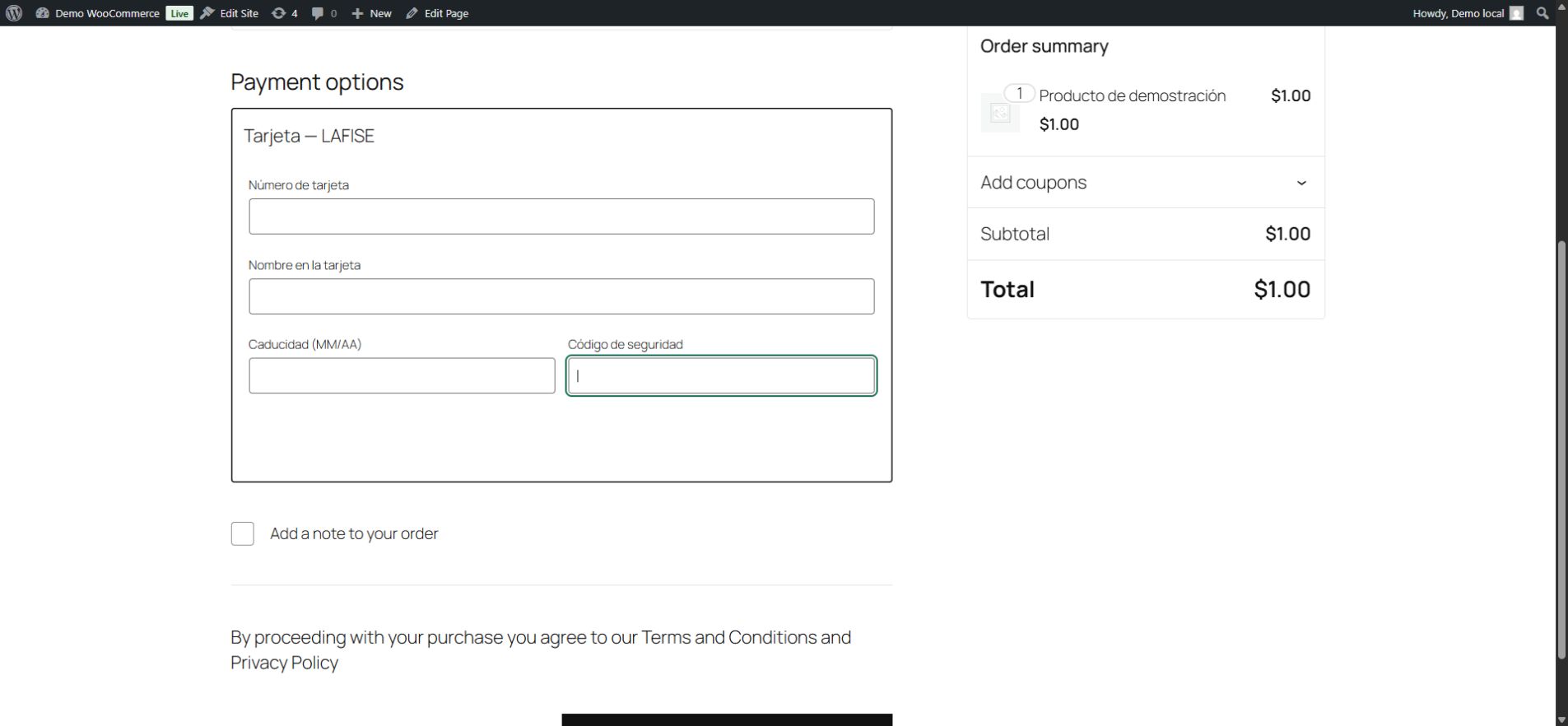
Y2KWebs Gateway for LAFISE connects WooCommerce stores to the LAFISE Costa Rica REST payment service. Customers enter their card details at checkout and complete the issuing bank’s 3DS verification when requested.
The plugin is free and open source. You need a LAFISE merchant account with REST payment credentials for your store. Bank fees and service conditions are governed by your merchant agreement. No Y2KWebs account or paid Y2KWebs service is required.
This is an independent integration developed by Y2KWebs. It is not an official LAFISE plugin and does not imply endorsement by LAFISE or WooCommerce. Their trademarks belong to their respective owners.
Features
- Classic WooCommerce checkout and Checkout Blocks.
- Card encryption in the browser using JWE and bank-provided transport keys.
- 3DS fingerprint and challenge handling.
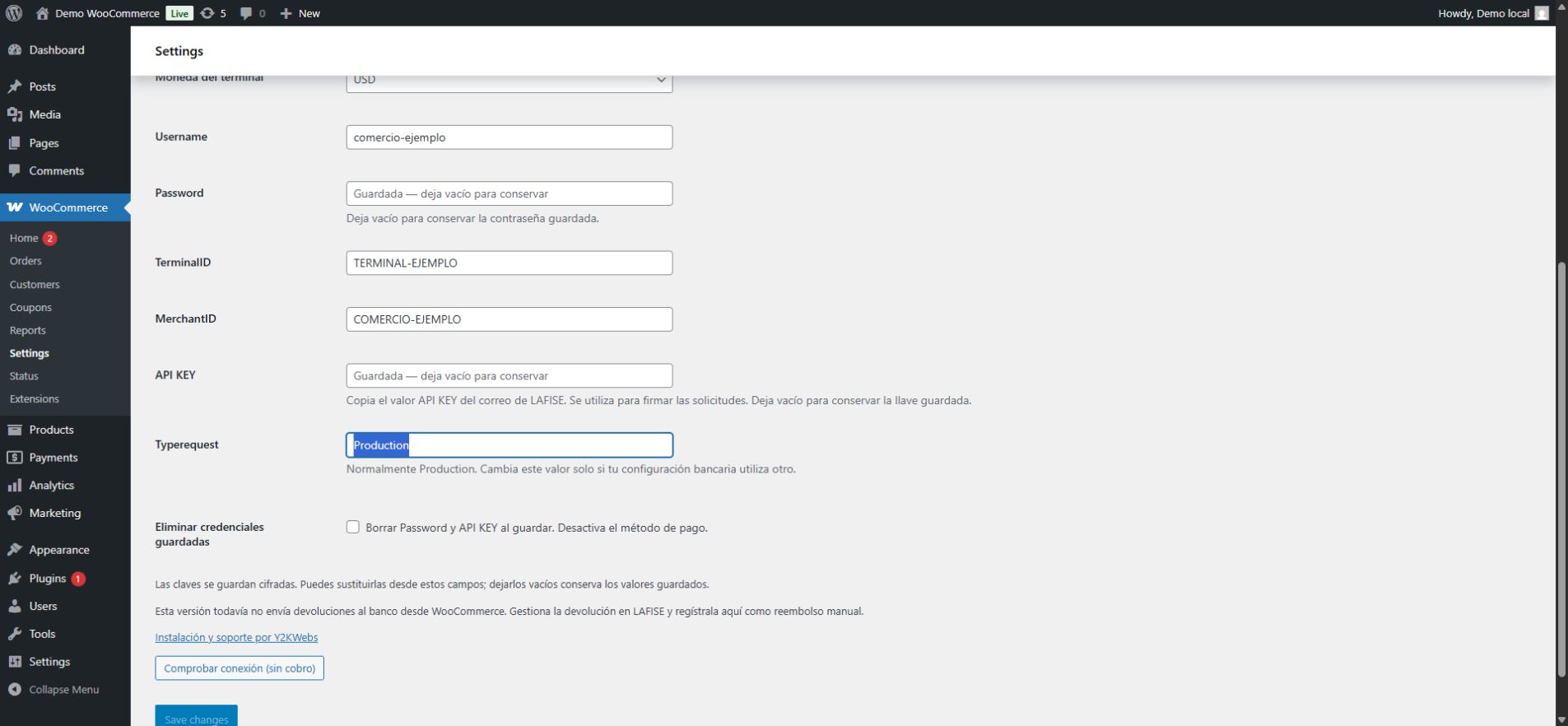
- Merchant credentials managed in WooCommerce settings; Password and API KEY are stored encrypted.
- Payment response signature, amount and currency validation, with duplicate-sale protection.
- Encrypted payment-attempt history and an administrator action to query payment status without making a new charge.
- WooCommerce High-Performance Order Storage (HPOS) and traditional order storage.
- No telemetry or checkout advertising. Optional professional installation and support is available separately.
Languages
The interface supports English and includes a complete Spanish translation for Spanish WordPress locales, even without downloaded language packs. Regional WordPress translations take precedence. The administrator follows the user language; checkout and payment verification follow the store language. Merchant-defined payment titles are preserved. Official directory translations are managed separately on Translate WordPress.
Requirements and current scope
WordPress 6.9 or later, WooCommerce 10.3 or later, PHP 8.2 or later with OpenSSL and DOM, MySQL/MariaDB with GET_LOCK support, HTTPS and pretty permalinks are required. Each installation uses one store currency (CRC or USD) and the corresponding bank terminal, without automatic currency conversion. Available currencies depend on your merchant agreement.
Automatic bank refunds, subscriptions and saved cards are not implemented. Refunds must be handled with LAFISE and recorded manually in WooCommerce.
Direct financial Sale approvals and declines are not classified automatically. Process3DS decline 59 is recognized only after signature and financial validation with no authorization. Other unrecognized or contradictory results remain on hold for review. Do not initiate another payment until an uncertain result has been reconciled with the bank.
A real USD 1 payment with a cardholder-completed manual 3DS challenge was verified with version 0.2.1. Automated tests use a simulated bank. See the validation record for exact versions, test coverage and remaining scenarios.
External service and privacy
This plugin requires the LAFISE Costa Rica payment service. Once a merchant deliberately configures and enables the gateway, connection checks and payments contact https://lafise-cr.portalpos.com/Interfaces/ for authentication, transport keys, payment processing, 3DS continuation and status queries.
Payment requests send encrypted card data, merchant and terminal identifiers, order reference, amount, tax, currency, buyer first and last name, phone, email, country, IP address, screen dimensions and the store’s 3DS callback URL. Authentication uses the merchant’s bank credentials over HTTPS. Server-to-server secrets are not exposed to the browser. During 3DS, the browser also contacts the issuing bank’s authentication service at a destination received from authenticated bank responses.
No developer-operated intermediary receives payments or buyer data. The plugin does not persist card numbers, CVV or encrypted card payloads. Payment attempts and bank references are retained locally, with the sensitive attempt payload encrypted. Deactivation and uninstall preserve that financial history. Review the security and retention guidance when configuring logs, backups and your store privacy notice.
Service information: LAFISE Costa Rica merchants.
Privacy information: LAFISE Costa Rica privacy policy.
Payment-service terms and fees are supplied by LAFISE in your merchant agreement; the bank’s general website terms are not a substitute for that agreement.
Documentation and support
- Configuration guide
- Source code, tests and development instructions
- Report an issue
- Private vulnerability reporting
For support, provide versions, reproduction steps using fictitious data and a generic error code. Never publish credentials, card details, cookies, bank responses or URLs containing payment tokens. Community support has no guaranteed response time.
Screenshots
Installation
- Install and activate WooCommerce. Configure HTTPS, pretty permalinks and the store currency supported by your LAFISE terminal.
- Install and activate this plugin using Plugins > Add New > Upload Plugin and the installable ZIP.
- Open WooCommerce > Settings > Payments > LAFISE — Y2KWebs.
- Enter Username, Password, TerminalID, MerchantID and API KEY using the values supplied by LAFISE. Save the settings.
- Run the connection check. It verifies authentication and transport-key format without charging a card.
- Coordinate an initial low-value payment with your merchant account and verify the paid order and bank result. The optional restricted testing mode limits users and amounts, but its payments are real.
- Enable normal checkout for buyers when configuration is complete. Exclude checkout, order payment, admin-ajax and /y2k-lafise/* from caching and HTTP body logging.
FAQ
-
Do I need to pay Y2KWebs to use the plugin?
-
No. The plugin is free and works without purchasing installation or support. LAFISE provides the required merchant service separately under its own terms.
-
Does testing mode use a bank sandbox?
-
No. It restricts eligible users and maximum amounts, but sends real payment requests. The connection check does not charge a card.
-
Can I refund a payment from WooCommerce?
-
Automatic bank refunds are not supported in this version. Arrange the refund with LAFISE and record it manually in the WooCommerce order.
-
What should I do if a payment remains on hold?
-
Check the order notes and use the administrator’s LAFISE status-query action without making a new charge. If there is insufficient bank reference data, reconcile the result in the bank portal. An uncertain result does not prove that the card was not charged.
-
Are my credentials shown after saving?
-
Password and API KEY are stored encrypted and are not displayed when reopening settings. Leave those fields empty to preserve their saved values. Other merchant identifiers remain available in settings.
Reviews
There are no reviews for this plugin.
Contributors & Developers
“Y2KWebs Gateway for LAFISE” is open source software. The following people have contributed to this plugin.
Contributors
Translate “Y2KWebs Gateway for LAFISE” into your language.
Interested in development?
Browse the code, check out the SVN repository, or subscribe to the development log by RSS.
Changelog
0.2.2
- Added English source strings and a complete bundled Spanish catalogue, with fallback for Spanish locales.
- Localized classic and block checkout, settings, payment verification, AJAX, status messages and order notes.
- Preserved merchant-defined titles, bank field names and payment protocol behavior.
0.2.1
- Added an explicit signature rule for the direct 3DS challenge response, preserving the original amount units.
- Recognize validated Process3DS decline 59 and permit a new buyer-requested attempt only when the prior attempt is definitively declined.
- Addressed Plugin Check findings in input validation, output escaping, resource loading and database queries; added local HTTP security regressions.
- Verified a real payment with a manual 3DS challenge before the Plugin Check corrections; subsequent regression tests use a simulated bank.
- Prepared the WordPress.org listing, external-service disclosure and submission documentation.
0.2.0
- Initial GitHub release with encrypted administrator-managed credentials, classic and block checkout, 3DS, payment-status queries and minimal encrypted diagnostics.
- Added normal checkout and optional restricted testing mode, authenticated 3DS destinations and safe authentication retries.