
Description
Getting your content indexed by Google shouldn’t take weeks. The XealBrax Auto Indexer connects your WordPress site directly to the official Google Indexing API.
Instead of waiting for Googlebot to passively discover your XML sitemaps, this plugin actively alerts Google the exact second you publish or update a post, prompting near-instant crawling.
Built by the web engineering team at XealBrax, the XealBrax Indexer uses a profoundly lightweight, native PHP OpenSSL engine.
Core Features:
- Instant API Pings: Automatically notify Google the moment you hit “Publish” or “Update”.
- Native JWT Authentication: We generate Google OAuth 2.0 tokens using pure PHP. No heavy dependencies, no Composer vendor folders. The entire plugin is under 100KB.
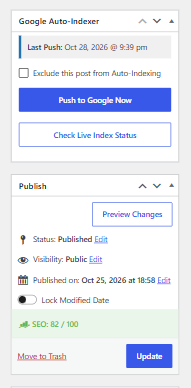
- Granular Control: A custom meta box in your post editor allows you to manually “Push to Google Now” via AJAX, or selectively exclude specific posts from being auto-indexed.
- Custom Post Type Support: Easily enable auto-indexing for WooCommerce Products, Portfolios, Recipes, or any other public custom post type.
- Ecosystem Ready: Works flawlessly alongside your existing SEO plugins (Yoast, Rank Math, AIOSEO, SEOPress) without conflicts.
External services
This plugin connects directly to Google APIs to automate your website’s indexing process.
When you publish or update a post, this plugin sends the specific URL of that post to the Google Indexing API to request an immediate crawl. To authenticate this request, the plugin uses the Google OAuth 2.0 token service using the Google Service Account JSON key you provide in the settings.
The only data sent to Google is the URL being indexed/updated and your provided Service Account credentials. No visitor data or other site data is transmitted.
This service is provided by Google LLC.
– Google Terms of Service: https://policies.google.com/terms
– Google Privacy Policy: https://policies.google.com/privacy
Additionally, if you choose to opt-in to usage tracking during activation or submit a bug report via the plugin dashboard, basic site data and contact information are routed securely to XealBrax servers to assist with troubleshooting and product improvement.
– XealBrax Terms of Service: https://xealbrax.com/terms-of-service/
– XealBrax Privacy Policy: https://xealbrax.com/privacy-policy/
Screenshots
Installation
Step 1: Plugin Installation
- Upload the
xealbrax-auto-indexerdirectory to your/wp-content/plugins/directory, or install directly through the WordPress plugins screen. - Activate the plugin through the ‘Plugins’ screen in WordPress.
Step 2: Google Cloud Setup
To use this plugin, you need a free Google Service Account JSON key.
1. Go to the Google Cloud Console and create a new project.
2. Search for the Web Search Indexing API and click Enable.
3. Go to IAM & Admin > Service Accounts and create a new service account. Copy the generated email address (ending in iam.gserviceaccount.com).
4. Click on the Service Account, go to the Keys tab, and click Add Key > Create new key (JSON format). Download this .json file to your computer.
Step 3: Google Search Console Setup
Google will block the API if the service account does not have permission to manage your site.
1. Go to Google Search Console and select your website.
2. Go to Settings > Users and permissions.
3. Click Add User, paste the iam.gserviceaccount.com email address, and set the permission to Owner (Full or Restricted will not work).
Step 4: Finalize in WordPress
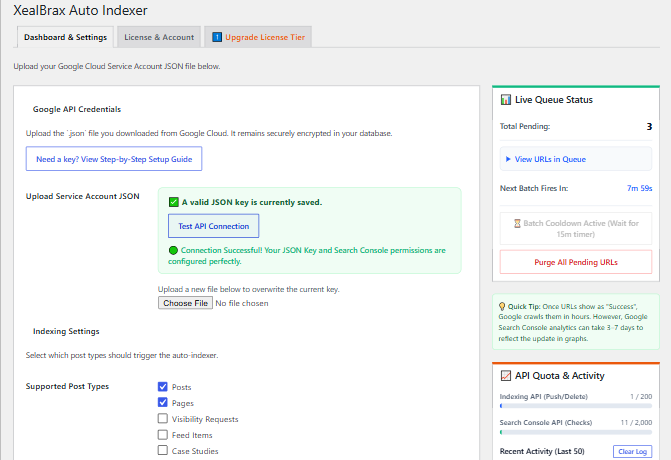
- In your WordPress admin, go to XB Indexer.
- Click “Choose File” and upload the
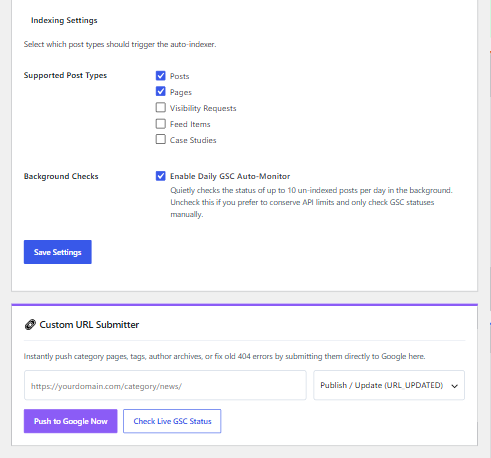
.jsonfile you downloaded from Google Cloud. - Select which post types you want to auto-index and hit Save. You’re done!
FAQ
-
Why use this instead of an XML Sitemap?
-
XML Sitemaps are passive. They simply leave a list of URLs on your server hoping Google comes to read them eventually. The Indexing API is active—it pushes a notification directly to Google’s servers demanding an immediate crawl. You should use both: your SEO plugin (like Yoast/Rank Math) for sitemaps, and this plugin for instant indexing.
-
What happens if I bulk-publish hundreds of posts?
-
Google imposes a strict 200 URL/day quota on the Indexing API. The plugin pings Google instantly, which may trigger a 429 Error if you bulk import hundreds of posts at once. Please be mindful of Google’s daily quotas when publishing or importing in bulk.
-
I clicked “Push to Google Now” and got a Server Error.
-
If you receive a cURL error or server timeout, your web host is likely blocking outgoing HTTP requests to
googleapis.com. Contact your hosting provider to ensure your server firewall allows outgoing cURL requests. -
I got “HTTP 403: Indexing API has not been used in project”.
-
This means you forgot to click the blue “Enable” button for the Web Search Indexing API inside your Google Cloud Console project.
Reviews
There are no reviews for this plugin.
Contributors & Developers
“XealBrax Auto Indexer” is open source software. The following people have contributed to this plugin.
Contributors
Translate “XealBrax Auto Indexer” into your language.
Interested in development?
Browse the code, check out the SVN repository, or subscribe to the development log by RSS.
Changelog
1.0.0
- Initial launch of the XealBrax Auto Indexer engine.
- Implemented native OpenSSL JWT signing for zero-dependency API connections.
- Added Editor Meta box for granular AJAX control.
- Added secure file-upload handling for Google JSON keys to prevent database string formatting errors.
- Integrated Freemius SDK for secure deployment.