

Description
WPInterface SEO is a modular SEO plugin that works with any theme, classic or block, and any page builder. Every feature listed below is included, with no ads or nag screens. Turn off the modules you do not need under SEO Modules.
Titles & meta
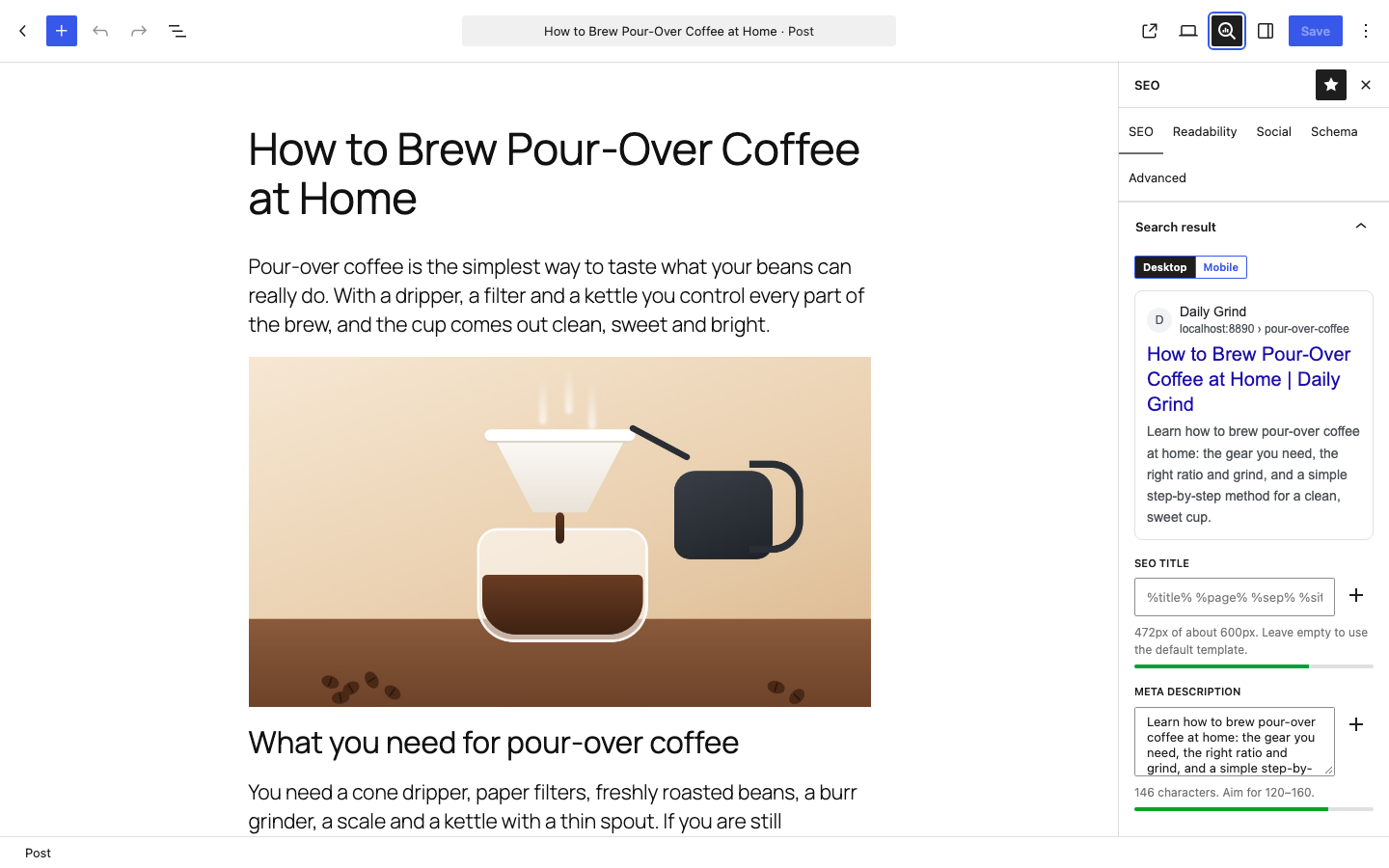
- SEO title and meta description templates per post type, taxonomy and archive, with variables such as %title%, %sep%, %sitename%, %primary_category% and %custom_field(key)%.
- Per-post, per-term overrides with a live Google preview (desktop and mobile).
- Robots controls: noindex, nofollow, noarchive, nosnippet, noimageindex; sensible defaults (search and 404 pages noindex, max-image-preview:large for Google Discover).
- Canonical URLs on every page type, including paginated archives.
Content analysis
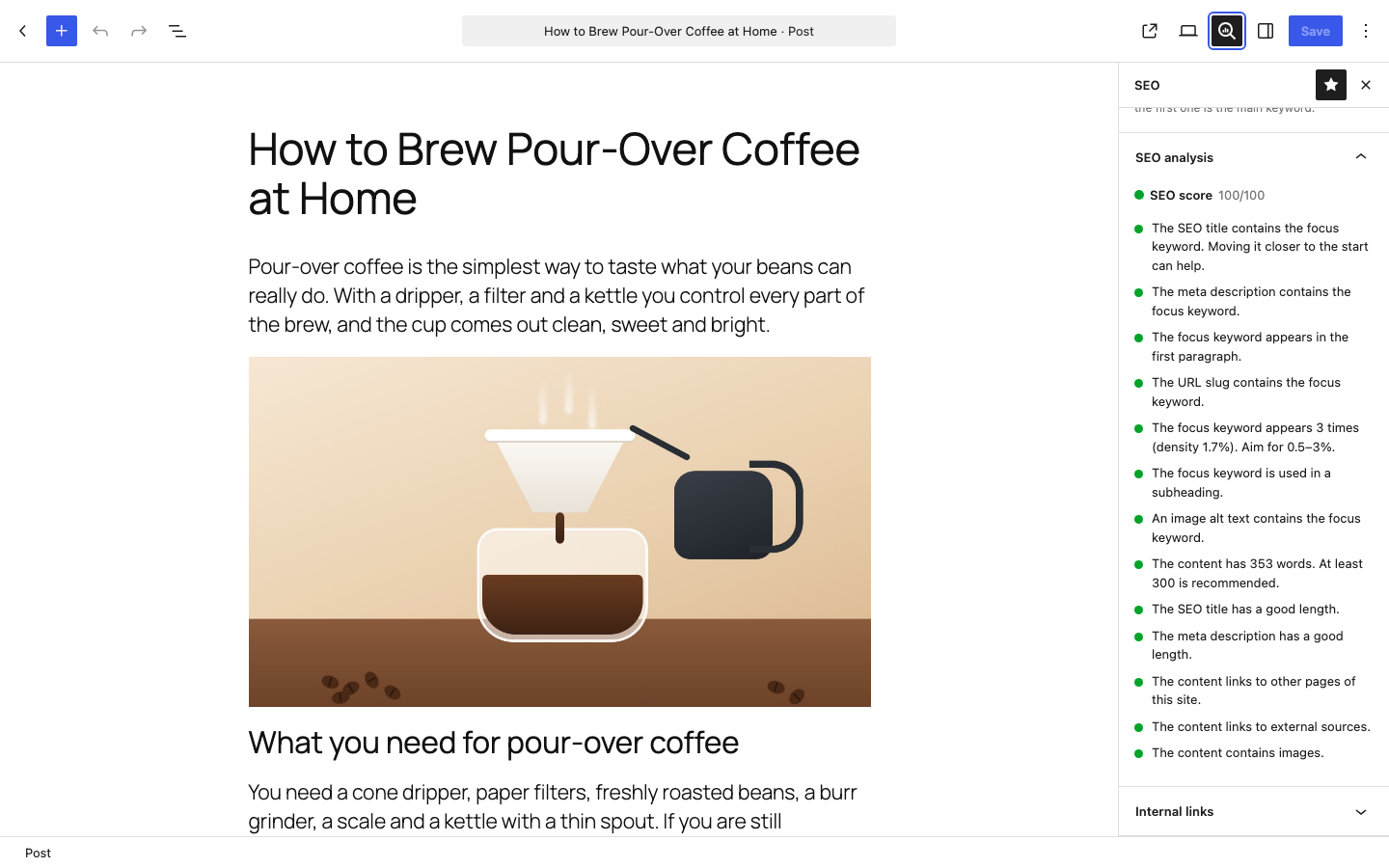
- Up to 5 focus keywords per post, checked live while you write (title, description, first paragraph, slug, subheadings, image alt text, density).
- Readability checks: sentence and paragraph length, subheadings, passive voice, transition words and reading ease. Language-specific checks for English, Spanish, German, French, Portuguese, Italian, Dutch, Hindi and Nepali.
- Warns when another post already targets the same focus keyword.
- SEO and readability scores in the post list, sortable and filterable.
- Runs in your browser; your content is never sent anywhere.
Google Search Console
- Connect once and see clicks, impressions, CTR and average position for the whole site (7, 28 or 90 days, compared with the period before), top pages and top searches.
- Per-post search data and on-demand URL Inspection (index status) in the editor, plus a “Clicks” column in post lists.
- Keyword position tracking from your own Search Console data, without a paid rank tracker.
- Content decay alerts for pages that are losing traffic.
- Sitemap status and one-click sitemap submission.
- Data is copied to your site once a day; screens never wait for Google. Use the one-click connection, or your own Google Cloud project.
- Site verification tags for Google, Bing, Yandex, Baidu and Pinterest.
Internal links
- Link counts for every post (links out and posts linking in) in the post list and editor; orphan content stands out.
- Link suggestions while you write, with the focus keyword of the target post as anchor text.
AI Assist (optional)
- Suggestions for SEO titles, meta descriptions, social text, image alt text (written from the image) and FAQ drafts.
- Uses the WordPress AI Client (WordPress 7.0+) with the AI provider you set up in Settings Connectors. The plugin stores no AI keys. Nothing runs automatically, and a daily per-user limit protects your budget.
Social
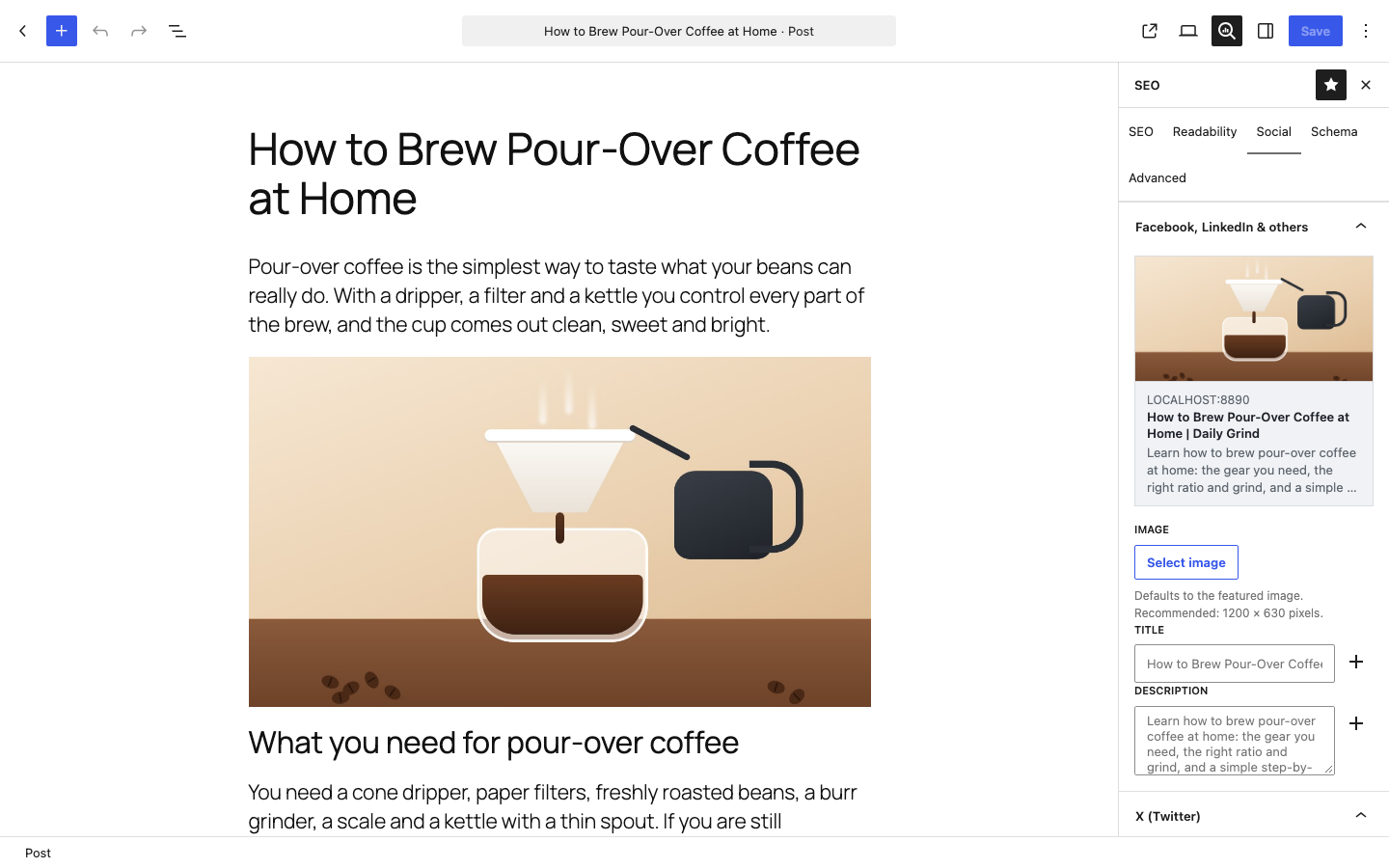
- Open Graph and X (Twitter) cards with Facebook and X previews in the editor.
- Custom social title, description and image per post and term; site-wide default image.
Schema (structured data)
- One connected JSON-LD graph: Organization or Person, WebSite, WebPage, BreadcrumbList, Article and author.
- Choose the page type (About, Contact, FAQ, Collection…) and article type (Article, BlogPosting, NewsArticle…) per post type or per post.
- Per-post structured data with guided forms: FAQ, How-to, Recipe, Event, Video, Job posting, Course, Software, Book and Product, with warnings for fields Google requires.
- Block Bindings source so block themes can show the SEO title, description or social image in templates.
XML sitemaps
- /sitemap.xml with per-type sitemaps, images and accurate last-modified dates; replaces the WordPress core sitemap.
- Optional Google News and video sitemaps.
- HTML sitemap block and [wpiseo_sitemap] shortcode for visitors.
- Polylang and WPML: every language is listed, with hreflang links between translations; title templates and breadcrumb labels can be translated.
- Noindex content is left out automatically; robots.txt points to the sitemap.
Redirects & 404 monitor
- 301, 302, 307, 308, 410 and 451 redirects with exact or regular-expression matching, hit counts, CSV import/export.
- Automatic redirects when a post or term URL changes; optional 410 or redirect for trashed posts.
- Redirect chains are flattened and loops are refused.
- 404 log with one-click redirects. No IP addresses are stored.
- Imports redirects from Redirection, Rank Math, Yoast SEO Premium, Slim SEO and SEOPress Pro.
Images
- Automatic alt text from a template for images without it, plus a bulk tool to save alt text in the media library.
- Attachment pages redirect to the file or parent post; optional clean file names on upload.
Robots & crawl
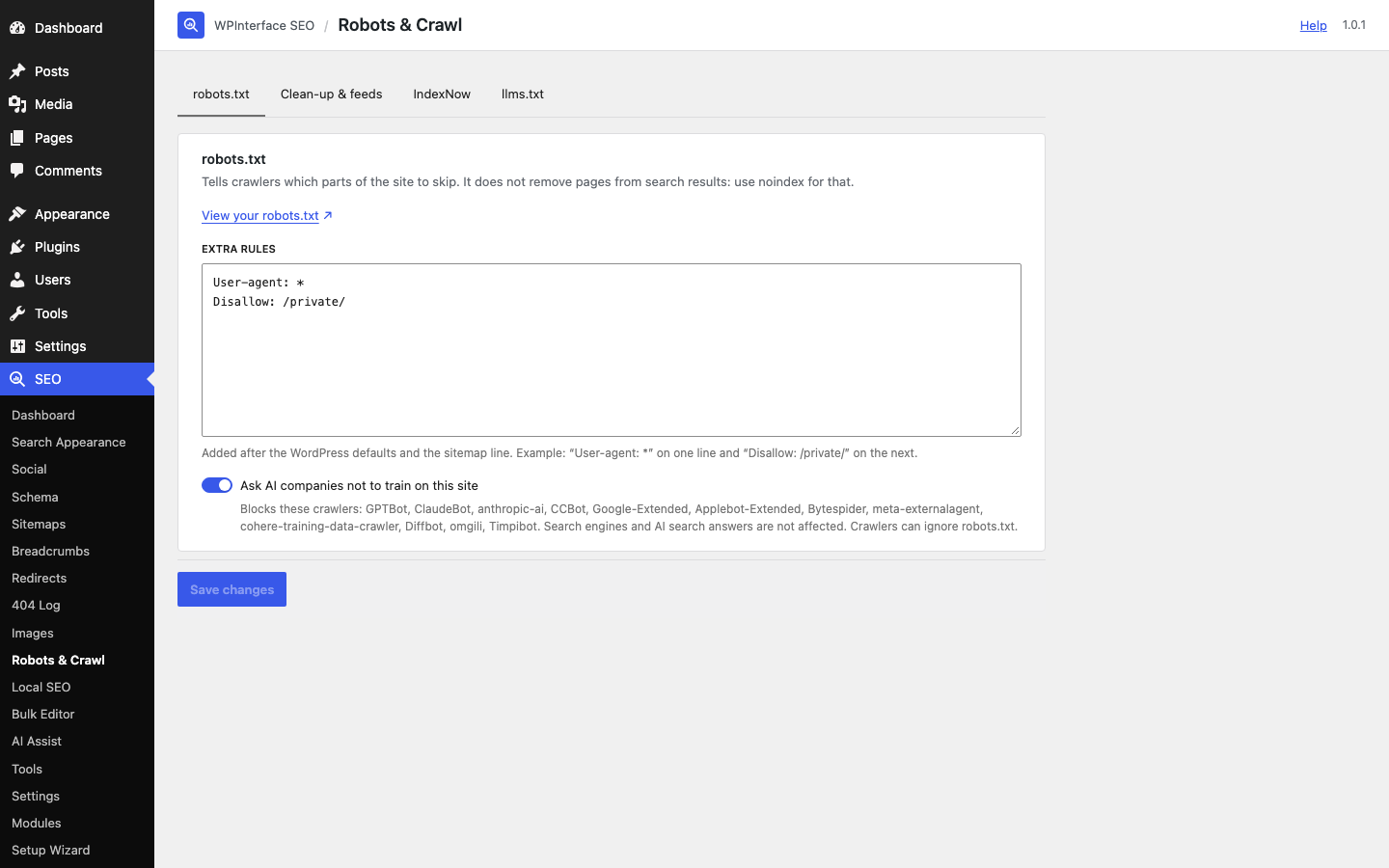
- robots.txt editor and an option to ask AI training crawlers not to use your content.
- Head clean-up (generator, RSD, shortlink and more), noindex for feeds, RSS before/after text.
- IndexNow: tell Bing and other IndexNow search engines about changes instantly (opt-in).
- Optional /llms.txt for AI assistants.
Local SEO
- Business type, address, geo coordinates, phone and opening hours added to your structured data.
- “Business Address & Hours” block and [wpiseo_local] shortcode with an optional OpenStreetMap map.
Online stores
- WooCommerce: Product schema with offers, GTIN, brand and reviews; noindex for cart, checkout and account pages.
- Easy Digital Downloads: Product schema and noindex for checkout pages.
Breadcrumbs
- “SEO Breadcrumbs” block, [wpiseo_breadcrumbs] shortcode and wpiseo_breadcrumbs() template function, with primary category support.
- The WordPress 7.0 Breadcrumbs block uses the same trail and primary category.
Tools
- Import from Yoast SEO, Rank Math, All in One SEO, SEOPress, The SEO Framework and Slim SEO (posts, terms, authors and settings).
- Bulk editor for SEO titles, descriptions and indexing.
- Elementor: SEO title, description, focus keyword and indexing in Elementor’s page settings.
- SEO inspector in the admin bar: see the title, description, robots, canonical and schema of any page.
- Abilities API: AI agents and tools (for example through the MCP Adapter plugin) can read and update SEO data, analyze posts and manage redirects, within each user’s permissions.
- Setup wizard, settings export/import, and role-based access.
- While another SEO plugin is active, output pauses automatically to avoid duplicate tags.
- WP-CLI: info, modules, templates, redirects (list, add, delete, import, export), imports from other plugins, sitemap flush, IndexNow submission, post analysis, link index rebuild and Search Console sync.
External services
The plugin works without any external service. These optional features connect to third parties only when you turn them on:
IndexNow
When IndexNow is turned on (SEO Robots & Crawl), the URLs of posts you publish, update or delete, your site’s host name and your IndexNow key are sent to api.indexnow.org, which shares them with participating search engines such as Bing, Yandex, Seznam and Naver. Nothing is sent from local or staging sites. The service is operated by Microsoft: IndexNow, Microsoft Services Agreement, Microsoft Privacy Statement.
OpenStreetMap
When the Local SEO map is set to “Embedded OpenStreetMap”, pages that show the business block load a map from openstreetmap.org in the visitor’s browser, which sends the visitor’s IP address and browser details to the OpenStreetMap Foundation. The default “Link” option loads nothing until the visitor clicks the link. Terms of use, Privacy policy.
Google Search Console
Only when a site manager clicks “Connect” on the Search Performance page (the module is off by default):
- Sign-in: the site manager signs in with Google, and Google asks for consent to read Search Console data (and, only if “Allow sitemap submission” is on, to submit sitemaps).
- One-click connection: the sign-in code and tokens pass through WPInterface’s token service at api.wpinterface.com, which holds the Google client secret. It exchanges and refreshes tokens with Google and stores nothing. Each request sends the authorization code, the PKCE verifier, a random install ID and, when the access token expires (about once a day), the refresh token. WPInterface privacy policy, WPInterface terms.
- Own Google Cloud project (advanced): the token service is not used.
- Data: once a day and when a manager clicks “Sync now”, the site requests its Search Console data (clicks, impressions, positions, queries and pages) directly from Google’s Search Console API. URL Inspection and sitemap submission run only when someone clicks the button. Disconnecting revokes access with Google. Google Privacy Policy, Google APIs Terms of Service.
AI providers
Only when AI Assist is turned on and someone clicks a “Suggest with AI” or “Write alt text with AI” button:
- The post title, focus keywords and text (or, for alt text, the image) are passed to the WordPress AI Client, which sends them to the provider the site owner set up in Settings Connectors. That provider’s terms and privacy policy apply; the plugin makes no direct request to any AI service.
- Requests are billed to the site owner’s account with that provider. Nothing is sent to WPInterface.
Screenshots



Blocks
This plugin provides 3 blocks.
- SEO Breadcrumbs Breadcrumb trail for the current page, with structured data for search engines.
- HTML Sitemap A list of your site's pages and posts for visitors, following your XML sitemap settings.
- Business Address & Hours Your business name, address, phone, opening hours and map, from SEO → Local SEO.
FAQ
Does it work with my theme?
Yes. The plugin does not depend on any specific theme. Your theme should declare
title-tagsupport (almost all modern themes do); the SEO dashboard tells you if it does not.Is my data deleted when I remove the plugin?
Only if you turn on “Delete all data when the plugin is deleted” in SEO Settings.
Is there a Pro version?
Yes. WPInterface SEO Pro is a separate add-on with a site audit and broken link checker, link tools, Bulk AI, schema templates, multiple locations, SEO history, client reports and white labelling. Nothing in this plugin is locked or limited without it. A few small, dismissible hints on the plugin’s own screens mention Pro; developers can remove them with the
wpiseo_show_upsellfilter.Where is the source code of the scripts?
The readable source of every script and style is included in
assets/src. To rebuildassets/build, runnpm installandnpm run buildin the plugin folder.
Reviews
There are no reviews for this plugin.
Contributors & Developers
“WPInterface SEO” is open source software. The following people have contributed to this plugin.
Contributors
Translate “WPInterface SEO” into your language.
Interested in development?
Browse the code, check out the SVN repository, or subscribe to the development log by RSS.
Changelog
1.0.1
- AI Assist now uses the AI Client built into WordPress 7.0 and later. Set up a provider once under Settings Connectors; the plugin no longer stores AI keys or contacts AI services itself.
- “Clean up file names on upload” now changes only uploaded files, not other file names WordPress handles.
- Security: submitted SEO fields are sanitized as soon as they are received, and breadcrumb and icon output is escaped with an allow-list.
- Post list score styles and the readable sitemap view now load as regular stylesheets.
- Schema markup is printed with WordPress’s own script tag function.
- Readme: clearer description and AI service disclosure.
1.0.0
- Initial release.