
Description
WP Ultimate CSV Importer is a powerful WordPress import plugin for importing data from CSV, XML and Excel files into WordPress.
Bulk import posts, pages, custom post types, users, WooCommerce products, images, taxonomies, custom fields, ACF fields and other WordPress data without manually creating records one by one.
Whether you need to import a CSV into WordPress, upload thousands of WooCommerce products, migrate content from another CMS, import an affiliate product feed, populate custom post types, or transfer data from spreadsheets into WordPress, WP Ultimate CSV Importer provides a visual field-mapping workflow without requiring code.
Prepare your data using Microsoft Excel, Google Sheets, LibreOffice, CSV, XML or other spreadsheet/data tools, upload your file, map the source columns to WordPress fields, validate the data and run the import.
What Can You Import Into WordPress?
WP Ultimate CSV Importer can import:
- WordPress posts
- WordPress pages
- Custom post types
- WooCommerce products
- WordPress users
- WooCommerce customers with the free add-on
- Categories
- Tags
- Custom taxonomies
- Custom fields and post meta
- Advanced Custom Fields (ACF)
- JetEngine fields and Custom Content Types
- MetaBox fields
- Pods fields
- Toolset Types fields
- Featured images
- Product images and galleries
- Media library files
- SEO metadata
- Multilingual content
- Affiliate product feeds
- Directory and listing data
- LMS content
- Membership data
- And more
Import files can be provided as CSV, XML, XLS, XLSX, TSV and other supported formats.
Import WooCommerce Products From CSV, XML or Excel
Need to bulk import products into WooCommerce?
WP Ultimate CSV Importer lets you map spreadsheet columns to WooCommerce product fields and import large product catalogs without manually creating products.
Import data such as:
- Product name
- Product description
- SKU
- Regular price
- Sale price
- Stock quantity
- Stock status
- Categories
- Tags
- Attributes
- Featured image
- Product gallery images
- Taxonomies
- Product metadata
Additional WooCommerce import capabilities are available through the free Import WooCommerce Suite add-on.
Install Import WooCommerce Suite
The WooCommerce add-on extends the importer for:
- Simple products
- Variable products
- Product variations
- Grouped products
- External / affiliate products
- WooCommerce orders
- WooCommerce customers
- WooCommerce coupons
- WooCommerce reviews
- WooCommerce refunds
- Additional WooCommerce data
Advanced operations, record updates and other resource-intensive WooCommerce workflows are available in WP Ultimate CSV Importer Pro.
Import CSV Files Into WordPress
Have data stored in a CSV file?
Upload the CSV file, choose the WordPress content type, and map each CSV column to the appropriate WordPress field.
You can import:
- Titles
- Content
- Excerpts
- Authors
- Publish dates
- Post status
- Categories
- Tags
- Taxonomies
- Featured images
- Custom fields
- SEO metadata
- Custom post types
The visual mapping interface allows you to connect your CSV columns with WordPress fields without writing PHP code.
Import Excel Files Into WordPress
WP Ultimate CSV Importer supports importing data directly from Excel spreadsheets, including XLS and XLSX files.
This is useful when your product catalog, customer list, content database or other WordPress data is already maintained in Excel.
Upload your spreadsheet, map its columns and import the records into WordPress.
Import XML Files Into WordPress
Import structured XML data into WordPress without manually converting the file to CSV.
XML imports can be mapped to:
- Posts
- Pages
- Custom post types
- WooCommerce products
- Categories
- Tags
- Taxonomies
- Custom fields
- Images
- Other supported WordPress fields
This is particularly useful when migrating content or consuming feeds supplied by third-party systems.
Import Google Sheets Data Into WordPress
You can import data from a publicly accessible Google Sheets CSV URL.
Publish the required Google Sheets tab as CSV, copy the public URL and use Upload from External URL in WP Ultimate CSV Importer.
This provides a convenient workflow for teams maintaining import data in Google Sheets.
Import WordPress Users
Bulk import WordPress users from CSV, XML or Excel.
Map fields including:
- Username
- First name
- Last name
- Password
- User role
- Display name
- User metadata
For additional WordPress user and WooCommerce customer metadata support, install the free Import Users & Customers with Meta add-on.
Install Import Users & Customers with Meta
Import ACF Fields From CSV
WP Ultimate CSV Importer integrates with Advanced Custom Fields (ACF).
The free plugin supports importing supported ACF field types including Basic, Choices, jQuery and WYSIWYG fields.
Advanced ACF fields such as repeaters, galleries, flexible content, relationship fields and additional complex field types are available with WP Ultimate CSV Importer Pro.
Import Custom Post Types and Custom Fields
Import data into custom post types created by WordPress themes, plugins or custom development.
Examples include:
- Events
- Property listings
- Business directories
- Job listings
- Portfolios
- Courses
- Membership records
- Classified listings
- Product catalogs
Map your source data to post fields, custom fields, taxonomies and supported third-party plugin fields.
Import JetEngine Data
WP Ultimate CSV Importer supports JetEngine fields and JetEngine Custom Content Types (CCTs).
JetEngine CCT import and export compatibility is included in the free ecosystem.
Advanced JetEngine operations, record updates and scheduled workflows are available in Pro.
Import Images From URLs
Import images while importing WordPress content or WooCommerce products.
Your CSV, XML or spreadsheet can contain image URLs. WP Ultimate CSV Importer can download supported remote images into the WordPress Media Library and associate them with imported content.
Use image imports for:
- Featured images
- WooCommerce product images
- Product galleries
- Post images
- Media library imports
You can also map image metadata such as alt text and titles to improve media organization and SEO.
Bulk Import WordPress Media
Need to move or create a large media library?
Import images using external URLs, local files (desktop) or supported media upload workflows.
Failed media imports are recorded in logs so problematic images can be identified and imported again.
Import Data Without Creating Broken Records
WP Ultimate CSV Importer includes Pre-Flight Validation to analyze import files before records are written to WordPress.
The validator can identify problems such as:
- Invalid file structures
- Encoding problems
- Inconsistent column counts
- Malformed delimiters
- Missing required values
- Other import-file problems
The File Health Score provides a quick indication of whether your import file is ready.
Review the reported issues, correct the source file and validate it again before beginning a large import.
Resume Interrupted WordPress Imports
Large imports can sometimes be interrupted by PHP execution limits, server resource limits, browser interruptions or network problems.
The Auto Recovery and Resume feature saves import progress so interrupted imports can continue from the appropriate point rather than forcing you to restart the entire operation.
This is especially useful when importing large product catalogs, media libraries or thousands of WordPress records.
Save and Reuse Import Mapping Templates
Don’t map the same spreadsheet every time.
Save frequently used field mappings as Mapping Templates and reuse them when importing files with the same structure.
Mapping templates can significantly reduce setup time for recurring manual import jobs.
Import Dashboard and Logs
Monitor WordPress imports from the importer dashboard.
The dashboard provides visibility into import activity using:
- KPI cards
- Import statistics
- Activity information
- Import logs
- Summary logs
- Failed media logs
Use the Log Manager to troubleshoot import failures and review completed imports.
AI-Assisted WordPress Imports
WP Ultimate CSV Importer supports integrations with AI services including:
- OpenAI / ChatGPT
- Google Gemini
- Anthropic Claude
AI-assisted import workflows can help generate or enhance supported content during the import process.
Pro provides additional AI content assistance for workflows such as category suggestions, SEO titles, meta descriptions and translations with human review.
Import Affiliate Product Feeds
WP Ultimate CSV Importer can be used to create and maintain websites powered by affiliate or supplier datafeeds.
Map feed fields to:
- WordPress fields
- WooCommerce product fields
- Product attributes
- Categories
- Taxonomies
- Custom fields
- Images
This makes the importer suitable for building:
- Affiliate stores
- Product catalogs
- Price comparison websites
- Supplier-driven WooCommerce stores
- Datafeed-powered WordPress websites
Migrate Content to WordPress
Moving from another CMS or ecommerce platform?
If your source system can provide its content as CSV, XML or another supported structured format, WP Ultimate CSV Importer can map that data into WordPress.
Typical migration workflows include:
- Shopify to WooCommerce
- Magento to WooCommerce
- Wix to WordPress
- Squarespace to WordPress
- Blogger to WordPress
- Drupal to WordPress
- Joomla to WordPress
- Custom CMS to WordPress
- Another database or application to WordPress
Export the content from your source platform, prepare the resulting data and map it to the appropriate WordPress fields.
WordPress to WordPress Migration
WP Ultimate CSV Importer also provides a Migration and One-Click Import workflow for transferring supported content between WordPress websites.
The export side of the migration requires the free WP Ultimate Exporter add-on.
Export the required WordPress data using the Migrate option and import the generated migration bundle into the destination website.
Read the Migration & One-Click Import documentation
WP Ultimate CSV Importer Ecosystem
WP Ultimate CSV Importer is the core import plugin.
Extend it with free companion plugins when additional modules are required.
WP Ultimate Exporter
Export supported WordPress data to CSV, XML and Excel.
Import WooCommerce Suite
Extend WooCommerce import support for products, variations, orders, customers, coupons, reviews, refunds and other supported WooCommerce records.
Download Import WooCommerce Suite
Import Users & Customers with Meta
Import WordPress users and WooCommerce customers with additional metadata.
Download Import Users & Customers with Meta
Popular Plugin Integrations
WP Ultimate CSV Importer integrates with many popular WordPress plugins and ecosystems.
Custom Fields
- Advanced Custom Fields (ACF)
- JetEngine
- MetaBox
- Pods
- Toolset Types
- Custom Field Suite
- CMB2
- CPT UI
- TotalPress
WooCommerce
- WooCommerce
- WooCommerce Product Bundles
- WooCommerce Billing & Shipping Information
- YITH Barcodes
- YITH Cost of Goods
- PPOM
SEO
- Yoast SEO
- Rank Math
- All in One SEO
- SEOPress
- Slim SEO
Multilingual
- WPML
- Polylang
- Polylang for WooCommerce
LMS
- LearnPress
- LifterLMS
- MasterStudy LMS
Directories and Listings
- Business Directory Plugin
- Advanced Classifieds & Directory Pro
- GeoDirectory
- WP Job Manager
Community and Membership
- BuddyPress
- bbPress
- WP-Members
- Members
- WPComplete
Other Integrations
- SureCart
- Easy Digital Downloads
- Elementor Templates
- Featured Image from URL (FIFU)
- Post Expirator
- WP Customer Reviews
- Exmage
- Events Calendar
- ChatGPT / OpenAI
- And more
View supported third-party integrations
Free vs Pro
The free version is designed for powerful manual WordPress data imports.
Use it to import supported:
- Posts
- Pages
- Custom post types
- Users
- Taxonomies
- Media
- Simple WooCommerce product data
- Supported ACF fields
- JetEngine CCTs
- Supported third-party fields
- CSV files
- XML files
- Excel files
- Google Sheets data
- Images
- Affiliate datafeeds
The free ecosystem can be extended using the Import WooCommerce Suite, Import Users & Customers with Meta and WP Ultimate Exporter add-ons.
Updating existing records is a Pro feature.
Upgrade to WP Ultimate CSV Importer Pro when you need advanced operations such as:
- Update existing WordPress records
- Advanced WooCommerce update workflows
- Scheduled imports
- Recurring imports
- FTP/SFTP automation
- Google Sheets scheduled imports
- Advanced ACF fields
- Advanced custom field plugin support
- Advanced WooCommerce operations
- Failed Record Retry Queue
- Spreadsheet Live Editor
- Cloud storage imports – Google Drive, Microsoft OneDrive
- Page builders
- External database migration – MySQL import, MariaDB import, PostgreSQL import, and SQL Server import
- REST API
- Webhooks
- API key management
- Advanced filtering
- Advanced exports
- Scheduled exports
- Google Sheets exports
- Mapping Template Import/Export
- Database optimization tools
- Priority support
Explore WP Ultimate CSV Importer Pro
Try WP Ultimate CSV Importer Pro
Want to test the advanced features before upgrading?
Trusted by WordPress Publications
WP Mayor
WP Mayor has reviewed WP Ultimate CSV Importer Pro as a WordPress data import and migration solution.
Kinsta
Kinsta has featured WP Ultimate CSV Importer Pro in its coverage of WooCommerce product export and migration tools.
Documentation and Tutorials
Screenshots


Installation
Install From the WordPress Dashboard
- Log in to your WordPress dashboard.
- Go to Plugins Add New.
- Search for WP Ultimate CSV Importer.
- Click Install Now.
- Click Activate.
- Open Ultimate CSV Importer from the WordPress dashboard.
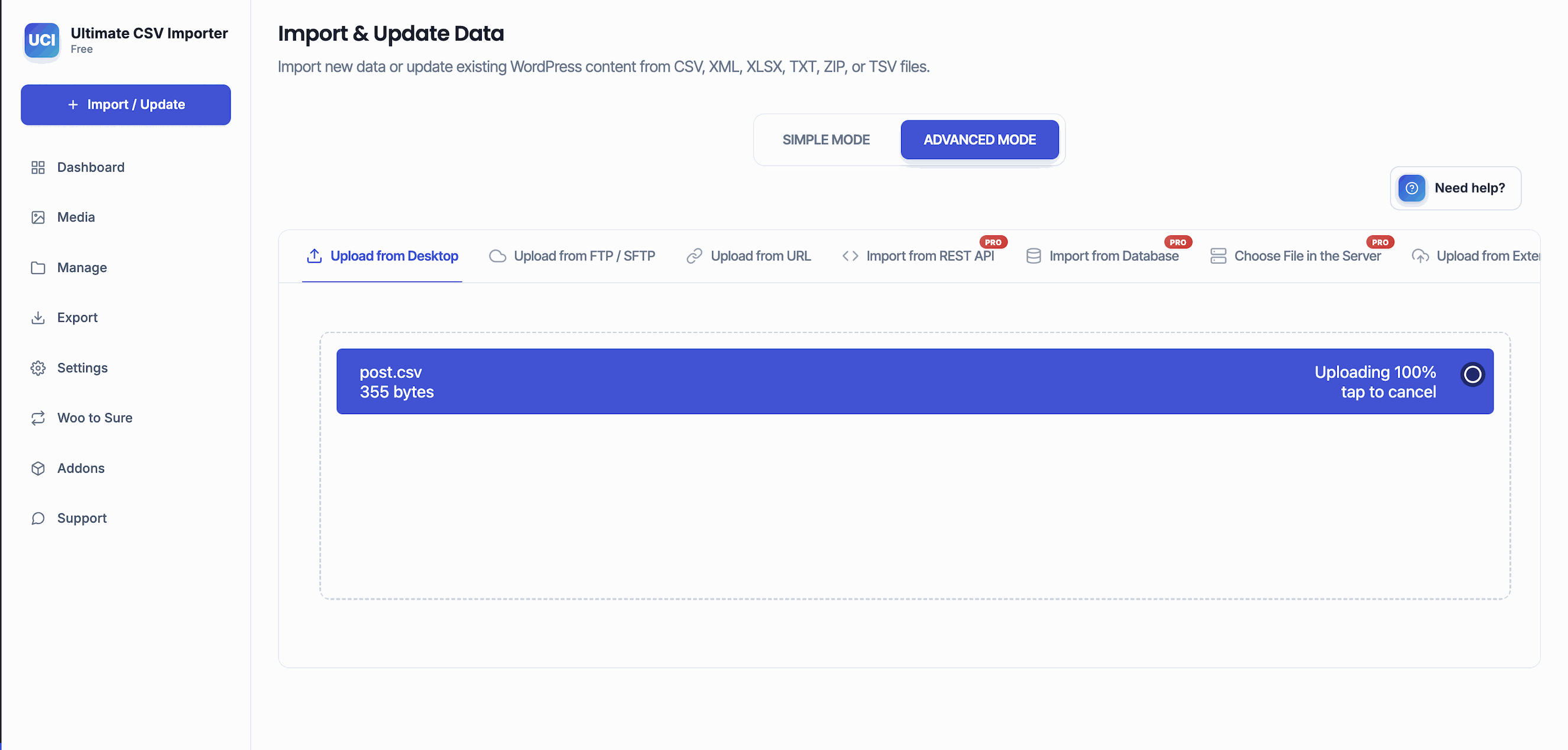
- Upload your CSV, XML or Excel file and begin mapping your data to run the import.
Manual Installation
- Download WP Ultimate CSV Importer from WordPress.org.
- Extract the plugin ZIP file.
- Upload the
wp-ultimate-csv-importerdirectory to/wp-content/plugins/. - Log in to WordPress.
- Go to Plugins Installed Plugins.
- Activate WP Ultimate CSV Importer.
- Open the importer and begin your first import.
FAQ
-
How do I import a CSV file into WordPress?
-
Install and activate WP Ultimate CSV Importer.
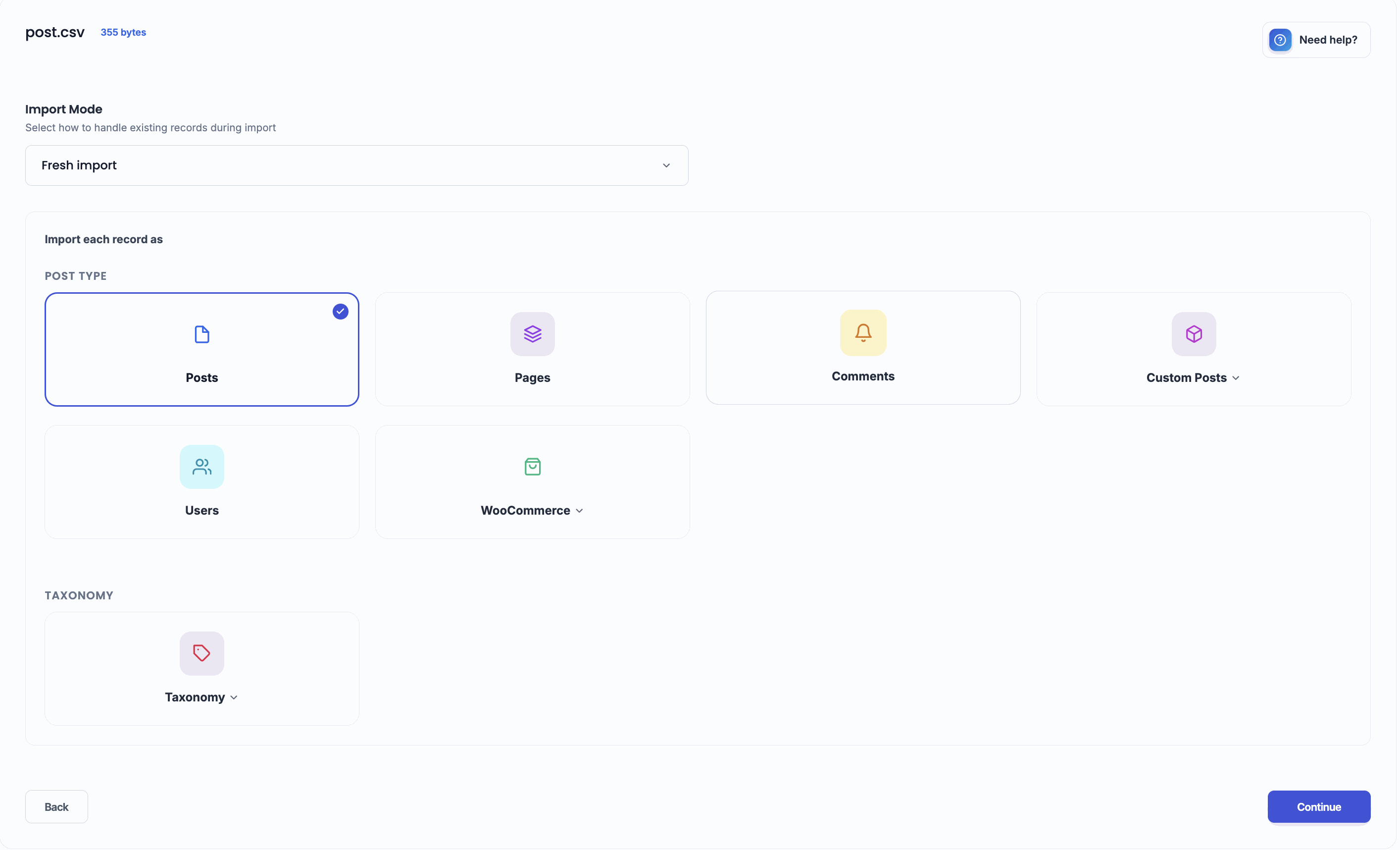
Go to Ultimate CSV Importer Import/Update, upload your CSV file and choose the WordPress content type you want to import.
Map your CSV columns to the corresponding WordPress fields, configure the import and run it.
You can use this workflow to import posts, pages, custom post types, users, WooCommerce products and other supported WordPress data.
-
Can I import Excel files directly into WordPress?
-
Yes.
WP Ultimate CSV Importer supports Excel spreadsheet formats including XLS and XLSX.
Upload the Excel file, select the WordPress content type, map the spreadsheet columns to WordPress fields and run the import.
You do not have to manually create each WordPress record.
-
Can I import XML into WordPress?
-
Yes.
Upload the XML file using WP Ultimate CSV Importer, select the appropriate WordPress content type and map the XML data to WordPress fields.
XML imports can be used for posts, pages, custom post types, WooCommerce products, taxonomies, custom fields and other supported data.
-
How do I bulk import WooCommerce products?
-
Prepare a CSV, XML or Excel file containing product information such as product name, SKU, description, price, stock, categories, attributes and image URLs.
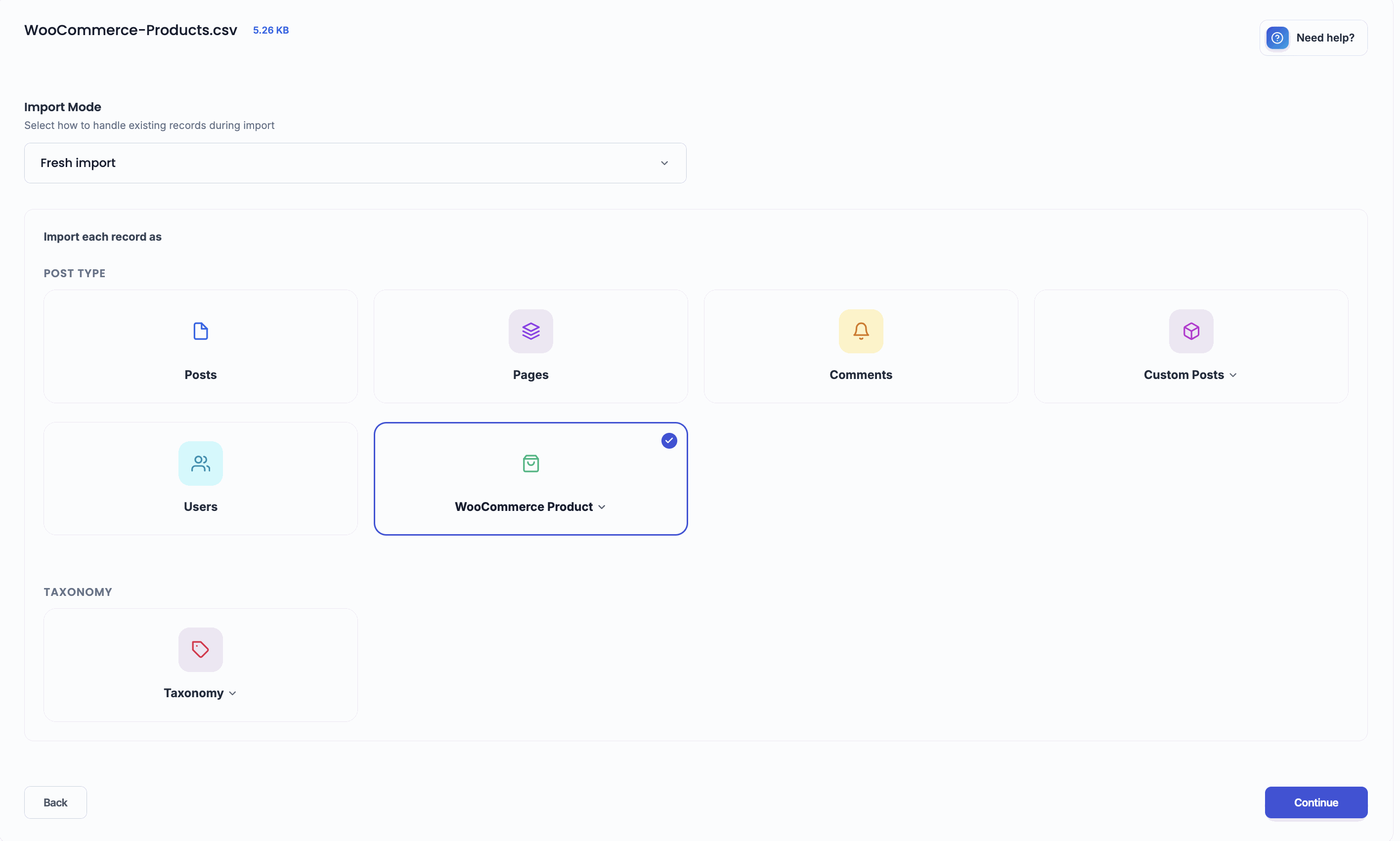
Upload the file to WP Ultimate CSV Importer and select WooCommerce Products as the import type.
Map your source columns to WooCommerce product fields and run the import.
For additional WooCommerce modules and product types, install the free Import WooCommerce Suite add-on.
-
Can I import variable WooCommerce products and variations?
-
Yes.
Variable products and variations are supported through the free Import WooCommerce Suite add-on.
Install WP Ultimate CSV Importer first and then install the WooCommerce Suite add-on.
Advanced updates and other resource-intensive WooCommerce operations require Pro.
Learn more about how to import WooCommerce products here.
-
Can I import WooCommerce orders?
-
Yes.
WooCommerce order imports are supported through the free Import WooCommerce Suite add-on.
Install and activate WP Ultimate CSV Importer first, then install the WooCommerce add-on and import the supported order data.
Advanced update operations require Pro.
Learn the detailed instructions on how to import WooCommerce Orders here.
-
Can I import WooCommerce customers?
-
Yes.
WooCommerce customers can be imported using the free Import WooCommerce Suite or the Import Users & Customers with Meta add-on, depending on the data you need to import. Refer to our guide for detailed instructions on importing WooCommerce Customers.
-
Can I import WooCommerce coupons and reviews?
-
Yes.
WooCommerce coupons and reviews are supported through the free Import WooCommerce Suite add-on.
-
Can I import products from Shopify to WooCommerce?
-
Yes, provided you can export the required Shopify product information into a supported structured file.
Export your Shopify catalog, prepare the required CSV data, upload it to WP Ultimate CSV Importer and map the Shopify columns to the corresponding WooCommerce fields.
Product images can also be imported when accessible image URLs are included in your source data.
-
Can I migrate Magento products to WooCommerce?
-
Yes.
Export the required Magento product data into a supported structured format and map the source fields to WooCommerce product fields using WP Ultimate CSV Importer.
This can reduce the amount of manual work required when rebuilding a product catalog in WooCommerce.
-
Can I migrate Wix or Squarespace content to WordPress?
-
Yes, when the source content can be exported or transformed into a supported CSV, XML or spreadsheet structure.
Map the exported titles, content, categories, images and other fields to WordPress using the importer.
-
Can I import Google Sheets into WordPress?
-
Yes.
Publish the required Google Sheets tab as CSV and use the resulting publicly accessible URL with the Upload from External URL option. Watch this tutorial to learn how to get a public CSV link in Google Sheets
After loading the file, choose the WordPress content type, map the columns and run the import.
Learn more in our guide for How to Import and Update data to WordPress.
-
How do I import ACF fields from CSV?
-
Upload your CSV and select the appropriate post type.
During field mapping, connect your source columns to the supported Advanced Custom Fields fields.
The free version supports selected ACF fields including Basic, Choices, jQuery and WYSIWYG fields.
More complex ACF fields such as repeater, gallery, flexible content and relationship fields require Pro version. Read how to import ACF fields in this guide.
-
Can I import custom post types?
-
Yes.
WP Ultimate CSV Importer can import supported custom post types and map source data to post fields, custom fields and taxonomies.
This makes it useful for directories, events, portfolios, listings, courses and other custom WordPress content.
-
Can I import JetEngine Custom Content Types?
-
Yes.
JetEngine Custom Content Types (CCTs) are supported by the free importer ecosystem.
Advanced update and scheduled workflows require the Pro version. Learn more about JetEngine import export here.
-
Can I import WordPress users from CSV?
-
Yes.
You can import WordPress users and map fields such as username, email, first name, last name, role, password and supported user metadata.
The free Import Users & Customers with Meta add-on provides additional user/customer import capabilities.
-
Can I import images from URLs into WordPress?
-
Yes.
Include publicly accessible image URLs in your import file and map the corresponding image fields.
WP Ultimate CSV Importer can download supported images into the WordPress Media Library and associate them with the imported content.
-
Can I import WooCommerce product images from external URLs?
-
Yes.
Include the product image URLs in your CSV, XML or spreadsheet and map them during the WooCommerce product import.
The importer can download supported remote images into WordPress and associate them with the appropriate products.
-
Can I add image alt text while importing images?
-
Yes.
Supported image metadata can be mapped during the import, including alt text and titles.
This helps maintain descriptive media metadata during bulk imports.
-
How do I check a CSV file for errors before importing it?
-
Use Pre-Flight Validation.
The validator analyzes your import file before records are written to WordPress and reports structural or data issues.
It also provides a File Health Score to help identify files that should be corrected before running a large import.
-
What happens if a large import times out?
-
WP Ultimate CSV Importer includes Auto Recovery and Resume.
Import progress is saved so an interrupted import can continue instead of requiring the complete job to start again.
This is particularly useful for large CSV files, WooCommerce catalogs and media imports.
For more troubleshooting tips, refer to the WP Ultimate CSV Importer troubleshooting guide.
-
Can I save a CSV field mapping and reuse it?
-
Yes.
Save your field configuration as a Mapping Template.
When another import uses the same file structure, load the saved template instead of mapping every column again.
-
Can I import thousands of WordPress records?
-
WP Ultimate CSV Importer is designed for bulk imports and does not impose a fixed row-count limit.
The practical size of an import can still depend on your WordPress hosting environment, PHP configuration, available memory, execution limits, file size and server resources.
Pre-Flight Validation and Auto Recovery can help when working with large datasets.
-
Can I update existing WordPress records with the free version?
-
No.
The free version focuses on importing records.
Updating existing records is available in WP Ultimate CSV Importer Pro.
Pro provides advanced update workflows for sites that need to synchronize or repeatedly update existing WordPress or WooCommerce records.
-
Does WP Ultimate CSV Importer support scheduled imports?
-
Scheduled and recurring imports are Pro features.
WP Ultimate CSV Importer Pro can automate supported import workflows using sources such as FTP/SFTP and Google Sheets.
-
Does WP Ultimate CSV Importer support AI?
-
Yes.
WP Ultimate CSV Importer integrates with supported AI services including OpenAI/ChatGPT, Google Gemini and Anthropic Claude.
AI functionality can assist supported content-generation workflows during imports.
Advanced AI-assisted content workflows are available in Pro.
-
Can I import data from an external database?
-
Direct external database migration is a Pro feature.
WP Ultimate CSV Importer Pro supports supported database workflows involving MySQL, MariaDB, PostgreSQL and SQL Server without requiring every migration to be manually converted into CSV first.
-
Does the plugin provide a REST API or webhooks?
-
REST API and webhook-based automation are Pro features.
These capabilities are intended for integrations where ERP, PIM, ecommerce or automation systems need to trigger supported import workflows programmatically.
-
Can I export WordPress data?
-
Yes, using the free WP Ultimate Exporter companion add-on.
Install WP Ultimate Exporter alongside WP Ultimate CSV Importer to export supported WordPress data.
Advanced export workflows, scheduling and additional export capabilities are available in Pro.
-
What is the difference between WP Ultimate CSV Importer Free and Pro?
-
The free version focuses on importing WordPress data from CSV, XML, Excel and other supported sources.
It provides the core import workflow, field mapping, supported plugin integrations, media handling, Pre-Flight Validation, Auto Recovery, Mapping Templates and other import capabilities.
The free companion add-ons extend WooCommerce, user/customer and export functionality.
Pro is intended for advanced operations such as updating existing records, recurring/scheduled imports, advanced WooCommerce workflows, advanced custom fields, external databases, cloud storage, APIs, webhooks and other automation-heavy workflows.
-
Where can I find sample CSV files?
-
Sample CSV and XML files are available here:
-
Where can I find documentation?
-
Documentation is available here:
Reviews


Contributors & Developers
“WP Ultimate CSV Importer – WordPress CSV, XML & Excel Import” is open source software. The following people have contributed to this plugin.
Contributors


“WP Ultimate CSV Importer – WordPress CSV, XML & Excel Import” has been translated into 6 locales. Thank you to the translators for their contributions.
Translate “WP Ultimate CSV Importer – WordPress CSV, XML & Excel Import” into your language.
Interested in development?
Browse the code, check out the SVN repository, or subscribe to the development log by RSS.
Changelog
9.1
- Fixed: Infinite loop occurring on some WordPress instances during update operations.
- Fixed: Enable Single Import/Export not loading the Import/Export button and panel on post and page edit screens.
- Fixed: Single Import/Export panel not opening on click, and export/import requests failing for draft posts.
- Fixed: Stability issues identified after the 9.0 release.
- Improved: Import workflow reliability and compatibility.
- Improved: Overall performance and stability for CSV, XML and Excel import operations.
9.0
- Added: CSV Pre-Flight Validation Framework with multiple scan modes and File Health Score reporting.
- Added: Auto Recovery and Resume Import, allowing interrupted imports to continue from the row where they stopped.
- Added: Template Management with input-field support for Simple Mode and Media Import.
- Added: Dashboard analytics with dynamic KPI cards, charts and Log Manager integration.
- Added: Complete French (
fr_FR) localization. - Added: Complete Italian (
it_IT) localization. - Added: Complete German (
de_DE) localization, including previously untranslated UI strings. - Added: Security baseline for import and export operations.
- Improved: Redesigned Dashboard, Mapping, Import, Export, Media, Template, Add-ons, Manager, Support and Settings sections with a modern responsive UI.
- Improved: Modernized Import Each Record, Chatbot and Need Help sections.
- Improved: Consistent primary styling across sections and resolved alert display issues.
- Improved: Pro tags now clearly identify features requiring an upgrade.
- Improved: Synced missing translation keys across language files.
- Improved: Plugin file-loading reliability using absolute include paths for core dependencies.
- Fixed: Mapping UI and functionality issues, including responsiveness and alignment.
- Fixed: WooCommerce order import issues involving order date and custom-field mapping.
- Fixed: Simple Mode import redirection issue.
- Fixed: Spanish localization gaps across the admin UI.
- Fixed: SQL injection vulnerability and hardened database queries across import extensions.
- Fixed: UI alignment in Save Template, Pre-Flight Validation and Background Import Queue sections.
- Fixed: Import section UI issues and Manager section functionality.
- Fixed: Template Import handling, dashboard display and activity status.
8.1
- Security: Hardened AJAX authorization, nonce handling and import workflows; remediated CVE-2026-13353 related vulnerabilities.
- Improved: Content Update UI with disabled controls and Pro labels for restricted importer types.
- Improved: Updated Free/Pro boundaries for content update functionality.
- Fixed: Incomplete Japanese localization across the admin UI.
- Updated: Plugin version, changelog and readme documentation.
8.0.1
- Improved: Compatibility with the latest JetEngine and MetaBox plugin versions.
8.0
- Added: Improved import workflow and duplicate handling.
- Added: Enhanced developer API with centralized lifecycle hook support.
- Improved: CPT slug handling and override field support during post imports.
- Improved: Localization support across admin UI components.
- Improved: Multilingual compatibility across site locales and language configurations.
- Improved: Namespace loading and internal file structure.
- Improved: Plugin activation stability and initialization.
- Improved: Add-on menu visibility and plugin navigation.
- Improved: Category import and taxonomy-processing reliability.
- Improved: Free and Pro plugin coexistence.
- Improved: Class loading and module initialization.
- Improved: Admin UI consistency and notice handling.
- Updated: Plugin version, changelog and readme documentation.
- Performed: Internal codebase cleanup and optimization.
- Compatibility: Tested and confirmed compatible with WordPress 7.0.