

Description
WordPress, by default, includes a simple robots.txt file that’s dynamically generated from within the WP application. This is great, but how do you easily change the content?
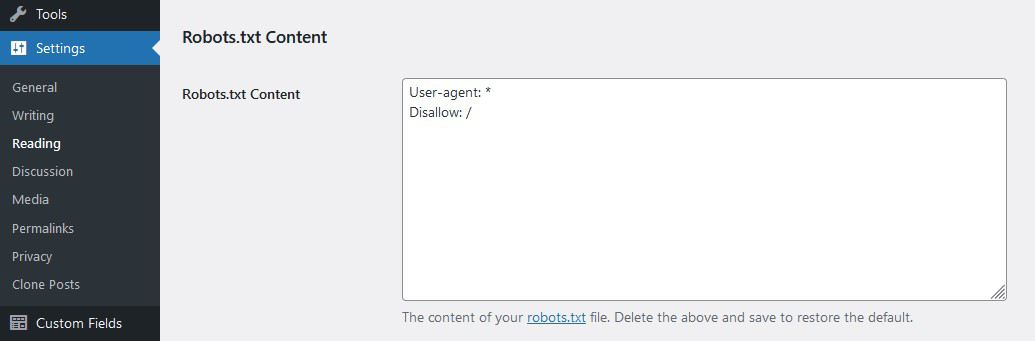
Enter WP Robots Txt, a plugin that adds an additional field to the “Reading” admin page where you can do just that. No manual coding or file editing required!
Simply visit https://your-site.com/wp-admin/options-reading.php and you can control the contents of your https://your-site.com/robots.txt
Screenshots
Installation
- Download the plugin
- Unzip it
- Upload the unzipped folder to
wp-content/pluginsdirectory - Activate and enjoy!
Or you can simply install it through the admin area plugin installer.
FAQ
-
I totally screwed up my `robots.txt` file. How can I restore the default version?
-
Delete all the content from the Robots.txt Content field and save the privacy options.
-
Could I accidently block all search bots with this?
-
Yes. Be careful! That said,
robots.txtfiles are suggestions. They don’t really block bots as much as they suggest that bots don’t crawl portions of a site. That’s why the options on the Privacy Settings page say “Ask search engines not to index this site.” -
Does discouraging search engines change robots.txt?
-
No. Since WordPress 5.3 that setting adds a
noindexmeta tag. It does not addDisallow: /torobots.txt. Your saved rules are still served. AddDisallow: /yourself if you want crawlers to skip the site. -
Why is my edited robots.txt not used?
-
WordPress only serves the virtual
robots.txtwhen there is no physicalrobots.txtfile in the site root. Delete or rename that file to use this plugin. -
Where can I learn more about `robots.txt` files?
-
Here is a general guide by Google and here is the WordPress SEO documentation.
Reviews


Contributors & Developers
“WP Robots Txt” is open source software. The following people have contributed to this plugin.
Contributors
“WP Robots Txt” has been translated into 8 locales. Thank you to the translators for their contributions.
Translate “WP Robots Txt” into your language.
Interested in development?
Browse the code, check out the SVN repository, or subscribe to the development log by RSS.
Changelog
1.3.6
- Compatibility with WordPress 7.1
- Stop HTML-escaping robots.txt output (it is text/plain; this broke URLs with
&) - Store sanitized plain text instead of
esc_html()in the option - Decode legacy HTML entities from older saved content
- Fix default
Disallow/Allowpaths on subdirectory installs (match coreadmin_url()) - Guard sitemap defaults for WordPress 5.3–5.4 and when sitemaps are disabled
- Use
esc_url_raw()for the default Sitemap line - Warn when a physical robots.txt file will override this plugin
- Keep saved rules when search engines are discouraged (WordPress does not add
Disallow: /) - Harden admin and plugin-row markup escaping
- Add
ABSPATHguards on included files
1.3.5
- Compatibility with WordPress 6.8
1.3.4
- Compatibility with WordPress 6.7
1.3.3
- Add Line Break to allow appending more rules. Thanks @flberger
1.3.2
- Add translation template
1.3.1
- Compatibility with WordPress 6.4
- WP Coding Standards compliant
1.3
- Ensure Compatibility with WP v6.3
- Increase PHP minimum required version
1.2
- Update the default robots.txt content
- Include sitemap reference
- Resolve code warnings/errors
- WP Coding Standards compliant
- Ensure Compatibility with WP v6
1.1
- Moved the settings field “officially” to the reading page
- General code clean up
1.0
- Initial version