
Description
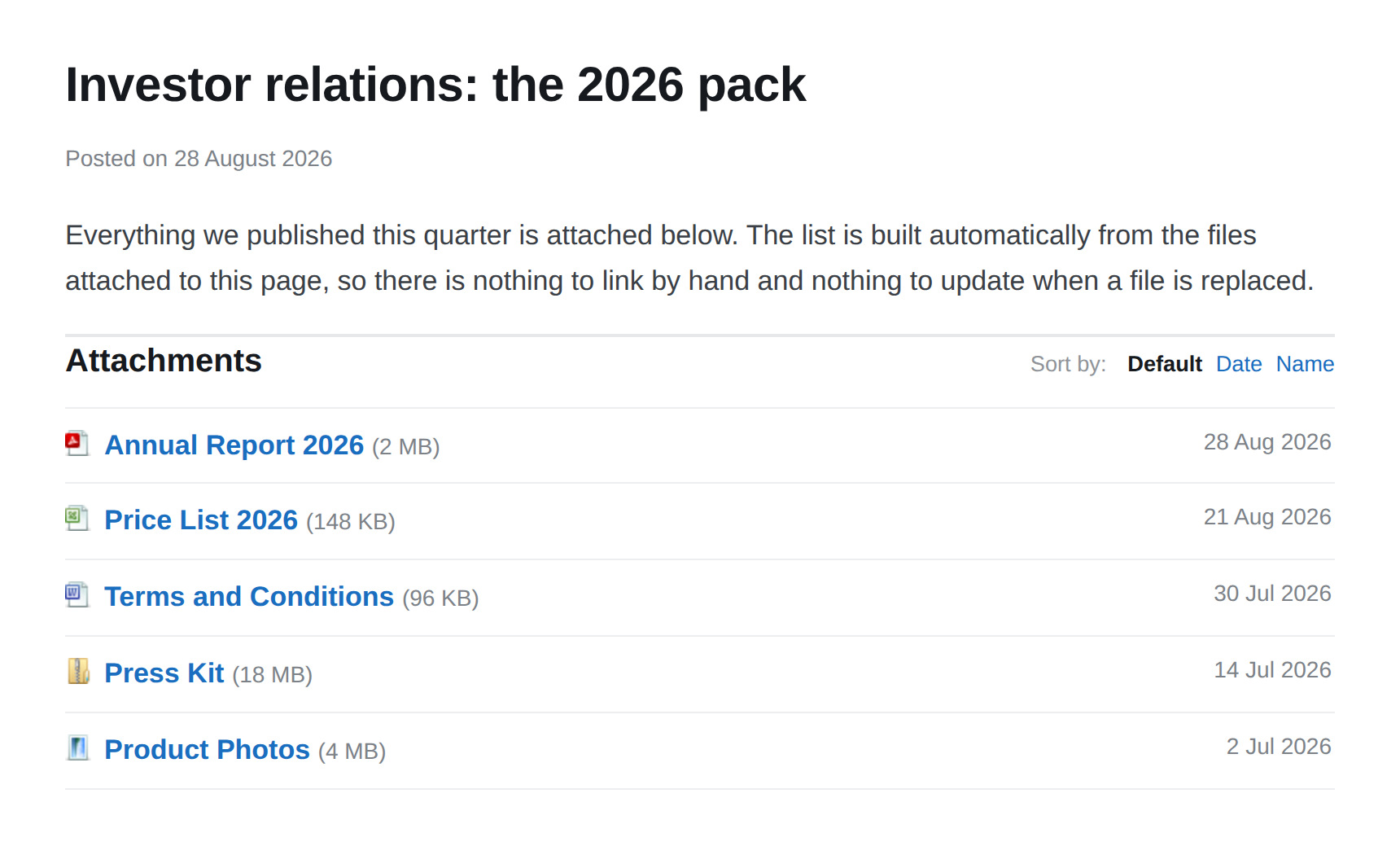
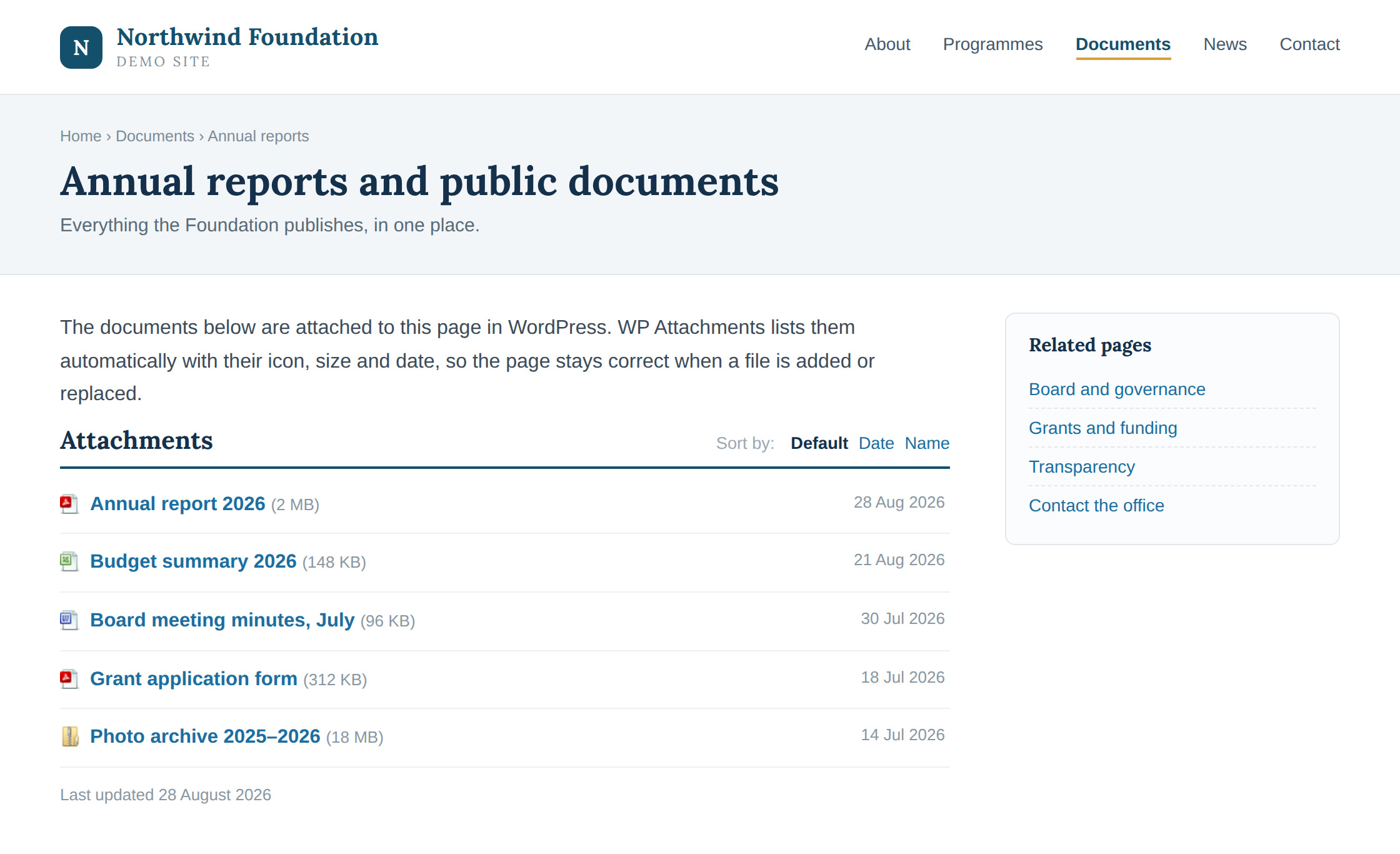
WP Attachments turns the files you upload to a post into a clean, automatic download list. Attach a file while editing, and it shows up under your content — no manual links, no shortcodes to remember.
It also fills the gaps in the WordPress Media Library, letting you attach, unattach and reattach files without leaving the screen you are on.
Key features
- 🤖 Lists attachments automatically after the post content
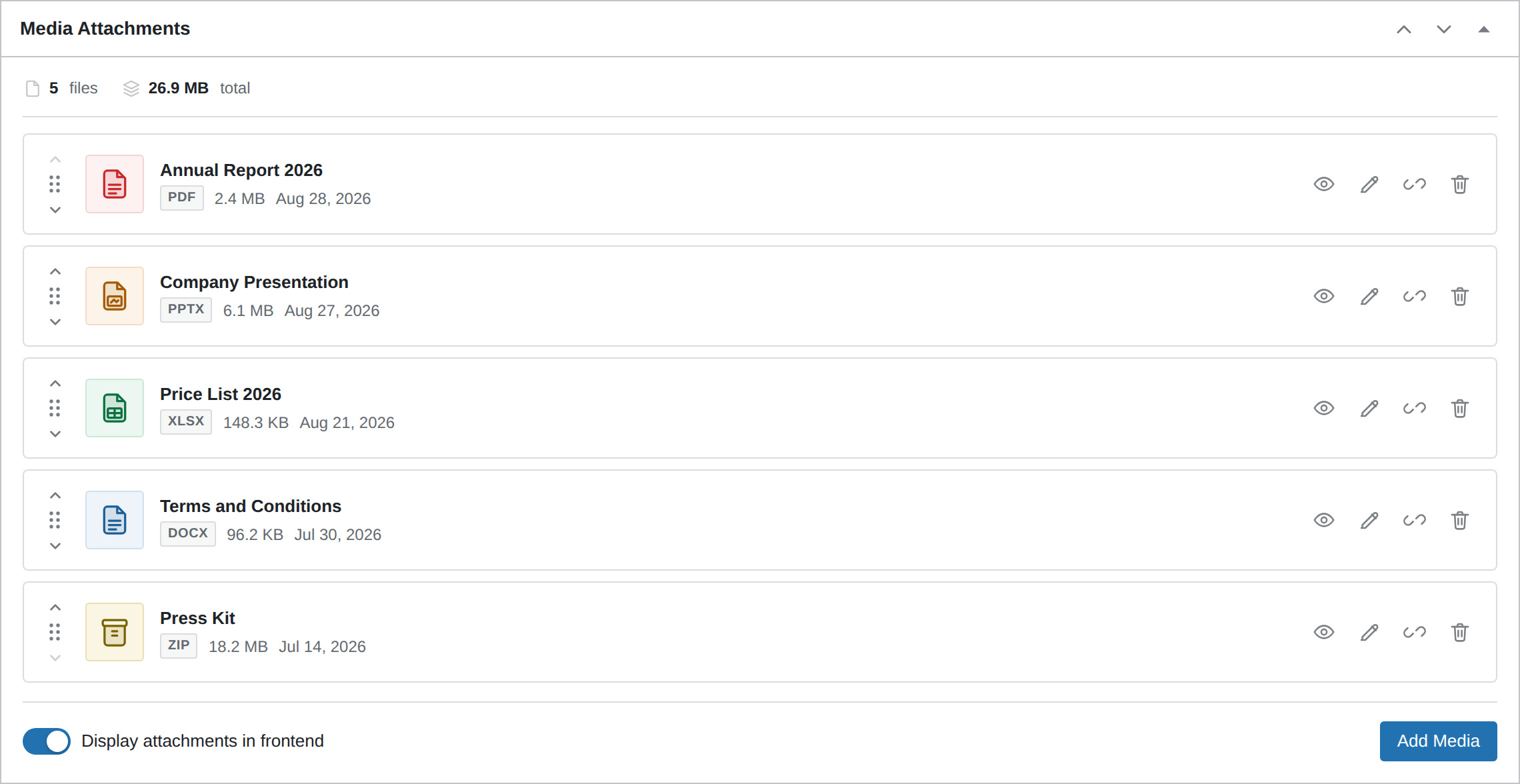
- ℹ️ Metabox for managing, previewing, renaming and reordering the files of a post
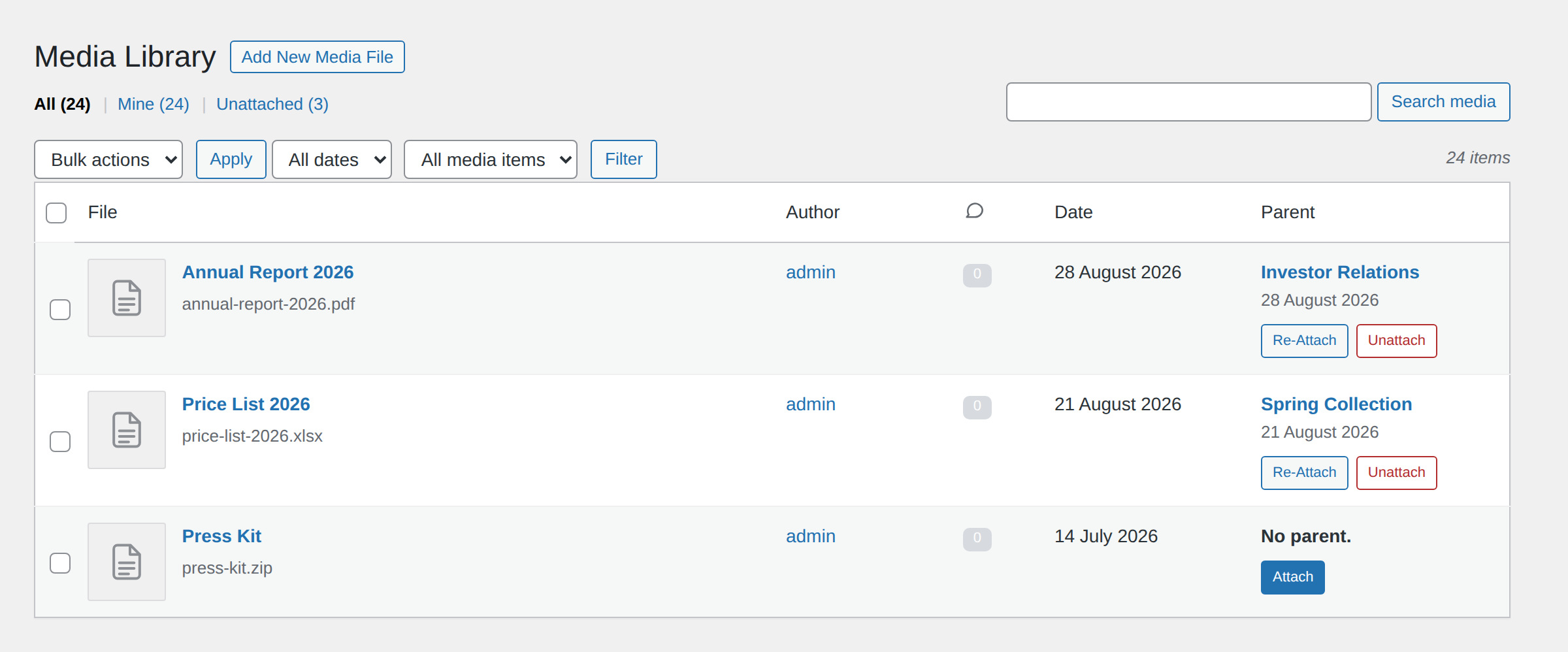
- 🔃 Attach, Unattach and Reattach actions in the Media Library
- 🔢 A Files column in the post and page lists: see the count, click through to the files
- 🔢 Download counter that ignores crawlers, prefetches and repeat clicks
- ♿ Reordering works with the mouse, the keyboard and screen readers
- 🧑💻 Filters for developers who want to change the markup
- 🛍️ WooCommerce compatible, including High-Performance Order Storage
- 🎨 Four icon packs for the frontend list
- 📜 Works with posts, pages and custom post types
- 🎢 Templates you can customise: title, date, size, caption, downloads and more
Contributions
- Part of WPGov.it, providing open source solutions for Italian Public Government websites.
- Thanks to the Italian community Porte Aperte sul Web for beta testing and ideas.
- Metabox based on IJ Post Attachments
- Some icons by Yusuke Kamiyamane.
Screenshots
Installation
- Install via the WordPress.org plugin directory or upload the files to your server.
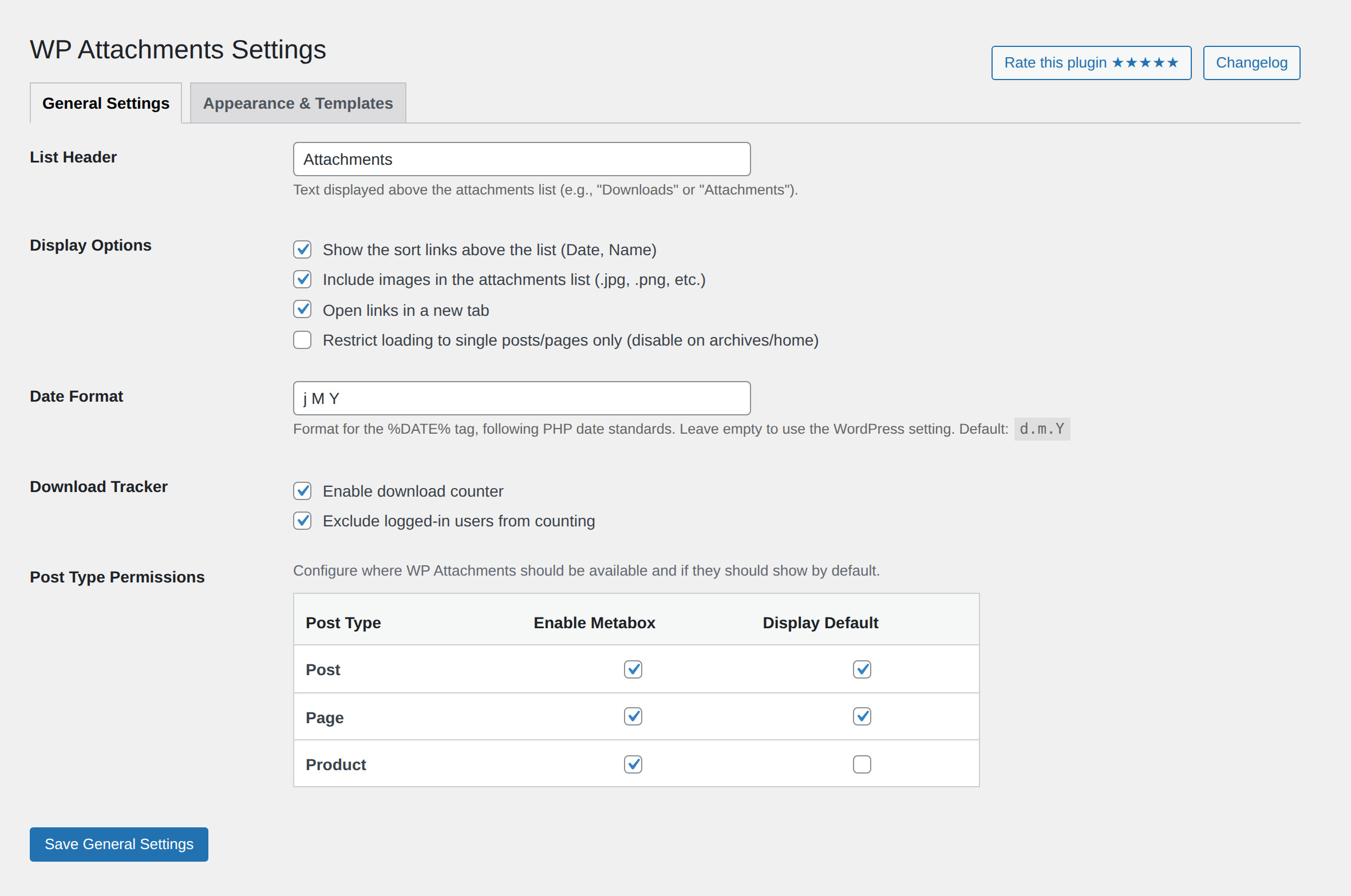
- Activate the plugin. To customise it, go to Settings WP Attachments.
- While editing a post, page or custom post type you will find the Media Attachments metabox. Extra actions are available in the Media Library: Attach, Unattach and Reattach.
FAQ
-
How do I hide the attachment list on a specific post or page?
-
Open the Media Attachments metabox while editing and switch off Display attachments in frontend, at the bottom left. The files stay attached, they are simply not listed on the site.
You can also set the default for a whole post type under Settings WP Attachments Post Type Permissions.
-
How do I avoid the same file being listed twice?
-
Do not insert the link manually. A file uploaded from the editor is attached to the content automatically and listed by WP Attachments, so you can simply close the media popup after uploading.
-
How do I reorder the files?
-
Three ways, all of which save straight away:
- drag a row by the grip on its left;
- use the Move up / Move down buttons on each row;
- focus the grip and press the up or down arrow key.
-
How do I see which files belong to a post?
-
The Files column in the post and page lists shows how many files each one has. Click the number to open the Media Library filtered to just those files.
-
Can I change the date format of the list?
-
Yes, under Settings WP Attachments Date Format. It accepts the standard PHP date characters and applies to the
%DATE%tag. Leave it empty to follow Settings General Date Format. -
Does the download counter count everything?
-
No. It skips browser prefetch requests and known crawlers, and it ignores repeat hits from the same visitor on the same file for a few minutes. Those requests still receive the file, they just do not move the number.
-
Which files can be previewed in the metabox?
-
Images, video, audio, PDF and plain text open in a preview dialog. Any other format shows its icon and a download link.
-
Developer filters
-
- wpatt_list_html — the whole list markup (
$html) - wpatt_before_entry_html — a single entry, before the tags are replaced (
$html) - wpatt_after_entry_html — a single entry, after the tags are replaced (
$html) - wpatt_accepted_formats — return a falsy value to hide a file (
$mime) - wpatt_download_throttle — how long the same visitor is ignored for the same file (
$seconds,$attachment_id) - wpatt_count_download_request — whether the current request may increment a counter (
$countable)
Examples
function my_custom_function( $html ) {
    // Alter the final HTML
    return $new_html;
}
add_filter( 'wpatt_list_html', 'my_custom_function' );


function my_pdf_only( $mime ) {
    // Only show PDFs in the list
    return $mime === 'application/pdf';
}
add_filter( 'wpatt_accepted_formats', 'my_pdf_only' );


// Count each visitor at most once per hour
add_filter( 'wpatt_download_throttle', function () {
    return HOUR_IN_SECONDS;
} );
There is also
wpatt_get_attachments_html( $parent_id ), which returns the list for any parent ID without going through thethe_contentfilter. - wpatt_list_html — the whole list markup (
Reviews


Contributors & Developers
“WP Attachments” is open source software. The following people have contributed to this plugin.
Contributors
“WP Attachments” has been translated into 6 locales. Thank you to the translators for their contributions.
Translate “WP Attachments” into your language.
Interested in development?
Browse the code, check out the SVN repository, or subscribe to the development log by RSS.
Changelog
6.0.3 2026-08-31
- New: a Files column in the post, page and custom post type lists shows how many files are attached to each one, and links straight to them in the Media Library.
- New: the Edit action in the metabox now opens media modal in place, so titles, captions and alt text can be changed without leaving the editor.
- Security: fixed a cross-site request forgery issue.
- Accessibility: files can now be reordered with the keyboard, and the frontend sort control works without JavaScript.
- The download counter now ignores crawlers and browser prefetch requests.
- Fixed wrong file sizes, the Date Format setting that had no effect, and the first attachment not showing up until the page was reloaded.
- New file type icons, and admin assets now load only on the screens that use them.
- WooCommerce: declared compatibility with High-Performance Order Storage.
5.3.4 2026-03-14
- Minor fixes and improvements.
5.3 2026-02-02
- Better permission handling
- Redesigned settings screen
5.2.1 2026-01-19
- Minor fixes and improvements.
5.2 2025-06-09
- Fixed regression with images (thanks @reesher + @steeltape for feedback)
- Added option to enable/disable for specific custom post types (completely or only frontend)
- Other minor fixes and improvements.
5.1 2025-05-25
- Date placeholders in attachment templates now use the WordPress date format setting (
Settings > General > Date Format) for better localization and consistency. - Improved templating: You can now use WordPress date formatting in your custom templates, and templating settings are more flexible and reliable.
- Other minor fixes and improvements.
- Major code refactoring for improved stability and maintainability
- Significant performance improvements
- Enhanced security throughout the plugin
- Improved admin capabilities and permission handling
- Brand new metabox for easier attachment management
- Refreshed admin columns for better overview and usability
5.0.12
- Latest stable release
5.0.6 2023-02-15
- Compatibility check
- Security fixes
- Minor changes
5.0.4 2021-10-20
- Compatibility check
- Linked development workflows on GitHub
- Minor changes
5.0 2020-11-28
- WooCommerce compatibility: add files to client orders
- Major improvements and technical changes
- Rewritten add_media popup with custom behavior
- Removed old translation files, now using translate.wordpress.org
- Minor changes
4.4.2 2020-04-29
- Minor improvements
4.4.1 2020-02-20
- Compatibility check
Version 4.4 18/11/2017
- Fixed critical bug for missing icons in WP 4.9
- Some problems may occur in previous WP versions for icons. Please update!
Version 4.3.6 10/01/2017
- Tested with WP 4.7
- Fixed php warning in custom post types with capabilities mapped
Version 4.3.4 06/07/2016
- 4.6 compatibility check
Version 4.3.3 02/04/2016
- Fixed bug in metabox date
- Tested with WP 4.5
Version 4.3.2 19/02/2016
- Fixed php notice error when debug active
Version 4.3.1 18/02/2016
- Auto exclusion of dropdown if attachments < 2
Version 4.3 23/12/2015
- Added option to show a dropdown for ordering
- Various improvements and bugfix
- Added support for translate.wordpress.org
Version 4.2 02/08/2015
- Added developer functions and filters
- Minor improvements
- ReadMe changes (FAQS added)
Version 4.1.2 6/07/2015
- Added es_ES translations by Joaquín Alejandro Duro Arribas
- ReadMe changes
Version 4.1.1 1/06/2015
- Tested with latest beta version
- Readme changes
Version 4.1 26/04/2015
- Added option to exlude logged-in users from download counter
- Fixed “extended” template
- Minor bugfixes
- Minor readme.txt changes
Version 4.0.2
- Correct bug of 404 error when file title contains special characters (download counter only)
- Minor improvements
Version 4.0.1
- Fixed download error 404 for some permalinks when counter enable
Version 4.0
- New and better metabox
- Added download counter function
- Added icon themes
- Added multiple schemes
- Redesigned options
- Performance improvements (2x faster)
- Minor improvements
Version 3.7 05/03/2015
- Added filter and option to restrict the plugin to single and page views
- Minor performance improvements
- Fixed wrong version in settings panel
- Better style for attachments list
Version 3.6.1 28/02/2015
- Added check for password protected posts
Version 3.6 28/02/2015
- Improved performance
- Improved metabox (faster & nicer)
- Improved option panel
- Added opton to deactivate the plugin on certain pages
Version 3.5.6 21/10/2014
- Fixed css conflict with italian schools WordPress theme “pasw2015”
Version 3.5.5 05/09/2014
- Added plugin icon
- Added serbian translation sr_RS
- readme.txt changes
Version 3.5.4 26/07/2014
- Fixed possible conflict with other plugins (ex. Members)
- Fixed missing translation of “Update” button in the options panel (world-wide)
Version 3.5.3 20/07/2014
- Added Brazilian Portuguese translations by Henrique Avila Vianna
Version 3.5.2 15/07/2014
- Fixed add media button not being displayed when no file attached
- Fixed metabox not showing up for add-new “admin” pages
- Upgraded uploader to be the same as WordPress’ integrated
- Improved add media button style to exactly match the WordPress’ standard
Version 3.5.1 12/07/2014
- Tested and working on WordPress 4.0 (beta)
Version 3.5 09/07/2014
- Added unattach link in media admin page
- Added unattach link in page/post/cpt editor
- Improved back-end metabox
- Improved capability handling for attach/reattach/unattach functions
- Improved some variables handling
- Added function to check if a file doesn’t exist and must skip filesize calculation (in order to avoid front-end errors)
Version 3.4 08/07/2014
- Added reattach link in media admin page
- Added attach link for unattached file in media admin page
Version 3.3 28/03/2014
- Added option to open files in a new tab [in Settings -> WP Attachments]
- Fixed conflict with “Members” plugin causing the metabox appearing in its options page
- Added an “eye” icon in the editor metabox showing that the file will be listed front-end
Version 3.2.3 26/03/2014
- Solved conflict with some newsletter plugins by addind code for avoiding the attachments list if the given post id is null
Version 3.2.2 12/03/2014
- Added support for MP3, ODT, ODS
- Changed size text for small files: now showing “< 1KB” instead of “n B”
- Better compatibility for Internet Explorer
Version 3.2.1 03/03/2014
- Added wp_enqueue_style for loading css style
- Performance improved
Version 3.2 03/03/2014
- New localization system. English & Italian already translations included
- New back-end metabox. That’s in beta, but i’m sure you will like it!
- Better option page
Version 3.1.4 4/11/2013
- Fixed missing ‘Backend.php’ (this function will be available in the next versions (3.2+)
Version 3.1.3 27/10/2013
- Another bugfix
Version 3.1.2 27/10/2013
- Fixed a bug causing content not to be loaded in some cases
Version 3.1.1 19/10/2013
- List title is now hidden correctly
Version 3.1 15/09/2013
- Fixed missing icon for images
- Added option to exclude images from being listed
- Improved settings page layout
Version 3.0.4 24/08/2013
- Readme minor changes
Version 3.0.3 23/08/2013
- Improved Css appearance
Version 3.0.2 23/08/2013
- Fixed activation error: unespected output – 1 charater
Version 3.0.1 22/08/2013
- Fixed missing external shortcode rendering
- Fixed reduntant css code
- Improved loop
- List header doesn’t show up anymore for empty attachments
Version 3.0 22/08/2013
- Added Css for showing icons
- Added file size
- Added attachment data
- Added options panel
Version 2.0 04/07/2013
- First functional release. Enjoy!
Version 1.0 07/01/2012
- First Release