
Description
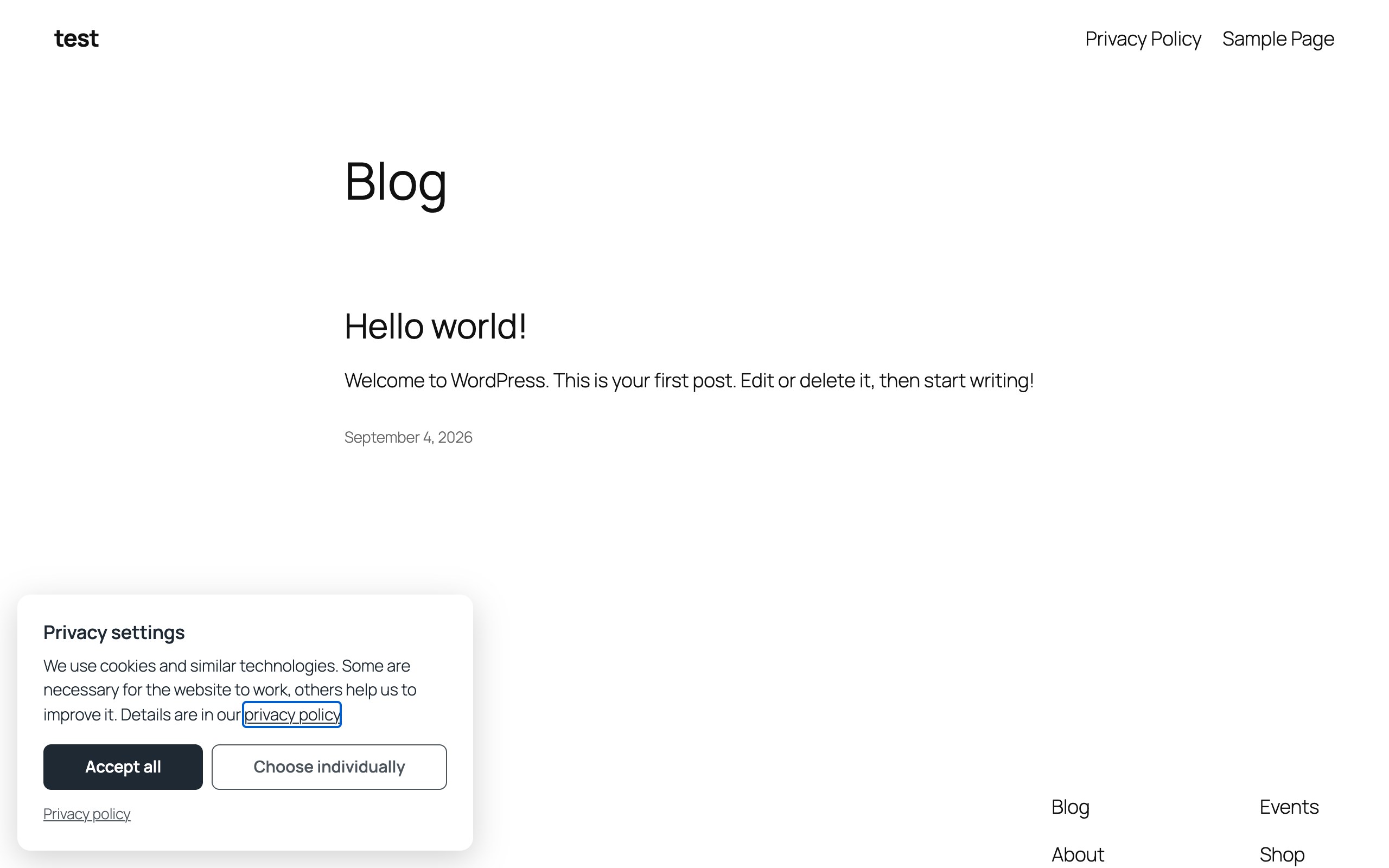
Most consent plugins are huge. Wonderful Cookie and Consent Banner does two things: it asks the visitor once and remembers the answer in a first-party cookie, and it holds back your tracking scripts and embedded videos or maps until the visitor accepts their category. Four categories — essential, statistics, marketing, external media — and that is all you need for a normal website.
Everything stays on your own server. The plugin contacts no external service, loads no remote fonts or scripts of its own, keeps no consent log, and sends nothing anywhere. The only third-party requests are the ones you configure as services, and those run only after consent.
Scripts that wait for consent
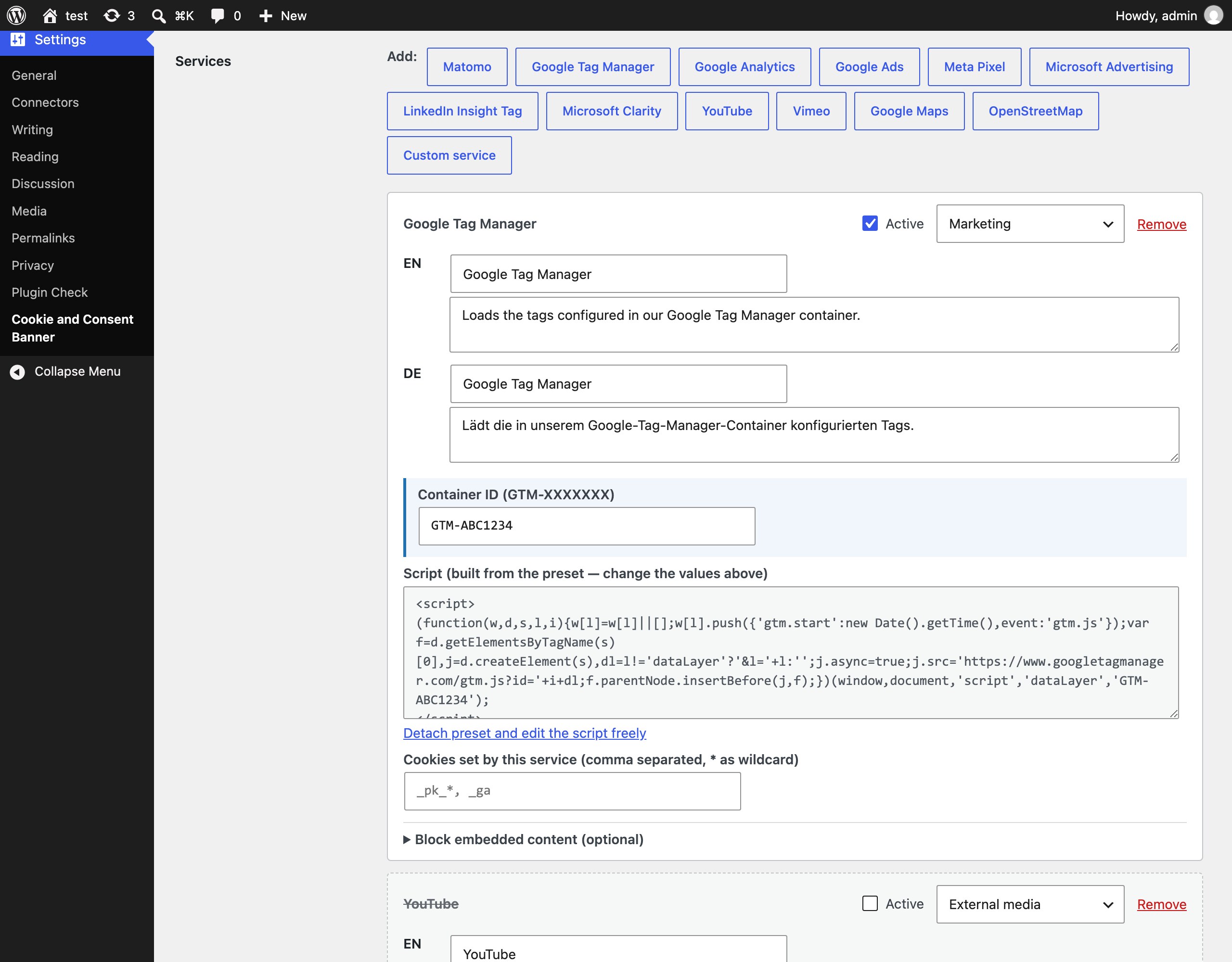
A service is a name, a short description, a category and the script exactly as the provider gave it to you. Paste it, save, done. Presets do the snippet for the usual suspects — you only fill in the account ID, in a field of its own, and the script is rebuilt from it every time you save. So the container ID stays where you can read and change it instead of being buried in minified provider code. “Detach preset” hands the script back for free editing whenever you want it:
- Matomo (self-hosted)
- Google Tag Manager
- Google Analytics 4
- Google Ads
- Meta Pixel
- Microsoft Advertising (UET)
- LinkedIn Insight Tag
- Microsoft Clarity
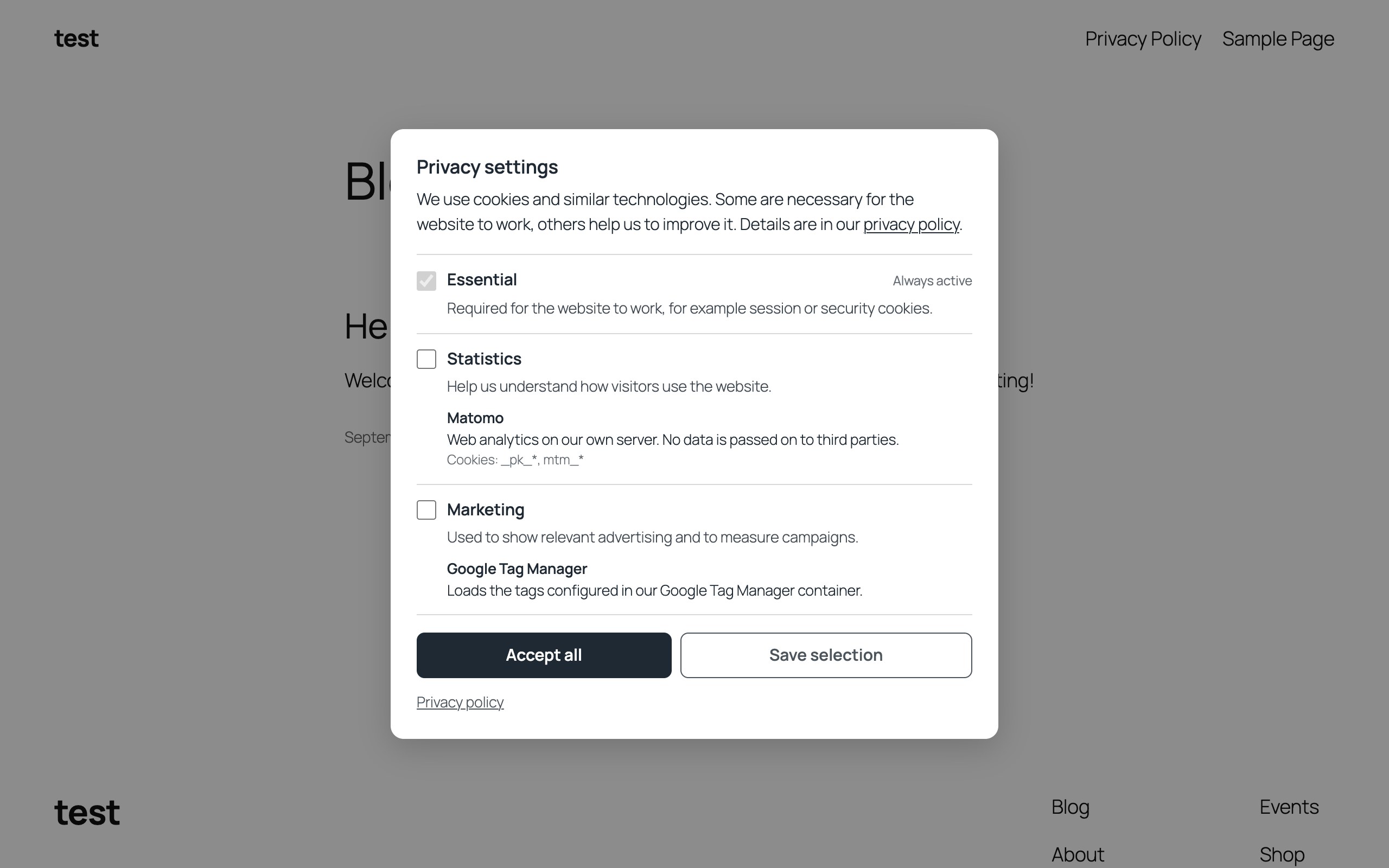
Every service can list the cookies it sets (with * as wildcard). They are shown to the visitor under “choose individually” and deleted when consent is withdrawn.
Every service has an “Active” switch. Switch it off and it keeps all its settings but stops running: no script, no entry in the banner, no blocked embeds — handy to take a tracker off the site for a while without deleting it and typing it in again later.
Embed blocking is folded away under “Block embedded content” and only opens by itself where hosts are configured, so a plain script service is not asked about iframes it will never have.
Adding a new optional service — or switching one back on — automatically raises the consent version, so every visitor is asked again.
Embedded content that waits too
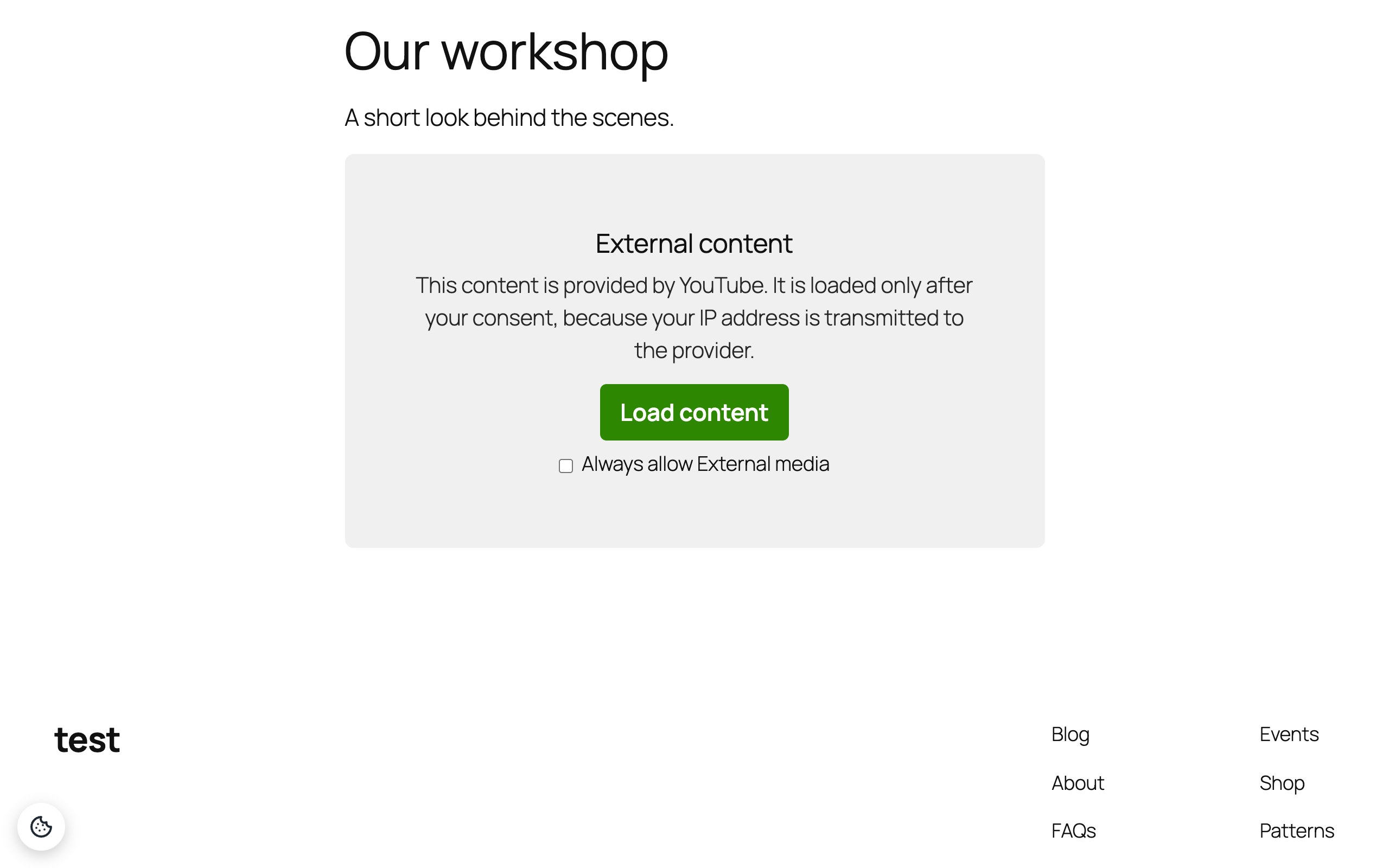
A service can also block embedded content: give it the hosts it comes from (youtube.com, youtube-nocookie.com, or with a path such as google.com/maps so the reCAPTCHA iframe is left alone) and every matching iframe in your content stays empty behind a placeholder until the visitor loads it once or allows the category for good. No request reaches the provider before that — not even for a thumbnail. Presets for YouTube, Vimeo, Google Maps and OpenStreetMap come with the host lists; the placeholder texts are yours to edit per language, and each service can have its own placeholder image.
It works with whatever put the iframe there: the block editor, the classic editor, oEmbed, Divi, Elementor, widgets. The server only removes the src attribute from matching iframes in the content; the browser builds the placeholder and puts the source back after consent, and also catches iframes that scripts add later. Players loaded purely through a provider’s JavaScript API are not covered.
Texts in as many languages as you need
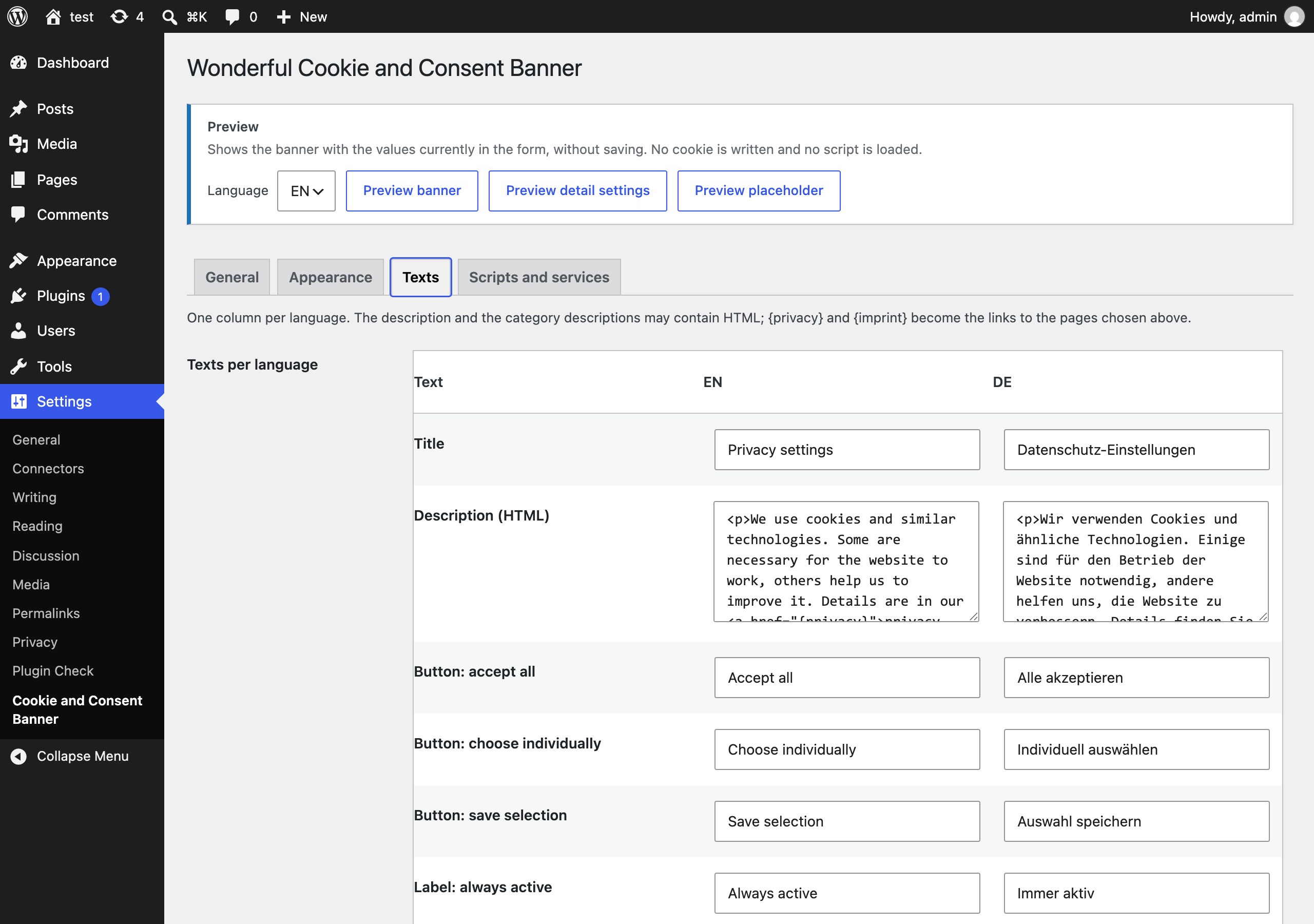
Enter language codes such as de, en and every text gets one column per language. The banner picks the language of the page — the site language, WPML and Polylang all work, and a filter lets you override it. English and German defaults are built in. The description and the category descriptions may contain HTML, so a link to your privacy policy is one <a> away; {privacy} and {imprint} become the links to the pages you chose.
Looks like your site, not like a plugin
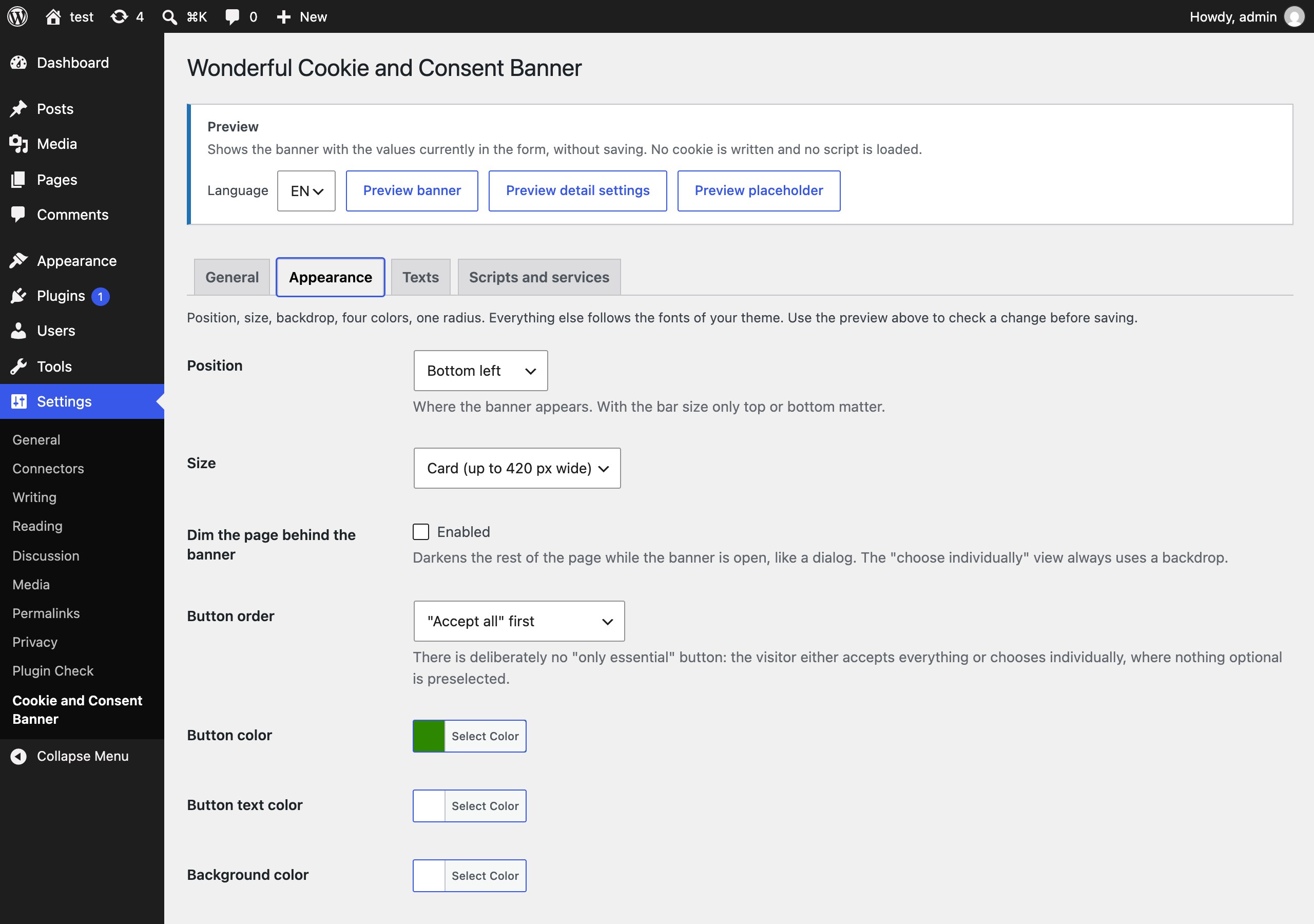
Position on a three-by-three grid (top, middle, bottom × left, center, right), size (card, wide, or a bar across the full width), an optional backdrop that dims the page, four colors, one corner radius, and the order of the two buttons. Fonts are inherited from your theme. The floating button that lets visitors change their mind later has its own background and icon color (unobtrusive by default), four built-in icons or an image of your own — or is switched off, if you prefer a link in the footer ([wonderful_cookie_and_consent_banner_link] or any link to #wonderful-cookie-and-consent-banner). [wonderful_cookie_and_consent_banner_status] on the privacy page shows the current choice per category; the banner stays closed there so the policy can be read before deciding.
Preview without saving
The settings page renders the banner with whatever is currently in the form. Change a color, click “Preview banner”, look, adjust, save when it is right. The preview writes no cookie and loads no script.
Deliberately no “only essential” button
The banner offers “Accept all” and “Choose individually”. Under “choose individually” nothing optional is preselected, and saving without ticking anything means essential only. Whether that is enough for your jurisdiction is your call — the plugin does not give legal advice.
Built-in safety rails
- Scripts can only be stored by users who may publish unfiltered HTML (administrators); anyone else keeps what is already saved.
- Every text passes through WordPress’ HTML sanitiser, every color, number and choice is validated before it is stored.
- The consent cookie is validated on every read; anything malformed counts as “no consent”.
- The served HTML is identical for every visitor, so page caches and CDNs never serve a wrong consent state.
- Keyboard operable, focus stays inside the dialog,
ariaroles and labels are in place, animations respect “reduce motion”.
For developers
JavaScript: wonderfulCookieAndConsentBanner.has('statistics'), .get(), .consentId(), .open(), .acceptAll(), .reset(). Events on document: wonderful-cookie-and-consent-banner-consent (on every page load with a stored decision and after every new decision; detail: categories, id, string, source), -changed (new decision only) and -loaded (a service script ran). The same wonderful_cookie_and_consent_banner_consent event is pushed to the dataLayer with the same payload, so one Google Tag Manager trigger covers every page.
Every decision gets a consent id (<client>-<timestamp>-<version>-<random>); the client part stays stable when the visitor changes their mind. Send it along with your analytics events if you want a record of consent — the plugin itself keeps no log.
PHP: wonderful_cookie_and_consent_banner_has( 'marketing' ) reads the request cookie (mind page caching). Filter wonderful_cookie_and_consent_banner_language overrides the language.
External services
The plugin itself contacts no external service: it loads no remote fonts, scripts or images of its own, sends nothing to the plugin author or anyone else, and keeps no consent log. The visitor’s decision is stored only in the visitor’s own browser, in a first-party cookie named wonderful_cookie_and_consent_banner.
External services are contacted only for services the site owner configures, and only after the visitor has consented to that service’s category. A fresh installation has no service configured and therefore contacts nothing at all. Services placed in the “essential” category run without consent, so that category should hold only what is strictly necessary.
Every service below is an optional template (“preset”) that a site owner may add. What is sent is in each case the same kind of data: requesting the provider’s script or iframe transmits the visitor’s IP address, browser and operating system information, the referring page and any cookies that provider has already set in that browser; what is collected from then on is determined by the provider and by the account the site owner configured. When it is sent differs:
- Script services: the provider’s script is requested on every page view, as soon as the visitor has consented to the service’s category, and then runs on its own.
- Embed services (videos, maps): nothing is requested from the provider until the visitor clicks “Load content” on the placeholder, or has consented to the category — not even a preview image.
Matomo (script, self-hosted)
Website analytics. Loads matomo.js from the Matomo installation URL the site owner enters and sends page views to matomo.php there, after consent. That URL is usually the site owner’s own server, in which case no third party is involved and the site owner’s own privacy policy applies. If a hosted Matomo installation is used, its operator’s terms apply.
Provider of the software: InnoCraft Ltd.
Terms of service: https://matomo.org/terms/
Privacy policy: https://matomo.org/privacy-policy/
Google Tag Manager (script)
Tag management. Loads gtm.js from www.googletagmanager.com on every page view after consent. Which further tags are then loaded, and what they collect, is configured by the site owner in their own Google Tag Manager container.
Provider: Google Ireland Limited.
Terms of service: https://marketingplatform.google.com/about/analytics/tag-manager/use-policy/
Privacy policy: https://policies.google.com/privacy
Google Analytics 4 (script)
Website analytics. Loads gtag.js from www.googletagmanager.com on every page view after consent and sends page views and events to Google’s servers, where they are attributed to the measurement ID the site owner entered. Sets the cookies _ga* and _gid.
Provider: Google Ireland Limited.
Terms of service: https://marketingplatform.google.com/about/analytics/terms/us/
Privacy policy: https://policies.google.com/privacy
Google Ads (script)
Conversion measurement and remarketing. Loads gtag.js from www.googletagmanager.com on every page view after consent and reports page views and conversions to the conversion ID the site owner entered. Sets the cookies _gcl_*.
Provider: Google Ireland Limited.
Terms of service: https://policies.google.com/terms — advertising specifics: https://business.safety.google/adsservices/
Privacy policy: https://policies.google.com/privacy
Meta Pixel (script)
Conversion measurement and remarketing for Facebook and Instagram advertising. Loads fbevents.js from connect.facebook.net on every page view after consent and reports a page view to Meta for the pixel ID the site owner entered. Sets the cookies _fbp and _fbc.
Provider: Meta Platforms Ireland Limited.
Terms of service: https://www.facebook.com/legal/terms/businesstools
Privacy policy: https://www.facebook.com/privacy/policy/
Microsoft Advertising, UET tag (script)
Conversion measurement and remarketing for Bing advertising. Loads bat.js from bat.bing.com on every page view after consent and reports page views and conversions to Microsoft for the UET tag ID the site owner entered. Sets the cookies _uet* and MUID.
Provider: Microsoft Corporation. For the site owner’s advertising account the Microsoft Advertising Agreement applies in addition.
Terms of service: https://www.microsoft.com/en-us/servicesagreement
Privacy policy: https://privacy.microsoft.com/privacystatement
Microsoft Clarity (script)
Session analytics (heatmaps, session recordings). Loads the Clarity tag from www.clarity.ms on every page view after consent; the tag records interactions with the page (mouse movement, clicks, scrolling, page content) and sends them to Microsoft for the project ID the site owner entered. Sets the cookies _clck, _clsk, CLID and MUID.
Provider: Microsoft Corporation.
Terms of service: https://clarity.microsoft.com/terms
Privacy policy: https://privacy.microsoft.com/privacystatement
LinkedIn Insight Tag (script)
Conversion measurement and remarketing for LinkedIn advertising. Loads insight.min.js from snap.licdn.com on every page view after consent and reports the page view to LinkedIn for the partner ID the site owner entered. Sets the cookies li_*, lidc, bcookie, UserMatchHistory and AnalyticsSyncHistory.
Provider: LinkedIn Ireland Unlimited Company.
Terms of service: https://www.linkedin.com/legal/user-agreement
Privacy policy: https://www.linkedin.com/legal/privacy-policy
YouTube (embed)
Video embeds. This preset loads no script; it holds iframes from youtube.com and youtube-nocookie.com back behind a placeholder. Only when the visitor loads the video, or has consented to the category, is the player requested from YouTube, which may set cookies.
Provider: Google Ireland Limited.
Terms of service: https://www.youtube.com/t/terms
Privacy policy: https://policies.google.com/privacy
Vimeo (embed)
Video embeds. Holds iframes from vimeo.com back until the visitor loads the video or has consented to the category; the player is then requested from Vimeo and may set the cookie vuid.
Provider: Vimeo.com, Inc.
Terms of service: https://vimeo.com/terms
Privacy policy: https://vimeo.com/privacy
Google Maps (embed)
Map embeds. Holds iframes from google.com/maps, maps.google.com and maps.googleapis.com back until the visitor loads the map or has consented to the category; the map is then requested from Google and may set cookies.
Provider: Google Ireland Limited.
Terms of service: https://www.google.com/help/terms_maps/
Privacy policy: https://policies.google.com/privacy
OpenStreetMap (embed)
Map embeds. Holds iframes from openstreetmap.org back until the visitor loads the map or has consented to the category; the map is then requested from OpenStreetMap.
Provider: OpenStreetMap Foundation.
Terms of service: https://wiki.osmfoundation.org/wiki/Terms_of_Use
Privacy policy: https://wiki.osmfoundation.org/wiki/Privacy_Policy
Custom services
The site owner can also paste any other script, and enter any other host whose iframes should be blocked. Such a service is not part of this plugin: which service is contacted, what data it receives and whose terms and privacy policy apply is determined entirely by the site owner who adds it, and must be documented in that site’s own privacy policy.
Screenshots
Installation
- Upload the plugin ZIP via Plugins Add New Upload Plugin, or unzip it into
/wp-content/plugins/. - Activate Wonderful Cookie and Consent Banner.
- Open Settings Consent Banner. Check the languages, pick your privacy policy page, adjust the colors to your theme.
- Add your services: click a preset, enter the account ID, or paste a custom script. For videos and maps click the YouTube, Vimeo, Google Maps or OpenStreetMap preset. Assign the category.
- Click “Preview banner” to check the result, then save.
- Optional: put
[wonderful_cookie_and_consent_banner_status]on your privacy page — it shows the visitor’s current choice per category with a button to change it, and the banner stays closed on that page so the policy can be read first.[wonderful_cookie_and_consent_banner_link]renders just a link, for example for the footer.
FAQ
-
Does the plugin make my site GDPR compliant?
-
No plugin can. It gives you the technical part: nothing optional runs before consent, the visitor can choose per category and withdraw later, and the texts are yours to write. Whether your texts, categories and the missing “only essential” button meet the rules that apply to you is a legal question.
-
Where is the consent stored?
-
In a first-party cookie called
wonderful_cookie_and_consent_bannerin the visitor’s browser, for the number of days you configure. Nothing is stored on the server, there is no consent log. -
How do I ask everyone again?
-
Raise the consent version. This happens automatically when you add a new optional service.
-
By default the banner is hidden for logged-in users, so editing the site is not interrupted; it never loads in the admin area, the Customizer, the Divi Visual Builder or the Elementor editor. Switch off “Hide for logged-in users” or use the preview on the settings page. Developers can veto loading with the
wonderful_cookie_and_consent_banner_should_loadfilter. -
Does it block YouTube or Google Maps embeds?
-
Yes. Add the YouTube (or Vimeo, Google Maps, OpenStreetMap) preset, or give any service the hosts its iframes come from. Matching iframes in your content are held back behind a placeholder until the visitor loads them once or allows the “external media” category. Embeds that a provider’s JavaScript API builds without an iframe in the content are not covered.
-
Which language does the visitor see?
-
The language of the page. WordPress’ locale (including WPML and Polylang) is matched against the languages you configured;
de_ATfindsde,pt_BRfindspt-brorpt. If nothing matches, the first configured language is used. The filterwonderful_cookie_and_consent_banner_languagecan override this. -
Can I use Google Consent Mode?
-
Set up the consent defaults in your own Google Tag Manager container and use the
wonderful_cookie_and_consent_banner_updatedataLayer event to send the update. The plugin deliberately does not ship Google-specific code. -
What happens on uninstall?
-
The single option is deleted. Visitor cookies live in their browsers and expire on their own.
Reviews
There are no reviews for this plugin.
Contributors & Developers
“Wonderful Cookie and Consent Banner” is open source software. The following people have contributed to this plugin.
Contributors
Translate “Wonderful Cookie and Consent Banner” into your language.
Interested in development?
Browse the code, check out the SVN repository, or subscribe to the development log by RSS.
Changelog
1.0.0
- Initial release.