

Description
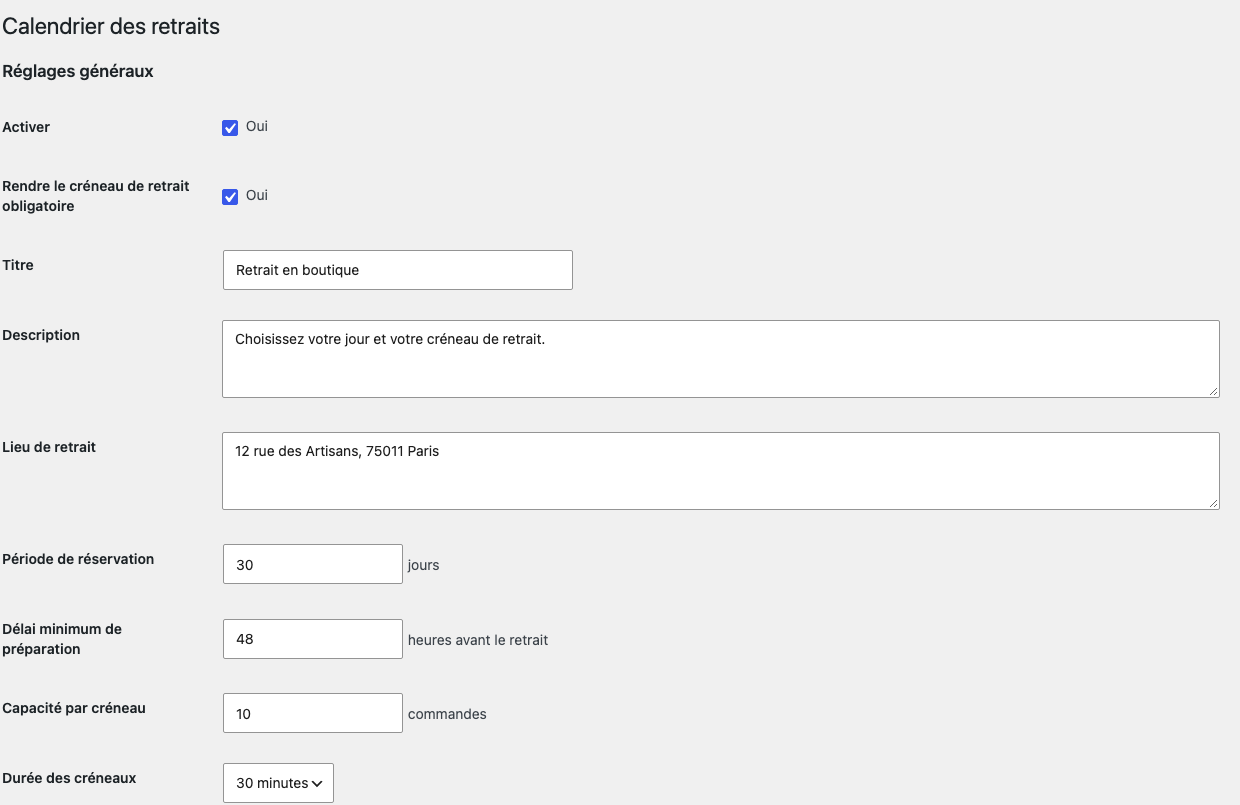
Wolfcourt Pickup Calendar adds configurable local-pickup date and time fields to the classic WooCommerce checkout and Checkout Block. Configure weekly opening hours, slot duration, advance-booking range, minimum preparation time, exceptional closure dates, and a capacity per slot.
Pickup details appear in order administration, customer order pages, confirmation pages, and emails. A shortcode displays public opening hours.
Features:
- One pickup location.
- Weekly opening ranges and exceptional closure dates.
- 15, 30, 45, or 60-minute slots.
- Minimum preparation time and advance-booking window.
- Per-slot order capacity with a checkout lock for simultaneous orders in both checkout modes.
- HPOS-safe order APIs.
- Server-side validation at checkout.
- Public-hours shortcode:
[wolfcourt_pickup_hours]. - Legacy Temptation settings, order data, and shortcode compatibility.
The Checkout Block presents separate date and time dropdowns. Dates without a currently bookable slot are omitted, and the time dropdown shows only the slots available on the selected date. The server checks the selected combination again when the order is placed. When pickup is optional, customers may omit it; if they select it, they must provide both a date and a time in either checkout mode.
No customer data is sent to an external service.
Troubleshooting
- No pickup date or time is offered? Review the enabled weekdays, their opening ranges, the booking window, minimum preparation time, exceptional closures, and per-slot capacity under WooCommerce > Click & Collect.
- A Checkout Block time is rejected after submission? Another customer may have taken the last place since the checkout loaded. Refresh and choose a different time; the server checks current capacity before accepting the order.
- A customer sees a full or temporarily busy slot? Another checkout may have reserved the last place. Refresh the checkout and choose a different slot. Capacity is rechecked when the order is placed.
- Migrating an existing store? Deactivate the former calendar first, review the retained settings, and place test orders in both classic and Block checkouts with your enabled payment methods.
Privacy
The plugin stores schedules, location and capacity settings in a WordPress site option. Customers’ selected pickup date, time and location are stored as WooCommerce order metadata and can appear in order administration and customer communications. The plugin does not send this data to an external service and has no telemetry. Uninstall preserves settings and order metadata for store continuity; manage or delete these records through the store’s normal order and data-retention process.
Screenshots
Installation
- Install and activate WooCommerce.
- Upload and activate the plugin ZIP.
- Open WooCommerce > Click & Collect.
- Configure the pickup location, preparation time, schedule, and closure dates.
- Run a test order before enabling the feature for customers.
When migrating from Temptation Click & Collect Calendar, deactivate the old plugin first. Existing settings and order metadata are retained.
FAQ
-
Does it support multiple pickup locations?
-
The free edition supports one location. Multiple locations, location-specific schedules, operational calendars, and reminders belong in the premium add-on.
-
Does it work with the Checkout Block?
-
Yes. The plugin supports both the classic checkout and the Checkout Block. The Block uses a checkout component, WooCommerce’s Store API, and server-side validation. Test your own checkout and payment methods before enabling the plugin for customers.
-
Are slot limits rechecked on the server?
-
Yes. Date, time, lead time, and current capacity are validated during both checkout modes. A database lock serializes the final capacity check and order creation while the database connection remains healthy. If the lock is unavailable or disappears during counting, checkout asks the buyer to retry rather than accepting an unprotected reservation.
Reviews
There are no reviews for this plugin.
Contributors & Developers
“Wolfcourt Pickup Calendar” is open source software. The following people have contributed to this plugin.
Contributors
Translate “Wolfcourt Pickup Calendar” into your language.
Interested in development?
Browse the code, check out the SVN repository, or subscribe to the development log by RSS.
Changelog
1.0.25
- Load the administration stylesheet through WordPress, only on the pickup settings screen.
- Preserve existing styles, settings and checkout behavior.
1.0.24
- Avoid repeated conversion in the booking-window loop and remove unused callback parameters.
- Document WooCommerce checkout nonce delegation and uncached advisory locks used to prevent overbooking.
1.0.23
-
Use product-specific settings and order metadata, retaining legacy reads and counting old/new orders once. Update the private Pro add-on to 0.3.3 before this core update.
-
Namespace the localized checkout JavaScript object and keep its consumers aligned.
- Keep translation catalogues outside the public package for WordPress.org language packs.
1.0.22
- Clear stale pickup date, time, and location from a reused Checkout Block draft order when optional pickup is removed.
1.0.21
- Translate the additional-slot count in the administration preview and clarify the settings path in the installation steps.
1.0.20
- Refuse a pickup reservation if the database connection no longer holds its slot lock after counting existing orders.
1.0.19
- Count reserved slots without unsupported
meta_queryarguments when WooCommerce uses legacy post-based order storage; retain the HPOS query on HPOS sites.
1.0.18
- Send Checkout Block pickup selections through the checkout data action available in WooCommerce 8.9 as well as newer versions.
1.0.17
- Let classic checkout pickup fields use the full width of their grid cells across WooCommerce themes, including narrow mobile screens.
1.0.16
- Refuse pickup reservations when the WooCommerce order-count query returns an invalid result instead of treating the unknown count as zero. Availability recovers on a later healthy request.
1.0.15
- Keep a selected pickup time after a classic WooCommerce checkout refresh when that slot is still available; clear it when the pickup date changes or the slot becomes unavailable.
1.0.14
- Require a complete date/time pair when an optional pickup is selected in the classic checkout, matching the Checkout Block. Do not save partial pickup order metadata.
1.0.13
- Calculate the minimum pickup lead time in actual elapsed hours across daylight-saving clock changes.
1.0.12
- Associate each pickup administration setting with its visible label, including weekday opening-hour fields.
1.0.11
- Stack and size the pickup date and time selectors in the Checkout Block order summary for easier reading and tapping. Refresh frontend assets on plugin updates.
1.0.10
- Hide pickup slots in missing or repeated local hours during daylight-saving clock changes. Other days retain their configured slots.
1.0.9
- Align comparison style and the Checkout Block integration class filename with WordPress Coding Standards; booking behavior is unchanged.
1.0.8
- Apply automatic WordPress Coding Standards formatting without changing booking rules, settings, or checkout fields.
1.0.7
- Move the calendar class into a separate PHP file without changing pickup settings, checkout fields, or order metadata.
1.0.6
- Declare WooCommerce as a WordPress plugin dependency while keeping the runtime fallback for older WordPress versions.
1.0.5
- Reuse paged WooCommerce order objects while counting pickup capacity, avoiding a second order lookup per result.
1.0.4
- Use distinctive global PHP symbol names while retaining pickup settings, order metadata and checkout fields.
1.0.3
- Show only the selected date’s available time slots in the Checkout Block using a checkout component and Store API data, while retaining server-side validation and capacity locking.
1.0.2
- Hide dates with no bookable slots in the Checkout Block and build its time list from all offered dates instead of only the next seven days.
1.0.1
- Ignore nested settings and checkout field values instead of coercing them into numeric limits or pickup choices; required pickup fields still reject missing choices.
1.0.0
- First market-preparation release.
- Preserves legacy settings and order metadata.
- Adds dependency handling, HPOS and Checkout Block declarations, stricter limits, safer request handling, conditional assets, localised JavaScript strings, bounded and paginated capacity counting, and a database lock around classic and Block checkout slot assignment.