

Description
Publish it — without putting it everywhere. Hide Posts gives you a simple checklist on every post, page, or product that controls exactly where it appears: keep a post out of the homepage and archives, off the search results, out of your RSS feed and REST API, or invisible to XML sitemaps and Yoast SEO — while it stays perfectly reachable at its own URL.
Perfect for syndication-only articles, landing pages, evergreen content you don’t want cluttering the blog roll, or products that should only be found via direct link.
Choose exactly where a post is hidden:
- Site pages — homepage, blog page, category, tag, author, and date archives, search results, post navigation (previous/next), and the Recent Posts widget
- Feeds & APIs — RSS feed and the REST API
- Sitemaps & SEO — WordPress core XML sitemaps, Yoast SEO sitemap, Yoast breadcrumbs, and Yoast internal link suggestions
- WooCommerce — hide products from the shop page, product category pages, and the store REST API
Built for real editorial workflows:
- Full Block Editor support — a native sidebar panel with all hide options, plus the classic metabox
- Works with the Query Loop block and custom queries
- Enable hiding for any Custom Post Type from the settings page
- Bulk Edit and Quick Edit support for managing many posts at once
- “Hidden On” column in the posts list so you always see what’s hidden where
- Custom database table and layered caching — no postmeta bloat, no slow queries on busy sites
Screenshots
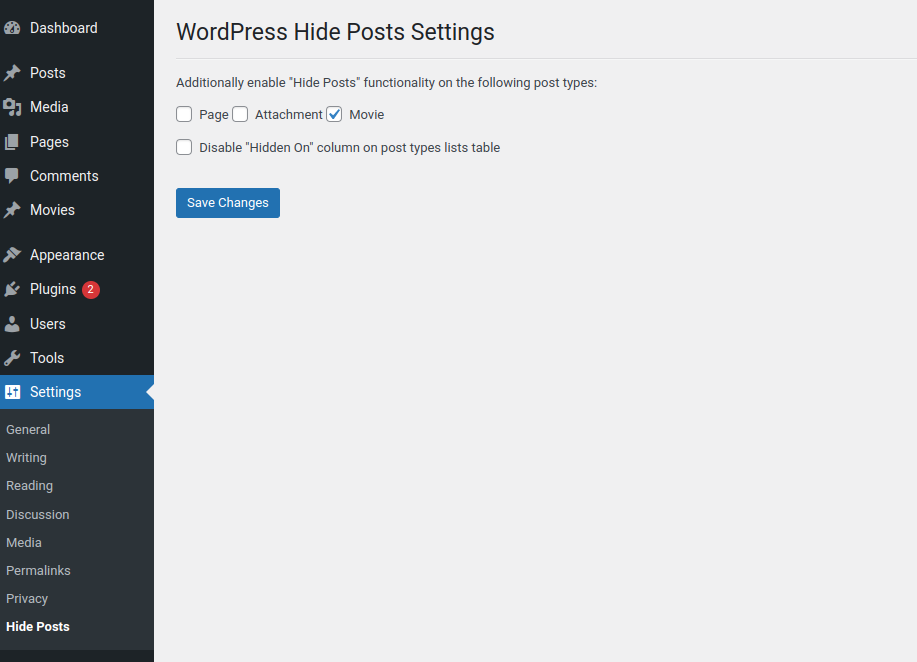
The Settings screen for the plugin.
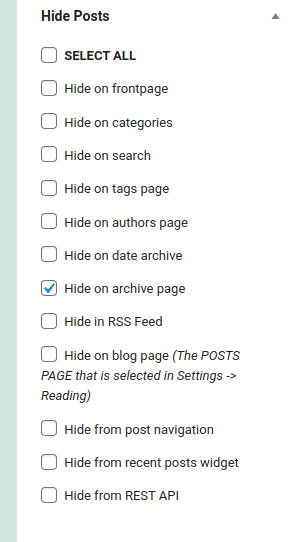
The Hide Posts options in the Add / Edit post screen.

Post Lists table ‘Hidden on’ column.
Installation
Installation and uninstallation are extremely simple. You can use WordPress’ automatic install or follow the manual instructions below.
Installing:
- Download the package.
- Extract it to the “plugins” folder of your WordPress directory.
- In the Admin Panel, go to “Plugins” and activate it.
- Go to Settings -> Hide Posts to enable the hide functionality for additional post types beside ‘post’.
Uninstalling:
- In the Admin Panel, go to “Plugins”, deactivate the plugin and click “Delete”.
Usage:
Using this plugin is simple. Once it has been activated, navigate to Settings -> Hide Posts and select additional post types for which you want to use the Hide functionality. The functionality is enabled by default for ‘Posts’ and cannot be disabled for that type post.
If you need any additional help fell free to contact me at martin@martincv.com for more information.
FAQ
-
Yes — by design. Hiding controls where a post is listed (homepage, archives, search, feeds, sitemaps, etc.), not who can open it. Anyone with the direct link can still read it, which is exactly what you want for syndication-only or direct-link content. If you need to restrict access itself, use WordPress’ built-in Private or Password-protected post status instead.
-
Will hiding a post remove it from Google?
-
No. Hiding a post from the XML sitemap only removes it from the sitemap — search engines that already know the URL can still index it. To keep a post out of search results, set it to “noindex” with your SEO plugin (e.g. Yoast’s “Allow search engines to show this content?” setting). The two work well together: hide it from your site’s listings here, noindex it there.
-
I checked a hide option but the post is still showing. Why?
-
The plugin clears its own caches the moment you save, so first check external layers: a page cache, object cache, or CDN can keep serving the old page — purge those. If the post appears via a theme or page-builder widget that runs its own custom database query, that query bypasses WordPress’ standard hooks and the plugin cannot filter it.
-
That’s intentional — you need to see and manage hidden posts. The “Hidden On” column shows exactly where each post is hidden. Hiding only affects visitor-facing output.
-
Does it work with Custom Post Types?
-
Yes. Go to Settings Hide Posts and enable the post types you want. Posts are enabled by default, and WooCommerce products get their own store-specific options.
-
The “Hide from Yoast internal link suggestions” option applies to Yoast’s internal linking suggestions, which are a Yoast SEO Premium feature. The Yoast sitemap and breadcrumb options work with free Yoast SEO.
-
What happens if I deactivate or delete the plugin?
-
Deactivating simply stops the hiding — all posts reappear everywhere, nothing is lost. Deleting the plugin also removes its settings and visibility data, so hidden posts become fully visible again.
-
This plugin saved me a lot of work. Where can I donate?
-
Thanks, donations help us to continue improving our plugins. Read More About Donations.
-
I want to migrate from other hide posts plugin to WordPress Hide Posts plugin
-
This is possible. This functionality is not free. You can contact me at martin@martincv.com for more information and send the name of the plugin you want to migrate from.
Reviews


Contributors & Developers
“Hide Posts” is open source software. The following people have contributed to this plugin.
Contributors
“Hide Posts” has been translated into 1 locale. Thank you to the translators for their contributions.
Translate “Hide Posts” into your language.
Interested in development?
Browse the code, check out the SVN repository, or subscribe to the development log by RSS.
Changelog
2.1.2
Release Date – 30 July 2026
- Fixed: posts marked “Hide from Yoast internal link suggestions” disappearing from the admin Posts list. The integration now uses Yoast’s
wpseo_link_suggestions_indexablesfilter and correctly hides posts from internal link suggestions (Yoast SEO Premium) instead of altering unrelated queries. - Fixed: “Hide on Yoast SEO sitemap” not working — the integration now uses Yoast’s
wpseo_exclude_from_sitemap_by_post_idsfilter to exclude individual posts. - Fixed: cache invalidation when hide options are saved from the Classic Editor, Quick Edit, or the Gutenberg sidebar — changes now take effect immediately.
- Fixed: empty results are now cached, avoiding a repeated database query on every request.
- Fixed: uninstall now also removes the legacy “Hide in RSS feed” post meta.
- Fixed: translation loading moved to
initfor WordPress 6.7+ compatibility. - Improved: hardened input handling in the Classic Editor save handler and the Gutenberg REST endpoint; removed unused code.
- Compatibility: tested up to WordPress 7.1.
2.1.1
Release Date – 30 December 2025
- Potential bug fix where hidden posts do not show in the admin area.
2.1.0
Release Date – 24 November 2025
Major Update: Gutenberg Block Editor Support & Custom Database Architecture
New Features
- Full Gutenberg Block Editor Support – Complete React-based sidebar panel with live checkboxes
- Custom REST API Integration – Dedicated REST endpoints for Gutenberg editor (
/whp/v1/hide-settings/{id}) - Select All / Deselect All Buttons – Quick bulk selection in Gutenberg sidebar
- Custom Database Table Architecture – All data stored in
wp_whp_posts_visibilitytable (NO wp_postmeta usage) - Smart Metabox Detection – Classic Editor metabox hidden in Gutenberg to avoid confusion
- SEO Plugin Integration – Hide posts from WordPress XML sitemap, Yoast SEO sitemap, breadcrumbs, and internal link suggestions
- Gutenberg Query Loop Block Support – Hidden posts properly excluded from Query Loop blocks
- Latest Posts Block Support – Hidden posts excluded from Gutenberg Latest Posts block
- Complete Bulk Edit & Quick Edit – Full AJAX functionality for efficient bulk operations
- Migration Notice Improvements – Only shows when legacy data exists with clear migration path
Gutenberg/Block Editor Enhancements
- React-based sidebar panel using WordPress
@wordpress/pluginsAPI - Real-time checkbox state management with React hooks
- Auto-save when clicking Update/Publish (integrated with Gutenberg save cycle)
- Conditional field display (CPT, WooCommerce, Yoast options shown only when relevant)
- WordPress 6.6+ compatibility (
wp.editor.PluginDocumentSettingPanel) - Backward compatibility with older WP versions (
wp.editPostfallback)
Performance Improvements
- 95%+ Faster Migration – Bulk INSERT…SELECT queries instead of individual inserts
- 70% Fewer Database Queries – Custom table optimized with indexes instead of postmeta searches
- Intelligent Cache Invalidation – Only clears changed conditions (80-95% more efficient)
- Object Cache Integration – Full wp_cache support with transient fallback
- Optimized Data Retrieval – Single query fetches all hide settings per post
Security Enhancements
- SQL Injection Prevention – All table names escaped with
esc_sql(), all queries use prepared statements - REST API Permission Checks – Proper
current_user_can()validation on all endpoints - Race Condition Protection – Migration uses transient locks to prevent concurrent execution
- Autosave Protection – Metabox save skipped for WordPress autosaves
- Input Validation – Whitelist validation for bulk edit actions
- Nonce Verification – Separate handling for Classic Editor (nonce required) and Gutenberg (REST API)
Bug Fixes
- Fixed Gutenberg checkbox values all saving as false (React state dependencies issue)
- Fixed Classic Editor metabox appearing in Gutenberg (causing confusion)
- Fixed undefined variable bug in fallback logic
- Fixed migration notice appearing on fresh installations
- Fixed duplicate key errors in custom table (added existence checks)
- Fixed cache invalidation to be condition-specific instead of global
- Added comprehensive database error checking and logging
Technical Improvements
- Custom REST API Class – Dedicated
REST_APIclass handles all Gutenberg endpoints - React State Management – Uses
useState,useEffect,useSelecthooks properly - Database Table with UNIQUE Constraints – Prevents duplicate entries at database level
- Comprehensive Error Logging – Clear messages for debugging database and save issues
- WordPress Coding Standards – Improved code quality and compliance
- Enhanced PHPDoc Documentation – Better inline documentation throughout
- Cleaner Uninstall Process – Removes all plugin options and custom table
Compatibility
- Tested with WordPress 6.7+
- Fully compatible with Gutenberg Block Editor
- Compatible with Classic Editor plugin (when installed)
- Compatible with Yoast SEO (all versions)
- Compatible with WooCommerce
- PHP 7.3+ required
Developer Notes
- Custom database table:
wp_whp_posts_visibility(post_id, condition, UNIQUE constraint) - REST API endpoints: GET/POST
/whp/v1/hide-settings/{post_id} - Data stored ONLY in custom table (wp_postmeta used only for migration fallback)
- Gutenberg script:
/assets/admin/js/whp-gutenberg.js(React-based) - All database queries use prepared statements
- Comprehensive caching with wp_cache and transients (WEEK_IN_SECONDS TTL)
2.0.3
Release Date – 12 January 2024
- Added support for Yoast Duplicate Post to clone the hidden flags over to the new copy
= 2.0.2
Release Date – 30 December 2024
- Updated frontpage / homepage query condition
2.0.1
Release Date – 27 December 2024
- Small updates on the displaying of the flags in admin.
2.0
Release Date – 27 December 2024
- Added custom database table to hold the hide post flags.
- All new Hide flags on posts will be saved in the new database table. A fallback to old data is also added in case the old data is not yet migrated to the new table.
- Added option to migrate the old data from wp_postmeta table to the new table.
1.1.1
Release Date – 05 October 2022
- Bug fix related to checkbox not checked when enabling Hide posts on signle post page.
1.1.0
Release Date – 02 September 2022
- Added option to hide posts on the single post page. This option will hide posts shown in any widget, block (related posts, recent posts etc) on the single post page.
1.0.3
Release Date – 01 September 2022
- Bug fix with conditional logic on when to modify meta query.
1.0.2
Release Date – 20 February 2022
- Hide WooCommerce Product from REST API bug fix.
1.0.1
Release Date – 13 February 2022
- Bug fix. Added check for enabled post type for REST API Hide.
1.0.0
Release Date – 07 February 2022
- Code base optimized and refactored.
- Added option to hide CPT on their own archive page.
- Added option to hide any post type on archive page other than category, tag. Ex: Custom Taxonomy archive page.
- Added option to hide posts in REST API calls.
- Added option to hide Woocommerce Products in REST API calls.
0.5.4
Release Date – 26 December 2021
- Added option to hide posts on the default WordPress Recent Posts Widget
(NOTE: This option will not work on the Latest Posts Gutenberg block. The feature can be tracked here core.trac.wordpress.org/ticket/54580) - Added compatibility with Zeen Theme Load More functionality
0.5.3
Release Date – 15 August 2020
- Fixed jQuery Migrate Helper warning showing in console
0.5.2
Release Date – 12 August 2020
- Added option to select all hide options in post metabox
- Add new column in posts list table that shows on which pages the post is hidden
- Added option in Settigns -> Hide Posts to disable the showing of the said column
0.5.1
Release Date – 19 May 2020
- Added option to hide posts default WordPress post navigation
- Fix for hiding menu items bug
0.5.0
Release Date – 17 April 2020
- Removed option to hide post from REST API added in version 0.4.3 due to conflict with Guttenberg save / update post.
The conflict happens because Guttenberg is using the REST API to save post and load additional data the hide post on REST API was causing conficts with the data.
0.4.4
Release Date – 14 April 2020
- Added option to hide post on date archive page
0.4.3
Release Date – 06 April 2020
- Added option to hide posts from REST API all posts query: /wp-json/wp/v2/posts/
Note: Single post entry in REST API remains available /wp-json/wp/v2/posts/[post_id]
0.4.2
Release Date – 13 February 2020
- Bug fix
0.4.1
Release Date – 13 February 2020
- Workaround added for issue showing warnings when is_front_page() function is called in pre_get_posts filter. This is related to wordpress core and can be tracked at #27015 and #21790
0.4.0
Release Date – 21 December 2019
- Added option to hide posts on the blog page as selected in Settings -> Reading (Posts Page)
0.3.2
Release Date – 13 December 2019
- Bug fix for checking if Woocommerce is active on mutlinetwork site
0.3.1
Release Date – 07 December 2019
- Added option to hide posts in RSS Feed
- Added options to hide Woocommece products on Store (Shop) page and on Product category pages
0.2.1
Release Date – 13 November 2019
- Compatibility checkup with WordPress 5.3
- Added option to enable the Hide Post functionality for additional post types (Check Settings -> Hide Posts)
- Added uninstall.php file to clean up options and post meta added by the plugin
0.1.1
Release Date – 05 September 2019
- Code and compatibility updates.
- Added translateable strings.
0.0.1
Release Date – 11 October 2017
- Public release of ‘WordPress Hide Posts’