

Description
Wholesale Essentials for WooCommerce adds a complete B2B wholesale system to your WooCommerce store. Set up wholesale registration, create unlimited wholesale roles with automatic percentage discounts, and control exactly what your wholesale customers see and pay.
It’s the free version of our popular WooCommerce Wholesale Pro plugin.
How the pricing works
Forget entering wholesale prices product by product. Wholesale Essentials for WooCommerce uses global, role-based percentage discounts instead. You create a wholesale role (for example, “Retailer” or “Distributor”), enter a percentage discount for that role, and the plugin automatically applies the correct discount to every product in your store. No manual price entry. No maintenance when you add new products.
This approach is ideal for stores with large catalogs, or for anyone who wants a simple, low-maintenance wholesale setup.
Why choose Wholesale Essentials for WooCommerce?
Most free wholesale plugins for WooCommerce give you one wholesale role and a per-product pricing field. That’s fine for very simple setups, but it falls apart quickly when you have multiple buyer types or a large catalog.
Wholesale Essentials for WooCommerce gives you:
- Unlimited wholesale roles – create as many as you need (Retailer, Distributor, VIP, Trade – whatever makes sense for your business), each with its own percentage discount.
- Wholesale registration built in – new wholesale customers can apply directly from your site, and they get an automatic welcome email when approved.
- Global percentage discounts – one discount setting per role, automatically applied across your entire catalog.
Features
Wholesale registration and login
- Wholesale login page created automatically using the
[wholesale_login]shortcode. - Wholesale registration form (without custom fields or manual moderation in the free version).
- Automatic welcome email sent to new wholesale customers on registration.
- Add wholesale users manually from Users > Add New.
- Admins are assigned your default wholesale role so they can preview wholesale pricing.
Unlimited wholesale roles with global discounts
- Create as many wholesale roles as you need.
- Set a percentage discount for each role – applied automatically across all products.
- Set a default wholesale role for new registrations.
- Customers see the original price crossed out with their wholesale price displayed.
Visibility and access control
- Hide prices and add-to-cart buttons from guests, with optional alternate content.
- Disable coupon codes for wholesale users.
Add tiered bulk quantity discounts
Want to encourage wholesale customers to buy in larger quantities? You can combine Wholesale Essentials for WooCommerce with our WooCommerce Discount Manager plugin to add tiered bulk quantity discounts for each wholesale role. For example, offer 10% off for orders of 10+ units and 20% off for 50+ units.
WooCommerce Wholesale Pro
Our Pro version adds lots more to take your wholesale store further.
- Moderate new registrations – Hold new accounts for admin approval, with a dedicated pending role.
- Wholesale store page – A dedicated area of your store for wholesale customers only.
- Product and category visibility – Set each product or category as Public Only, Wholesale Only, or Both. Controls what wholesale and non-wholesale customers see on the shop page, in category archives, and in navigation menus.
- Login and registration redirect URLs – Send customers to any page after registering or logging in.
- Wholesale price display options – Choose whether to show or hide the original price alongside the wholesale price.
- Disable tax – Global setting to remove tax for wholesale users.
- Product-specific wholesale pricing – Set exact wholesale prices on individual products from the Edit Product screen.
- Wholesale sale pricing – Add sale prices specifically for wholesale users.
- Apply wholesale discounts to sale prices – Control how discounts interact with existing sale prices.
- Per-role settings – Product-specific pricing toggle, sale pricing, tax status, and price display in shop, all configured per role.
- Category-specific wholesale discounts – Set a percentage discount on individual product categories from the Edit Category screen.
- Email customization – Customize the registration and moderation email templates.
- Registration fields – Add custom fields to the wholesale registration form.
- Payment method visibility – Control which payment gateways are available to each wholesale role.
- Shipping method visibility – Control which shipping options are available to each wholesale role.
- Setup wizard – Guided setup to get your wholesale store configured quickly.
- Moderation emails – Admin notification for new registrations, plus customer emails for pending, approved, and declined status.
View WooCommerce Wholesale Pro
External services
This plugin links to external resources on barn2.com, our company website, from within the WordPress admin area.
What it is and what it is used for:
- Links to product pages, documentation pages, and support contact for our paid plugin “WooCommerce Wholesale Pro” appear in the plugin’s settings screens.
- These links allow users who are evaluating the free version to learn more about, and optionally purchase, the paid upgrade.
What data is sent and when:
- No data is sent automatically. The links are standard HTML anchors that open in a new browser tab only when the site administrator clicks them.
- When a link is clicked, the administrator’s browser makes a request to
barn2.comexactly as it would for any other external link. The plugin itself does not transmit any site data, user data, or telemetry to barn2.com.
Links to barn2.com’s terms of service and privacy policy:
- Terms of service: https://barn2.com/terms/
- Privacy policy: https://barn2.com/terms/privacy-policy/
Screenshots
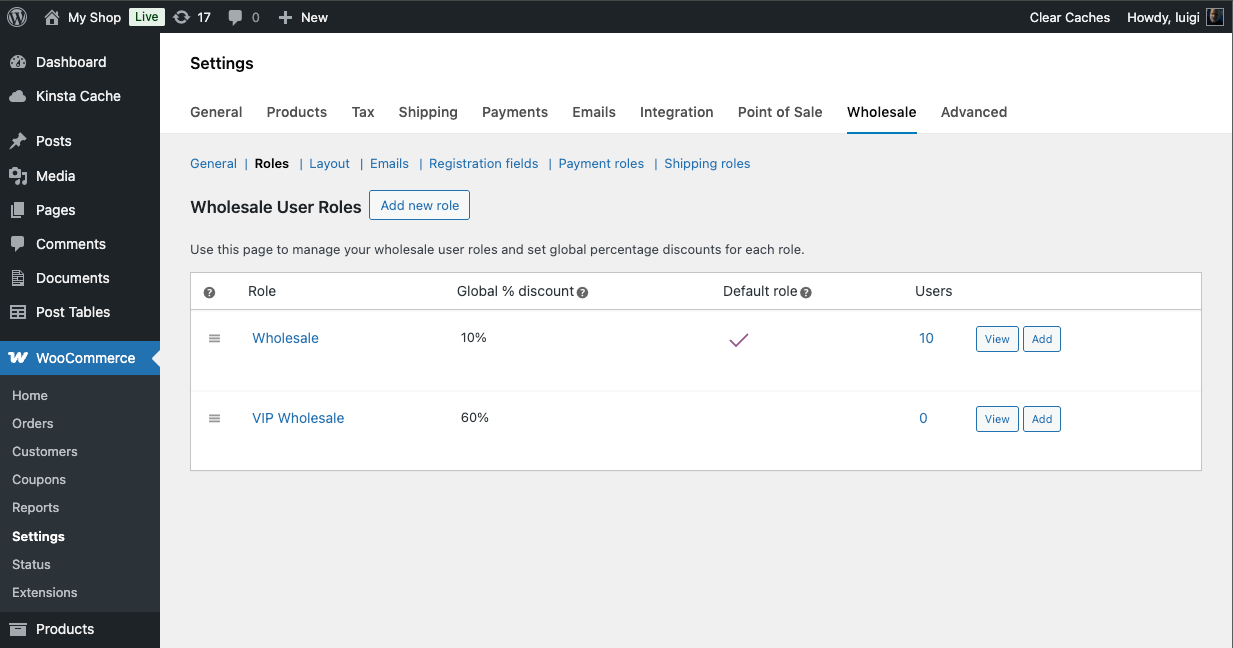
Wholesale roles settings – create unlimited roles and set a percentage discount for each one. 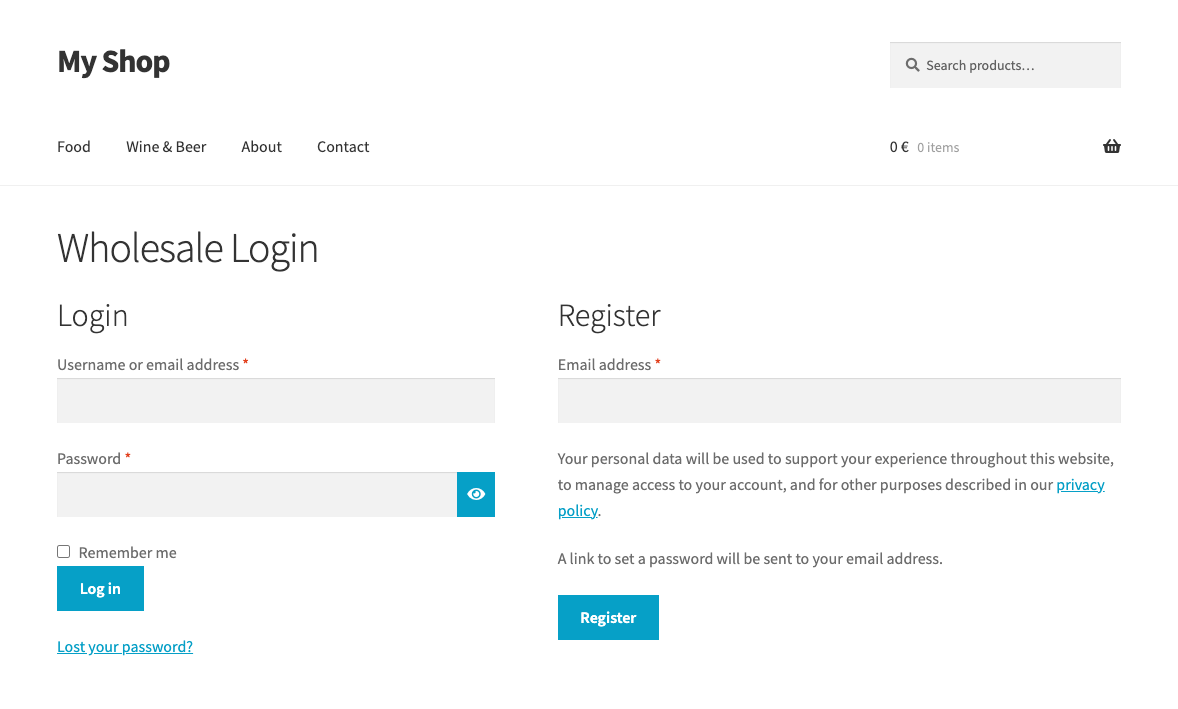
Wholesale login and registration page on the frontend. 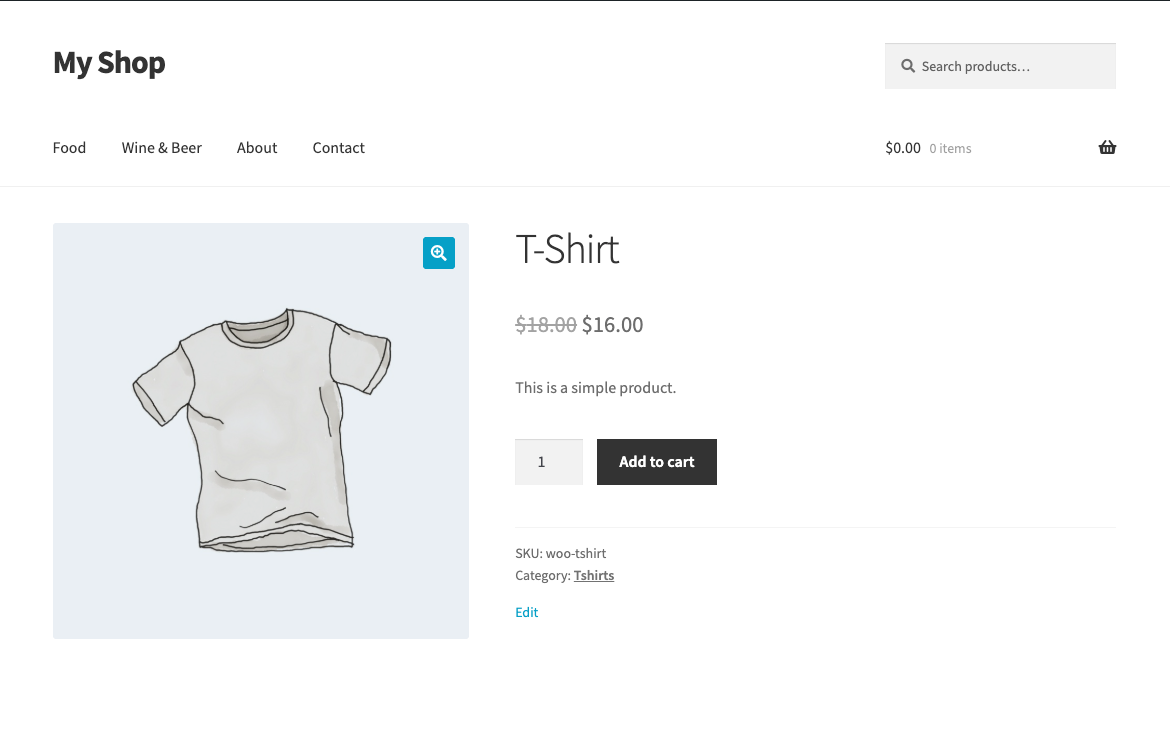
Wholesale price display on the product page – original price crossed out, wholesale price shown. 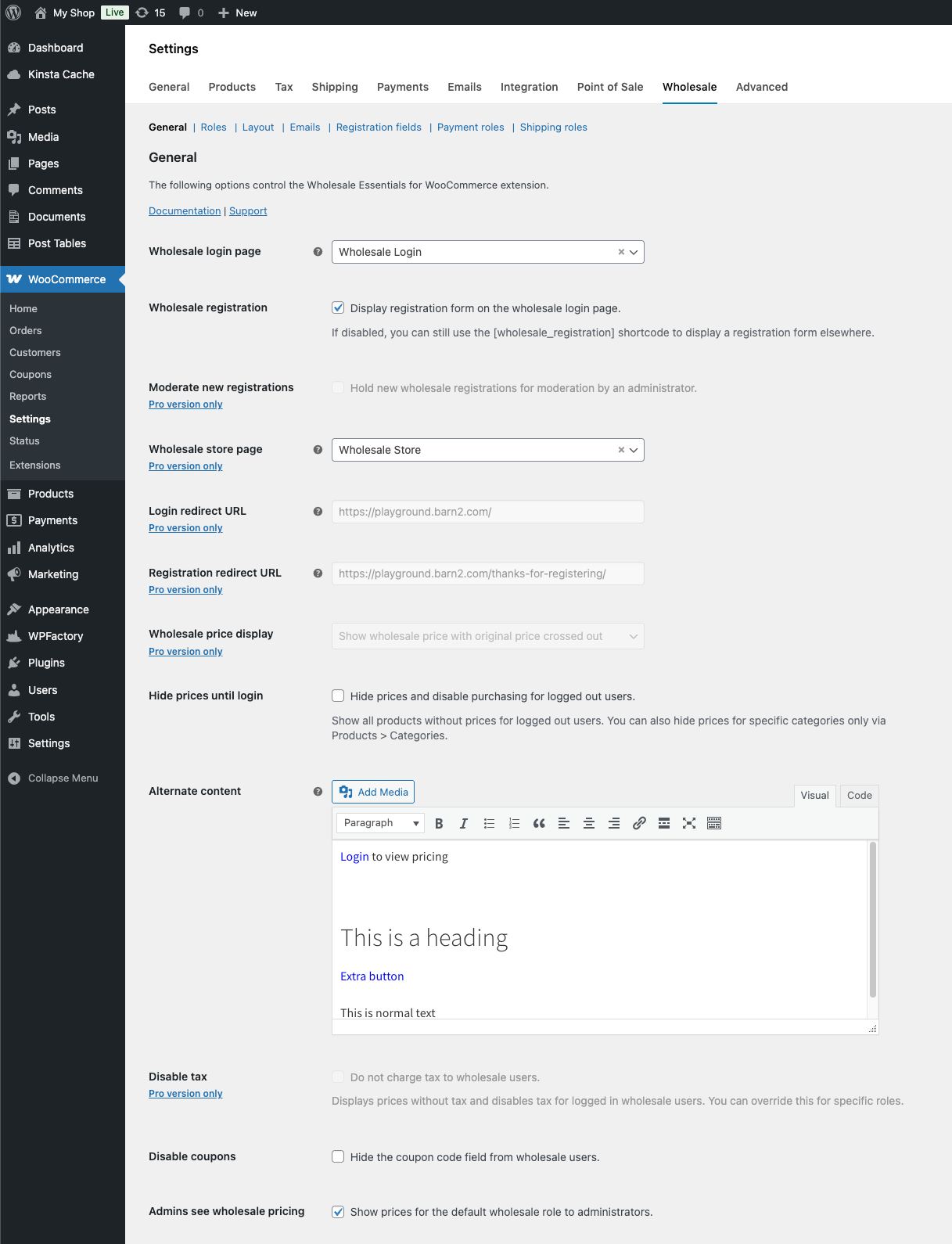
Wholesale settings in the WooCommerce admin. 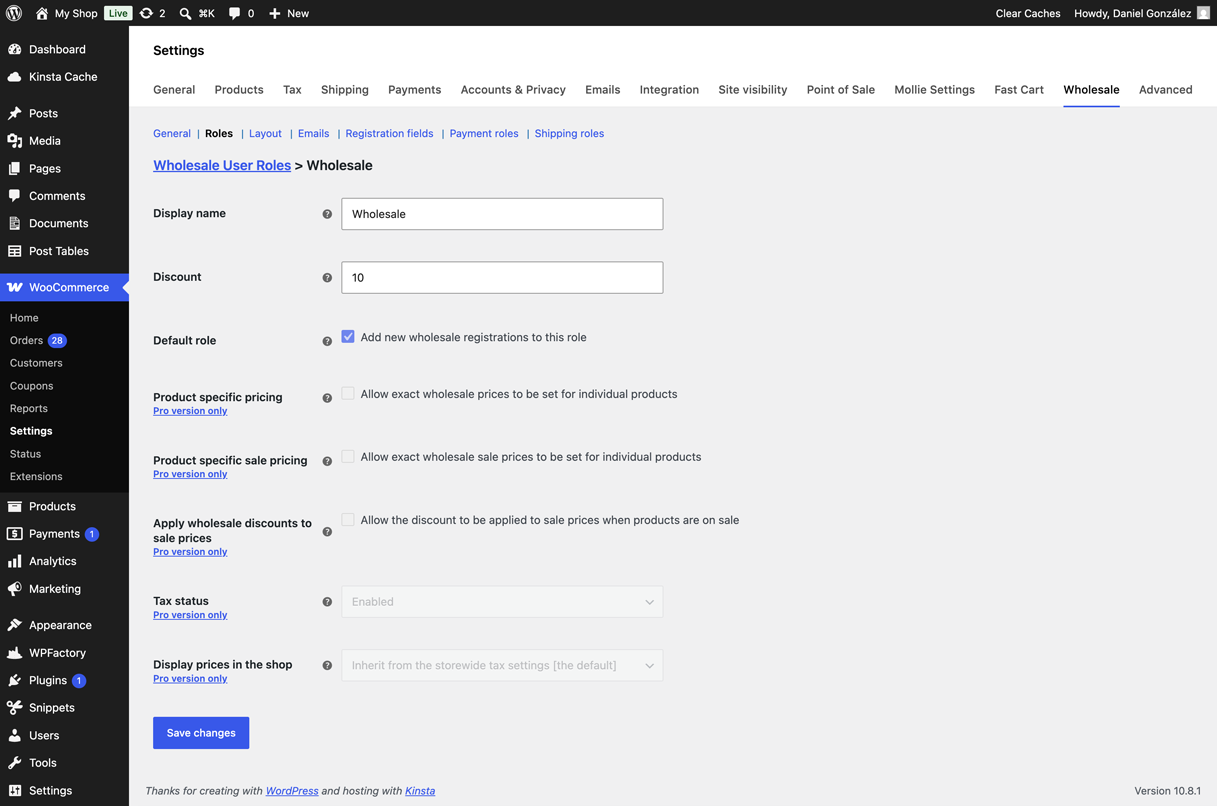
Add/edit wholesale role page 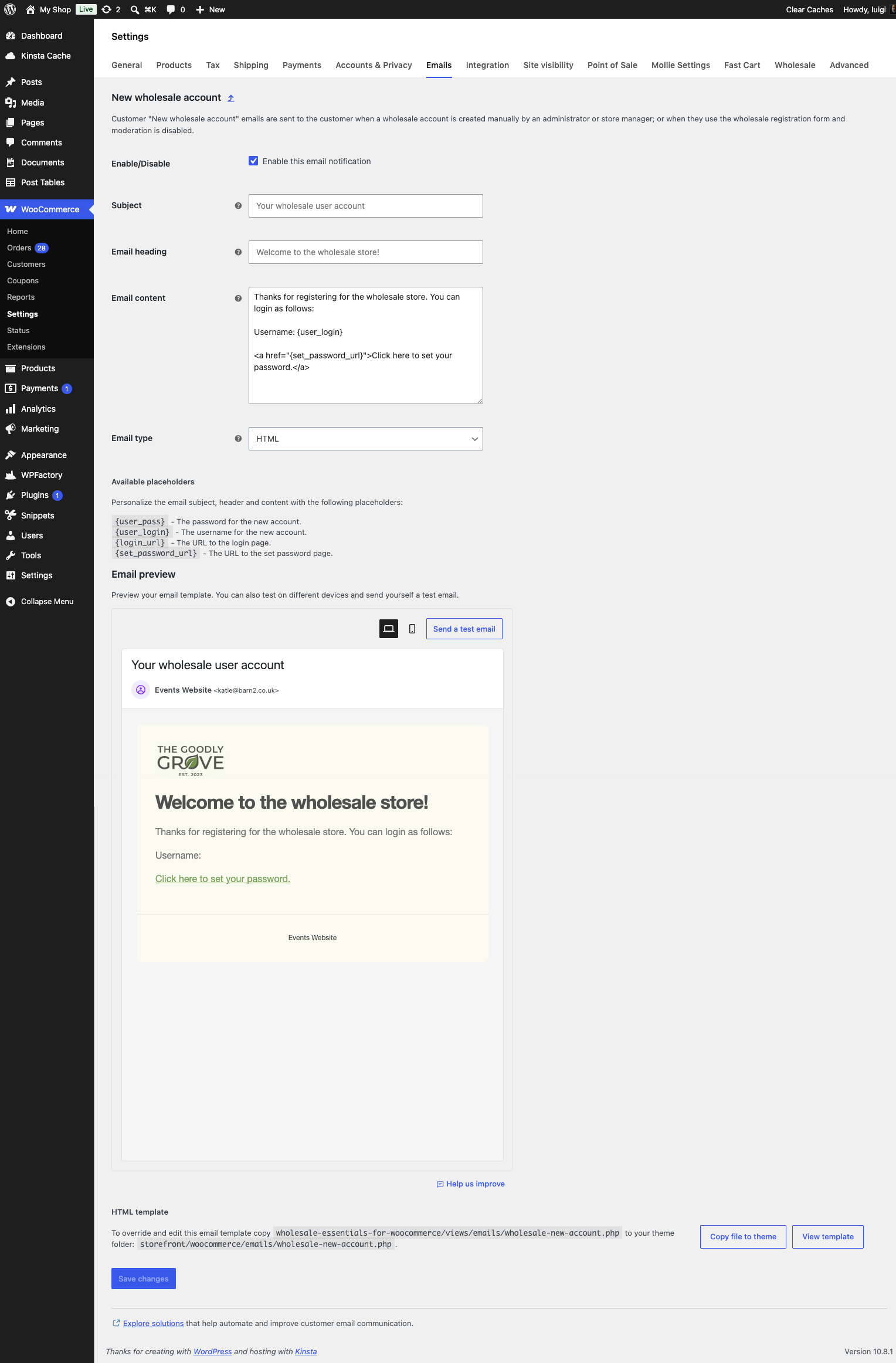
Editor of the new wholesale user notification email template
Installation
- Upload the plugin files to the
/wp-content/plugins/wholesale-essentials-for-woocommercedirectory, or install the plugin directly through the WordPress Plugins screen. - Activate the plugin through the Plugins screen in WordPress.
- Go to WooCommerce > Settings > Wholesale to configure your wholesale roles and settings.
- Add your wholesale login/registration page using the
[wholesale_login]shortcode.
FAQ
-
How do I set up wholesale pricing in my WooCommerce store?
-
Once you’ve installed and activated Wholesale Essentials for WooCommerce, go to WooCommerce Settings Wholesale. The plugin automatically creates a default Wholesale role and a Wholesale Login page (containing the
[wholesale_login]shortcode) on activation.To set up wholesale pricing:
- Go to the Roles tab and edit the default Wholesale role (or click Add new role to create a new one).
- Enter a percentage discount, for example 20%. This is automatically deducted from the price of every product for users with this role.
- Save the role.
- Either send your customers to the Wholesale Login page to register themselves, or add wholesale users manually from Users Add New and assign them the wholesale role.
New wholesale customers receive an automatic welcome email with their login details and start seeing wholesale prices across your whole store.
The full documentation covers every setting and option in detail.
-
How does the wholesale pricing work?
-
You set a percentage discount for each wholesale role – for example, 20% off for “Retailer” and 30% off for “Distributor”. The plugin applies that discount automatically to every product in your store whenever a customer with that role is logged in. You don’t need to edit individual products.
-
Can I create more than one wholesale role?
-
Yes. Wholesale Essentials for WooCommerce supports unlimited wholesale roles, each with its own percentage discount. This is one of the key differences from some other free wholesale plugins which limit you to a single role.
-
Can wholesale customers register themselves?
-
Yes. The plugin includes a wholesale registration form which you can embed anywhere using the
[wholesale_login]shortcode. New registrations are automatically approved and the customer receives a welcome email. If you want to manually approve registrations before customers gain access, that’s available in WooCommerce Wholesale Pro. -
Can I set different prices for individual products?
-
The free version uses global percentage discounts only – one discount percentage per role applied across all products. Product-specific wholesale pricing is available in WooCommerce Wholesale Pro.
-
Can I add tiered pricing based on quantity?
-
The plugin doesn’t include tiered quantity pricing, but you can use it alongside our WooCommerce Discount Manager plugin to add quantity-based bulk discounts per role.
-
Does this work with WooCommerce’s standard tax settings?
-
Yes. Tax is applied as normal unless you upgrade to WooCommerce Wholesale Pro, which lets you disable tax for wholesale roles.
-
Is this plugin compatible with my theme?
-
Wholesale Essentials for WooCommerce works with any theme that is compatible with WooCommerce. The wholesale price display follows your theme’s standard WooCommerce price styling.
-
What’s the difference between the free and Pro versions?
-
The free version covers the core wholesale setup: registration, unlimited roles with global percentage discounts, price visibility, and coupon control. The Pro version adds moderation, product-level and category-level pricing, email customization, registration fields, shipping and payment visibility by role, and more. See WooCommerce Wholesale Pro.
-
Where can I find the documentation?
-
Like all Barn2 plugins, Wholesale Essentials for WooCommerce comes with in-depth documentation. You can either read the instructions above, or the dedicated documentation page on the Barn2 site.
Reviews


Contributors & Developers
“Wholesale Essentials for WooCommerce” is open source software. The following people have contributed to this plugin.
Contributors
Translate “Wholesale Essentials for WooCommerce” into your language.
Interested in development?
Browse the code, check out the SVN repository, or subscribe to the development log by RSS.
Changelog
1.0.1
Release date 27 May 2026
- Fix: Update link to knowledge base documentation
- Tweak: Improved plugin’s description in readme.txt file
1.0.0
Release date 27 May 2026
- Initial release.