Description
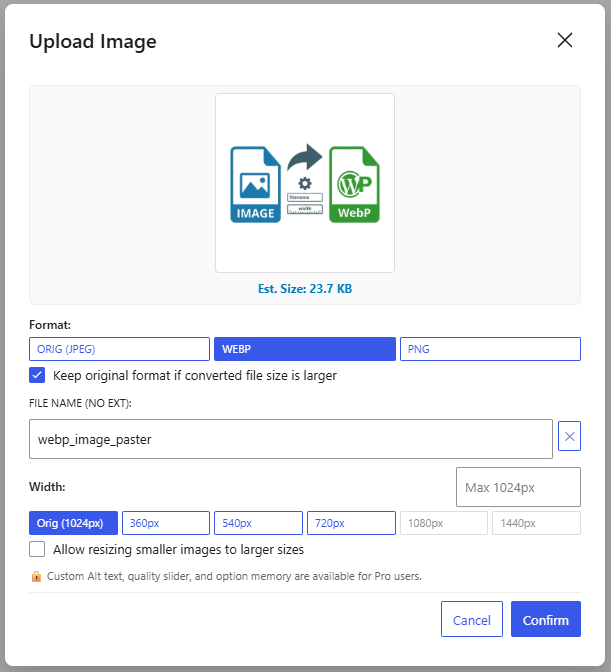
WebP Image Paster streamlines your media workflow within the WordPress Gutenberg Block Editor. Simply paste from your clipboard or drag and drop any image directly into the editor, set a filename, choose your preferred format (ORIG, WebP, PNG), and it will be processed and uploaded directly to your media library.
Key Features
- Clipboard Paste & Drag-and-Drop: Seamlessly catches images pasted or dropped into the Gutenberg editor.
- Direct Featured Image Drag-and-Drop: Drop photos directly onto the Gutenberg sidebar ‘Featured Image’ panel to automatically convert to WebP and set as the post’s featured image.
- HEIC / HEIF Format Support: Easily drag & drop or paste photos from Google Photos and Apple iOS devices; automatically decoded and converted on-the-fly to WebP/JPG/PNG.
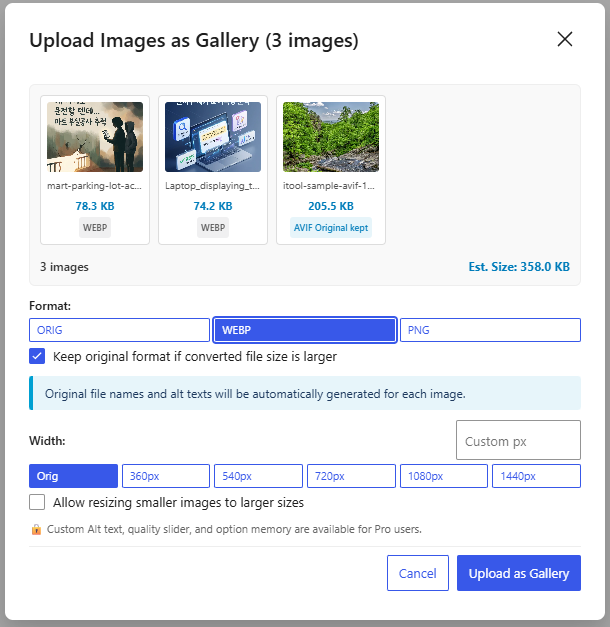
- Multi-Image Drag-and-Drop Gallery: Drop multiple images at once to batch process them and insert them as a Gutenberg Gallery block.
- Keep Original Format (ORIG): Supports an ‘ORIG’ option to upload files directly without re-compression, preserving GIF animations, AVIF compression, and original qualities.
- Smart Block Placement & Replacement: Inserts images at exact drop locations, replaces empty paragraph blocks, or updates existing image blocks upon drop.
- Smart Dimension Detection & Upscaling Control: Detects and displays natural image width directly on the Orig button, prevents accidental blurriness by disabling larger presets by default, and includes a toggle to allow upscaling when needed.
- Client-side Image Conversion: Converts raw image data directly in your browser using HTML5 Canvas for ultra-fast processing.
- Format Selection: Choose between ORIG, WebP, and PNG formats with dynamic format detection.
- Smart Size-Guard & Auto Fallback: Automatically preserves the original format if converting would increase file size, preventing unnecessary bloat and quality loss.
- Custom Filename & Alt Text: Easily specify filenames and automatically generate SEO-friendly Alt text.
- Preset Widths: Choose quick width presets (360px, 540px, 720px, 1080px, 1440px) or upload original dimensions.
- Automatic Block Insertion: Automatically uploads the processed file to the Media Library and inserts an Image Block into your post.
Screenshots
Installation
- Upload the
webp-image-pasterfolder to the/wp-content/plugins/directory, or install the plugin directly through the WordPress plugins screen. - Activate the plugin through the ‘Plugins’ screen in WordPress.
- Open the Gutenberg editor and paste (
Ctrl+V/Cmd+V) or drag and drop any image directly into the editor.
FAQ
-
Does this plugin modify existing images in the Media Library?
-
No, this plugin only processes new images that are pasted or dropped directly into the Gutenberg Block Editor.
-
Where does the image conversion happen?
-
The image conversion is performed on the client-side (inside your web browser) before the file is uploaded to your WordPress server, saving server memory and CPU resources.
Reviews

Contributors & Developers
“WebP Image Paster” is open source software. The following people have contributed to this plugin.
Contributors

“WebP Image Paster” has been translated into 2 locales. Thank you to the translators for their contributions.
Translate “WebP Image Paster” into your language.
Interested in development?
Browse the code, check out the SVN repository, or subscribe to the development log by RSS.
Changelog
1.0.3
- Added Featured Image direct drag-and-drop: Drag photos directly onto the Gutenberg sidebar ‘Featured Image’ panel to convert and register as the featured image.
- Added HEIC/HEIF image support: Intercepts and converts HEIC/HEIF photos (Google Photos, Apple iOS devices) on-the-fly directly in the browser to WebP/JPG/PNG.
- Added multi-image drag-and-drop support to batch upload images as a Gutenberg Gallery block.
- Fixed a conflict with the native WordPress Media Library where the blue drag overlay would freeze.
- Fixed an issue where the image drop feature would occasionally fail to respond.
- Optimized internal code structure and performance.
1.0.2
- Added dynamic ‘ORIG’ format option: Preserve original formats (GIF animations, AVIF, SVG, pre-compressed JPEG/WebP) with 100% lossless bypass.
- Added Drag and Drop support: Drop images directly into the Gutenberg editor between blocks, replacing empty blocks, or replacing existing image blocks.
- Added smart natural dimension detection: Displays original width on the ‘Orig’ button (e.g., Orig (640px)).
- Added upscaling prevention: Presets larger than the original image are disabled by default with dynamic max-width placeholders to avoid accidental quality degradation.
- Added ‘Allow resizing smaller images to larger sizes’ toggle checkbox (with option memory in Pro).
- Added smart format detection and automatic quality/dimension fallback for pre-optimized images.
- Fixed an issue where pasted/dropped images were always inserted at the end of the document instead of the target position.
1.0.1
- Added option to choose image output format (PNG or WebP).
1.0.0
- Initial public release.