
Description
WdBasic checks your site and explains, in plain language, what is stopping it from getting visitors from Google and how to fix it. No SEO knowledge needed.
Free audit (works without an account)
The audit runs entirely on your own server. Nothing is sent anywhere.
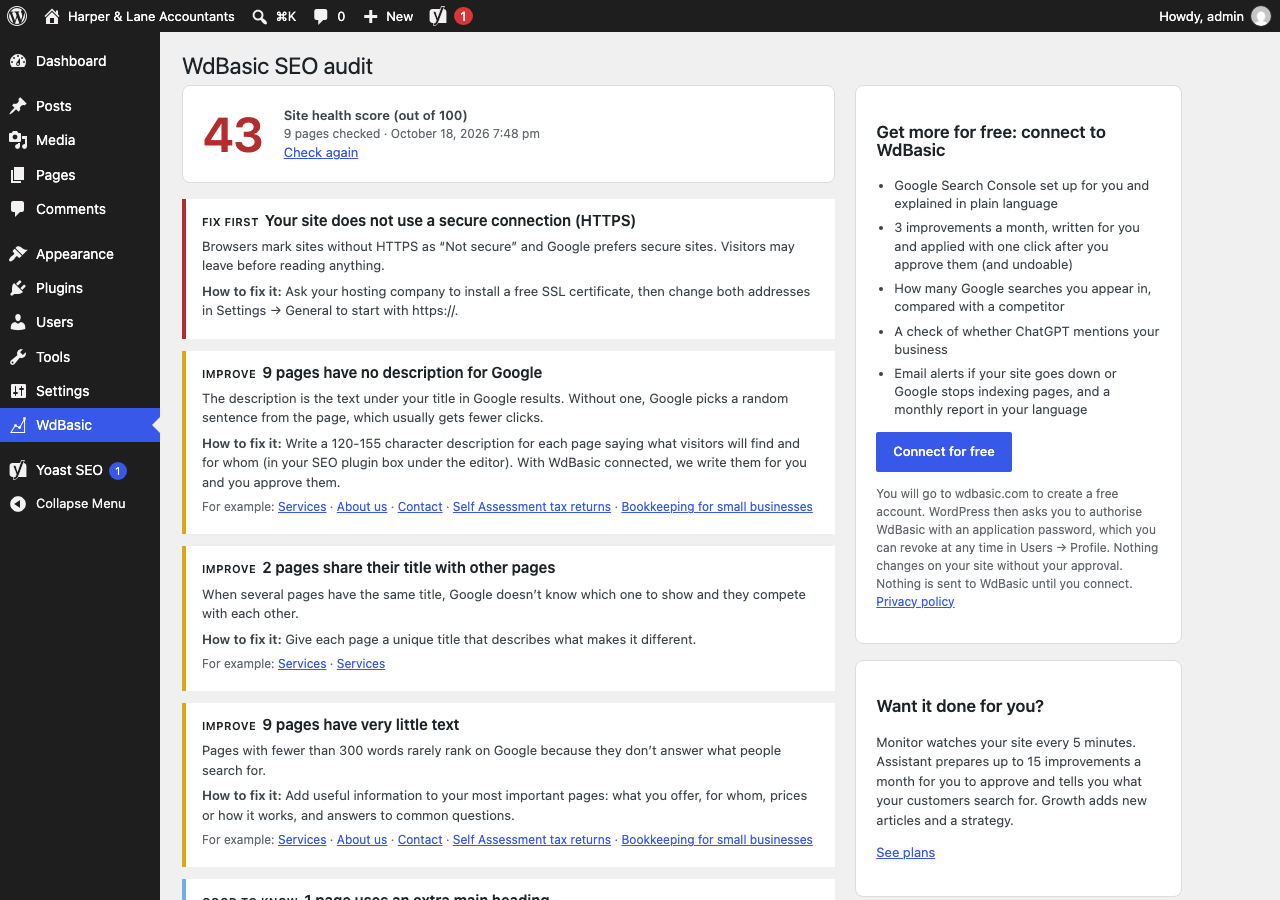
- Is your site hidden from Google? (search engine visibility, robots.txt, pages marked “noindex”)
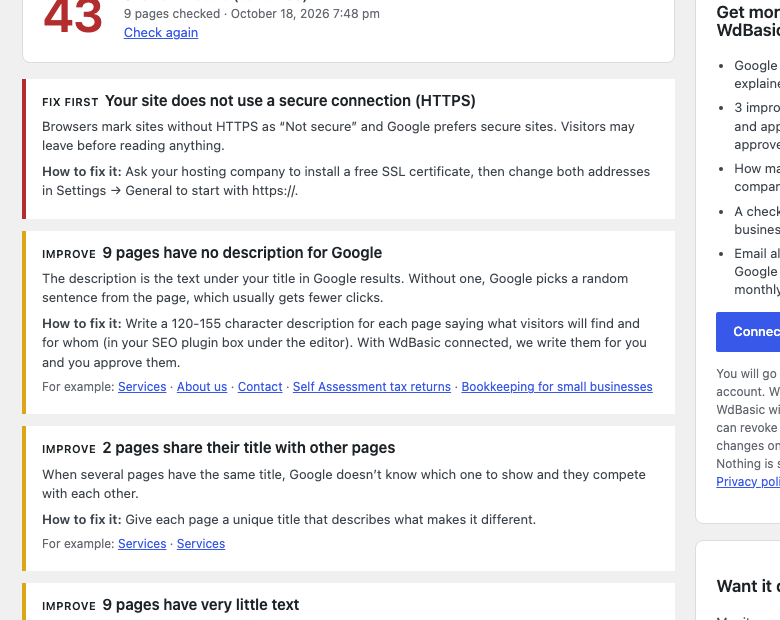
- Secure connection (HTTPS), readable page addresses and sitemap
- Pages without a description for Google, duplicate titles and pages with very little text
- Images without alternative text and extra main headings
- Pending WordPress and plugin updates and old PHP versions
- Site name, tagline, site icon and business details for Google
Each problem comes with why it matters and how to fix it, plus links to the affected pages. You also get a health score out of 100.
Optional: connect to WdBasic (free account)
If you choose to connect, you also get:
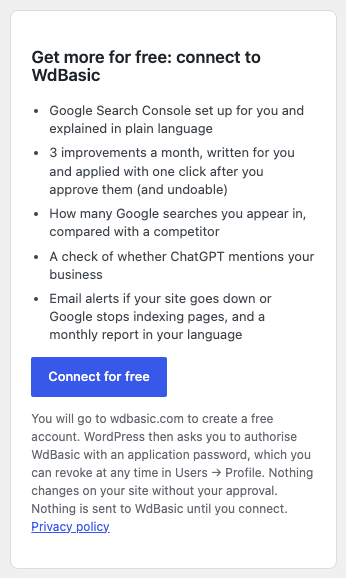
- Google Search Console set up automatically and explained in plain language
- 3 improvements a month (SEO titles, descriptions…) written for you and applied with one click only after you approve them. Every change can be undone.
- How many Google searches you appear in, compared with a competitor
- A check of whether ChatGPT mentions your business
- Email alerts and a monthly report in your language
Paid plans (optional)
On wdbasic.com you can subscribe to Monitor (monitoring every 5 minutes with alerts), Assistant (up to 15 improvements a month, keywords and competitors) or Growth (new articles and strategy). The plugin works fully without them and never locks features.
Works with your SEO plugin
Compatible with Yoast SEO, Rank Math and SEOPress. Without an SEO plugin, WdBasic outputs the SEO title, description and FAQ structured data itself.
Languages
English, Spanish and more. Your audit and reports are shown in your WordPress language.
External services
The free audit does not contact any external service.
Only if you choose to connect your site to WdBasic (wdbasic.com, operated by WdBasic Limited, UK):
- When: when you click “Connect for free”, you go to wdbasic.com and WordPress asks you to authorise WdBasic with an application password. Nothing is sent before that.
- What is sent: your site address, the name and email you enter on wdbasic.com and the application password, which is stored encrypted. Afterwards WdBasic reads, through the WordPress REST API, the public content of your pages, their SEO titles and descriptions, image alt texts and basic technical information (WordPress, PHP and theme versions, active plugins and their versions) to prepare reports and suggestions.
- What WdBasic changes: only what you approve in your WdBasic dashboard (SEO titles and descriptions, FAQs, page text, image alt texts, business details, redirects). Every change can be undone. If you ask for automatic Search Console setup, WdBasic adds Google’s verification tag to your site.
- Third parties: to produce reports and suggestions WdBasic uses Google Search Console, DataForSEO (search data) and AI providers. See the privacy policy.
- You can disconnect at any time by revoking the “WdBasic” application password in Users Profile.
Terms of service: https://wdbasic.com/terms
Privacy policy: https://wdbasic.com/privacy
Screenshots
Installation
- Plugins Add New search for “WdBasic” Install Activate.
- Go to WdBasic in the dashboard menu to see your audit.
- Optional: click Connect for free to create your WdBasic account.
FAQ
-
Is the audit really free?
-
Yes. It runs on your server, it has no limits and it doesn’t need an account.
-
Will WdBasic change my site without asking?
-
No. Every suggested change waits for your approval and can be undone.
-
Do I need an SEO plugin?
-
No. If you use Yoast SEO, Rank Math or SEOPress, WdBasic works with their fields. If you don’t, it outputs the tags itself.
-
I can’t see “Application Passwords” in my profile
-
A security plugin has probably disabled them. Re-enable application passwords in its settings, or ask your hosting company.
-
How do I disconnect?
-
Users Profile Application Passwords revoke “WdBasic”. You can also deactivate the plugin; the changes you approved stay on your site.
Reviews
There are no reviews for this plugin.
Contributors & Developers
“WdBasic” is open source software. The following people have contributed to this plugin.
Contributors
Translate “WdBasic” into your language.
Interested in development?
Browse the code, check out the SVN repository, or subscribe to the development log by RSS.
Changelog
2.0.3
- Translations are now delivered by translate.wordpress.org.
2.0.2
- Connected sites: your WdBasic dashboard now shows the same health score as the WdBasic page in your WordPress dashboard.
2.0.1
- Connected sites: also shares the installed versions of active plugins and the theme, so your WdBasic account can warn you about known security issues.
2.0.0
- New: free SEO and site health audit in the dashboard, with a health score and plain-language explanations.
- New: optional connection to a free WdBasic account.
- Renamed from “WdBasic Connector”. Everything already applied is kept.
1.4.0
- Connector for WdBasic: SEO titles, descriptions, FAQs, alt texts, business details and redirects applied after approval.