

Description
VSPTECH Reseller connects your WordPress site to the Reseller API of VSP TECH, a hosting and domain provider based in Cameroon.
Domain search. The [vsptech_domain_search] shortcode displays a search bar. Visitors type a domain name and see whether it is available, with the sale price from your VSP TECH reseller catalogue, in CFA francs (FCFA).
Order from the search (needs WooCommerce). Once you designate a WooCommerce product, an “Order now” button adds an available domain to the cart at your sale price. The price is read from the API on your server, and availability is checked again at that moment.
Automatic registration (needs WooCommerce). When an order is paid, the plugin registers the domain carried by each order line and adds the result to the order notes.
Connection status. The settings page shows whether the connection works, your VSP TECH wallet balance and your reseller tier.
What you need
- A VSP TECH reseller account with an active white label offer. The API is included in the white label, and the API key is created in your Reseller area. These are paid VSP TECH services.
- A VSP TECH wallet balance, to pay for the domains that are registered.
- WooCommerce, only if you want to sell from the search or use automatic registration. The domain search works without it.
What this plugin does not do
- It does not sell or set up web hosting. It handles domain names only.
- It does not create the WooCommerce product that sells domains: you create it once (see Installation).
- It does not transfer domains (see the FAQ).
Description en français
VSPTECH Reseller relie votre site WordPress à l’API Revendeur de VSP TECH, fournisseur d’hébergement et de noms de domaine au Cameroun.
Recherche de domaine. Le shortcode [vsptech_domain_search] affiche une barre de recherche : le visiteur saisit un nom de domaine et voit s’il est disponible, avec le prix de vente de votre catalogue revendeur VSP TECH, en francs CFA (FCFA).
Commande depuis la recherche (WooCommerce requis). Une fois un produit WooCommerce désigné dans les réglages, le bouton « Commander maintenant » ajoute le domaine disponible au panier, à votre prix de vente. Le prix est lu à l’API par votre serveur et la disponibilité est revérifiée à ce moment-là. Sans ce produit, ou si la boutique n’est pas en francs CFA (XAF), le bouton n’apparaît pas.
Enregistrement automatique (WooCommerce requis). Quand une commande est payée, l’extension enregistre le domaine porté par chaque ligne de commande et note le résultat sur la commande. Chaque domaine est payé avec votre solde VSP TECH, au prix revendeur, et son renouvellement automatique est activé.
État de la connexion. La page de réglages indique si la connexion fonctionne, votre solde et votre palier revendeur.
Il vous faut un compte revendeur VSP TECH avec une marque blanche active (l’API y est incluse) et un solde suffisant. L’extension ne vend pas d’hébergement, ne crée pas le produit WooCommerce à votre place (voir Installation, en anglais) et ne transfère pas de domaines.
External services
This plugin relies on the VSP TECH Reseller API, operated by VSP TECH, to check domains, read your account status and order domains. Requests go to https://vsptech.host/api/reseller/v1 (an administrator can change this address in the settings). A VSP TECH reseller account and API key are required. Nothing is sent until an API key is saved.
Requests are made by your server. Visitors’ browsers do not contact VSP TECH, and the plugin does not send visitors’ IP addresses. Every request contains your API key and the plugin version.
- When an administrator opens the settings page: a request for your balance and reseller tier. No other data is sent.
- When someone uses the domain search or clicks “Order now”: the domain name, to get its availability and price.
- When a WooCommerce order is paid (with automatic activation on, for each order line carrying a domain): the domain name, the action, the one-year duration, your default name servers, the WooCommerce order number and the automatic renewal setting, plus the customer’s billing details as the domain owner: first and last name, company, email, phone, address, city, state, postcode and country.
VSP TECH passes domain owner details to its registrar and to the registry of the extension to register the domain, and some may appear in the public WHOIS directory. Tell your customers about this in your own privacy policy.
Screenshots
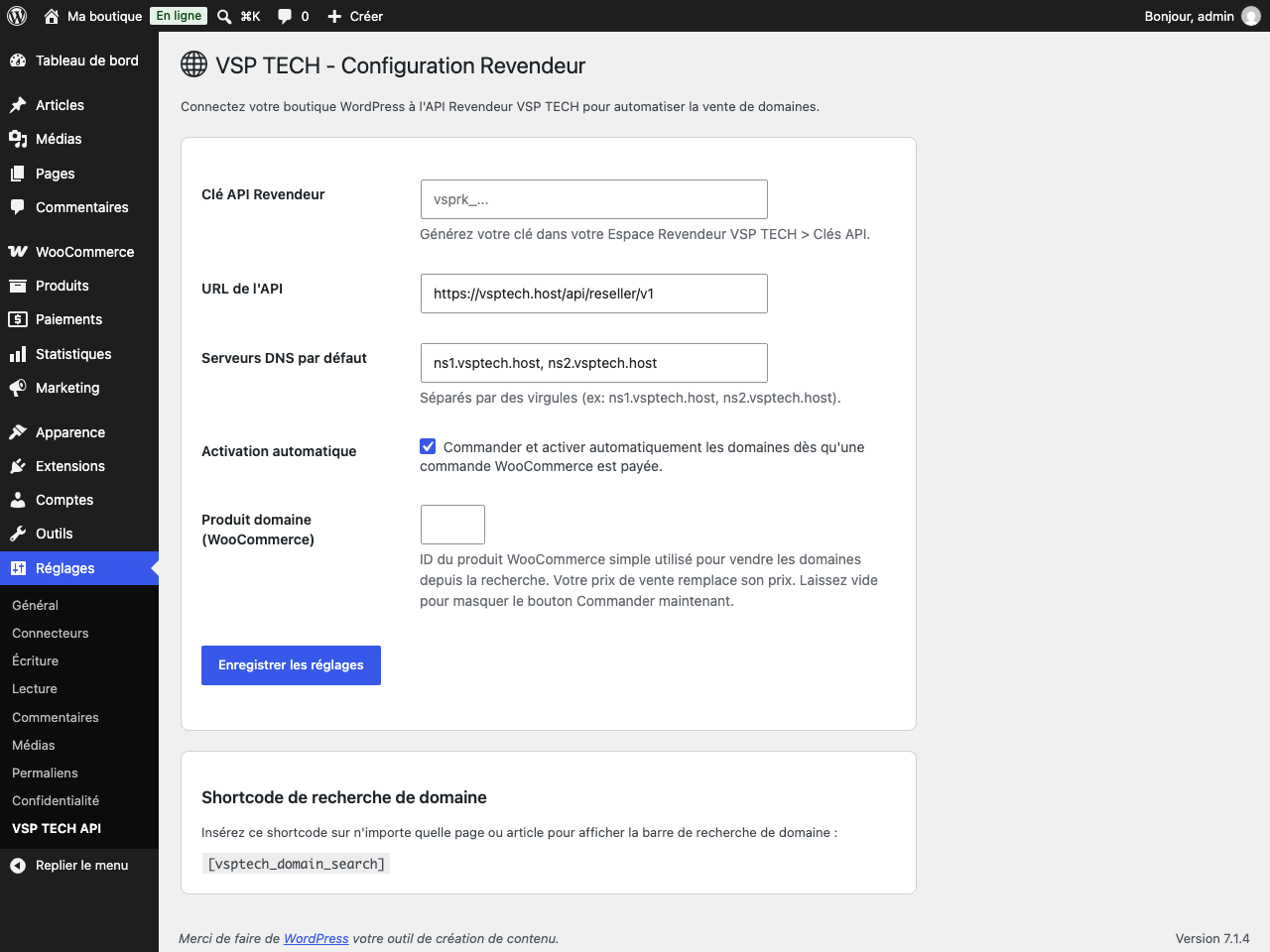

[vsptech_domain_search] shortcode.Installation
- Install the plugin from Plugins > Add New, or upload the
vsptech-resellerfolder to/wp-content/plugins/. - Activate the plugin.
- Go to Settings > VSP TECH API and paste your Reseller API key (
vsprk_...), available in your VSP TECH Reseller area. - Set your default name servers (2 to 4), or leave the field empty to use those of your white label, otherwise those of VSP TECH.
- Keep “Automatic activation” ticked if paid WooCommerce orders should register domains, and untick it otherwise.
- Add the
[vsptech_domain_search]shortcode to a page or post. - To sell from the search: create one simple, virtual WooCommerce product with any price, set its catalog visibility to Hidden, and enter its ID in “Domain product” on the settings page. The store currency must be CFA francs (XAF). Your sale price replaces the product price in the cart, and the product can only be bought through the search form.
FAQ
-
Does it work without WooCommerce?
-
Yes. The settings page and the domain search shortcode work without WooCommerce. The “Order now” button and automatic registration need it, and the settings page tells you when WooCommerce is not active.
-
The button only appears when the order can really go through: WooCommerce is active, the “Domain product” setting points to a published, in-stock product with a price, the store currency is XAF, and your catalogue has a sale price for that extension.
-
Which price does the customer pay?
-
Your sale price for one year, read from the VSP TECH API by your server when the domain is added to the cart. Nothing sent by the browser can change it, and your purchase price is never sent to the browser. No currency conversion is applied.
-
How does the plugin know which domain to register?
-
It reads the
domainorder item meta, or_domainif the first is empty. The “Order now” button addsdomainto the order line for you. Another plugin can set it too. Lines without it are ignored. -
What is charged when an order is paid?
-
Each domain is registered for one year and paid immediately from your VSP TECH wallet, at your reseller price. What your customer paid you is not used. Automatic renewal is turned on, so VSP TECH charges one more year to your wallet when the domain expires. If your balance is too low, or the domain was taken after the customer ordered, nothing is charged and the failure is added to the order notes. With cash on delivery, registration starts when you mark the order Completed.
-
Are domain transfers supported?
-
No. A transfer needs an authorization code, which the plugin does not send, so the API refuses it and the refusal is added to the order notes.
-
Where is my API key stored?
-
In the WordPress options table, without encryption. It is never displayed again after saving, and it is deleted when you click “Remove the saved key” or uninstall the plugin. We recommend limiting the key to your server’s IP addresses in your Reseller area.
-
Visitors see “This page has expired”
-
The search form uses a WordPress security token that lasts 12 to 24 hours. If a page cache keeps the page longer, exclude that page from the cache or shorten the cache lifetime.
-
Does the older shortcode still work?
-
No. Since version 1.0.3, use
[vsptech_domain_search]. Pages that still contain[vsp_domain_search]show the shortcode as plain text until you replace it.
Reviews
There are no reviews for this plugin.
Contributors & Developers
“VSPTECH Reseller” is open source software. The following people have contributed to this plugin.
Contributors
Translate “VSPTECH Reseller” into your language.
Interested in development?
Browse the code, check out the SVN repository, or subscribe to the development log by RSS.
Changelog
1.0.3
- Every name the plugin declares now uses the
vsptechprefix: the old[vsp_domain_search]shortcode is removed (use[vsptech_domain_search]) and order lines carry avsptech_domainmeta. Orders placed with earlier versions are still processed. - Translations now come from translate.wordpress.org: the bundled French files are removed.
1.0.2
- New: the “Order now” button now adds the domain to the WooCommerce cart, through a product chosen in the settings. It replaces a button that displayed a confirmation without adding anything.
- The price is calculated on the server from the API, and availability is checked again when the domain is added.
- The button is hidden when WooCommerce is not active, no product is set, the store currency is not XAF, or no sale price exists.
- The order line carries the
domainmeta used by automatic registration.
1.0.1
- Security: visitors no longer receive your purchase prices or API errors, the API key is no longer sent back to the settings page, the API URL must use HTTPS, and the search uses a nonce and validates its input.
- Enqueued scripts and styles, translatable strings with a French translation, settings deleted on uninstall.
- New
[vsptech_domain_search]shortcode name.[vsp_domain_search]still works.
1.0.0
- First release.