

Description
A customer writes “I can’t find this product” or “there is no Add to cart button”. WooCommerce knows whether a product is visible and purchasable, but it never tells you which factor decided it: status, catalog visibility, out of stock with “Hide out of stock items”, empty price, variations, or another plugin. The product list has no column or filter for it either. And the shop and search do not read the product’s visibility setting directly: they read the product_visibility terms that WooCommerce sets when the product is saved, which can get out of sync after an import.
Visibility Doctor for WooCommerce reads all of this and answers in one line per question. It changes nothing.
On the product edit screen
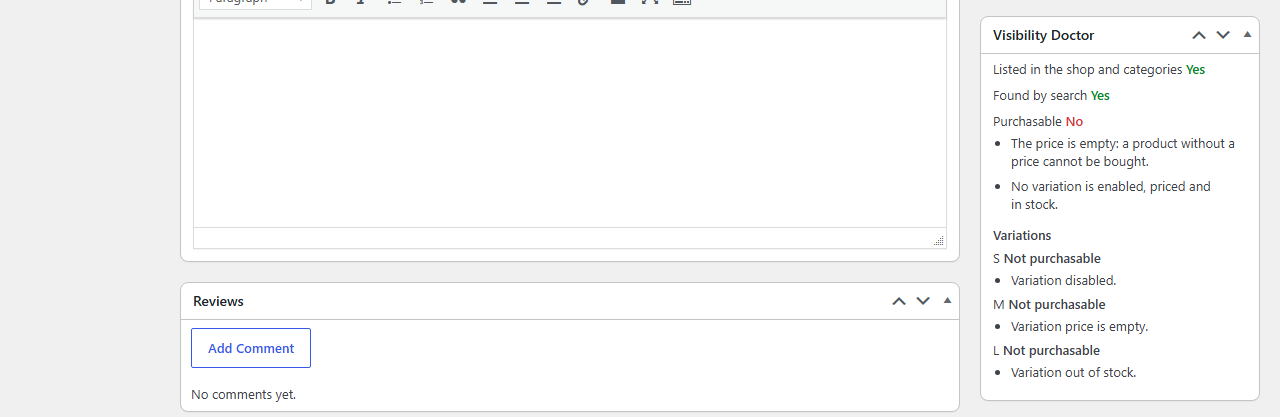
A “Visibility Doctor” box in the sidebar of the product edit screen gives three verdicts, each “yes” or “no” followed by its causes in plain words:
- Listed in the shop and categories
- Found by search
- Purchasable
Then the warnings (out-of-sync out-of-stock term, password, inconsistent stock quantity, another plugin hiding the product, with that plugin’s name) and, for a variable product, one line per variation: its attributes, purchasable or not, and why. A healthy product shows three “yes” and nothing else.
Store-wide audit
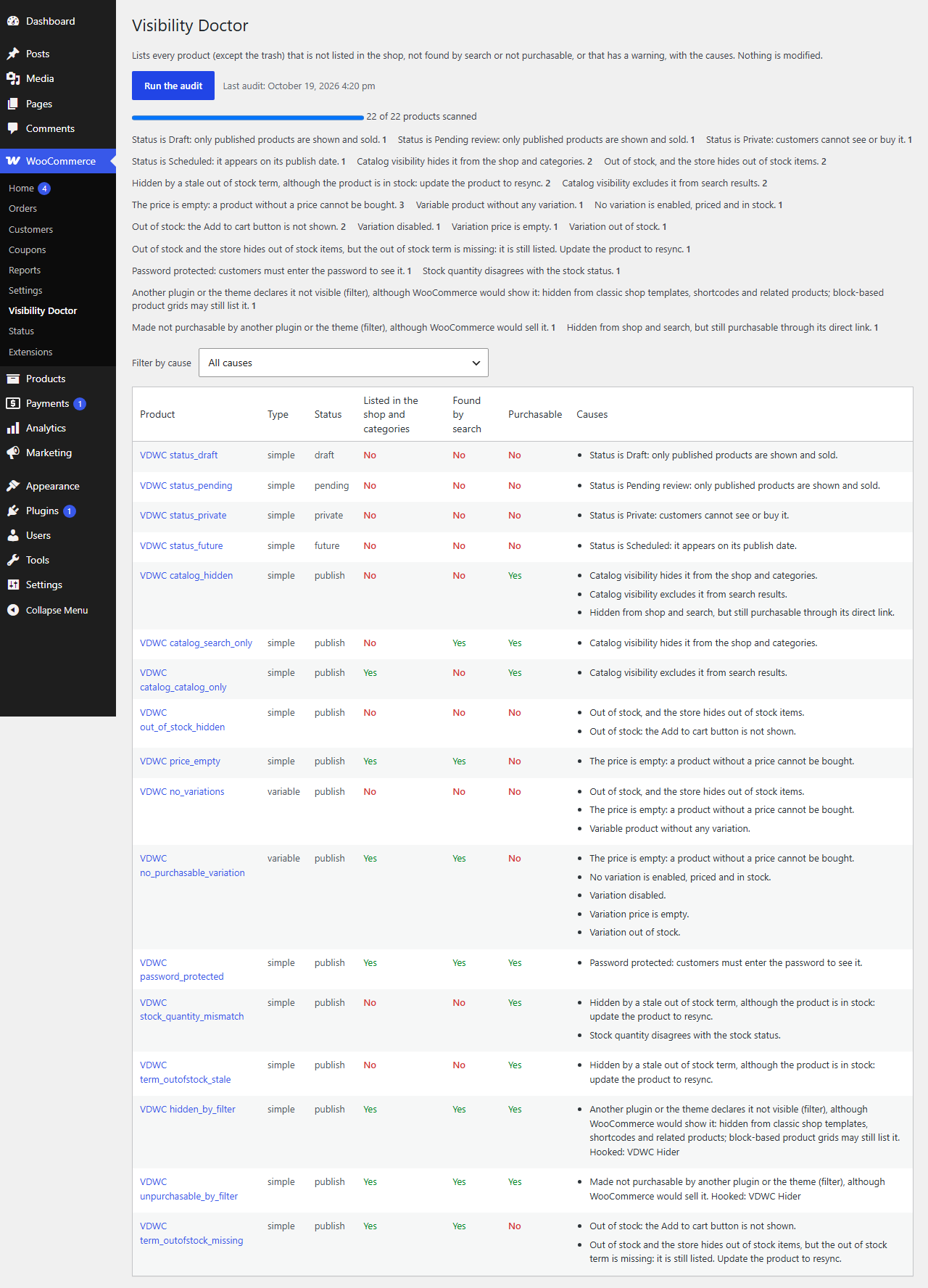
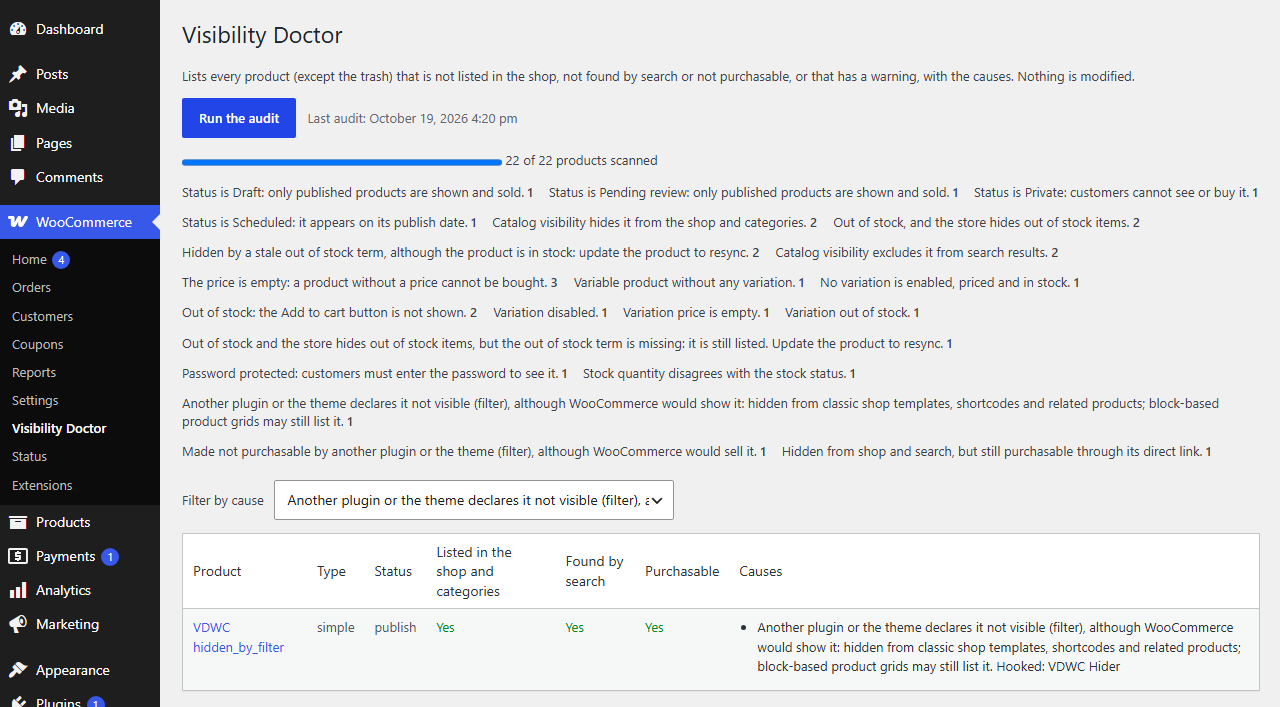
WooCommerce > Visibility Doctor: “Run audit” goes through all your products (trash excluded) in batches of 100, shows its progress, then lists every product with at least one “no” or one warning: product (linked to its edit screen), type, status, the three verdicts and the causes. Counters per cause at the top, and a filter by cause. The last result is kept, with its date, and reopened as is until you run the next audit. Nothing is modified: each line links to the product.
What it detects
- Status: draft, pending review, private, scheduled, in the trash.
- Catalog visibility: hidden, search results only, shop only.
- Out of stock while “Hide out of stock items from the catalog” is on.
- Empty price.
- Variable product with no variations, or with no purchasable variation (each variation disabled, without a price, or out of stock).
- Out-of-stock visibility term out of sync after an import: the product is hidden by “Hide out of stock items” although its stock status says in stock, or listed although it is out of stock.
- Password-protected product.
- Stock quantity inconsistent with the stock status (quantity 0 or less but not out of stock, or quantity above 0 but out of stock).
- Product hidden, or made not purchasable, by another plugin, with the name of the plugin, mu-plugin or theme that hooks the filter.
- Product hidden from the shop and search but still purchasable through its direct link.
An out-of-stock product shows “Purchasable: no” with the cause “out of stock”: WooCommerce itself still reports it as purchasable, but no Add to cart button appears.
Privacy
- No external calls, no tracking, no analytics.
- No personal data. The plugin reads your products and the “Hide out of stock items” setting, and stores only the last audit result in one option (
vdwc_last_audit, not autoloaded), deleted when you uninstall the plugin (on every site of a multisite). - Only users who can manage WooCommerce (
manage_woocommerce) see the box and the audit page.
Pro add-on
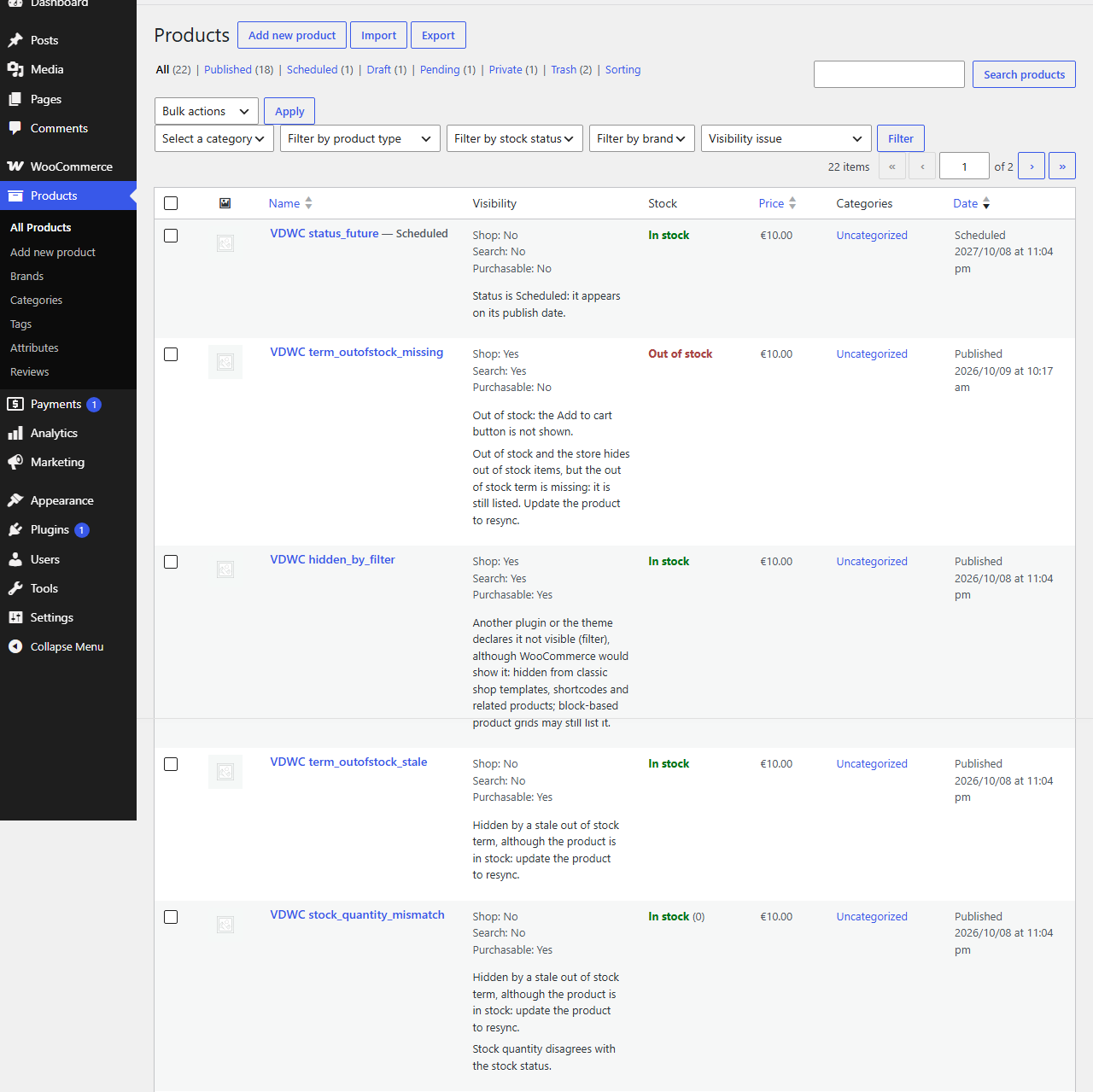
An optional, separate Pro plugin adds a CSV export of the audit, a “Visibility” column and filter in the product list, and a WP-CLI command; this free plugin stays complete on its own, nothing in it is time-limited or locked. Details: https://timaub.fr/visibility-doctor-for-woocommerce/
Français
Un client écrit « je ne trouve pas tel produit » ou « il n’y a pas de bouton Ajouter au panier ». WooCommerce sait si un produit est visible et achetable, mais ne dit jamais lequel des facteurs a joué. Visibility Doctor for WooCommerce le dit, sans rien modifier.
Sur l’écran de modification d’un produit, la boîte « Visibility Doctor » donne trois verdicts, chacun « oui » ou « non » avec ses causes en clair : listé dans la boutique et les catégories, trouvé par la recherche, achetable. Puis les avertissements et, pour un produit variable, une ligne par variation. La page WooCommerce > Visibility Doctor audite toute la boutique par lots de 100 produits et liste ceux qui ont au moins un « non » ou un avertissement, avec un filtre et des compteurs par cause ; le dernier résultat est conservé.
Causes détectées : statut (brouillon, en attente de relecture, privé, planifié, corbeille) ; visibilité catalogue (masqué, recherche seule, boutique seule) ; rupture de stock avec le réglage « masquer les produits en rupture » ; prix vide ; produit variable sans variation ou sans variation achetable (désactivée, sans prix, en rupture) ; terme de rupture désynchronisé après un import (le produit est masqué par « masquer les produits en rupture » alors que son stock dit « en stock », ou l’inverse) ; mot de passe ; quantité de stock incohérente avec l’état du stock ; produit masqué ou rendu non achetable par un autre plugin, nommé ; produit masqué de la boutique et de la recherche mais achetable par lien direct.
Aucun appel externe, aucun pistage, aucune donnée personnelle. Seul le dernier résultat d’audit est stocké (option vdwc_last_audit), supprimé à la désinstallation.
Screenshots
Installation
- Install and activate WooCommerce 9.0 or later.
- In Plugins > Add New, search for “Visibility Doctor for WooCommerce”, then install and activate it. Or upload the
visibility-doctor-for-woocommercefolder to/wp-content/plugins/and activate it in Plugins. - Open any product: the “Visibility Doctor” box is in the sidebar of the edit screen.
- For the whole store: WooCommerce > Visibility Doctor, then “Run audit”.
FAQ
-
Does it change my products?
-
No. Both the box and the audit are read-only. The plugin reads your products, their visibility terms and the “Hide out of stock items” setting, and only stores the last audit result. To fix a cause, open the product from the audit line and change it yourself.
-
The shop and search rely on the
product_visibilityterms that WooCommerce sets when a product is saved. If the box reports an out-of-sync term, open the product and click “Update” so WooCommerce sets the terms again. Then clear any page cache (caching plugin, host or CDN), since a cached page still shows the old catalog. -
How does it know another plugin is involved?
-
For a published product, it compares the verdict WooCommerce would give on its own with the result after the filters other plugins can hook into. If they differ, it lists the plugins hooked to those filters, by name.
-
Does it work with the block editor or the new product editor?
-
The diagnosis box is a classic meta box on the product edit screen. Compatibility with WooCommerce’s new product editor has not been tested yet. The audit page is a separate admin page and does not depend on the product editor.
-
Does it work with WPML or Polylang?
-
Not tested yet. A product that is not published in one language is not one of the causes the plugin checks.
-
Why does the audit say some products could not be read?
-
The audit reads products through the WooCommerce product API, which skips a product that has no product type (a direct database import can create one). The page counts them and shows a warning; open and update each of these products so WooCommerce sets its type, then run the audit again.
-
Is it heavy on a large catalog?
-
The audit loads at most 100 products per request, variations included, and runs only when you click “Run audit”. Its scripts and styles load only on the audit page and the product edit screen. The kept result is limited to 2,000 lines; beyond that, the page says the list is truncated.
-
Does it call any external service?
-
No. No remote requests, no tracking, no analytics.
Reviews
There are no reviews for this plugin.
Contributors & Developers
“Visibility Doctor for WooCommerce” is open source software. The following people have contributed to this plugin.
Contributors
Translate “Visibility Doctor for WooCommerce” into your language.
Interested in development?
Browse the code, check out the SVN repository, or subscribe to the development log by RSS.
Changelog
1.0.0
- First release: Visibility Doctor box on the product edit screen (listed in the shop, found by search, purchasable, with causes, warnings and one line per variation), store-wide read-only audit in WooCommerce > Visibility Doctor (batches of 100, filter and counters per cause, last result kept), no external calls.