
Description
Vimine is a membership platform for associations: membership requests and cards, events, assemblies. This plugin brings the parts members use to the association’s own WordPress site:
- Sign in with Vimine — members sign in with their own Vimine account. The plugin is a confidential OAuth 2.1 client: the sign-in happens on Vimine, the code exchange (PKCE plus the client secret) on your server, so the members’ passwords never reach WordPress and their tokens never reach the browser.
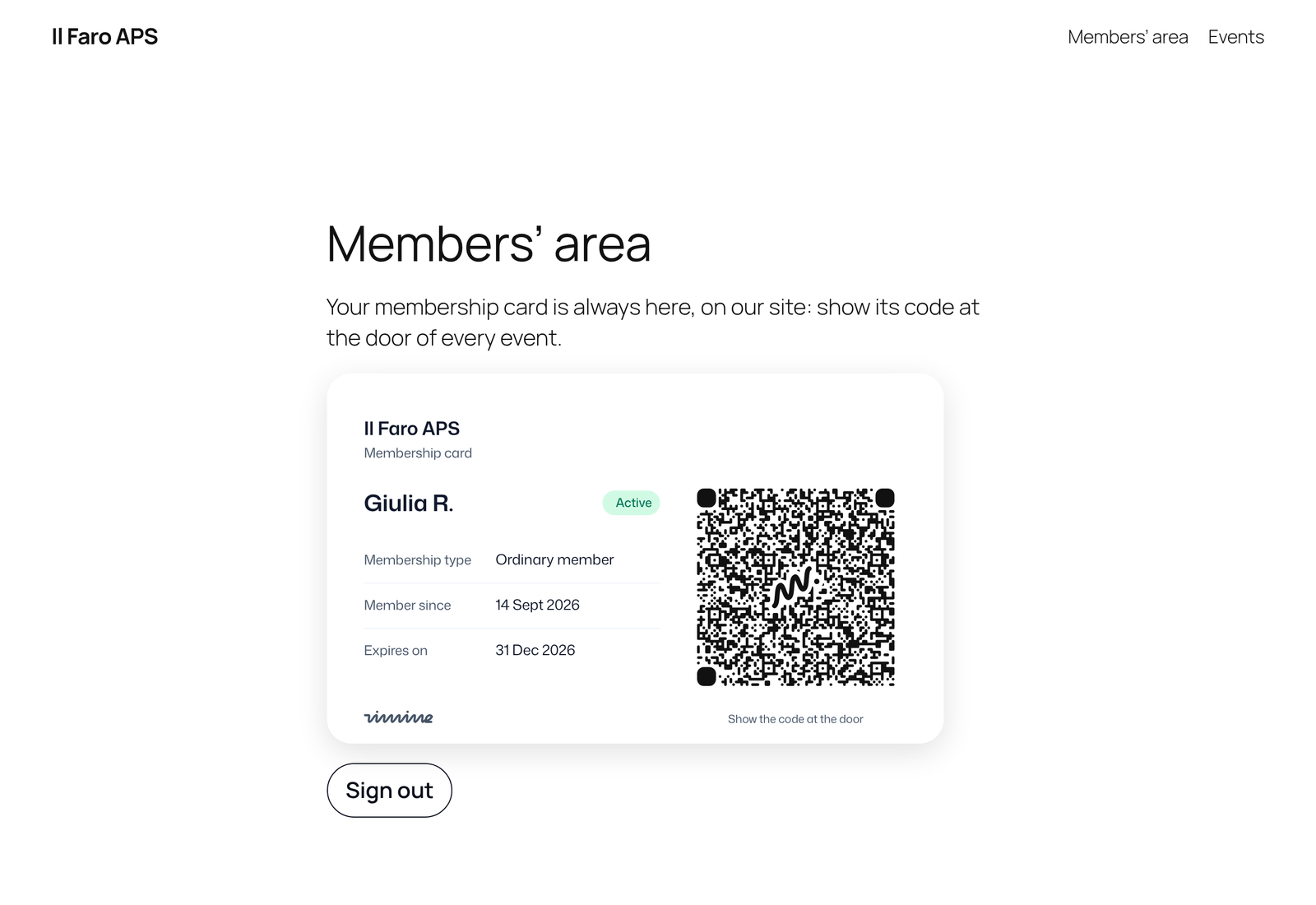
- Membership card — the signed-in member’s card, with the QR code to show at the door.
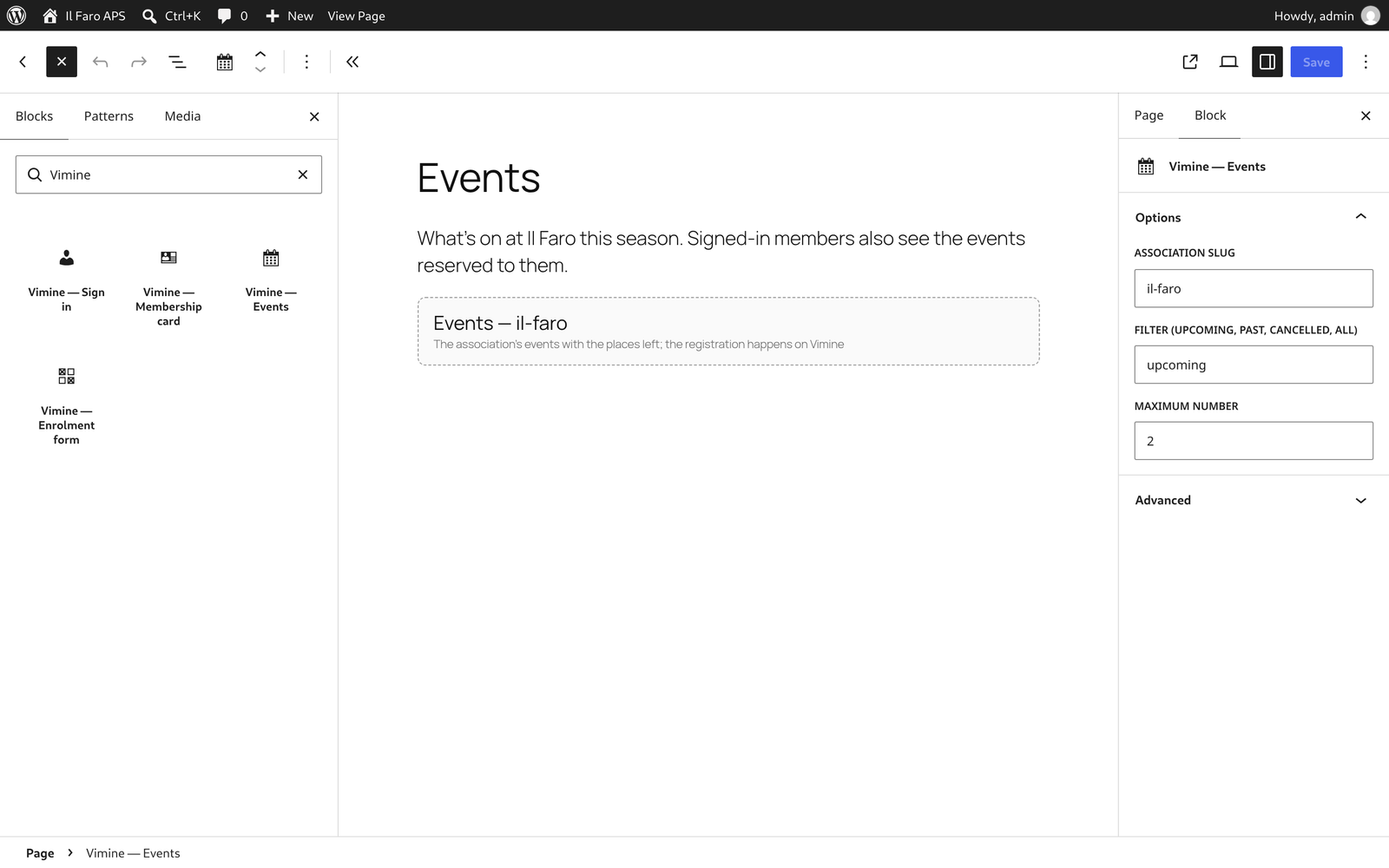
- Events — the association’s events with the places left: the public ones for visitors, every published one for signed-in members. Each event links to its page on Vimine, where the registration happens.
- Enrolment form — the association’s membership form, embedded in the page, in the site’s language.
Each of them is a block (under Widgets in the editor) and a shortcode: [vimine_signin], [vimine_card], [vimine_events slug="…"], [vimine_enroll slug="…"].
The texts members see follow the site’s language: English, Italian, French, Spanish, German, Portuguese (Brazil), Chinese (Simplified and Traditional).
What you need
- An association on Vimine. The enrolment form works on every plan, Free included. Sign-in, the card and the events use Vimine’s developer API, which comes with the paid plans (pricing).
- For sign-in, the card and the events: a confidential client registered in the association’s Developers console on Vimine.
The developer guide, with every option: developers.vimine.network.
External services
This plugin connects your site to Vimine (https://vimine.network/en/), the membership platform your association uses. It is what the plugin is for: without Vimine it does nothing. Two Vimine addresses are involved, both editable in Settings Vimine.
app.vimine.network — the pages members see, opened in their browser:
- Sign-in: “Sign in with Vimine” sends the browser to
/oauth/authorizewith the site’s client ID, its redirect URI, the permissions requested and a one-time PKCE challenge. The member signs in on Vimine, which sends the browser back to your site with a one-time code. - Sign-out: “Sign out” sends the browser to
/oauth/logoutwith the client ID and the page to return to, so that the member’s Vimine session ends too. - Enrolment form: the block and
[vimine_enroll]load/enroll/<association>in an iframe, with the site’s language. What the visitor types into that form goes to Vimine from the form itself, under Vimine’s terms, not through the plugin. - The events list links each event to its page on Vimine (
/agenda/…) and shows the cover image Vimine provides for it.
api.vimine.network — called by your server only:
- After a sign-in: the code, the PKCE verifier, the client ID and the client secret, to obtain the member’s tokens (
/v1/oauth/token); later the refresh token, to renew them; on sign-out, the refresh token, to revoke it (/v1/oauth/revoke). - Where a page shows the card: the member’s access token, to fetch their card (
/v1/me/membership/card.svg). - Where a page shows the events: the association’s slug, the filter and the number of events — with the member’s access token when a member is signed in (
/v1/events), without credentials otherwise (/v1/aps/<association>/events).
Nothing is sent before the plugin has a client ID and secret, except the enrolment form, which loads only on the pages that show it. The plugin does not contact Vimine for visitors who neither sign in nor open a page with one of its blocks.
Vimine’s terms of service: https://vimine.network/en/legal/terms/ — developer terms: https://vimine.network/en/legal/developers/ — privacy policy: https://vimine.network/en/legal/privacy/
Screenshots

Blocks
This plugin provides 4 blocks.
- Signin
- Card
- Enroll
- Events
Installation
- Install the plugin from Plugins Add New Plugin, or upload the
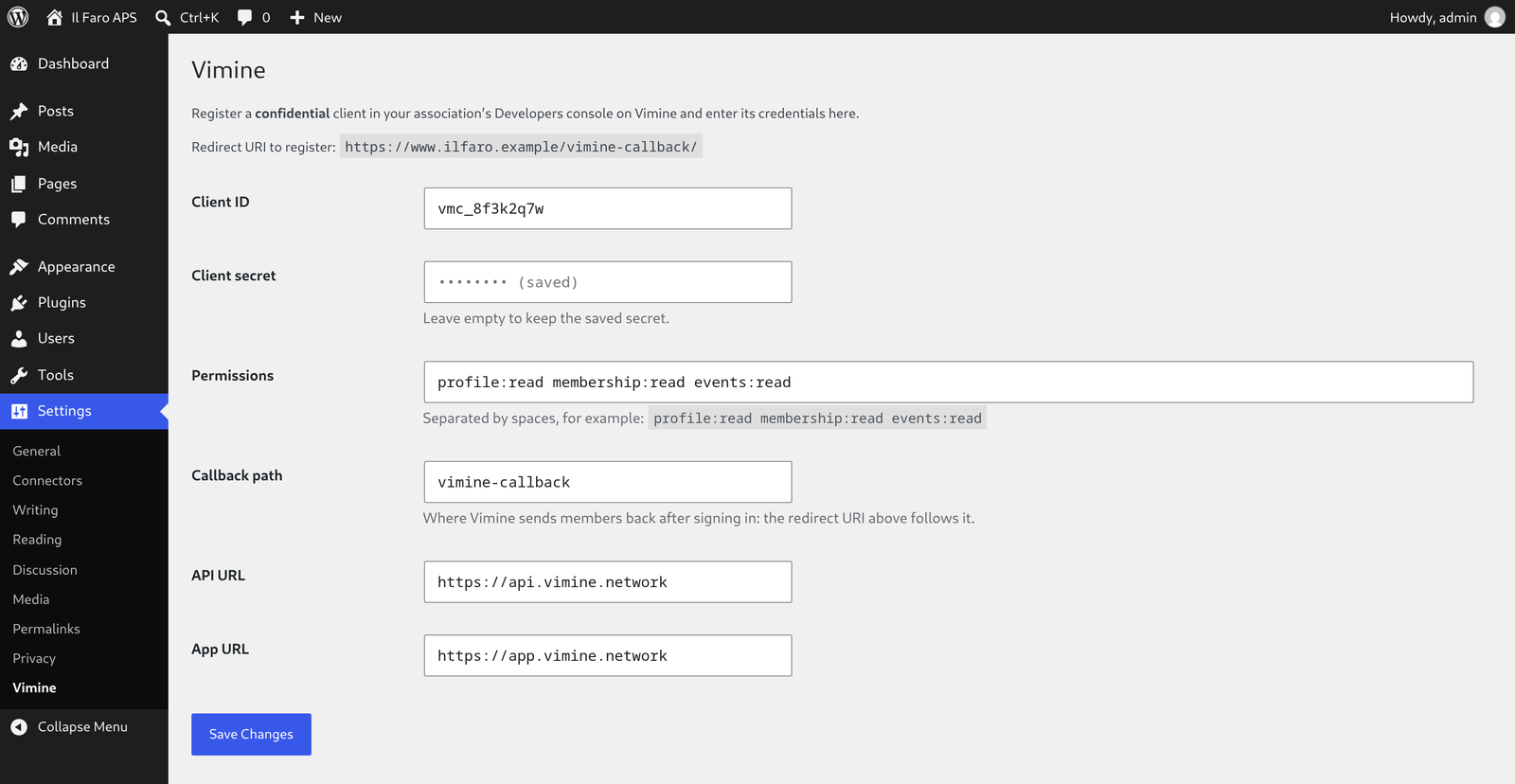
viminefolder towp-content/plugins/, and activate it. - Open Settings Vimine: it shows the redirect URI of your site (normally
https://your-site/vimine-callback/). - In the association’s Developers console on Vimine, register a confidential client with that redirect URI and the permissions you need — at least
profile:read membership:read, plusevents:readto show members the events reserved to them. - Back in Settings Vimine, enter the client ID and secret and save. The secret stays in the site’s database and is not shown again.
- Add the blocks, or the shortcodes, to your pages.
The enrolment form needs none of this: the block, or [vimine_enroll slug="…"] with the association’s slug, is enough.
FAQ
-
Where are the members’ tokens kept?
-
On your server, in WordPress transients. The browser only receives a random session identifier, in an HttpOnly cookie.
-
Two, and only for a visitor who clicks “Sign in with Vimine”:
vimine_flow— for up to 10 minutes while a sign-in is in progress: it ties the answer from Vimine to the browser that asked for it.vimine_session— from the sign-in until the member signs out (at most 30 days): the identifier of the member’s session on this site.
Both are HttpOnly and SameSite=Lax, and Secure on an https site. Whether your cookie notice needs to mention them is for you to judge; the plugin sets no other cookie and adds no tracking.
-
What does “Sign out” do?
-
It revokes the member’s tokens, ends the Vimine session too (single sign-out) and brings the member back to the page they were on.
-
Can I use a page cache?
-
Yes. The pages a signed-in member sees carry their own data, so the plugin marks them as not cacheable: it defines
DONOTCACHEPAGE, which the common caching plugins honour, and sends no-cache headers when it still can. If a server or CDN cache sits in front of the site, make it skip requests that carry thevimine_sessioncookie. -
Can I change the look?
-
Every element carries a
vimine-…class, and the buttons follow the--vimine-accentand--vimine-accent-contrastCSS variables.
Reviews
There are no reviews for this plugin.
Contributors & Developers
“Vimine” is open source software. The following people have contributed to this plugin.
Contributors
Translate “Vimine” into your language.
Interested in development?
Browse the code, check out the SVN repository, or subscribe to the development log by RSS.
Changelog
0.1.5
- Traditional Chinese (zh_TW): the translation reads in Taiwan’s usage — it had been converted by machine from the Simplified, words and all (登出, QR Code, 重新導向…).
0.1.4
- The plugin’s texts are now written in English, with Italian and the other languages as translations; the settings page and the block editor are translated too.
- Events: “1 place left”, “2 places left” — each language with its own plural forms.
- Sign-in: on a site installed in a subfolder, the member comes back to the page they started from.
- Sign-in block: with “Return to” left empty the member comes back to the page they started from, as with the shortcode (they were taken to the home page).
- Blocks: each block renders inside its own wrapper, so a block theme places it in the content column (the sign-in button sat at the page’s left edge, the card was centred).
- Settings: the permissions field is wide enough for its usual value.
- Pages shown to a signed-in member are kept out of page caches: they carry the member’s own data.
- Settings: the API and app URLs must be https (plain http only on a local or development site); an empty field keeps the saved value.
- Every value read from the request is unslashed and sanitised; the redirects to Vimine go through wp_safe_redirect().
- Deleting the plugin deletes its settings, the client secret included.
0.1.3
- Languages: the texts members see (sign-in, card, events) follow the site’s language — English, French, Spanish, German, Portuguese (Brazil), Simplified and Traditional Chinese, as well as Italian.
- Enrolment: the form opens in the site’s language whatever it is, if Vimine speaks it (in Italian otherwise).
0.1.2
- Card: the image shows the rules between the facts and the Vimine mark at the foot.
0.1.1
- Enrolment: the form opens in the site’s language (Italian or English;
lang="en"in the shortcode, or “Language” in the block, to choose it). - Enrolment: someone who already has a Vimine account can continue on Vimine in a new tab and join in one step.
0.1.0
- First version: sign-in, card, enrolment; shortcodes and blocks.