

Description
VelticAI connects your WordPress or WooCommerce site to an AI chatbot that actually knows your business, because it is trained on your own pages, products, and FAQs.
Unlike generic AI assistants, every answer VelticAI gives can be reviewed and approved in your dashboard before it goes live. You stay in control of what your chatbot says.
External Services
This plugin connects to the VelticAI API to power the AI chat widget on your site.
What data is sent:
– Your website content (pages, posts, WooCommerce products) is sent to VelticAI for indexing when you run a sync
– Visitor chat messages are sent to VelticAI to generate AI responses
– Lead contact details (name, email, phone) submitted via the chat widget are sent to VelticAI
When data is sent:
– During content sync (manually triggered by you in plugin settings)
– When a visitor sends a chat message on your site
– When a visitor submits the lead capture form in the chat widget
Service information:
– Service: VelticAI (https://velticai.com)
– Privacy Policy: https://velticai.com/privacy.html
– Terms of Service: https://velticai.com/terms.html
This plugin requires a VelticAI account to function. By installing and activating this plugin, you agree to VelticAI’s Terms of Service.
Key Features
- Trained on your content – syncs your pages, posts, and WooCommerce products automatically
- Review queue – every answer is queued for your approval before visitors see it
- Lead capture – collects visitor name and email after a configurable number of messages
- WooCommerce ready – product names, prices, and descriptions synced automatically
- No coding needed – paste your API key and Bot ID, done
How It Works
- Create your bot on VelticAI (https://velticai.com) and start a free 5-day trial
- Install this plugin and enter your API Key and Bot ID in Settings > VelticAI
- Click “Sync Pages & Products” to push your content
- Review your bot’s first answers in the VelticAI dashboard
- Your chat widget goes live on every page of your site
Privacy
This plugin sends your published page, post, and product content (title, URL, text body) to the VelticAI API at api.velticai.com for indexing. No visitor personal data is sent during content sync. Visitor chat messages are sent to the API when a visitor uses the chat widget. See VelticAI Privacy Policy at https://velticai.com/privacy.html for full details.
Requirements
- A VelticAI account (free 5-day trial at https://velticai.com)
- WordPress 5.9 or higher
- PHP 7.4 or higher
Screenshots

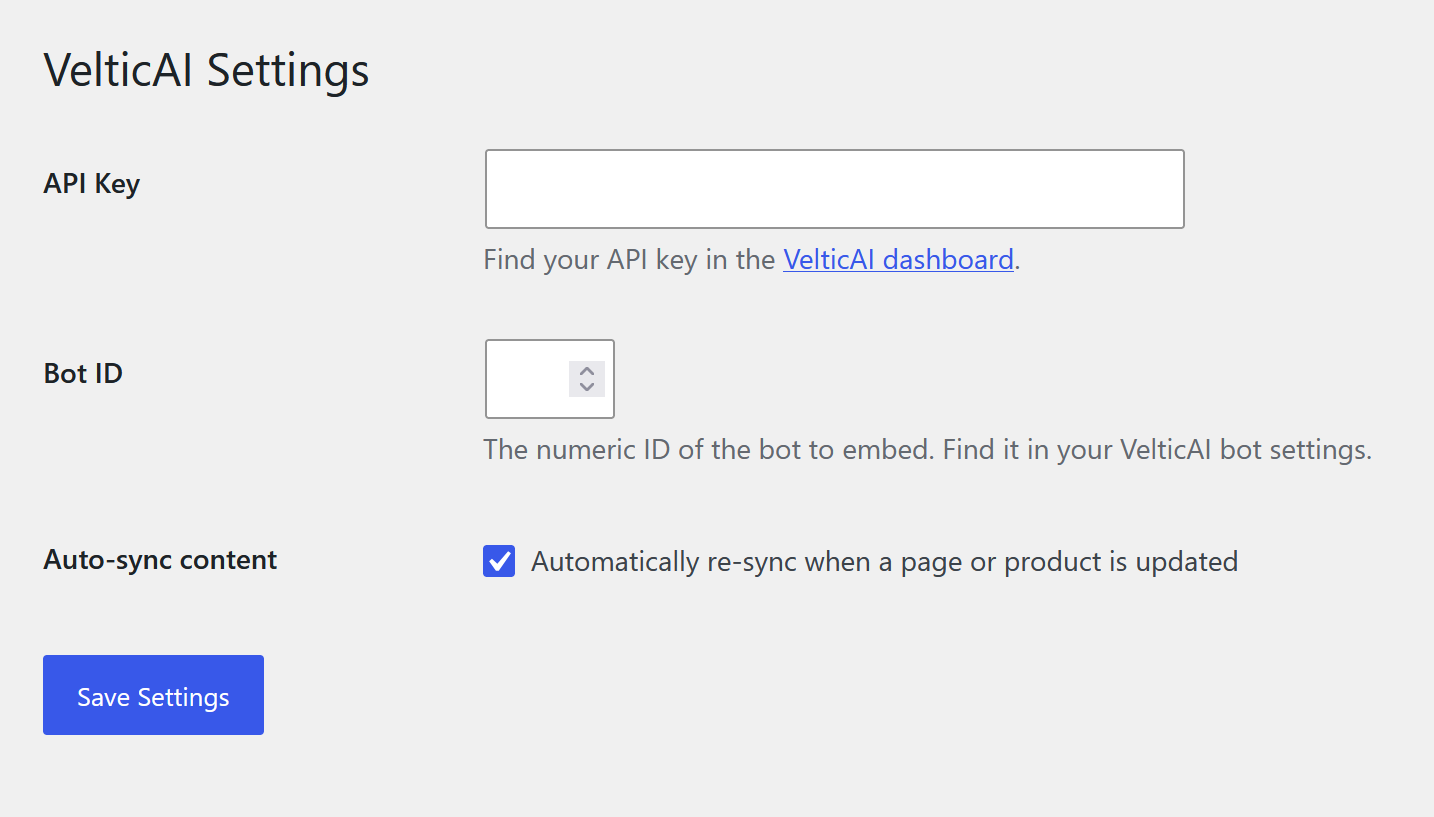
Installation
- Upload the plugin files to the /wp-content/plugins/velticai-ai-chat directory, or install the plugin through the WordPress plugins screen directly
- Activate the plugin through the Plugins screen in WordPress
- Go to Settings > VelticAI to configure the plugin
- Enter your API Key and Bot ID (both found in your VelticAI dashboard at https://app.velticai.com/settings/api)
- Click Save Settings, then click Sync Pages & Products
FAQ
-
Do I need a VelticAI account?
-
Yes. The plugin connects your WordPress site to your VelticAI account. You can start a free 5-day trial at https://velticai.com with no credit card required.
-
Chat messages are sent to api.velticai.com to generate responses. VelticAI does not sell visitor data. See the full Privacy Policy at https://velticai.com/privacy.html for more details.
-
Does it work with WooCommerce?
-
Yes. If WooCommerce is active, the plugin automatically includes product titles, descriptions, and prices in the content sync.
-
Can I control what the bot says?
-
Yes. Every new answer the bot generates is added to a review queue in your VelticAI dashboard. You can approve, correct, or flag each answer. Corrections are learned immediately.
-
How often is content synced?
-
Content syncs automatically once per day via WordPress cron. You can also trigger an immediate sync from the Settings page, and individual pages/products are re-synced whenever you save them if auto-sync is enabled.
-
Can I hide the chat widget on specific pages?
-
Not yet via the plugin settings UI, but you can filter it using a hook. Add this to your theme’s functions.php:
add_filter( ‘velticai_show_widget’, function( $show ) {
if ( is_page( ‘contact’ ) ) return false;
return $show;
} );
Reviews
There are no reviews for this plugin.
Contributors & Developers
“VelticAI – AI Chat & Lead Capture” is open source software. The following people have contributed to this plugin.
Contributors
Translate “VelticAI – AI Chat & Lead Capture” into your language.
Interested in development?
Browse the code, check out the SVN repository, or subscribe to the development log by RSS.
Changelog
1.0.0
- Initial release.