
Description
Vanquish Order Approval for WooCommerce puts every new order in front of you before it goes ahead. You approve it or reject it from the order screen, the orders list or a bulk action, and the customer is told by email and on their own order page.
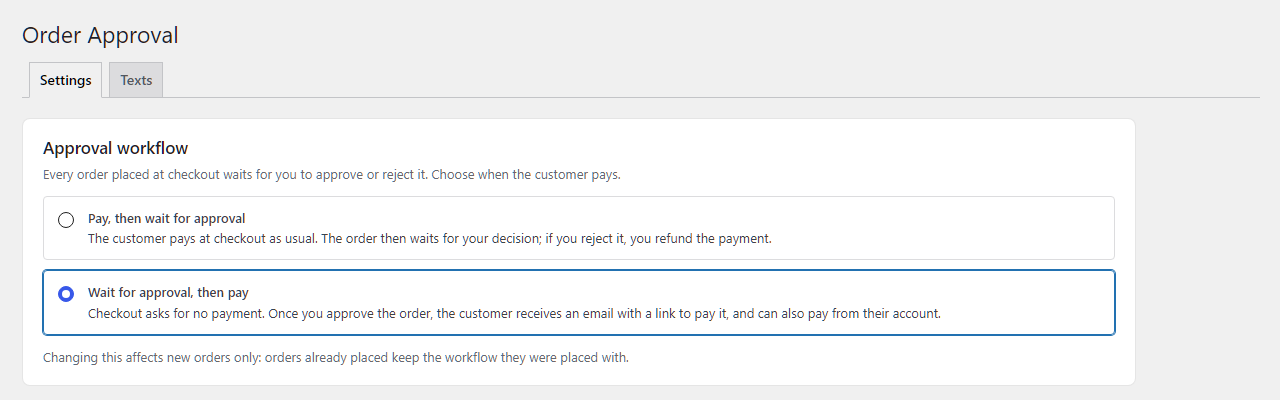
Choose when the customer pays:
- Pay, then wait for approval — checkout takes the payment as usual, then the order waits for your decision. Ideal when you want to check stock, an address or a custom request before you ship.
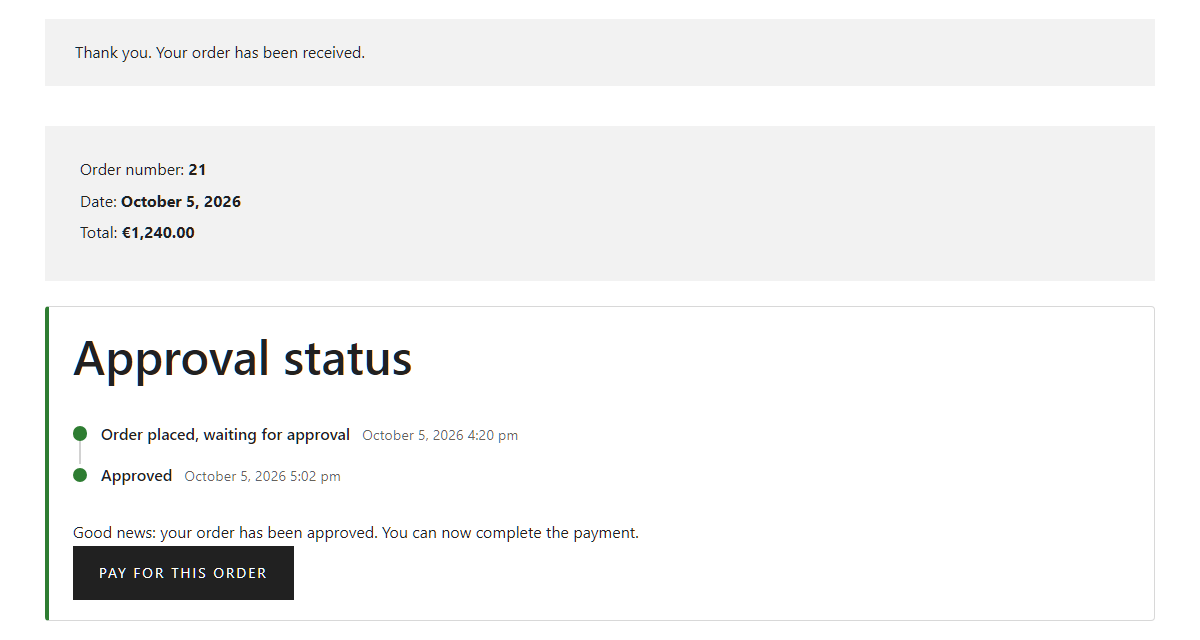
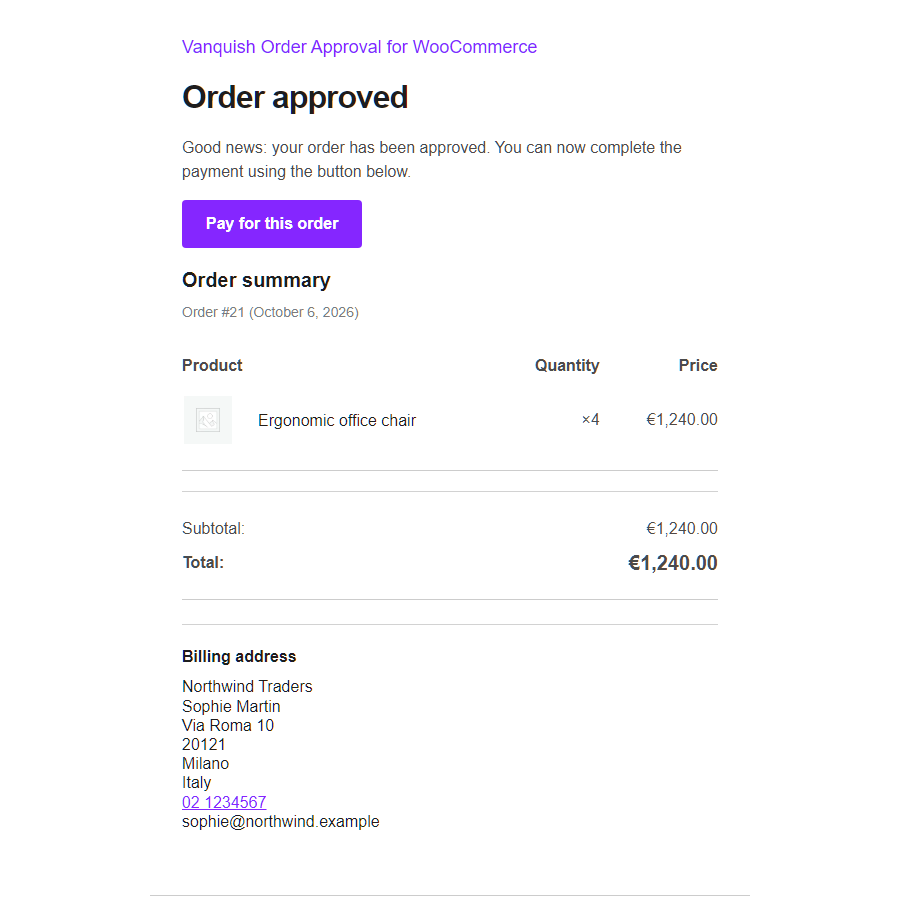
- Wait for approval, then pay — checkout asks for no payment at all. Once you approve the order, the customer gets an email with a payment link, and can also pay from their account. Ideal for quotes, B2B and wholesale, made-to-order and anything you price or confirm by hand.
It works with the block checkout and the classic checkout, with any payment method, and with HPOS (High-Performance Order Storage).
Free features
- Approval for every order, in either workflow: pay then wait, or wait then pay.
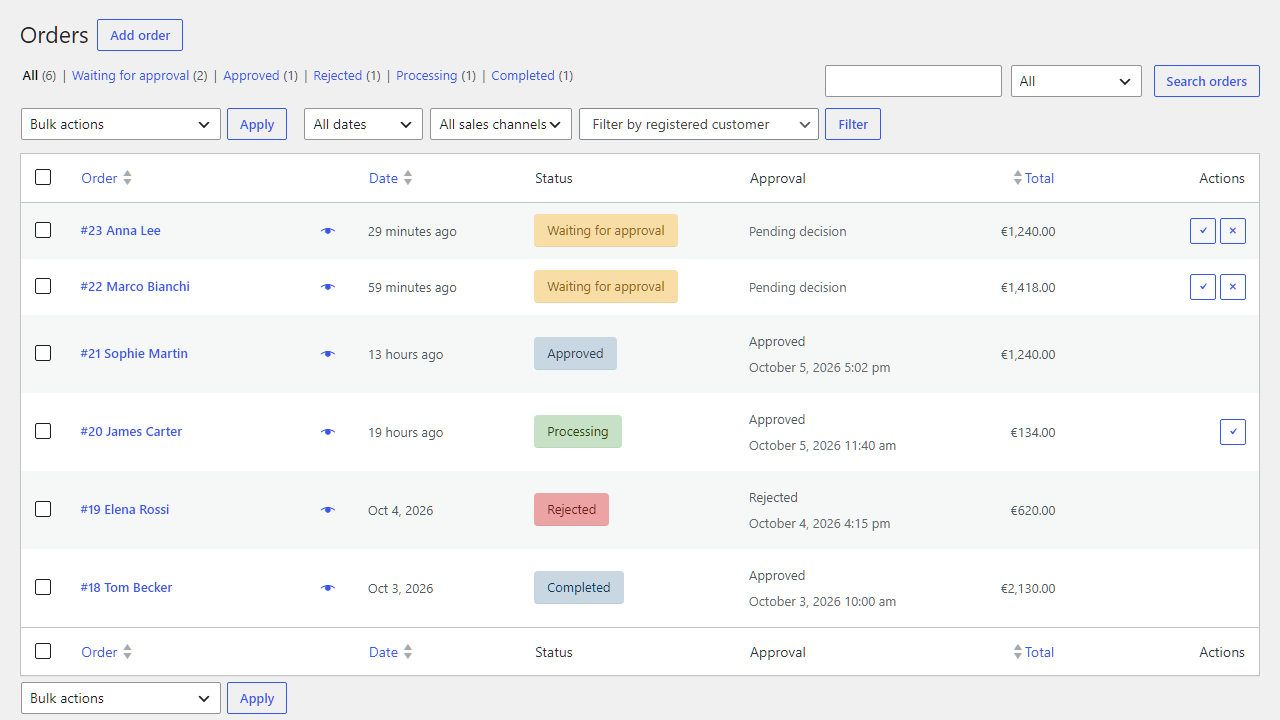
- Three order statuses: Waiting for approval, Approved, Rejected, with their own colours in the orders list.
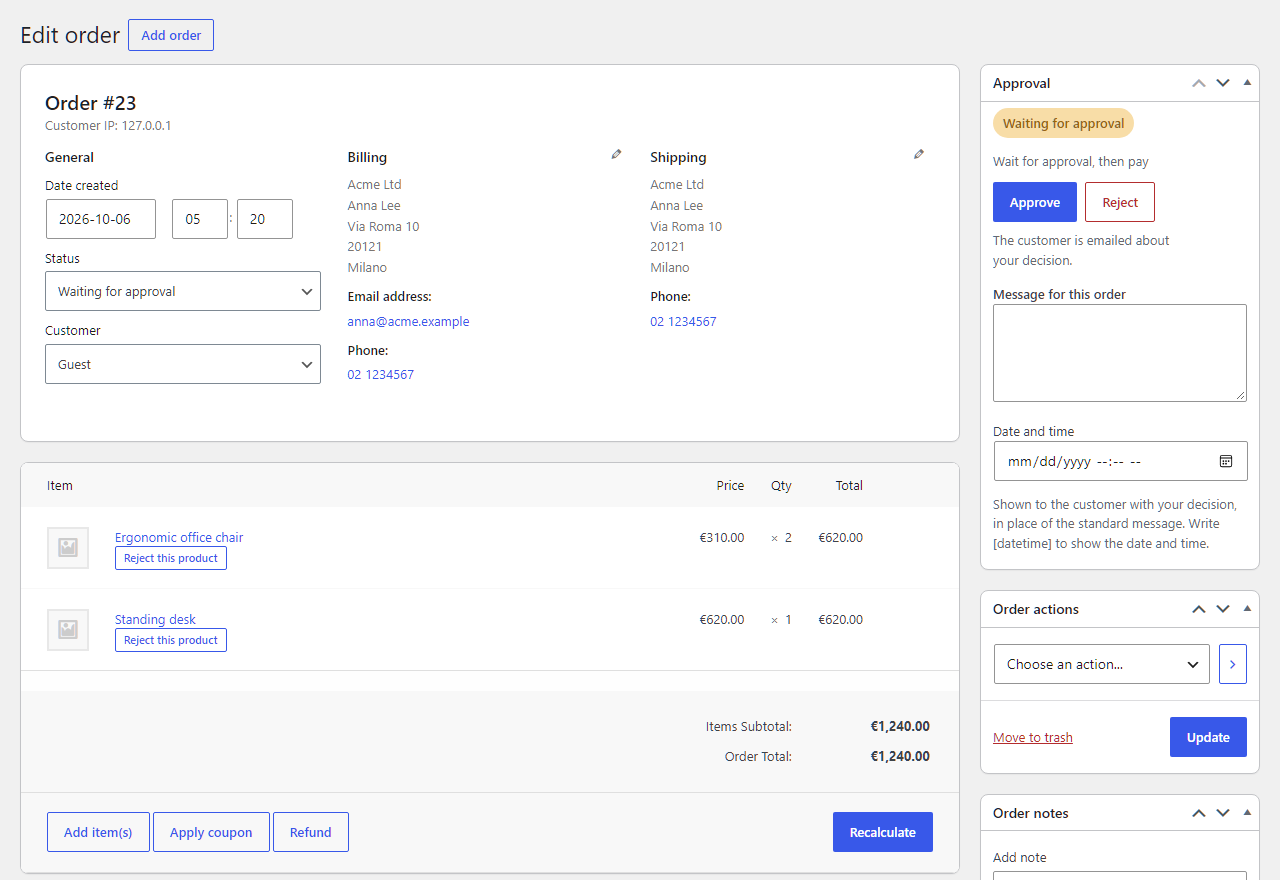
- An Approval box on the order screen: where the order stands, when it was decided, and Approve / Reject buttons.
- An Approval column, Approve / Reject buttons on each waiting order, and bulk actions in the orders list.
- An approval status box for the customer on the order received page and on the order in My account, with a timeline and a Pay button once an approved order can be paid. While the order waits, the box updates by itself when you decide — no reload needed.
- Four emails, managed in WooCommerce Settings Emails like any other: Order awaiting approval and Order approved (with a Pay button when there is something to pay) and Order rejected to the customer, Payment for an approved order to you. Your own “From” name and address for them, if you like.
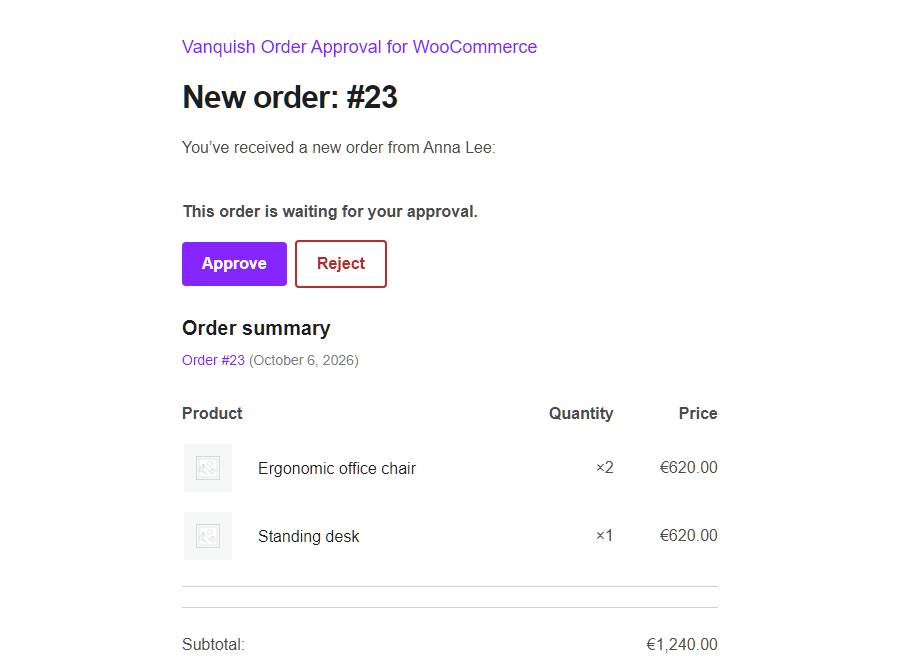
- A line in WooCommerce’s “New order” email telling you the order is waiting for your approval.
- Orders can still be edited while they wait.
- Stock held for the order while it waits, and put back when it is rejected; downloadable products unlocked only once the order is approved.
- Orders already placed keep their workflow if you change it later; orders you create by hand in the admin are left alone.
- Every text translatable; template overrides from your theme.
- Migrates automatically from the CodeCanyon plugin “WooCommerce Order Approval”: your settings are imported and your orders keep working, with nothing to convert.
Premium features
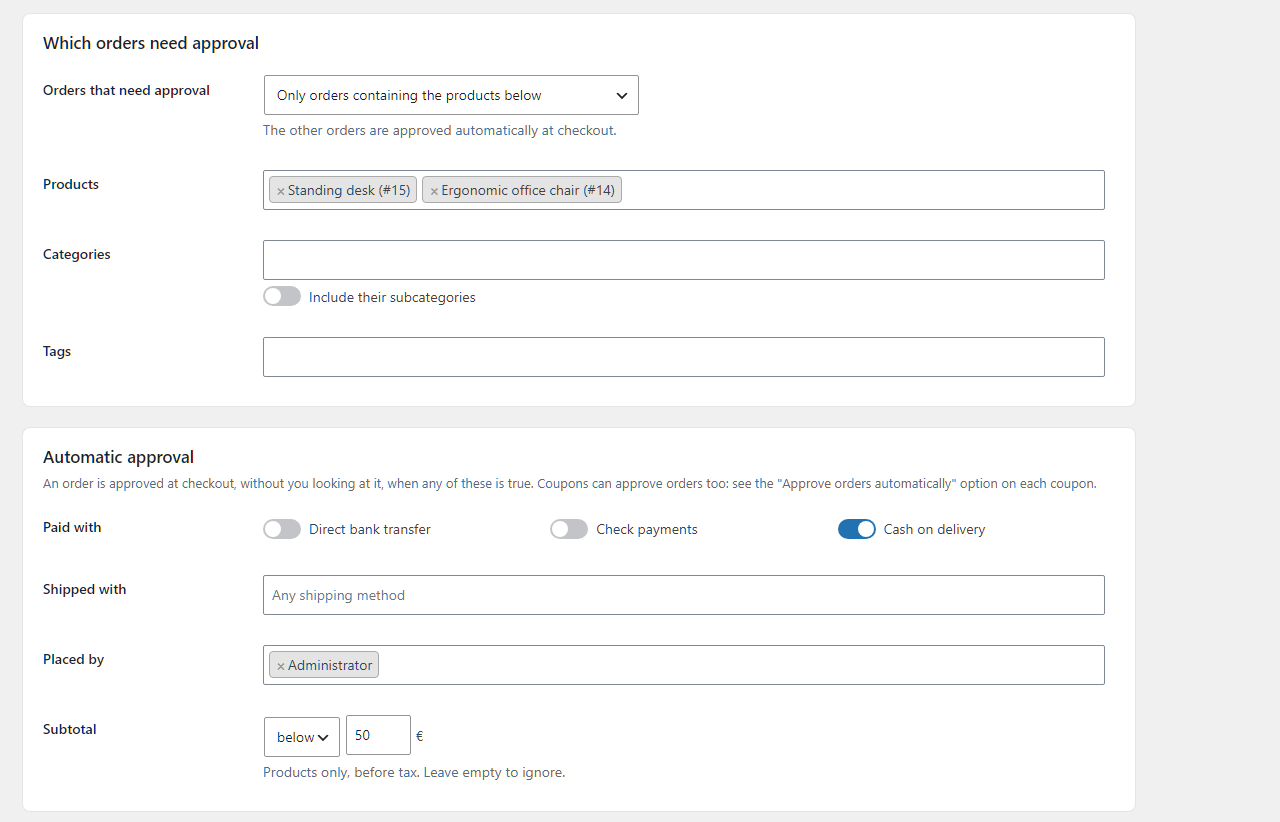
- Approval rules — ask for approval only for orders containing certain products, categories (with their subcategories) or tags, or for every order except those. The rest go straight through.
- Automatic approval — approve an order at checkout, without looking at it, when it is paid with a payment method you trust, shipped with a given method, placed by a customer with a given role, above or below an amount, or when it uses a coupon marked “approve automatically”.
- Approve from your inbox — Approve and Reject buttons in the “New order” email. Each link is signed, works once and expires, and opens a confirmation page rather than deciding on its own, so mail scanners cannot click it for you.
- Automatic cancellation — an approved order the customer has not paid in time is cancelled and its stock put back.
- Customer cancellation — let the customer cancel the order themselves for a while after it is approved.
- Refund on rejection — rejecting a paid order refunds it automatically through the payment method, when the method supports refunds.
- Reject single products — approve the order but not every product in it: the line stays, costs nothing, and the order total is recalculated. Approve it again and its price comes back.
- A time at checkout — let the customer choose a time for the order (same-day pick-ups and deliveries): earliest and latest time, a minimum notice, an “as soon as possible” choice, optional or required. Classic and block checkout.
- A message for each order — tell this customer something about your decision, with a date and time, in their approval box and in the email.
- Your own wording, in every language — rewrite the approval box and the email subjects, headings and messages, with placeholders such as the order number and the payment link, in each language of a WPML, Polylang or Falang site.
External services
The free version does not send any data to external services. Everything runs on your own site, and the emails go out through WooCommerce.
This plugin uses Freemius to manage licensing and updates for the premium version, and to offer an optional opt-in when you first activate it. Nothing is sent unless you opt in or activate a licence; if you do, Freemius receives your site URL, WordPress and PHP versions and your administrator email address, in order to deliver updates and support. See freemius.com, its terms and its privacy policy.
The premium version adds no external services of its own: refunds go through the payment method already installed on your site.
More WooCommerce plugins by Vanquish
- Vanquish Upload Files for WooCommerce – let customers upload files (even large ones) on the product, cart, checkout and order pages, for custom, personalized and print-on-demand products.
- Vanquish Shipping Tracking for WooCommerce – tracking numbers on orders and emails, with 1,600+ carriers and their logos, a direct tracking link and a Track button. No account needed.
- Vanquish Multiple Addresses for WooCommerce – give customers an address book: save multiple billing and shipping addresses and pick one at checkout.
- Vanquish Attach Me for WooCommerce – attach any file to any order or product, show it to the customer and send it with the order emails.
Screenshots
Installation
- Upload the plugin files to the
/wp-content/plugins/vanquish-order-approval-for-woocommercedirectory, or install the plugin through the WordPress plugins screen. - Activate the plugin through the ‘Plugins’ screen in WordPress.
- Make sure WooCommerce is installed and active.
- Choose your workflow under Order Approval Settings. From then on, every order placed at checkout waits for your decision.
FAQ
-
Which workflow should I choose?
-
Pay, then wait if you would normally take the order anyway and only want a chance to say no: the money is collected at checkout, and if you reject the order you refund it (Premium can do that for you). Wait, then pay if you need to confirm price, stock or feasibility first: nothing is charged until you approve, and the customer pays from the link in the “Order approved” email or from their account.
-
Does it work with the block checkout?
-
Yes. Both workflows work with the block checkout and with the classic
[woocommerce_checkout]shortcode. -
Does it work with my payment method?
-
Yes, with any of them. If orders paid with a particular method do not reach “Waiting for approval”, Order Approval Settings Advanced has other moments to assign the status at, for payment plugins that behave unusually.
-
Can the customer still pay later in “wait, then pay”?
-
Yes. An approved order shows a Pay button in the customer’s approval box and in My account Orders, and the “Order approved” email carries the payment link. With Premium you can cancel approved orders that are not paid within a time you choose.
-
Will the customer be charged twice, or receive confusing emails?
-
No. In “wait, then pay” the order goes straight to “Waiting for approval” without passing through “Processing”, so the customer never receives the “your order is being processed” email for an order you have not accepted yet, and nothing is charged until they pay the approved order.
-
What happens to stock?
-
Stock is taken out when the order is placed, as WooCommerce always does, so nobody else can buy the units you are deciding about. Rejecting the order puts it back.
-
Does it work with HPOS (High-Performance Order Storage)?
-
Yes, with HPOS and with the classic order storage.
-
I am migrating from the CodeCanyon “WooCommerce Order Approval” plugin. Do I lose anything?
-
No. The order statuses have the same names, so every order — waiting, approved, rejected, or long completed — keeps its status and history with nothing to convert. Your settings are imported automatically the first time the new plugin runs, and Order Approval Settings Import from the old plugin shows what was imported. The old plugin’s data is never changed or deleted, so you can always go back.
The two plugins drive the same statuses, so they cannot run together: while the old one is active the new one waits and says so. Deactivate the old one and everything carries on.
-
Can I change the wording the customer sees?
-
The plugin’s texts are translatable like any other plugin’s, and each email’s subject, heading and additional content are edited in WooCommerce Settings Emails. Premium adds a Texts screen to rewrite the approval box and the email messages, per language.
-
No. The premium package is the same plugin with more in it. Everything described above under “free features” works the same either way, and the settings you have already made are untouched by activating a licence.
-
There are monthly, yearly and lifetime plans, for one site up to twenty-five. The current prices are on the pricing page.
To order, install and activate the free version, then go to Order Approval Upgrade in your WordPress admin. The plans and a secure checkout, handled by Freemius, are right there, and the same screen walks you through activating Premium on your site.
-
Yes, and it is the best way to start. The free version on WordPress.org is the same plugin with fewer features: install it on your own site, with your own theme and payment methods, and check that the approval flow fits your checkout, your emails and the customer’s account pages before upgrading. Premium adds features on top of it, on the same foundations.
-
What happens if I uninstall the plugin?
-
Nothing of yours is removed: your settings and your orders, with their statuses, stay as they are, so reinstalling puts you back exactly where you were. Only the plugin’s scheduled events and caches go.
Reviews


Contributors & Developers
“Vanquish Order Approval – Approve & Reject Orders for WooCommerce” is open source software. The following people have contributed to this plugin.
Contributors

Translate “Vanquish Order Approval – Approve & Reject Orders for WooCommerce” into your language.
Interested in development?
Browse the code, check out the SVN repository, or subscribe to the development log by RSS.
Changelog
1.0.0
- First release, replacing the CodeCanyon plugin “WooCommerce Order Approval”.