

Description
TurkCDN rewrites the image addresses under wp-content/uploads to your TurkCDN zone. The first time an image is requested, TurkCDN pulls it from your site, stores it and serves it from the CDN from then on. Your files stay where they are.
- Every upload address on the page is rewritten: posts, pages, theme, srcset and background images.
- Works with WooCommerce out of the box: product, gallery and category images live in the uploads folder, so they come from the CDN too.
- Optionally serves JPG and PNG images as WebP or AVIF. GIFs keep their animation.
- Social sharing images (og:image) and site icons keep their original format so every platform can read them.
- Optional viewer: click to enlarge and hover to magnify, configured per size in the TurkCDN panel.
- Does not touch the admin area or your files. Deactivate the plugin and the addresses go back to normal.
You need a TurkCDN account. The free plan is enough to get started: turkcdn.com.
External services
This plugin connects your site to TurkCDN (https://turkcdn.com), an image CDN operated by TurkCDN. It does not work without a TurkCDN account.
- When the TurkCDN address is set, image addresses on your public pages point to TurkCDN, so visitors’ browsers load those images from TurkCDN. The browser sends the usual request data (IP address, user agent, referrer) to TurkCDN.
- The first time an image is requested, TurkCDN downloads it from your site’s uploads folder.
- When the viewer option is on, the bundled viewer script reads your zone’s display settings from your TurkCDN address (
turkcdn.json).
Nothing is sent while the TurkCDN address is empty. The plugin sends no data from the admin area.
- Terms of service: https://turkcdn.com/mesafeli-satis/
- Privacy policy: https://turkcdn.com/gizlilik/
Screenshots
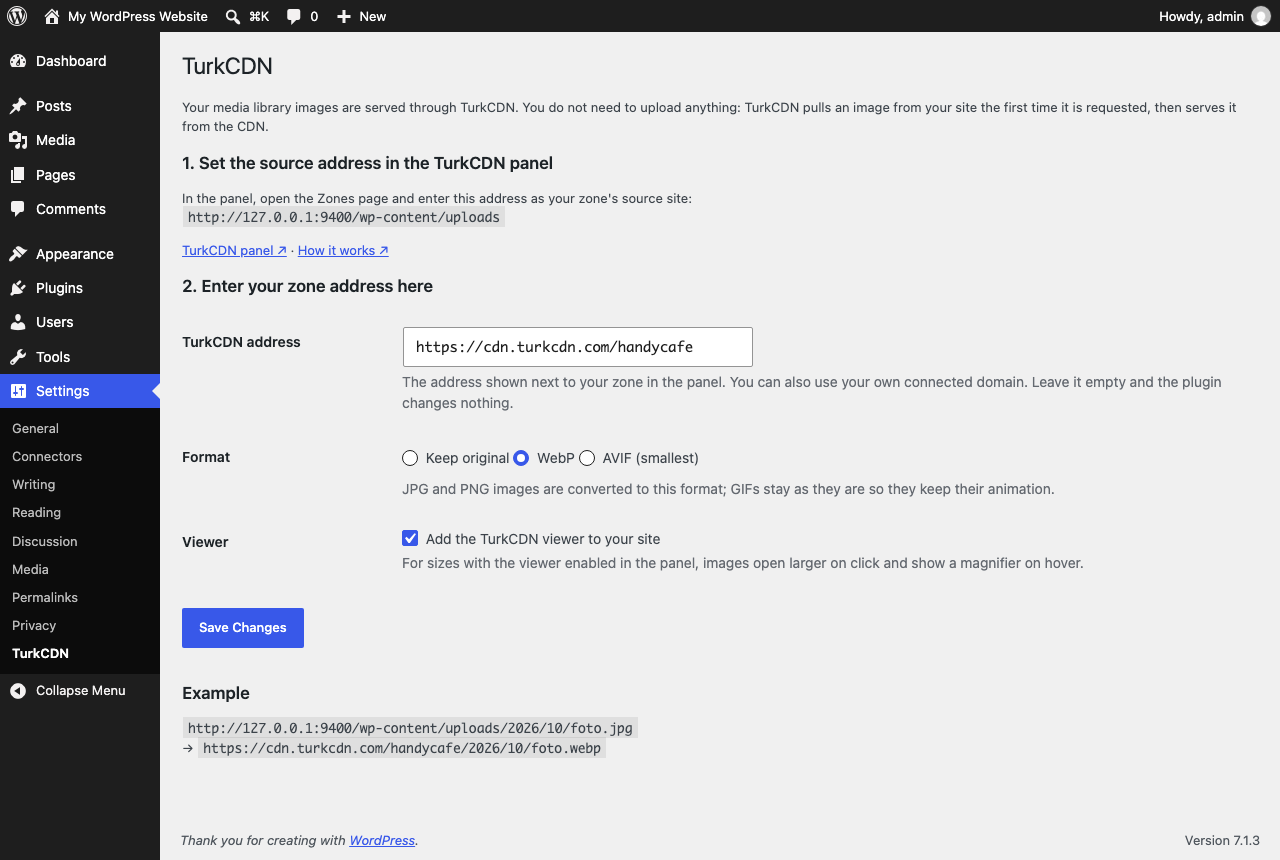
Installation
- Install and activate the plugin.
- Go to Settings > TurkCDN and copy the uploads address shown there.
- In the TurkCDN panel, open the Zones page and paste it as your zone’s source site.
- Back in Settings > TurkCDN, enter your zone address (for example
https://cdn.turkcdn.com/mystore) and save.
FAQ
-
I replaced an image but the old one still shows
-
TurkCDN does not ask your site for an image again once it has it. Delete that image in the TurkCDN panel; the new one is pulled on the next request.
-
My site has a security plugin or hotlink protection
-
TurkCDN requests come with the user agent
TurkCDN/1 (+https://turkcdn.com). Allow it. -
Can I use my own domain?
-
Yes. Connect a domain such as
img.mystore.comto your zone in the TurkCDN panel and enter it as the TurkCDN address in the plugin settings. -
What happens if I deactivate the plugin?
-
Image addresses go back to your own site immediately. Nothing in your database or media library is changed.
Reviews
There are no reviews for this plugin.
Contributors & Developers
“TurkCDN” is open source software. The following people have contributed to this plugin.
Contributors
Translate “TurkCDN” into your language.
Interested in development?
Browse the code, check out the SVN repository, or subscribe to the development log by RSS.
Changelog
0.2.0
- Plugin strings are now in English with a bundled Turkish translation.
- The viewer script is bundled with the plugin instead of loading from the CDN.
- Settings are removed on uninstall.
0.1.0
- First release.