

Description
ThemeREX Auto Dealer is a complete vehicle inventory plugin built for dealerships, classifieds sites, and automotive marketplaces.
It registers a trx_ad_listing custom post type that handles cars, trucks, motorcycles, boats, RVs, ATVs, and commercial vehicles in a single inventory. Every standard vehicle attribute — make, model, year, mileage, condition, fuel type, transmission, drivetrain, body style, color, price, and 30+ more — has first-class admin UI, taxonomies, REST endpoints, and Gutenberg/Elementor surfacing.
Free features
- Vehicle CPT with 10 specialised taxonomies (make, model, body style, fuel type, transmission, drivetrain, condition, color, vehicle type, features)
- Dealer CPT with logo, location, contact, and hours
- 16 Gutenberg blocks (Search Form, Vehicle Grid, Vehicle Card, Specs Table, Contact Form, Dealer Info, Single Listing, Media Slider, Specs Highlights, Similar Vehicles, Recently Viewed, Featured Carousel, Favorites List, Compare Link, Comparison Table, Map View)
- 17 Elementor widgets covering all the above + theme-builder conditions for “All Vehicles” / “All Dealers” (full list in the Elementor Widgets section below)
- 10 dynamic tags for Elementor — bind any text widget to VIN/Make/Model/Year/Mileage/Price/Fuel/Status/Gallery/Dealer
- 4 starter block patterns — inventory page, single vehicle, dealer landing, search hero
- AJAX-powered archive filters (price range, year range, mileage range, body style, fuel type, condition, dealer, status, featured, accident-free)
- Server-side aggregation cache with event-driven invalidation
- Custom DB table
wp_trx_ad_vehicle_specsfor sub-200ms search response on up to 5,000 listings - REST API endpoints:
/vehicles,/vehicles/{id},/dealers,/dealers/{id},/models?make=N,/search-options,/forms/submit,/leads,/vehicles/{id}/pdf - PDF spec sheet generation via Dompdf (free)
- QR code on listing edit screen via chillerlan/php-qrcode (free)
- Compare bar + favorites (localStorage, no login required)
- Recently viewed strip
- Similar vehicles widget (3-tier heuristic: body+condition make body alone)
- EV-specific fields (battery capacity, range, charge time)
- schema.org structured data — Car, Vehicle, Motorcycle, Offer, AutoDealer, BreadcrumbList, FAQPage
- SEO-plugin compatibility — Yoast, Rank Math, AIOSEO, SEOPress, The SEO Framework, AEO Optimizer, or standalone
- Lead capture forms — inquiry, test-drive, callback, finance, trade-in
- Auto-reply email to customer + dealer notification with merge tags
- Per-IP rate limit (3/hour/listing) to deter spam
/llms.txtAI-crawler discovery file (standalone mode)- WPML + Polylang i18n support
- Bulk admin actions (mark available, sold, reserved, coming soon, feature, unfeature)
- Quick-edit featured toggle
- Vehicle specifications panel covering 29 non-taxonomy spec fields
Pro Version
ThemeREX Auto Dealer Pro is a separate plugin, distributed from themerex.net, that runs alongside this free plugin (the free plugin is fully functional on its own and keeps running independently). The Pro plugin adds:
Multi-dealer marketplace
trx_ad_dealer+trx_ad_agentuser roles with curated capabilities- Data isolation — dealers see only their own listings + leads
- Per-listing analytics (views, calls, WhatsApp taps, inquiries) with cookie-debounced view tracking
- Dealer performance dashboard + dealer directory shortcode
- Social proof counters (X people viewed today)
- Dealer response-time badge
Lead CRM
trx_ad_leadCPT auto-captures every inquiry, call, WhatsApp tap, and test-drive request- 5-state status workflow (new contacted qualified closed_won/lost) with auto-logged transitions
- Internal notes with timestamps
- Per-dealer email notification routing (Reply-To customer)
- HMAC-SHA256 signed outbound webhooks
- CSV export with active list filters respected
Sales-driving features
- WooCommerce integration — reservation deposits + per-listing fees + paid featured listings (7/14/30-day tiers)
- Geo radius search + saved searches + daily email digest + Web Push notifications (VAPID-signed)
- Test-drive booking with calendar UI + per-dealer hours
- Price tracking + “Reduced by $X” badge + single-page sparkline
Inventory power tools
- CSV import + export with 3-mode duplicate handling (skip / update / replace)
- XML import + export
- Scheduled imports (WP-Cron)
- VIN decoder (NHTSA + bring-your-own paid API)
- AI listing description generator (bring-your-own OpenAI key)
- 4 marketplace feed adapters (Facebook Marketplace, AutoTrader, AutoScout24, Mobile.de) with per-dealer feed keys
- AEO/GEO optimization — agent-discoverable schema, AI-bot policy, sitemap variants
- Per-listing layout overrides (Gutenberg / Elementor / default)
- Custom field schema editor + frontend renderer + CSV bridge
- Multisite network-wide settings
Full details, screenshots, and FAQ: themerex.net/trx-auto-dealer. The Pro plugin installs alongside the free one; the free plugin stays installed — Pro hooks into its registered modules via do_action( 'trx_ad_register_modules' ), so deactivating Pro safely reverts to free behavior with no data loss.
Why a custom DB table?
Performance. WordPress’s postmeta table indexes by post_id + meta_key but not by meta_value, so a filter like “Toyota Camry, 2018-2022, under $25k, under 60k miles” forces ten cross-joins against postmeta — fast at 50 listings, painfully slow at 5,000.
This plugin maintains a denormalised wp_trx_ad_vehicle_specs table with one row per listing and ~55 indexed columns. The taxonomies remain the source of truth (you can change a make’s slug and it updates everywhere); the specs row is rebuilt automatically by a save_post_trx_ad_listing hook. Search queries hit the specs table directly via a single SQL statement.
The table is rebuilt idempotently on plugin upgrade and on demand via a re-sync helper.
Privacy
The free plugin does NOT phone home. No telemetry, no opt-in dialogs, no remote analytics.
The lead capture form sends submissions via wp_mail() to the configured admin email — same channel WordPress uses for password resets. Outbound HTTP requests from the free plugin: none by default. If you enable a map provider, map tiles and geocoding requests occur as documented in the “External services” section below; with the default “Disabled” setting no request ever leaves your site.
The Pro plugin adds VIN decoder (sends VIN to NHTSA over HTTPS, opt-in per request), AI description generator (sends a prompt to OpenAI’s API using YOUR API key, opt-in per request), and outbound webhook (sends lead data to a customer-configured URL, opt-in per webhook). All are off by default.
Elementor Widgets
Every plugin feature is available as a native Elementor widget — no shortcode wrappers. The 17 widgets ship in the free plugin under an “Auto Dealer” category in the Elementor panel:
- Vehicle Search Form — AJAX search with configurable filter fields
- Vehicle Grid — filterable, paginated inventory grid
- Vehicle Card — single vehicle teaser card with type-ahead vehicle picker
- Single Listing — full vehicle detail layout for theme builders
- Vehicle Specs Table — complete specification table
- Vehicle Specs Highlights — configurable key-specs strip
- Vehicle Media Slider — gallery/video slider with thumbnails
- Featured Carousel — featured vehicles carousel
- 360° View — interactive exterior spin viewer
- Contact Form — inquiry / test-drive / callback / finance / trade-in forms
- Listing Form — frontend vehicle submission form
- Dealer Info — dealer profile card (logo, contact, hours, map link)
- Dealer Directory — dealer grid with listing counts
- Map View — vehicle/dealer map (Leaflet or Google Maps)
- Favorites List — visitor’s saved vehicles
- Compare Link — header-ready compare counter link
- Comparison Bar — sticky compare bar with slide-in comparison table
Plus 10 dynamic tags (VIN, Make, Model, Year, Mileage, Price, Fuel, Status, Gallery, Dealer) for binding any Elementor text/image widget to vehicle data, and theme-builder display conditions for vehicle and dealer archives.
Third-party assets and licenses
Bundled vendor packages, all GPL-compatible:
- Dompdf (LGPL 2.1) — PDF generation for vehicle spec sheets
- chillerlan/php-qrcode (MIT) — QR code rendering on listing edit screen
- Masterminds/html5 (MIT) — HTML5 parsing helper used by Dompdf
- phenx/php-font-lib (LGPL 2.1) and phenx/php-svg-lib (LGPL 3.0) — Dompdf font/SVG support
- sabberworm/php-css-parser (MIT) — CSS parsing helper used by Dompdf
- composer/autoload — Composer autoloader (MIT)
All PDF/QR/search processing happens on your server. The optional map features contact external services as documented below.
External services
This plugin can connect to the following external services. None of them are contacted unless you enable the corresponding feature; no service is used with the default settings.
OpenStreetMap Nominatim (geocoding)
Used to convert a dealer’s street address into map coordinates so the dealer can be shown on a map. Contacted only when you set Settings Maps Map Provider to “OpenStreetMap (Leaflet)”: when a dealer is saved without coordinates, the dealer’s address (street, city, state, postcode, country) and your site URL (sent as the User-Agent, as required by Nominatim’s usage policy) are sent to nominatim.openstreetmap.org. Results are cached for 30 days. No visitor data is ever sent.
Service by the OpenStreetMap Foundation: Nominatim usage policy, OSMF privacy policy.
OpenStreetMap tiles (map display)
When the OpenStreetMap provider is enabled, map images (tiles) are loaded in the visitor’s browser from tile.openstreetmap.org, which receives the visitor’s IP address and the map area being viewed, as with any embedded map.
OSMF Tile Usage Policy, OSMF privacy policy.
Google Maps Platform (map display and geocoding)
Contacted only when you set Map Provider to “Google Maps” and enter your own Google API key. The Maps JavaScript API is loaded in the visitor’s browser (Google receives the visitor’s IP address and map interactions), and dealer addresses are sent to the Google Geocoding API with your API key when a dealer is saved without coordinates.
Google Terms of Service, Google Privacy Policy.
Screenshots
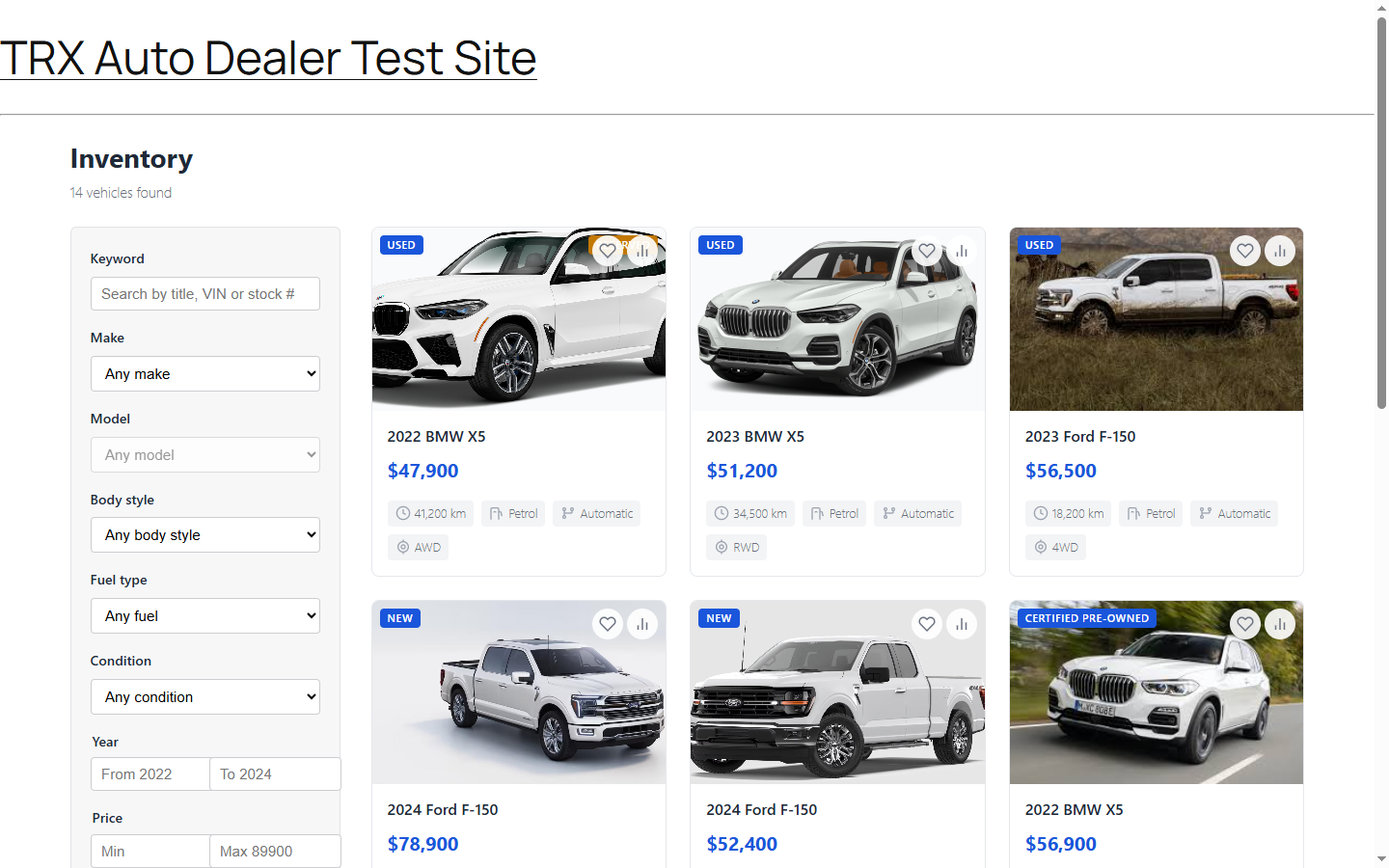
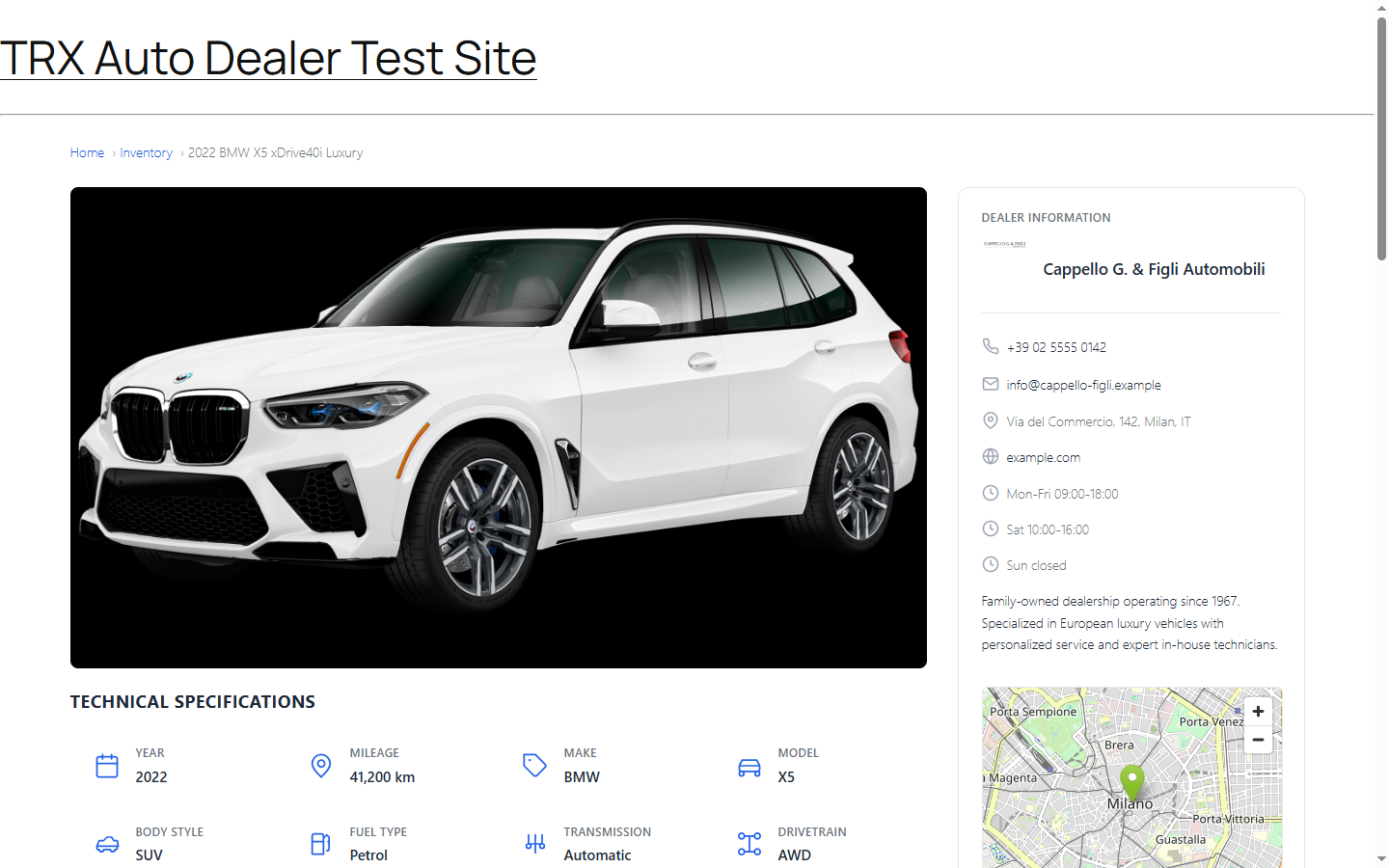
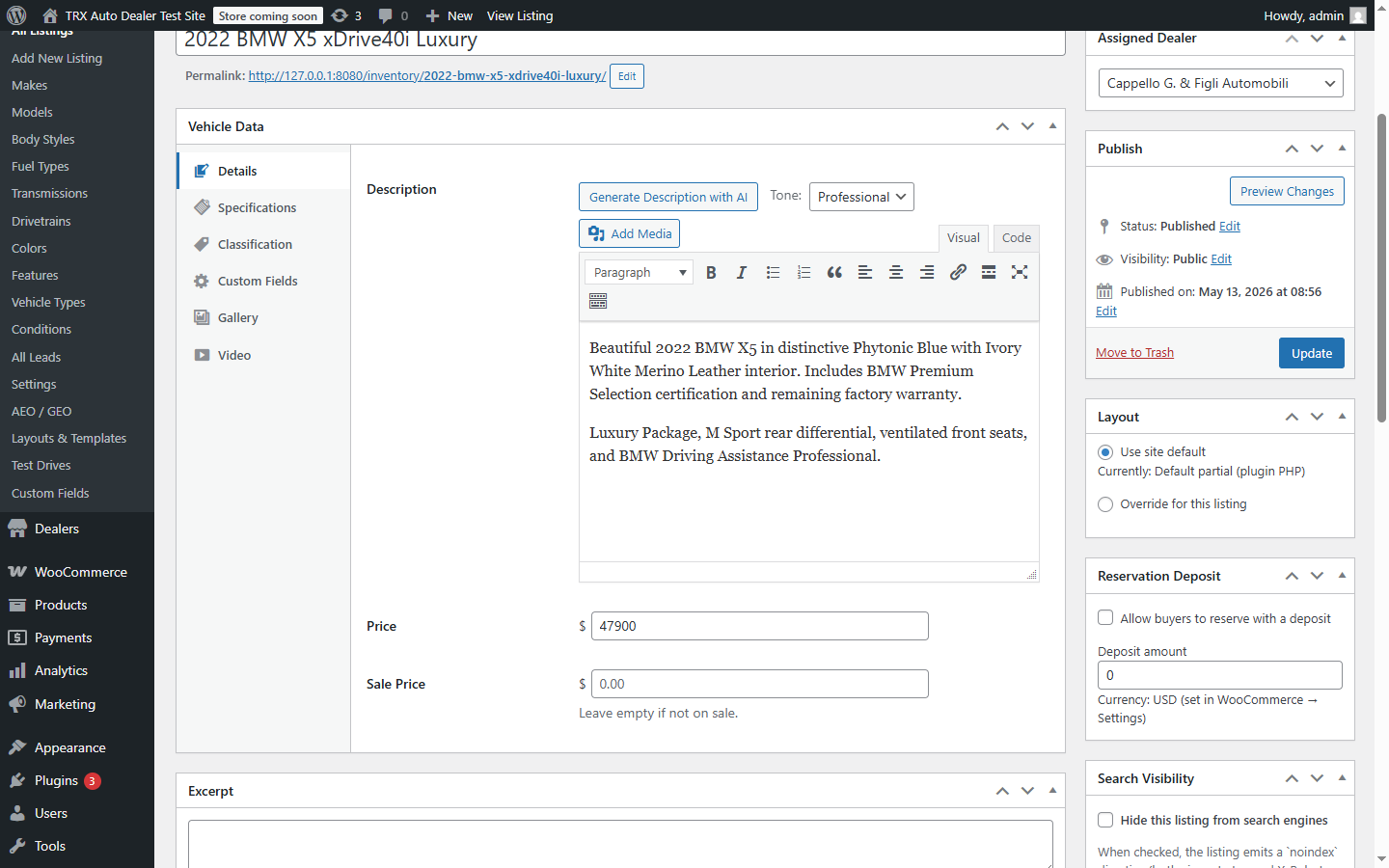
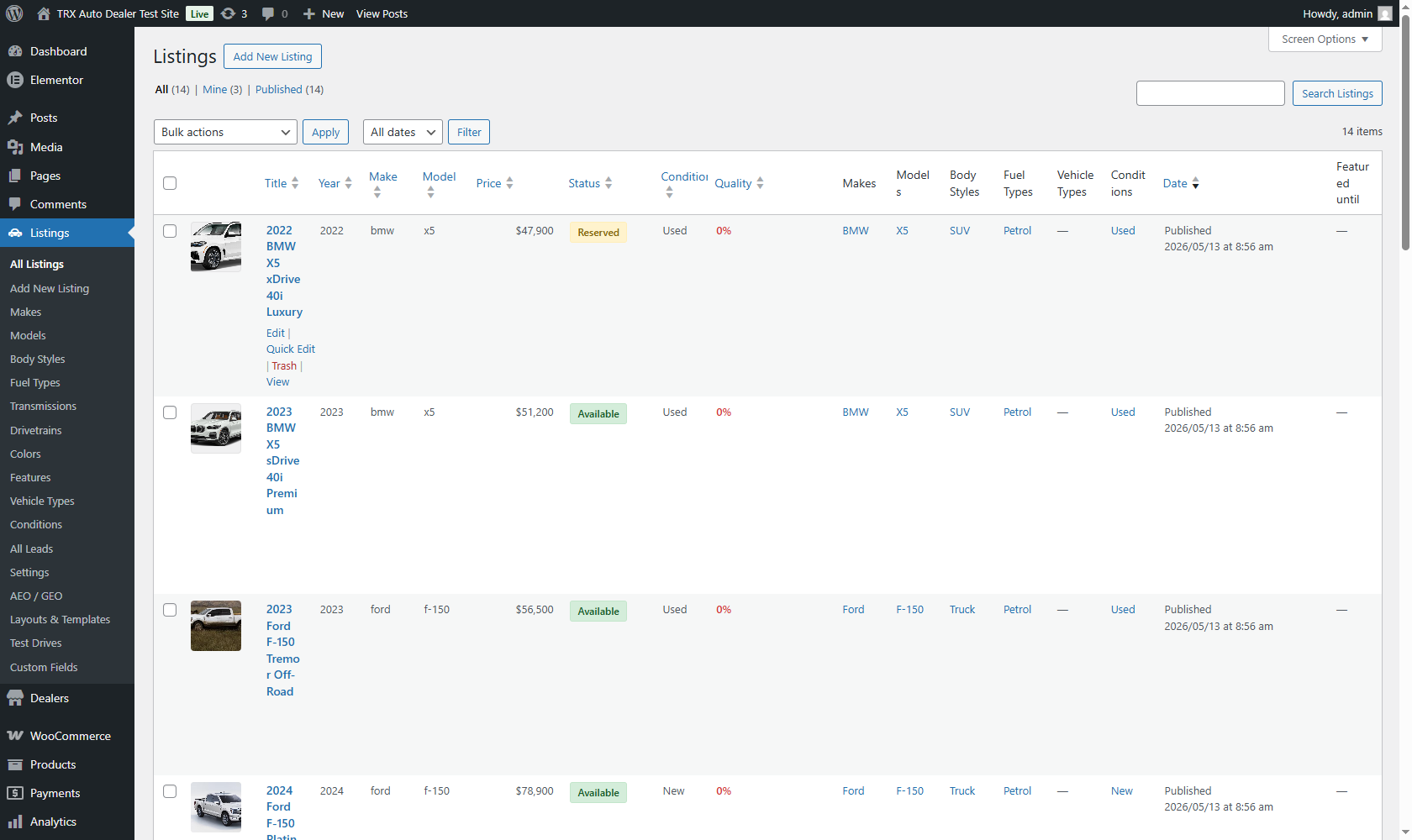
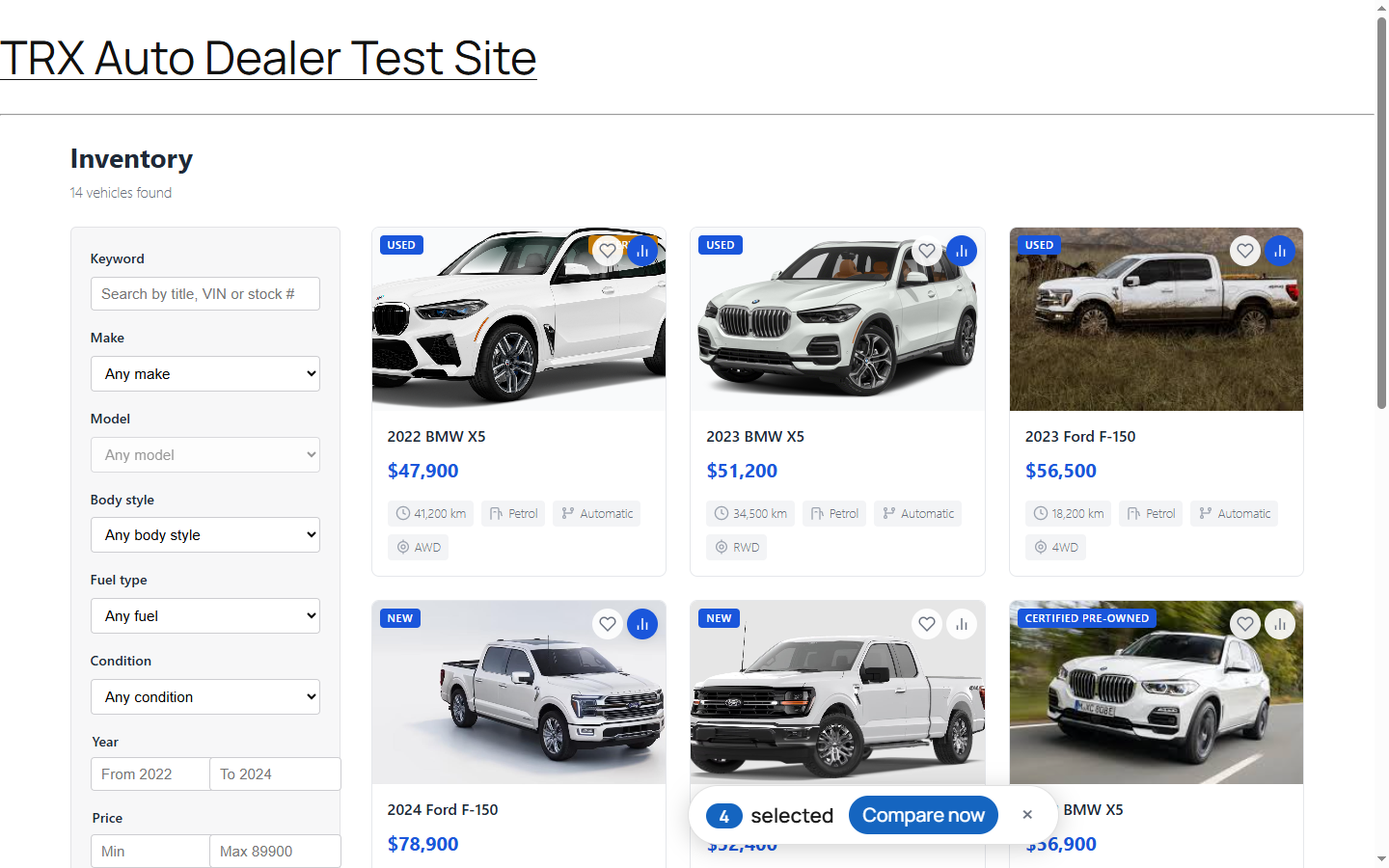
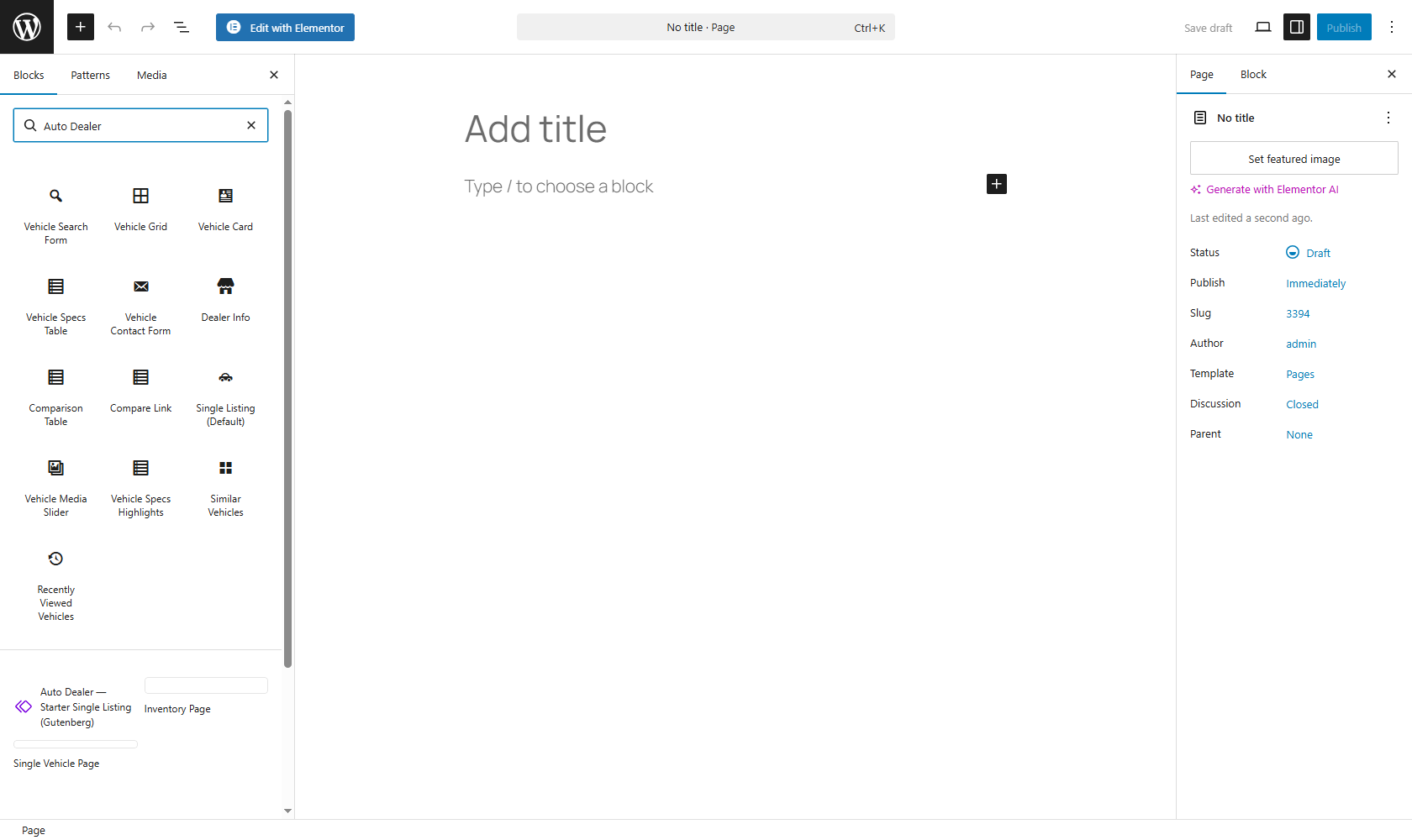
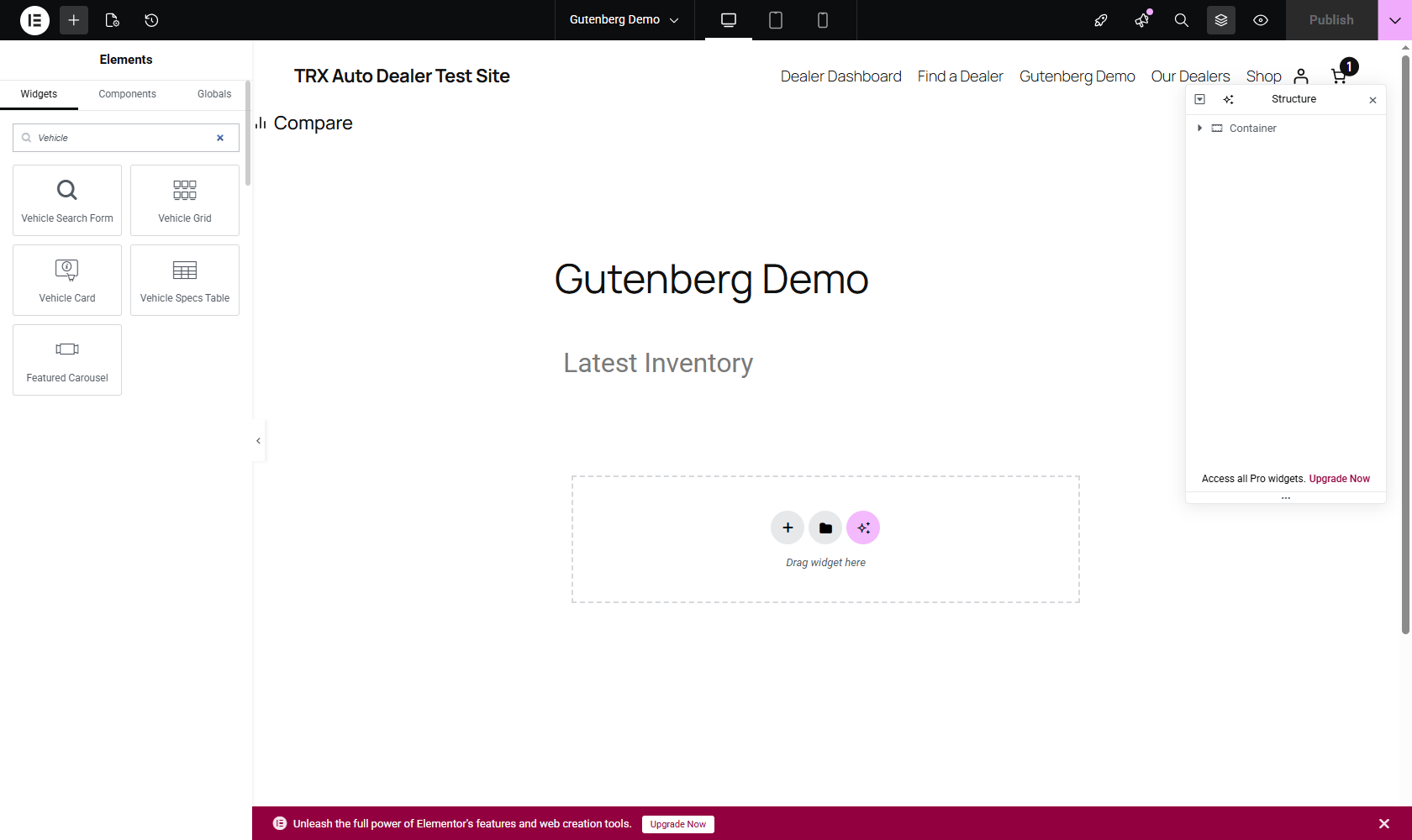
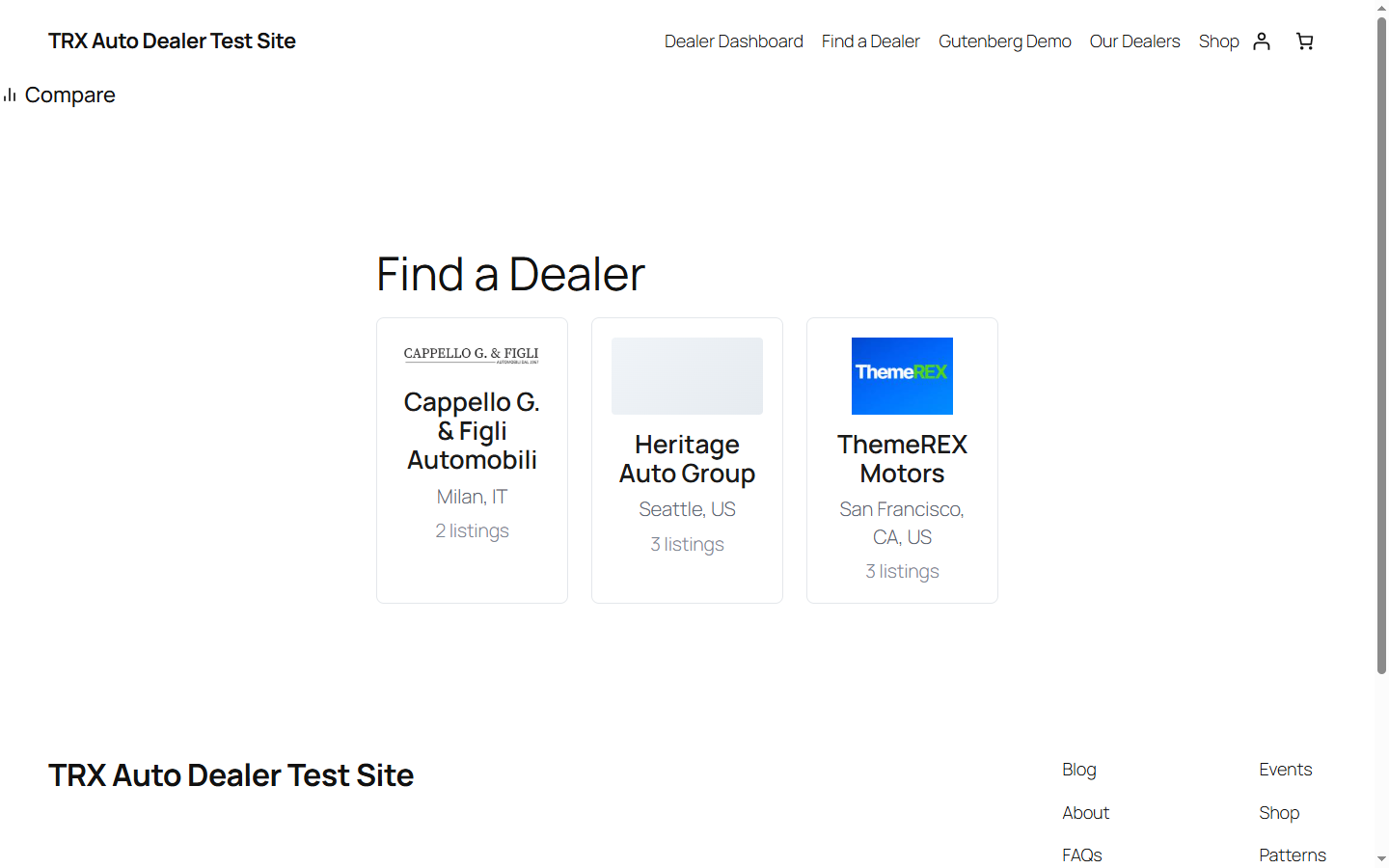
Blocks
This plugin provides 10 blocks.
- Dealer Info
- Comparison Table
- Map View
- Vehicle Card
- Featured Carousel
- Vehicle Grid
- Favorites List
- Contact Form
- Specs Table
- Search Form
Installation
- Upload the plugin zip via
Plugins → Add New → Upload Plugin, or extract intowp-content/plugins/. - Activate ThemeREX Auto Dealer through the Plugins screen.
- Visit
Listings → Settingsto configure currency, units, and per-page count. - Add a dealer at
Listings → Dealers → Add New. - Add vehicles at
Listings → Add New. Fill in the Vehicle Data meta box on the right side of the edit screen. - Build your inventory archive — drop the Search Form and Vehicle Grid blocks onto a page (Gutenberg) or use the equivalent Elementor widgets.
For multi-dealer marketplaces and the full feature set, install ThemeREX Auto Dealer Pro alongside the free plugin.
FAQ
-
Does this work with my theme?
-
Yes. The plugin ships its own templates for archive and single-listing screens, and falls back to your theme’s
single.php/archive.phpif you’ve overridden it. UseListings → Settings → Layoutsto pick between the plugin’s default, Gutenberg, or Elementor as your single-listing layout. Custom theme templates can be dropped intoyour-theme/trx-auto-dealer/and the plugin’s template loader will pick them up (WooCommerce-style override system). -
Can I import my existing inventory?
-
The Pro plugin includes CSV and XML importers with 3-mode duplicate handling (skip / update / replace). The free plugin can import via WP All Import or any third-party tool by writing to the
trx_ad_listingpost type and the relevant taxonomies — the specs table syncs automatically. -
Does it support electric vehicles?
-
Yes. Battery capacity (kWh), electric range (mi/km), and charge time are first-class fields with their own admin UI section. The EV cost estimator computes annual electricity cost and cost/km based on your local rates.
-
Does it work with WooCommerce?
-
The free plugin runs fine alongside WooCommerce but doesn’t integrate with it — vehicles are NOT WC products. The Pro plugin adds optional WC integration for taking refundable deposits and charging per-listing fees in marketplace mode.
-
Multilingual support?
-
Full WPML and Polylang support at equal depth. The
wpml-config.xmlshipped with the plugin tells WPML which fields are translatable; Polylang’s auto-detection covers the same cases via the same hooks. -
GDPR / privacy compliance?
-
The free plugin doesn’t collect or transmit any user data. Lead form submissions go to your own email via
wp_mail(). No cookies are set by the plugin except for the recently-viewed-vehicles strip (sessionStorage, expires when the user closes the tab — no server-side persistence) and the optional geo-radius prompt in Pro (15-minute expiry, opt-in). -
Where do search filters get their data from?
-
The plugin maintains a
wp_trx_ad_vehicle_specscustom table — one row per listing, ~55 columns indexing every searchable attribute. Filters run a single SQL query against this table instead of cross-joiningpostmeta. This makes “Toyota Camry, 2018-2022, under $25k, under 60k miles” fast at 5,000 listings; standard WP_Query would crawl at that scale. -
I changed my theme and search results look wrong.
-
Your theme may be intercepting the
trx_ad_listingarchive. TryListings → Settings → Templatesand toggle between the plugin’s default and your theme’s template. If you’ve added template overrides inyour-theme/trx-auto-dealer/, those take precedence — remove or fix them. -
Do I need any other plugins?
-
No required dependencies. Optional integrations: Elementor (for the widget set), Yoast SEO / Rank Math / AIOSEO / SEOPress / TSF / AEO Optimizer (for schema-piece coordination — the plugin works fine standalone), WooCommerce (Pro-only, for deposits/fees), WPML or Polylang (for multilingual).
-
Where is support?
-
- Community support: WordPress.org plugin forum.
- Premium support (priority response): included with the separate Pro plugin from themerex.net.
Reviews
There are no reviews for this plugin.
Contributors & Developers
“ThemeREX Auto Dealer” is open source software. The following people have contributed to this plugin.
Contributors
Translate “ThemeREX Auto Dealer” into your language.
Interested in development?
Browse the code, check out the SVN repository, or subscribe to the development log by RSS.
Changelog
1.0.13 — 2026-08-18
- Added: bundled translations for 8 locales — Spanish (es_ES), Italian (it_IT), German (de_DE), French (fr_FR), Russian (ru_RU), Ukrainian (uk), Portuguese (pt_PT), and Brazilian Portuguese (pt_BR). Covers the full catalog: admin, frontend, widgets, and the block editor.
- Fixed: block-editor strings now load translations — the editor script’s JED catalogs are registered via
wp_set_script_translations(), and the translation template now includes the editor’s JavaScript strings.
1.0.12 — 2026-08-11
Changes requested by the WordPress.org plugin review (round 5).
- Removed: the bundled Select2 library. Select2 has published no stable release after 4.0.13 (its only newer release is the 4.1.0-rc.0 release candidate), so rather than ship an outdated or pre-release library the plugin no longer bundles it at all. The admin taxonomy pickers on the vehicle edit screen now use native WordPress multi-select fields, and the Make Model cascade runs on plain JavaScript.
1.0.11 — 2026-08-03
Changes requested by the WordPress.org plugin review (round 4).
- Changed: bundled Select2 library downgraded from the 4.1.0-rc.0 release candidate to the latest stable release, 4.0.13.
- Changed: every shortcode callback and the single-listing content filter now apply
wp_kses()against the plugin’s HTML allowlist at thereturnstatement, so the escaping of returned markup is explicit at the callback boundary.
1.0.10 — 2026-07-27
Changes requested by the WordPress.org plugin review (round 3).
- Changed: the dashboard listing-delete link now uses a fixed nonce action, so the handler verifies the nonce before reading any other request parameter; the listing ID is validated afterwards and per-listing authorization is enforced separately via
current_user_can( 'delete_post' ). - Changed: every remaining superglobal read is sanitized in the same expression as the read (
map_deep()/array_map()overwp_unslash()); no sanitization-related PHPCS exemptions remain anywhere in the plugin. - Changed: the generated appearance CSS is additionally passed through
wp_strip_all_tags()beforewp_add_inline_style()as defense in depth (all values were already sanitized as hex colors / clamped integers at save time).
1.0.9 — 2026-07-20
Changes requested by the WordPress.org plugin review (round 2).
- Changed: every HTML fragment the plugin renders is now escaped at the point of output with
wp_kses()against an explicit allowlist — no escaping exemptions remain outside binary/plain-text download streams. - Changed: all admin settings-tab and quick-edit JavaScript moved into the enqueued
admin.jsbundle; PHP passes data only viawp_localize_script(), and no script bodies are composed in PHP. - Changed: the frontend print button and dashboard delete confirmation now use data attributes handled by the enqueued frontend script instead of inline
onclickhandlers. - Changed: the “Pro Version” admin page is now purely informational — it links to the separately distributed Pro plugin’s page and contains no pricing, checkout, or locked-looking interface elements. The blurred leads preview screen and disabled per-listing-layout controls were removed entirely.
- Changed: meta-box section save handlers each re-verify the save nonce independently, and the frontend listing-delete handler verifies its nonce before reading any request parameter.
- Changed: uninstall no longer rewrites the core roles option manually; it uses
remove_role()and busts the object cache. - Changed: bundled license files ship with a
.txtextension, and internal build tooling is excluded from the distributed archive.
1.0.8 — 2026-07-13
Changes requested by the WordPress.org plugin review.
- Changed: removed the “Pro” badge from the Maps and Taxonomies settings tabs — both features are and always were fully functional in the free plugin; the label was misleading.
- Changed: dealer-address geocoding now runs only when a map provider is actively selected. With maps disabled (the default) no request ever leaves your site. The services used are documented in the new “External services” readme section.
- Changed: all admin and widget styling/scripts now load through enqueued files or wp_add_inline_script/style — no more raw script/style tags in page output.
- Changed: JSON-LD structured data is emitted with escaped slashes so listing content can never break out of the script context.
- Updated: dompdf PDF library 2.0.8 3.1.5 (latest, includes upstream security fixes).
1.0.7 — 2026-07-11
Fixes found while building the public demo site.
- Fixed: PDF spec sheet generation failed with a “Class not found” error on every distributed build — the dependency-isolation step (PHP-Scoper) did not rewrite php-font-lib’s dynamically built class names, so loading any TrueType font (all PDFs use DejaVu Sans) crashed. The build now patches the three affected call sites, and the release gate renders a real PDF through the shipped files before a zip can ship.
- Fixed: bulk actions (“Mark as Sold” etc.) and quick-edit on the vehicle list table updated only the internal search index, not the vehicle itself — so the change silently reverted on the next save and status-dependent features (like the Pro Reserve button) did not follow. Both now update the vehicle and re-index it.
- Added: the dealer card (Dealer Info block/widget and Dealer Directory widget) now links to the dealer’s own page — clickable name and logo plus a “View Dealer Page” button. Previously there was no way to reach a dealer’s page from these widgets. The link can be switched off per widget, and hides itself when the card is shown on that dealer’s own page.
1.0.6 — 2026-07-05
Bug-fix release — first fixes from real-server testing on a block theme (WordPress 7.0, Twenty Twenty-Five).
- Fixed: theme mobile navigation (hamburger menu) did not open on plugin pages with block themes — the script-module import map is now printed correctly on inventory and single-listing pages.
- Fixed: the FEATURED badge on listing cards rendered underneath the favorite/compare buttons — badges now stack next to the condition badge, clear of the buttons.
- Fixed: the compare page showed the “Compare Vehicles” heading twice.
- Fixed: the single-listing spec table printed drivetrain acronyms as “Awd” instead of “AWD”.
- Fixed: the compare bar button rendered “Comparenow” without a space.
- Fixed: archive filters did nothing on sites with Plain permalinks — applying a filter never narrowed the results and left a broken URL; filters now work in both AJAX and no-JS modes regardless of permalink structure.
- Added: a “Delete all data on uninstall” toggle under Settings -> Maintenance — previously the uninstall cleanup opt-in existed but had no way to enable it.
- Fixed (accessibility): the RESERVED/PENDING status badges and the FEATURED badge did not meet WCAG AA color contrast; the amber palette was adjusted (darker amber for status badges, dark text on the featured badge).
- Packaging: rebuilt the distribution autoloader — the previous zip could fail to activate with a “class not found” fatal error.
1.0.5 — 2026-06-19
Bug-fix release — second round of external-tester UAT fixes (frontend, theming, dealer pages, Elementor).
- Fixed: Custom Fields settings tab — the “Add Field” button and the per-row remove button now work, and added fields save and persist.
- Fixed: clicking the main image on a single listing now opens an enlarged lightbox with previous/next controls plus arrow-key and Escape navigation.
- Fixed: the favorites heart now fills (instead of turning the whole button into a red disc) and shows a brief confirmation toast.
- Fixed: the mobile filter drawer now opens above sticky theme headers, has a clearly visible close button, and closes automatically after you apply a filter.
- Fixed: the Appearance “Primary color” now applies to buttons, links, form fields, and the compare bar — not just the condition badge.
- Fixed: single-listing / dealer photo-gallery navigation arrows now sit over the image (they were misplaced below it) and render correctly even when Elementor is active.
- Fixed: the Elementor “Dealer Info” and “Dealer Map” widgets now render on a published page instead of appearing blank outside the editor.
- Fixed: dealer WhatsApp numbers typed with spaces, dashes, or parentheses are now saved (previously silently discarded); the dealer page now shows a “View on map” link when only a street address (no coordinates) is set.
- Fixed: inventory archive pagination — pages beyond the first showed “No vehicles found”; all pages now display their listings.
- Fixed: saving a settings tab now shows a “Settings saved.” confirmation.
- Fixed: the comparison page no longer scrolls sideways on phones (the wide table scrolls within its own box).
- Fixed (accessibility): the listings results area is now a labelled region with a screen-reader heading and a live result count; zero axe-core violations across the main pages.
- Fixed (RTL): card badges and action buttons now mirror correctly in right-to-left languages.
- Fixed (performance): gallery images now declare their dimensions to prevent layout shift.
1.0.4 — 2026-06-19
Bug-fix release — first fixes from external-tester UAT (block themes + Plain permalinks).
- Fixed: block themes (e.g. Twenty Twenty-Five) no longer show the “Theme without header.php is deprecated” notice on the inventory archive, single-listing, and dealer pages.
- Fixed: the
/inventory/archive now renders listings (not the blog feed) on sites using “Plain” permalinks. - Fixed: uninstall now reliably removes the Auto Dealer custom roles even on hosts with a persistent object cache.
- Fixed: breadcrumb structured data no longer emits a PHP 8.1 “null array offset” deprecation in standalone schema mode.
- Added: deactivating the free plugin while Auto Dealer Pro is active is now blocked, with a clear prompt to deactivate Pro first.
1.0.3 — 2026-06-03
Version-sync release. No functional changes to the free plugin; released in lockstep with Pro 1.0.3 (which corrects the bundled sample-import files and adds importer enum-alias tolerance).
1.0.2 — 2026-06-03
Bug-fix release.
- Fixed: inventory archive AJAX (live result count, cascading makemodel dropdown, facet narrowing) returned 404 on sites using “Plain” permalinks because the REST URL was built with a second “?” separator. Pretty-permalink sites were unaffected.
1.0.1 — 2026-06-03
Maintenance release.
- Fixed: editor fields and marketplace feeds no longer render blank for listings whose data lives only in the denormalized specs table (post meta now falls back to the specs column).
- Fixed: vehicle attribute acronyms (SUV, CPO, AWD/FWD/RWD, 4WD, EV, …) now display fully upper-cased on the compare table instead of “Suv”/”Cpo”.
- Fixed: Favorites/Compare toggle buttons now expose aria-pressed state and use present-tense (“Add to / Remove from”) accessible labels.
- Fixed: cleared the WP 6.7+ early-translation (_load_textdomain_just_in_time) notice from the vehicle-data meta box.
1.0.0 — 2026-05-11
Initial public release.
- Vehicle + Dealer custom post types with full admin UI
- 10 specialised taxonomies + 13 Gutenberg blocks + 15 Elementor widgets
- Custom DB table for sub-200ms search at 5,000-listing scale
- Schema.org structured data with 7 SEO-plugin compatibility modes
- Lead capture with auto-reply + dealer notification
- PDF spec sheet generation
- WPML + Polylang i18n
- Free + Pro split with Pro plugin available separately