
Description
NDIS Provider Review is an independent directory where Australian NDIS participants, families and support coordinators find and compare disability support providers.
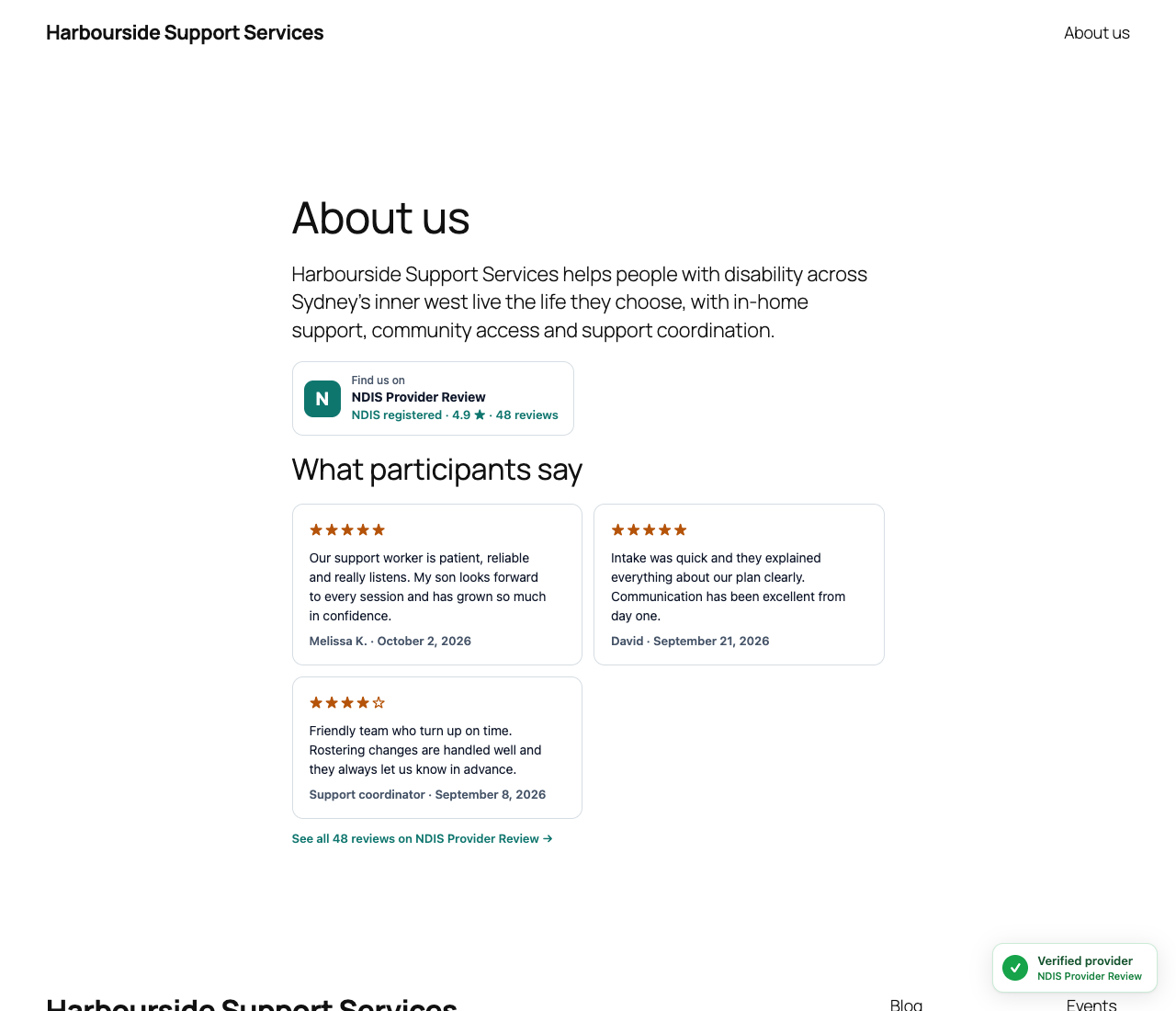
TrustCard lets an NDIS provider show their listing on their own website. Participants see at a glance that you’re listed, whether you’re NDIS registered, your rating and what people say about you. One click takes them to your full public profile.
Three widgets
- TrustCard
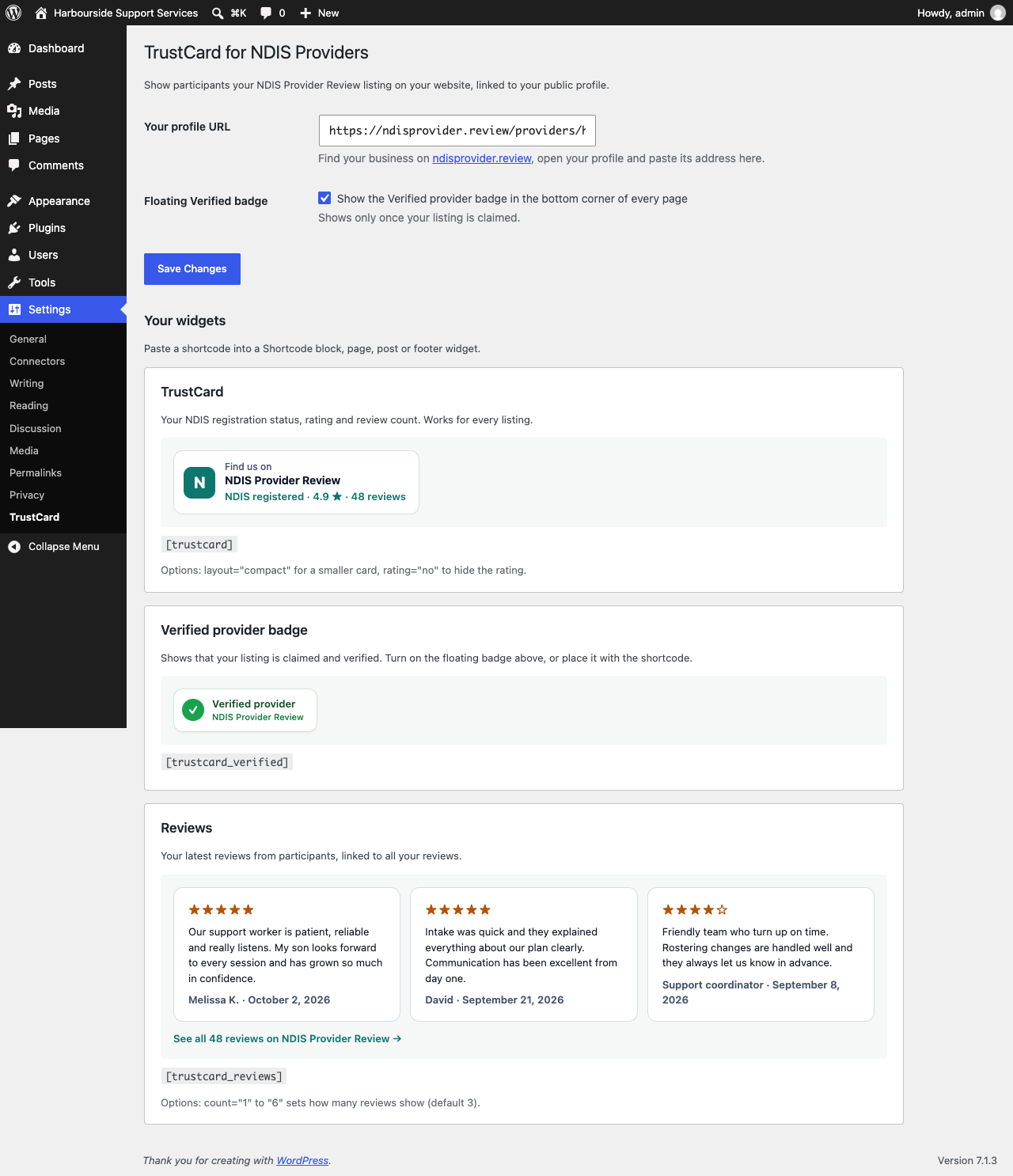
[trustcard]: your NDIS registration status, rating and review count. Works for every listing. Uselayout="compact"in footers and sidebars, orrating="no"to hide the rating. - Verified provider badge
[trustcard_verified]: shows that your listing is claimed. Place it with the shortcode, or turn on the floating badge to show it in the corner of every page. Needs a claimed listing (free). - Reviews
[trustcard_reviews]: your latest written reviews, linked to all your reviews. Usecount="1"tocount="6"(default 3). Included with a Featured listing on NDIS Provider Review.
Also
- Lightweight: no JavaScript on your site, one small stylesheet loaded only where a widget appears
- Listing data is stored and refreshed in the background every 12 hours, so visitors never wait for it, and widgets still work if the directory can’t be reached
- No account needed for the TrustCard. Unclaimed listings get a link to claim the listing for free
Getting started
- Find your business at ndisprovider.review and open your profile.
- Copy the profile address, such as
https://ndisprovider.review/providers/your-business. - In WordPress, go to Settings TrustCard, paste the address and save. The page previews each widget.
- Add a shortcode where you want a widget, or turn on the floating Verified badge.
NDIS Provider Review is independent and is not affiliated with or endorsed by the National Disability Insurance Agency (NDIA), the NDIS Quality and Safeguards Commission or the Australian Government.
External services
This plugin connects to the NDIS Provider Review directory to show your listing details and reviews.
- What is sent: the provider profile slug you saved in the settings (for example
your-business), your site’s home URL in the User-Agent header, and the standard data of any HTTPS request (such as your server’s IP address). No visitor data is sent: requests are made by your web server, not your visitors’ browsers. - When: in a background task (WP-Cron) when the stored copy is older than 12 hours and a page with a widget is viewed, when a widget is first shown for a listing, and when you save the plugin settings.
- Endpoints:
https://ndisprovider.review/embed/provider.json?slug=<slug>(listing details) andhttps://ndisprovider.review/embed/reviews.json?slug=<slug>(reviews, for the reviews widget only). - What is received: your public listing’s name, NDIS registration status, rating, review count and whether the listing is claimed and featured; and, for the reviews widget, your latest published reviews with their star rating, reviewer display name and date.
The widgets are normal links to your profile on ndisprovider.review. Visitors who click them go to that website.
Service provided by NDIS Provider Review: Terms, Privacy statement.
Screenshots
Installation
- In WordPress, go to Plugins Add New, search for “TrustCard for NDIS Providers” and click Install Now, then Activate.
- Go to Settings TrustCard and paste your profile URL.
- Add
[trustcard],[trustcard_verified]or[trustcard_reviews]to a page, post or widget, or turn on the floating Verified badge.
FAQ
-
Where do I find my profile URL?
-
Search for your business name at ndisprovider.review, open your listing and copy the address from your browser. It looks like
https://ndisprovider.review/providers/your-business. -
My business isn’t listed. Can I still use the plugin?
-
The directory lists providers from public NDIS provider register data. If you can’t find your business, contact NDIS Provider Review and we’ll help.
-
Do I need to claim my listing?
-
Not for the TrustCard, which works for any listing. The Verified provider badge shows once your listing is claimed. Claiming is free and also lets you add your description and contact details and show whether you’re accepting new participants.
-
Why doesn’t the reviews widget show?
-
The reviews widget is included with a Featured listing on NDIS Provider Review, and shows reviews that have written feedback. Until then the shortcode shows nothing to visitors, and a short note that only logged-in administrators can see.
-
Where do the rating and reviews come from?
-
They are the rating and published reviews on your public NDIS Provider Review profile. The plugin refreshes them in the background every 12 hours.
-
Does the plugin slow down my site?
-
No. It adds no JavaScript. The stylesheet is small and only loads on pages that show a widget. Listing data is stored on your site and refreshed in the background, so page views never wait for an external request.
-
No. The plugin sets no cookies and sends no visitor data.
Reviews
There are no reviews for this plugin.
Contributors & Developers
“TrustCard for NDIS Providers” is open source software. The following people have contributed to this plugin.
Contributors
Translate “TrustCard for NDIS Providers” into your language.
Interested in development?
Browse the code, check out the SVN repository, or subscribe to the development log by RSS.
Changelog
1.0.1
- Visitors never wait for the directory: stored listing data is refreshed in the background with WP-Cron.
- Listing details now come from a smaller endpoint that returns only what the widgets show.
1.0.0
- First release: TrustCard, Verified provider badge (inline or floating) and reviews widget, with a settings page that previews each one.