
Description
Most AI plugins hand you a paragraph of prose and leave you to parse it. This one does the opposite. It connects WordPress to the TypeSafe System One API, whose Jev model answers typed questions and returns values your code can branch on directly:
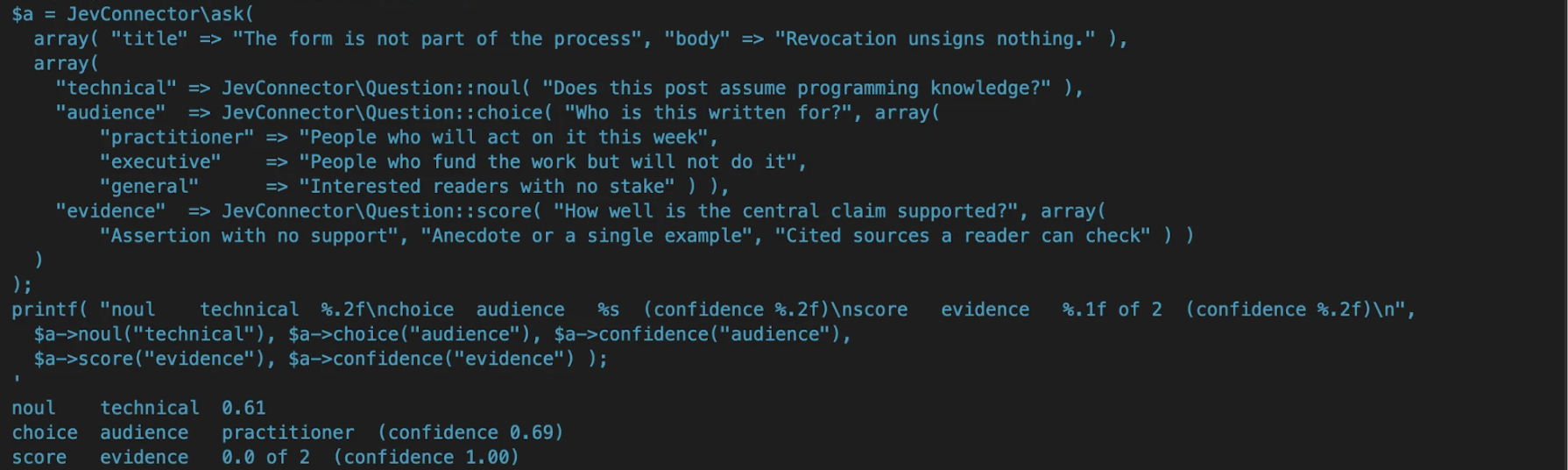
- Noul — the probability, from 0 to 1, that a statement is true.
- Choice — one option from a set you define, with the full probability distribution and a confidence figure.
- Score — a position on an ordered scale you define, with probabilities per level and a confidence figure.
Many questions can be sent in a single call and are evaluated in parallel.
In five lines
use JevConnector\Question;

$answer = JevConnector\ask(
    array( 'comment' => $comment->comment_content ),
    array( 'hostile' => Question::noul( 'Does this comment attack a person rather than an idea?' ) )
);

if ( ! is_wp_error( $answer ) && $answer->noul( 'hostile' ) >= 0.9 ) {
    wp_set_comment_status( $comment, 'hold' );
}
A probability you branch on, not prose you parse. For a choice or a score the
gate is is_confident(); for a noul the probability is itself the confidence,
so the threshold goes straight on the value.
At its core this is a connector, not a feature. The plumbing comes first:
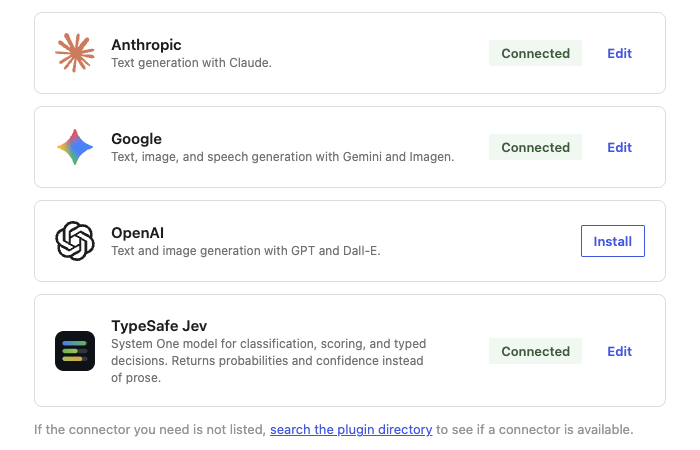
- Registration with the WordPress Connectors API, so your key is managed by core under Settings Connectors and never by a field this plugin invented.
- A PHP client with retry and backoff on rate-limit and overload responses.
- Question builders that validate the shape before anything leaves your site.
- A response reader with one accessor per answer type, plus a confidence gate.
- Response caching keyed by request content, so re-evaluating identical material costs nothing.
- A REST proxy at
/wp-json/jev/v1/askso admin-side JavaScript never sees your key. - Filters and actions at every point worth intercepting.
This plugin adds no menu and no screens of its own. Like the provider connectors for Anthropic and Google, it is the card under Settings Connectors plus a PHP and REST surface for other code to build on. What a site does with Jev’s answers belongs to the theme or plugin that owns the content.
TypeSafe and Jev are trademarks of their owner. This plugin is an independent client and is not affiliated with, endorsed by, or sponsored by TypeSafe, and it ships no TypeSafe logo.
Common uses
Spam is not one of them: leave that to Akismet, which sees signals from millions of sites. Jev answers questions about meaning that a spam filter does not ask.
- Comment moderation: “Does this comment attack a person rather than an idea?” Hold it for a human.
- Contact form routing: “Which team should answer this: billing, technical, sales, other?” Send it to that inbox.
- Tags and categories: “Is this post about this term?”, one question per existing term in a single call. Suggest the terms; an editor accepts.
- Pre-publish checks: “How well is the central claim supported?” on a scale you define. Show it in the publish checklist.
- Policy and compliance: “Does this post make a health claim?” Require review before publishing.
- Checking AI-written drafts: “Does the summary state anything the source does not?” Flag it before it goes out.
- Product listings: “Is this a prohibited item under our policy?” and “Which category fits?” Queue it for review.
- Reviews and feedback: “What is the tone?” and “Does this report a defect?” Route defects to support.
- Related posts and search: “How relevant is this post to the one being read?”, per candidate. Reorder the list.
- Lead qualification: “How well does this enquiry fit the customer we serve?” Answer the best fits first.
Anything that publishes, deletes or emails should wait for a high confidence or a human.
Example
$answer = JevConnector\ask(
    array( 'comment' => $comment_text ),
    array(
        'off_topic' => JevConnector\Question::noul( 'Is this comment unrelated to the post?' ),
        'route'     => JevConnector\Question::choice(
            'Where should this go?',
            array(
                'approve' => 'Clearly a real, on-topic comment',
                'hold'    => 'Plausible but needs a human look',
                'trash'   => 'Abuse or harassment',
            )
        ),
    )
);

if ( ! is_wp_error( $answer ) && $answer->is_confident( 'route', 0.9 ) ) {
    do_something( $answer->choice( 'route' ) );
}
External services
This plugin connects to the TypeSafe System One API, a third-party service operated by TypeSafe, to evaluate the content you pass to it. You supply your own API key.
What is sent: the state you supply to JevConnector\ask() or to the REST route (which may include post content, comment text, or any other data your code passes), the questions you define, and your model identifier. Your API key is sent as a bearer token, and the request’s User-Agent header identifies this plugin, its version, and your site’s home URL.
When it is sent: only when your own code calls JevConnector\ask() or JevConnector\models(), or a permitted user calls one of the REST routes. models() asks only for the list of model names your account can use, sends no content, and is cached for a day. This plugin itself never initiates a request. Nothing is sent until an administrator has connected TypeSafe under Settings Connectors, and no request is made on activation, on page load, or on any schedule. Identical repeat requests are served from a local cache rather than re-sent.
Where it goes: https://api.typesafe.ai/v1/systemone for questions and https://api.typesafe.ai/v1/models for the model list.
Service terms and policies: https://docs.typesafe.ai/legal
Documentation: https://docs.typesafe.ai
Screenshots
Installation
- Upload the plugin to
/wp-content/plugins/and activate it. - Go to Settings Connectors and add your TypeSafe API key to the TypeSafe Jev card. Keys are available from the TypeSafe console.
That is the whole setup. The default model (jev-latest) and the capability the REST route requires (edit_posts) are changed in code, with the jevc_default_model and jevc_rest_capability filters, the same way the core AI provider connectors leave choices to the code that uses them.
To keep the key out of the database, set it in the environment or in wp-config.php instead. WordPress checks both before the stored value:
define( 'TYPESAFE_API_KEY', 'your-key' );
FAQ
-
Do I need a TypeSafe account?
-
Yes. The plugin is a bring-your-own-key client for a third-party API. Create a key at https://console.typesafe.ai/keys.
-
Why does this require WordPress 7.0?
-
Because key management is handled entirely by the Connectors API introduced in 7.0. Rather than ship a second, weaker credential field for older versions, the plugin targets the platform that does it properly.
-
Is this an AI provider for the core AI Client?
-
Not yet. Jev is not an LLM: it returns a probability, a choice, or a score with a confidence figure, and the core AI Client has no capability for that kind of model yet. WordPress checks every AI provider key against a matching provider in the AI Client when it is saved and clears it if there is none, so the plugin registers under its own connector type until the AI Client supports decision models. WordPress stores and masks the key either way.
-
Which Jev model does it use?
-
jev-latest, TypeSafe’s alias for its newest stable release, so new Jev releases arrive without a plugin update. To stay on one version, return a versioned id such as
jev-1.13.0from thejevc_default_modelfilter.JevConnector\models()lists the names your account can send. -
How can I contribute?
-
Development happens on GitHub: https://github.com/juanlentino/tribar-connector-for-typesafe-jev. Issues marked “good first issue” are a good start, and questions go to Discussions there.
-
Does anything get sent without my say-so?
-
No. Until a key is present, every call returns a
jevc_not_configurederror and no HTTP request is made. -
Can I use this from the block editor?
-
Yes. Call
POST /wp-json/jev/v1/askwith astateand aquestionsobject. The route requires a logged-in user withedit_postsby default; change the capability with thejevc_rest_capabilityfilter. -
What happens when TypeSafe is rate-limiting or overloaded?
-
429, 529 and 5xx responses are retried up to three times with exponential backoff, honoring
Retry-Afterwhen present. Everything else fails fast and returns aWP_Error. -
Which hooks are available?
-
Filters:
jevc_default_model,jevc_http_timeout,jevc_request_payload,jevc_request_args,jevc_retry_delay,jevc_rest_capability,jevc_cache_ttl,jevc_connector_type,jevc_connector_args. Actions:jevc_after_response,jevc_request_failed.
Reviews
There are no reviews for this plugin.
Contributors & Developers
“Tribar Connector for TypeSafe Jev” is open source software. The following people have contributed to this plugin.
Contributors
Translate “Tribar Connector for TypeSafe Jev” into your language.
Interested in development?
Browse the code, check out the SVN repository, or subscribe to the development log by RSS.
Changelog
0.4.6
- Renamed to Tribar Connector for TypeSafe Jev, with the slug tribar-connector-for-typesafe-jev, at the directory review’s request. Function names, hooks, setting names and the REST namespace are unchanged.
- New: pass
'long_context' => truetoJevConnector\ask()to send one request with TypeSafe’s long-context header.
0.4.5
- The opening example holds a hostile comment for review instead of checking for spam, which is Akismet’s job.
- New “Common uses” section: ten everyday ways to use typed answers on a WordPress site.
0.4.4
- Hardening: the REST route validates its input instead of cleaning it. A malformed model id or a question without text instructions is refused with a clear error.
0.4.3
- The Connectors card shows the plugin’s own icon instead of the generic placeholder.
0.4.2
- The TypeSafe logo is removed from the Connectors card. The card shows WordPress’s generic placeholder, because every image a directory plugin ships must be GPL-compatible.
0.4.1
- The description now states that the plugin is independent and not affiliated with TypeSafe.
- The plugin’s home moved to github.com/juanlentino/connector-for-typesafe-jev, named after the plugin.
0.4.0
- New:
JevConnector\models()andGET /wp-json/jev/v1/modelslist the Jev models and aliases your account can send, cached for a day, the way the core AI provider connectors list theirs. - The External services section now covers the model list request.
0.3.1
- Documentation only, no behaviour change. Corrected the FAQ on why the plugin is not an AI provider yet: WordPress clears an AI provider key on save when no matching AI Client provider exists, and there is none for decision models until the AI Client supports them.
- The description now opens with a five-line example and lists two screenshots.
0.3.0
- The plugin is now a pure connector, like the Anthropic and Google provider connectors: the card under Settings Connectors, the PHP client, and the REST proxy. The Settings TypeSafe Jev screen and the two optional modules (comment guardrail, term suggestions) are removed. Model and REST capability are set with the existing filters.
0.2.5
- The not-connected notice links only the word “Connectors”, so shells that open it in its own window title that window sensibly.
0.2.4
- Fixed the “Get your API key” link on the Connectors card; it now opens the console’s keys page.
0.2.3
- Fixed the link to Settings Connectors on the plugin’s settings screen and in the not-connected notice. It pointed at a page core refuses; it now opens the Connectors screen.
0.2.2
- The connector card under Settings Connectors now shows the TypeSafe mark instead of the generic placeholder.
0.2.1
- Directory readiness: escaped caller-supplied ids in validation messages, removed the unused Domain Path header, and marked the plugin tested up to WordPress 7.1.
- The External services disclosure now mentions the site URL sent in the User-Agent header.
0.2.0
- Added an optional comment guardrail module: two-question agreement, hold as the fallback, decisions logged to comment meta.
- Added an optional term suggestions module: one question per existing term in a single call, suggest-only.
- Both modules are off by default and can be switched on under Settings TypeSafe Jev.
0.1.0
- First release: Connectors API registration, client, question builders, response reader, response cache, and REST proxy.