
Description
Book appointments online with a simple booking form and flexible scheduling. Time Slot is a lightweight booking plugin with a powerful booking system. Manage availability, send notifications, and accept payments in one place.
Control Your Schedule & Availability
Set your schedule to prevent unwanted bookings
- Business Hours, Breaks & Holidays – Set your business hours, break times, and holidays to block unavailable dates and times on your booking form
- Service Days Off (Pro) – Set days off for each service to control when appointments can be booked
- Customer Panel (Pro) – Allow customers to cancel appointments and edit their profile
- Staff Days Off – Add days off for staff members to block their availability on the booking calendar
- Block Fully Booked Time Slots – Automatically hide unavailable time slots from your booking form
- Advance Notice – Set the advance notice time to prevent last-minute, same-day appointments
- Buffer Time Between Appointments – Add time before appointments to prepare for the next booking
- Single Service Booking Form – Hide the service field on the booking form when only one service is available
- Unlimited Appointments & Services – Create and manage unlimited appointments, services, staff, and customers
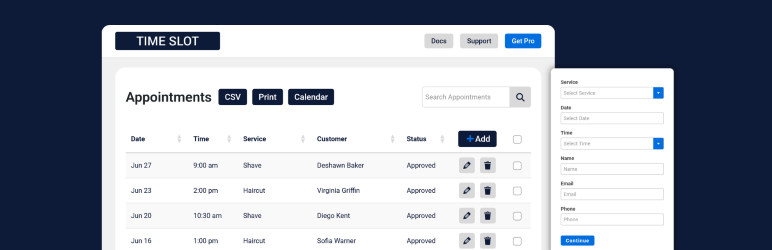
- Appointment Management Dashboard – Add, edit, cancel, and delete appointments from your admin dashboard
Accept Payments & Offer Coupons
Handle payments, refunds, and discounts directly from your website
- PayPal Payments (Pro) – Securely accept PayPal payments for booked appointments
- Stripe Payments (Pro) – Accept card payments instantly on the booking form
- Mollie Payments (Pro) – Accept credit card payments for bookings on your website
- Refund Management (Pro) – Issue refunds directly from your dashboard
- Coupons & Promo Codes – Create percentage or fixed discounts for your booking form
- Multiple Currencies – Display prices in your selected currency with automatic formatting
- Secure Payments (Pro) – Payment data is handled securely without storing card details in your database
Send Notifications & Sync Calendars
Send messages to your customers and staff, and update your calendar
- Confirmation Emails – Send emails when appointments are booked or canceled
- Email Reminders (Pro) – Send automatic reminders before upcoming appointments
- SMS Notifications (Pro) – Send SMS messages for bookings, cancellations, and reminders
- Google Calendar Sync (Pro) – Sync appointments with Google Calendar in both directions
- iCal Calendar Files – Include calendar files in emails for easy import into calendar apps
- Custom Booking Messages – Customize messages shown on the booking form and confirmation screen
Manage Records, Data & Settings
Save and manage your booking data and settings
- Customer Management – Store and manage customer contact information
- Export Appointment Details – Export data as CSV files for reporting or backup
- Print & Save Records – Save or print booking data for your business records
- Import Customer Data (Pro) – Import customer data from CSV files
- Import & Export Settings – Move your booking settings between websites
Setup & Display the Booking Form
Customize the booking form and add it to your website
- Booking Form Embed – Add your booking form with a block or shortcode
- Page Builder Support – Works with Elementor, Beaver Builder, Divi, and more
- Booking Form Style – Adjust colors and styles to match your website
- Custom Booking Fields (Pro) – Collect additional information from customers
- Quick Setup Wizard – Guided setup to quickly configure basic settings
Support Multiple Languages & Accessibility
Reach more users with translation, screen reader, and keyboard support
- Translation Ready – Works with WPML and Polylang, and supports multiple languages
- Available Languages – Fully translated into English, Spanish, French, Dutch, German, Italian and Polish
- Accessibility Support – Booking form and admin pages support keyboard and screen readers
Who Should Use This Plugin
Time Slot is designed for businesses and individuals who need to manage appointments or reservations. Examples include:
- Beauty & Personal Care – Hair salons, barbershops, tattoo artists, nail salons
- Health & Fitness – Yoga & dance lessons, personal trainers, wellness coaches
- Professional Services – Consultants, lawyers, coaches, accountants, notaries
- Events & Creative – Photographers, caterers, wedding planners, musicians
- Real Estate – Real estate agents, contractors, cleaning services, inspectors
- Repairs & Technical Services – Plumbers, mechanics, electricians, technicians
- Education – Tutors, teachers, private lessons, coaching sessions, workshops
- Recreation & Clubs – Club facilities, sports courts, equipment
How to Start Booking
Visit our documentation for detailed setup instructions.
- Setup Wizard – Configure your date and time settings, services, and business hours
- Display the Booking Form – Add your booking form with a shortcode, block, or page builder
- Email Notifications – Customize your messages to customers and staff
- Full Documentation – View all setup guides and advanced settings
Screenshots


Blocks
This plugin provides 1 block.
- Time Slot Booking Form Add the Time Slot booking form to your page or post
Installation
In your dashboard, go to the Plugins page and click the Add New button.
Search for Time Slot, and click the Install Now button in the plugin details box.
Click the Activate button, and you’re done!
How to Start Booking
Visit our documentation for detailed setup instructions.
- Setup Wizard – Configure your date and time settings, services, and business hours
- Display the Booking Form – Add your booking form with a shortcode, block, or page builder
- Email Notifications – Customize your messages to customers and staff
- Full Documentation – View all setup guides and advanced settings
FAQ
-
Do I need to know how to code to use Time Slot?
-
No! Time Slot was designed to be easy to use by everyone, so there’s no coding required.
-
Can I test Time Slot before installing it on my website?
-
Yes! Try the quick admin setup, browse the settings pages, or add some style in the WordPress playground. Then visit the home page in the playground to preview how the booking form will look on your website.
-
Can I use Time Slot with my page builder or theme?
-
Yes! Time Slot has built in booking form widgets for Elementor and Beaver Builder, a Gutenberg block, and the shortcode
[timeslot-form]to use anywhere else. If you use a free theme or page builder plugin from the WordPress repo, add it in the WordPress playground to try it out. -
What is the difference between Time Slot and Time Slot Pro?
-
The free version of Time Slot includes everything you need to start taking bookings with email notifications. Time Slot Pro adds payments, SMS notifications, and more. See the full feature comparison for details.
-
How can I contact support if I have questions or need help?
-
After you have viewed our documentation, send us a message on the support forum or on our website if you still have questions or need help.
Reviews


Contributors & Developers
“Time Slot – Booking and Appointment System” is open source software. The following people have contributed to this plugin.
Contributors
“Time Slot – Booking and Appointment System” has been translated into 25 locales. Thank you to the translators for their contributions.
Translate “Time Slot – Booking and Appointment System” into your language.
Interested in development?
Browse the code, check out the SVN repository, or subscribe to the development log by RSS.
Changelog
Version: 1.5.9
Date: August 11, 2026
- Added customer panel
- Updated booking form validation and dynamic styles
Version: 1.5.8
Date: June 8, 2026
- Updated admin notices
Version: 1.5.7
Date: May 5, 2026
- Updated admin calendar
- Deferred script loading
Version: 1.5.6
Date: April 7, 2026
- Updated admin styles
Version: 1.5.5
Date: March 24, 2026
- Fixed date and time general settings
Version: 1.5.4
Date: March 23, 2026
- Updated admin UI
Version: 1.5.3
Date: February 18, 2026
- Added Twilio SMS
Version: 1.5.2
Date: January 15, 2026
- Added admin calendar view
Version: 1.5.1
Date: January 2, 2026
- Updated staff table data
Version: 1.5.0
Date: December 23, 2025
- Updated styles
- Updated form labels
Version: 1.4.9
Date: December 10, 2025
- Updated string internationalization
- Updated escaping and sanitization
Version: 1.4.8
Date: November 17, 2025
- Updated booking form email
- Added single service form option
Version: 1.4.7
Date: November 10, 2025
- Added setup wizard
- Updated appointment table
Version: 1.4.6
Date: October 13, 2025
- Added Select2 translations
- Updated DataTables
Version: 1.4.5
Date: September 22, 2025
- Organized general settings pages
- Updated database
- Updated time options on booking form
Version: 1.4.4
Date: August 12, 2025
- Updated time display on appointment table
- Fix for loading translations
Version: 1.4.3
Date: July 20, 2025
- Fix for any staff option on booking form
Version: 1.4.2
Date: June 19, 2025
- Added Pakistan rupee currency
Version: 1.4.1
Date: May 17, 2025
- Updated TinyMCE for email settings
Version: 1.4.0
Date: March 11, 2025
- Updated break hours
Version: 1.3.9
Date: December 15, 2024
- Validated break hours
Version: 1.3.8
Date: November 10, 2024
- Added Georgian lari currency
Version: 1.3.7
Date: October 6, 2024
- Escaped attributes on Elementor widget wrapper
Version: 1.3.6
Date: September 28, 2024
- Added booking form button text transform option
Version: 1.3.5
Date: July 22, 2024
- Updated date display on appointments data table
Version: 1.3.4
Date: July 19, 2024
- Updated date formats on the booking form and appointments data table
- Changed minimum supported php version to 8.0
Version: 1.3.3
Date: June 9, 2024
- Added i18n strings to admin placeholders
Version: 1.3.2
Date: May 9, 2024
- Improved time options for break hours on the booking form
Version: 1.3.0
Date: April 22, 2024
- Added Indian rupee currency
Version: 1.2.9
Date: March 31, 2024
- Updated to allow no staff
Version: 1.2.8
Date: January 28, 2024
- Updated rest route responses and permissions
Version: 1.2.7
Date: January 20, 2024
- Updated business hours rest route
- Added Moroccan dirham currency
- Improved zero staff error handling
Version: 1.2.6
Date: December 27, 2023
- Removed old version of jQuery Validate
- Updated i18n strings for breaks
Version: 1.2.5
Date: October 29, 2023
- Added break hours to business settings
- Updated business hour placeholder to use time format setting
Version: 1.2.4
Date: August 31, 2023
- Updated colors and urls
Version: 1.2.3
Date: August 9, 2023
Fix:
– Updated block to V3
Version: 1.2.2
Date: July 25, 2023
Fix:
– Required all php files
– Updated company address if null
– Added css for select background color
Version: 1.2.1
Date: July 2023
Feature:
– Added South African rand currency
Fix:
– Fixed staff days off i18n
– Updated staff database structure
– Updated modal window close settings
Version: 1.2.0
Date: June 23, 2023
Fix:
– Fixed script conflict
Version: 1.1.9
Date: June 20, 2023
Feature:
– Added Beaver Builder module
Fix:
– Updated table delete cascade
– Updated booking form style
Version: 1.1.8
Date: June 8, 2023
Fix:
– Updated email and ics
– Updated file structure
Version: 1.1.7
Date: May 18, 2023
Feature:
– Added multiple language compatibility
Version: 1.1.6
Date: April 21, 2023
Fix:
– Updated translation strings
Version: 1.1.5
Date: March 31, 2023
Fix:
– Updated jQuery DatePicker styles
Version: 1.1.4
Date: March 23, 2023
Features:
– Added autoloader
Fix:
– Added class to stop scripts from loading on frontend pages with no form
Version: 1.1.3
Date: March 11, 2023
Features:
– Added additional appearance settings
Version: 1.1.2
Date: February 17, 2023
Features:
– Updated email headers
Version: 1.1.1
Date: January 26, 2023
Features:
– Updated field validations
Version: 1.1.0
Date: December 15, 2022
Features:
– Added new data table class
Version: 1.0.8
Date: December 07, 2022
Fix:
– Updates to database structure
Version: 1.0.7
Date: November 30, 2022
Features:
– Internationalized currency
Version: 1.0.5
Date: November 11, 2022
Features:
– Internationalized dates
– Added success message for refunds
Version: 1.0.3
Date: October 28, 2022
Features:
– Improved tab navigation responsive styles
– Style updates for Gutenberg block preview
Version: 1.0.2
Date: October 20, 2022
Fix:
– Fixes a bug where date was becoming fully booked on frontend datepicker
Version: 1.0.1
Date: October 14, 2022
Features:
– Added translation support for JavaScript files
– Added Elementor booking form widget
Version: 1.0.0
Date: September 2022
Features:
– Launched Time Slot