

Description
TiboSpeed makes WordPress as fast as a static website, and it does everything on your own server. There is no cloud service, no API key, no quota and no monthly fee.
Static page cache
- Pages are saved as ready-made HTML files. On Apache and LiteSpeed servers, these files are served directly by the web server through .htaccess rules, so PHP and WordPress do not run at all. A rule for Nginx is included as well.
- Without the server rules, the plugin still serves cached pages through a lightweight early loader, before WordPress loads.
- Gzip-compressed copies and 304 Not Modified responses are supported.
- Tracking parameters such as utm_source, gclid and fbclid are ignored, so visitors coming from ads also get the cached page.
Smart purge and preload
- When a post changes, only the affected pages are refreshed: the post itself, the home page, its categories and tags, the author page and, for products, the shop page.
- Changes that affect the whole site trigger a full refresh. This includes menus, widgets, theme settings, Elementor templates and plugin updates.
- Purged pages are rebuilt in the background, so visitors never get a cold page.
- “Warm cache” builds every page from your browser, so it works on shared hosting without loopback requests.
Safe JavaScript optimization
- Defer uses the WordPress core loading strategy (6.3+). Core checks dependencies and inline scripts, and loads any script that cannot be deferred safely the normal way.
- Analytics, ads, pixels and live chat scripts can wait until the first user interaction (scroll, tap, key press). Over 40 services are recognized, including Google Analytics, Tag Manager, Meta Pixel, Hotjar, Clarity, TikTok and Tawk.to.
- Optional “delay all JavaScript” mode for the highest scores. Script order and DOMContentLoaded/load handlers are preserved.
- Cart, checkout and account pages are never delayed.
Images and video
- The LCP image (the largest image above the fold) gets the highest priority and is preloaded.
- Native lazy loading for images and iframes. The first images are skipped automatically.
- Missing width and height attributes are added to prevent layout shift (CLS).
- WebP copies are generated on your server with GD or Imagick, for new uploads and in bulk. Originals are kept, and a WebP copy is not used if it turns out larger.
- YouTube embeds are replaced with a lightweight preview. The real player loads on click.
CSS, fonts and HTML
- CSS minification with correct URL rewriting. Original files are never modified.
- Optional local hosting of Google Fonts, plus font-display: swap.
- Preconnect hints for third-party origins, instant page navigation with Speculation Rules, and HTML minification.
- WordPress cleanup: emoji script, embeds, Dashicons for visitors, separate block CSS, head clutter and Heartbeat control.
WooCommerce and Elementor
- Cart, checkout and account pages are excluded automatically. Visitors with items in their cart get personal, uncached pages.
- The cart fragments AJAX request is removed while the cart is empty.
- One click applies Elementor’s own fastest performance settings.
Database
- Clean up revisions (keeping the latest ones), auto-drafts, old trash, spam, expired transients and orphaned post meta, then optimize tables.
- Optional weekly cleanup.
- Autoload size report.
Easy to use
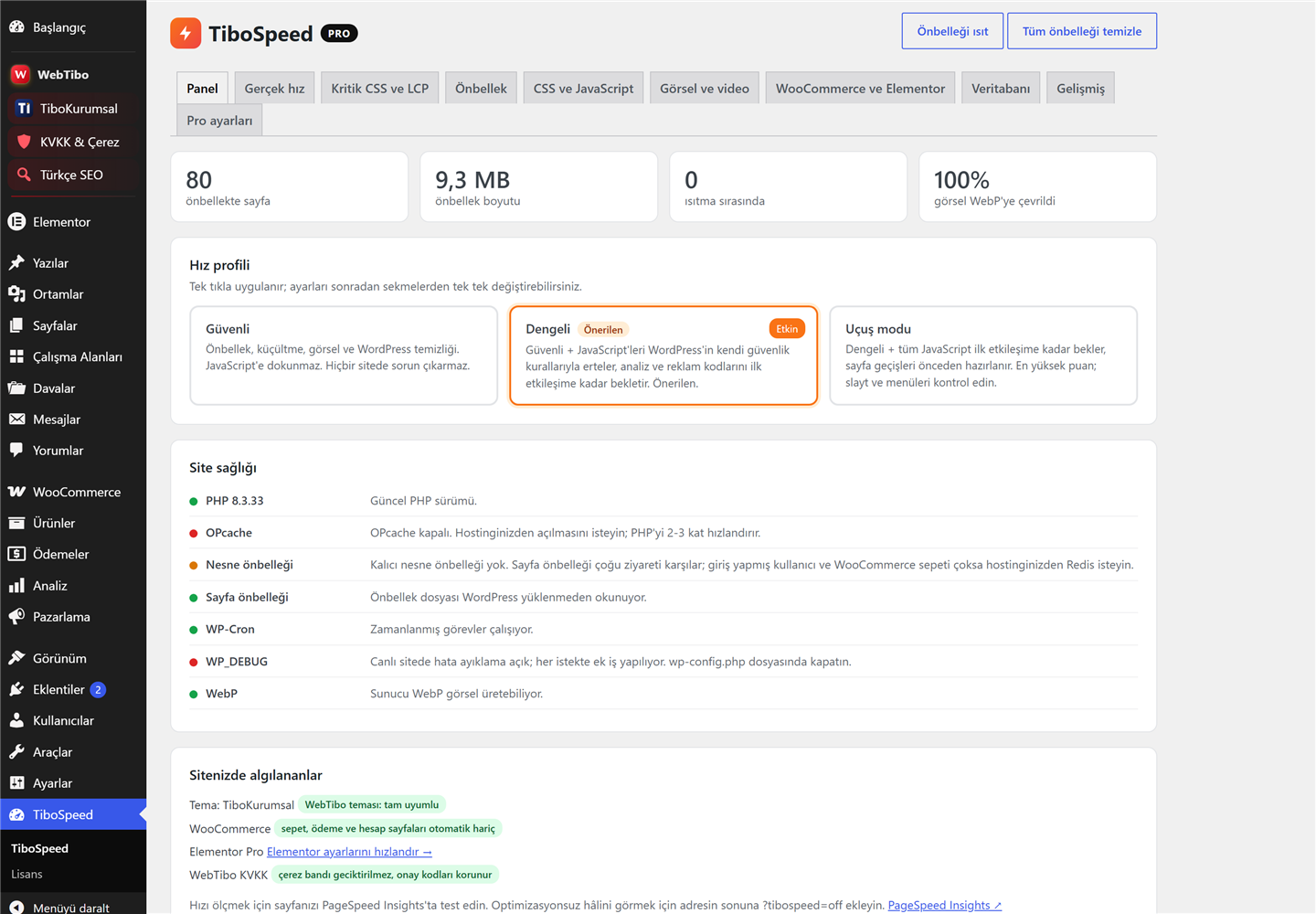
- Three profiles: Safe, Balanced and Flight mode. The plugin suggests one based on your site.
- Site health checks for PHP, OPcache, object cache and conflicting plugins.
- Admin bar shortcuts, and a ?tibospeed=off parameter to compare a page without optimization.
The interface is in English with a complete Turkish translation included, and it is fully translatable.
Pro add-on
An optional Pro add-on is available at https://webtibo.com/eklentiler/tibospeed/. It adds:
- Critical CSS generated in your own browser, with no cloud service.
- LCP detection by real measurement on mobile and desktop.
- Real-user Core Web Vitals monitoring without cookies.
- Self-healing script delay.
- AVIF images and CDN support.
No feature of this plugin is locked, limited or time-restricted.
External services
This plugin can connect to Google Fonts (fonts.googleapis.com and fonts.gstatic.com), a service provided by Google. This happens only if you turn on the optional “host Google Fonts locally” setting, which is off by default. When the setting is on and your theme or a plugin loads a Google Fonts stylesheet, the plugin downloads that stylesheet and its font files once from your server and stores them in wp-content/cache/tibospeed, so your visitors no longer connect to Google. Only the stylesheet URL is sent; no visitor or site data is sent. Google Fonts terms: https://developers.google.com/fonts/terms and privacy policy: https://policies.google.com/privacy
The optional “delay JavaScript” feature contains a list of well-known third-party script hostnames and names (for example Google Analytics, Meta Pixel, Hotjar, Microsoft Clarity, Tawk.to, Crisp, Intercom, JivoChat and Zendesk). This list is only used to recognise scripts that your theme or other plugins already add to your pages, so that they can wait until the first user interaction. TiboSpeed itself never connects to these services and sends them no data; whether those scripts load at all is decided by the theme or plugin that added them.
Cache preloading only requests pages of your own site.
Screenshots


Installation
- Install and activate the plugin.
- The setup screen opens and the recommended profile is applied automatically.
- Click “Warm cache” to cache all pages, and “Convert all” on the Images and video tab to create WebP copies of existing images.
When activated, the plugin adds define( 'WP_CACHE', true ); to wp-config.php, creates wp-content/advanced-cache.php and adds rules to .htaccess. All of these are removed when the plugin is deactivated.
FAQ
-
Does it work with other cache plugins?
-
Use only one page cache plugin at a time. TiboSpeed warns you when another cache plugin is active, and it never overwrites another plugin’s advanced-cache.php without your permission.
-
Something looks broken after enabling a setting. What should I do?
-
Switch to the Safe profile or add the script to “JavaScript never to delay” on the Advanced tab. Add ?tibospeed=off to any URL to see the page without optimization.
-
Does the plugin connect to external servers?
-
No. The only exception is the optional “host Google Fonts locally” setting, which is off by default. When you enable it, the plugin downloads the font files from Google once, so that your visitors no longer connect to Google.
-
Does it work on Nginx?
-
Yes. Pages are served from the cache before WordPress loads. For full static mode, add the rule shown on the Advanced tab to your server configuration.
Reviews
There are no reviews for this plugin.
Contributors & Developers
“TiboSpeed – Page Cache & Speed Optimization” is open source software. The following people have contributed to this plugin.
Contributors
“TiboSpeed – Page Cache & Speed Optimization” has been translated into 1 locale. Thank you to the translators for their contributions.
Translate “TiboSpeed – Page Cache & Speed Optimization” into your language.
Interested in development?
Browse the code, check out the SVN repository, or subscribe to the development log by RSS.
Changelog
1.0.4
- WooCommerce: new option to skip WooCommerce styles and scripts on pages without products.
- WooCommerce: products are refreshed in the cache when a scheduled sale starts or ends.
1.0.3
- Admin interface CSS classes now use the plugin’s own prefix.
1.0.2
- Inline JSON is now encoded with JSON_HEX_TAG and JSON_HEX_AMP only (no unescaped slashes or unicode).
1.0.1
- Prefixed all functions, options, hooks and handles with the plugin slug (existing settings are migrated automatically); escaped output; removed load_plugin_textdomain.
1.0.0
- Initial release.