

Description
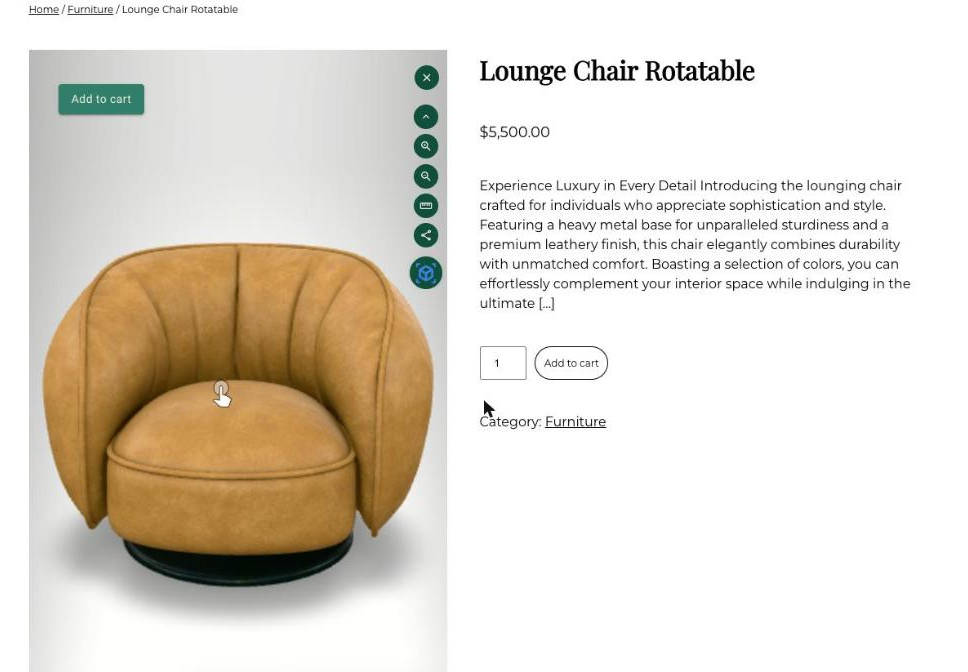
Thridify turns product models into 3D, AR and configurator experiences: shoppers spin the product, change finishes and options, and place it in their room on their phone. This plugin puts those experiences on your WooCommerce store.
You build and publish experiences in your Thridify account. The plugin connects your store, tells Thridify which products you sell, and shows the viewer on the products that have one. Products without an experience look exactly as they did before.
What you get
- A 3D icon on the product gallery, a “View in 3D” button, or Images / 3D tabs under the gallery. Pick one, set the position and button text.
- A “View in 3D button” block and a
[thridify_3d_button]shortcode, so you can put the button anywhere in your product template. - A 3D icon on product cards in the shop, category, tag and search pages.
- Variation sync. Picking a variation on the page updates the 3D model, and choosing a finish in 3D selects the matching WooCommerce variation.
- Add to cart from the viewer. The shopper’s configuration goes into the cart as a “Configuration” line on the item and stays on the order. WooCommerce sets the price, as always.
- AR on iPhone and Android, served by Thridify.
- Catalog sync. Product IDs, SKUs, slugs and names of published products are sent to Thridify, so it can match each product to its experience by SKU, slug, name or ID.
- A “3D” column on the Products list showing which products have a published experience, and a per-product switch to hide the viewer.
- Experience switcher and brand colour settings, saved straight to your Thridify account.
- Optional 3D-assisted sales measurement (off by default): see how many orders followed a 3D or AR engagement, right in WooCommerce.
- Works with classic and block themes, the block cart and checkout, and High-Performance Order Storage (HPOS).
How it works
- Install and activate the plugin, then open WooCommerce Thridify 3D & AR.
- Click “Connect with Thridify”, sign in to Thridify (or create an account), and confirm. You come straight back to WordPress.
- Your catalog syncs in the background. Products that match a published experience show the viewer.
A Thridify account is required. You can create one during the connect step.
External services
This plugin connects to Thridify, a hosted service operated by 14818032 Canada Inc. (operating as Thridify). Nothing is sent to Thridify until a store administrator clicks “Connect with Thridify”.
- Account connection (api.thridify.com): when you connect, your browser is sent to Thridify to sign in and approve. The plugin then receives a connection token and sends your site’s address so Thridify can allow it to load your experiences.
- Catalog sync (api.thridify.com): after connecting, a few minutes after products change, and daily, the plugin sends the product ID, SKU, slug and name of each published product. Prices, stock and customer data are never sent.
- Viewer (viewer.thridify.com, models.thridify.com, admin.thridify.com): on product and shop pages, shoppers’ browsers load Thridify’s viewer script and the product’s 3D files. Like any web request, this shares the shopper’s IP address and browser details with Thridify. The Products list in wp-admin also checks models.thridify.com to show which products have 3D.
- Settings (api.thridify.com): the Experience switcher tab and the “Send brand colour to Thridify” button read and save settings in your Thridify account when you use them.
- 3D-assisted sales (api.thridify.com, only if you turn it on): when an order is paid or refunded, the plugin sends the order ID, total, currency, item count and whether it followed a 3D engagement. No names, addresses, emails or payment details. On the storefront it sets a first-party cookie,
_thridify_3d(30 days), after a shopper engages 3D. If your cookie banner supports the WP Consent API, the cookie is only set with statistics consent.
If you choose the Sandbox environment (enterprise accounts only), the same calls go to devviewer.thridify.com, devmodels.thridify.com, devadmin.thridify.com and api-dev.thridify.com instead.
Thridify Terms of Service and Privacy Policy.
Screenshots

Blocks
This plugin provides 1 block.
- View in 3D button A button that opens the product's Thridify 3D/AR experience. Hidden on products without one.
Installation
- Install from Plugins Add New (search for “Thridify”), or upload the plugin folder to
/wp-content/plugins/. - Activate it. WooCommerce must be active.
- Go to WooCommerce Thridify 3D & AR and click “Connect with Thridify”.
- In Display, choose how the viewer appears. In Catalog, choose how products are matched (SKU by default).
FAQ
-
Do I need a Thridify account?
-
Yes. The 3D models, experiences and AR are hosted by Thridify. You can create an account during the connect step.
-
A product doesn’t show the viewer. Why?
-
The viewer only appears when Thridify has a published experience that matches the product. Check that the experience is published in Thridify and that the value you match on (SKU by default) is the same in both places. The Catalog tab lists examples of products that did not match, and the Products list shows a “3D” column.
-
Yes. Add the “View in 3D button” block to your single-product template, or use
[thridify_3d_button]in a classic template or page builder. Set Product pages to “Off” if you only want the button where you placed it. -
Does it slow down my pages?
-
The plugin adds one small script and checks a ~1 KB file per product. The 3D viewer itself only loads when a product has an experience, and the heavy files load when the shopper opens it.
-
Does it work with my theme?
-
It targets WooCommerce’s own templates and product blocks, so most themes work without changes. If a theme’s scripts or styles conflict with the viewer, switch Rendering to “Isolated frame”.
-
What happens when I disconnect or uninstall?
-
Disconnecting releases your site from your Thridify account and the viewer stops showing. Uninstalling also deletes the plugin’s settings. Orders keep their “Configuration” lines because they are part of the order.
Reviews
There are no reviews for this plugin.
Contributors & Developers
“Thridify – 3D & AR Product Viewer for WooCommerce” is open source software. The following people have contributed to this plugin.
Contributors
Translate “Thridify – 3D & AR Product Viewer for WooCommerce” into your language.
Interested in development?
Browse the code, check out the SVN repository, or subscribe to the development log by RSS.
Changelog
1.0.3
- Viewer tooltips no longer break one letter per line on block themes that use Columns.
1.0.2
- Images / 3D tabs sit below the gallery on block themes.
- The 3D icon on product cards and galleries now has a light backdrop, so it stays visible on dark product photos.
1.0.1
- Images / 3D tabs: the viewer always fits the product gallery, including slider galleries.
- New “Button shape” setting (square, rounded or pill).
1.0.0
- First release: connect with Thridify, catalog sync, product-page icon, button and tabs, shop-card icons, View in 3D block and shortcode, variation sync, add to cart from 3D, experience switcher, brand colour, optional 3D-assisted sales measurement.