

Description
ThemeMiles SEO Agent – AI-Powered SEO Audit & Priority Scoring for WordPress
Most WordPress sites are leaking organic traffic — not because of one big problem, but because of dozens of small SEO issues nobody notices until rankings drop.
ThemeMiles SEO Agent fixes that. It scans every published post, page, and WooCommerce product for 12 of the most impactful SEO issues, then ranks them by estimated business impact — not just by severity. The result is an actionable priority list that tells you which issues to fix first, so you stop wasting time on low-value cleanup while high-traffic pages bleed rankings.
Works Alongside the SEO Plugin You Already Have
ThemeMiles SEO Agent detects whether you’re running Yoast SEO, Rank Math, or All in One SEO and reads from the correct meta fields for each. Your existing SEO plugin stays in place — ThemeMiles SEO Agent is the audit and automation layer on top. You get the diagnosis; your SEO plugin handles the presentation.
What You Can Do With the Free Plugin Right Now
➜ Run a full site-wide SEO audit across posts, pages, and WooCommerce products
➜ Detect missing or out-of-range meta titles (30–65 characters) and meta descriptions (50–160 characters)
➜ Find missing focus keywords, Open Graph tags, schema markup, and canonical URLs
➜ Catch thin content (under 300 words), duplicate meta descriptions, and H1/title conflicts
➜ Check up to 10 internal links per post for 404 broken URLs
➜ Spot focus keywords absent from the meta title
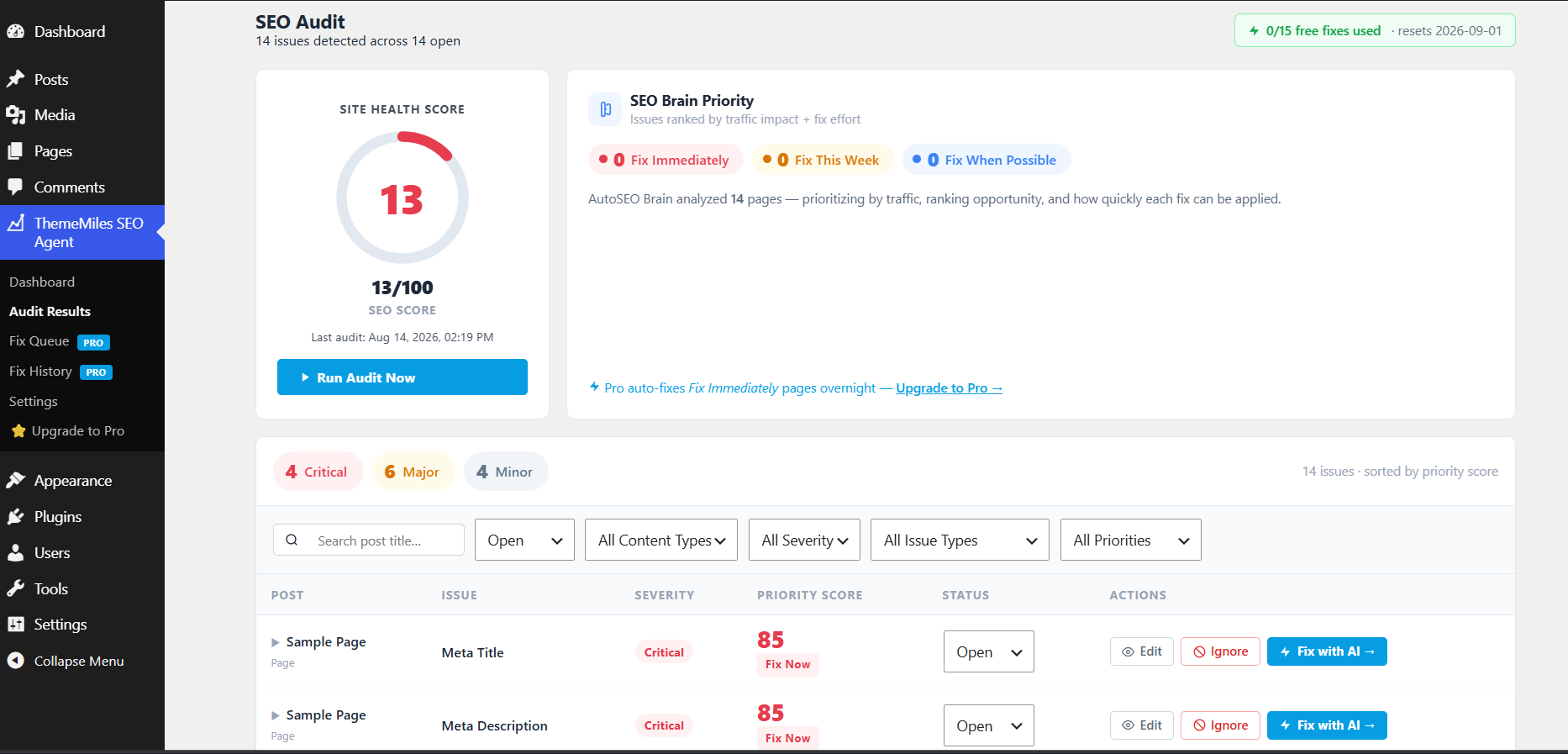
➜ See a 0–100 site health score that reflects your real SEO posture
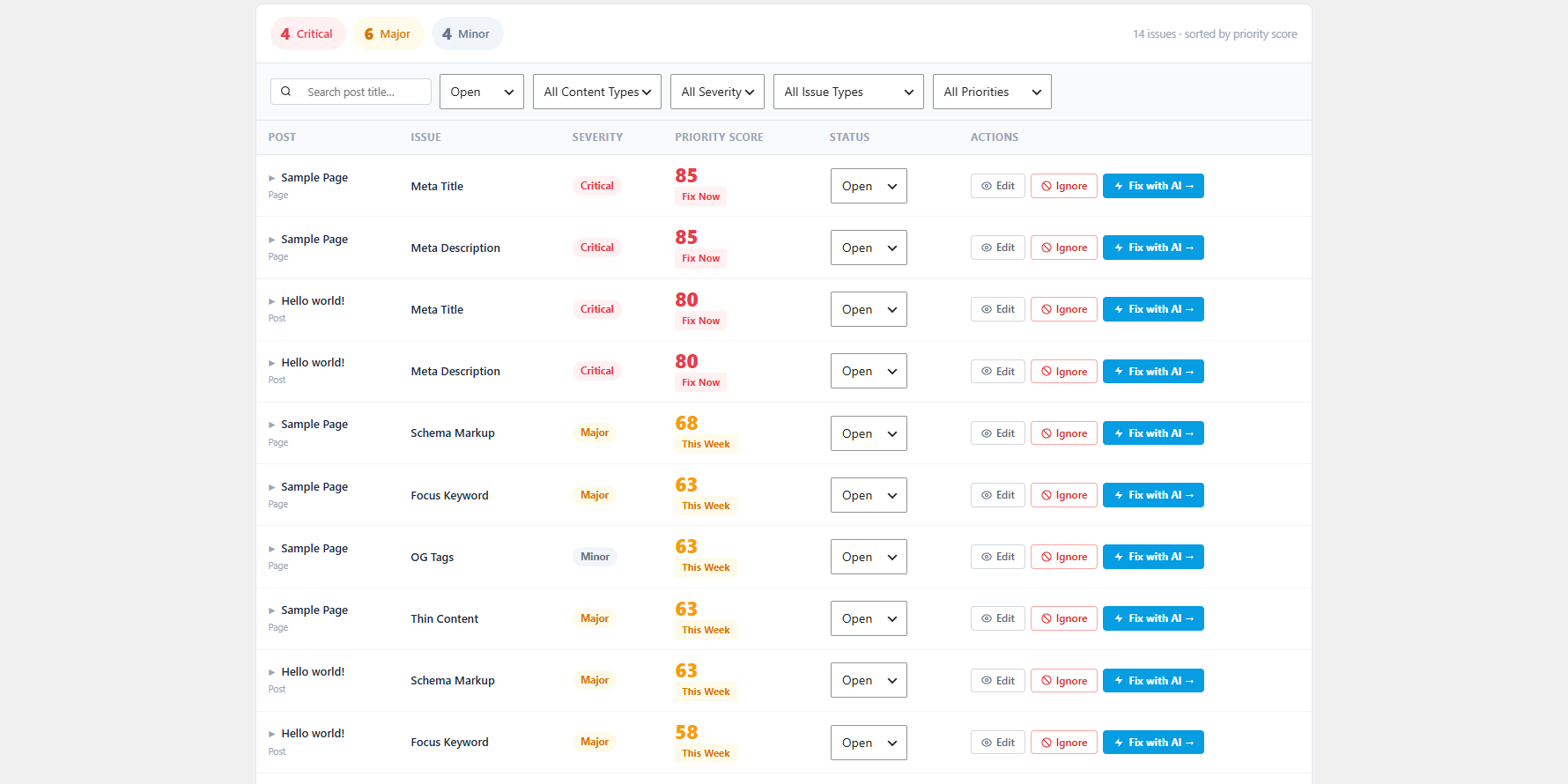
➜ Score every issue 0–100 by the SEO Brain Priority Score — built from traffic weight, ranking opportunity, issue severity, and fix effort
➜ Issues grouped into four action tiers: Fix Immediately · Fix This Week · Fix When Possible · Low Priority
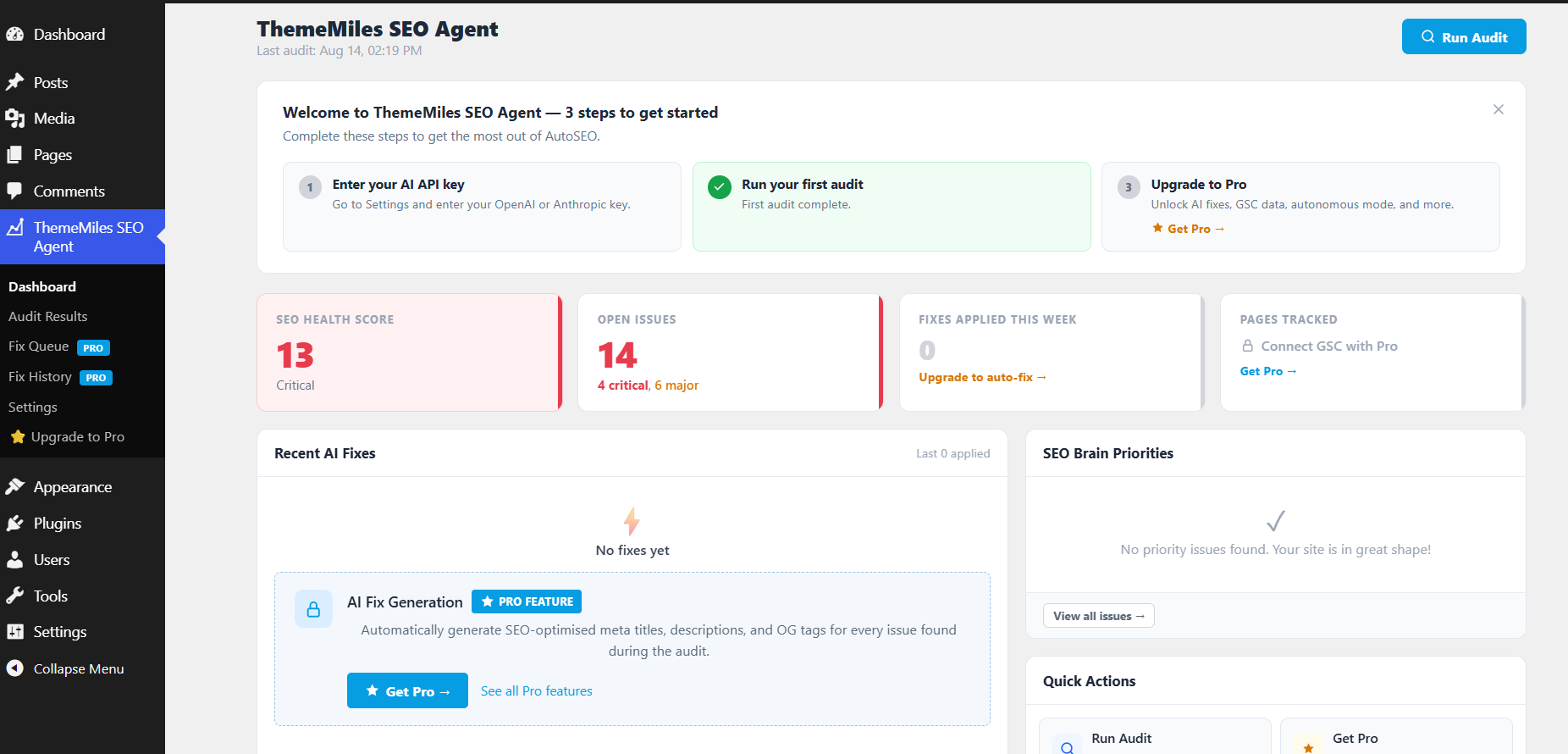
➜ Dashboard with health score gauge, SEO Brain summary, and top-priority issue cards
➜ Schedule weekly audits to run automatically at a time you choose
➜ Trigger a manual audit instantly from the dashboard
➜ Mark issues as ignored or manually resolved
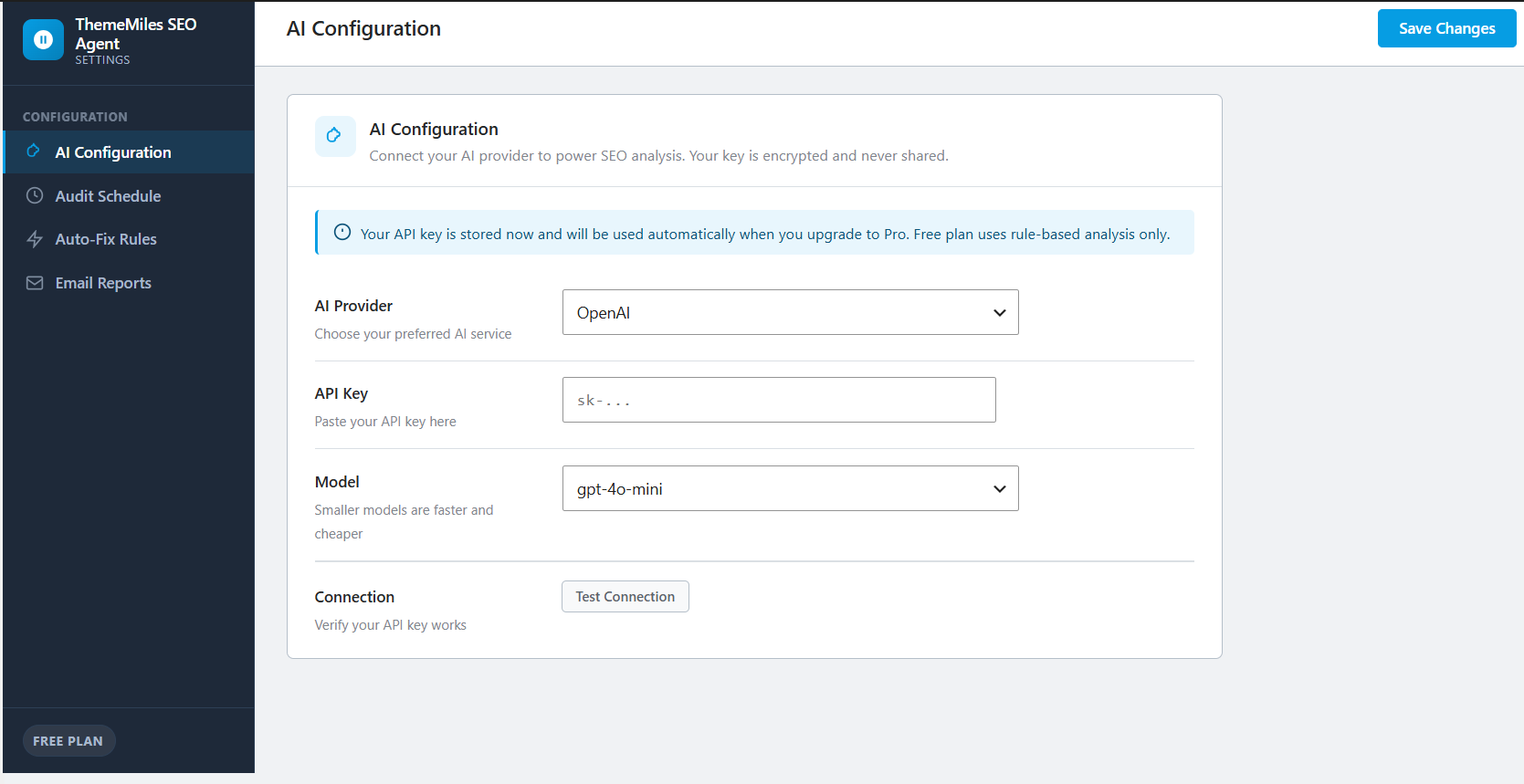
➜ Fix up to 15 issues per month with AI — add your own OpenAI, Anthropic, or Groq API key and apply one-click AI-generated fixes to meta titles, descriptions, OG tags, and focus keywords
The Free / Pro Model — What You Need to Know
ThemeMiles SEO Agent (this plugin) is the free version. It does everything listed above — including 15 AI-generated fixes per month using your own API key (OpenAI, Anthropic, or Groq) — and costs nothing. When you use the AI fix feature, your post content is sent to the AI provider you choose; see the External Services section below for full details.
ThemeMiles SEO Agent Pro is a separate premium plugin sold at thememiles.com. You install one or the other — not both simultaneously. Upgrading from free to Pro takes under two minutes, and all your audit data is preserved in the same database tables.
What Pro Adds
AI Fix Generation (Free: 15/month on 4 field types · Pro: unlimited on all field types)
✔ Unlimited AI fixes — no monthly cap; generate and apply fixes for every open issue
✔ All field types — extends AI fixes to alt text, schema, canonical, and every other field (free covers meta title, meta description, OG tags, focus keyword)
✔ Fix Queue — review, edit, approve, or reject every suggestion before anything touches your site (free applies immediately)
✔ Rollback — undo any fix at any time; every original value is snapshotted before the first change
Traffic Intelligence
✔ Fix impact tracking — measures position, impressions, and CTR changes 7 and 14 days post-fix
✔ Google Search Console integration — feeds real traffic data into the SEO Brain for accurate prioritisation
✔ Google PageSpeed Insights — Core Web Vitals pulled per URL and factored into scoring
Advanced Automation
✔ Autonomous nightly mode — generate and apply fixes overnight within your approved rules
✔ Schema markup generator — Article, FAQ, HowTo, and Product schemas auto-generated and injected
✔ GEO / AI Search optimisation — score and improve visibility in ChatGPT, Perplexity, and Google AI Overviews
✔ Content decay detection — flag ranking drops before they hit page 2
Growth & Agency
✔ Competitor gap analysis — DataForSEO integration (BYOK) for keyword gap detection
✔ Agency dashboard — manage multiple sites with white-label reporting (Business/Agency plans)
How the BYOK model works: Both free and Pro connect to AI providers using your API key. You sign up with OpenAI, Anthropic, or Groq directly, control your own usage limits, and pay them directly. A typical fix costs $0.001–$0.003 on GPT-4o-mini. ThemeMiles SEO Agent never marks up AI credits. The free plugin allows up to 15 AI fixes per month; Pro removes that limit.
Who Can Benefit From ThemeMiles SEO Agent?
ThemeMiles SEO Agent is perfect for:
✔ Bloggers and content creators
✔ eCommerce store owners running WooCommerce
✔ Niche site builders
✔ Marketing teams and SEO professionals
✔ Web design and development agencies
✔ Local businesses managing their own site
✔ WordPress consultants who audit client sites
✔ Any WordPress site that wants more organic traffic
External Services
This plugin can connect to third-party AI APIs to generate SEO fix suggestions. These connections only occur when you enter your own API key in Settings and click “Fix with AI” on a specific issue — they are never made automatically or without your action.
What data is sent to AI providers: The post title, a plain-text excerpt of the post content (approximately the first 200 words, HTML stripped), the site name, and the focus keyword. No visitor data, personal information, or data from other posts is ever transmitted.
When connections occur: Only when a logged-in administrator explicitly triggers a fix by clicking the “Fix with AI” button in the Audit Results page. The free plugin allows up to 15 such fixes per month.
1. OpenAI API — free plugin (15 fixes/month) and Pro (unlimited)
Used to generate meta titles, descriptions, OG tags, and other SEO field fixes when you select OpenAI as your provider and supply your own API key.
Data sent: post title, content excerpt (~200 words), site name, focus keyword.
When: only when an administrator clicks “Fix with AI” for a specific issue.
Provider: OpenAI, L.L.C.
Service home: https://openai.com/
Privacy policy: https://openai.com/policies/privacy-policy/
Terms of use: https://openai.com/policies/terms-of-use/
2. Groq API — free plugin (15 fixes/month) and Pro (unlimited)
An OpenAI-compatible inference API used as an alternative AI provider. Same data and trigger conditions as OpenAI above.
Data sent: post title, content excerpt (~200 words), site name, focus keyword.
When: only when an administrator clicks “Fix with AI” for a specific issue.
Provider: Groq, Inc.
Service home: https://groq.com/
Privacy policy: https://groq.com/privacy-policy/
Terms of use: https://groq.com/terms-of-service/
3. Anthropic API — free plugin (15 fixes/month) and Pro (unlimited)
Used to generate meta titles, descriptions, and other SEO field fixes when you select Anthropic as your provider and supply your own API key.
Data sent: post title, content excerpt (~200 words), site name, focus keyword.
When: only when an administrator clicks “Fix with AI” for a specific issue.
Provider: Anthropic, PBC.
Service home: https://www.anthropic.com/
Privacy policy: https://www.anthropic.com/privacy
Terms of use: https://www.anthropic.com/legal/consumer-terms
4. Internal link checker — this free plugin
During a site audit, the plugin uses WordPress’s built-in wp_remote_head() to check links found in post content. Only URLs that begin with your own home_url() are ever requested — the checker is strictly limited to your site’s own pages. No data leaves your server to any third party.
5. ThemeMiles.com — upgrade links in this free plugin
The Upgrade to Pro page and admin banner contain standard HTML anchor tags pointing to https://thememiles.com/thememiles-seo-agent-pro/. No data is transmitted to ThemeMiles servers automatically. These links only activate when an administrator clicks them.
Privacy policy: https://thememiles.com/privacy-policy/
6. WordPress.org — review nudge link in this free plugin
After sufficient usage, an admin notice contains an HTML link to the plugin’s WordPress.org reviews page. No data is transmitted automatically.
7. Google Search Console API — ThemeMiles SEO Agent Pro only
ThemeMiles SEO Agent Pro can connect to your own Google Search Console account via Google OAuth to import traffic metrics (position, impressions, clicks, CTR) for priority scoring. You authorise the connection; no data is shared with ThemeMiles.
Google Privacy policy: https://policies.google.com/privacy
8. Google PageSpeed Insights API — ThemeMiles SEO Agent Pro only
The Pro plugin can call the PageSpeed Insights v5 API to retrieve Core Web Vitals data for your URLs. Only your site’s own public URLs are submitted. Results are cached for 48 hours.
Google Privacy policy: https://policies.google.com/privacy
9. DataForSEO API — ThemeMiles SEO Agent Pro optional
Competitor gap analysis in Pro uses the DataForSEO API. This is strictly opt-in and requires you to supply your own DataForSEO API key (BYOK). No calls are made without your key.
Service home: https://dataforseo.com/
Privacy policy: https://dataforseo.com/privacy-policy/
Source Code
The unminified JavaScript source files and webpack build configuration for this plugin are publicly available at:
https://bitbucket.org/thememile/plugin-autoseo-agent
To rebuild the compiled assets from source:
1. Clone the repository
2. Run npm install
3. Run npm run build
Screenshots
Installation
Method 1: Install directly from WordPress Admin (recommended)
- Log in to your WordPress admin dashboard.
- Navigate to Plugins > Add New Plugin.
- Type ThemeMiles SEO Agent in the search box.
- Click Install Now next to the ThemeMiles SEO Agent result by ThemeMiles.
- Click Activate Plugin, then go to ThemeMiles SEO Agent > Dashboard and click Run Audit Now to scan your site.
Method 2: Manual upload via FTP or cPanel
- Download
thememiles-seo-agent.zipfrom the WordPress.org plugin repository. - Log in to your WordPress admin dashboard.
- Go to Plugins > Add New Plugin > Upload Plugin.
- Click Choose File, select the downloaded zip, then click Install Now.
- Click Activate Plugin, then go to ThemeMiles SEO Agent > Dashboard and click Run Audit Now to scan your site.
After Activation
- The onboarding wizard detects your active SEO plugin (Yoast SEO, Rank Math, or All in One SEO) automatically.
- Optionally enter your AI provider API key (OpenAI, Anthropic, or Groq) to unlock 15 free AI-generated fixes per month.
- Choose a weekly audit schedule, or click Run Audit Now to start immediately.
- Review your SEO Brain priority tiers — start with Fix Immediately issues for the highest impact.
FAQ
-
Does ThemeMiles SEO Agent replace Yoast SEO, Rank Math, or All in One SEO?
-
No — it works alongside your existing SEO plugin, not instead of it. ThemeMiles SEO Agent detects which SEO plugin you have active and reads from its meta fields. With an API key configured it writes AI-generated fixes directly to those same meta fields (15/month free, unlimited in Pro). Your SEO plugin handles how tags appear on the front end; ThemeMiles SEO Agent tells you what’s wrong and fixes it. You must keep your SEO plugin active.
-
How does the two-plugin model work?
-
ThemeMiles SEO Agent (this plugin, free on WordPress.org) handles site auditing, priority scoring, and reporting. It is fully functional on its own — no Pro licence required.
ThemeMiles SEO Agent Pro is a separate premium plugin available at thememiles.com. It removes the 15-fix monthly cap, adds a Fix Queue (review every suggestion before it is applied), rollback, unlimited field types, Google Search Console integration, schema generation, and more. The two plugins share the same database tables, so you install one or the other — not both. Switching from free to Pro (or back) preserves all your audit history and issues data completely.
-
What exactly does the free version detect and report?
-
The free plugin runs a 12-check audit on every published post, page, and WooCommerce product:
- Meta title — missing, or outside the 30–65 character range
- Meta description — missing, or outside the 50–160 character range
- Duplicate meta description — same description text used on multiple posts
- Missing focus keyword — no focus keyword set in your SEO plugin
- Image alt text — images in post content or attached to the post with no alt attribute
- Schema markup — no JSON-LD or SEO plugin schema detected on the post
- Open Graph tags — missing OG title or OG description for social sharing
- Thin content — post word count below 300 words
- Duplicate Title / H1 — the post title and the first H1 in the content are identical
- Missing canonical URL — no canonical set in your SEO plugin
- Broken internal links — up to 10 internal URLs per post checked for 404 responses
- Keyword absent from title — the focus keyword does not appear in the meta title
Every issue gets a 0–100 priority score and a tier label (Fix Immediately / Fix This Week / Fix When Possible / Low Priority). You also get a site-wide health score from 0 to 100.
-
How much does the AI cost to use?
-
Both the free plugin and Pro use a BYOK (Bring Your Own Key) model — you sign up directly with OpenAI, Anthropic, or Groq, supply your own API key in Settings, and pay the provider directly for any usage. ThemeMiles SEO Agent never marks up or resells API credits.
The free plugin allows up to 15 AI-generated fixes per month at no cost from ThemeMiles. Each fix sends a small amount of post content to your chosen AI provider. A typical fix — meta title or meta description — costs roughly $0.001–$0.003 using GPT-4o-mini. Groq’s free tier makes fixes effectively $0.00. The monthly counter resets on the 1st of each month.
ThemeMiles SEO Agent Pro removes the monthly cap and unlocks all field types (alt text, schema, OG tags, focus keyword, and more) with no per-fix limit.
-
Does it work with WooCommerce products?
-
Yes. The audit engine scans WooCommerce product post types alongside posts and pages. If you use Yoast SEO for WooCommerce, Rank Math, or AIOSEO alongside WooCommerce, ThemeMiles SEO Agent reads from and writes AI-generated fixes to the correct meta keys for each SEO plugin automatically (15 fixes/month free, unlimited in Pro).
-
Can I undo an AI fix if I don’t like the result?
-
Rollback is a ThemeMiles SEO Agent Pro feature. Pro takes a snapshot of the original field value before applying any fix; you can roll back a single fix, every fix from an entire audit run, or all fixes on a specific post — at any time from the Fix History page. The free plugin applies fixes immediately without a snapshot, so rollback is not available in the free version.
-
Will ThemeMiles SEO Agent slow down my website?
-
No. ThemeMiles SEO Agent is entirely an admin-side tool. It adds zero JavaScript, CSS, or hooks to your public-facing site. Audits run in the background using WP-Cron, processing posts in batches of 50. Front-end visitors see no impact whatsoever.
-
What happens to my Pro licence when it expires?
-
When a ThemeMiles SEO Agent Pro licence expires, AI fix generation and auto-apply are disabled until you renew. You can still view all audit results and fix history. All your data — issues, fixes, snapshots, audit runs — stays intact in the database. If you switch back to the free plugin instead of renewing, it continues reading from the same tables, so your audit history is fully preserved.
-
How is ThemeMiles SEO Agent different from Alli AI or other AI SEO tools?
-
A few key differences: ThemeMiles SEO Agent integrates natively with Yoast SEO, Rank Math, and AIOSEO — fixes are written to those plugins’ own meta keys, not to a separate meta layer. The BYOK model means you pay the AI provider directly with no per-fix mark-up. In Pro, every generated fix goes through a Fix Queue so you can review it before it is applied. The free tier includes a full audit engine, priority scoring, and 15 AI fixes per month at no cost from ThemeMiles — most comparable tools require a paid subscription just to see detected issues.
-
Is it beginner-friendly?
-
Yes. The audit results page puts Fix Immediately issues at the top, so you always know where to start. No API key is required to run your first audit — just activate and click Run Audit Now. An onboarding wizard walks you through SEO plugin detection and schedule setup step by step. Once you have results, add a free Groq API key in Settings to unlock the Fix with AI button and apply fixes in one click (15/month free). Audit results show the current field value and the recommended range in plain language.
-
Does it work on WordPress Multisite?
-
The plugin is designed for standard single-site installations. While it may function on individual network sites within a Multisite setup, a network-wide dashboard and centralised scanning are not included in the current version. ThemeMiles SEO Agent Pro’s Business and Agency plans include an agency-style dashboard for managing multiple separate single-site installations.
-
Will my audit data be preserved when I upgrade from free to Pro?
-
Yes, completely. Both plugins use identical database table names —
wp_autoseo_issues,wp_autoseo_fixes,wp_autoseo_snapshots, andwp_autoseo_audit_runs. When you install ThemeMiles SEO Agent Pro (which deactivates and replaces the free plugin), it reads from and writes to the exact same tables. Every detected issue, audit run, manually resolved item, and ignored issue is preserved with no migration needed.
Reviews
There are no reviews for this plugin.
Contributors & Developers
“ThemeMiles SEO Agent” is open source software. The following people have contributed to this plugin.
Contributors
Translate “ThemeMiles SEO Agent” into your language.
Interested in development?
Browse the code, check out the SVN repository, or subscribe to the development log by RSS.
Changelog
1.0.4
- Updated: readme Screenshots section revised to reflect the 4 current admin screenshots (Dashboard, SEO Audit health score, SEO Audit issue list, Settings AI Configuration).
1.0.3
- Fixed: Pro upgrade URL corrected to https://thememiles.com/thememiles-seo-agent-pro/ throughout readme.
- Updated: readme External Services section now accurately documents that the free plugin can call OpenAI, Groq, and Anthropic APIs (up to 15 fixes/month with BYOK) — all three providers listed with terms and privacy policy links.
- Updated: readme description, tagline, FAQ, and BYOK model explanation corrected to reflect that AI fix generation (15/month) is included in the free plugin.
1.0.2
- Fixed: Plugin URI updated from /autoseo-agent/ to /thememiles-seo-agent/ in plugin header and readme.
1.0.1
- Fixed: all admin scripts and styles now enqueued via
wp_add_inline_script()/wp_add_inline_style()instead of raw HTML tags, per WordPress.org guidelines. - Fixed: all
$wpdbqueries use%iplaceholder for table names instead of variable interpolation. - Fixed: non-prefixed variables renamed in view and uninstall files.
- Removed:
load_plugin_textdomain()call (deprecated since WordPress 4.6). - Changed: background audit job uses WP-Cron instead of Action Scheduler.
1.0.0
Initial release.
Audit engine
- 12-check site-wide SEO audit: meta title (30–65 chars), meta description (50–160 chars), duplicate meta descriptions, missing focus keyword, image alt text (post content + attached media), schema / JSON-LD markup, Open Graph tags, thin content (<300 words), duplicate Title/H1, missing canonical URL, broken internal links (404 check, up to 10 per post), focus keyword in title.
- Auto-detects active SEO plugin: Yoast SEO, Rank Math, All in One SEO. Falls back to Yoast meta keys.
- Audits published posts, pages, and WooCommerce products in one pass.
- Batch processing (50 posts per batch) via WP-Cron — no server timeout on large sites.
- Auto-resolves open issues on re-audit when the underlying problem is corrected.
SEO Brain Priority Scoring
- 0–100 priority score per issue: traffic weight (post type proxy; GSC data in Pro) + ranking opportunity (positions 4–10 score highest) + issue severity (critical/major/minor) + fix effort (AI-fixable issues score highest).
- Four priority tiers: Fix Immediately (>=75), Fix This Week (>=50), Fix When Possible (>=25), Low Priority (<25).
- Site-wide rescore job runs automatically after every audit and can be triggered manually.
- Brain summary transient cached for 1 hour for instant dashboard loads.
Admin UI
- Dashboard: 0–100 health score SVG gauge (stroke-dasharray), SEO Brain summary bar, top-issue cards, last audit timestamp, run-audit button with live polling.
- Audit Results: priority-ranked issue table, severity / issue type / priority tier / status / search filters, paginated 25 per page, expandable rows with current value and recommended range.
- Fix Queue: free upgrade-preview page showing real issue values alongside blurred Pro suggestions, feature comparison, estimated AI cost, and upgrade CTA.
- Settings: API provider selector, API key field (never exposed to browser after save), model selector, audit schedule (frequency + time of day), auto-fix rules per field type (disabled in free), email report settings.
- Upgrade to Pro: three-plan pricing grid (Pro / Business / Agency), per-plan feature checklists, FAQ section, 7-day money-back notice.
- Onboarding wizard: multi-step modal on first activation — SEO plugin detection, API key setup, audit schedule, first audit trigger.
- Dismissible free upgrade banner on all AutoSEO admin pages (per-user, 15-minute cool-down after dismissal).
- Review nudge: shown to admins after 5+ applied fixes and 14+ days active, with “Remind me in 30 days” option.
Data and infrastructure
- Four database tables created on activation:
wp_autoseo_issues,wp_autoseo_fixes,wp_autoseo_snapshots,wp_autoseo_audit_runs. - DB version check on every load via
maybe_upgrade()— runsdbDelta()only when needed. - WP-Cron used for reliable background job processing.
- Weekly scheduled audit with configurable time of day (settings-driven).
- REST API: 11 endpoints under
autoseo/v1/— issues (paginated, filterable, JOIN with wp_posts for post titles), issues/summary, issues/rescore, audit/run, audit/status, brain/summary, settings (GET/POST), settings/test-connection, license/status, license/activate, license/deactivate. - License controller is a pure stub in the free plugin — returns
plan: freewith zero HTTP requests. - PSR-4 autoloader with
vendor/autoload.phpfallback to manualspl_autoload_register. - Full uninstall cleanup via
uninstall.php: drops all four tables, deletes all plugin options, removes all_transient_autoseo_*and_transient_timeout_autoseo_*entries.