
Description
Tastoria Recipe Manager is a powerful yet easy-to-use recipe plugin that helps you create, organize, and share beautiful recipes on your WordPress site. Whether you’re a food blogger, chef, or cooking enthusiast, Tastoria Recipe Manager provides everything you need to showcase your recipes professionally.
Key Features
📝 Custom Recipe Post Type
Dedicated recipe post type with all the fields you need for professional recipe management.
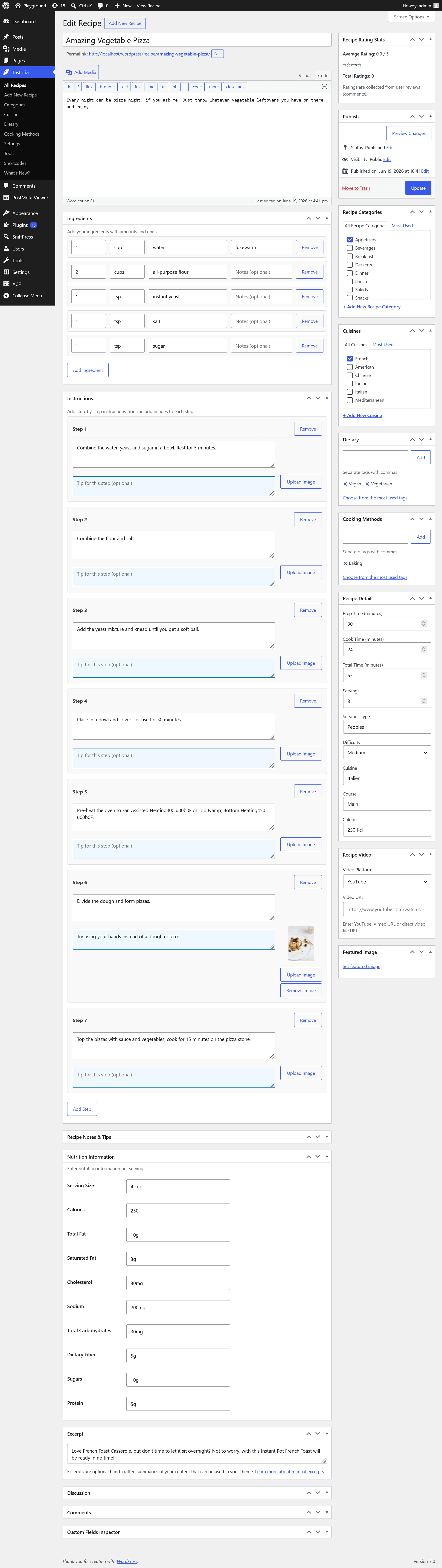
🔧 Dynamic Ingredients & Instructions
Add, remove, and reorder ingredients and steps. Include tips, images, and notes for each step.
📁 Advanced Taxonomies
Organize recipes by categories, cuisines, dietary preferences, and cooking methods.
🎨 Multiple Layout Styles
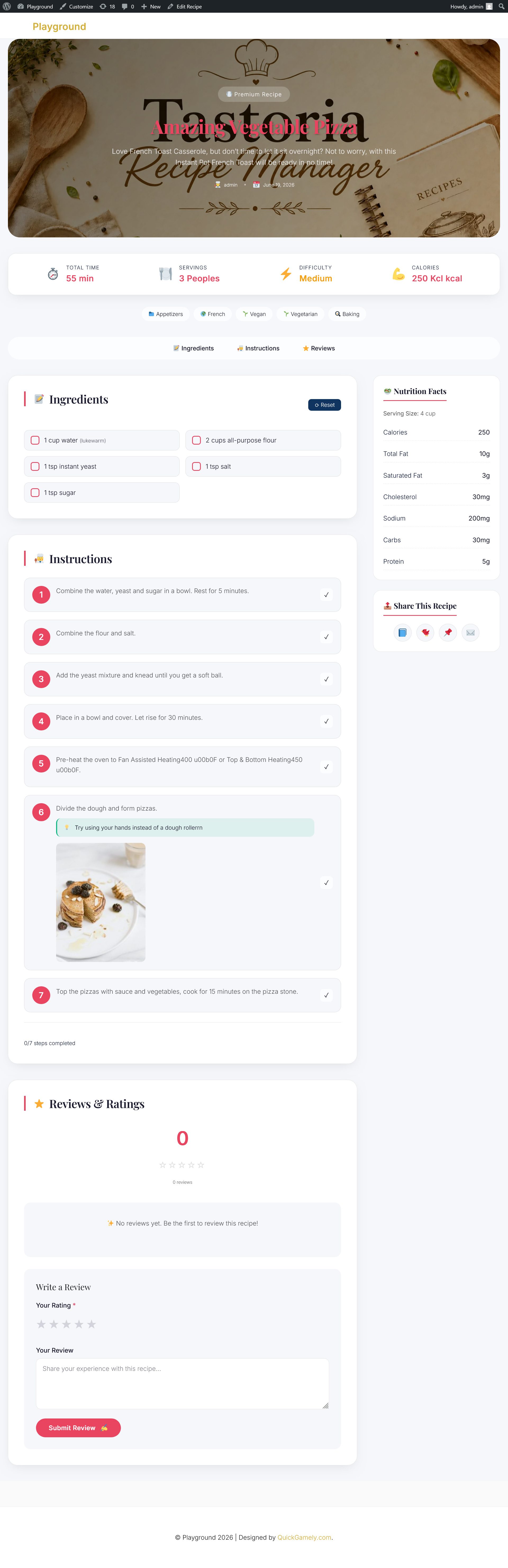
Choose from Classic, Modern, or Retro Tastoria Recipe Manager layouts to match your website’s aesthetic.
⭐ User Ratings & Reviews
Allow users to rate recipes and leave reviews. Display average ratings and review counts with AJAX submission.
🔍 AJAX Filtering
Filter recipes by categories, cuisines, dietary needs, and cooking methods without page reload.
📊 Nutrition Facts
Complete nutrition information panel for health-conscious recipes.
🎬 Video Support
Embed YouTube, Vimeo, or upload your own cooking videos.
📋 Shortcodes
Flexible shortcodes for grids, filters, and recipe displays anywhere on your site.
🔎 SEO Optimized
Built-in Schema.org markup for rich snippets in search results.
🌐 Translation Ready
Fully translatable with .pot file included.
Shortcodes
[tastrema_grid]– Display a grid of all recipes with pagination[tastrema_filter]– Display AJAX-powered filter form
Example Usage:
[tastrema_grid columns=”4″ posts_per_page=”12″]
[tastrema_filter show_categories=”yes” show_cuisines=”yes”]
Perfect For
- Food blogs and recipe websites
- Cooking schools and culinary sites
- Restaurant menu displays
- Personal recipe collections
- Health and nutrition blogs
- Meal planning websites
Additional Information
Credits
Tastoria Recipe Manager is created with love for food bloggers and recipe enthusiasts. Thank you for using Tastoria Recipe Manager!
Support
For documentation, bug reports, and feature requests, please visit the Tastoria Recipe Manager menu in your WordPress admin.
Contributing
Tastoria Recipe Manager is open-source software. Contributions are welcome!
Translations
Tastoria Recipe Manager is translation ready. You can translate it into your language using the .pot file included in the languages folder.
Screenshots


Installation
- Upload the
tastoria-recipe-managerfolder to the/wp-content/plugins/directory - Activate the plugin through the ‘Plugins’ menu in WordPress
- Go to Tastoria Recipe Manager Settings to configure your preferences
- Start adding recipes from the Tastoria Recipe Manager menu in your admin sidebar
FAQ
-
How do I display recipes on my site?
-
Use the
[tastrema_grid]shortcode on any page or post. You can also use[tastrema_filter]for a complete recipe directory. -
Can users rate recipes?
-
Yes! Users can leave star ratings and written reviews. Ratings appear in the recipe page and are used for schema markup.
-
How do I add nutrition information?
-
When editing a recipe, scroll to the Nutrition Information meta box and fill in the values. These will display in the sidebar on the frontend.
-
Can I add videos to recipes?
-
Yes! You can add YouTube, Vimeo URLs or upload your own video files in the Recipe Video meta box.
-
Is the plugin mobile-friendly?
-
Yes! Tastoria Recipe Manager is fully responsive and works perfectly on all devices including desktops, tablets, and smartphones.
-
Does it work with page builders?
-
Yes, Tastoria Recipe Manager works with any WordPress theme and page builder. Use the shortcodes to display recipes anywhere.
-
How do I change the layout style?
-
Go to Tastoria Recipe Manager Settings and select your preferred layout style from Classic, Modern, or Retro Tastoria.
-
Can users leave reviews without logging in?
-
Yes, you can allow guest reviews in WordPress discussion settings. Guest reviewers need to provide their name and email.
-
Does it support Schema markup for SEO?
-
Yes! Tastoria Recipe Manager adds complete JSON-LD schema markup to all recipe pages for better search engine visibility.
Reviews
There are no reviews for this plugin.
Contributors & Developers
“Tastoria Recipe Manager” is open source software. The following people have contributed to this plugin.
Contributors

Translate “Tastoria Recipe Manager” into your language.
Interested in development?
Browse the code, check out the SVN repository, or subscribe to the development log by RSS.
Changelog
1.0.0
- Initial release
- Custom recipe post type
- Dynamic ingredients and instructions with tips and images
- Recipe categories, cuisines, dietary, and cooking method taxonomies
- Multiple layout styles (Classic, Modern, Retro)
- User ratings and reviews with AJAX submission
- Recipe schema markup for SEO
- Nutrition information panel
- Video support (YouTube, Vimeo, MP4)
- Shortcodes for grids and filters
- AJAX-powered recipe filtering
- Admin settings page
- Shortcodes documentation
- About page with system status
- Translation ready