
Description
Perishable and dated stock — food, supplements, cosmetics, anything with a best-before or use-by date — needs a different kind of pricing than the rest of your catalogue. Left alone, it either sits at full price until it’s unsellable, or someone has to remember to mark it down manually, product by product, week after week.
Expiry Tracking and Discount Engine tracks expiry dates natively per product (or per variation), and automatically prices clearance discounts as each batch approaches its date — no spreadsheets, no manual sale-price editing, no forgotten stock.
This is a WooCommerce extension. WooCommerce must be installed and active; the plugin adds to your existing products rather than replacing any part of your store.
What it does (free)
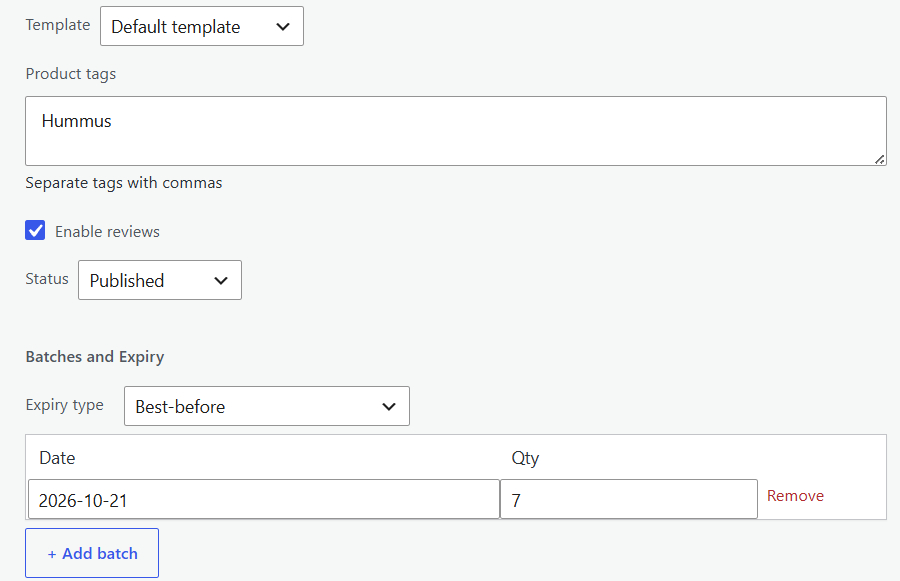
- Native batch tracking — record one or more expiry dates and quantities per product, right on the product edit screen. Works with simple and variable products.
- Best-before and use-by aware — the two date types behave differently (best-before stays sellable a little past its date; use-by is pulled before it), each with its own configurable grace window.
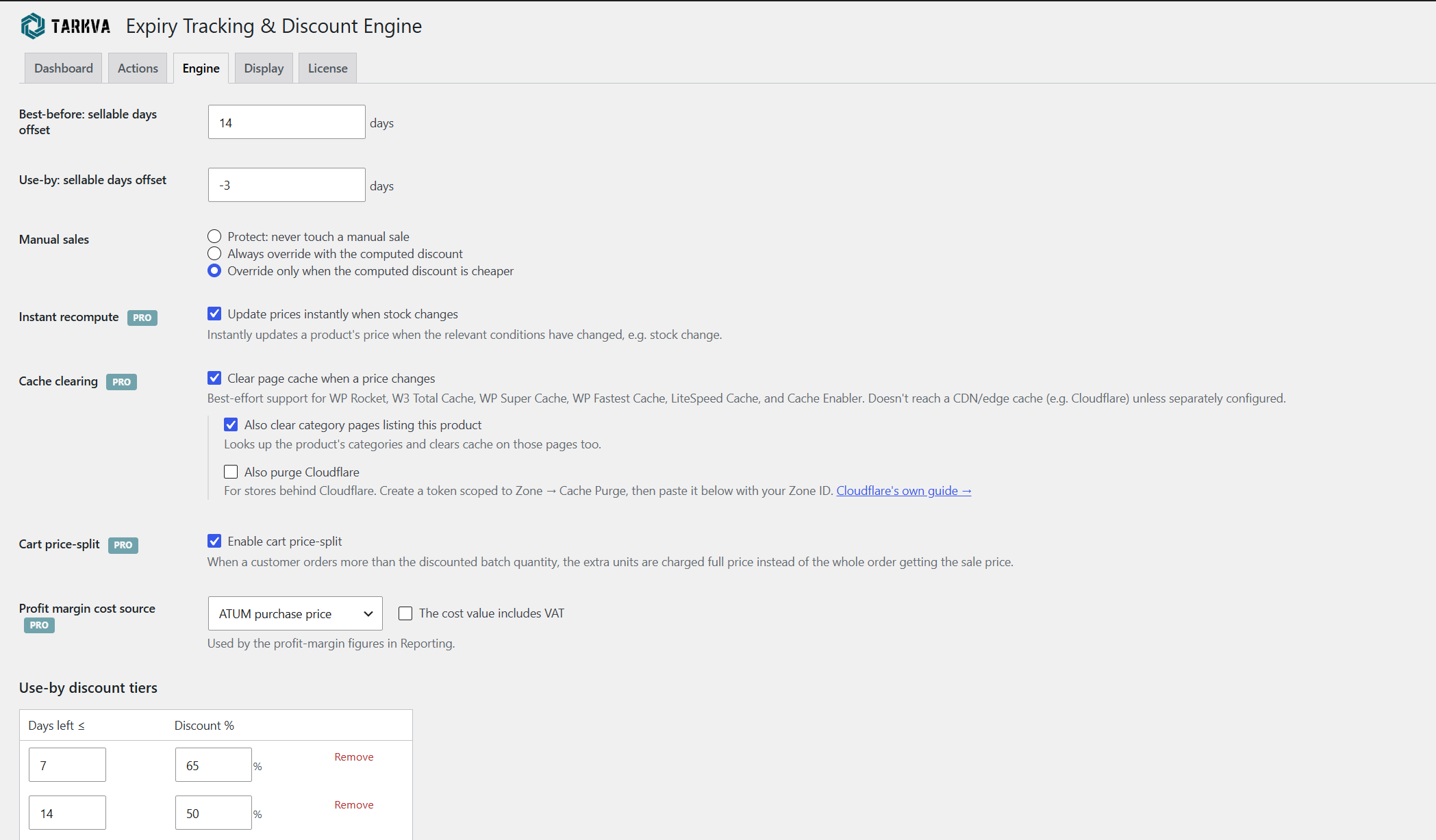
- Automatic clearance pricing — a configurable table of discount tiers (“7 days left 65% off”, “30 days left 20% off”, and so on) prices each product automatically as its date approaches.
- Runs on its own schedule — an automatic sweep recalculates every tracked product’s price for you; pick twice daily, daily, weekly, semi-monthly or monthly to match how fast your stock moves.
- Customers never buy expired stock — expired-but-retained stock stays visible to you for reference, but is automatically hidden from customers and excluded from product feeds (Google Shopping, Facebook, etc.) once it’s no longer sellable.
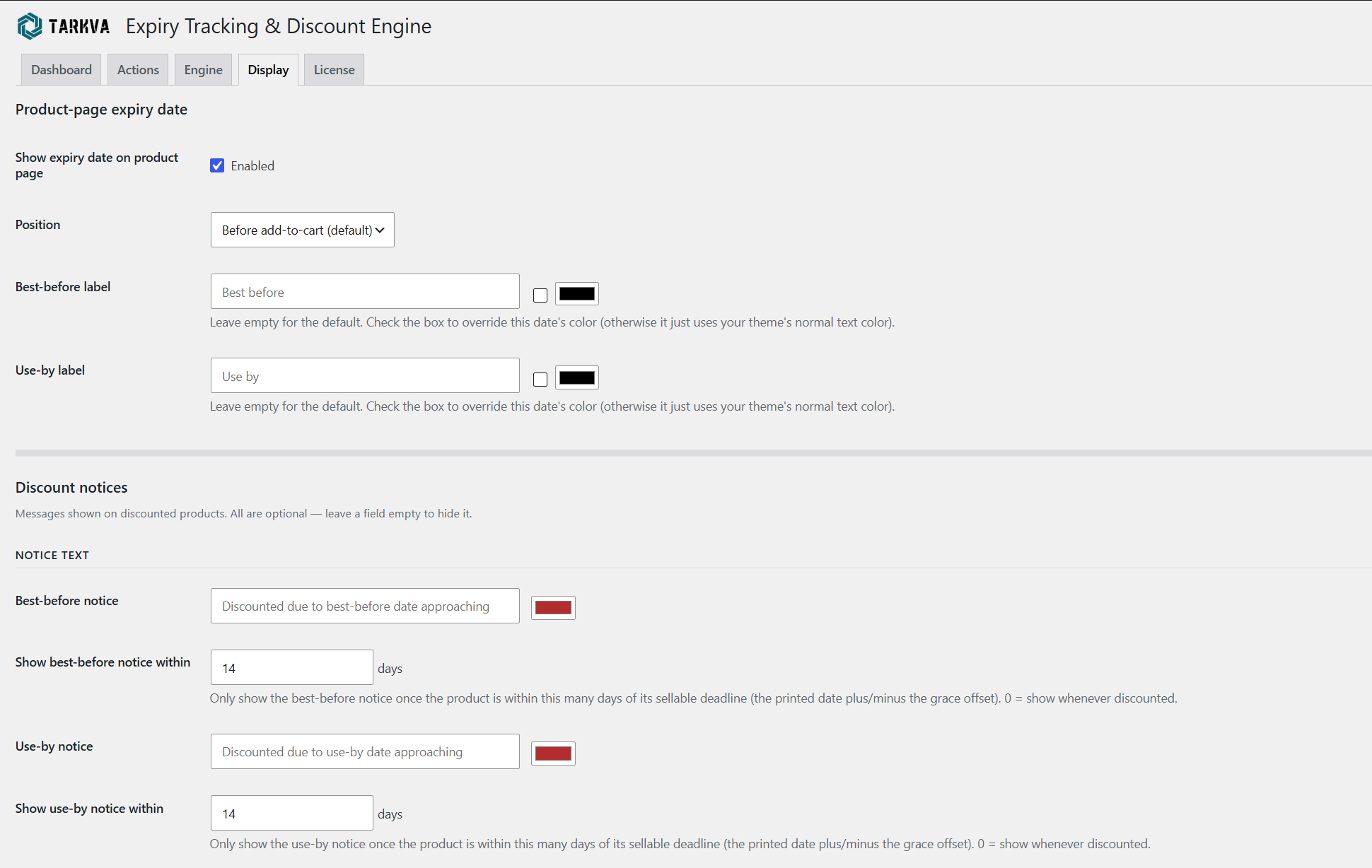
- A clear expiry notice on the product page — a configurable message shown to shoppers, with labels, colors, and placement you control so it fits your store’s voice and design.
- Your choice on manual sale prices — protect a price you’ve set by hand entirely, let the engine always manage it, or only override it when the engine’s own discount is deeper: you decide which.
- EU Omnibus-friendly pricing — your product’s regular price is never altered or reset when a discount tier applies, so the reference (“was”) price shown to customers is always your genuine original price, not an inflated or escalating one.
- Unlimited tracked products and unlimited discount tiers — no caps of any kind. Track your whole catalogue and build as many discount tiers per date type as your pricing strategy needs.
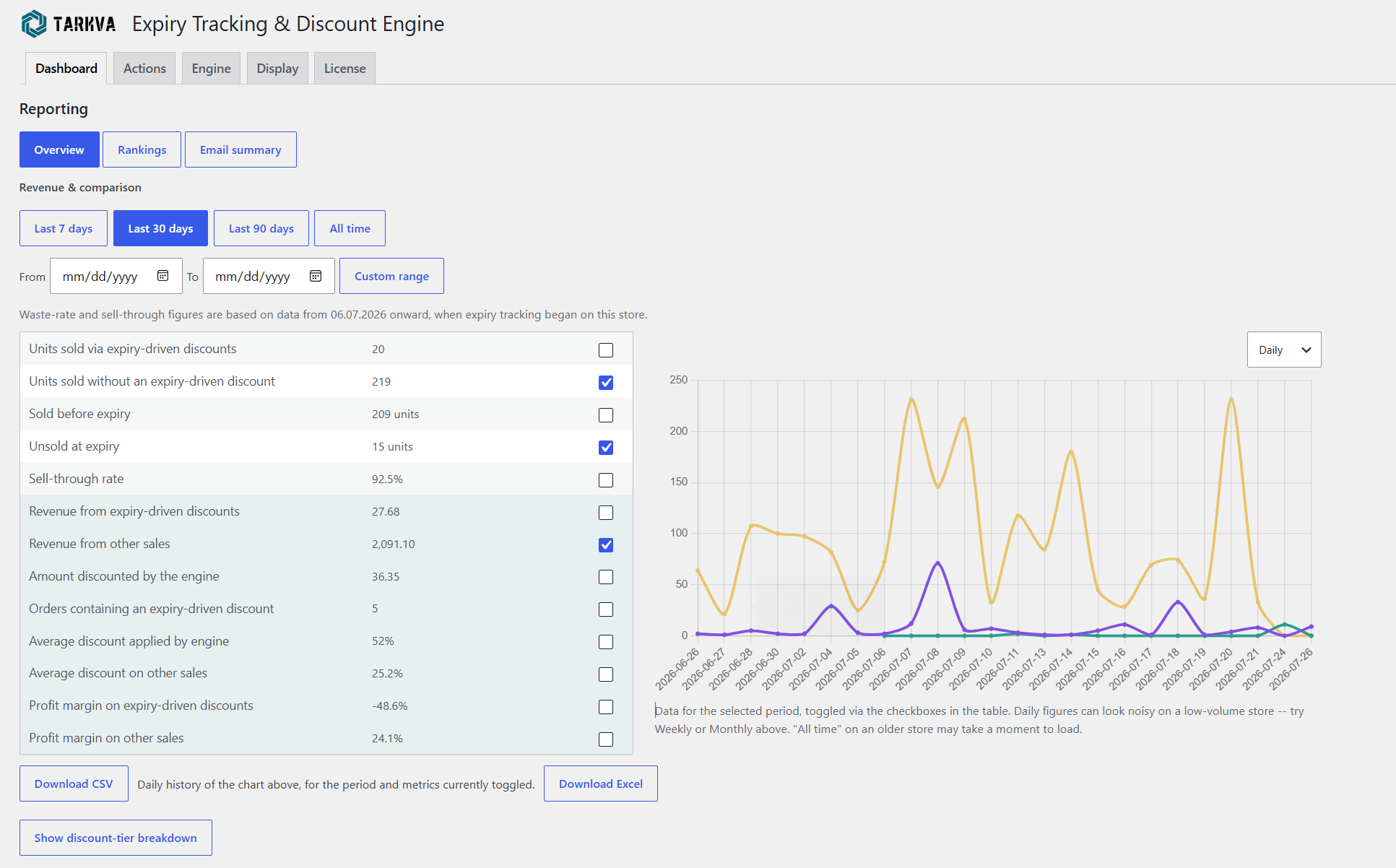
- Free Reporting dashboard — sales, waste, and sell-through metrics with a toggleable trend chart, a full Rankings table comparing every tracked product side by side, and a scheduled email summary, all included at no cost.
- Backup and restore — snapshot all your batch and expiry data at any time, and restore from any saved snapshot.
- WP-CLI support for previewing, applying, and inspecting discounts from the command line.
Why this is different
Most “sale” or “dynamic pricing” plugins schedule a fixed discount for a fixed period. This plugin instead reasons about your actual expiry dates: how close a batch is to its sellable deadline drives the price, automatically, continuously, without you touching it.
Want more?
The Pro add-on builds on the same engine for stores that want to go further:
- Stock & velocity intelligence — slow-selling or overstocked batches discount earlier and harder; batches projected to sell out comfortably discount later or not at all, protecting margin
- Cart price-split — only the at-risk quantity gets the discounted price; extra units in the same order are charged full price
- Advanced notices — cart reminders, discounted-quantity display, custom CSS placement
- Scheduled, automated backups
- Bulk CSV import for batch and expiry data
- Deeper reporting — revenue and profit-margin figures, plus one-click Excel exports
- Instant price recompute plus automatic page-cache clearing (including Cloudflare)
- Priority customer support and configuration assistance
Learn more at tarkva.com.
Privacy and external services
This plugin does not send any data anywhere by default. See “External services” below for the one case where it does, and only when you explicitly opt into it.
External services
This plugin connects to tarkva.com, the developer’s own licensing server, to validate a Pro add-on license key and check for available Pro updates. This only happens if and when you enter a license key on the plugin’s License tab — nothing is sent otherwise, and this free plugin works fully without ever triggering it. The data sent is the license key itself and this plugin’s fixed product identifier; no other site data is transmitted. This service is provided by Tarkva: Terms of Service, Privacy Policy.
The Engine tab’s cache-clearing settings (a Pro-only feature) include a link to Cloudflare’s own public documentation on creating an API token, for reference if you also install the separate Pro add-on. This free plugin never contacts Cloudflare itself, sends it no data, and does not require an account with it — the link is informational only, and the associated settings fields are read solely by that separate add-on’s own code, never by this plugin.
License
This plugin is free software, licensed under the GPLv2 (or later) — see LICENSE.txt in this
plugin’s own folder for the full license text, or https://www.gnu.org/licenses/old-licenses/gpl-2.0.html.
In plain terms: you’re free to use, study, modify, and redistribute this plugin, including copies
you’ve modified yourself, for any purpose, commercial or otherwise. There is no warranty of any
kind, including for any financial gain or loss resulting from the automatic pricing decisions this
plugin makes on your store. As with any plugin that automatically modifies your store’s data, keep
your own regular backups before and during use — standard practice for any such plugin, not a sign
that this one is unusually risky. This applies only to this free plugin — the separately-sold
“Expiry Tracking and Discount Engine PRO” add-on is not distributed under the GPL and is not
covered by this section; see its own LICENSE.txt for the terms that apply to it.
Screenshots
Installation
- Make sure WooCommerce is installed and active — this plugin extends it and will not activate without it.
- Upload the plugin files to
/wp-content/plugins/tarkva-expiry-tracking-and-discount-engine, or install directly through the WordPress plugins screen. - Activate the plugin through the ‘Plugins’ screen in WordPress.
- Go to Products Expiry & Discounts to configure discount tiers and notices.
- On any product you want to track, open the Inventory tab and set its expiry type and batch dates.
FAQ
-
Do I need WooCommerce?
-
Yes. This is a WooCommerce extension, not a standalone plugin — it reads your WooCommerce products, prices and orders, and WordPress will not let it activate unless WooCommerce is active. It works with any reasonably current WooCommerce version; there is nothing to configure on the WooCommerce side.
-
Does this work with variable products?
-
Yes. Each variation can have its own expiry batches; the expiry type (best-before/use-by) is set once on the parent and inherited by all variations.
-
Will customers ever be able to buy expired stock?
-
No. Once a batch is past its sellable window, it’s automatically excluded from what customers can purchase and from product feeds, while remaining visible to you for reference.
-
Does it work with multilingual/translation plugins?
-
Yes. All customer-facing text (notices, labels) is a setting you configure, so your translation plugin translates it exactly like any other text on your site.
-
Does it replace my existing expiry-tracking plugin?
-
It can. The plugin includes a native batch/expiry data model, so once your dates are entered here, you no longer need a separate expiry-tracking plugin.
-
Can I set discounts without expiry dates involved?
-
Not at this time — this plugin is purpose-built for expiry-driven clearance. For general-purpose discount rules unrelated to expiry dates, pair it with a dedicated dynamic pricing plugin.
Reviews
There are no reviews for this plugin.
Contributors & Developers
“Tarkva – Expiry Tracking and Discount Engine” is open source software. The following people have contributed to this plugin.
Contributors
Translate “Tarkva – Expiry Tracking and Discount Engine” into your language.
Interested in development?
Browse the code, check out the SVN repository, or subscribe to the development log by RSS.
Changelog
1.8.5
Changed
- The listing now states plainly that this is a WooCommerce extension. WooCommerce was previously
only implied — named in the plugin’s tags and enforced technically, but never actually said in
the description, the installation steps or the FAQ, so it was possible to install this expecting
it to work on WordPress alone. Nothing about how the plugin behaves has changed.
1.8.4
Fixed
- Widened the expiry date picker further, in both directions. 1.8.3 raised the ceiling but kept a
narrow floor, so entering or correcting an older date was still restricted. The picker now spans
thirty years back to fifty years ahead, and the span remains filterable
(wcde_datepicker_year_range). CSV import was never affected by any of this — it accepts any
valid date directly.
1.8.3
Fixed
- Expiry dates more than six years ahead could not be entered. The date picker’s year list stopped
at the current year plus six, and a date typed by hand beyond that was silently pulled back into
range instead of being kept — a real problem for long-dated goods such as tinned food, spirits or
supplements. The picker now offers thirty years ahead, and the range is filterable
(wcde_datepicker_year_range) if you need more. Nothing in the plugin or the database ever
limited the date itself; this was purely the picker.
1.8.2
Fixed
- Corrected the feature list: instant price recompute is part of the Pro add-on, not the free
plugin. The free plugin recalculates on its configurable schedule (twice daily through monthly).
The description previously implied both, and listed the feature under free and Pro at once.
New
- An occasional, dismissible prompt asking for a WordPress.org review. It only appears after the
plugin has been in use for two weeks and only if you actually have expiry-tracked products, can
be postponed or turned off permanently, and never blocks anything. There is also a quiet link
under License Reviews if you would rather leave one on your own terms.
1.8.1
Fixed
- If your Pro license is active but the Pro add-on plugin isn’t installed on the site, the plugin
now says so. Previously the only mention was on the License tab, so every locked field showed a
plain PRO badge — identical to what someone who had never bought Pro would see. There is now a
notice on the plugin’s own screens and on the Plugins screen, and the PRO badge itself explains
on hover that the licence is fine and only the add-on is missing.
Security
- Every value the plugin prints in the WordPress admin is now escaped at the point it is printed,
rather than where it was built. The values were already escaped before, but escaping at the
output itself is what the WordPress coding standards require, and it keeps a future edit from
quietly introducing a gap. - All database queries now pass table and column names as prepared identifiers, and product-ID
lists inIN (...)clauses are bound as individual placeholders instead of being assembled into
the query text. - Data embedded into inline admin scripts is encoded at the point it is written into the page.
Changed
- No settings, stored data, pricing behaviour, or reporting figures change in this release. It is
a code-hardening pass only.
1.8.0
New
- All free-tier limits removed. The plugin now tracks an unlimited number of products, supports an
unlimited number of discount tiers per date type, and shows every row of the Rankings table. No
feature in this plugin is limited by quantity any more.
Changed
- The Engine tab’s discount-tier tables now show and let you edit every tier you have configured,
with no cap on adding more. - The Rankings table and its CSV export now include every expiry-tracked product. Revenue and
Profit margin remain columns supplied by the Pro add-on, which is what calculates those figures. - Removed the product-limit notices from the product edit, product list, and plugin settings
screens, along with the “limit reached” message from backup restore, since there is no longer any
limit to report.
Fixed
- The scheduled summary email could permanently drift onto the wrong day of the week. WordPress only
runs scheduled tasks when someone visits your site, so on a quieter store an email set for Monday
could actually go out on, say, Thursday — and from then on Thursday became the new send day, with
every further delay shifting it again. The schedule now always re-anchors to the day you chose, so
a late send corrects itself on the very next cycle. - If duplicate summary emails ever ended up scheduled, every future email was sent that many times,
permanently. Only one is ever scheduled now, and any existing duplicates clear themselves on the
next send. - The Dashboard trend chart could keep drawing Pro-only metrics from previously cached report data
after a Pro license expired, even though those metrics were no longer selectable. Those series now
disappear as soon as the license does.
Security
- Saving a report date range or a Rankings sort order as your remembered default now requires a
valid nonce and the manage_woocommerce capability. Viewing a report from a URL still works
exactly as before, including bookmarked links — only storing that choice as your new default is
gated. - Product and category names embedded into admin JavaScript are now hex-escaped, so a name
containing HTML can never break out of its surrounding script block.
Improved
- The summary email now states the exact date range it covers (“23.07.2026 to 30.07.2026”, in your
site’s own date format) instead of only “last 7 days”, so it is always clear which period the
figures belong to. - Numbers now use your site’s own decimal and thousands separators throughout the reporting screens
and the summary email, instead of always using the English convention. A store set to Estonian,
German or French now reads 1.234,56 rather than 1,234.56. Export filenames also use a neutral,
correctly-sorting date format and your site’s timezone. - All inline JavaScript is now generated through output buffering with explicit escaping on every
dynamic value, replacing heredoc syntax throughout, in line with WordPress.org’s plugin coding
requirements.
1.7.0
- Fixed: “Unsold at expiry,” sell-through rate, Rankings, the scheduled email, and the Dashboard
trend chart could misreport waste for a batch whose actual sellable deadline (printed date plus
its best-before/use-by grace window) fell on a different day, or a different reporting period,
than its raw printed date — a best-before batch with real shelf life left could show as wasted
too early, and a use-by batch pulled early could be missed entirely until its printed date
arrived. All of these now consistently use each batch’s actual sellable deadline. - Fixed: a permanently deleted product (or variation) that still had an expired, unsold batch
could lose that waste record entirely instead of it being counted. Deleting a product now gives
any such batch one last chance to be recorded first. - Fixed: the “Remove” button on a batch row (Inventory tab and Quick Edit) wasn’t vertically
aligned with its Date/Qty fields.
1.6.0
- New: “Rankings” (Dashboard Reporting Rankings) — a sortable, filterable table comparing every
expiry-tracked product side by side: current stock, days to sellable deadline, units wasted,
waste rate, units sold, and sell-through rate. Pro adds Revenue and Profit margin columns to the
same table. - New: every discount notice (best-before, use-by) can now have its own background color, next to
its own text field. - New: best-before and use-by product-page dates can each optionally override their own text color.
- New: the product-page expiry date’s position dropdown now also offers “After add-to-cart button”
and “Before product meta” (previously 3 options, now 5 — the same choices already offered
elsewhere). - New: a “cost includes VAT” option next to the Engine tab’s profit-margin cost source, and a
Discount timer option on the Display tab — both require Pro to take effect, same as other
Pro-gated settings already on these tabs. - Improved: order lines now record a regular-price snapshot at the time of sale for every order,
not just discounted ones — improves the accuracy of Pro’s revenue and profit-margin reporting.
1.5.0
- New: the Actions tab’s “Pending changes” table now includes a “Reason” column explaining why
each product is about to change (excluded, out of stock, no qualifying batch, days left, etc.). - New: a free scheduled email summary (Dashboard Reporting Email summary) — pick weekly,
every-2-weeks, or monthly, plus your own day and time. - New: “Units sold without an expiry-driven discount” is now shown for free alongside “Units sold
via expiry-driven discounts,” for comparison. - New: the product-page expiry date’s position dropdown now also offers “After add-to-cart button”
and “Before product meta” (previously 3 options, now 5 — the same choices already offered
elsewhere). Best-before and use-by dates can each optionally override their own text color.
Discount notices (best-before/use-by) can also have their own background color now. - Changed: the Dashboard’s revenue/comparison table is now free-tier rows first, with the Pro-only
figures grouped into a single section below rather than mixed in row by row. - Changed: “Sold before expiry” now counts every sale, in your selected date range, of any product
currently marked as expiry-tracked — discounted or not, and drawing on your store’s full order
history, not just what’s been logged since this feature was installed. “Unsold at expiry” now
reflects the date range you’ve selected instead of all-time, and keeps a permanent record as
each batch expires so the count stays accurate even if you later clean up old batch entries. - Changed: “Manual sales” is a 3-way choice again — protect entirely, always override, or override
only when the computed discount is cheaper than your manual price. - New: the automatic-reconcile schedule dropdown now includes “No schedule.” Batch tracking and
hiding expired stock from customers work the same regardless of what’s set here. - Changed: “Update prices instantly when stock changes” now requires an active Pro license — the
automatic schedule’s new Hourly option keeps the practical gap small for everyone else. If you
were relying on this without Pro, switch the schedule to Hourly to stay close to instant. - Changed: the wp-admin order screen now shows the actual best-before/use-by date for each
expiry-tracked line item (using your own configured label wording), for every sale — not just
discounted ones — instead of raw internal metadata. - Fixed: the Dashboard’s date-range buttons (Last 7 days, Last 30 days, etc.) now actually show
which range is currently selected. - Fixed: “All time” in Reporting was showing 0 for most figures.
- Fixed: “Priority email support” wording updated to “Priority customer support and configuration
assistance” (Pro doesn’t only offer email support).
1.4.0
- New: the Dashboard now opens with a “Revenue & comparison” report — units/orders sold at a
discount, average discount applied, and a batch sell-through/waste metric all calculated for
real, no Pro required, with a 7/30/90-day/all-time/custom date range and a free CSV export. - New: exclude specific products or categories from discount-engine management entirely (Engine tab).
- Changed: “Manual sales” is now a plain on/off choice (protect entirely, or let the engine always
manage price) instead of a price-comparison condition. - Changed: “update prices instantly on stock change” is now a visible, optional toggle (Engine tab).
- Changed: the automatic-reconcile schedule now also offers Hourly, Semi-monthly, and Monthly.
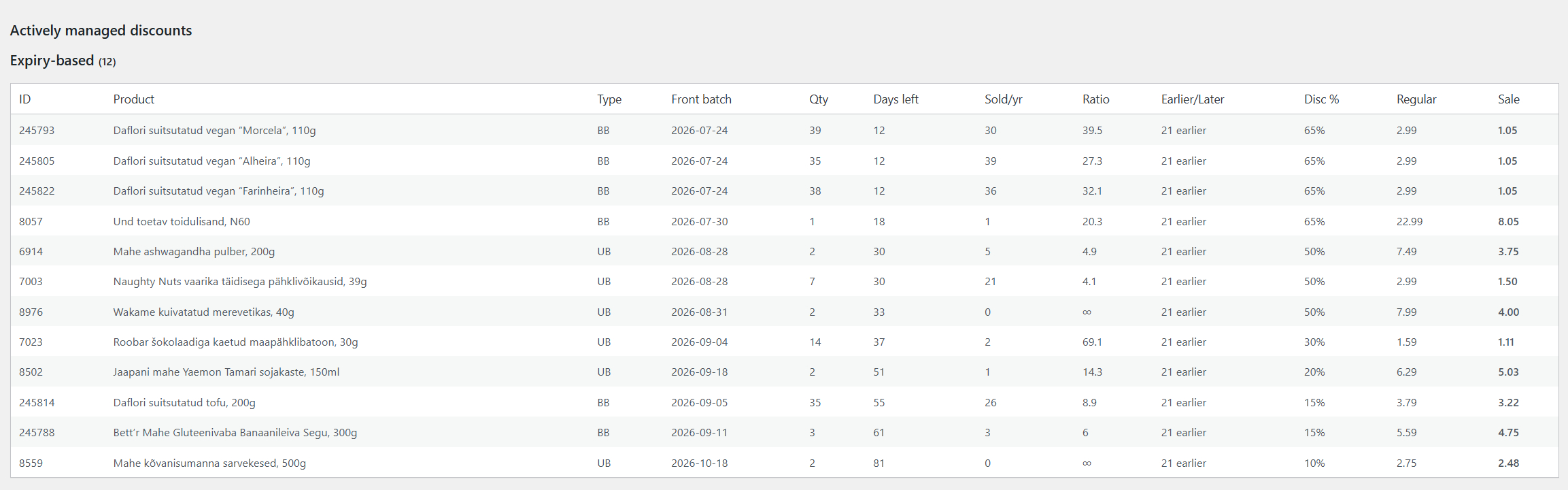
- Changed: the Dashboard’s product table is now “Actively managed discounts,” with search/scroll
past 15 products. - Fixed: the Engine tab’s product/category exclusion search now actually filters by what’s typed.
1.3.0
- New: custom CSS-selector notice placement (product page) is now available to everyone — moved out
of the Pro add-on, since it’s plain positioning, not an automation feature. - Changed: the Engine tab’s Stock & Velocity section now appears after the discount-tier tables.
1.2.0
- Changed: the Engine tab’s Stock & Velocity fields are now grouped into one consolidated section
(Pro feature — no change to plain date-based discounting for everyone else).
1.1.0
- New: CSV export of batch/expiry data (Actions tab) — one row per batch, matched by SKU. Doubles
as a spreadsheet-friendly backup and as the starting template for the Pro add-on’s CSV import.
1.0.0
- Initial public release.