
Description
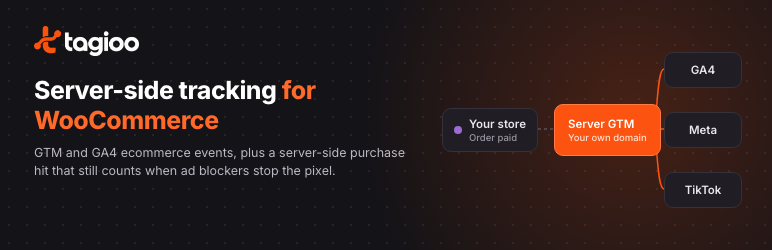
Ad blockers, Safari’s tracking limits and closed browser tabs stop many purchases from ever reaching GA4, Meta or TikTok. Tagioo Server-Side Tracking for WooCommerce sends every paid order from your WordPress server to your own server-side Google Tag Manager (sGTM) container, so the sale is recorded even when the browser pixel never fires.
It also gives your Google Tag Manager web container a complete GA4 ecommerce dataLayer, so you don’t need a separate GTM plugin.
What it does
- Server-side purchase hit. When an order is paid (or reaches Processing, for cash on delivery and bank transfer), the plugin sends a GA4 purchase event from your server to your sGTM container. It runs in the background, so checkout is never slowed down, and it tries again if your sGTM server is briefly unavailable.
- GA4 ecommerce dataLayer. Pushes
view_item,view_item_list,search,add_to_cart,remove_from_cart,view_cart,begin_checkout,add_shipping_info,add_payment_infoandpurchasewith items, value and currency. Works with the classic checkout and the Cart and Checkout Blocks, including AJAX add to cart and quantity changes. - Customer data for better matching. Purchase events include the billing email, phone number (in international format), name and address, so your server tags can hash them and send them to Meta and TikTok. Logged-in shoppers’ details are added to earlier events too.
- No double counting. Browser and server events share an
event_id(the WooCommerce order ID for purchases), which Meta and TikTok use to deduplicate them. - Longer-lasting Meta identifiers. Turns the
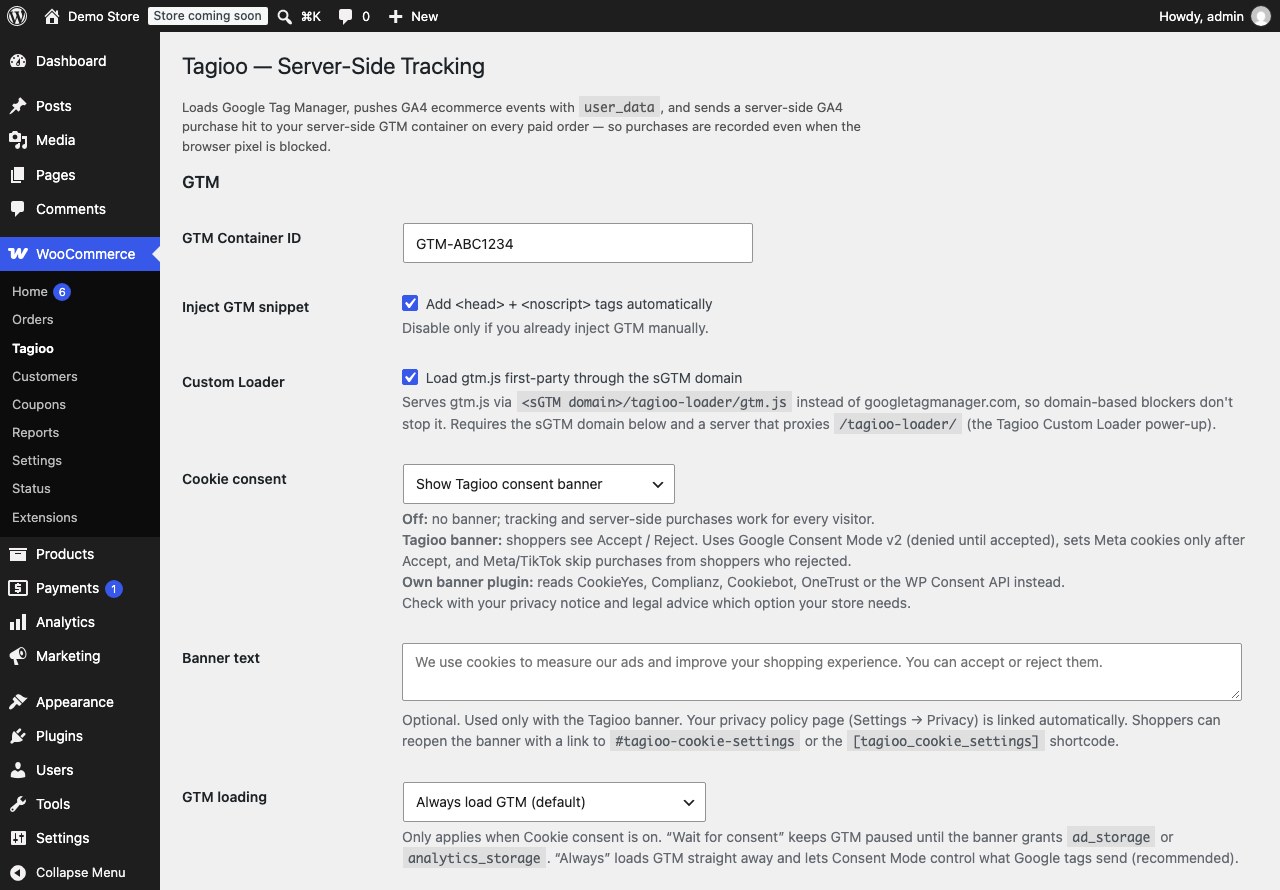
fbclidfrom an ad click into the_fbccookie on the landing page, keeps_fbpand_fbcas first-party cookies set by your server, and saves them on the order. - Google Tag Manager snippet. Adds your GTM container to every page. Turn it off if your theme or another plugin already loads GTM.
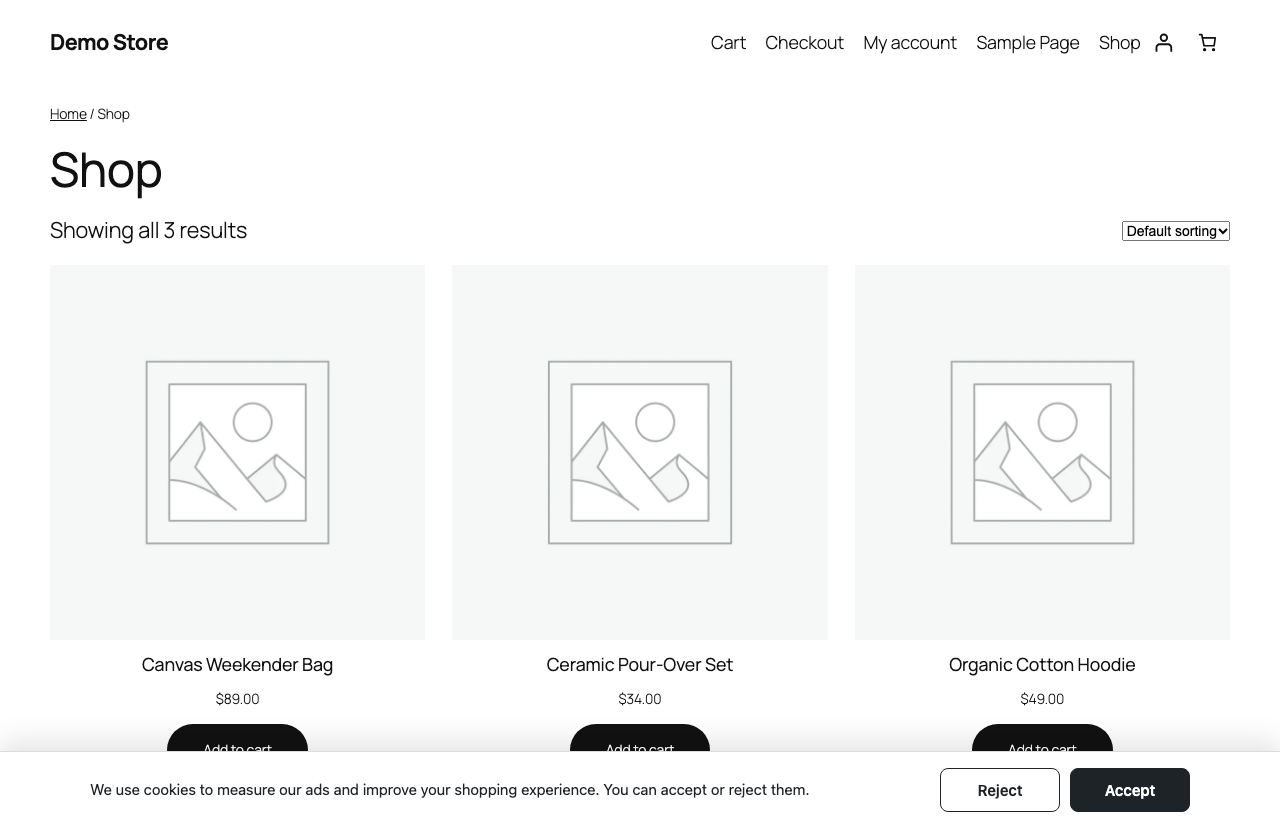
- Cookie consent (optional). Show Tagioo’s Accept / Reject banner with Google Consent Mode v2, or read the shopper’s choice from CookieYes, Complianz, Cookiebot, OneTrust or the WP Consent API. The choice is sent with the server-side purchase hit so your sGTM tags can respect it.
- Custom Loader (optional). Loads
gtm.jsfrom your sGTM domain instead of googletagmanager.com, for servers set up to serve it (Tagioo-hosted servers are). - Compatible with WooCommerce High-Performance Order Storage (HPOS).
What you need
- WooCommerce.
- A Google Tag Manager web container whose tags (for example GA4, Meta Pixel and TikTok Pixel) use the dataLayer events above.
- A server-side GTM container on your own subdomain, such as
sgtm.yourstore.com, with a GA4 client and the server tags you want (for example GA4, Meta Conversions API and TikTok Events API). You can host it yourself or use Tagioo, which sets up both containers for you. - Your GA4 Measurement ID and a GA4 Measurement Protocol API secret.
Every feature in the plugin is free. Nothing is locked behind a licence or account, and it works with any server-side GTM container, not only Tagioo’s.
External services
This plugin connects to the following services. Nothing is sent until you enter the matching setting on WooCommerce Tagioo.
Google Tag Manager
When a GTM Container ID is set and “Inject GTM snippet” is on, every front-end page loads https://www.googletagmanager.com/gtm.js (and the ns.html noscript iframe) from Google. Google receives the visitor’s IP address, user agent and the page URL, and the tags you configure inside GTM decide what else is sent. If cookie consent is set to “Wait for consent”, GTM loads only after the visitor accepts.
Google Terms of Service: https://policies.google.com/terms
Google Privacy Policy: https://policies.google.com/privacy
Your server-side GTM container (sGTM domain)
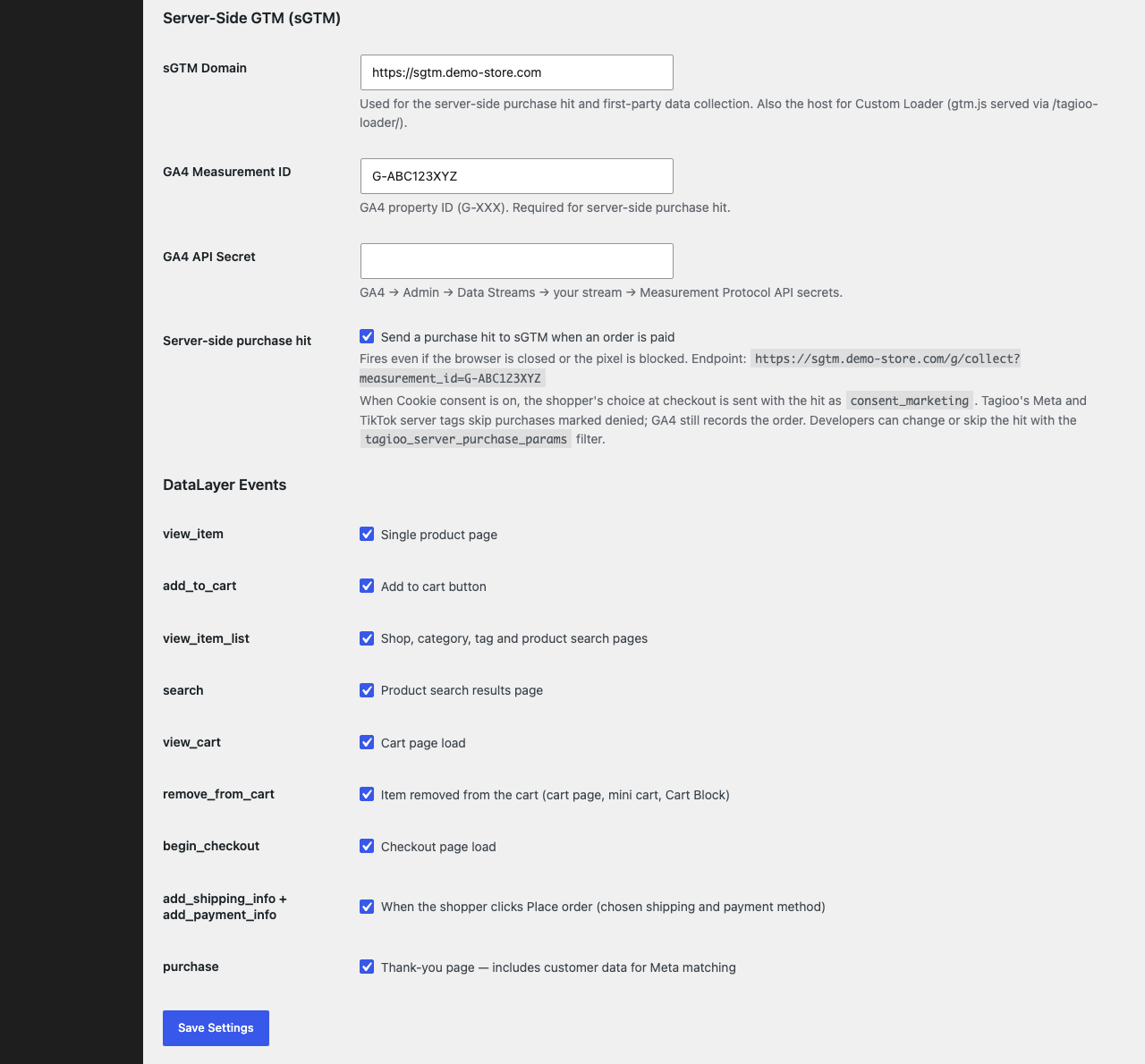
When an sGTM domain, GA4 Measurement ID and API secret are set and “Server-side purchase hit” is on, the plugin sends one request per paid order from your server to <your sGTM domain>/g/collect. The request contains the order number and ID, total, tax, shipping, currency, coupon codes, line items, and the customer’s billing email, phone, first and last name, city, state, postcode and country, customer ID, IP address, user agent, Meta _fbp/_fbc values and (when consent is enabled) the shopper’s marketing consent. Your sGTM container then forwards this data to the destinations you configure there, such as Google Analytics 4, the Meta Conversions API or the TikTok Events API.
The sGTM domain is chosen by you. If it is hosted by Tagioo, the Tagioo terms and privacy policy apply:
Tagioo Terms: https://tagioo.com/terms
Tagioo Privacy Policy: https://tagioo.com/privacy
Custom Loader
When “Custom Loader” is on, gtm.js and ns.html are loaded from <your sGTM domain>/tagioo-loader/ instead of googletagmanager.com. The request goes to your sGTM domain, which passes it on to Google Tag Manager. The same Google and Tagioo terms above apply.
Destinations configured in your containers
Data forwarded by your GTM or sGTM containers is governed by those services’ own terms, for example:
Meta: https://www.facebook.com/legal/terms and https://www.facebook.com/privacy/policy
TikTok: https://ads.tiktok.com/i18n/official/policy/terms and https://www.tiktok.com/legal/privacy-policy
Privacy
The plugin sets these cookies on the store’s own domain:
_fbp,_fbc— Meta browser and click identifiers (90 days). With the Tagioo consent banner they are only set after the shopper accepts.tagioo_consent— the shopper’s choice in the Tagioo consent banner (180 days).tagioo_q— a short-lived flag (10 minutes) that tells the page an add/remove-to-cart event is waiting to be sent.
It saves the shopper’s _fbp, _fbc, IP address, user agent and consent choice as order meta so the server-side purchase hit can send them later.
You are responsible for telling shoppers about this tracking in your privacy policy and for choosing the cookie consent option your store needs.
Screenshots
Installation
- Make sure WooCommerce is installed and active.
- In WordPress, go to Plugins Add New Plugin, search for “Tagioo Server-Side Tracking”, click Install Now, then Activate.
- Go to WooCommerce Tagioo.
- GTM: enter your GTM container ID (
GTM-XXXXXXX). If your theme or another plugin already adds GTM, untick Inject GTM snippet so it doesn’t load twice. - Server-side GTM: enter your sGTM domain (for example
https://sgtm.yourstore.com), your GA4 Measurement ID (G-XXXXXXXXXX) and a GA4 Measurement Protocol API secret. To create the secret, go to GA4 Admin Data streams your web stream Measurement Protocol API secrets Create. The server-side purchase hit only runs when all three are filled in. - Events: all events are on by default. Untick any you don’t want.
- Cookie consent: leave it Off, choose Show Tagioo consent banner, or choose Use my own cookie banner plugin if your store already has one.
- Click Save Settings.
Check that it works
- Open a product page with GTM Preview mode (Tag Assistant) running. You should see a
view_itemevent with the product’s name, price and currency. - Place a test order and make sure it is paid or Processing. Within a few minutes the purchase should appear in GA4 Realtime, and in Meta Events Manager as a server event if your sGTM container sends to Meta.
- If it doesn’t, check WooCommerce Status Logs for entries with the source
tagioo.
The server-side purchase hit is sent by WP-Cron, which runs when your site gets visits. On a store with very little traffic, a real server cron job makes the hit arrive sooner.
FAQ
-
Do I need a Tagioo account?
-
No. The plugin works with any server-side GTM container you control. Tagioo is one way to host one.
-
Will purchases be counted twice?
-
No. The browser purchase event and the server-side hit share the same
event_id(the WooCommerce order ID), which Meta and TikTok use to keep only one of them. Make sure your browser pixel tags in GTM pass theevent_idfrom the dataLayer. Both hits also carry the same GA4transaction_id. -
Does it work with the Checkout Block?
-
Yes. Events fire on both the classic shortcode checkout and the Cart and Checkout Blocks.
-
Can I change or skip the server-side hit?
-
Yes. Use the
tagioo_server_purchase_paramsfilter. Return modified parameters, orfalseto skip the hit for an order. -
Where do I see errors from the server-side hit?
-
The plugin tries each purchase up to five times, waiting a little longer each time (1, 2, 3 and 4 minutes). Failed attempts are logged in WooCommerce Status Logs under the source
tagioo.
Reviews
There are no reviews for this plugin.
Contributors & Developers
“Tagioo Server-Side Tracking for WooCommerce” is open source software. The following people have contributed to this plugin.
Contributors
Translate “Tagioo Server-Side Tracking for WooCommerce” into your language.
Interested in development?
Browse the code, check out the SVN repository, or subscribe to the development log by RSS.
Changelog
2.7.0
- Renamed to Tagioo Server-Side Tracking for WooCommerce.
- Inline scripts and styles now use the WordPress script and style APIs.
- Escaping and input sanitizing hardened throughout.
- Phone numbers sent for ad matching now get the right country code for every country (WooCommerce’s calling-code table), including Bangladesh (+880), North America and the Caribbean (+1), Russia and Kazakhstan (+7) and Italian landlines. The store’s base country is used when an order has no billing country.
- Server-side hit errors now go to WooCommerce Status Logs.
2.6.0
- Optional cookie consent: Tagioo banner with Google Consent Mode v2, or read an existing banner plugin.
- Optional “wait for consent” GTM loading.
2.5.0
- Added
view_item_list,search,view_cart,remove_from_cart,add_shipping_infoandadd_payment_infoevents.