

Description
TackQuote for WooCommerce adds request-a-quote buttons to your products, so B2B and wholesale shoppers can ask for a price instead of checking out — and optionally syncs orders one-way to your TackQuote account.
Learn more about the WooCommerce integration · Create a free TackQuote account
What you get
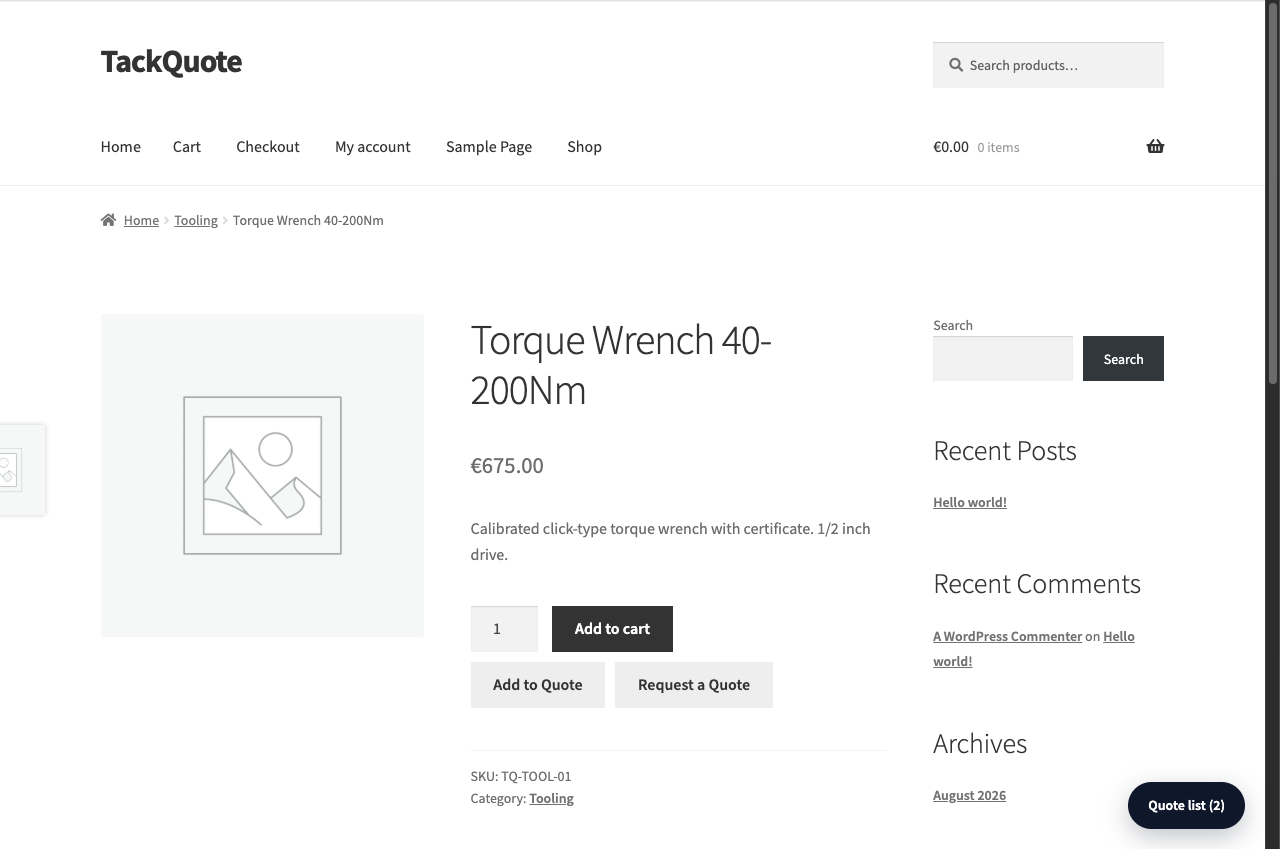
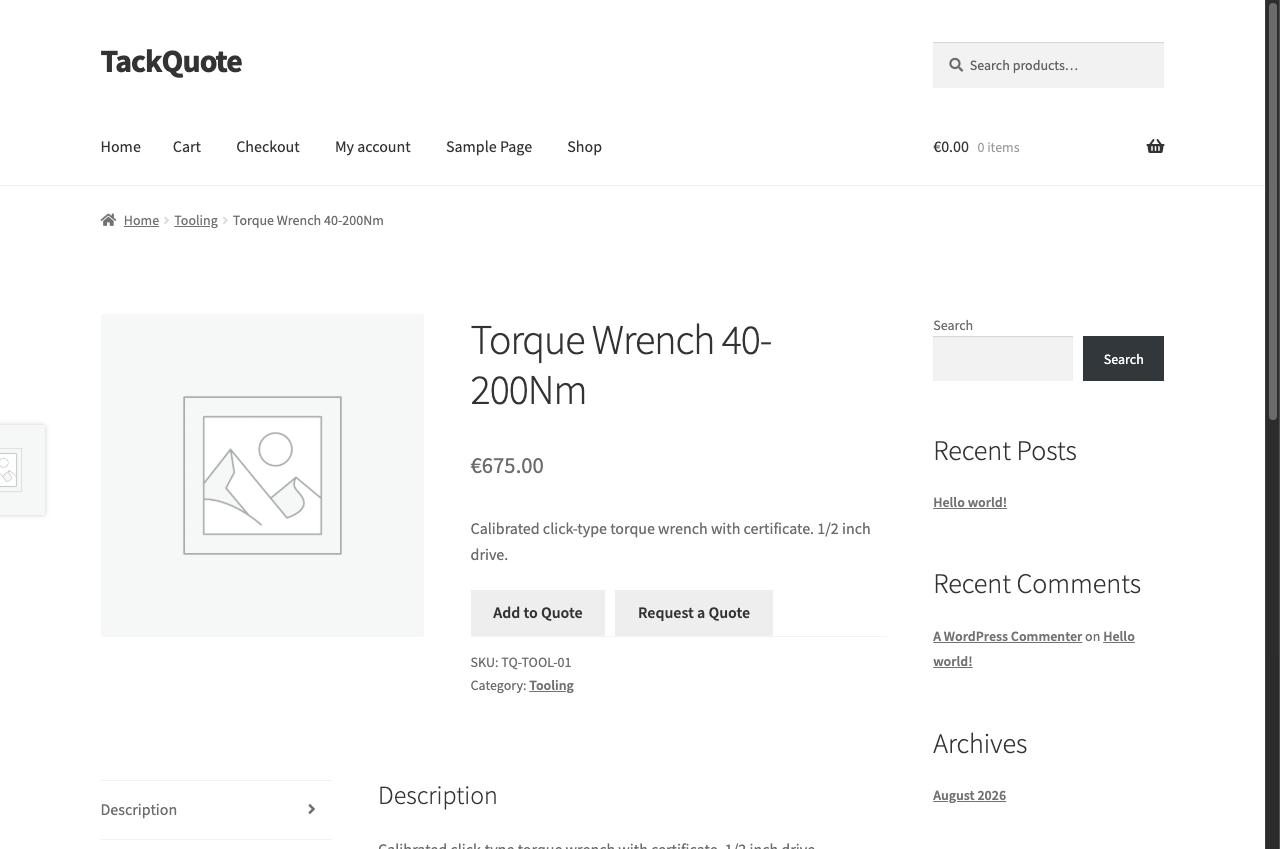
- Add to Quote and Request a Quote buttons on product pages. Show either, both, or neither.
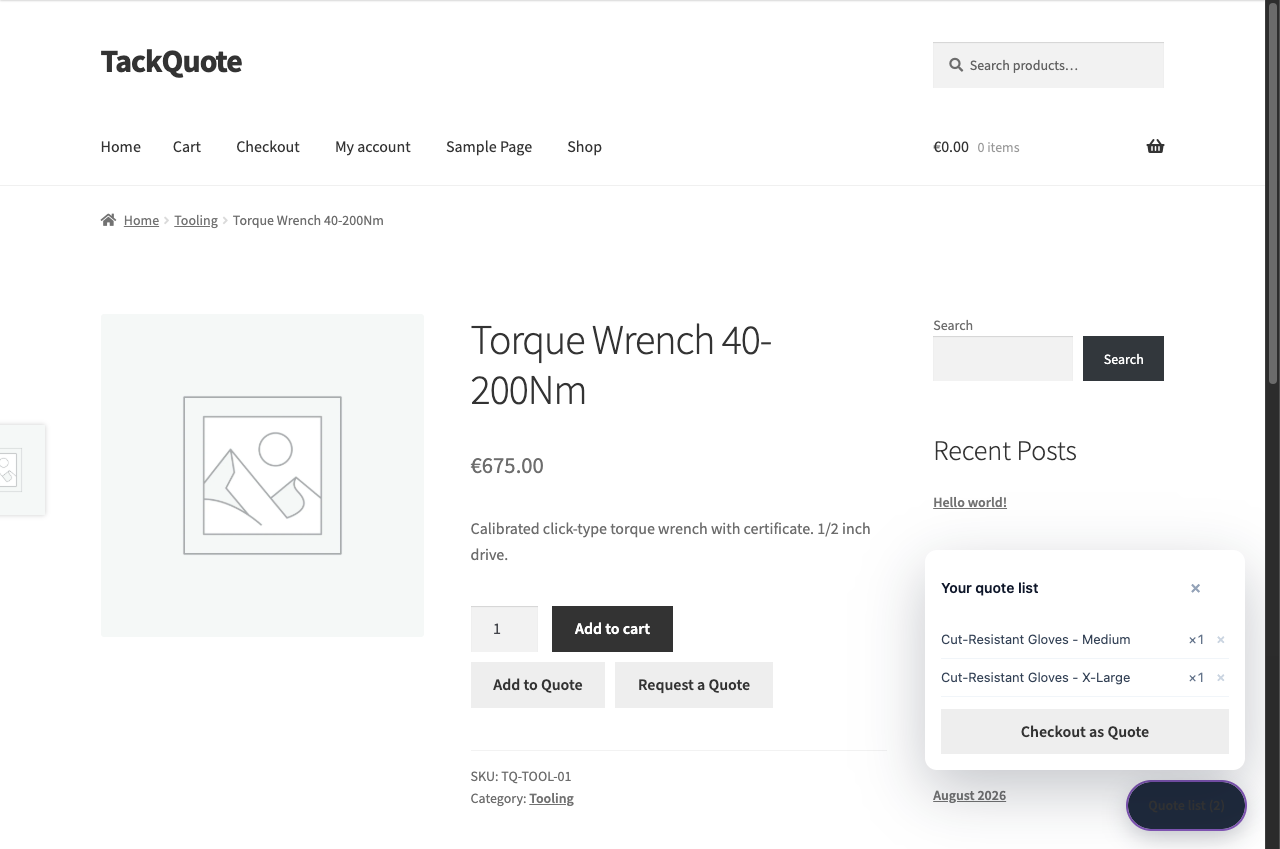
- A floating quote list with Checkout as Quote — several products, one request. It is separate from the WooCommerce cart, so stock and checkout are untouched.
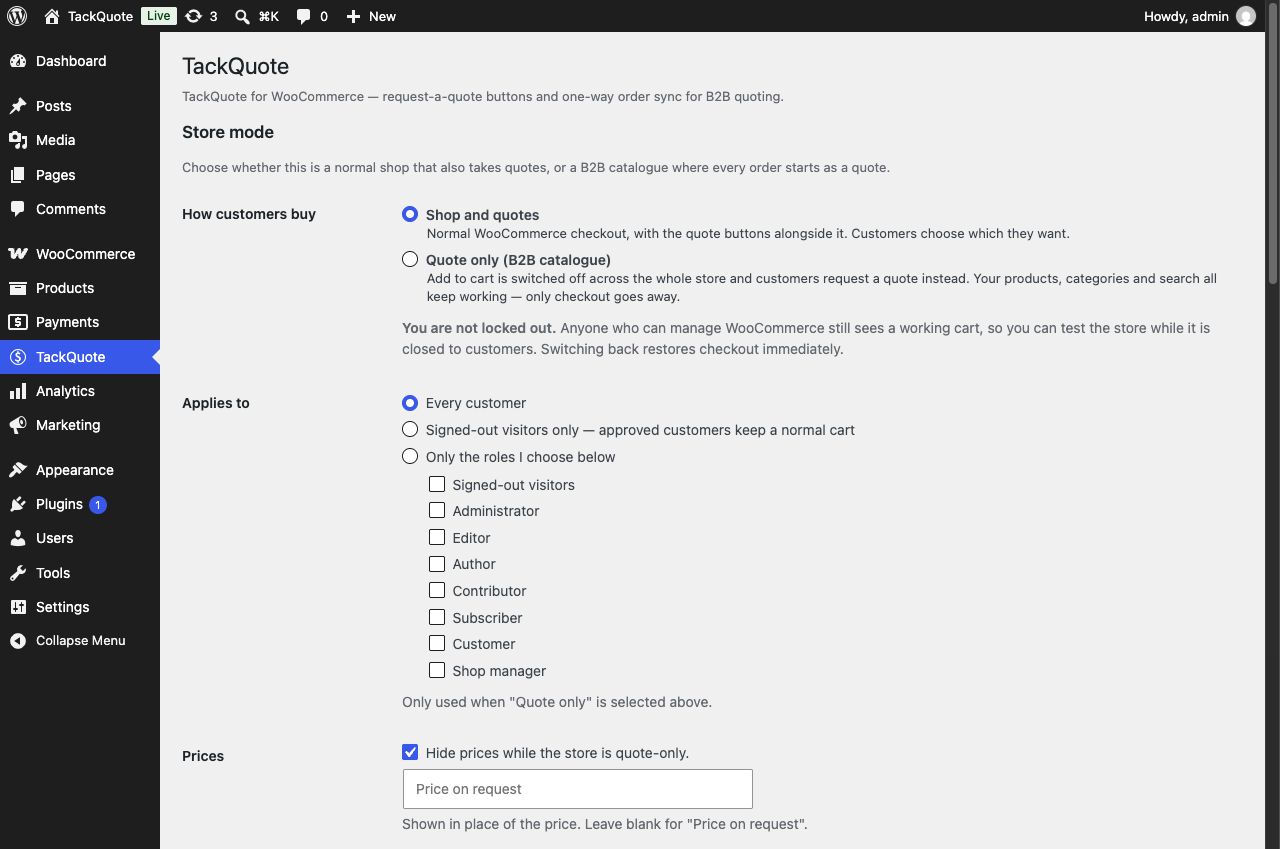
- Quote only (B2B catalogue) mode — switch Add to Cart off across the whole store and take quotes instead. Your products, categories and search keep working; only checkout goes away. Apply it to everyone, to signed-out visitors only, or to chosen roles.
- Optional one-way order sync to TackQuote — off by default, and queued through Action Scheduler so it never runs inside checkout.
- Works with WooCommerce High-Performance Order Storage (HPOS).
Setup is one field: paste your TackQuote API key. You can create an account here.
What it does not do
- It does not replace WooCommerce checkout or act as a full CPQ workspace.
- Order sync is outbound only — it does not import quotes as orders, sync your catalogue, or touch inventory.
- Failed syncs are logged (WooCommerce Status Logs, source
tackquote) and never block checkout.
Source code is developed in the open at github.com/ackm04/tack-ecommerce-extensions.
External services
This plugin connects to the TackQuote API, a third-party B2B quoting service operated by
TackQuote, to send quote requests that shoppers submit on your store and — only if you
switch it on — to send data about orders placed in your store.
The service is required for the plugin to work. Without a TackQuote account and API key the
plugin cannot create quotes, and its storefront buttons do nothing. Nothing is sent anywhere
until you enter an API key.
All requests go to the API base URL set under TackQuote TackQuote API URL, which is
https://api.tackquote.com/v1 unless your TackQuote support contact gave you a different
one. Every request carries your TackQuote API key so the service can identify your account.
-
Connection test —
GET /integrations/woocommerce/ping, falling back toGET /health.
Sent when an administrator clicks “Test TackQuote connection” on the plugin settings screen.
Sends your API key only: no store, order or customer data. -
Quote form field policy —
GET /integrations/woocommerce/registration-config.
Sent when a storefront page showing a quote button is viewed and the cached policy has
expired (cached for 15 minutes). Sends your API key only: no store, order or customer data. -
Quote request —
POST /integrations/woocommerce/quote-requests.
Sent when a shopper submits the quote form on your storefront. Sends what that shopper typed
into the form, plus the products being quoted: email address, first and last name, phone
number if given, company name and any company details the seller’s registration policy
requires (legal name, tax/VAT ID, registration number, website, address, city, state, postal
code, country, company phone, industry, employee count), the free-text note if written, and
for each requested product its name, SKU, quantity, unit price excluding tax and WooCommerce
product ID, together with the store’s currency code. -
Order sync —
POST /integrations/woocommerce/order-sync. Off by default.
Sent when an order is created and each time its status changes, but only if the merchant has
switched on “Sync orders to TackQuote”. Sends the whole order: the customer’s billing and
shipping addresses, email address and phone numbers, WooCommerce customer ID, their order
note, the order ID, number and status, currency and totals, coupon codes, timestamps, the
payment method ID and title, the payment gateway’s transaction ID, and every line item with
its name, SKU, product and variation IDs, quantities, totals, taxes and item meta. No card
numbers, no card details and no gateway credentials are ever sent. The Privacy section
below lists every field individually.
This plugin sends data to no other external service.
The TackQuote service is provided by TackQuote. By using this plugin you agree to their
terms. Please review them before entering an API key:
- Terms of Service: https://tackquote.com/terms
- Privacy Policy: https://tackquote.com/privacy
Privacy
This plugin sends data to TackQuote, a third-party service, over HTTPS. It sends nothing anywhere else, and it never sends payment card data.
Where data is sent
To the TackQuote API base URL configured under TackQuote TackQuote API URL — https://api.tackquote.com/v1 unless your TackQuote support contact gave you another one. Endpoints used:
GET /integrations/woocommerce/ping(andGET /health) — connection test. Sends no store or customer data.GET /integrations/woocommerce/registration-config— fetches which fields the quote form should ask for. Sends no store or customer data.POST /integrations/woocommerce/quote-requests— a shopper’s quote request.POST /integrations/woocommerce/order-sync— order sync. Only when the merchant has switched order sync on. It is off by default.
What a quote request sends
Sent when a shopper submits the quote form, using only what they typed into it:
- Email address
- First name, last name
- Phone number (if provided)
- Company name, and any company fields the seller’s registration policy requires (for example legal name, tax/VAT ID, registration number, address, city, state, postal code, country, company phone, industry, employee count)
- The free-text note, if written (capped at 2,000 characters)
- The requested products: name, SKU, quantity, unit price excluding tax, and the WooCommerce product ID
- The store’s currency code
What order sync sends (off by default)
Sent for each order when it is created and when its status changes, if the merchant
has enabled Sync orders to TackQuote. This is the whole order, because a quote
that becomes an order is only useful to the seller if it carries who is buying and
where it is going. Read this list before switching order sync on.
The customer’s identity and addresses
- Billing address in full: first name, last name, company, street (both lines), city, state or county, postal code, country, email address and phone number
- Shipping address in full: the same fields, including shipping phone where WooCommerce holds one
- The WooCommerce customer ID, or
0for a guest order - The customer’s order note, as they wrote it
The order
- WooCommerce order ID, order number and status
- Currency, item subtotal, discount total, shipping total, tax total and order total
- Coupon codes applied
- A purchase-order number, only if your store fills the
tack_quotes_order_po_numberfilter — WooCommerce core has no purchase-order field, so nothing is sent unless you wire one up - Created, last-modified, paid and completed timestamps
- An idempotency key, so a repeated delivery of the same order state can be discarded
Payment
- Payment method ID and its display title (for example
stripe/ “Credit Card”) - The gateway transaction ID, where the gateway recorded one
- Whether the order still needs payment, and when it was paid
No card numbers, no card details, and no gateway credentials are ever sent. The
transaction ID is a reference the gateway issued, not an instrument.
Line items
- Product name, SKU, WooCommerce product ID and variation ID
- Quantity, line subtotal, line total and line tax
- Item meta — the variation attributes and any custom item fields your store records on a line (for example “Size: Large”, “Colour: Blue”). If your checkout writes customer-supplied text onto a line item, it is included here
- Shipping lines: method title and cost. Fee lines: name and amount
If you are a merchant in the EU, UK or another jurisdiction with a transfer regime
Order sync sends personal data about your customers to TackQuote, which makes
TackQuote a processor acting on your instructions. That is why it ships switched
off and why enabling it is a deliberate act rather than a default. Before you
enable it, satisfy yourself that you have a lawful basis and, where required, a data
processing agreement in place with TackQuote. Your own privacy policy should name
TackQuote as a recipient; the plugin adds suggested wording to
Settings Privacy for you to review and adapt.
What is stored on your own site
- Plugin settings, as WordPress options: the TackQuote API key, API URL, button labels, and the feature toggles.
tack_quotes_registration_config— a transient caching the quote-form field policy for 15 minutes.tack_qr_*— short-lived transients counting quote requests per visitor for rate limiting. They hold a salted hash of the visitor’s IP address, never the address itself, and expire after 5 minutes._tack_quotes_sync_key— order meta recording which order state was last accepted by TackQuote, so the same state is not sent twice.
Deleting the plugin removes every option above and the tack_quotes_registration_config transient, on every site of a multisite network. The tack_qr_* rate-limit counters are left to expire on their own (they last five minutes and are keyed on a hash, so there is no name to delete). The _tack_quotes_sync_key order meta is deliberately left in place: orders are financial records and an uninstall routine should not rewrite every one of them.
Suggested privacy policy text
The plugin adds suggested wording to Settings Privacy Policy guide in WordPress, listing the same fields. Edit it to match how your store actually uses the plugin.
Screenshots
Installation
WooCommerce must be installed and active first, and you need a TackQuote account — create one here if you do not have one yet.
Install
- In WP Admin go to Plugins Add New, search for TackQuote for WooCommerce, and click Install Now.
- Activate TackQuote for WooCommerce.
- Open TackQuote in the admin menu.
- Paste your TackQuote API Key (TackQuote Settings Developer API Keys). Leave the API URL as the default unless support gives you another base URL.
- Enable or disable the quote buttons and order sync as needed, then click Save TackQuote settings.
- Click Test TackQuote connection to verify.
Before you enter an API key, read the External services section above: the plugin cannot create quotes without sending data to the TackQuote API.
Manual install
- Download
tackquote.zipfrom the releases page, or build it from source withbash bin/build.sh. - In WP Admin go to Plugins Add New Upload Plugin, upload the ZIP, and choose Replace current with uploaded if an older copy is already installed.
- Activate, then follow steps 3–6 above.
- Your API key and toggles are stored as WordPress options and are preserved across updates.
FAQ
-
Where do I get an API key?
-
In TackQuote, go to Settings Developer API Keys.
-
Does it work with High-Performance Order Storage (HPOS)?
-
Yes. The plugin declares HPOS (
custom_order_tables) compatibility via WooCommerceFeaturesUtiland uses the WooCommerce order CRUD APIs (wc_get_order, order status hooks) rather than directwp_postsorder queries. You can run with HPOS enabled. -
Is order sync bidirectional?
-
No. Sync is one-way: WooCommerce TackQuote on order create and status change. Turning the toggle off stops new pushes; it does not delete data already in TackQuote.
-
My store collects a purchase-order number at checkout. Can it be synced?
-
Yes, with one line of code. WooCommerce core has no purchase-order field, and there is no
meta key this plugin could guess that would be right for every B2B extension — a guess that
looks correct and silently returns nothing is worse than an empty field. So the value is
read through a filter your theme or a small site plugin fills in:add_filter( 'tack_quotes_order_po_number', function ( $po, $order ) { return $order->get_meta( '_my_checkout_po_field' ); }, 10, 2 );Replace
_my_checkout_po_fieldwith the meta key your checkout writes. Without this filter
nothing is sent and TackQuote records no purchase-order number. -
No, and no. “Add to Quote” adds the product to a separate, browser-side quote list — it never touches the WooCommerce cart, stock, or totals. “Checkout as Quote” creates a quote request in TackQuote from that list’s contents. Customers can still shop and check out through WooCommerce completely normally, at the same time, with no interaction between the two.
-
Why doesn’t “Add to Quote” send a quote request immediately?
-
So shoppers can add multiple products before requesting one combined quote. Use the floating “Quote list” button (bottom-right) once you’ve added everything you want quoted, then click “Checkout as Quote”.
Reviews
There are no reviews for this plugin.
Contributors & Developers
“TackQuote for WooCommerce” is open source software. The following people have contributed to this plugin.
Contributors
Translate “TackQuote for WooCommerce” into your language.
Interested in development?
Browse the code, check out the SVN repository, or subscribe to the development log by RSS.
Changelog
1.5.1
- Shortened the description and added links to the WooCommerce integration page and to account signup, so it is clear where to get an API key.
- No code changes.
1.5.0
- Order sync now sends the whole order, not eleven fields of it. Previously the payload carried no address of any kind — a merchant testing it in production reported “no name, not address information, nothing”, and they were right. It now carries both addresses in full, phone numbers, the WooCommerce customer ID and order note, the real item subtotal alongside discount/shipping/tax/total, coupon codes, payment method and gateway transaction reference, the created/modified/paid/completed timestamps, shipping and fee lines, and per-line product/variation IDs, line subtotal, tax and item meta (so “Large / Blue” survives the sync).
- Fixed:
subtotalwas never sent, so the receiving end recordedsubtotal = total— meaning every order from a store that charges tax or shipping claimed its goods cost what the customer paid. - New:
tack_quotes_order_po_numberfilter. WooCommerce core has no purchase-order field, so nothing is sent unless your store wires one up; see the FAQ. Previously a purchase-order number could never be reported at all. - Fixed:
modifiedAtis sent but deliberately excluded from the idempotency hash. Under HPOS, recording a successful push writes order meta, and that stamps a new modified date — so hashing it would have invalidated the key the push just recorded and de-duplication would never have converged. - The privacy disclosure on the settings screen, the wording offered to Settings Privacy, and the External services and Privacy sections of this readme now describe the payload that is actually sent. An under-disclosure is worse than none: a merchant reads it and concludes the transfer is narrower than it is.
- Fixed: the settings screen named the WooCommerce log source as
tack-quotes; it has beentackquotesince the 1.3.3 slug rename. - Added
tests/test-order-payload.php, a WP-CLI contract test that names every required payload field against a real WooCommerce order, and offline payload coverage intests/run.php. - Tests: the quote-only mode suite now asserts that
woocommerce_is_purchasableis actually hooked, not just that the callback decides correctly. It previously proved only the latter, so a wiring mistake would have hidden the buttons while the Store API kept taking orders. No behaviour change — the wiring was already correct.
1.4.0
- New: Store mode. A single setting turns the whole storefront into a B2B catalogue — “Add to cart” is withdrawn and customers request a quote instead. Choose whether it applies to every customer, to signed-out visitors only (so approved trade customers keep a normal cart), or to specific roles. Optionally replace prices with “Price on request”.
- The switch is enforced server-side via
woocommerce_is_purchasable, which WooCommerce checks before accepting any cart line — so a hand-crafted?add-to-cart=link, the Store API and cached pages are all refused, not just the button hidden. - Carts filled before the store was switched to quote-only are emptied on the cart and checkout pages with an explanatory notice. WooCommerce’s own cart validation only checks that a product still exists, not that it is purchasable, so without this a pre-existing cart could still be checked out and the store would not really be quote-only.
- Anyone who can manage WooCommerce keeps a working cart, so you can test your own store while it is closed to customers.
- Quote buttons now also mount outside the add-to-cart form, so they survive when the cart button is withdrawn.
1.3.4
- Fixed: the Settings link on the Plugins screen led to “Sorry, you are not allowed to access this page.” even for an administrator. The link carried a hardcoded
page=tack-quotes, which was the admin page slug up to 1.3.1; the 1.3.2 and 1.3.3 renames moved the slug totackquoteand left the link behind. Pointing at an unregistered page makes WordPress emit its permission-denied message, so the failure looked like a capability problem and was not one. The link is now derived from the same constant the menu is registered with, so the two cannot drift again. - Added a regression test (
tests/run.php, no PHPUnit or WordPress install required) asserting the Settings link resolves to a registered admin page that requiresmanage_options.
1.3.3
- The plugin slug, text domain, plugin folder and distributed ZIP are now all
tackquote, matching the slug assigned on WordPress.org. WordPress requires the text domain to equal the slug, and a plugin folder that disagrees with either is its own defect. The admin page, the enqueued script/style handles, the Action Scheduler group and the WooCommerce log source move with it, so the log source is nowtackquote. - readme.txt now carries an External services section disclosing the TackQuote API: that the plugin cannot function without it, that nothing is sent until an API key is entered, and, endpoint by endpoint, what is sent and when — with links to the Terms of Service and Privacy Policy.
- Fixed the download links, which pointed at a repository that does not exist. The source now lives at https://github.com/ackm04/tack-ecommerce-extensions.
- Note for anyone updating a manually installed 1.3.2: the folder changed from
tackquote-for-woocommerce/totackquote/, so WordPress treats the new ZIP as a separate plugin. Deactivate and delete the old copy after installing this one. Your API key and toggles are stored as WordPress options and survive both.
1.3.2
- Packaging: the distributed ZIP now unpacks to
tackquote-for-woocommerce/, matching the plugin slug, and is rebuilt from the current source. The previously published download still contained pre-1.2.0 code, so stores installing it got the old buttons and none of the 1.3.1 security fixes. - No functional changes to the plugin itself beyond the version bump.
1.3.1
- Security: company field names supplied by the API are now escaped and allowlisted before being rendered into the quote form, closing a cross-site scripting hole.
- Security: the TackQuote API key is no longer rendered into the settings page HTML. Leave the field blank to keep the saved key; a new “Remove saved API key” button clears it.
- Security: the settings page now requires the administrator capability, which is also the capability WordPress requires to save it — a shop manager previously saw the page but could not save it.
- Quote requests from the storefront are rate limited per visitor, the note field is length-capped, and the request timeout is 5s instead of 20s.
- Order sync is now queued and sent on a background request through Action Scheduler, so it no longer runs inside checkout, and each push carries an idempotency key so the same order state is never sent twice.
- Order sync now defaults to OFF on new installs, and readme.txt documents exactly which fields are sent where. Existing stores keep their current setting.
- An expired or cache-stale security token now says so and offers a reload, instead of showing a generic error that could never be resolved.
- Quantity and variation are read from the clicked product’s own form, fixing wrong values on grouped products, product archives, related-product rows and sticky add-to-cart bars.
- Declares compatibility with the Cart and Checkout blocks, and adds the
WC tested up toheader that WooCommerce needs before it will surface any compatibility declaration. - Uninstall now removes every option and transient the plugin creates.
1.3.0
- “Add to Quote” no longer adds the product to the WooCommerce cart. It now adds to a separate, browser-side “quote list” that never touches stock, cart totals, or checkout. A floating “Quote list” button (bottom-right, site-wide) appears once at least one product is added, showing what’s in it and a “Checkout as Quote” button that submits the whole list as one TackQuote request. The WooCommerce cart page no longer has a quote button — quoting and purchasing are now fully separate paths.
1.2.0
- Restored “Request a Quote” as an independent, configurable product-page button alongside “Add to Quote” — Settings TackQuote now has checkboxes to show “Add to Quote”, “Request a Quote”, both, or neither on product pages (the cart page’s “Checkout as Quote” is unaffected). Both default to on for existing and new installs.
1.1.0
- Split the single “Request a Quote” button into two: “Add to Quote” on product pages (adds the product to the cart, same as Add to Cart) and “Checkout as Quote” on the cart page (submits everything in the cart as one quote request). Previously the product-page button submitted a quote for that one product immediately, with no way to accumulate multiple products into a single request without using the whole-cart button on every add.
1.0.1
- Replaced the browser
prompt()/alert()quote-request flow with a real modal dialog (email + optional note fields, inline validation, loading/success/error states). Email is pre-filled for logged-in customers.
1.0.0
- Initial release: Request a Quote button, one-way order sync, TackQuote settings, HPOS declaration.