

Description
Surf7 Simple Catalog is a clean, focused catalog plugin for WordPress built by Surf7.net.
If you sell by enquiry, quotation or conversation rather than checkout — auto parts, machinery, furniture, jewellery, wholesale, custom manufacturing, made-to-order, property, vehicles, boats — this plugin is built for you. There is no cart, no checkout, no payment and no stock, by design.
Core features
- Catalog post type
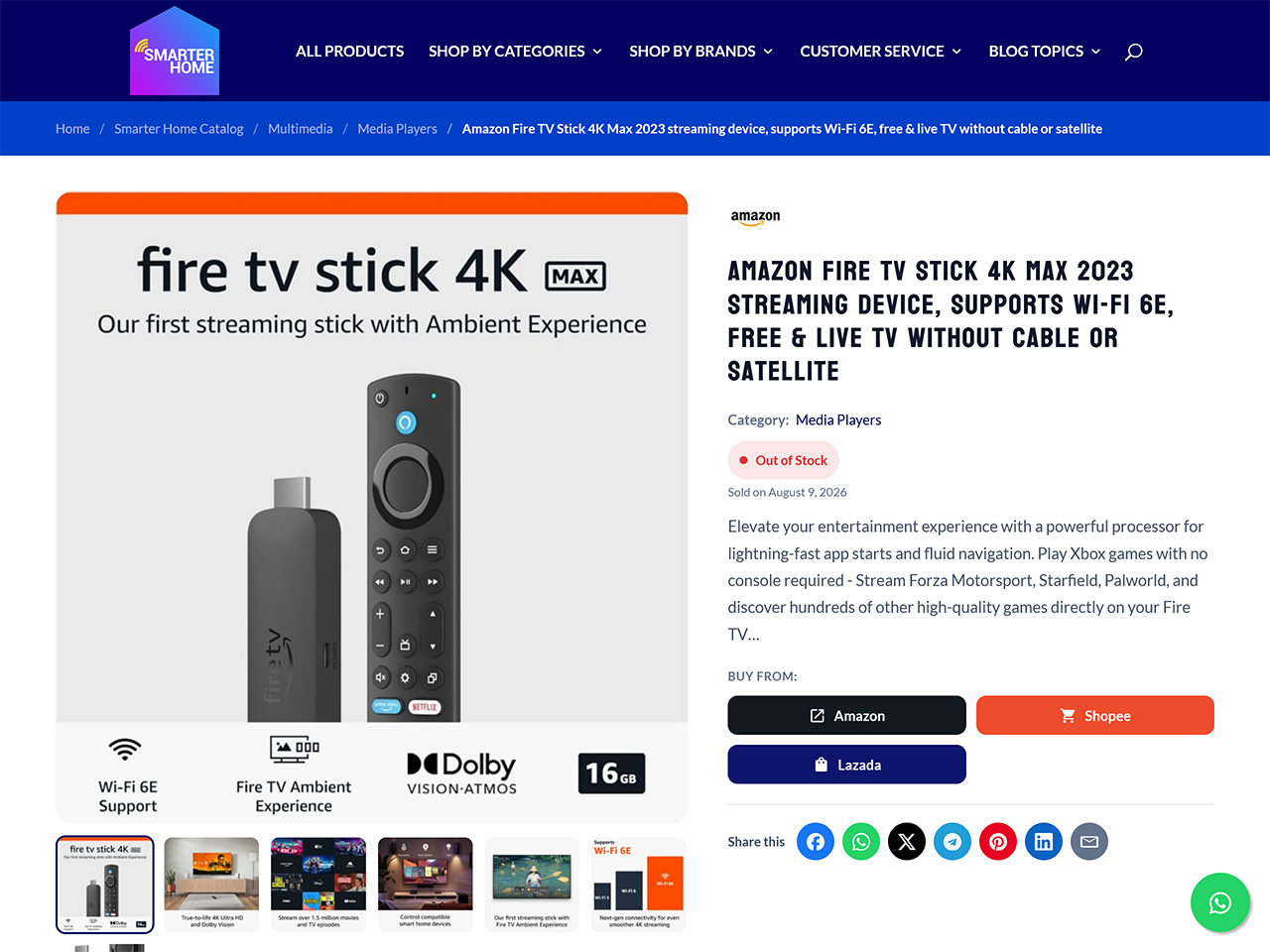
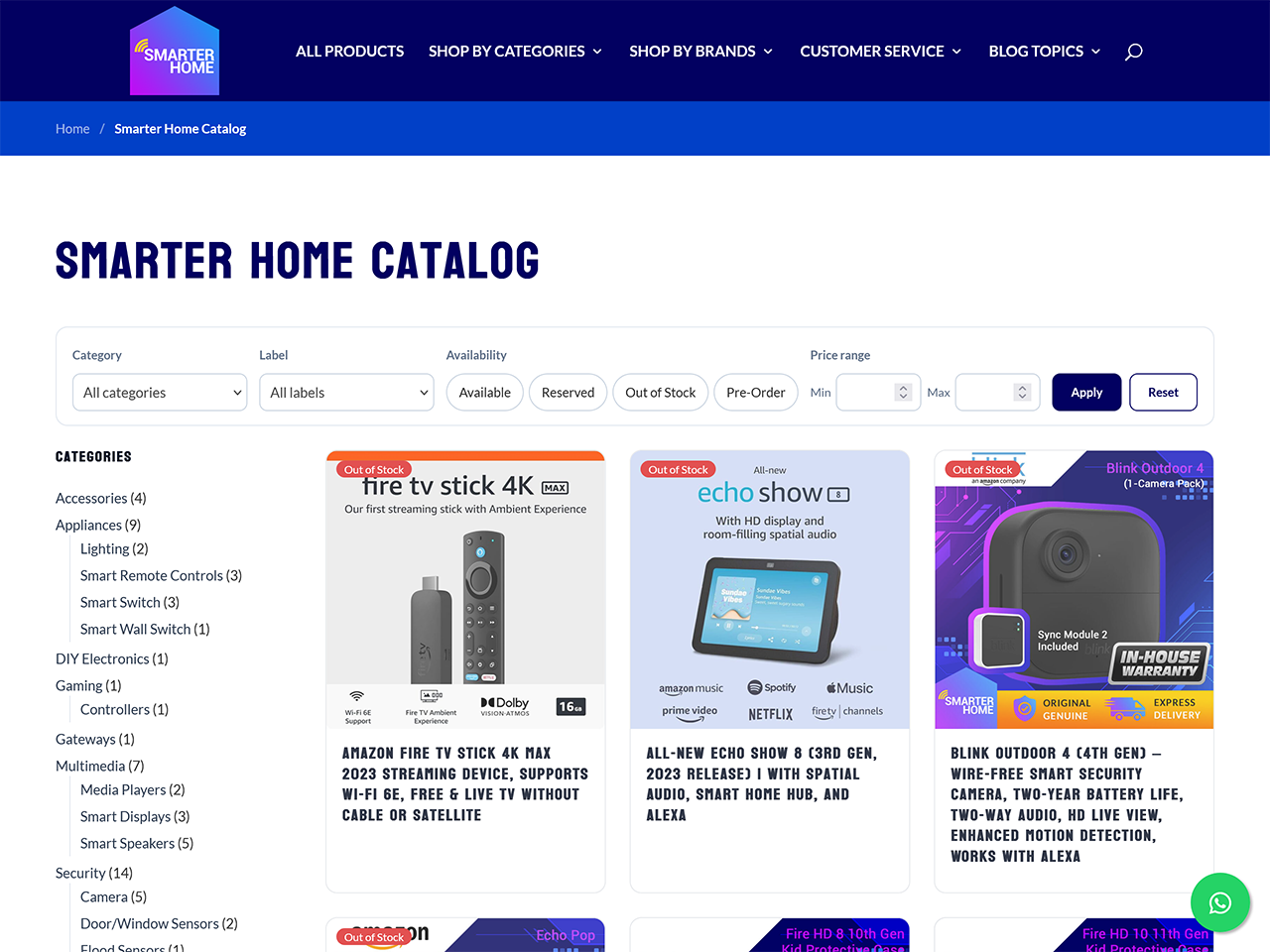
scat_product— REST-enabled, revisions, featured image, gallery, custom REST endpoints,WP_Queryfriendly. - Three taxonomies: hierarchical Categories (thumbnail image, long description, display order, hide-from-filters), flat Labels (colour chips, display order), and Brands (logo, website URL, exactly one brand per product, with an A–Z brand index at
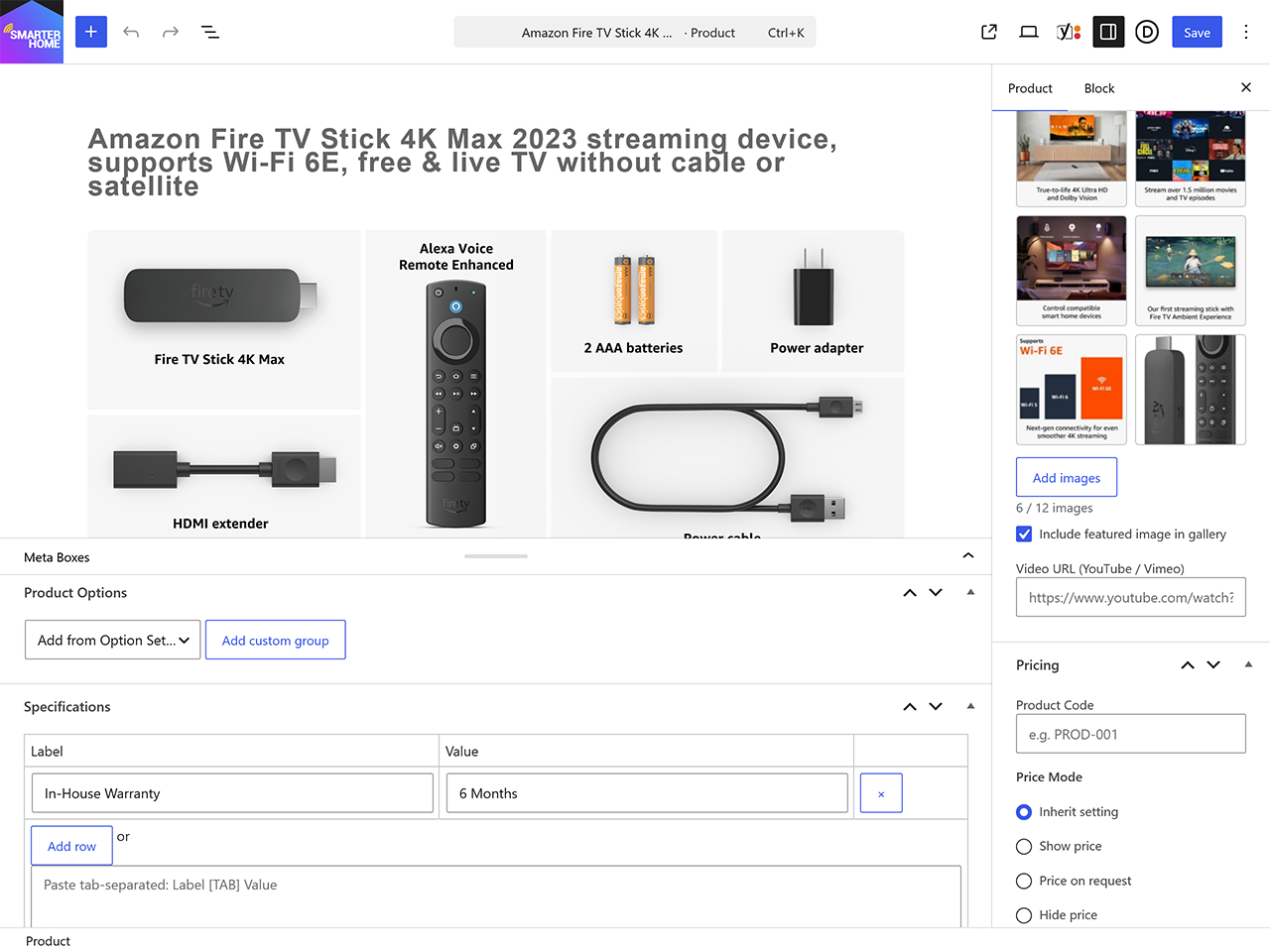
/brand/). - Product meta from a single typed schema: gallery, price, a price range derived from the product’s own options, price mode (show / on request / hide), availability (Available, Reserved, Sold, Coming soon) with configurable text and colour per status, featured star with an AJAX toggle, a specifications table with paste-from-spreadsheet, files and downloads, video URL, stock note, custom badge text, and per-product enquiry overrides.
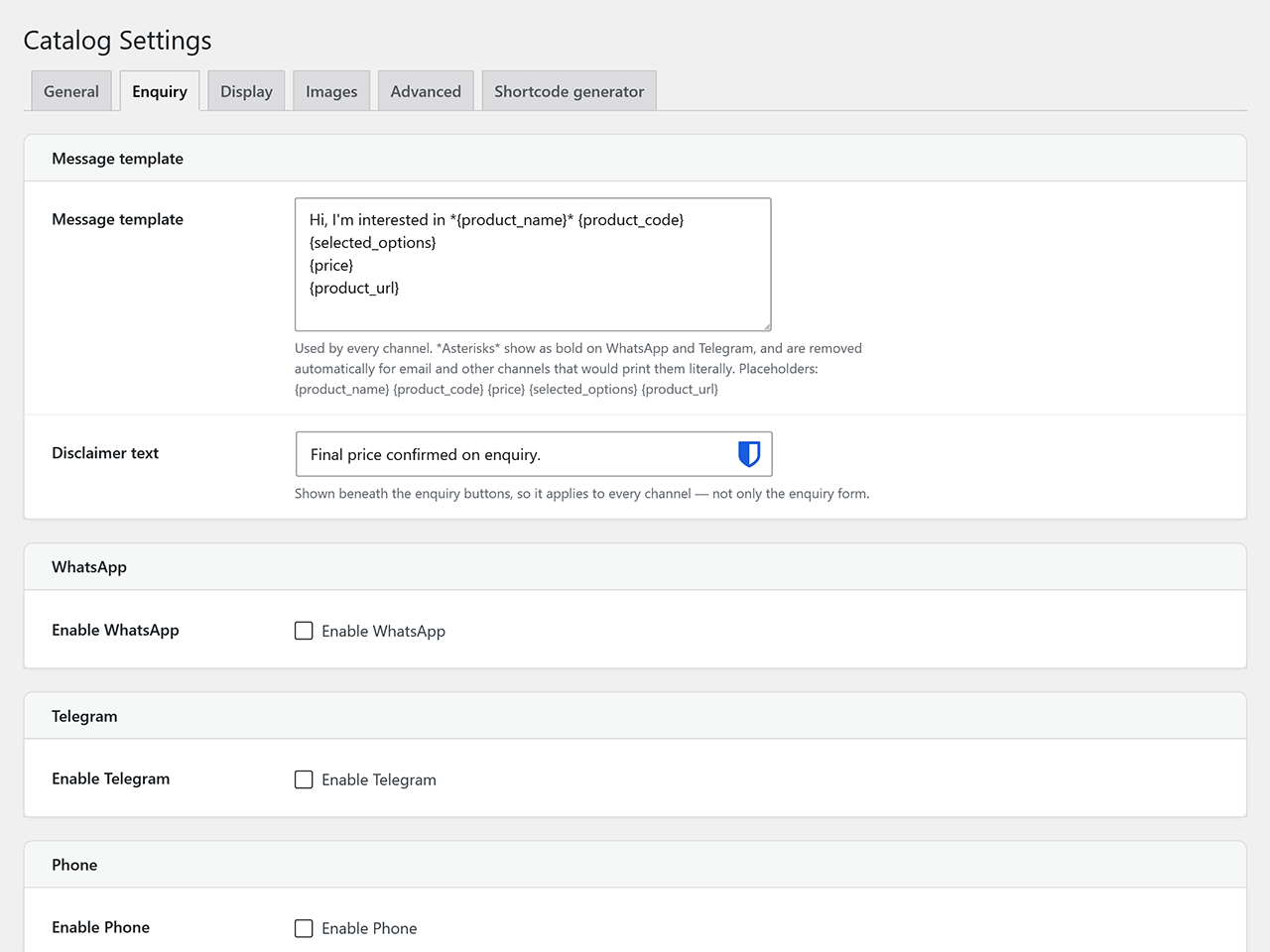
- Five enquiry channels — WhatsApp, Email, Phone, Telegram and a custom link. Email either opens the visitor’s mail client or uses the built-in enquiry form. One message template drives every channel, with placeholders including
{product_name},{product_code},{product_url},{price},{selected_options},{visitor_message}and{site_name}. Optional enquiry log in its own table, with CSV export, BCC copies and an auto-reply to the visitor carrying a configurable Reply-To address. - Spam guard: hidden honeypot field, three-second time trap, hourly per-IP rate limit, and optional Google reCAPTCHA v3 or Cloudflare Turnstile.
- Options engine: up to 10 global option sets, 100 values each, in five display types — dropdown, swatch, checkbox, package and free text. Per-value price adjustment or absolute price, and per-product groups that update the displayed price without a reload. Options are informational and enquiry-affecting only; they never create variations or touch stock.
- Front-end templates, every one overridable from your theme’s
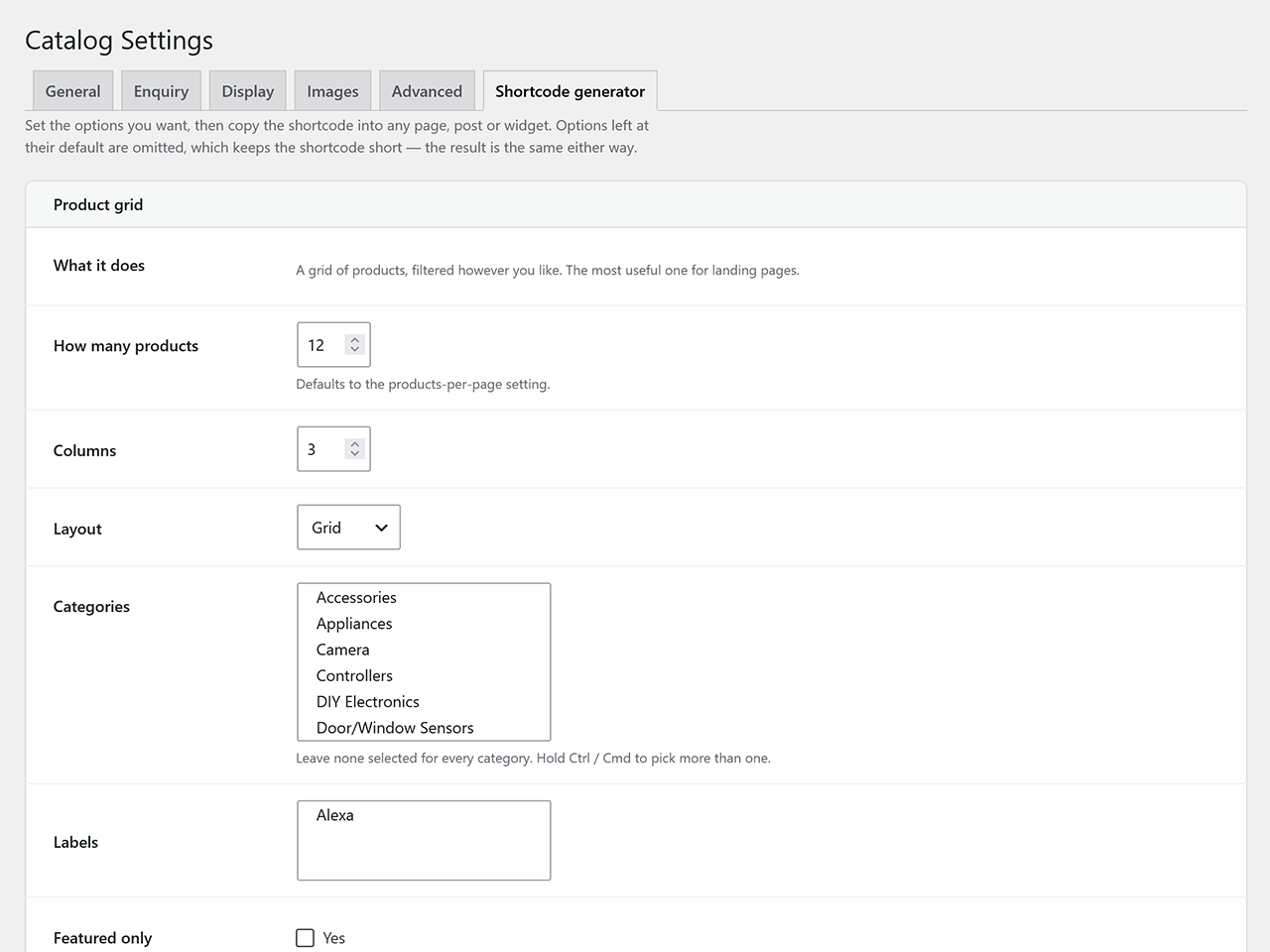
simple-catalog/folder. Archive as grid, list or masonry; category, label and brand archives; product page with gallery, lightbox, breadcrumbs, tabs and related products; filters for category, label, availability, price range and sort order; classic pagination or an AJAX Load more button. Responsive and RTL-aware, and verified to render with full site chrome on block themes as well as classic ones. - Six blocks and seven shortcodes, plus a shortcode generator under Catalog Settings that builds a shortcode from real controls and copies it to the clipboard.
- Admin UX: drag-to-reorder gallery via
wp.media, quick edit, bulk actions (draft, publish, sold, available, featured, duplicate), CSV import and export, and a JSON full-site export/import for staging production deployments. - WooCommerce migration: bring an existing WooCommerce catalogue across in place. Non-destructive, re-runnable, preserves category hierarchy, brands, term images and every affiliate link.
- External shop buttons: per-product links to Shopee, Lazada, Amazon and anywhere else, each with its own colours and inline SVG icon.
- REST API at
wp-json/simple-catalog/v1/—products,enquiry,taxonomy-index,nonce. - WP-CLI:
wp simple-catalog activate|deactivate|flush|version|purge-enquiries|export|import|export-csv-products|import-csv-products|caps|regenerate-thumbs. - Security:
map_meta_capcapabilities granted to administrators and editors, a nonce and a capability check on every write path, REST permission callbacks, a sanitise callback on every registered meta key, escaping at the point of output, and prepared statements on every custom-table query. - SEO friendly: configurable permalink bases, Product JSON-LD, BreadcrumbList, ItemList on archives, and Open Graph / Twitter cards that step aside when Yoast, Rank Math or SEOPress is active.
- Performance: CSS and JS enqueued only on catalogue pages, five configurable image sizes, lazy loading with an optional blur-up placeholder, CSS custom properties instead of repeated inline styles, and an enquiry nonce that can be fetched at interaction time so full-page caching cannot serve a stale one.
- Internationalisation: full
surf7-simple-catalogtext domain with a bundled.pot, an RTL stylesheet, and default button labels that re-translate when the site’s locale changes.
Privacy
The optional enquiry log stores the name, email address, phone number and message a visitor submits. It is off by default. IP addresses are never stored in the clear — only a salted SHA-256 hash, used for rate limiting. Retention is configurable (never, 90, 180 or 365 days) and enforced by a daily job.
The plugin registers with WordPress’s own privacy tools, so Tools Export Personal Data returns a visitor’s enquiries and Tools Erase Personal Data anonymises them — clearing the name, email, phone, message, originating page, browser and IP hash while leaving the date and product, which identify nobody. Both work whether or not logging is currently switched on, because turning it off never deletes what was already stored. Suggested policy wording is offered under Settings Privacy.
The plugin makes no outbound requests except the ones described under External services below, each of which you choose to enable. Nothing phones home, and no data is sent anywhere by default.
External services
Out of the box this plugin contacts no external service. The following are used only after you deliberately switch them on, and each is listed with what is sent and when.
Google reCAPTCHA v3 — used only if you select it under Catalog Settings Spam and enter a site key and secret key.
- On any page showing the enquiry form, the visitor’s browser loads
https://www.google.com/recaptcha/api.js. Google receives the visitor’s IP address, browser details and the page they are on, as with any third-party script. - When an enquiry is submitted, your server sends your secret key, the reCAPTCHA token produced by the visitor’s browser, and the visitor’s IP address to
https://www.google.com/recaptcha/api/siteverifyto confirm the submission is not automated. - Terms of service: https://policies.google.com/terms — Privacy policy: https://policies.google.com/privacy
Cloudflare Turnstile — used only if you select it under Catalog Settings Spam and enter a site key and secret key.
- On any page showing the enquiry form, the visitor’s browser loads
https://challenges.cloudflare.com/turnstile/v0/api.js. Cloudflare receives the visitor’s IP address, browser details and the page they are on. - When an enquiry is submitted, your server sends your secret key, the Turnstile token, and the visitor’s IP address to
https://challenges.cloudflare.com/turnstile/v0/siteverify. - Terms of service: https://www.cloudflare.com/website-terms/ — Privacy policy: https://www.cloudflare.com/privacypolicy/
Image sideloading during import — used only if you tick “Download remote images” on the Import screen. Your server then fetches the image URLs contained in the file you uploaded, so the destinations are whichever hosts those URLs point to. No third party is involved beyond the hosts you supplied.
JSON import from a URL — used only if you call the simple-catalog/v1/import-export/import/json REST endpoint with a url parameter, which requires an administrator or editor login. Your server downloads that address and imports it. No such request is made from the admin screens.
Outbound links (no data is sent)
Two features render ordinary links to other websites. The plugin makes no request to any of them: nothing is contacted unless a visitor clicks, and when they do it is their own browser that navigates, exactly as with any link you place in a post. No data is transmitted by this plugin, and nothing is embedded, tracked or loaded from these hosts.
Enquiry channels and share buttons. If you switch on WhatsApp or Telegram enquiries, the button is a link to https://api.whatsapp.com/send or https://t.me/. If you switch on share buttons under Catalog Settings Display, each is a link to that network’s own share page — Facebook, X, WhatsApp, Telegram, Pinterest, LinkedIn, or a mailto: link. The product title and its URL travel in the link’s query string, which is what the network needs to prefill the share; both are already public.
Terms and privacy for the networks involved:
- WhatsApp — https://www.whatsapp.com/legal/terms-of-service and https://www.whatsapp.com/legal/privacy-policy
- Telegram — https://telegram.org/tos and https://telegram.org/privacy
- Facebook — https://www.facebook.com/terms.php and https://www.facebook.com/privacy/policy
- X — https://x.com/en/tos and https://x.com/en/privacy
- Pinterest — https://policy.pinterest.com/terms-of-service and https://policy.pinterest.com/privacy-policy
- LinkedIn — https://www.linkedin.com/legal/user-agreement and https://www.linkedin.com/legal/privacy-policy
External shop buttons. Per-product links to marketplaces such as Shopee, Lazada or Amazon. Every destination is a URL you enter yourself on the product; the plugin ships no addresses of its own and contacts nothing.
If you select a CAPTCHA provider, tell your visitors: sending their IP address to Google or Cloudflare is a disclosure you are responsible for under GDPR and similar laws. The suggested privacy-policy text under Settings Privacy does not cover it, because whether it applies depends on a setting only you can see.
Screenshots
Blocks
This plugin provides 3 blocks.
- Enquiry Buttons Enquiry channels for a product: WhatsApp, email, phone, Telegram, custom.
- Catalog Grid Display a responsive grid of catalog products.
- Single Product Show a single catalog product by ID.
Installation
- Upload the
surf7-simple-catalogfolder to/wp-content/plugins/. - Activate the plugin through the Plugins screen in WordPress.
- Walk through the four-step onboarding wizard (slugs, currency, channels, display, sample products) or go straight to Catalog Settings.
- Start creating products via Catalog Add New.
FAQ
-
Does Simple Catalog add a cart or checkout?
-
No. Simple Catalog is catalog-only by design. Visitors browse and then contact you. If you need a cart and checkout, use WooCommerce.
-
Can I import products from a CSV?
-
Yes. Go to Catalog Import / Export. Download the template CSV, fill it in and upload it — there is a dry-run mode that validates everything and writes nothing. Ticking the sideload option downloads any remote images into your media library.
-
Can I move a WooCommerce catalogue across?
-
Yes, from the same Import / Export screen. WooCommerce products are read and never modified, and the migration is re-runnable: a second pass updates what it created rather than duplicating it.
-
Does it work with my theme?
-
Almost certainly. The templates are minimal semantic HTML driven by CSS custom properties you can override, and every one can be replaced by copying it from
wp-content/plugins/surf7-simple-catalog/templates/towp-content/themes/{your-theme}/simple-catalog/. Block themes and classic themes are both supported. -
Does it support Multisite?
-
Partly. The uninstaller and the WooCommerce importer loop every site on the network, so uninstalling cleans up properly. Multisite as a whole has not been formally tested — treat it as unsupported for now and test on staging first.
-
Where is the full changelog?
-
CHANGELOG.md in the plugin folder carries the complete history, including what was verified on a live site for each release.
Reviews
There are no reviews for this plugin.
Contributors & Developers
“Surf7 Simple Catalog” is open source software. The following people have contributed to this plugin.
Contributors
Translate “Surf7 Simple Catalog” into your language.
Interested in development?
Browse the code, check out the SVN repository, or subscribe to the development log by RSS.
Changelog
1.64.1
Follow-up to the WordPress.org review. One fix.
- The “Load more” button and the enquiry form no longer fall back to a guessed address when the plugin’s own script data is missing. Both endpoints were already resolved properly in PHP and passed to the script, but each carried a hardcoded fallback path that would have been wrong on a site installed in a subdirectory, on multisite, with a relocated admin directory, or using plain permalinks. The fallbacks are gone; the resolved values are the only source.
1.64.0
Addresses the WordPress.org plugin review. Mostly hardening; one setting has been removed.
Removed
- The Custom CSS box under Catalog Settings Developer is gone. Plugins in the directory may not accept arbitrary CSS, JavaScript or PHP — WordPress has its own error-checking CSS editor in the Customizer and the Site Editor, and that is where site-wide styling belongs. Any CSS you had saved there is discarded on update; move it to Appearance Customise Additional CSS before updating if you still need it.
Security
- The single-product REST endpoint no longer serves unpublished products.
wp-json/simple-catalog/v1/products/{id}returned drafts, pending, private and password-protected products in full to anyone who guessed an ID, while the collection endpoint alongside it correctly showed only published ones. Reading a product that is not published now requires permission to edit it. - The JSON import-from-URL endpoint now uses WordPress’s safe HTTP client, so it can no longer be pointed at addresses on the site’s own network.
- Options selected on the enquiry form are sanitised before they reach the enquiry email, the enquiry log and the CSV export.
- The duplicate-handling and import-mode values on the Import screen are checked against the list the form actually offers instead of being stored as sent.
- Nonces are sanitised before verification, and the browser and IP values read from the request are sanitised on the way in.
Import / Export
- CSV import can now update your products instead of duplicating them. The exported file has always started with an ID column, but the importer never read it — it matched only on
sku/code. So exporting your catalogue, changing a price and importing it back created a second copy of every product that had no product code. Rows are now matched on ID first, then onsku/code, and only then created. An ID that does not belong to a product on this site is ignored rather than trusted, so a file from another site cannot overwrite the wrong product. - “Duplicate handling” on the Import screen now does something. Skip, Update and Always create new previously all behaved the same way, because the setting was never passed to the importer. The default is now Update, and the option that claimed to match “by slug / title” has been reworded to describe what actually happens.
- Import results now appear on the Import tab. Uploading a file returned you to the Import / Export screen with the Export tab showing, so the preview — and the completion report, and the WooCommerce migration report — were all rendered onto a panel you could not see until you clicked Import.
wp simple-catalog import-csv-productsaccepts--duplicate=update|skip|create.
Under the hood
- Uploaded import files now go through WordPress’s own upload handler rather than being moved by hand, so host filesystem policies and security filters apply to them.
- Exports written by WP-CLI, and the guard files in the plugin’s uploads folder, go through the WordPress filesystem API.
- The plugin’s theme colours and the two admin fallbacks for the brand metabox are enqueued rather than printed as literal
<style>and<script>tags, so they can be dequeued, reordered and minified like any other asset. - Video thumbnails fall back to the provider’s lower-resolution image through the plugin’s own script instead of an inline
onerrorattribute, and every URL in the gallery is escaped for the context it is printed into. - The enquiry form records the page it was submitted from using WordPress’s resolved address rather than request headers.
- Coding-standards config now matches the plugin’s text domain, so translator-facing checks actually run.
No action is required after updating unless you were using the Custom CSS box.
1.63.1
A housekeeping release. No functional changes to the catalogue itself.
- The plugin’s text domain and folder now match its WordPress.org slug, so translations are loaded rather than silently ignored.
- First-run setup wizard: the welcome text no longer prints a raw escape code where an apostrophe belongs, and the four step markers are no longer numbered twice.
1.63.0
A security and correctness release. Updating is recommended.
Catalogue display
- Sold products now move to the back of the catalogue. Products are always grouped Available, then Coming Soon, then Reserved, then Sold, no matter which sort you or your visitor chooses — the chosen sort still applies within each group. This covers the main catalogue, category, label and brand archives, search results, and grids placed with the Catalog Grid block or the
[catalog_grid]shortcode. Sold items stay visible and linkable; if you would rather hide them completely, the existing “Hide sold products” setting is unchanged. - The Catalog Grid block’s Sort setting, and the
orderbyattribute of the[catalog_grid]shortcode, now actually work. Both were being ignored, so every grid came out newest-first whatever you chose. - Product and archive pages now carry a proper meta description if you have no SEO plugin installed. It is built from the product’s excerpt or description with all HTML, shortcodes and entities stripped out, so a catalogue imported from a marketplace no longer risks showing raw list markup in search results. If you do run Yoast, Rank Math or SEOPress, nothing changes — the plugin leaves the description to them.
- Brand archives now appear in structured data. They were producing none at all, unlike category and label archives.
- Brand archives now behave like the rest of the catalogue. Pages such as
/brand/your-brand/were skipping the plugin’s own settings entirely — products per page, the sort order, and the filters all had no effect there.
Security
- Fixed an SQL injection on the Enquiries screen. The sort order taken from the URL was written into the query without being restricted to real column names, and the screen is available to editors as well as administrators. Only sites with enquiry logging switched on were affected.
- Hardened the import upload. The file was saved using the extension supplied by whoever uploaded it, into a folder with no access protection. The extension is now decided by the plugin, and the folder is protected on creation.
- Fixed the product structured data (JSON-LD) so a product title or specification containing HTML can no longer break out of the script block.
- The hourly enquiry rate limit can no longer be bypassed by forging an
X-Forwarded-Forheader, which previously handed the sender a fresh allowance on every request. - The anti-spam timestamp is now signed, and a submission that omits it is rejected rather than skipping the check entirely.
Privacy
- Registered with WordPress’s own privacy tools. Tools Export Personal Data now returns a visitor’s enquiries, and Tools Erase Personal Data anonymises them — clearing name, email, phone, message, originating page, browser and IP hash, and keeping only the date and the product. Both work even if logging has since been switched off, because turning it off never deleted what was already stored.
- Suggested privacy-policy wording is offered under Settings Privacy, and it states your configured retention period.
Import / Export
- The CSV import now shows you what happened. Counts, any file-level problems, and a table of the rows that need attention with the reason for each. Previously the import ran and returned you to a blank upload form, so per-row reasons were recorded and then discarded.
- A dry run now offers an Import for real button, so you can check the file and then commit it without uploading twice.
- Fixed dry-run counts. A preview of new products reported them as updates rather than as creations.
Fixes
- Ticked availability filters now show as ticked. The filter always applied correctly; only the chips failed to reflect it.
- The category and label filters now read the whole term ID rather than its first digit, so any ID of 10 or above selects the right term in the dropdown.
- The Delete confirmation on Option Sets now appears. It was silently broken, so an option set was deleted on a single click with no prompt.
- Removed a JavaScript error thrown on every product edit screen.
- When an enquiry email cannot be sent, the enquiry is saved first and flagged with the mail server’s actual reason, so nothing is lost and the cause is visible.
Under the hood
- Confirmed compatible with PHP 8.1 through 8.4.
- Removed unused code, including a helper class that nothing referenced.
- Added a development toolchain — coding standards, static analysis and tests — with the results recorded in
docs/hardening-audit.md. - No database changes. Nothing to do after updating.
1.62.3
- Fixed: the availability filter ignored the badge wording, so renaming a status under Settings Display left the badge and the filter calling the same status different things. Both now read the same setting.
- Known issue: a ticked availability filter applies correctly but does not render as ticked.
1.62.2
- Fixed: a category image or brand logo could not be removed once set. Both term forms now carry a Remove control, shown only when there is something to remove.
1.62.0
- Added: a shortcode generator tab under Catalog Settings. One card per shortcode, with real controls, a self-updating shortcode string and a Copy button. Attributes left at their default are omitted.
1.61.0
- Fixed: catalog pages rendered with no site header or footer on block themes. Both are now drawn through the
core/template-partblock, in the same position the theme’s own templates use.
Earlier releases are documented in CHANGELOG.md.