
Description
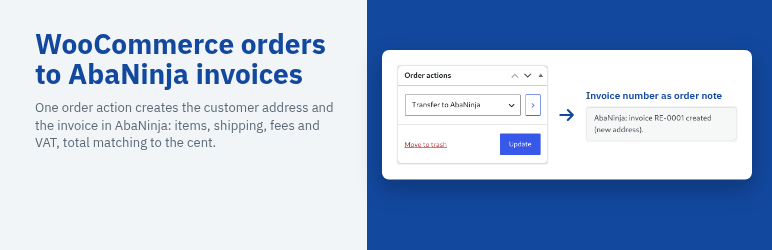
AbaNinja (Swiss21, DeepCloud AG) is a Swiss accounting and invoicing software for small companies. Shops on WooCommerce have had to copy every order into AbaNinja by hand. With this plugin, one click on an order does it:
- Open an order and choose “Transfer to AbaNinja” under Order actions
- The customer is created as an address in AbaNinja; if AbaNinja reports an existing address with the same e-mail address, that one is used, so there are no duplicates
- An invoice is created with all items, shipping and fees, the VAT rate of each line, prices including VAT and the order number as reference
- The totals in AbaNinja match the shop exactly: a unit price that does not come out to the centime is sent as one line “3 × Article” with the line total
- The AbaNinja invoice number is stored on the order and written as an order note; each order is transferred only once
- Failed transfers are noted on the order and can be repeated with the same order action
- A log in the admin shows the last 50 transfers
AbaNinja requires a salutation (Mr, Ms, Family) for person addresses, which a shop does not know. The plugin therefore creates every customer as an address of type company, private customers with their full name, so no salutation is ever guessed.
The admin screen, order notes and invoice texts follow the language of the site: English, German (Switzerland and Germany), French and Italian are included. New AbaNinja addresses get the language of the shop (de, fr, it, otherwise en).
Pro extension: a separate paid plugin transfers every order automatically as soon as it is processing or completed, and creates a credit note in AbaNinja for every refund. More at https://www.strainovic-it.ch/en/abaninja-shop-connector/
This plugin is not affiliated with or endorsed by DeepCloud AG or Swiss21. AbaNinja is a trademark of its owner.
External services
This plugin connects to the AbaNinja API (https://api.abaninja.ch), operated by DeepCloud AG, Abacus-Platz 1, 9300 Wittenbach, Switzerland, on behalf of the shop owner.
- When: only when an administrator uses the order action “Transfer to AbaNinja” on an order, and when the administrator clicks “Test connection” on the settings page. Nothing is sent in the background or during checkout.
- Sent: the shop owner’s AbaNinja API token; the billing name, company, e-mail address, phone number and address of the order; the ordered items with quantities, prices and VAT rates; shipping and fees; the order number and date.
- Received: account, address and invoice identifiers and the invoice number and total.
- AbaNinja API documentation: https://docs.abaninja.ch
- AbaNinja API terms of use: https://www.deepcloud.swiss/legal/NB-DeepCloud-AG_API_EN.pdf
- AbaNinja terms and conditions: https://www.abaninja.ch/en/legal/
- DeepCloud privacy policy: https://www.deepcloud.swiss/datenschutz/
Shop owners must mention the transfer to AbaNinja in their own privacy policy.
Screenshots


Installation
- Install and activate the plugin, WooCommerce must be active.
- In AbaNinja (from the Basic plan, the API is not available in the free Starter plan) go to Settings Automation API Tokens and create a token with the scopes “profile” and “customers”.
- Open WooCommerce AbaNinja, paste the token, click “Test connection” and save. The account UUID is filled in automatically if left empty.
- Open an order and choose “Transfer to AbaNinja” under Order actions.
FAQ
-
Which AbaNinja plan do I need?
-
The API is available from the Basic plan. The free Starter plan has no API tokens.
-
Can every order be transferred automatically?
-
Not with this plugin: here every order is transferred with the order action. Automatic transfer of every order and credit notes for refunds come with the paid Pro extension, see https://www.strainovic-it.ch/en/abaninja-shop-connector/
-
Does the plugin send the invoice to the customer?
-
No. The invoice is created in AbaNinja and can be sent from there.
-
Which languages are included?
-
English, German (de_CH, also used for de_CH_informal; de_DE for all other German locales), French (fr_FR, also used for fr_BE, fr_CA and fr_CH) and Italian (it_IT, also used for it_CH). Other site languages show the English texts.
Reviews
There are no reviews for this plugin.
Contributors & Developers
“Strainovic IT Shop Invoices for AbaNinja” is open source software. The following people have contributed to this plugin.
Contributors
“Strainovic IT Shop Invoices for AbaNinja” has been translated into 1 locale. Thank you to the translators for their contributions.
Translate “Strainovic IT Shop Invoices for AbaNinja” into your language.
Interested in development?
Browse the code, check out the SVN repository, or subscribe to the development log by RSS.
Changelog
0.3.3
- Swiss addresses now carry the canton, which AbaNinja requires: from the order, otherwise from the postcode. Without it AbaNinja rejected every Swiss customer.
- Returning customers are recognised again: an existing AbaNinja address with the same e-mail address is reused instead of creating a new one.
0.3.2
- Translation files are no longer bundled; translations come from translate.wordpress.org.
0.3.1
- A refund of an order that is already in AbaNinja adds an order note: the credit note has to be recorded in AbaNinja manually.
0.3.0
- Renamed to “Strainovic IT Shop Invoices for AbaNinja” with the slug and text domain strainovic-it-shop-invoices-for-abaninja.
- Orders are transferred with the order action “Transfer to AbaNinja”. Automatic transfer moved to the Pro extension.
- The AbaNinja receiver of the invoice is stored on the order.
0.2.0
- English source texts, translations for German (Switzerland and Germany), French and Italian included.
- New AbaNinja addresses get the language of the shop.
0.1.0
- First release: WooCommerce order to AbaNinja address and invoice.