
Description
A new store looks empty until it has products. Storefill fills it with the demo content your theme
was designed around, so you can see every section working and then swap the demo products for your
own.
Open Appearance Import demo, check the requirements, and click Import demo content.
Storefill adds:
- Products, with photos, prices, sale prices, stock, specifications, variations and reviews
- Product categories with images, brands and filterable attributes
- Pages and blog posts
- A navigation menu
- The demo’s look: one of the theme’s own style variations for block themes (Twenty Twenty-Five
imports in its Noon style), and Customizer settings and widgets for classic themes - The demo homepage and blog page (optional)
Safe on a store that already has content
- Your own content is never changed or deleted. If a product, page or category with the same name
already exists, Storefill uses it as it is. - Every item Storefill adds, and the previous value of every setting it changes, is recorded.
Remove demo content deletes exactly those items and restores those settings. Content you
added yourself is kept. - Your store’s visibility, title, address, currency, payments and shipping are left alone unless
you tick “This is a public demo site”.
For theme demo sites
Tick This is a public demo site (or use --demo-site on the command line) to also set the site
title and store address, switch store visibility to Live, turn on pretty permalinks, unpublish
WordPress’s sample post and page, and add a demo checkout: a payment method that takes no money and
delivery methods, so visitors can place a test order. Never use this option on a real store.
WP-CLI
wp storefill packs
wp storefill import unishop --demo-site
wp storefill status unishop
wp storefill remove unishop --yes
Supported themes
Demo packs are available for Twenty Twenty-Five (the default WordPress theme) and Unishop. Packs
for more themes are added to the demo library over time; Storefill finds them without an update.
For theme developers
A demo pack is a few JSON files (content, dashboard settings, Customizer settings and widgets)
and a folder of photos in the public
demo-pack repository. Its README documents the format.
Nothing in a pack is executed: Storefill only reads data and imports images through the WordPress
media library. Pack text is treated as plain text (any HTML is stripped), and a pack can only change
a fixed list of store and site-identity settings, never accounts, roles, URLs or security settings.
External services
Storefill downloads demo packs from the public demo-pack repository on GitHub, published with
GitHub Pages at som3669.github.io.
- What is requested: the pack index (
index.json), the pack for your active theme
(pack.json) and that pack’s photos. - When: when you open Appearance Import demo (the index and the pack are then cached for six
hours), and when you import (the photos). - What is sent: nothing about your site or its users. The requests are plain file downloads.
Like any web request, they reveal your server’s IP address to GitHub.
GitHub is operated by GitHub, Inc.:
Terms of Service,
Privacy Statement.
To use another host, define STOREFILL_SOURCE in wp-config.php with its base URL. To read packs
from a folder on the server and make no requests at all, define STOREFILL_LOCAL_PACKS with the
folder path.
Screenshots


Installation
- In your dashboard, go to Plugins Add New Plugin, search for “Storefill”, then install and
activate it. Or upload the
storefill-demo-content-importerfolder to/wp-content/plugins/and activate it on the Plugins screen. - Activate a theme that has a demo pack, and WooCommerce if the pack builds a store.
- Go to Appearance Import demo and click Import demo content.
FAQ
-
Will importing overwrite my products or pages?
-
No. Storefill only adds. When something with the same name already exists, it is used as it is and
never changed, and removal never deletes it. -
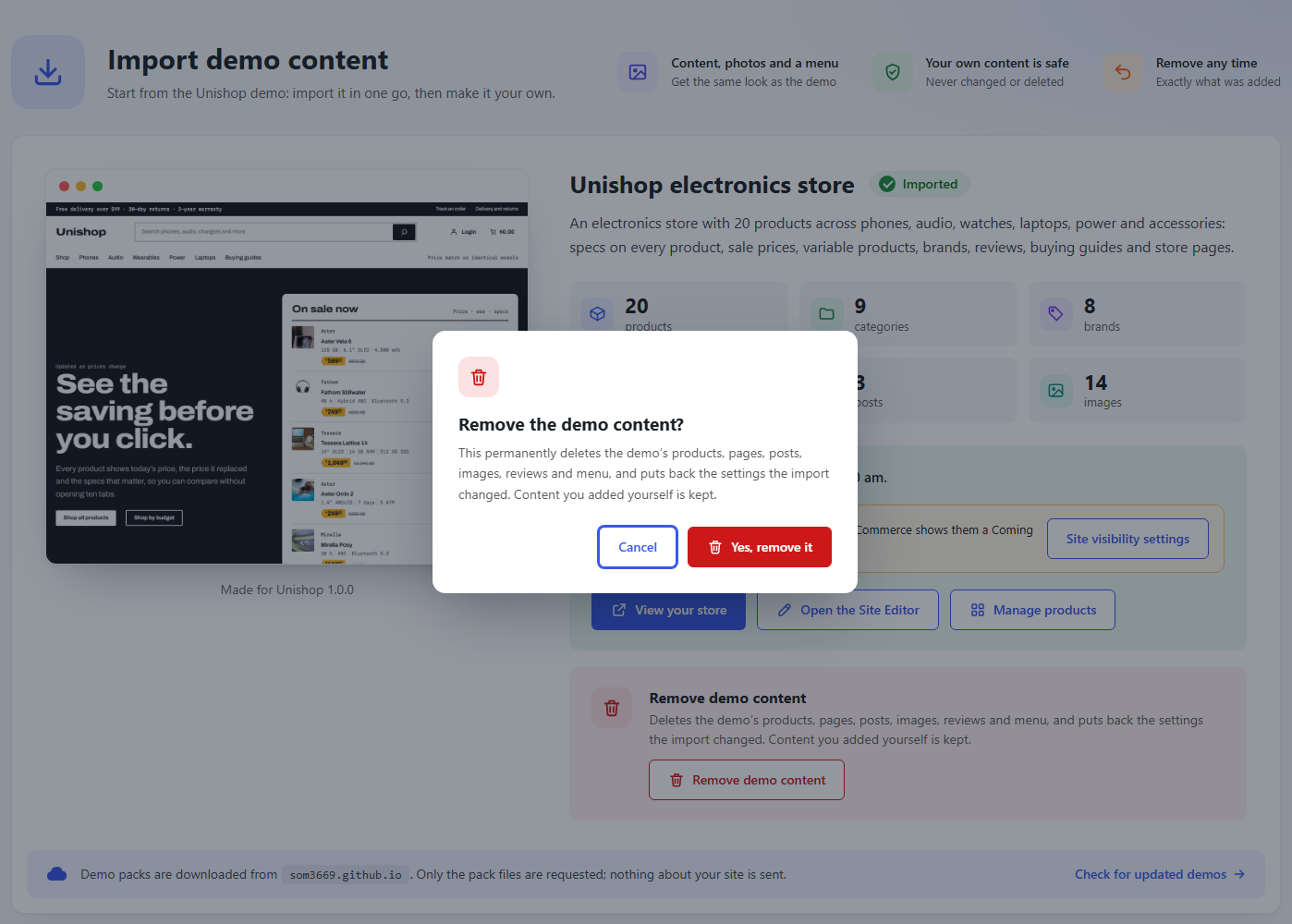
How do I remove the demo content?
-
Appearance Import demo, click Remove demo content, and confirm. Or run
wp storefill remove . -
Will importing change my site’s design?
-
Yes, to match the demo. A block theme switches to the style variation its demo uses, if it names
one, and a classic theme gets the demo’s Customizer settings and widgets. Storefill records your own
styles and settings first, and removing the demo puts them back exactly. -
What happens if the import stops half way?
-
Open Appearance Import demo again and click Finish the import, or click Try again on the
step that stopped. Every step picks up where it left off without duplicating anything. -
What happens to the demo content if I uninstall Storefill?
-
It stays on your site. Storefill keeps its record of what it imported, so if you install it again
you can still remove the demo content. Remove the demo first if you want it gone. -
Does it work without WooCommerce?
-
Packs that build a store need WooCommerce, and the import screen says so. Packs with only pages,
posts and a menu work without it.
Reviews
There are no reviews for this plugin.
Contributors & Developers
“Storefill – Demo Content Importer” is open source software. The following people have contributed to this plugin.
Contributors
Translate “Storefill – Demo Content Importer” into your language.
Interested in development?
Browse the code, check out the SVN repository, or subscribe to the development log by RSS.
Changelog
1.0.0
- Initial release.