

Description
English
Give your customers a Kaspi Pay option at checkout
Starlight Payment Gateway for Kaspi lets WooCommerce stores in Kazakhstan accept orders in tenge through a Kaspi Pay merchant link. Save your link and add payment instructions. Customers can then open the Kaspi payment page after placing an order.
Use it if you check incoming payments yourself. You do not need a Kaspi API key or a paid plugin subscription. Check the payment in Kaspi Pay, then confirm the order manually in WooCommerce.
How it works
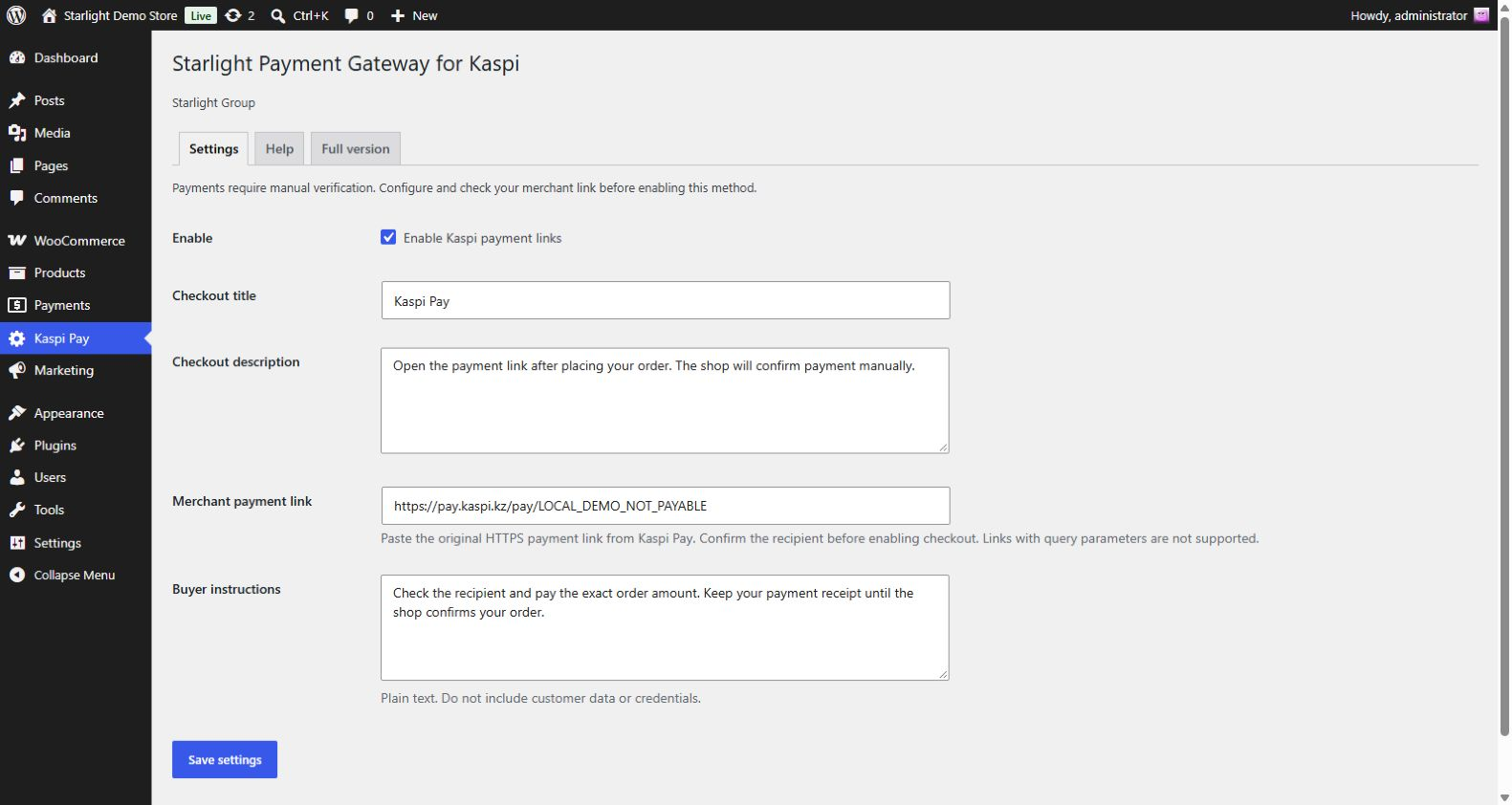
- Save your original Kaspi Pay merchant link in the plugin settings, verify the recipient and enable the payment method.
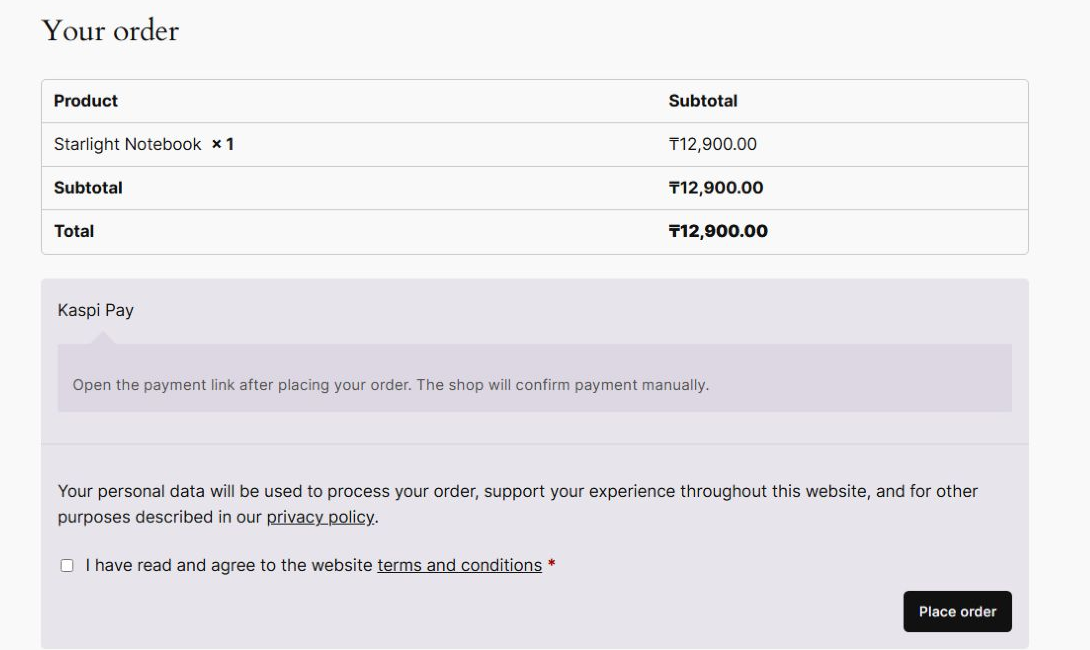
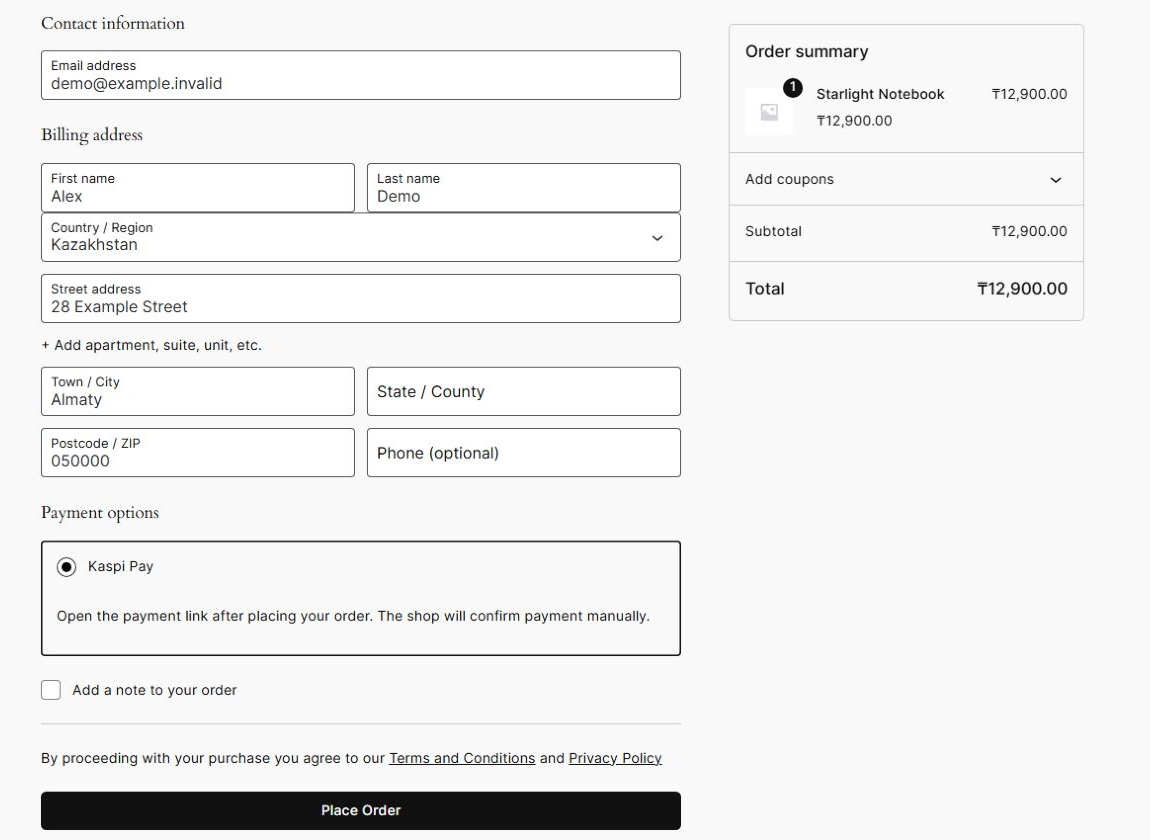
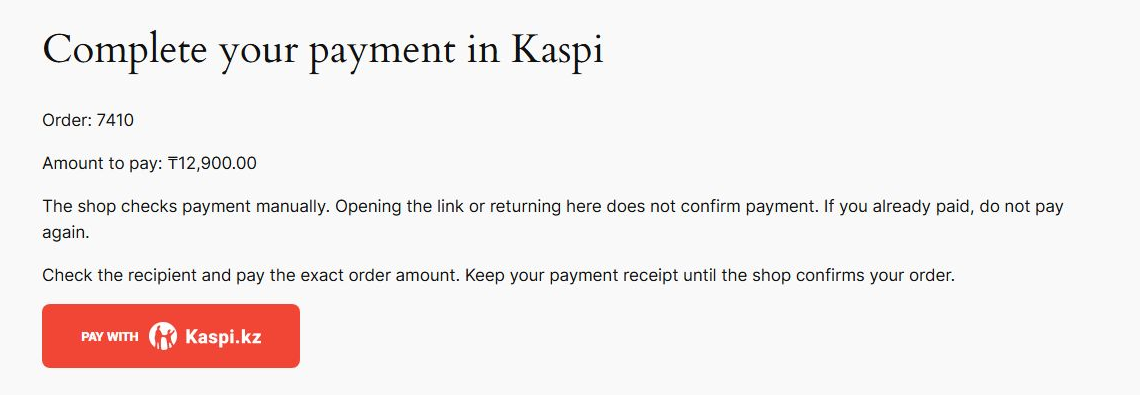
- The customer selects Kaspi Pay at checkout, places the order and follows the payment link. They check the recipient and enter the exact order amount.
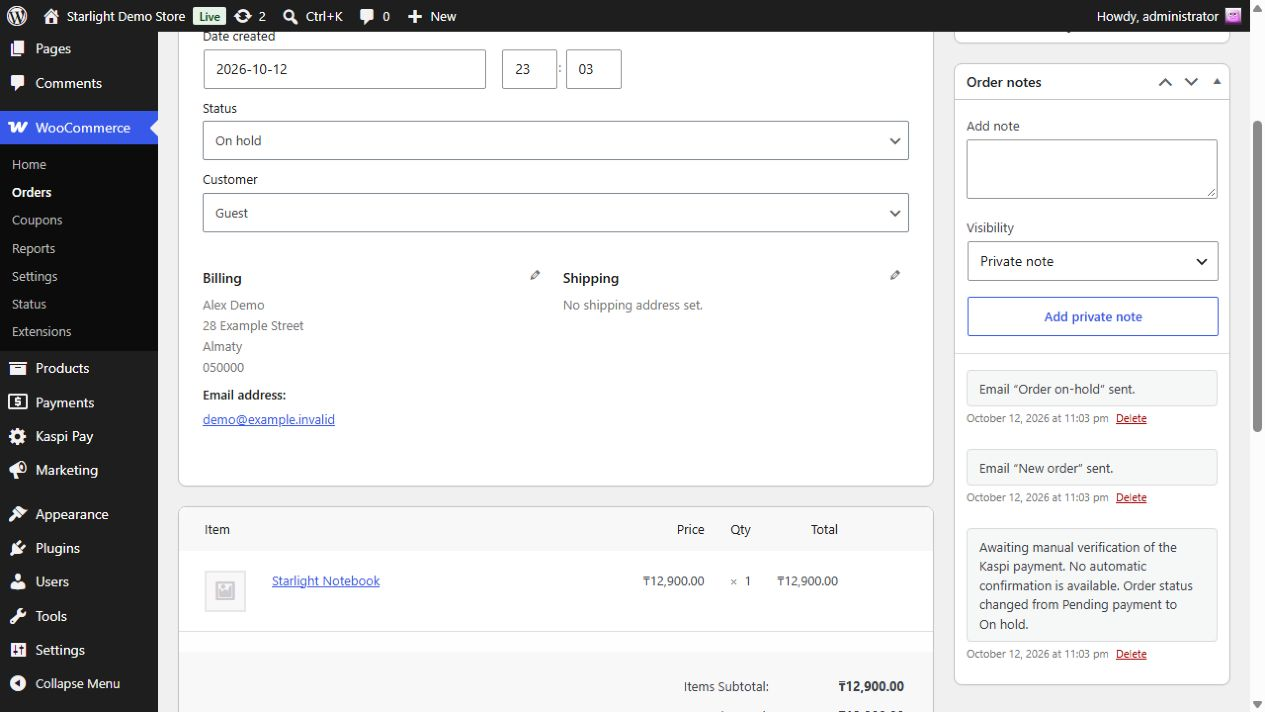
- The order stays On hold until you check the incoming funds and update its status in WooCommerce. Fulfil it only after verifying payment.
What your store gets
- A familiar payment option: offer Kaspi Pay links alongside your store’s other available payment methods.
- Instructions where customers need them: show the amount, payment link and your guidance on protected order pages. The on-hold order email reminds customers about manual verification and links back to their order.
- Checkout compatibility: works with classic checkout, Checkout Blocks and HPOS order storage.
- Control over your checkout text: customise the payment-method title, description and buyer instructions.
- Consistency for existing orders: saved payment instructions stay with each order when you change the settings.
- A free starting point: no plugin-imposed order limits, license activation or registration with Starlight Group.
Before you start
You need WooCommerce, a store accepting KZT orders and your own Kaspi Pay merchant payment link. All customers use the same link for your sales point. The plugin does not add the amount or order number to it. A link click, a return to your store or a customer screenshot does not confirm payment. This version does not generate QR codes, confirm payments automatically or process refunds.
The interface uses your WordPress language. Translations are installed as separate WordPress.org language packs when available. The Russian text on this page does not install a translation in your store.
Ready to reduce manual payment checks?
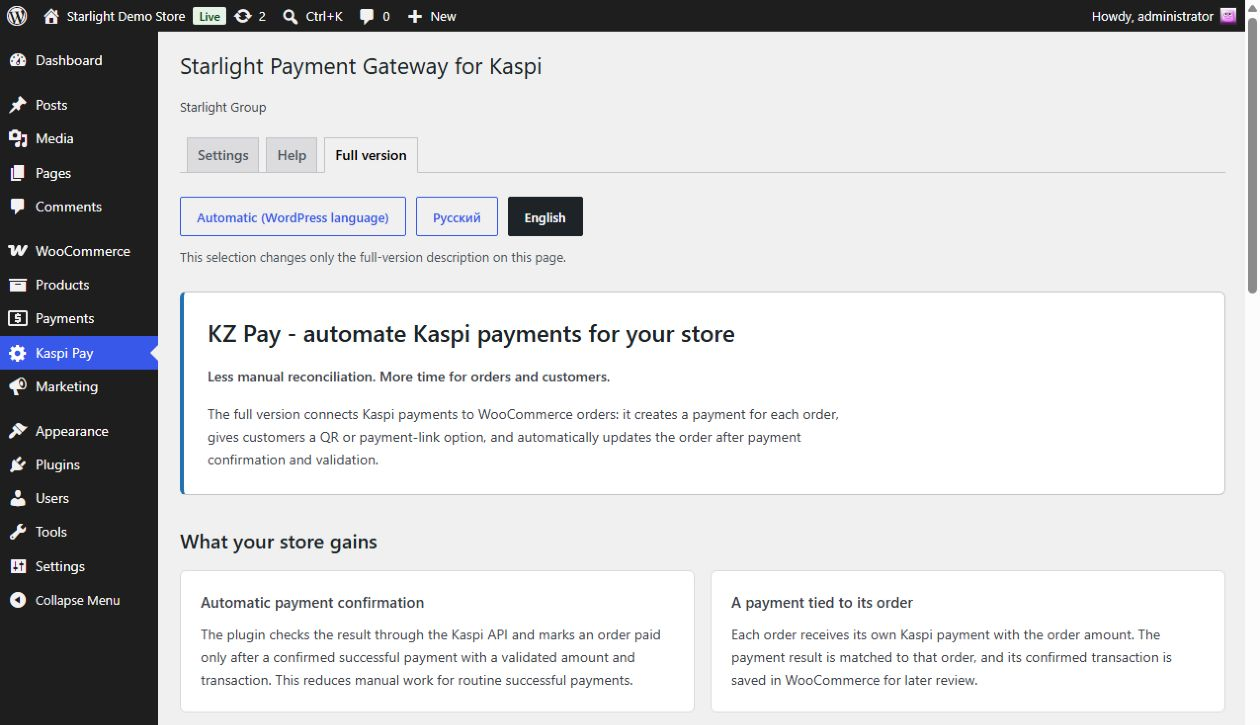
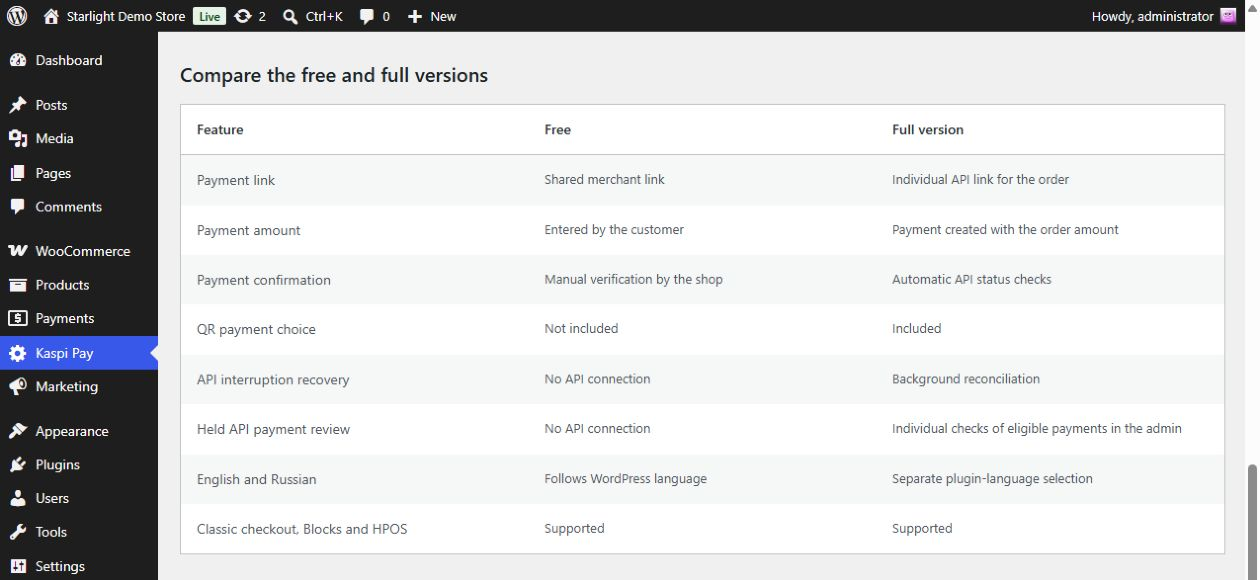
Explore KZ Pay, the full version by Starlight Group. This separate commercial plugin creates a payment link for each order with its amount already set. Customers can pay by link or QR code. The plugin checks the payment status automatically and confirms a successful payment only after validating the amount and transaction.
To use the full integration, your business needs access to Kaspi Public QR API Scheme 1. Buying the plugin does not provide API access. The free version works on its own, so you can keep using it without upgrading.
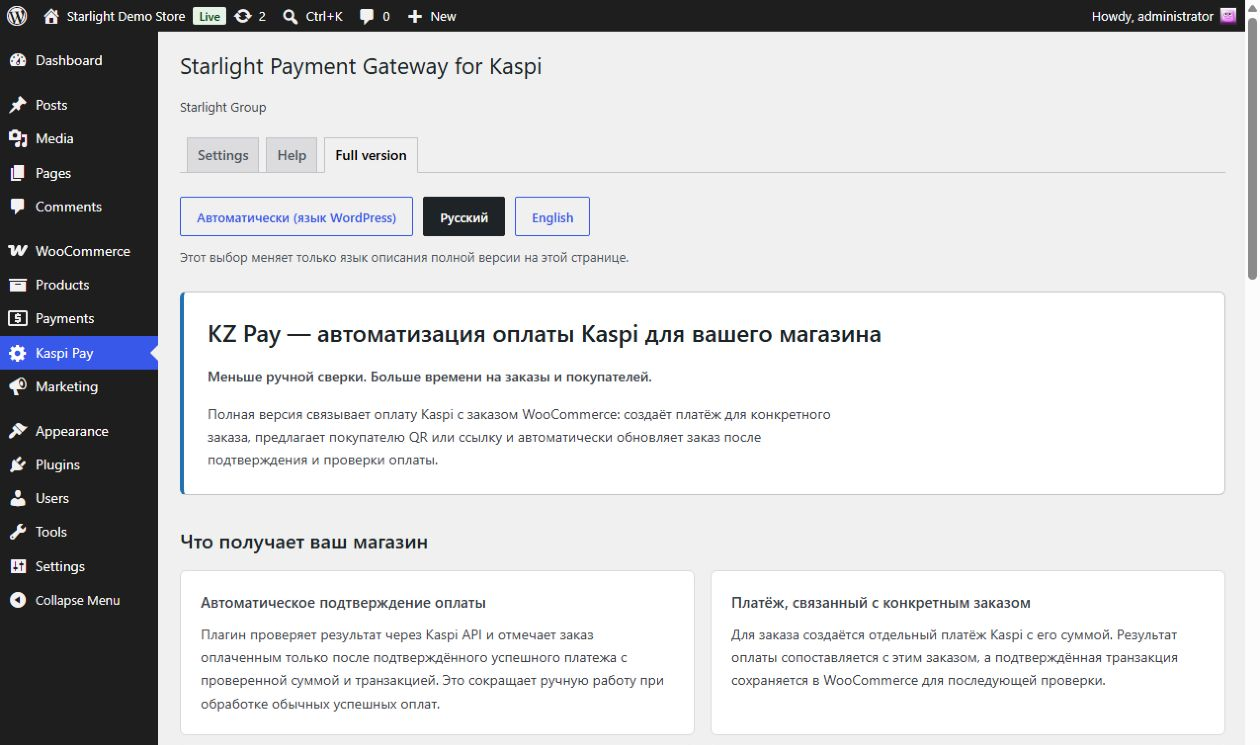
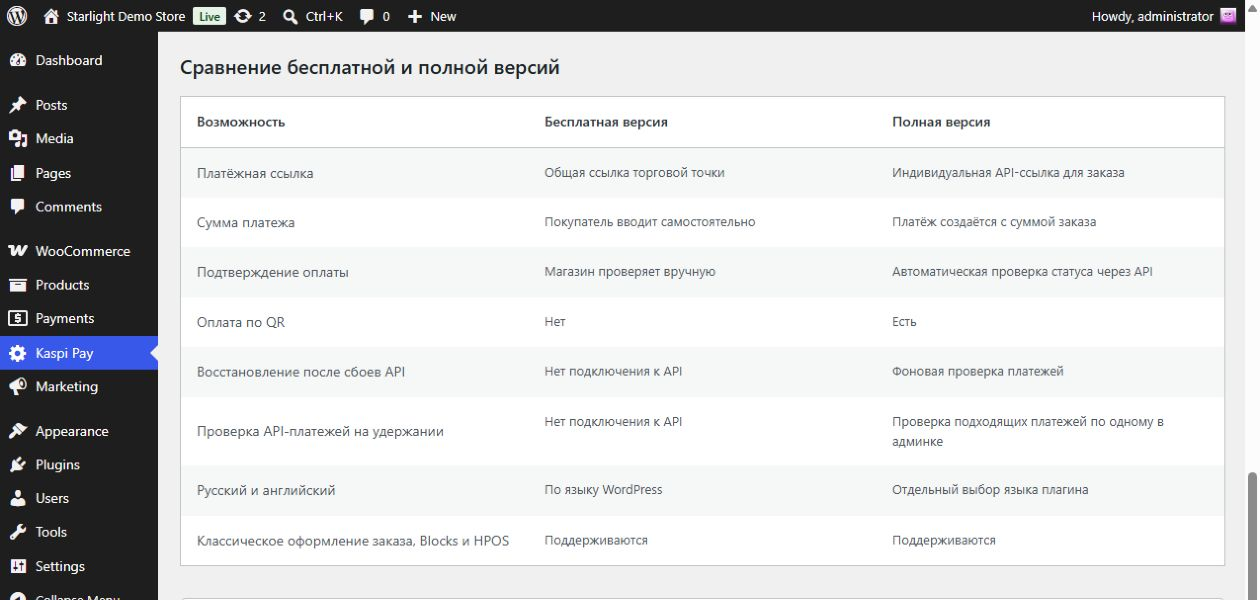
The Full version tab compares the two plugins. Choose Automatic, Русский or English to change the description language. Russian needs the plugin’s Russian language pack. If it is missing, the page explains which language it uses. This choice does not change WordPress or checkout settings.
Need help getting started?
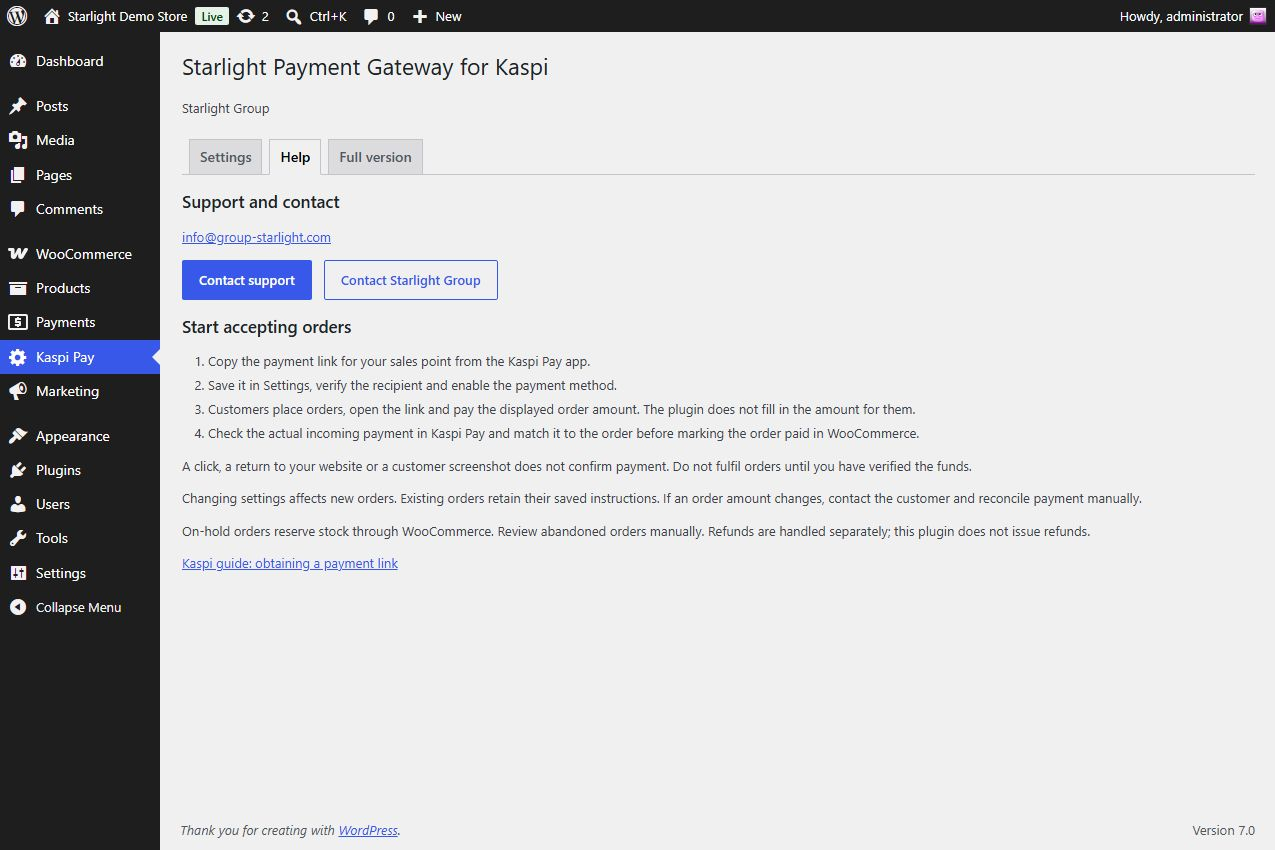
Email info@group-starlight.com or visit the Starlight Group contact page. The Help tab also gives you direct buttons to contact support and Starlight Group.
Developed independently by Starlight Group. Not affiliated with, endorsed by, or an official product of Kaspi.kz, WooCommerce or Automattic. All trademarks belong to their respective owners.
Русский
Добавьте оплату через Kaspi Pay в ваш интернет-магазин
Starlight Payment Gateway for Kaspi позволяет магазинам на WordPress и WooCommerce в Казахстане принимать заказы в тенге с оплатой по ссылке Kaspi Pay. Сохраните свою платёжную ссылку и добавьте инструкции. После оформления заказа покупатель сможет перейти к оплате. Плагин бесплатный.
Используйте плагин, если сами проверяете поступление денег. API-ключ Kaspi и платная подписка для этого не нужны. Проверьте оплату в Kaspi Pay, затем вручную подтвердите заказ в WooCommerce.
Как это работает
- Сохраните оригинальную платёжную ссылку Kaspi Pay в настройках плагина, проверьте получателя и включите способ оплаты.
- Покупатель выбирает Kaspi Pay, оформляет заказ и переходит по ссылке. Он проверяет получателя и самостоятельно вводит точную сумму заказа.
- Заказ остаётся в статусе «На удержании», пока вы не проверите поступление денег и не измените его статус в WooCommerce. Выполняйте заказ только после проверки оплаты.
Что получает ваш магазин
- Привычный покупателям способ оплаты: предложите оплату по ссылке Kaspi Pay наряду с другими доступными способами.
- Понятные инструкции: сумма, платёжная ссылка и ваши пояснения доступны на защищённых страницах заказа. Письмо о заказе на удержании напоминает о ручной проверке оплаты и содержит ссылку на заказ.
- Совместимость с WooCommerce: поддерживаются классическое оформление заказа, Checkout Blocks и хранилище заказов HPOS.
- Настраиваемые тексты: задайте название способа оплаты, описание и инструкции для покупателя.
- Сохранение инструкций: изменение настроек не заменяет инструкции, уже сохранённые в существующих заказах.
- Бесплатный старт: плагин не ограничивает количество заказов, не требует активации лицензии или регистрации в Starlight Group.
Что нужно для начала
Вам нужны WooCommerce, заказы в тенге (KZT) и собственная действующая платёжная ссылка Kaspi Pay для торговой точки. Бесплатный плагин использует общую ссылку и не подставляет сумму или номер заказа. Переход по ссылке, возврат на сайт и скриншот покупателя не подтверждают оплату. Генерация QR, автоматическое подтверждение платежей и возврат денег в эту версию не входят.
Интерфейс использует язык WordPress. Переводы устанавливаются отдельными языковыми пакетами WordPress.org по мере их появления. Русский текст на этой странице не устанавливает перевод в вашем магазине.
Хотите сократить ручную проверку платежей?
Посмотрите полную версию KZ Pay от Starlight Group. Этот отдельный коммерческий плагин создаёт платёжную ссылку для каждого заказа с уже указанной суммой. Покупатель может оплатить по ссылке или QR-коду. Плагин автоматически проверяет статус платежа и подтверждает успешную оплату только после проверки суммы и транзакции.
Для полной интеграции вашему бизнесу нужен доступ к Kaspi Public QR API по схеме 1. Покупка плагина не предоставляет доступ к API. Бесплатная версия работает самостоятельно, поэтому переходить на платную необязательно.
Во вкладке «Полная версия» можно сравнить возможности двух плагинов. Выберите «Автоматически», «Русский» или «English», чтобы изменить язык описания. Для русского текста нужен русский языковой пакет плагина. Если пакета нет, страница объясняет, какой язык используется. Этот выбор не меняет язык WordPress и настройки оформления заказа.
Нужна помощь с началом работы?
Напишите на info@group-starlight.com или откройте страницу контактов Starlight Group. Во вкладке «Помощь» также доступны кнопки «Написать в поддержку» и «Связаться со Starlight Group».
Независимый продукт Starlight Group. Плагин не связан с Kaspi.kz, WooCommerce или Automattic, не является их официальным продуктом и не имеет их официального одобрения. Все товарные знаки принадлежат соответствующим владельцам.
Privacy and external services
English
The plugin makes no server requests to Kaspi or Starlight Group, uses no telemetry and loads no external tracking assets. The public merchant payment link and buyer instructions are saved in WooCommerce settings and relevant order metadata. Existing order data stays in WooCommerce. No Freemius registration is required.
Only a buyer’s explicit click opens the merchant-provided Kaspi page. The plugin adds no customer details, order keys or amounts to that URL, and suppresses referrer transmission on that link. Kaspi handles the external payment page under its own terms.
The Help tab includes Kaspi’s payment-link guide, an email link to info@group-starlight.com and the Starlight Group contact page. The Full version button opens the KZ Pay product page.
These links open only when clicked. The plugin does not embed the pages, load remote assets or send analytics.
Contact links do not include information about your store, orders or customers. You decide what to include in your message.
Deactivation or removal retains settings and order history. No uninstall cleanup is performed.
Русский: конфиденциальность и внешние сервисы
Плагин не отправляет серверные запросы в Kaspi или Starlight Group, не использует телеметрию и не загружает внешние средства отслеживания. Платёжная ссылка и инструкции сохраняются в настройках WooCommerce и данных соответствующих заказов. Данные заказов остаются в вашем магазине. Регистрация во Freemius не требуется.
Платёжная страница Kaspi открывается только после нажатия покупателем ссылки. Плагин не добавляет в неё данные покупателя, ключ доступа к заказу или сумму и запрещает передачу адреса исходной страницы через referrer. Внешняя платёжная страница работает на условиях Kaspi.
Во вкладке «Помощь» доступны инструкция Kaspi по получению платёжной ссылки и контакты Starlight Group. Написать в поддержку можно по адресу info@group-starlight.com. Кнопка полной версии открывает страницу KZ Pay.
Ссылки открываются только по нажатию. Плагин не встраивает эти страницы, не загружает с них внешние ресурсы и не отправляет аналитику.
Ссылки для связи не содержат данных магазина, заказов или покупателей. Вы сами решаете, что написать в обращении.
Отключение или удаление плагина сохраняет настройки и историю заказов. Автоматическая очистка этих данных при удалении не выполняется.
Screenshots
Installation
- Install and activate WooCommerce.
- Install this plugin and open Kaspi Pay.
- Save your original merchant payment link and instructions. Verify the recipient.
- Enable the method. Always check incoming payments before fulfilling orders.
FAQ
-
Does clicking the link confirm payment?
-
No. Opening the payment link, returning to your website or sending a screenshot does not confirm payment. Check the actual incoming funds in Kaspi Pay, match the payment to the order, and then update the order status in WooCommerce. Do not fulfil the order before this check.
-
Why is my link rejected?
-
Use the original merchant payment link from Kaspi Pay. The plugin accepts supported payment addresses on
pay.kaspi.kzover HTTPS. It rejects shortened links, third-party redirects, query parameters, fragments, explicit ports and embedded login details. If your original link is rejected, contact support before editing it. Do not remove parts of the link just to make it pass validation. -
What happens if I change the link or order total?
-
A new link or edited instructions apply to new orders. Existing orders keep the instructions saved at checkout. If you change an order total, the plugin hides the payment button because the saved amount no longer matches. Contact the customer and check the payment manually. If they have already paid, check the incoming funds before asking them to pay again.
-
What happens when the commercial plugin is active?
-
The free payment method is hidden from new checkout when the plugin detects the commercial version as active. Existing manual orders keep their payment instructions and still require manual verification. Installing the full version does not turn those orders into API payments.
-
Does the free plugin require a Kaspi API key or a KZ Pay license?
-
No. You need your own Kaspi Pay merchant payment link and a WooCommerce store accepting KZT orders. The free plugin does not require a Kaspi API key, a KZ Pay account, a plugin license or a paid upgrade. Kaspi’s merchant eligibility and service terms still apply independently.
-
How do I update the plugin or replace an old test package?
-
For a regular directory version, use the plugin update offered by WordPress. If you are replacing an earlier unpublished test package with a different folder name, deactivate that copy before installing Starlight Payment Gateway for Kaspi. The settings and manual-order data from those earlier packages use the same identifiers and are retained. Do not activate both copies at once. This does not migrate orders from a separate commercial or full API plugin.
-
Where can I get help?
-
Email info@group-starlight.com or use the buttons in Kaspi Pay > Help. You can also visit the Starlight Group contact page. Tell us your plugin version and describe the problem. Never send passwords, payment credentials, order access keys or customer payment details.
-
How are translations installed?
-
WordPress installs translations as separate language packs once they are approved and available. Set your WordPress language, then open Dashboard > Updates > Update Translations. The Russian text on this directory page is separate from the interface translation. It does not mean that an official Russian pack is already available or installed. Translation files are not included in the plugin ZIP. With the Russian pack installed, you can choose Russian on the Full version tab even in an English admin. Without the pack, the tab explains which language it uses.
-
Подтверждает ли переход по ссылке оплату заказа?
-
Нет. Открытие платёжной ссылки, возврат на сайт и скриншот покупателя не подтверждают оплату. Проверьте фактическое поступление денег в Kaspi Pay, сопоставьте платёж с заказом и затем измените статус заказа в WooCommerce. До этой проверки заказ выполнять не следует.
-
Почему плагин не принимает мою платёжную ссылку?
-
Используйте оригинальную ссылку торговой точки из Kaspi Pay. Плагин принимает поддерживаемые платёжные адреса на
pay.kaspi.kzпо HTTPS. Сокращённые ссылки, сторонние перенаправления, параметры после знака вопроса, фрагменты после решётки, явно указанные порты и встроенные данные входа не поддерживаются. Если исходная ссылка отклоняется, напишите в поддержку, прежде чем менять её. Не удаляйте части ссылки только ради прохождения проверки. -
Что произойдёт, если изменить ссылку или сумму заказа?
-
Новая ссылка и изменённые инструкции применяются к новым заказам. В существующих заказах остаются инструкции, сохранённые при оформлении. Если вы измените сумму заказа, плагин скроет кнопку оплаты, поскольку сохранённая сумма больше не совпадает с текущей. Свяжитесь с покупателем и проверьте платёж вручную. Если он уже заплатил, проверьте поступление денег, прежде чем просить оплатить повторно.
-
Что произойдёт при активации коммерческой версии?
-
Когда плагин обнаруживает активную коммерческую версию, бесплатный способ оплаты скрывается при новом оформлении заказа. Уже созданные ручные заказы сохраняют свои инструкции и по-прежнему требуют ручной проверки оплаты. Установка полной версии не преобразует эти заказы в API-платежи.
-
Нужны ли для бесплатной версии API-ключ Kaspi или лицензия KZ Pay?
-
Нет. Вам нужны собственная платёжная ссылка Kaspi Pay для торговой точки и магазин WooCommerce с заказами в тенге (KZT). Бесплатный плагин не требует API-ключа Kaspi, аккаунта KZ Pay, лицензии плагина или перехода на платную версию. Требования Kaspi к продавцам и условия обслуживания действуют отдельно.
-
Как обновить плагин или заменить старую тестовую сборку?
-
Обычную версию из каталога обновляйте через доступное обновление плагина в WordPress. Если вы заменяете раннюю неопубликованную тестовую сборку с другим названием папки, сначала отключите её, затем установите Starlight Payment Gateway for Kaspi. Настройки и данные ручных заказов тех сборок используют прежние идентификаторы и сохраняются. Не активируйте обе копии одновременно. Это не перенос заказов из отдельного коммерческого или полного API-плагина.
-
Куда обратиться за помощью?
-
Напишите на info@group-starlight.com или воспользуйтесь кнопками во вкладке «Помощь» в разделе Kaspi Pay. Также доступна страница контактов Starlight Group. Укажите версию плагина и опишите проблему. Не отправляйте пароли, платёжные учётные данные, ключи доступа к заказам и платёжные данные покупателей.
-
Как установить русский перевод интерфейса?
-
WordPress устанавливает переводы отдельными языковыми пакетами после их одобрения и появления в системе обновлений. Выберите язык WordPress, затем откройте «Консоль > Обновления > Обновить переводы». Русский текст в каталоге и перевод интерфейса магазина независимы друг от друга. Наличие русского описания не означает, что официальный языковой пакет уже доступен или установлен. Файлы перевода не входят в ZIP плагина. С установленным русским пакетом вкладка «Полная версия» может показывать русский текст даже в английской админке. Без пакета вкладка объясняет, какой язык используется.
Reviews
There are no reviews for this plugin.
Contributors & Developers
“Starlight Payment Gateway for Kaspi” is open source software. The following people have contributed to this plugin.
Contributors
Translate “Starlight Payment Gateway for Kaspi” into your language.
Interested in development?
Browse the code, check out the SVN repository, or subscribe to the development log by RSS.
Changelog
1.0.9
- Make support emails and external links clickable throughout the directory description and privacy text.
- Simplify English and Russian descriptions and FAQs. Payment behavior is unchanged.
1.0.8
- Refresh all ten directory screenshots with the current Kaspi Pay menu, support contacts, checkout flow and English/Russian Full version layout.
- Add bilingual gallery captions. Payment behavior is unchanged.
1.0.7
- Move the admin page to a top-level Kaspi Pay menu, matching the commercial product menu name, icon and position.
1.0.6
- Confirm compatibility with WooCommerce 11.2.1, including HPOS with synchronization disabled and legacy order storage.
- Improve the Full version tab with a spaced language selector, responsive benefit cards and a readable comparison table.
1.0.5
- Rewrite the directory description with complete English and Russian sections, clear setup steps, store benefits and full-version requirements.
- Add a complete Russian explanation of privacy and external services.
- Rewrite all eight FAQs in English and Russian, clarify link validation and distinguish normal updates from old test-package replacement.
1.0.4
- Add prominent email-support and Starlight Group contact buttons to the Help tab.
- Use info@group-starlight.com consistently in the plugin description and support FAQ.
1.0.3
- Use the commercial payment-link button design with the local Kaspi logo, responsive sizing, hover styling and visible keyboard focus.
1.0.2
- Give settings text fields and text areas a consistent responsive width and more room for checkout descriptions and buyer instructions.
- Add captions for the settings, classic and Blocks checkout, buyer instructions, manual order verification, Help and Full version directory screenshots.
1.0.1
- Rename the free directory product to Starlight Payment Gateway for Kaspi; preserve gateway settings and manual-order metadata.
- Use automatic WordPress.org language loading and separate language packs instead of bundled translation catalogs.
- Expand the Full version tab with bilingual benefits, a detailed comparison, trial information and connection requirements.
- Add Automatic, Russian and English controls for the advertisement without changing WordPress or checkout language.
- Improve English and Russian listing descriptions.
1.0.0
- Initial independent manual payment-link gateway by Starlight Group.
- Protected order instructions, native Checkout Blocks registration, and a dedicated Full version admin tab.
- Public directory identity, original KZ Pay branding and a direct product-page link.