
Description
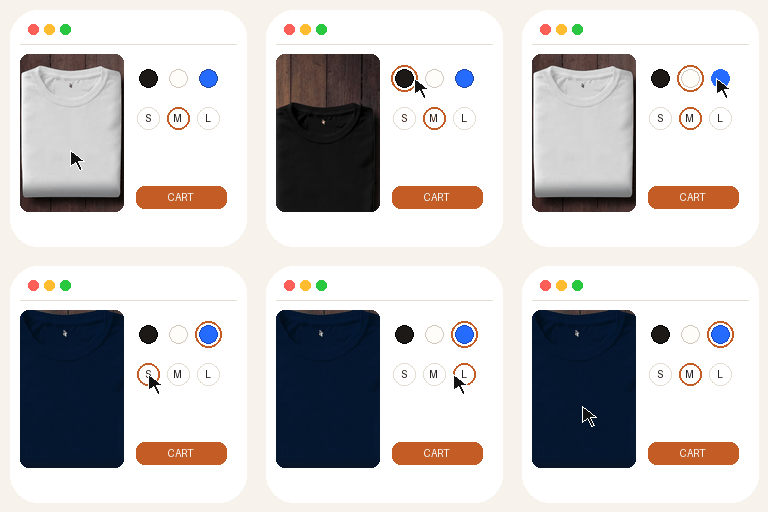
SparkSwipe Variation Swatches replaces WooCommerce variation dropdowns with color, label, and button swatches on variable products. It uses WooCommerce’s native product attributes and variations as the source of truth — it does not duplicate products, stock, or prices.
Why merchants like it
- Easy — a setup wizard configures attributes in a couple of minutes
- Beautiful — three style presets (Minimal, Classic, Modern) with shape, size, and gap controls
- Fast — frontend CSS and JS load only on product pages
- Compatible — works with WooCommerce’s variation form, prices, images, and add to cart
Free features
- Color, label, button, and dropdown swatches
- Circle, square, and rounded shapes
- Size, spacing, borders, and selected states
- Basic term-name tooltips
- Global attribute configuration
- Product-level overrides (display + shape)
- Disable or cross unavailable variations
- Reset variations
- Setup wizard / tutorial and live preview
- System status report
- Translation-ready and RTL-friendly
Pro (separate plugin)
Additional features are available in a separate Pro plugin (not included here):
- Image swatches and image + text
- Radio, dual color, and gradient types
- Term images and secondary colors
- Per-product swatch image overrides
- Shop, category, and search swatches
- Blur / hide unavailable options
- Custom CSS
This free plugin is fully functional on its own.
Screenshots


Installation
- Install and activate WooCommerce.
- Upload this plugin or install it from Plugins Add New.
- Activate SparkSwipe Variation Swatches.
- Complete the tutorial (or skip it and open SparkSwipe Swatches in the admin menu).
- Assign colors to attribute terms under SparkSwipe Swatches Attributes.
FAQ
-
Does this replace WooCommerce variations?
-
No. The original variation selects stay in the form (visually hidden). Swatches update those selects so price, stock, images, and add to cart keep working.
-
Will I lose settings if I deactivate the plugin?
-
No. Settings are kept by default. You can choose “Delete all plugin data” under Settings Uninstall before removing the plugin.
-
Can I style one product differently?
-
Yes. Edit a variable product and open the SparkSwipe Swatches tab. Turn on Override global styles to change display and shape per attribute.
-
Are image swatches included in Free?
-
Image swatches (and term images) are part of the separate Pro plugin. Free includes color, label, button, and dropdown.
Reviews
There are no reviews for this plugin.
Contributors & Developers
“SparkSwipe Variation Swatches for WooCommerce” is open source software. The following people have contributed to this plugin.
Contributors
Translate “SparkSwipe Variation Swatches for WooCommerce” into your language.
Interested in development?
Browse the code, check out the SVN repository, or subscribe to the development log by RSS.
Changelog
1.1.4
- Refresh WordPress.org banners, animated icon, and catalog-style screenshots
1.1.3
- Use one distinctive sparvasw prefix for PHP names, options, REST, and meta writes
1.1.2
- Finish the SparkSwipe rename in remaining admin, tutorial, and license strings
1.1.1
- Keep in-stock swatches clickable on first paint — they no longer grey out before WooCommerce finishes checking combinations
- Select numeric attribute values (7, 10, 00) reliably instead of treating them as numbers
- Do not prefix custom product attributes with pa_ when that taxonomy does not exist
- Re-bind swatches when a variation form is loaded over AJAX or after a fragment refresh
- Clicking the selected swatch clears it, matching WooCommerce’s reset behaviour
- Declare compatibility with WooCommerce 11.1 and keep swatch boxes sized correctly in Safari
- Restore the first-run tutorial redirect after activation
1.1.0
- Rename to SparkSwipe Variation Swatches for WooCommerce (distinctive slug)
- Remove locked Pro feature code from the free plugin (Guideline 5)
- Replace the Pro feature list with swatch previews, per-style preview dialogs, and a Free/Pro comparison table; drop all leftover “locked” styles and scripts
- Harden REST term permissions for WooCommerce attribute taxonomies only
- Prefix options, meta, REST, and handles with sparvasw_
- Show a skeleton placeholder while the Attributes and System Status panels load, instead of a blank screen
- Show a retry prompt when a panel fails to load, instead of leaving the screen empty
- Align the dashboard stat values and card buttons, and restore the marker on the Pro feature list
- Group short settings fields into rows, style the section headings consistently, and match checkboxes and radios to the plugin palette
- Give the border colour pickers visible labels
- Use Aptos / Segoe UI / Tahoma for titles and all admin and swatch text
1.0.23
- Product Smart Swatches tab: shorter copy, clearer override switch contrast
- Product Image display: per-term swatch image overrides with live preview (Pro)
- Admin URL slug fixes for the dashboard and tutorial links
1.0.0
- Initial release.