Description
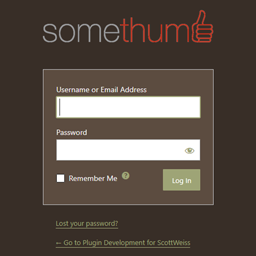
Somethumb Login Identity displays the custom logo selected under Appearance > Customize > Site Identity on the WordPress login screen.
Features:
- Uses the site’s existing custom logo.
- Adds custom-logo support when the active theme does not provide it.
- Restores Appearance > Customize when WordPress does not display the link.
- Supports standard image formats and SVG logos.
- Preserves the logo’s proportions when WordPress has image dimensions.
- Limits the displayed logo width to 320 pixels.
- Links the login logo to the website homepage.
- Uses the website name as the logo link text for accessibility.
- Adds no settings page and requires no configuration beyond selecting a custom logo.
If no custom logo is selected, the standard WordPress login logo remains unchanged.
Screenshots


Installation
- Upload the
somethumb-login-identityfolder to/wp-content/plugins/, or install the ZIP file through Plugins > Add Plugin > Upload Plugin. - Activate Somethumb Login Identity.
- Select a logo under Appearance > Customize > Site Identity if the site does not already have one.
FAQ
-
Where does the plugin get the logo?
-
It uses the custom logo selected under Appearance > Customize > Site Identity.
-
What if my theme does not support a custom logo?
-
The plugin adds custom-logo support when the active theme does not already provide it.
-
What if Appearance > Customize is missing?
-
The plugin restores the Customize link under Appearance when WordPress does not display it.
-
Does the plugin support SVG logos?
-
Yes. WordPress does not permit SVG uploads by default, so an SVG-enabling plugin may be required. When SVG dimension metadata is unavailable, the logo uses a maximum width of 320 pixels and the WordPress login screen’s default logo height.
-
What happens if the site has no custom logo?
-
The plugin makes no visual change, and WordPress displays its standard login logo.
-
Can I still style the rest of the login page?
-
Yes. This plugin only changes the logo and its link behavior. Other login-page styling can be added by the theme or another plugin.
Reviews
There are no reviews for this plugin.
Contributors & Developers
“Somethumb Login Identity” is open source software. The following people have contributed to this plugin.
Contributors

Translate “Somethumb Login Identity” into your language.
Interested in development?
Browse the code, check out the SVN repository, or subscribe to the development log by RSS.
Changelog
1.0.0
- Initial release.
- Replaced the WordPress login logo with the Site Identity custom logo.
- Added custom-logo support for themes that do not provide it.
- Restored Appearance > Customize when WordPress does not display the link.
- Added proportional raster-image sizing and an SVG fallback.
- Changed the login-logo destination to the website homepage.
- Used the website name as the login-logo link text for accessibility.