

Description
Smart Support is a self-hosted WordPress helpdesk and support ticket system for businesses, agencies, online stores, membership sites, and service teams that want to manage customer support directly inside WordPress.
The plugin gives customers a clean frontend Support Center where they can register, log in, submit support tickets, upload attachments, review replies, search their ticket history, and track ticket status. Support agents and supervisors can manage tickets from the WordPress admin area with role-based access, departments, priorities, products, internal notes, reports, notifications, and ticket assignment controls.
Live Demo
Smart Support can be used as a:
- WordPress helpdesk plugin
- WordPress support ticket system
- Customer support ticket system
- Customer service help desk
- Support desk plugin
- Ticket management plugin
- Self-hosted helpdesk solution
Unlike a hosted support SaaS, Smart Support keeps your support workflow connected to your own WordPress website and database. You control the site, user accounts, ticket records, uploaded files, permissions, and integrations.
WordPress customer support from one dashboard
Smart Support turns WordPress into a complete customer support workspace. Customers use the frontend portal, while agents work with ticket details, replies, attachments, internal notes, departments, products, priorities, statuses, customer history, and notifications.
The plugin is suitable for small support teams, growing businesses, digital agencies, consultants, SaaS companies, WooCommerce stores, product support teams, and organizations that need a private support ticket system without sending users to a separate third-party portal.
Frontend Support Center for customers
Fresh installations create a Support Center page automatically. You can also add the following shortcode to any WordPress page: [smart_support_page]. The shortcode creates the main customer-facing support portal.
Customers can:
- Register and log in from the frontend
- Reset their password
- Use optional Google reCAPTCHA protection
- Submit a new support ticket
- Add a subject, message, department, product, priority, and other available fields
- Upload ticket attachments
- Review ticket replies and message history
- Search and filter their tickets
- View tickets by status, department, and state
- Close and reopen their own tickets when permitted
- Rate support replies with a 5-star rating system
- Use the portal on desktop, tablet, or mobile
Ticket management for agents and supervisors
Support agents and supervisors get a structured WordPress ticket management workflow with tools for organizing, assigning, replying to, and resolving customer requests.
Team features include:
- Open, delayed, and closed ticket states
- Reopen and close actions
- Reply and Close for faster ticket handling
- Ticket assignment and auto-assignment
- Agent visibility controls for own tickets, department tickets, or all tickets
- Departments, products, priorities, and ticket types
- Public replies and agent-only internal notes
- Ticket attachments and secure downloads
- Customer details and ticket history
- Search by ticket ID, subject, or content
- Status, department, state, and keyword filters
- Optional ticket sidebar for quick navigation
- Waiting indicators for unanswered tickets
- Configurable sequential or hash-based ticket numbers
- Capability-based roles and permissions
- Agent performance and rating reports
Email notifications and customer communication
Smart Support can send email notifications for important support ticket events, including new tickets, ticket replies, delayed tickets, closed tickets, reopened tickets, and account-related actions.
Email features include:
- Notification settings for customers and agents
- Editable email subjects and message templates
- Configurable sender name and sender email
- Template tags for customer, ticket, and agent information
- Translatable notification content
- Separate frontend and admin ticket URL template tags
- Dashboard notifications with ticket links
Optional AI assistance for support agents
Smart Support includes optional AI-assisted tools for authorized staff working on individual tickets. AI is disabled until a supported provider is configured.
Depending on your configuration, agents can:
- Summarize long ticket conversations
- Generate suggested replies
- Rewrite a reply draft before sending
- Preview rewritten content
- Ask follow-up questions about a ticket conversation
- Add custom instructions to an AI action
On WordPress 7.0 or later, Smart Support can use a configured WordPress Core AI provider. The plugin can also use the OpenAI-compatible provider settings available under Smart Support Settings Advanced AI as a fallback.
AI requests are sent from your WordPress server to the provider you configure. Smart Support does not route AI traffic through Smart Support vendor servers solely to provide this feature.
Reports and support performance
Smart Support includes reporting tools for monitoring ticket volume, ticket status, ratings, and agent performance.
Reporting features include:
- Ticket volume reports
- Status-based reporting
- Agent performance reports
- Average agent rating
- Total ratings per agent
- Dashboard ticket counts
- Chart.js-powered visual reports
Roles and access control
Smart Support uses capability-driven access controls so administrators can manage who can view, create, assign, reply to, and manage support tickets.
Built-in support roles include:
- Support User
- Support Agent
- Support Supervisor
Administrators can assign departments, change capabilities, control ticket visibility, configure whether agents can create tickets, and manage supervisor-level access.
Ticket automation
Built-in automation features help support teams manage inactive tickets and reduce repetitive work.
- Auto-close tickets after a configurable period of inactivity
- Optionally auto-close only tickets waiting for a customer response
- Auto-delay inactive tickets
- Notify customers when tickets are delayed or closed
- Auto-assign tickets when an agent replies
- Respect the configured maximum open tickets per agent
- Use 0 as the maximum for unlimited assignments
- Archive closed tickets manually or automatically after a configured number of days
- Keep archived tickets out of normal dashboards, reports, and ticket lists until restored
- Manage archived tickets from a dedicated Archive Tickets page with search, pagination, restore, and delete tools
Search, filters, and ticket navigation
Smart Support includes practical ticket search and filtering tools for busy support teams.
- Global search by ticket ID, subject, or message content
- Highlighted search results with result counts
- Filters for status, department, state, and assigned agent access
- Compact admin search bar
- Optional ticket list sidebar
- Status filter inside the ticket sidebar
- Quick navigation between support tickets
Ticket numbers
Administrators can choose the ticket number format that best matches their workflow:
- Sequential ticket numbers, such as
2501001and2501002 - Hash-based ticket numbers, such as
#121and#456
Responsive and translation-ready
The frontend Support Center and WordPress admin interfaces are designed for desktop, tablet, and mobile use. Smart Support is translation-ready and includes a .pot file in the languages directory.
The plugin is also designed for WordPress multisite environments.
Free Core Features
Smart Support includes the following features in the free core plugin:
- Frontend Support Center powered by
[smart_support_page] - Automatic Support Center page creation on fresh installations
- Frontend customer registration and login
- Password reset link
- Optional Remember Me setting
- Optional first-name and last-name auto-fill
- Optional Google reCAPTCHA v2, v2 Invisible, or v3
- Frontend ticket submission
- Rich text editor support
- Ticket attachments
- Secure attachment downloads
- Configurable attachment file types, sizes, and counts
- Customer ticket dashboard
- Customer ticket search and filters
- Public ticket replies
- Agent-only internal notes
- Ticket timeline and change history
- Open, delayed, and closed ticket states
- Ticket close and reopen actions
- Closed ticket archive and restore workflow
- Dedicated Archived Tickets page with search, pagination, restore, delete, bulk restore, and bulk delete tools
- Optional auto-archive rules for closed tickets
- Reply and Close action
- Customer close and reopen controls
- Departments
- Products
- Priorities
- Configurable Ticket Types
- Optional frontend Ticket Type field
- Ticket assignment
- Auto-assignment when an agent replies
- Maximum open tickets per agent
- Agent visibility for own, department, or all tickets
- Department-based agent access
- Support User, Support Agent, and Support Supervisor roles
- Capability-based access management
- Agent management screen
- Real-time capability assignment and removal
- Configurable agent ticket creation permission
- Customer and agent email notifications
- Configurable email templates
- Notification center with ticket links
- Open ticket count badge
- Waiting indicator for unanswered tickets
- 5-star reply ratings
- Average and total rating values
- Agent performance reports
- Ticket volume and status reports
- Chart.js reporting integration
- Global search by ticket ID, subject, or content
- Search highlighting and result counts
- Ticket status, department, and state filters
- Optional ticket navigation sidebar
- Sequential and hash-based ticket numbers
- Auto-close inactive tickets
- Auto-delay inactive tickets
- Configurable delay and close notifications
- Responsive frontend and admin interfaces
- Translation-ready strings
- Multisite compatibility
- Uninstall cleanup options for plugin data, settings, and roles
- Optional REST API with API key authentication
- Optional AI assistant for authorized support staff
Premium Add-ons
Smart Support offers optional premium add-ons for teams that need advanced integrations, automation, reporting, custom data, and larger support workflows.
Email Bridge: Convert incoming emails to support tickets and reply to tickets via email.
Canned Replies: Enable your team to create and use predefined responses for common issues.
Webhooks: Send ticket event notifications to external systems (CRMs, automations, custom apps) using secure, signed outgoing webhooks.
Custom Status: Create unlimited custom ticket statuses with colors, icons, and workflow rules.
Registration Fields: Add unlimited custom fields to your registration forms.
Custom Fields: Create unlimited custom ticket fields from the backend and automatically collect additional information during ticket submission.
Ticket Templates: Speed up ticket creation with reusable templates.
Front-end Support: Give your support agents a complete, professional frontend dashboard.
Gravity Forms Integration: Turn Gravity Forms submissions into Smart Support helpdesk tickets with field mapping, deduplication, and admin cross-links.
WooCommerce Tickets: Provide purchase-based support, link orders to tickets, and manage customer support seamlessly WooCommerce.
Organizations / Company Profile: Manage companies and teams as organizations.
Guest Support: Allow guests to submit support tickets without registration using email-only authentication.
Auto-Close Alert: Add warning reminder emails, batch limits, cron recurrence control, and richer auto-close email templates.
Smart Widget: Bring instant, on-page support with a customizable floating widget.
Auto Responder: Automatically send responses to support tickets based on intelligent rules.
Documentation: Instantly insert knowledge base articles into ticket replies.
Private Credentials: Securely exchange sensitive login details inside support tickets.
SLA (Service Level Agreement): Enforce response and resolution commitments with advanced SLA management.
Reports: Expand support reporting with deeper ticket analytics, performance insights, and export-ready operational data.
Scheduled Tickets: Create one-time or recurring support tickets automatically for maintenance, renewals, follow-ups, and planned customer work.
Time Tracking: Accurately track time spent on support tickets by agents, departments, and clients.
Productivity Suite: Enhance agent productivity with comprehensive workflow tools.
Additional add-ons, bundles, and pricing information are available at: Smart Support Pricing
REST API Integrations
Smart Support includes an optional REST API for server-to-server integrations such as CRM synchronization, automations, imports, and custom applications. The REST API is disabled by default. For setup and endpoint information, see the REST API documentation
External Services and Privacy
Smart Support is self-hosted, but some optional features connect to external services when an administrator enables and configures them. Smart Support uses Google reCAPTCHA (optional) for spam prevention (Terms of Service & Privacy Policy) and Chart.js in the admin for analytics (Terms of Service & Privacy Policy). The plugin validates permissions server‑side, escapes output, verifies nonces on all forms, and stores files securely using WordPress APIs.
AI providers
The Smart Support AI assistant is optional. It can use a connected WordPress Core AI provider on WordPress 7.0 or later, or the OpenAI-compatible provider. For more details read AI Documentation
Ticket and customer data
Smart Support stores the information needed to operate the support system on the WordPress site. Site owners are responsible for setting suitable privacy, access, retention, deletion, and backup policies for their support data.
Screenshots
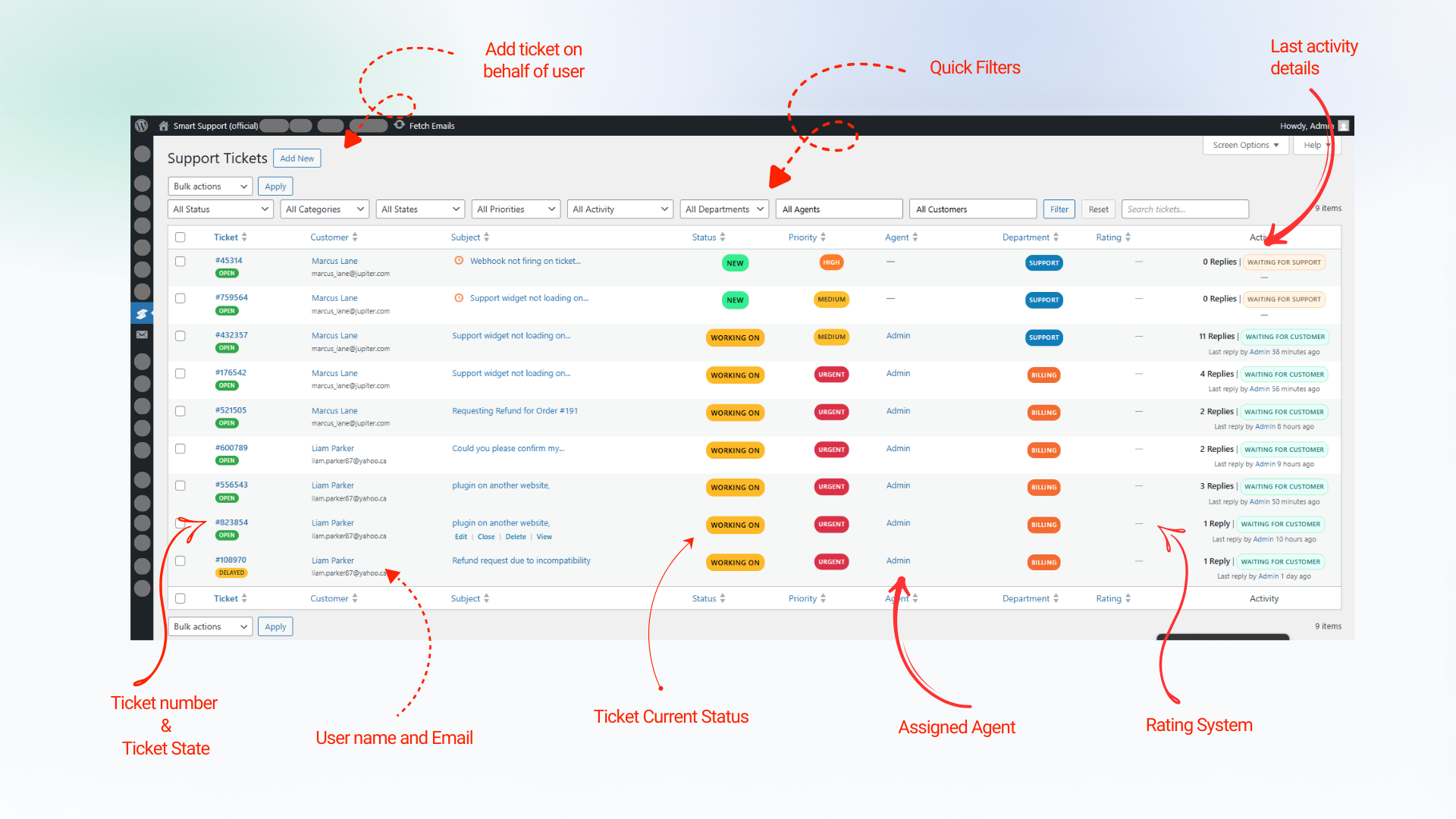
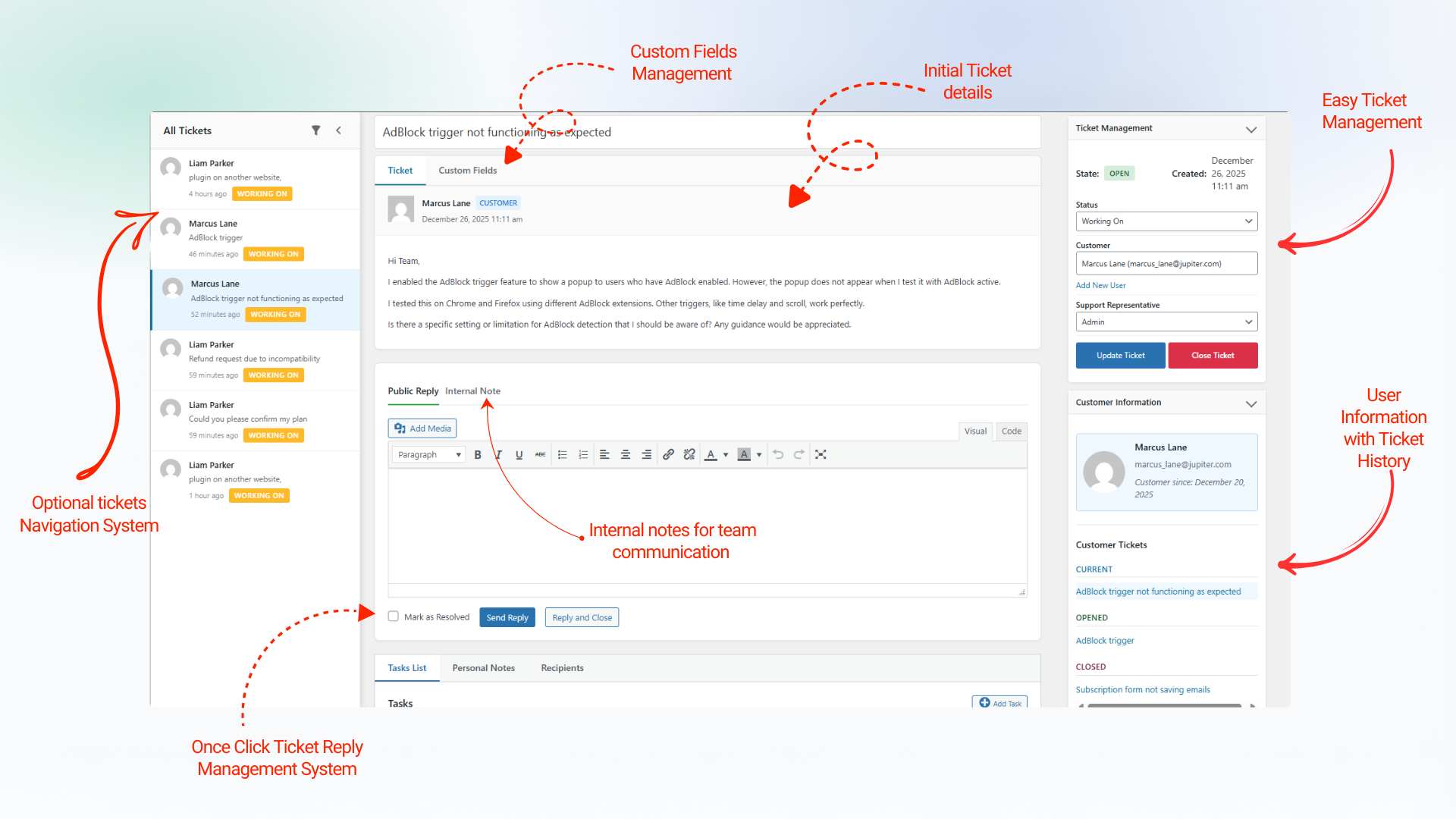


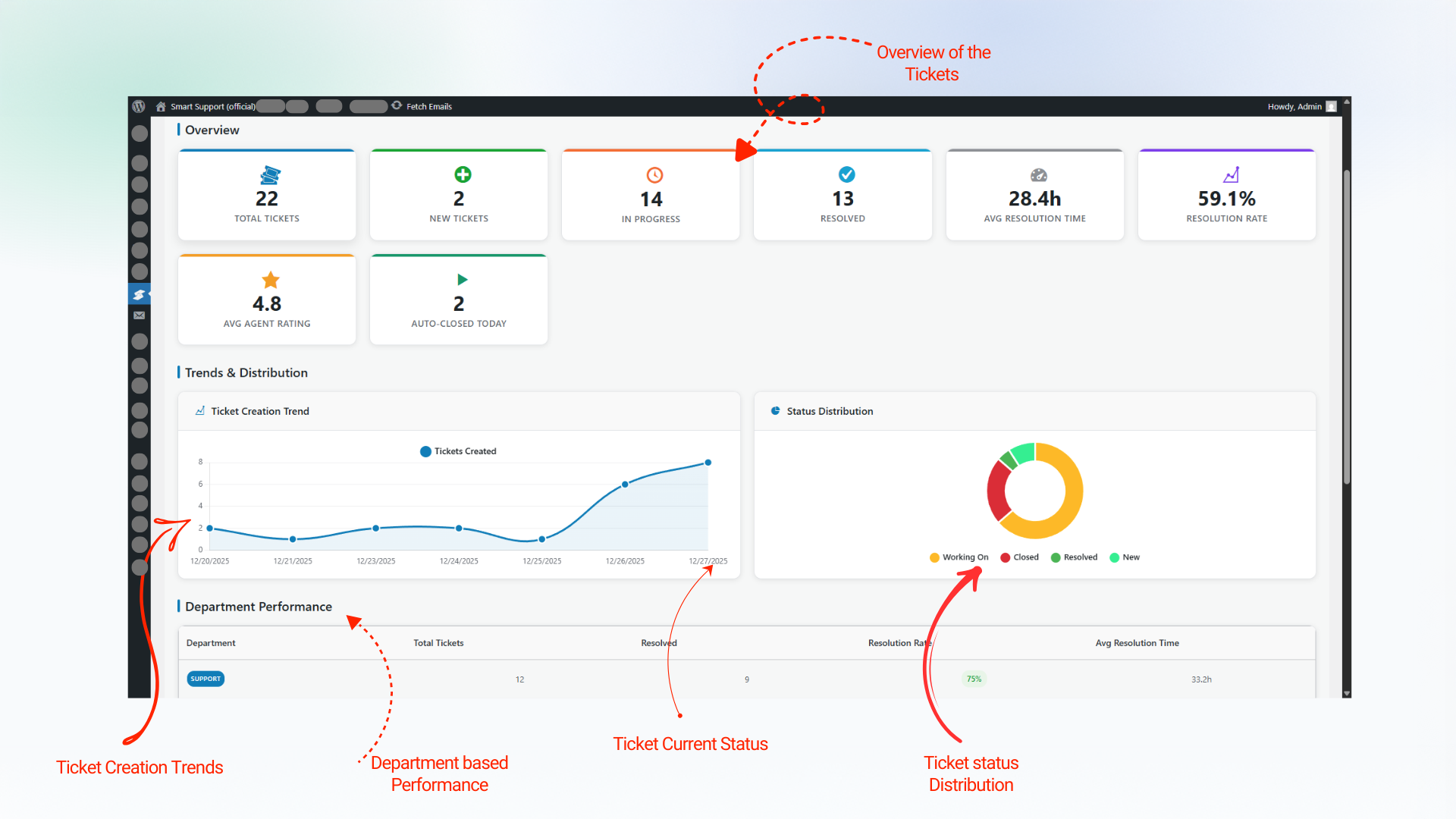
Installation
Install from the WordPress Plugin Directory
- In the WordPress dashboard, go to Plugins Add New.
- Search for
Smart Support. - Locate Smart Support and click Install Now.
- When installation is complete, click Activate.
- Open the Smart Support menu in the WordPress dashboard.
- Go to Smart Support Settings and configure the support system.
- Open the automatically created Support Center page and confirm that it contains
[smart_support_page].
Manual installation
- Upload the
smart-supportfolder to/wp-content/plugins/. - In the WordPress dashboard, go to Plugins.
- Activate Smart Support.
- Open Smart Support Settings and configure the plugin.
- On a fresh installation, Smart Support creates a Support Center page automatically.
- To create the page manually, add
[smart_support_page]to any WordPress page.
FAQ
-
Is Smart Support a WordPress support ticket system?
-
Yes. Smart Support is a self-hosted WordPress support ticket system and helpdesk plugin for managing customer support conversations, ticket replies, customer accounts, file attachments, departments, priorities, notifications, reports, and agent workflows from your own WordPress website.
-
Is Smart Support a self-hosted helpdesk?
-
Yes. The plugin runs on your WordPress installation and stores support data in your site’s database and uploads environment. Optional external services are used only when you enable and configure features such as reCAPTCHA or AI.
-
How do I create the Support Center page?
-
Fresh installations create a Support Center page automatically. To create one manually, add
[smart_support_page]to a standard WordPress page. -
Can customers submit support tickets from the frontend?
-
Yes. Customers can register, log in, create support tickets, upload allowed attachments, review replies, search ticket history, and track ticket status through the frontend Support Center.
-
Does Smart Support support multiple agents?
-
Yes. Smart Support includes Support Agent and Support Supervisor roles with capability-driven permissions, department assignments, ticket visibility controls, notifications, and agent performance reporting.
-
Can agents see only their own tickets?
-
Yes. Administrators can configure agent visibility for assigned tickets, department tickets, or all tickets, depending on the team’s workflow and permissions.
-
Does Smart Support work with themes and page builders?
-
The portal is designed to render inside the normal WordPress content area. When using a page builder, a blank or canvas page template may provide the best layout. Theme or builder CSS can affect form and layout styling, so site-specific adjustments may occasionally be required.
-
How do attachments work?
-
Administrators can configure allowed file types, file size limits, and attachment counts. Files are stored using WordPress APIs and can be downloaded by authorized users according to ticket access permissions.
-
Does Smart Support support Google reCAPTCHA?
-
Yes. Google reCAPTCHA v2, v2 Invisible, and v3 are supported. Administrators can enable it for supported login, registration, and ticket forms in the Advanced settings.
-
Does Smart Support work on WordPress multisite?
-
Smart Support is designed to be multisite-compatible. Test the plugin with the specific network setup, themes, plugins, user roles, and site configuration used by your organization.
-
Is there a mobile app?
-
A separate mobile app is not required. The frontend Support Center is responsive and can be used in modern mobile and tablet browsers.
-
What security measures does Smart Support use?
-
The plugin uses WordPress nonces, capability checks, sanitization, escaping, restricted attachment access, and other WordPress security practices. Site owners should also keep WordPress and all installed software updated, protect administrator accounts, and maintain secure backups.
-
Does Smart Support include reports?
-
Yes. The Reports area can display ticket volume, status information, ratings, and agent performance data using Chart.js-based visualizations.
-
Can I export or back up support tickets?
-
Ticket data is stored in the WordPress database, including custom tables used by the plugin. Use your hosting backup system or a suitable database backup and export process. Additional structured export workflows may be available through integrations or extensions.
-
Can I translate Smart Support?
-
Yes. Smart Support is translation-ready and includes a
.potfile in thelanguagesdirectory. -
How do I add the floating support widget?
-
The floating support widget is available through the optional Smart Widget add-on. After installing and activating the add-on, use its settings to configure the button, placement, and available support options.
-
Are there shortcodes besides the main Support Center shortcode?
-
The primary frontend entry point is
[smart_support_page]. It renders the complete customer support portal on one WordPress page. -
My form inputs are not visible on the Support Center page. What should I check?
-
Confirm that you are viewing the page containing
[smart_support_page]. Clear site, plugin, server, and browser caches. Temporarily disable HTML optimization or minification that may alter forms. Inspect the page for theme or page-builder CSS that hides or overrides inputs, then apply a site-specific CSS correction if needed.
Reviews


Contributors & Developers
“Smart Support – Self-Hosted Helpdesk & Custom Support Ticket System with AI Agent Support” is open source software. The following people have contributed to this plugin.
Contributors

Interested in development?
Browse the code, check out the SVN repository, or subscribe to the development log by RSS.
Changelog
2.0.3 – 2026-08-21
- New: Added core ticket archiving for closed tickets, including single-ticket Archive actions and bulk Archive support.
- New: Added an Archived Tickets admin page with search, pagination, restore, delete, bulk restore, and bulk delete actions.
- New: Added archive settings under General > Ticket Closing, including archive enablement, submenu visibility, and auto-archive rules for closed tickets.
- New: Added Archived By tracking and a username column to the Archived Tickets list.
- Improvement: Added ticket numbers to admin customer ticket history entries.
- Improvement: Updated WordPress compatibility metadata to 7.1.
2.0.2 – 2026-07-24
- New: Automatically creates the frontend Support Center page with the support shortcode on fresh installs.
- New: Added configurable Ticket Type support with an optional frontend field and admin management screen.
- New: Added General Settings toggles for Departments, Priorities, and Products, hiding disabled fields from Smart Support submenus and frontend ticket screens.
- New: Added functional Appearance controls for portal background, panels, text, borders, radius, width, spacing, and button style.
- New: Added a Reset to Default button for Appearance settings.
- New: Added an Agent Management setting to control whether agents can update ticket custom fields.
- New: Added the Reports and Scheduled Tickets add-ons to the Smart Support Add-ons page, including product and bundle links.
- Improvement: Restyled frontend ticket reply action buttons with flatter, standard button colors and spacing.
- Improvement: Moved the waiting-for-agent-response icon to the end of ticket subjects and left-aligned Status, Priority, and Department columns in the admin ticket list.
- Improvement: Removed the unused frontend ticket reply preview button and reply preview modal.
- Tweak: Moved Account Approved Email under Require Approval and only show it when approval is enabled.
- Tweak: Clarified that Max Tickets Per Agent can be set to 0 for unlimited assignments.
- Fix: Treat delayed frontend tickets as active tickets when hiding closed tickets, counting open tickets, and showing close actions.
- Fix: Reactivated delayed tickets by setting them back to open when an agent adds a public reply.
- Fix: Logged auto-delay activity in ticket history instead of adding an internal note reply.
- Fix: Improved frontend attachment button contrast, normalized allowed file extension helper text size, and matched create-ticket attachment field sizing to ticket replies.
- Fix: Kept frontend secondary button text white when Appearance link colors are customized.
- Fix: Aligned ticket reply action tabs so add-on controls render in the same row as Public Reply and Internal Note.
- Fix: Registration links and tabs now only appear when support page registration is enabled.
- Fix: Prevented the frontend create-ticket subject field from restoring the previous ticket subject from saved drafts.
- Fix: Agent auto-assignment now respects the configured max open tickets per agent.
- Fix: Corrected backend Custom Fields tab AJAX saves to use the ticket page nonce and prevented valid saves from showing an error when no stored ticket field value changed.
2.0.1
- Improvement: Added WordPress 7.0 compatibility metadata.
- Improvement: Smart Support AI now uses a configured WordPress Core AI provider first, with the existing OpenAI-compatible Smart Support settings as a fallback.
- Improvement: Moved agent capability repairs into activation and versioned upgrade handling to avoid unnecessary user lookups during normal requests.
- Fix: Deactivation now clears the auto-close and auto-delay cron hooks scheduled by the plugin.
2.0.0
- New: Added optional AI assistance for support agents, including ticket summaries, suggested replies, rewrite with preview, questions, and custom prompts.
- New: Added REST API endpoints under
smart-support/v1for integrations using API key authentication. - Tweak: Renamed the Analytics menu to Reports.
- Improvement: Added minor fixes and general improvements.
1.0.10
- Improvement: Improved file attachments for admin replies and fixed file visibility before submission.
- Improvement: Redesigned the support portal with a cleaner layout and clearer login and registration flow.
- Improvement: Enhanced login and registration forms for better readability and spacing.
- Improvement: Updated navigation for logged-in users with easier access to tickets and ticket creation.
- Improvement: Refreshed the customer support dashboard with a simpler layout, integrated settings, and improved empty states.
- Improvement: Reduced duplicate navigation elements.
- Fix: Standardized email notifications for ticket status changes, including closed and reopened tickets.
- Improvement: Reorganized email templates and separated SMTP configuration.
1.0.9
- New: Added a User Management setting to send or skip the account approval email.
- New: Made the Powered by Smart Support Desk footer optional and disabled it by default.
- Fix: Fixed email template preview and added Template Tags buttons to the email editors.
1.0.8
- New: Added a ticket and reply history timeline with change tracking.
- Tweak: Renamed Auto-Close Settings to Ticket Closing.
- New: Added an option to delete attachments when a ticket is closed.
1.0.7
- Update: Removed the legacy floating widget from the core plugin.
- Fix: Fixed
wpdb::prepare()warnings. - Fix: Fixed the form auto-save issue that caused previous ticket details to appear when creating a new ticket.
- Fix: Allowed customers to reply to delayed tickets.
- Fix: Improved dashboard filter bar responsiveness.
- New: Added uninstall options for plugin data, settings, and role cleanup.
- Update: Moved Appearance settings into Advanced subtabs.
1.0.6
- New: Added support for the Auto Responder add-on.
- New: Added support for the Documentation add-on.
- New: Added support for the Time Tracking add-on.
- New: Added support for the SLA add-on.
- New: Added support for the Productivity Suite add-on.
- New: Added an optional ticket sidebar for quick ticket navigation.
- New: Added a status filter to the ticket sidebar.
- Update: Moved Custom Fields from the sidebar widget into the Ticket and Custom Fields tab system.
- Update: Expanded the ticket reply editor toolbar.
- Fix: Preserved line breaks in frontend and admin ticket messages and replies.
- Fix: Redirected agents and administrators to the WordPress admin area when they access the customer Support Center page.
- Fix: Improved WooCommerce compatibility for Smart Agent and Smart Supervisor roles.
- New: Added a centralized status registry for unified ticket status management.
- New: Added
{ticket_url_user}and{ticket_url_agent}email template tags. - Fix: Redirected unauthenticated users who open ticket links to the login page.
1.0.5
- New: Added support for the Smart Widget add-on.
- New: Added support for the WooCommerce Integration add-on.
- Fix: Standardized the notifications table column name.
- Fix: Corrected notification issues.
- Update: Added compatibility updates for WordPress 6.9.
- Fix: Processed template tags into actual values before storing replies.
- Fix: Improved context building for agent name resolution.
- Fix: Improved email template integration and context handling.
- Fix: Prevented duplicate ticket reply notifications.
- Fix: Fixed frontend attachment uploads.
- Fix: Corrected automatic assignment of new tickets to agents.
- Fix: Improved file upload validation.
- Fix: Added attachment processing for standard and AJAX ticket replies.
1.0.4
- New: Added an option to auto-close only tickets waiting for a customer response.
- Fix: Corrected ticket property access in the edit form to prevent PHP warnings.
- Fix: Added missing department, product, and agent data to the ticket edit template.
- Fix: Corrected the database reference in the ticket edit form.
1.0.3
- New: Added an optional Terms and Privacy Policy checkbox to customer registration.
- New: Added WordPress-style ticket row actions in the admin ticket list.
- New: Redesigned email settings with a card-based template list and modal editor.
- New: Added responsive HTML email templates.
- New: Added a searchable email template tag insertion tool.
- New: Added TinyMCE to email template modals.
- New: Added an Unapproved filter to the Users screen.
- New: Improved the user approval workflow with notices, emails, and restricted ticket access.
- Fix: Fixed attachment uploads that appeared successful but were not attached in the admin area.
- Fix: Fixed reCAPTCHA key fields not appearing when reCAPTCHA was enabled.
- Fix: Removed unwanted whitespace from the Reports page layout.
1.0.2
- New: Added a dedicated Agent Management settings tab.
- New: Added email template tag processing in agent replies.
- New: Added support for single-brace and double-brace template tag formats.
- New: Added dynamic customer and agent name replacement in reply content.
1.0.1
- New: Added agent reply notifications and a waiting indicator.
- New: Replaced tab-based internal notes with an internal notes modal.
- New: Added an open ticket count badge to the admin menu.
- New: Added Support User, Support Agent, and Support Supervisor roles.
- New: Added 5-star ratings for ticket replies.
- New: Added the premium add-ons and licensing framework.
- New: Added sequential and hash-based ticket number formats.
- New: Improved the admin dashboard column layout.
- New: Added agent ticket visibility controls.
- New: Added agent department assignments.
- New: Added a setting that allows agents to create tickets.
- Fix: Improved ticket access control in the admin area and frontend.
- Fix: Improved department-based ticket filtering.
- Fix: Improved customer search during ticket creation.
- Fix: Optimized sidebar layout and responsive proportions.
- Fix: Improved form visibility and styling.
- Fix: Improved hash-based ticket number validation and URL handling.
1.0.0
- Initial release with frontend ticket submission, support roles, ticket replies, file attachments, notifications, auto-close, responsive layouts, security controls, and reports.