Description
Every paid WooCommerce order becomes an invoice in FreeAgent, so you stop typing orders into your books by hand.
When an order reaches Processing or Completed (you choose the statuses), the plugin:
- Finds the customer in FreeAgent by email (from an earlier synced order, or among your 300 most recently updated FreeAgent contacts), or creates them with their name, company, email, phone and billing address.
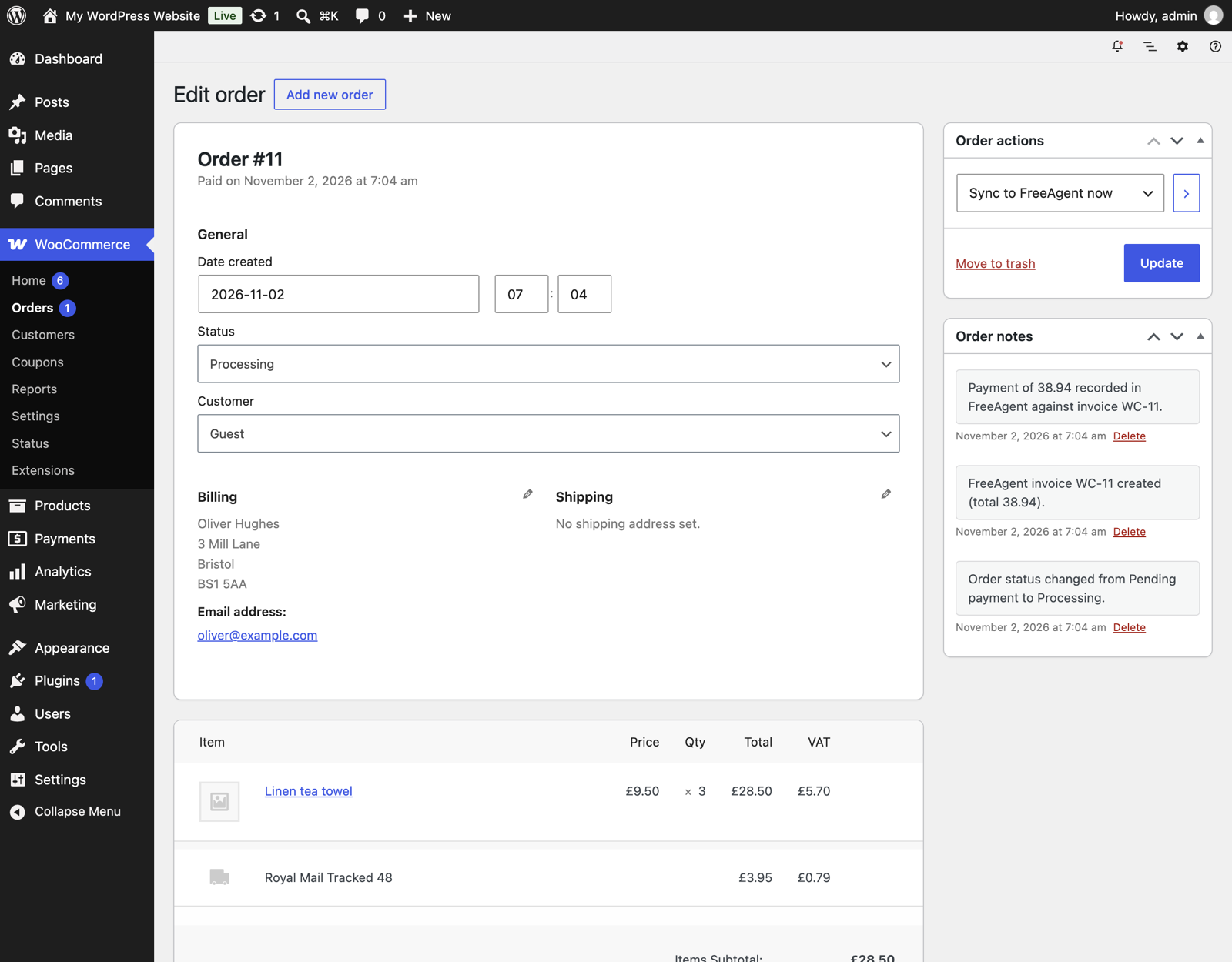
- Creates an invoice numbered WC-(order number) with one line per product and fee, a separate shipping line, and the VAT rate WooCommerce charged on each line.
- Marks the invoice as sent. No email goes to your customer.
- Explains a payment in the bank account you choose, so the invoice shows as paid.
Each step saves its FreeAgent link on the order, and the order notes show the invoice number. If FreeAgent is down, rate limits the request or a token expires, the order is retried in the background up to 5 times (after 5 minutes, 30 minutes, 2 hours and 6 hours). A retry never creates a second invoice or a second payment for the same order. You can also send any order by hand with the “Sync to FreeAgent now” order action.
What you set up
- Your own free FreeAgent developer app (OAuth identifier and secret). This keeps your keys in your own site. Nothing goes through our servers.
- The FreeAgent bank account where payments are explained, for example the account your payment gateway pays out to.
- The income category for products and fees, and the one for shipping (Sales by default).
- A Sandbox switch, so you can try everything against a free FreeAgent sandbox company first.
Requirements and limits in version 0.1
- A FreeAgent account. Built and tested with a UK limited company in the FreeAgent sandbox.
- If your FreeAgent company is VAT registered, each line gets the WooCommerce VAT rate. If it is not, lines are sent without VAT.
- Orders must be in your FreeAgent company currency. Orders in other currencies are skipped with an order note.
- Refunds are not sent to FreeAgent yet. Record credit notes in FreeAgent by hand for now.
- Orders paid before you installed the plugin are not sent automatically. Use the order action for each one.
- Works with the WooCommerce block checkout, the classic checkout and High-Performance Order Storage (HPOS).
External service
This plugin connects to FreeAgent, an accounting service run by FreeAgent Central Ltd, so it can create contacts, invoices and payment explanations in your FreeAgent company. It sends data only after you connect your own FreeAgent app on the settings screen:
- When you click Connect, your browser goes to the FreeAgent approval page (api.freeagent.com, or api.sandbox.freeagent.com in sandbox mode), and the plugin exchanges the returned code for tokens at the same host.
- When an order is sent, the plugin sends the customer’s name, company, email, phone and billing address, the order number, date, line items, prices, VAT rates and shipping, and the payment amount and method name to the FreeAgent API at that host.
FreeAgent terms: https://www.freeagent.com/terms/
FreeAgent privacy notice: https://www.freeagent.com/privacy/
This plugin is not made, endorsed or supported by FreeAgent. FreeAgent is a trademark of FreeAgent Central Ltd.
Screenshots


Installation
- Install and activate the plugin. WooCommerce must be active.
- Go to WooCommerce > Settings > FreeAgent Sync. Copy the redirect URI shown there.
- Sign in at https://dev.freeagent.com/ (a free developer account), create an app and add the redirect URI. Save.
- Copy the app’s OAuth identifier and OAuth secret into the plugin settings and save. Tick Sandbox only if you are testing with a sandbox company.
- Click Connect to FreeAgent, sign in with the FreeAgent login you use for your books and approve access.
- Choose the bank account for payments and check the income categories, then save.
- Place a test order and check the order notes for the FreeAgent invoice number.
FAQ
-
Why do I need my own FreeAgent developer app?
-
A client secret cannot be kept secret inside a plugin that anyone can download. With your own app, your keys stay in your site and FreeAgent only gives access to the company you approve. Creating the app is free.
-
Which orders are sent?
-
Orders that reach one of the statuses you pick (Processing and Completed by default) after you connect. Each order is sent once. Changing the status again does not create a second invoice.
-
An order note says the FreeAgent total differs from the order total.
-
FreeAgent works out VAT from the rate on each line, so rounding can differ from WooCommerce by a penny, and a WooCommerce rate that is not one of your FreeAgent VAT rates can differ more. Check the invoice in FreeAgent.
-
Where do I see errors?
-
In the order notes of the order, and in WooCommerce > Status > Logs under the source skillmerc-sync-for-freeagent. Turn on the debug log for more detail.
Reviews
There are no reviews for this plugin.
Contributors & Developers
“Skillmerc Sync for FreeAgent” is open source software. The following people have contributed to this plugin.
Contributors
Translate “Skillmerc Sync for FreeAgent” into your language.
Interested in development?
Browse the code, check out the SVN repository, or subscribe to the development log by RSS.
Changelog
0.1.0
- First release: connect with your own FreeAgent app (live or sandbox), send paid orders as contact, invoice, mark as sent and payment explanation, VAT rate per line, shipping line, background retries, manual order action.