
Description
SiteTransit Content Migrator helps WordPress administrators migrate blog posts from a public source website into WordPress when they own the content or have permission from the content owner to migrate it.
The plugin can discover public posts through:
- WordPress REST API
- RSS 2.0 and Atom feeds
- XML sitemaps and sitemap indexes
- Public server-rendered blog/archive pages
- A manual list of post URLs
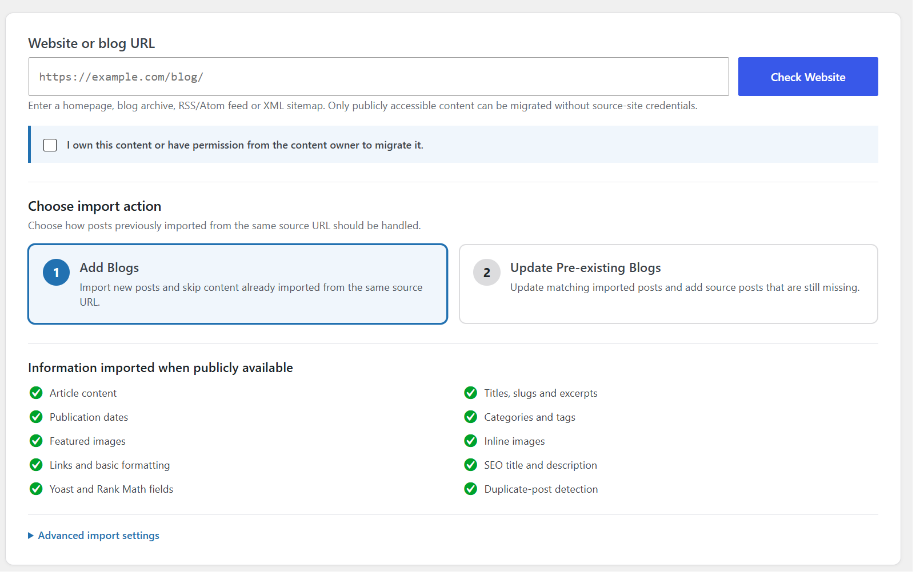
When the source exposes the information publicly, SiteTransit Content Migrator can import:
- Article content
- Post titles, slugs and excerpts
- Original publication dates
- Categories and tags
- Featured images
- Inline content images
- Links and basic HTML formatting
- SEO titles and descriptions
- Yoast SEO title and description fields
- Rank Math title and description fields
Imported content is sanitized before it is saved to WordPress. Remote requests use the WordPress HTTP API and are limited to safe public HTTP/HTTPS URLs.
SiteTransit Content Migrator stores the original source URL with imported posts so later runs can skip duplicates or update posts previously imported from the same source.
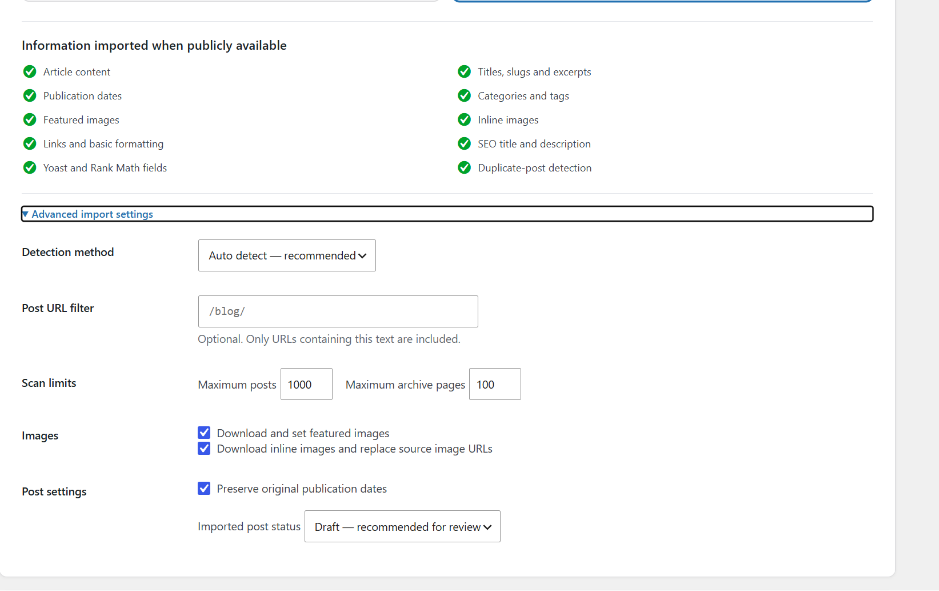
By default, imported posts are created as Drafts so they can be reviewed before publication.
Authorization and responsible use
SiteTransit Content Migrator is a migration tool. Before scanning a source, the administrator must confirm that they own the content or have permission from the content owner to migrate it.
Do not use SiteTransit Content Migrator to reproduce copyrighted or restricted content without authorization. The site administrator is responsible for ensuring that each migration complies with applicable copyright, privacy, contractual and website-access requirements.
External requests
SiteTransit Content Migrator does not use a vendor-operated SaaS service, telemetry service, advertising service, license server, or analytics endpoint.
When an administrator starts a migration, the plugin sends HTTP/HTTPS requests from the WordPress server to the source website URLs entered or discovered during that migration. These requests are necessary to discover and retrieve the content and media selected for migration. Source websites may log those requests according to their own server configuration and privacy policies.
No migration content is sent to a server controlled by the plugin author.
Supported source behavior
A website can be migrated when its public posts are available through a supported REST endpoint, feed, sitemap, or server-rendered HTML that WordPress can retrieve.
Common source platforms may work through these public interfaces, including WordPress, Blogger, Shopify blogs, Squarespace, Wix, Ghost, Tumblr, Medium, Webflow and custom websites. Compatibility depends on the public structure and access rules of the individual source site.
SiteTransit Content Migrator does not claim guaranteed extraction from every website.
Important limitations
- Only publicly accessible content can be retrieved without source-site credentials.
- Drafts, private posts and backend-only fields cannot be retrieved from a public source.
- JavaScript-only article content may not be available to server-side WordPress requests.
- Firewalls, anti-bot systems, authentication, robots restrictions or source-server blocking can prevent access.
- Generic HTML structures vary by website. Review imported Drafts before publishing.
- Some remote media may be blocked or unavailable. The post import can continue when an image fails.
- HTML crawling requires the PHP DOM extension.
- XML sitemap scanning requires the PHP SimpleXML extension.
Screenshots
Installation
- Upload the
sitetransit-content-migratorfolder to/wp-content/plugins/, or install the plugin ZIP through Plugins > Add Plugin > Upload Plugin. - Activate SiteTransit Content Migrator.
- Open Tools > SiteTransit Content Migrator.
- Enter the authorized source website or blog URL.
- Confirm that you own the content or have permission to migrate it.
- Click Check Website.
- Review the detected source and number of posts.
- Choose Add Blogs or Update Pre-existing Blogs.
- Import a selected batch or all detected posts.
- Review imported Drafts before publishing.
FAQ
-
Does the plugin require access to the old WordPress dashboard?
-
No. It works with content that the source website makes publicly available through supported interfaces.
-
Can I migrate content that I do not own?
-
Only when you have permission from the content owner or another valid legal right to migrate and reproduce that content.
-
No. Migration requests are made directly from your WordPress server to the source website selected for the migration.
-
How are duplicate posts handled?
-
The source URL is stored as post metadata. Add Blogs mode skips a matching imported source URL. Update Pre-existing Blogs mode updates the matching imported post.
-
Are imported posts published automatically?
-
Draft is the default. An administrator can choose Published in Advanced import settings.
-
Are remote images copied to my Media Library?
-
Yes, when image importing is enabled and the remote image is reachable, within the size limit, and recognized as a supported image type by WordPress.
-
Why was a page not detected?
-
Try the exact blog archive URL, a direct RSS/Atom feed, a sitemap, a URL filter, or the Manual post URL list method. JavaScript-only or access-restricted pages may not be retrievable.
-
What happens if DOM or SimpleXML is missing on my server?
-
The plugin displays a capability notice. WordPress REST and feed-based imports may still work, while HTML crawling or sitemap scanning can be unavailable.
Reviews
There are no reviews for this plugin.
Contributors & Developers
“SiteTransit Content Migrator” is open source software. The following people have contributed to this plugin.
Contributors
Translate “SiteTransit Content Migrator” into your language.
Interested in development?
Browse the code, check out the SVN repository, or subscribe to the development log by RSS.
Changelog
3.4.0
- Renamed and packaged the plugin as SiteTransit Content Migrator.
- Added explicit content ownership/authorization confirmation.
- Added final WordPress KSES sanitization before imported HTML is saved.
- Hardened remote URL handling and dangerous protocol filtering.
- Added safer XML and HTML parsing behavior.
- Added graceful DOM and SimpleXML dependency handling.
- Added MIME-validated image downloading with support for extensionless image URLs when WordPress recognizes the image type.
- Improved lazy-loaded,
srcset, andpictureimage discovery. - Added image ALT metadata when available.
- Improved source URL normalization and duplicate detection.
- Improved update mode so removed categories, tags, SEO metadata and featured images can be synchronized.
- Moved admin CSS and JavaScript into properly enqueued local asset files.
- Removed legacy version notices and old plugin naming.