

Description
Readers and Google both find posts by following links, so an unlinked post — one no other post links to — is the hardest one on your site to reach. Most sites have more of them than they think.
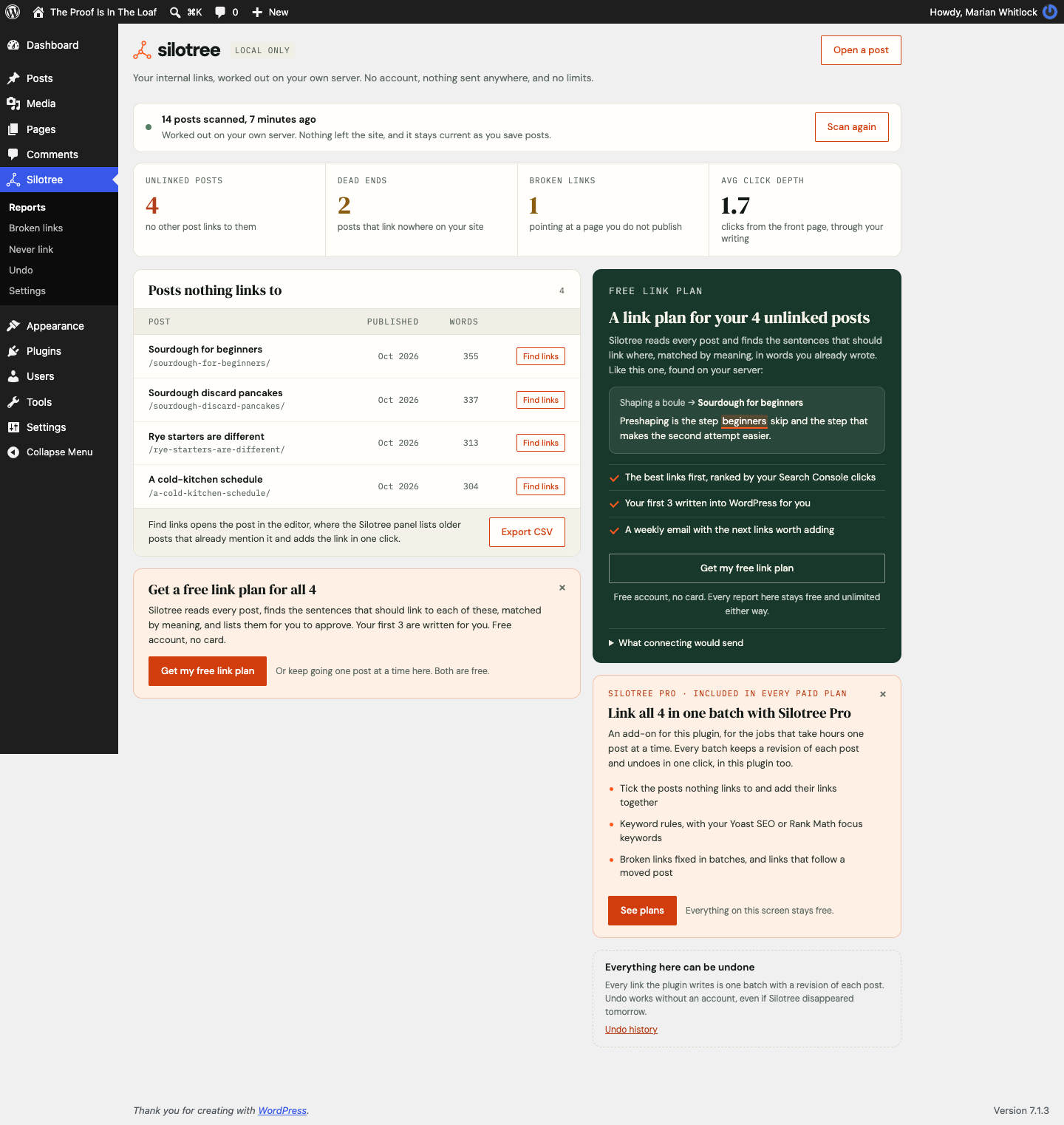
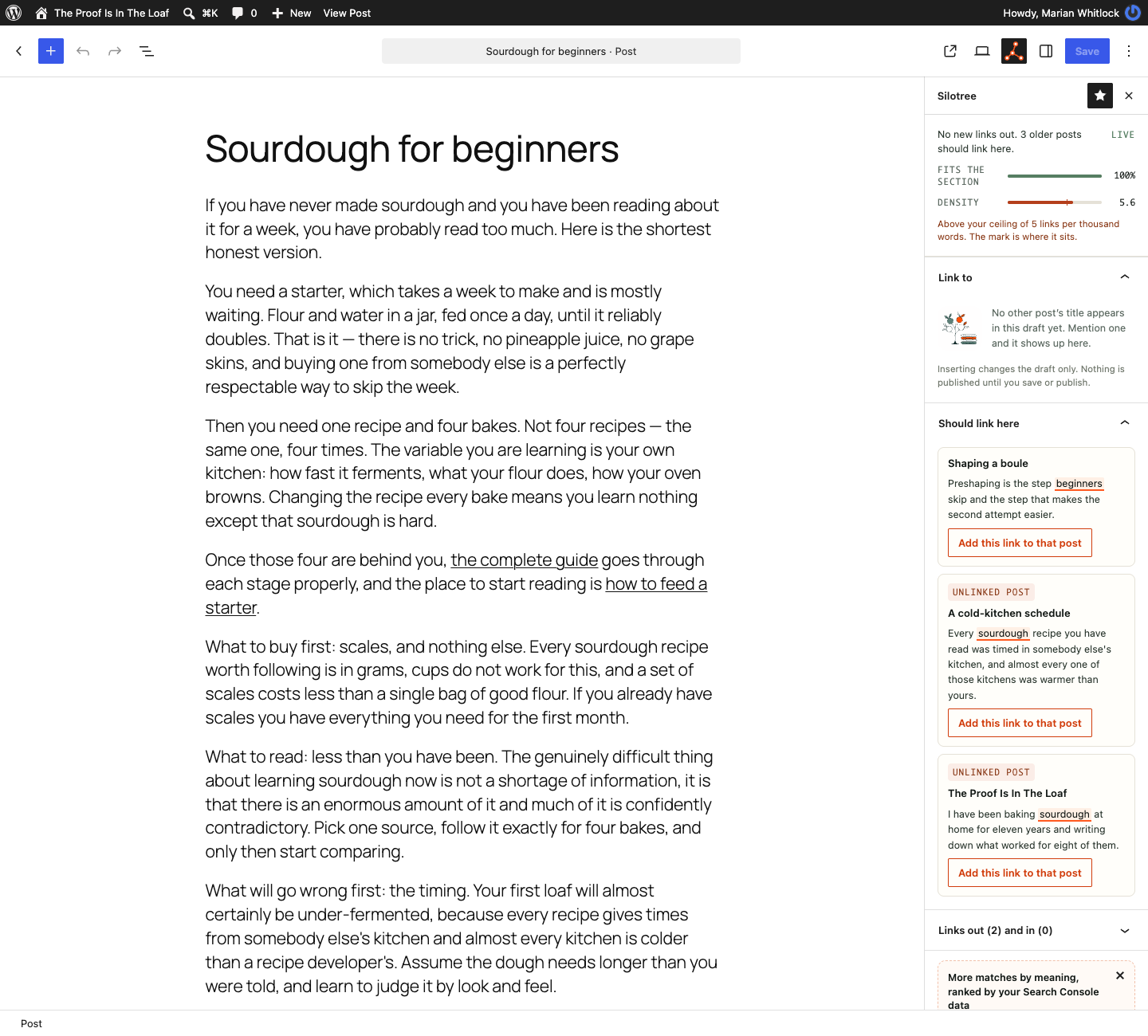
Silotree reads your published posts on your own server and shows you which ones are unlinked. For each one it finds the sentence in your other posts that already mentions it, so the link is made of words you wrote yourself. You approve it, Silotree writes it into the post, and one click undoes it.
Free, with no limits
No cap, no trial, nothing locked. All of this runs on your own server:
- Your unlinked posts, each with its date and length, and the whole report as a CSV
- Dead ends, broken links and click depth from your front page, counted through menus, categories and links in posts
- Suggestions as you write — the editor sidebar and the publish prompt offer links both ways, up to three each way on publish
- A never-link list, a Links report, the Classic Editor, Elementor text widgets, and undo for every batch
- WPML and Polylang, one language at a time, never a translation
- Off until you switch them on: click counts (no cookies) and arrows on external or new-tab links
Category and tag pages show link counts. The inbound count is the one figure that ignores menus and categories: it counts only the links you wrote. They are ordinary links and stay if you deactivate.
Safety
A revision is saved first. Posts are skipped if revisions are off or open in an editor, then read back. Undo removes only that batch, at most six Silotree links a post. Changed text, a repeated anchor, or words in a link, heading, button, code, shortcode or card are refused, with a reason. Only paragraphs, lists, quotes and Elementor text widgets are written. Elementor is put back if anything else changed. Category and tag text is kept for undo.
Optional: your free link list
No account required. A free one at silotree.io suggests sentences for unlinked posts. You apply the first 3 you approve in WordPress, or from the app if you turn on one-click apply with your own Application Password, with a score from 0 to 100 (the free checker too). Meaning matches cover up to 500 pages, with Search Console ranking and a weekly email. The app suggests fixes for broken and redirected links on every plan; you apply them in WordPress, or from the app with that same password. Batches in wp-admin are Pro. Connecting starts 14 days of Solo (Pro, no card), then Free. Solo, Studio and Agency have a 30-day money-back guarantee. Links added in WordPress are never limited, and nothing is sent until an administrator presses Connect.
Silotree Pro
A separate add-on from silotree.io, in paid plans and the 14-day trial. None of its code is in this plugin, and nothing above needs it. It adds keyword rules (previewed, once a post, Yoast SEO and Rank Math), bulk linking, a URL changer, bulk edits, broken-link batches, and links that follow a moved or trashed post. Editor fixes stay free. Batches keep a revision and undo here. Links stay if a plan ends. Rules from before 0.6.0 are kept.
External services
This plugin connects to the Silotree service at https://silotree.io (or the address in the silotree_app_url option on a self-hosted install). Silotree is operated by Thomas Kanze, a self-employed individual based in Costa Rica. It is used only after an administrator connects the site, from the setup screen or Silotree Settings. Until then the plugin sends nothing anywhere: the scan, the reports, the editor sidebar, the publish prompt, the never-link list and the CSV export all run on your own server. Links in the plugin that open silotree.io (help articles, “Connect free account”, “See plans”) are ordinary links you choose to follow; they carry a label saying which screen they came from (from and utm_* in the address) and nothing about your site’s content. The “Run the full audit” link shown to people who cannot connect the site also carries the site’s domain, so the free checker can start on it.
Once connected:
- What the service reads: Silotree reads the full text, titles, addresses and publication dates of your site’s published posts, so it can match them by meaning and suggest links. It reads only what your site already publishes; drafts and private posts are never sent.
- Connecting: the site address, the address of the settings screen, a one-time code and a verifier are exchanged with silotree.io. Silotree answers with the site key, once, over HTTPS, and then calls this site’s REST API once to confirm the site holds it.
- Admin screens (Silotree Reports and the posts-list columns): the site’s domain is sent to fetch counts, suggestions and the plan. Answers are cached for a few minutes; the posts list and the editor only read the cache and refresh it in the background through WP-Cron, so they never wait on Silotree. When Silotree cannot be reached the plugin waits ten minutes before asking again.
- Post editor: the editor sidebar’s own suggestions are worked out on this server and the draft is never sent to Silotree. When the site is connected, the Silotree panel asks for that post’s suggestions, sending the site’s domain and the post’s ID (
post_id). - Matching posts to your scan: post IDs, their public URLs and a hash of each post’s content are sent so suggestions can be matched to posts.
- Publishing a post: the post ID, its public URL and its title are sent so Silotree can suggest links to it. The publish prompt also asks, by post ID, for any links Silotree has already found for that post.
- Related posts block: the list of related posts is fetched from silotree.io at most every six hours (fifteen minutes after a failed try), in the background through WP-Cron, after somebody has been in wp-admin.
- Suggestions: silotree.io calls this site’s REST API (
/wp-json/silotree/v1/) to read published data and store suggestions. By default it cannot change posts. You apply and undo suggestions in wp-admin. - Optional one-click apply: if an administrator turns on “Let Silotree apply changes from the app” under Silotree Settings, and pastes an Application Password for their own WordPress account into the Silotree app, silotree.io calls this site’s REST API to apply links, undo a batch, and save or bin a guide draft. Those calls sign in as that account with the Application Password (HTTP Basic authentication). WordPress only accepts an Application Password over HTTPS. The calls are refused while the setting is off, and they can only do what that account can already do. You create the password under Users Profile Application Passwords. Silotree stores it encrypted. Revoke it in WordPress at any time, or turn the setting off, and remote changes stop.
- Link click counts, only if you turned them on: once a day, the last 8 days of daily totals (post ID, the linked post’s ID and address, the day and the total). Nothing about readers. Delete click counts in Settings asks Silotree to delete its copy.
This plugin does not check for, download or install Silotree Pro. If you install Silotree Pro yourself, it is a separate plugin with its own description of what it sends (whether the site’s plan includes Pro, and its own updates from silotree.io).
After it is issued at connection, the site key is not sent again in either direction: every request between this site and Silotree is signed with it (HMAC-SHA256, with a timestamp and a one-time nonce). Pressing Regenerate key in Settings replaces it and disconnects the site until it is connected again. Nothing is loaded from silotree.io on the pages your readers see.
Terms of service: https://silotree.io/terms, Privacy policy: https://silotree.io/privacy
Privacy
Out of the box, this plugin adds nothing to the pages your readers see and collects nothing about them.
Link click counts are off until an administrator turns them on in Silotree Settings On your pages. When they are on:
- On single posts and pages, a small script (under 1 KB, loaded with
defer) notices when a reader clicks a link in the post, and sends three things to this site’s own REST API (/wp-json/silotree/v1/click) withnavigator.sendBeacon: the post’s ID, the address of the link, and a short-lived nonce from that page. Links in menus, headers, footers, sidebars and forms are left out. - The plugin adds one to a daily total for that post and that link, and only when the post really contains that link. It stores the day, the post, the post the link goes to and the total. Nothing else is stored or sent.
- No cookies and no browser storage are used, and no IP address, browser details, referrer or visitor ID are stored. Two clicks cannot be tied to one person, so there is no personal data to export or erase.
- People who can edit posts are not counted: the script is not loaded for them.
- Totals are kept for 90 days, then deleted. Delete click counts in Settings deletes them all at once. Deleting the plugin deletes the table.
- If the site is connected to Silotree, the last 8 days of totals (post, link, day, total) are sent to silotree.io once a day, so the weekly email and the Results screen can show which links readers use. Silotree keeps them 90 days, and Delete click counts deletes them there too; if Silotree cannot be reached at that moment, the plugin asks again once a day, and sends no new totals until it has.
- To keep a script from flooding the counts, the plugin also keeps one number for the whole site: how many clicks it counted in the current minute. It says nothing about who clicked.
Link icons are styles only: no script, no request, and nothing is collected.
The plugin suggests wording for your privacy policy under Settings Privacy.
Screenshots



Blocks
This plugin provides 1 block.
- Silotree related posts
Installation
- In WordPress, go to Plugins Add New, search for Silotree, then press Install Now and Activate.
- Silotree opens a short setup screen: it reads your posts on your own server and shows what it found. Nothing is sent anywhere.
- Open Silotree Reports (just above Appearance in the admin menu) any time. The scan stays current as you save posts.
- Optional: for a free link list from the Silotree service, press Get my free link list on the setup screen or in Silotree Settings. You sign in to Silotree, confirm, and land back with the site connected. There is no key to copy; if your site cannot open Silotree in a browser, Settings also has a key you can paste instead.
To install by hand, download the zip from WordPress.org (or https://silotree.io/downloads/silotree.zip) and upload it under Plugins Add New Upload Plugin. Step-by-step help, with screenshots: https://silotree.io/docs/install-and-update-the-plugin
FAQ
-
Where is the documentation?
-
The Silotree help centre has step-by-step articles for everything below, with screenshots: https://silotree.io/docs
-
Does “unlinked” mean nobody can reach the post?
-
No. Your menus, category and tag archives and your sitemap may all still reach it, and so may a link from another site. What Silotree counts is contextual links: one post linking to another from inside its text. Those are the links readers actually follow mid-article, and the ones that tell search engines which of your posts belong together, so a post with none of them is the hardest to find even when it is technically reachable.
-
Is it really free? What is the catch?
-
Everything in this plugin is free and has no limits: the reports, the editor sidebar, the publish prompt, the never-link list, undo and the CSV. Nothing in it is locked or waiting for a payment. Silotree earns its money from paid plans of the optional Silotree service, which does work on our servers (meaning-based matching across every post, Search Console ranking, suggestions you apply in WordPress and a weekly email) and includes Silotree Pro, a separate add-on plugin for keyword rules, bulk linking, batch broken-link fixes and links that follow moved posts. You never need either to use this plugin.
-
Does it work without an account?
-
Yes, completely. Nothing is sent anywhere unless an administrator connects the site. How the editor sidebar works: https://silotree.io/docs/editor-sidebar
-
Is there a limit on how many links I can add?
-
Not in WordPress. Add as many as you like from the editor and the publish prompt. Silotree adds at most six of its own links to any one post, so no post becomes a wall of links. The free Silotree account’s allowance counts suggestions you apply in WordPress and suggestions the app has sent for you to apply.
-
Does it only work for blogs?
-
No. It works on any WordPress site with posts or pages that should point at each other, blogs, magazines, documentation, shop guides, local business sites. It only ever links your own pages to each other.
-
Will it slow my site down?
-
No. By default nothing runs when a reader loads a page, and there is no front-end script. Two optional settings in Silotree Settings On your pages add a little: link click counts add one deferred script under 1 KB to single posts (none for you or your editors), and link icons add under 1 KB of inline styles. Neither loads anything from another site. The scan runs in the background through WP-Cron, in batches, and stops on its own. While a Silotree screen is open, that screen moves it along too, so it finishes on hosts where WP-Cron does not run.
-
What happens if I deactivate it?
-
The links stay. They are ordinary WordPress links in your own words. Deleting the plugin removes its tables, its settings and its site key. By default the links in your posts are left alone; Silotree Settings lets you choose instead to keep the links and remove Silotree’s marks from them, or to take every Silotree link out and leave the words. Step by step: https://silotree.io/docs/uninstall-the-plugin
-
Does it conflict with Rank Math or Yoast?
-
No, they do different jobs. Keep your SEO plugin for titles, schema and sitemaps. Silotree Pro can import their focus keywords as keyword rules you preview first: https://silotree.io/docs/keyword-rules
-
Which editors are supported?
-
The block editor, the classic editor, and the page builders below. In the block editor, links are written into paragraphs, lists, quotes and table cells, including blocks nested in groups, columns and accordions; headings, captions and blocks from other plugins are left alone. Content is only ever changed by wrapping a phrase that is already in your post, and anything it cannot place with certainty is refused with a reason rather than edited. The full list of what it will and won’t edit: https://silotree.io/docs/what-the-plugin-edits
-
Does it work with Elementor and other page builders?
-
Yes. Silotree writes links into the text modules of these builders, in the data each builder builds the page from:
- Elementor: Text Editor widgets.
- Divi 4 and Divi 5: Text modules.
- Beaver Builder: Text Editor modules, in the published layout and its draft.
- Bricks: Rich Text and Basic Text elements.
- Thrive Architect: Text elements, and the copy shown on archive pages.
- Advanced Custom Fields: WYSIWYG fields, for words that are not in the post’s body.
It never edits headings, buttons, blurbs, code or any other module: if the words are in one of those, it says which and leaves the page alone. It also leaves alone a module that is a global or synced copy, one whose text is dynamic or differs by screen size, and text in a query loop. Each change keeps a revision and a copy of the page from before, is read back after saving (if the link is missing, or anything else in the page changed, the page is put back), and can be undone like any other batch. The builder’s caches are cleared afterwards.
Posts built with Oxygen, WPBakery or Avada, Thrive landing pages, and Beaver Builder pages with unpublished changes are read and counted, but not written to, and the refusal says why. Oxygen signs its content and hides any text whose signature no longer matches, so Silotree does not write to it.
-
What happens to links when I change a post’s permalink?
-
WordPress redirects a post’s old slug, so links to it keep working. Links to the old address that no longer resolve show up under Silotree Link fixes, where you can fix each one in the editor. Silotree Pro can point them at the new address for you, in the background, as one batch you can undo.
-
I had keyword rules. Where did they go?
-
Keyword rules moved to Silotree Pro in version 0.6.0, and this plugin no longer runs them. Your saved rules are still in your site’s database, unchanged, and you can download them as a JSON file at any time from Silotree Settings Saved keyword rules, free, with no account. Silotree Pro, part of the paid plans, runs saved rules again if you install it. Links they already wrote stay in your posts, and any batch can still be undone from Silotree Undo history, with or without Pro. The never-link list did not move: it is under Silotree Never link.
-
It says it cannot reach Silotree. What do I do?
-
Press Check connection on Silotree Settings. Most often a security plugin or firewall is blocking
/wp-json/silotree/, or the host blocks outgoing requests. Every message and its fix: https://silotree.io/docs/plugin-cant-reach-silotree -
A link was not added. Why?
-
Silotree refuses a link rather than guess, and always says why: a page builder it does not write to, words in a builder’s heading or button rather than its text module, words that changed, someone editing the post, or revisions turned off. Every reason and what to do: https://silotree.io/docs/link-didnt-land
-
Does it work on multisite?
-
Yes. On a multisite, WordPress filters the HTML that anyone but a super admin saves, which would strip embeds from a post. Silotree checks that the only change it is making is its own link and saves exactly that, so your embeds are left alone.
Reviews
There are no reviews for this plugin.
Contributors & Developers
“Silotree – Internal Links, Orphan Pages & Broken Links” is open source software. The following people have contributed to this plugin.
Contributors
Translate “Silotree – Internal Links, Orphan Pages & Broken Links” into your language.
Interested in development?
Browse the code, check out the SVN repository, or subscribe to the development log by RSS.
Changelog
0.8.8
- Database queries bind every dynamic value with placeholders: post types, ignored ids, language codes, LIKE terms, and lists of ids.
0.8.7
- The Silotree service reads published posts and stores suggestions. It does not sign in as anyone. You apply and undo suggestions in wp-admin (Silotree Suggestions and Silotree Undo history).
- Optional: turn on “Let Silotree apply changes from the app” and paste an Application Password for your own account into Silotree. The app can then apply, undo and save guide drafts as that account, and only with what that account can already do. Off by default. The password is sent only on those calls, over HTTPS, and WordPress checks it.
- Notices that follow a posts-list action stay on that screen. Output in wp-admin is escaped. Forms and REST writes check a nonce and a capability.
0.8.6
- On a connected site, Reports lists your unlinked posts again, with or without Silotree Pro, counted on your own server as before. The Silotree app’s own lists sit beside it.
- Connecting a site says that it starts 14 days of Solo, Silotree Pro included, with no card. Once the trial is over, the free plan’s card says so, and that links written during it stay.
- Wording: “free link plan” is now “free link list”, so it is not mistaken for a pricing plan. The editor’s note on a connected free site says the free audit also finds matches by meaning, and opens Silotree rather than the plans. The readme says which broken-link fixes are free in the app and which are Silotree Pro in wp-admin, how many pages a free scan reads, and lists every Silotree Pro feature.
0.8.5
- Ask an AI assistant about your internal links. On WordPress 6.9 and later, the plugin offers five read-only abilities: the site’s summary, unlinked posts, buried posts, broken links, and one post’s links in and out. With the WordPress MCP Adapter installed, an assistant connected to your site can use them. They read the plugin’s own scan, send nothing anywhere, need no Silotree account, and are open only to people who can edit posts.
0.8.4
- The Silotree related posts block is in the block inserter: search for it, and the editor shows the list readers will see for that post, or says the post has no list yet. Before, it could only be pasted in as block markup.
- The never-link list is sent to Silotree a moment after you save it, and again every few hours, so the app stops suggesting links from or to those posts, categories and words instead of suggesting links the plugin then refuses.
- The posts list’s Suggestions column shows how many links wait to be added to each post. It always showed a dash.
- A post’s links report counts links in from published posts only, the same posts it lists, so the total and the list agree.
- On a connected site with Silotree Pro, Reports lists the unlinked posts again, so Pro’s “Add suggested links…” can be used from there.
- When Silotree no longer recognises the site, the plugin passes on why, and whether it asked under the address it was connected under, so Silotree Pro can tell a deleted or disconnected site from a staging copy or a passing problem.
- Never-link words are lower-cased in every script (Ä, É, Cyrillic), as the app compares them.
- Wording: messages now name the menus as they are, Silotree Settings and Silotree Undo history, and Reports links to its help article.
0.8.3
- Page builders: after a link is written into a builder page, or undone, the page’s cache is cleared (WordPress’s own, and WP Rocket, W3 Total Cache, LiteSpeed Cache and WP Super Cache when present), and an Elementor write rebuilds only that page’s styles, not the whole site’s. Developers can purge more with the new
silotree_builder_writtenaction. Divi links are checked on the rendered page like any post; for other builders the editor says the link is saved in the builder rather than shown on the page. Text inside a linked Bricks box is no longer written, so a link is never put inside another link. Links in a builder page’s buttons and headings now count as links in, so those posts are no longer reported as unlinked. A link that lands in the builder but not in the plain fallback copy is kept rather than undone. - Link click counts: links are matched on sites with plain permalinks (
?p=123). Counting stops for the rest of a minute past 600 clicks site-wide, and at 5,000 clicks a day for one link. Old counts are deleted by a daily task, so they go even on days without clicks. If Silotree cannot be reached when you press Delete click counts, its copy is deleted on a later day, and no new counts are sent before that. Settings and Reports now say that counts are sent to Silotree once a day when the site is connected. The two On your pages switches no longer cost a database query on every page. - Link fixes: removing a link to one part of a page (
/guide/#pricing), or pointing it somewhere else, no longer touches plain links to the page itself (/guide/). - Undo: the copies of builder pages kept for undo are deleted after 90 days (undo still works by the links’ own marks), and deleting the plugin removes every builder’s copies.
0.8.2
- The Links screen for each post, and Link fixes, have extension points an add-on can use for batch actions. Nothing changes on either screen without one.
- Target keywords: each post can say which words it is about, in the block editor’s Silotree sidebar or the Classic Editor’s box, saved with the post. Until you set them, your SEO plugin’s focus keywords (Yoast, Rank Math or All in One SEO) are used. Once the site is connected, Search Console queries for the post can be added in one click. Suggestions on a target keyword are marked “On keyword”.
- Category and tag pages that have a written introduction can now be linked to from your posts.
- Links can be written into category and tag descriptions, with the same checks as posts, and each batch can be undone in one click.
- Links to category and tag pages are no longer reported as broken.
- Reports lists your category and tag pages: how many posts each has, how many links your posts send to it, and whether it has an introduction.
0.8.1
- For add-ons such as Silotree Pro’s URL changer: the writer can point existing links in your writing at addresses the add-on works out, through the same revision, read-back and one-click undo as every other batch. Nothing changes on a site without such an add-on.
0.8.0
- Page builders: links are now written into Divi 4 and Divi 5 Text modules, Beaver Builder Text Editor modules, Bricks Rich Text and Basic Text elements, and Thrive Architect Text elements, as well as Elementor’s Text Editor widgets. Each goes into the data the builder shows the page from, is read back after saving and put back if anything else changed, keeps a revision and a copy of the page from before, and undoes in one click.
- Advanced Custom Fields: words that are in a WYSIWYG field rather than the post’s body are linked in the field. Text and textarea fields are read, not written, and the refusal names the field.
- Words in a builder’s heading, button or other module are refused with the module named. Global modules, dynamic text, text that differs by screen size and text in a query loop are left alone.
- Beaver Builder pages with unpublished changes, Thrive landing pages, and Oxygen, WPBakery and Avada pages are read but not written to, and the refusal says why.
- Block editor: table cells, and paragraphs inside accordions, can take links.
- On a page-builder page opened in the WordPress editor, Silotree’s panel says which builder it is in one line. Insert link writes into the builder’s text on the saved page; for Divi and builders Silotree only reads, the panel lists the links to add in the builder.
- The scan reads each builder page’s own text, and ACF WYSIWYG fields, so their links are counted.
- For add-ons such as Silotree Pro: the publish prompt can show rows an add-on supplies, and a link can be kept out of words another rule has a better claim to. Nothing changes on a site without an add-on.
- New, optional and off by default: link click counts. See which links in your posts readers click, on Reports (“Links readers click”) and on each post’s Links screen (“Clicked 14 times in 30 days”). Counts per post, link and day only: no cookies, no IP addresses, nothing about who clicked, and your editors are never counted. One deferred script under 1 KB on single posts. Kept 90 days, and deleted in one click. Connected sites see the written links readers use in the weekly email and on Results.
- New, optional and off by default: link icons. A small arrow after links to other sites and links that open in a new tab, with words for screen readers (“opens in a new tab”). CSS only, in your theme’s link colour.
- Both are in Silotree Settings On your pages. The readme has a new Privacy section.
0.7.0
- Main guides: when Silotree finds a topic with no main guide, it can save the guide’s outline here as a draft. One heading per post in the topic, what each post covers, and a link to each. Nothing existing is edited, and an untouched draft can be taken back from Silotree.
0.6.1
- Saved keyword rules can be downloaded free from Silotree Settings for as long as any are saved, and the note that they moved to Silotree Pro now shows once.
- On a free site, the editor box shows one plain line about matches by meaning, which can be dismissed, instead of a preview of locked results.
- The posts list and the editor never wait on Silotree while they draw: they read the last answer and refresh it in the background. The posts list counts links for every row in one query.
- Uninstall works on multisite, site by site, and on large sites: it rewrites only the posts Silotree edited, in small batches, without creating revisions.
- Exporting the link CSV and the Undo screen need the Editor role, as other site-wide actions do.
- Requests are always signed; the old way of sending the key with each request, from before 0.2, is gone.
- The readme’s External services section says in full what is sent once the site is connected.
0.6.0
- Keyword rules, and links that follow a post when its permalink changes, are now part of Silotree Pro, a separate add-on included in every paid Silotree plan. Rules you already made stay in your database, unchanged, and can be downloaded as a file from Silotree Settings; a one-time note on Silotree’s screens says so. Links they wrote stay, and every batch still undoes from this plugin.
- The never-link list has its own screen, Silotree Never link, with the same settings as before.
- The publish prompt adds each link with its own button, and says which ones landed and why any did not.
- Undo history names batches approved in the Silotree app correctly.
- Once a free site is connected, the Reports screen says how many more links Silotree found by meaning, with a link to see them in Silotree. It is a count from the connection the plugin already has, nothing extra is sent, and it can be dismissed.
0.5.0
- Click depth counts every link a reader can click: your menus, the category and tag pages they lead to, the home page’s list of posts, and the links in your writing. It used to follow the writing alone, which put posts that are two clicks from the menu ten clicks deep. The unlinked and dead-end reports still count only links in your writing.
-
Average click depth is left off the overview when there is no home page to count from, rather than shown as a dash.
-
Elementor: links are now written into Elementor pages, in their Text Editor widgets, instead of being refused. They go into the data Elementor builds the page from, and into the post’s plain copy where the same words are there. After saving, the page is read back and checked: the link is there once, the page data is valid, and nothing else changed; otherwise it is put back as it was. Elementor’s cache is cleared, a revision and a copy of the page are kept, and Undo takes the links back out of both.
- Elementor: words in a heading, button, icon box or other widget are refused with the widget named, so you know where to add the link by hand.
- Other page builders (Divi, Beaver Builder, Bricks, Oxygen, WPBakery, Avada, Thrive Architect) are still read but never written to.
- New: when you change a published post’s permalink, links to the old address in your other posts are pointed at the new one, in the background and as one batch you can undo. On by default; Settings turns it off.
- The scan reads an Elementor page’s own text, so its links are counted. Your posts are scanned again once after updating.
- Deleting the plugin with “remove links” or “remove marks” now covers Elementor pages too, and clears the copies kept for undo.
0.4.1
- Fix: links to WordPress itself (the dashboard, the login page, the REST API, XML-RPC and files under wp-content) are no longer reported as broken links. WordPress’s own Sample Page links to /wp-admin/, so every new site showed one broken link that was not.
- While a scan runs again, Reports and the setup screen keep showing the last scan’s figures, marked “last scan”, with a “Rescanning… 12 of 40 posts” bar. They used to show zeros until it finished. Only the very first scan shows progress alone.
- The scan carries on while a Silotree screen is open, even on hosts where WP-Cron does not run. It used to stop at “0 of 20” there. Cron and the open page never read the same posts at once.
- Counts stay current when Silotree writes links from the app, and when a batch is undone: the posts involved are counted again straight away, with no need to press “Scan again”.
- Click depth now works when your home page shows your latest posts (Settings Reading), the most common setup. A post on the first page of the list is one click deep, a post on page three is three, and links in your writing are followed from there. Sites with a static front page are measured from it, as before.
- The setup screen says “Connect this site to Silotree” when you arrive from the Silotree app’s onboarding, so the button matches the instructions.
- Fix: telling Silotree that a post was published no longer gets lost on a busy server. The plugin now waits up to three seconds for the answer and tries once more a minute later if it did not get through.
0.4.0
- Everything in WordPress is now free with no limits. The 10-link cap on links written from the editor, the publish prompt and keyword rules is gone; only links written from the Silotree app count towards the free account’s 10 (now 3).
- A setup screen after activation: the scan runs while you watch and shows its headline result. Connecting an account is optional and can be skipped.
- Silotree has its own menu, with Reports, Broken links, Keyword rules, Undo and Settings in one place. The old Settings Silotree address still works.
- Redesigned screens in Silotree’s own typefaces (shipped with the plugin, nothing loaded from elsewhere), with designed empty, loading, error and success states.
- The connect notice no longer appears on other admin screens. Every suggestion to connect or upgrade lives on Silotree’s own screens and can be hidden.
- Fix: the publish prompt no longer opens when an already published post is opened in WordPress 7.
- Broken links show a “Fix in editor” action for each link.
0.3.0
- A live sidebar in the block editor, a Silotree box in the Classic Editor, keyword rules with Yoast SEO and Rank Math import, a never-link list, and a links-in-and-out report for every post.
- Broken links can be fixed from Silotree: a redirected link is pointed at its final address, and a dead one is unlinked with its words kept. Both can be undone.
- Admin pages stay fast when Silotree cannot be reached: the plugin waits before asking again.
- Links are only written into paragraph-like blocks, so third-party blocks are never left “invalid”.
- The local link graph updates when a post is saved, trashed or deleted, and large sites are sent in batches past 2,000 posts.
- A redesigned Settings Silotree screen, with clear states for every step.
0.2.0
- One-click connect from Settings Silotree, with the key entered by hand as a fallback, and a button to make a new key.
- Requests between the site and Silotree are signed and cannot be replayed; the key itself never travels.
- Nothing is sent to Silotree until the site is connected.
- Undo removes exactly the links a batch added, and keeps everything written since.
- Several links to one post in one batch now all land; a changed paragraph is refused instead of the whole post.
- Never links inside headings, buttons, captions, navigation, shortcodes or recipe cards.
- Backslashes in posts are preserved, nested blocks are edited without duplicating markup, and embeds survive on multisite.
- A post is not edited on a site with revisions turned off, or while somebody has it open.
- The related-posts table works on MySQL 8.
0.1.0
- First release: local scan, unlinked-post and dead-end reports, click depth, broken links, anchor grouping, CSV export, editor panel, publish prompt, and cloud apply with per-batch undo.