

Description
Buyers want to know about the area before they book a viewing. Sigora answers on your own listing pages: schools, transport, health, sold prices, crime, broadband and more around a live map, every figure from an official UK source and styled to your brand. It works on any WordPress website: add the Sigora shortcode to your listing template once and it appears on every listing. Using Property Hive? It is even simpler: the widget adds itself to every property page, with no template edits.
Start a free 30-day trial, no card needed: sigora.uk/partner
Works with any WordPress website
- Any WordPress site: place the Sigora shortcode in your listing template once, with each listing’s postcode (plus its coordinates if you have them), and every listing gets its own area guide. The Sigora Widget block adds it to any single page in a couple of clicks.
- Property Hive: nothing to place. The widget adds itself to every property page, reads each home’s location from Property Hive’s own fields, and lets you hide it or narrow the lenses on any single listing.
Nine lenses. You choose which ones show.
- Overview: the whole area at a glance, on one map around the home.
- Schools: the nearest schools, with their results and the Sigora inspection summary.
- Transport: the nearest stations and their lines, and every bus stop within a mile.
- Health: GPs, pharmacies and dentists nearby, with inspection ratings and patient survey scores.
- Prices: HM Land Registry sold prices near the home, set against the council area and England, with five-year trends.
- Crime: the Sigora crime rating, with Police.uk figures set against the council area and England.
- Amenities: the cafés, restaurants, pubs, shops and everyday places within a walk.
- Environment: air quality, noise, modelled long-term flood risk from rivers, sea and surface water where covered, and green space.
- Connectivity: Ofcom broadband and mobile coverage, with address-level broadband speed where Ofcom has a match.
Set it up your way, once
Every lens can be switched on or off for your website in the Sigora console, and the choice applies to every listing. Lead with Schools if families are your buyers; leave Crime off if it will not help.
- Smart rules: show Crime only where it is better than the national average, and show air quality only when it is acceptable.
- Want a big map? Keep the area summary collapsed for a full-width map.
- Your look: your brand colour and a light or dark theme in the console; Standard or Tall height and a maximum width on the plugin’s Sigora page, because your page needs those before the widget loads.
Free co-branded area reports
Every plan includes co-branded PDF area reports for any address, not just your listings. Generate one from your console in seconds: print-ready A4 pages with your logo on the cover and the same official evidence inside. Leave it with a vendor after a valuation or add it to the viewing pack.
Paid plans include 1,000 reports a month and the free trial includes 15. There is no per-report charge. See a sample report (PDF).
Why agents trust it
- Every figure names its source: ONS, DfE, HM Land Registry, Police.uk, NHS, Ofcom and more.
- No cookies, no visitor tracking: the widget adds nothing your visitors need to consent to.
- One install covers every listing: no per-property work, ever.
- Free for 30 days: full access, no card needed.
- Simple plans: from £19.99 a month per website, sized by how many listings you have live, with every lens and area reports on every plan. See plans.
Sigora is an independent product. Property Hive compatibility means the plugin detects Property Hive and places the widget on its property pages; Sigora is not affiliated with or endorsed by Property Hive.
External services
This plugin relies on Sigora, a hosted third-party service, to render the
widget and supply its data. The plugin does not bundle a widget runtime and
cannot show anything without it.
What is sent, where, and when:
-
Hosted widget script. On every page where the widget is placed, the
visitor’s browser loads the Sigora widget script from
https://sigora.uk/widgets/v1/sigora-widget.js, the address your Sigora
account returns during a connection test. As with any
externally hosted script, that request sends the visitor’s IP address, user
agent, and the page URL as referrer. -
Local-area data. The loaded script then requests area data from the Sigora
API athttps://sigora.uk. It sends your public Sigora site key, your site’s
origin, the page URL, and the listing context you configured for that
placement – latitude and longitude, or postcode, or place slug – together with
the listing reference. It does not send names, email addresses, or any other
personal data held by WordPress. -
Connection test. When an administrator presses Test connection on the Sigora
admin page, WordPress makes one server-side request to
https://sigora.uk/api/v1/public/widget/plugin/diagnostic carrying your site
key and your site’s origin. Nothing is sent at any other time. -
Optional listing inventory. Only if you save a private inventory token,
Sigora reads your published Property Hive listing records from this site over an
authenticated REST route on its own schedule. Remove the saved token to revoke
that access. The token is never emitted in page HTML or in public REST output.
The service is provided by Sigora Insights Ltd (https://sigora.uk). Using this
plugin means accepting that provider’s terms and privacy policy:
- Terms of service: https://sigora.uk/legal/b2b-tos
- Privacy policy: https://sigora.uk/privacy
- Data processing addendum: https://sigora.uk/legal/b2b-dpa
Screenshots

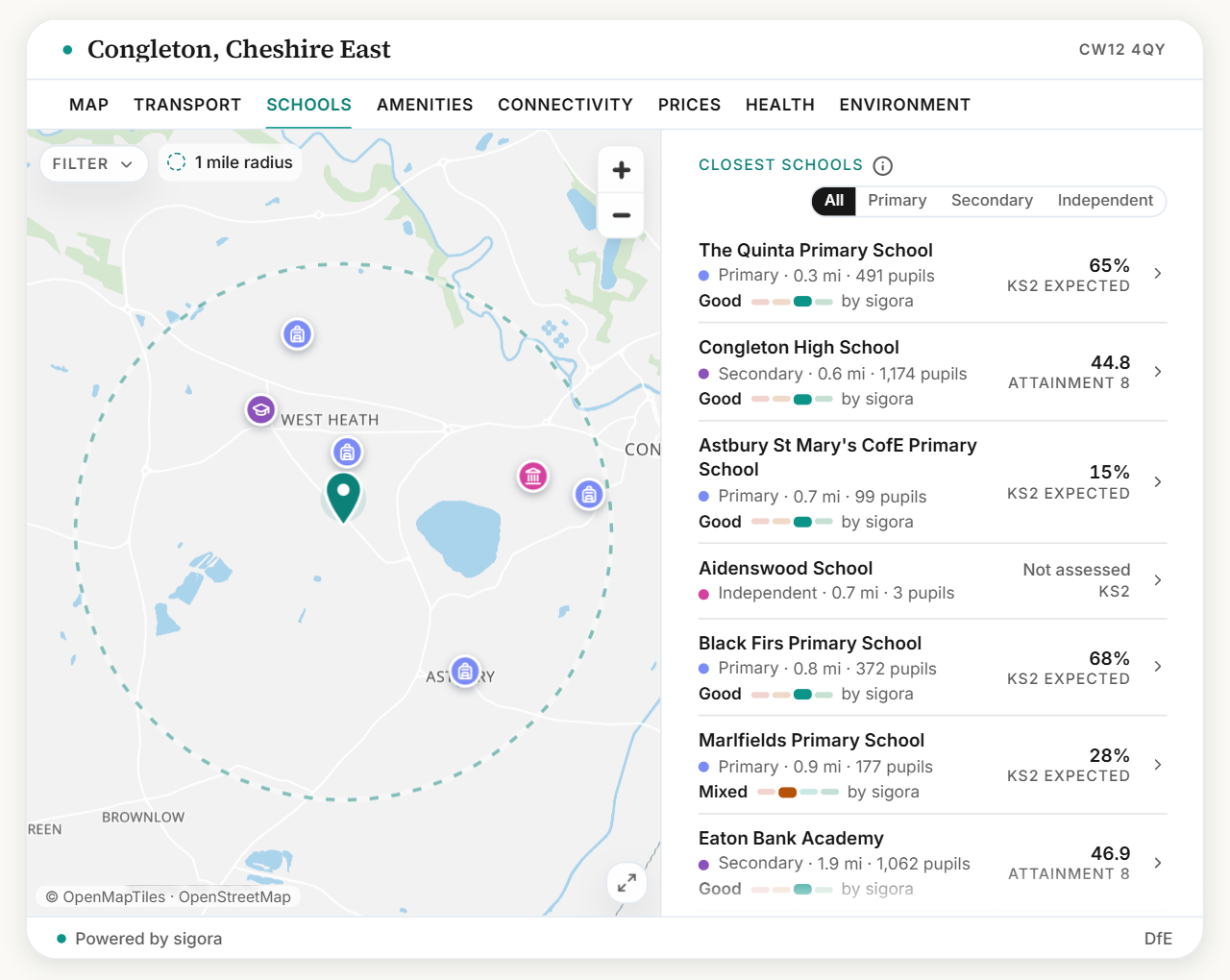


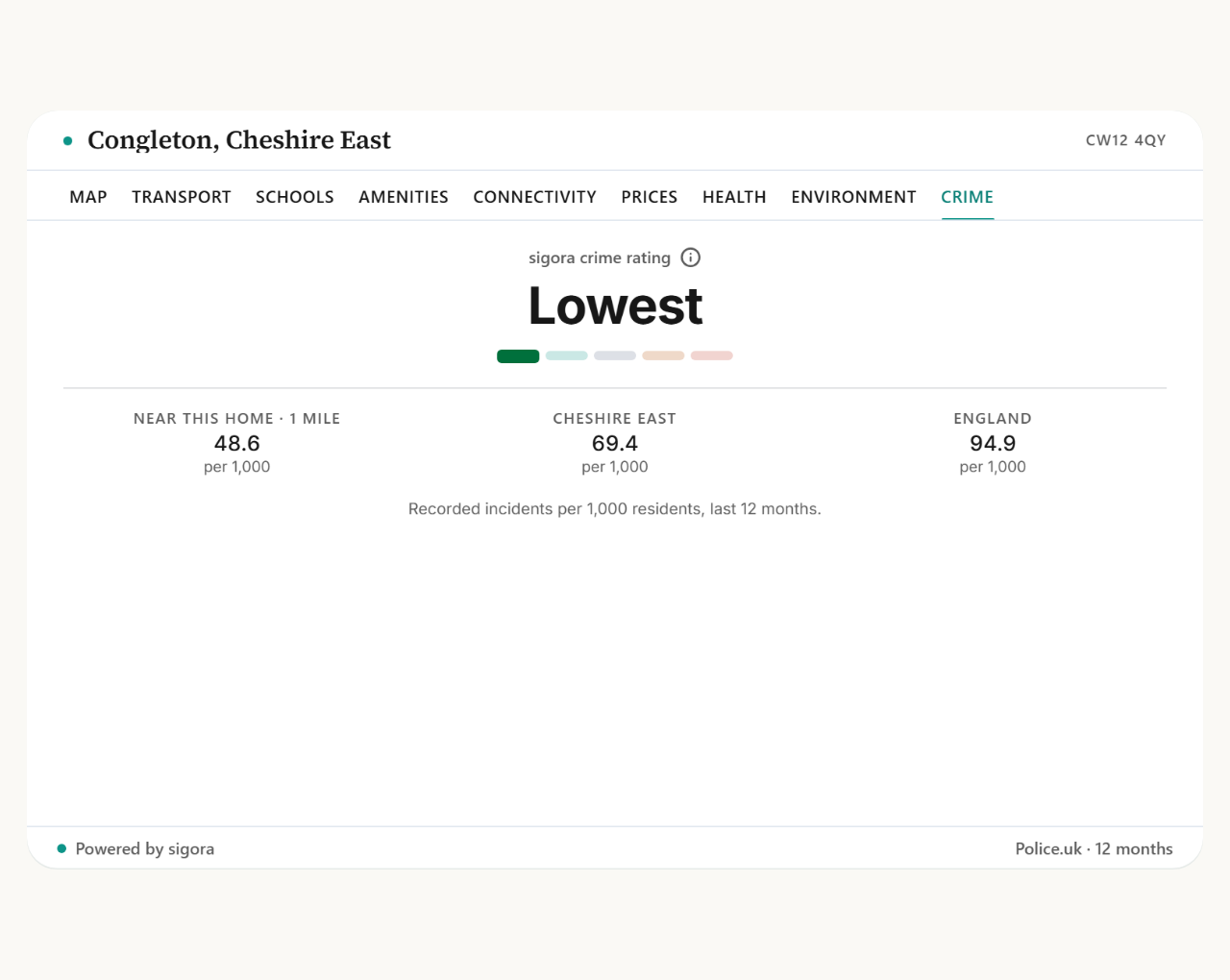


Blocks
This plugin provides 1 block.
- Sigora Widget
Installation
- Upload the
sigora-widgetfolder to/wp-content/plugins/, or install the ZIP from the WordPress plugin screen. - Activate “Sigora Widget”.
- Open the new top-level “Sigora” menu in the WordPress admin sidebar.
- Paste the site key from the Sigora partner console. If you do not have one, use the Start free trial link.
- Run Test connection to check the site key, WordPress origin, plan state, and widget bundle URL.
- If Property Hive is active, leave automatic placement on for property pages. Otherwise, add the Sigora Widget block or shortcode where the widget should appear.
On a Property Hive property page, a bare [sigora_widget] uses that property’s
own location. Anywhere else, give it the listing’s location, for example
(wire the postcode to the listing’s own postcode field):
[sigora_widget postcode="..." listing_id="..."]
Where listings carry coordinates, add lat/lng as well; the postcode stays,
because Connectivity (broadband and mobile signal) needs it
([sigora_widget postcode="..." listing_id="..." lat="..." lng="..."]).
On a Property Hive property page, a shortcode that gives coordinates still
picks up the property’s postcode and reference when it leaves them out.
Lenses, layout, colours and theme come from your Sigora console, so they are
not set in the shortcode.
FAQ
-
Do I need Property Hive?
-
No. The Sigora Widget block and shortcode work on any WordPress site. If you do
use Property Hive, the widget adds itself to your property pages and reads each
listing’s location, so there is nothing to place by hand. -
Can I choose which lenses appear?
-
Yes. Switch any of the nine lenses on or off for your website in the Sigora
console. The smart rules for Crime and air quality are set there too. -
Are the area reports really included?
-
Yes. Every paid plan includes 1,000 co-branded area reports a month, and the
free trial includes 15. There is no per-report charge. -
What versions are supported?
-
The compatibility floor is WordPress 6.0+, PHP 7.4+, and Property Hive 1.5+ when
Property Hive mode is active. The admin Plugin health view reports the installed
WordPress, PHP, and Property Hive versions. -
How does the plugin authenticate with Sigora?
-
The plugin uses the public Sigora site key and the detected WordPress site
origin. There is no plugin API key and no separate identity stack. -
What does Test connection check?
-
Test connection calls the Sigora plugin diagnostic endpoint with the configured
site key and detected site origin. It reports missing site key, invalid key,
blocked origin, inactive site, plan-derived lens availability, and bundle URL
state when the Sigora backend returns those fields. -
Why is the widget not showing on a Property Hive listing?
-
Automatic placement uses Property Hive’s standard property page: it adds the
widget after the property details, or after the description where a theme
prints it through WordPress’s normal content output. Some custom themes build
their own property page and skip both. If so, ask whoever built your website
to add[sigora_widget]to your property page template where the widget should
appear. On a Property Hive property page it needs nothing else: it uses that
property’s own location. The diagnostic log also records missing-location and
disabled-listing states for administrators. -
Can I choose where the widget appears on my property pages?
-
Yes. Automatic placement uses one fixed spot. For a different spot, untick
automatic placement, add[sigora_widget](or the Sigora Widget block) to your
property page template where you want it, and tick Custom property template so
your listings are still counted. A page never shows two Sigora widgets. -
What location fields does Property Hive mode use?
-
Sigora uses the property’s map pin from Property Hive (
_latitudeand
_longitude) first, then the older_property_location_latitudeand
_property_location_longitude fields, then RealEstateListing JSON-LD
geo.latitude andgeo.longitude. A 0,0 pin counts as not set. It also
keeps a postcode from common Property Hive postcode meta fields when coordinates
exist, because broadband and mobile evidence is postcode-keyed. A postcode is
the fallback location only when no usable coordinates are available. -
Where do I set the lenses, layout, colours and size?
-
In your Sigora console, the single place to configure the widget’s appearance.
The plugin only needs your site key; it does not duplicate those settings, so
nothing in WordPress can clash with your console. A single listing can still
narrow the lenses with the_sigora_showcustom field (it cannot unlock lenses
that are not enabled for the site), and_sigora_disableskips injection for
that listing. -
How does the plugin get updates?
-
Through WordPress, from the WordPress.org plugin directory. The plugin contains
no updater of its own and does not check any Sigora URL for new versions, so
update checks, the update notice and the auto-updates toggle all behave exactly
as they do for any other directory plugin. Builds installed from a direct ZIP
before the directory listing existed are replaced by installing the directory
version once, after which updates arrive automatically.Automatic updates stay off until you turn them on. Click “Keep sigora up to date
automatically” on the plugin’s Sigora page, or use “Enable auto-updates” on the
Plugins screen; both change the same WordPress setting. Most improvements need
no plugin update at all, because the widget itself is served by Sigora. -
What data leaves my site?
-
See the External services section above. In short: visitors’ browsers load the
widget from Sigora and Sigora returns local-area data for the listing location
you configured. Nothing personal held by WordPress is sent. -
Does the plugin track visitors?
-
No. The plugin renders the hosted Sigora widget, which sets no cookies and loads
no analytics scripts. Widget events are aggregate runtime events tied to site
and listing context, not visitor identity.
Reviews
There are no reviews for this plugin.
Contributors & Developers
“Sigora Widget” is open source software. The following people have contributed to this plugin.
Contributors
Translate “Sigora Widget” into your language.
Interested in development?
Browse the code, check out the SVN repository, or subscribe to the development log by RSS.
Changelog
0.2.9
- Clearer settings and shortcode examples.
0.2.8
- Clearer shortcode guidance; Property Hive pages fill in each property’s postcode and reference.
0.2.7
- Optional one-click automatic updates.
0.2.6
- Improved phone layout and accessibility; updated screenshots.
0.2.5
- Connect Property Hive listing inventory automatically after Test connection on HTTPS sites.
- Keep manual inventory credentials behind Advanced.
0.2.4
- Clearer setup guidance.
- Minor improvements.
0.2.3
- Improved Property Hive location handling.
- More flexible placement for custom property templates.
- Simpler settings page.
- Minor improvements.
0.2.2
- Add Widget height (Standard 520px / Tall 640px) and Maximum width to the Sigora admin page. PropertyHive automatic placement uses them; a shortcode or block
heightattribute still overrides the height.
0.2.1
- Rename the plugin from “Sigora Widget for WordPress” to “Sigora Widget”. The WordPress.org plugin directory does not permit “WordPress” in a plugin name. The folder, main file, text domain, settings and site key are unchanged.
- Document the Sigora external service in the readme: what is sent, when, and the provider’s terms, privacy policy and data processing addendum.
- Accept
healthin per-listing lens overrides, so all nine lenses can be named in_sigora_showand in the block’s lens field. - List the nine lenses in the readme and replace the placeholder screenshots with real captures.
0.2.0
- Add a private, paginated Property Hive listing inventory that Sigora can synchronize without visitor traffic.
- Source publication and enablement remain separate from independent page verification.
0.1.0
- Adds the top-level Sigora admin page with site-key storage, Property Hive
auto-inject toggle, widget height, diagnostic log, partner links, and Test
connection (lenses, layout, colours and theme are set in the Sigora console). - Adds generic shortcode and dynamic Gutenberg block rendering.
- Adds Property Hive detection, automatic property-page injection, coordinate
extraction, listing ID fallback,_sigora_show, and_sigora_disable. - Adds WordPress.org readme/assets, direct-download ZIP packaging, version
compatibility matrix, GPL notice, and Plugin health diagnostics.