

Description
Generating an image with AI takes a minute or more per picture. A landing page needs a dozen. Shilpi Image Kit fills those slots from the free stock libraries instead, in about a second each.
One call to auto_image searches Pexels, Pixabay, Openverse and Wikimedia Commons together, ranks the results against the slot the image has to fill, downloads the winner, resizes it, converts it to WebP, sets the alt text and returns a URL.
Ranking that knows about the slot. Aspect ratio, minimum width and the site’s brand colour all feed the score, so a 16:9 hero gets a wide photograph in the right palette rather than whatever matched the keyword first.
Ranking that knows about the licence. A CC0 photograph outranks one that requires a credit, which outranks one that adds share-alike terms. What lands on a client site is the picture with the fewest obligations attached to it.
One round trip. All four sources are queried together, not one after another, and results are cached for 24 hours.
No duplicates. The same source URL always resolves to the same attachment, so rebuilding a page does not fill the library with copies.
Credits kept. The photographer, the source and the licence are stored on every attachment, shown in a Credit column in the media library and available through the [shilpi_image_credits] shortcode.
Sources
- Pexels and Pixabay need a free API key. Both allow, and Pixabay requires, copying the file to your own server.
- The WordPress Photo Directory is WordPress.org’s own community photo library. No key, and everything in it is CC0, so no attribution is required.
- Openverse, WordPress.org’s own media search, works with no key at all.
- Wikimedia Commons works with no key and covers real places, food, plants and local life far better than the curated libraries.
Shutterstock, Adobe Stock, Envato Elements and Canva are deliberately not supported: their terms do not allow a plugin to license and redistribute their images on your behalf.
Using it by hand
Wherever WordPress opens “Choose an image”, a Free stock photos tab sits
beside “Upload files” and “Media Library”. Search, pick, and the photograph is
downloaded, resized, credited and selected, without leaving the dialog.
REST API
For integrations, authenticated WordPress REST endpoints are available at /wp-json/shilpi-image-kit/v1/. They support searching free images and importing a selected result into the Media Library.
External services
This plugin searches external image services and downloads selected image files. A search is sent only when an authenticated WordPress user with permission to upload files uses the Free stock photos tab or an authenticated integration calls the plugin’s REST API. An image is downloaded only after that user chooses it or requests automatic import. The site server’s IP address and HTTP user agent are necessarily visible to each contacted service.
The plugin does not send WordPress usernames, email addresses, post content, analytics, or tracking identifiers to these services. It does not contact them on ordinary public page views. Search responses are cached on the WordPress site for the configured period.
WordPress Photo Directory
Used to search WordPress.org’s CC0 photo collection and download a selected photo. The plugin sends the search phrase, requested orientation, colour, pagination parameters, and result limit to WordPress.org when a search is performed. No account or API key is required.
- Service: https://wordpress.org/photos/
- Terms of Service: https://wordpress.org/about/terms-of-service/
- Privacy Policy: https://wordpress.org/about/privacy/
Openverse
Used to search openly licensed images. The plugin sends the search phrase, requested image type, orientation, licence filters, page, and result limit to the Openverse API when a search is performed. If the site owner configures an optional Openverse access token, that token is sent in the request authorization header. When an image is imported, its image host receives a download request.
- Service: https://openverse.org/
- Terms of Use: https://docs.openverse.org/terms_of_service
- Privacy Policy: https://openverse.org/privacy
Wikimedia Commons
Used to search freely licensed media. The plugin sends the search phrase, file-type restriction, pagination parameters, and result limit to the Wikimedia Commons API when a search is performed. No account or API key is required. When an image is imported, Wikimedia’s image server receives the download request.
- Service: https://commons.wikimedia.org/
- Terms of Use: https://foundation.wikimedia.org/wiki/Policy:Terms_of_Use
- Privacy Policy: https://foundation.wikimedia.org/wiki/Policy:Privacy_policy
Pexels
Used to search and import stock photographs when the site owner enables Pexels and supplies a Pexels API key. The plugin sends that API key in the authorization header together with the search phrase, requested orientation, page, and result limit when a search is performed. When an image is imported, Pexels’ image server receives the download request and the source page is sent as the HTTP referrer.
- Service and API: https://www.pexels.com/api/
- Terms of Service: https://www.pexels.com/terms-of-service/
- Privacy Policy: https://www.pexels.com/privacy-policy/
Pixabay
Used to search and import stock photographs and illustrations when the site owner enables Pixabay and supplies a Pixabay API key. The plugin sends that API key, the search phrase, image type, orientation, safe-search choice, colour, page, and result limit to the Pixabay API when a search is performed. When an image is imported, Pixabay’s image server receives the download request and the source page is sent as the HTTP referrer.
- Service and API: https://pixabay.com/api/docs/
- Terms of Service: https://pixabay.com/service/terms/
- Privacy Policy: https://pixabay.com/service/privacy/
Screenshots
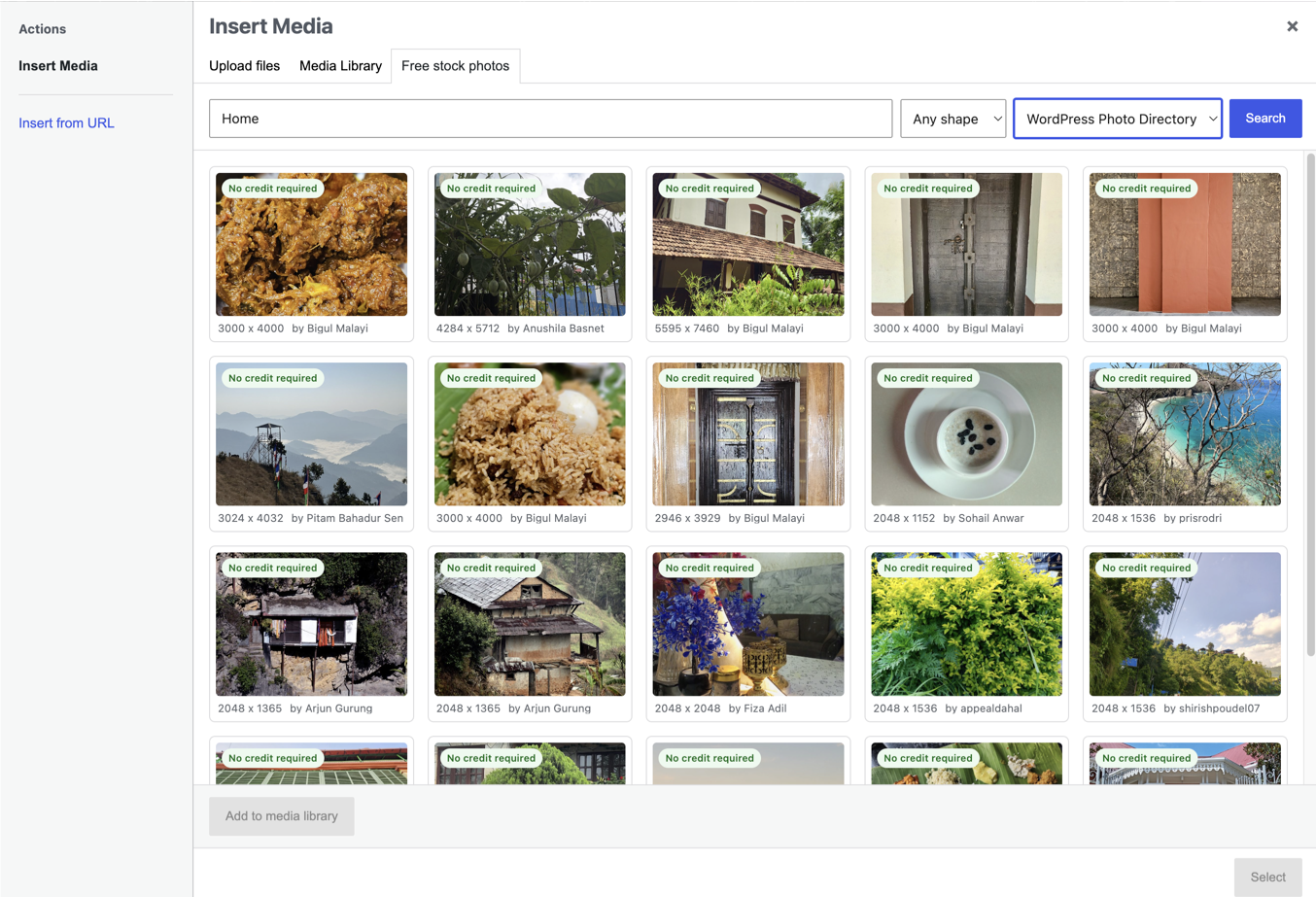
Installation
- Install and activate the plugin.
- Go to Settings, Image Kit.
- Add a Pexels or Pixabay key, or just leave Openverse and Wikimedia Commons enabled, which need none.
Keys can also be defined in wp-config.php as SHILPI_IK_PEXELS_KEY, SHILPI_IK_PIXABAY_KEY and SHILPI_IK_OPENVERSE_TOKEN, which then take precedence over the settings screen.
FAQ
-
Why is Unsplash not included?
-
Unsplash’s API guidelines require their image URLs to be hotlinked rather than copied to your own server, which is the opposite of what this plugin does.
-
Do I have to credit the photographer?
-
Pexels and Pixabay ask for it without requiring it. Several Openverse and Wikimedia Commons licences do require it. The credit is stored on every attachment either way, so
[shilpi_image_credits]in the footer covers you.
Reviews
There are no reviews for this plugin.
Contributors & Developers
“Shilpi Image Kit” is open source software. The following people have contributed to this plugin.
Contributors
Translate “Shilpi Image Kit” into your language.
Interested in development?
Browse the code, check out the SVN repository, or subscribe to the development log by RSS.
Changelog
1.0.2
- Changed: every class, constant, function, hook, transient, meta key, script handle and CSS class now uses the unique “shilpi_ik” prefix (Shilpi_IK_ for classes, SHILPI_IK_ for constants) instead of the short “sik” prefix.
- Changed: the optional wp-config.php keys are now SHILPI_IK_PEXELS_KEY, SHILPI_IK_PIXABAY_KEY and SHILPI_IK_OPENVERSE_TOKEN.
1.0.1
- Fixed: moved settings-page CSS to a properly enqueued local stylesheet.
- Changed: uniquely prefixed the credit shortcode as
[shilpi_image_credits]. - Added: full disclosure of every external image service, the data sent, when it is sent, and links to terms and privacy policies.
- Changed: removed WordPress.org directory artwork from the installable plugin package.
1.0.0
- Added: a “Free stock photos” tab in the WordPress media modal. Search every source by hand wherever WordPress opens “Choose an image”, pick one, and it is imported, selected and handed straight back to whatever opened the dialog.
- The tab honours the same ranking, licence gate and credit storage as the agent tools, and says why a search came back empty rather than leaving you guessing.
1.3.0
- Added: a licence gate. The site chooses which licences it will accept, and search enforces it. The default allows only images that oblige nothing, so a placeholder nobody replaces cannot become a licence problem after delivery.
- Added: when a search is emptied by that gate, the response says how many images were refused and why, instead of looking like a library with nothing to offer.
1.2.0
- Changed: results are now ranked by what the licence obliges the site owner to do. A CC0 image outranks a CC BY one, which outranks CC BY-SA, so the picture that reaches a client site is the one least likely to cause trouble later.
- Changed: sources are listed and weighted with the fewest strings attached first, led by the CC0 WordPress Photo Directory.
- Added: every search result reports an obligation of none, attribution or share-alike.
- Changed: the settings screen is rebuilt as source cards showing each source’s licence, what it is good for, whether it is ready, and its key field in place, with storage options separated out.
1.1.0
- Added: the WordPress Photo Directory as a fifth source. Community-contributed, CC0, no key and no attribution required, with real orientation and colour filtering through its taxonomies.
- Added: a source introduced by an update is switched on automatically on sites that already have saved settings, unless the owner had previously unticked it.
1.0.4
- Added: the plugin now registers its own Shilpi skill. The instructions appear under Skills the moment the plugin is activated and disappear when it is deactivated, with no Markdown file to upload by hand.
- Added: an agent routing rule, so an agent building a page is told to read the skill before writing any markup that shows an image.
1.0.3
- Fixed: cached searches survived a plugin update, so rows parsed by the previous version kept being served for up to 24 hours after a parser fix.
- Fixed: a rate-limited or failing source had its failure cached for the full window, turning a momentary refusal into a source that stayed dark all day.
1.0.2
- Fixed: Wikimedia Commons reported the requested thumbnail width even when it returned a smaller unscaled original, so images below the requested min_width slipped through.
- Fixed: auto_image did not report when it had relaxed the search to find a result.
- Fixed: a relaxed retry still applied the original minimum width, which defeated the retry.
- Fixed: a rate-limited Openverse or Wikimedia request reported a rejected API key, for sources that use no key.
- Changed: dropped the load_plugin_textdomain() call. WordPress has loaded translations by itself since 4.6 and the plugin ships no bundled catalogue.
- Changed: readme now documents WordPress 7.1 as tested.
1.0.1
- Fixed: Wikimedia Commons returned nothing usable, because scaled thumbnails are served from thumb.wikimedia.org and only upload.wikimedia.org was trusted.
- Fixed: Openverse creator names could arrive percent-encoded and rendered as gibberish in the credit line.
- Fixed: some content delivery networks refused the download with a 403; requests now carry a normal browser user agent and the source page as referer.
- Added: a search that finds nothing now retries automatically with the orientation and size filters dropped, then with a shorter phrase, instead of returning empty.
1.0.0
- First release.