

Description
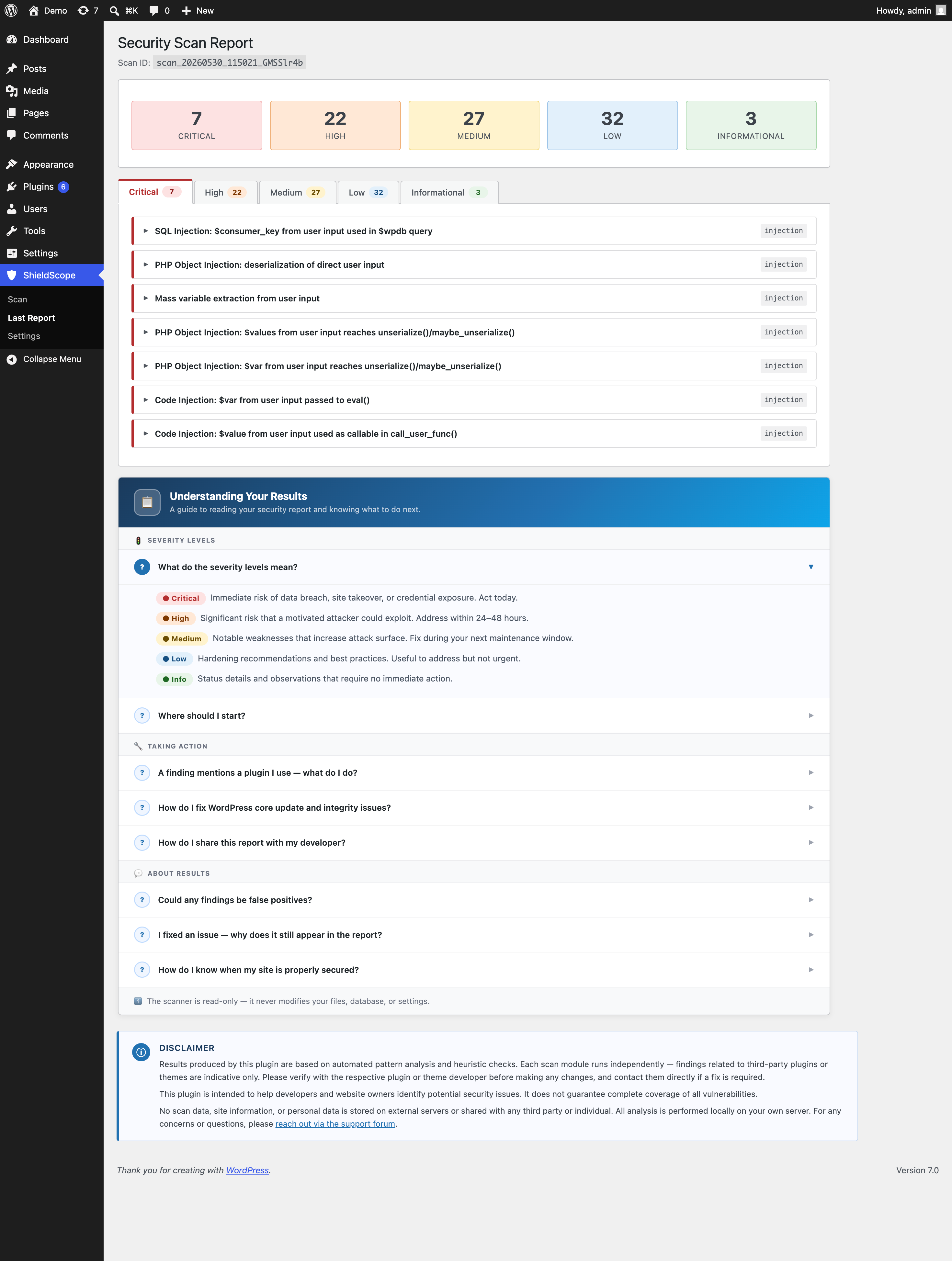
ShieldScope – Site Security Scanner runs a deep, read-only security audit across your entire WordPress site and produces a clear report of issues grouped by severity: Critical, High, Medium, Low, and Info.
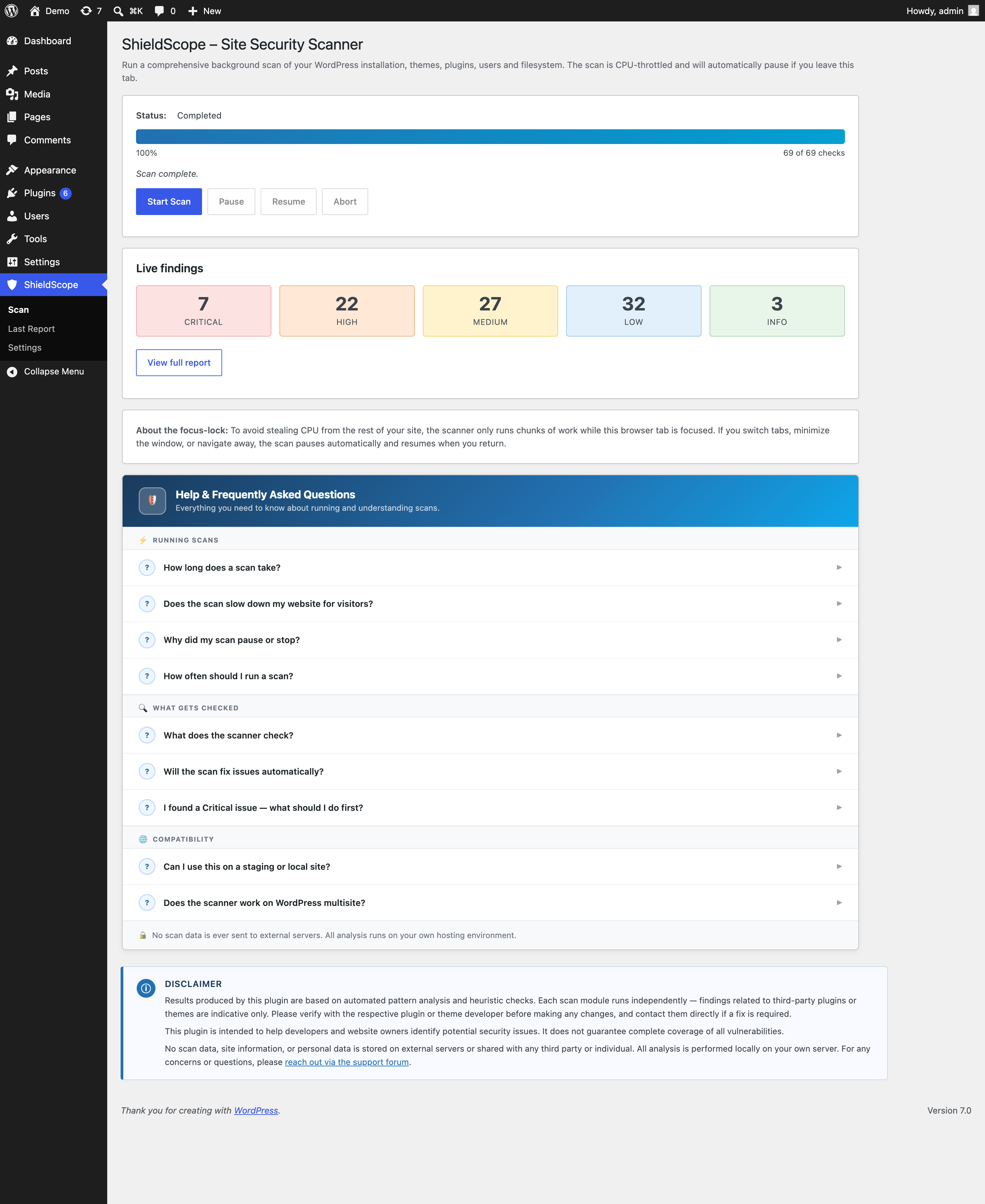
Most security scanners either freeze your admin panel while they run, or quietly hammer your server in the background. ShieldScope does neither. It runs in small, controlled steps with a built-in speed limit — so your site stays fast and responsive the whole time. If you switch to another browser tab, the scan automatically pauses and picks up exactly where it left off when you return.
Here is what ShieldScope checks:
WordPress Core Health
Checks that your WordPress installation is up to date and securely configured. Flags outdated versions, exposed debug settings, insecure table prefixes, and other common setup mistakes that attackers actively look for.
Core File Integrity
Verifies that every WordPress core file is exactly as it should be by comparing against official WordPress checksums. Flags any modified or unexpected files inside core WordPress folders — a common sign of a hacked or tampered site.
User Accounts
Reviews all administrator accounts for common weaknesses: a default “admin” username, too many admin accounts, weak or outdated password storage, empty passwords, and accounts whose login name is visible to the public.
Files & Folders
Scans your site’s file system for risky permissions, sensitive configuration files left publicly accessible, leftover backup files that should never be on a live server, and unexpected files in folders where only media should live.
Plugins
Flags plugins with pending security updates, plugins that are installed but inactive (a common attack surface), and plugins that appear to have been abandoned by their developers with no recent maintenance.
Themes
Flags themes with pending updates, extra inactive themes that add unnecessary risk, and checks whether your site has a proper active theme configured.
Malicious Code Patterns
Scans plugin and theme files for known malware signatures, hidden backdoors, and dangerous code patterns that attackers commonly plant on compromised WordPress sites.
SSL & HTTPS
Checks that your SSL certificate is valid and not about to expire, that your site uses a modern version of HTTPS encryption, that all pages load securely, and that visitors are always redirected from HTTP to HTTPS automatically.
Security Headers
Checks that your site sends the right security instructions to visitors’ browsers — protections that help prevent clickjacking, content-type attacks, and referrer leaks. Also checks whether your WordPress version number is being broadcast publicly, which gives attackers a head start.
Database Settings
Checks database-level security settings: whether open user registration is configured with too many permissions, whether your site URLs are consistent, and whether any administrator accounts were created recently without your knowledge.
Injection Vulnerabilities
Scans plugin and theme code for common vulnerability patterns including SQL injection, cross-site scripting (XSS), and other code weaknesses that attackers exploit to take control of WordPress sites or steal visitor data.
Access Control
Tests whether parts of your site that should require a login are actually protected. Looks for username leaks through public author pages, missing brute-force login protection, lack of two-factor authentication, and whether admin pages and API endpoints enforce proper access checks.
Server Configuration
Checks for server-level security issues: outdated PHP versions that no longer receive security patches, sensitive files accidentally left accessible to the public (such as environment config files or debug logs), and server settings that leak technical information to potential attackers.
Server-Side Request Forgery (SSRF)
Looks for code patterns in plugins and themes that could allow an attacker to trick your server into making unauthorised requests to other systems — both on the internet and inside your private network.
Vulnerable & Outdated Components
Checks your database software version, WordPress version, and installed plugins against known vulnerability records and end-of-support dates. Flags anything running on software that no longer receives security patches.
Vulnerability Database
Cross-references your installed plugins and themes against a known vulnerability database. A free WPScan API key (optional) enables live lookups for every plugin and theme on your site. Without a key, a built-in list of the most commonly exploited plugins is checked automatically — no setup needed.
ShieldScope never makes any changes to your site. It is strictly read-only. It scans, reports, and recommends — nothing else.
Third-Party Services
This plugin communicates with the following external services only while a scan is actively running. No data is sent on regular page loads.
WordPress.org Core Checksums API
During the Core Integrity check, the plugin fetches the official file checksums for your exact WordPress version and locale from the WordPress.org API. The only data sent is your WordPress version number and site locale (for example, en_US). No personal data, usernames, or site URLs are transmitted.
- Service: https://api.wordpress.org/core/checksums/1.0/
- Privacy policy: https://automattic.com/privacy/
WPScan Vulnerability Database (optional)
If you enter a WPScan API key in Settings, the Vulnerability Database check sends the slug and version number of each installed plugin and theme to wpscan.com to retrieve known vulnerability data. This feature is disabled by default and requires you to explicitly provide an API key. The free tier allows 25 requests per day; results are cached for 24 hours.
- Service: https://wpscan.com/api/v3/
- Privacy policy: https://automattic.com/privacy/
- Terms of service: https://wpscan.com/terms/
Disclaimer
ShieldScope uses automated analysis to identify potential security issues. Findings should be reviewed before acting on them — particularly for plugins and themes, where a finding may require verification with the plugin or theme developer.
This plugin is designed to help website owners identify security risks on their own sites. It does not guarantee detection of every possible vulnerability.
All scanning is performed locally on your own server. No scan data, site content, or personal information is stored externally or shared with any third party. For questions, please use the support forum.
Screenshots
Installation
- In your WordPress admin, go to Plugins Add New and search for ShieldScope, then click Install Now and Activate.
- Alternatively, download the zip and go to Plugins Add New Upload Plugin.
- Once activated, click ShieldScope in your admin sidebar.
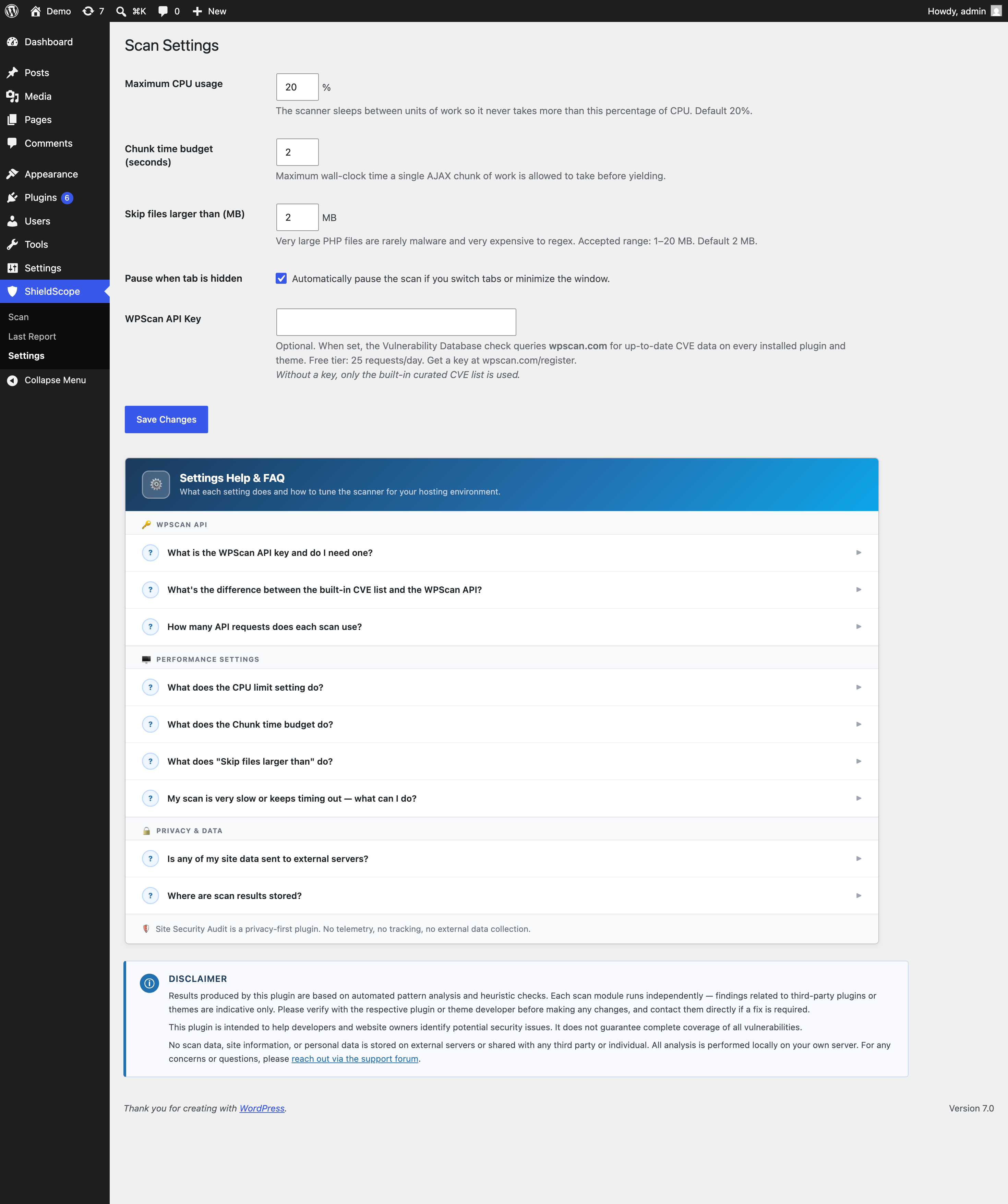
- Optionally adjust settings (scan speed, file size limits, WPScan API key) under ShieldScope Settings, then click Start Scan.
- When the scan is complete, go to ShieldScope Last Report to see your results.
FAQ
-
Will this slow down my site while it scans?
-
No. ShieldScope has a built-in speed limiter. By default it uses no more than 20% of your server’s processing capacity, and pauses proportionally between each piece of work. Visitors on your site will not notice the scan running. You can adjust the speed limit further in Settings if needed.
-
Why does the scan pause when I switch browser tabs?
-
The scan runs through your browser, so if you leave the tab the scan would either stall or run uncontrolled. ShieldScope pauses automatically when you switch away and resumes the moment you come back — your browser tab title even changes to remind you. You can turn this behaviour off in Settings if you prefer the scan to continue in the background.
-
Does it make any changes to my site?
-
No. ShieldScope is completely read-only. It scans your site and records findings, but it never modifies your files, changes any settings, or touches user accounts. The only thing it writes is its own scan results and progress — nothing that affects how your site runs.
-
Where do I find the results after a scan?
-
Go to ShieldScope Last Report in your WordPress admin. Findings are grouped by severity so you can work through the most important issues first.
-
What is the WPScan API key for?
-
It enables live vulnerability lookups for every plugin and theme installed on your site, using the WPScan vulnerability database. The free tier gives you 25 lookups per day, and results are cached so the limit is rarely hit. If you do not add a key, ShieldScope still checks your plugins against its built-in list of commonly exploited plugins automatically.
-
Is any of my site data sent to external servers?
-
Only during a scan, and only for two specific checks. The Core Integrity check sends your WordPress version number and language code to the official WordPress.org API — no URLs or personal data. The Vulnerability Database check (only if you add a WPScan API key) sends plugin and theme names and version numbers to wpscan.com. Nothing else leaves your server. Full details are in the Third-Party Services section above.
-
How long does a scan take?
-
It depends on how many plugins and themes are installed and how large your file system is. A typical site takes between 5 and 20 minutes. You can leave the tab open and come back — the scan saves its progress and will not restart from scratch.
Reviews
There are no reviews for this plugin.
Contributors & Developers
“ShieldScope – Site Security Scanner” is open source software. The following people have contributed to this plugin.
Contributors
Translate “ShieldScope – Site Security Scanner” into your language.
Interested in development?
Browse the code, check out the SVN repository, or subscribe to the development log by RSS.
Changelog
1.3.2
- Fixed: Core file integrity check no longer floods the report with false “modified core file” warnings on WordPress Playground, WordPress Studio, or other SQLite-based installs.
- Improved: If a large share of core files genuinely differ (different WordPress version, locale, or a customised hosting build), the scan now reports one clear summary instead of a wall of individual findings.
- Fixed: User account check no longer flags accounts as using a “non-standard” password hash on WordPress 6.8 and later.
- Fixed: Malicious code, injection, SSRF, access control, and uploads folder scans could skip some files when a scan batch ended partway through a large directory. All files are now scanned reliably.
- Fixed: Plugin activation via WP-CLI or WordPress Playground blueprints no longer silently fails to set up the results table.
- Fixed: Findings report page now loads correctly on SQLite-based WordPress installs.
- Improved: wp-config.php accessibility check downgraded from High to Low severity for the normal case of an empty response — this is expected behaviour, not exposure.
- Added: Twenty Twenty-Six recognised as a default WordPress theme.
1.3.1
- Fixed: Corrected URL on settings admin page.
- Fixed: Updated language file.
1.3.0
- New: SSL/TLS check — flags certificates expiring within 30 days, outdated encryption protocols, mixed HTTP/HTTPS content, and missing HSTS headers.
- Improved: All recommendations rewritten to be shorter and more actionable.
- Improved: Scan, Report, and Settings admin pages redesigned with clearer layouts, severity indicators, and FAQ accordions.
- Cleanup: Removed legacy files left over from a previous plugin rename.
1.2.0
- New: Injection vulnerability scanner — detects SQL injection, XSS, LDAP injection, and other common code-level attack patterns in plugin and theme files.
- New: Access control scanner — tests login protection, two-factor authentication availability, username exposure, and whether admin pages enforce proper permission checks.
- New: Server configuration scanner — flags outdated PHP versions, publicly accessible sensitive files, insecure cron configuration, and dangerous server settings.
- New: SSRF scanner — identifies code patterns that could allow attackers to trigger unauthorised server-side requests.
- New: Vulnerable components check — flags end-of-life database versions, WordPress versions with known critical vulnerabilities, and high-risk plugins.
- New: Vulnerability database — optional WPScan API integration plus a built-in list covering 18+ commonly exploited plugins.
- Fixed: Database version detection now correctly identifies all end-of-life MariaDB versions in the 10.x and 11.x branches.
- Fixed: PHP 8.2 now correctly flagged as end-of-life (went EOL December 2025).
1.1.0
- New: Core file integrity check — verifies every WordPress core file against official checksums and flags anything that has been modified or does not belong.
- Improved: File size limit setting now uses megabytes instead of raw bytes.
- Improved: Clearer messaging when the scan pauses due to tab switching, including a visible banner and updated browser tab title.
- Added: Full architecture documentation in the GitHub repository.
1.0.0
- Initial release.