

Description
SEO should not feel expensive, repetitive or impossible.
I built SEO Magic because essential SEO help should be available to small websites, freelancers, creators and stores without adding another expensive subscription. It is a genuinely useful free SEO assistant — not a limited demo that stops before the magic happens.
Install it, connect your own API key and try it on one unfinished post or image. SEO Magic can help you discover missing SEO fields, generate contextual suggestions, improve content and save only what you approve. Try it once and you will understand the name.
The plugin is free. No SEO Magic license key. No credit card. No automatic changes you did not request.
See the magic before you install
Start here: install SEO Magic and connect your API key
Watch SEO Magic create image titles, alt text, captions and descriptions
Watch it improve SEO titles and meta descriptions inside WordPress
Why people install SEO Magic
- See what is missing: quickly find posts, pages, products, archives and images that still need SEO work.
- Turn blank fields into useful drafts: generate SEO titles, meta descriptions, social metadata and image text from real WordPress context.
- Improve content without leaving WordPress: work on structure, readability, headings and introductions in a focused assistant.
- Review everything first: edit every suggestion and save only the version you choose.
- Work one item or many: use manual tools when you want precision or controlled bulk workflows when you want speed.
- Keep your current SEO plugin: works with Yoast SEO, Rank Math and All in One SEO.
- Start for free: the complete Free feature set below does not require an SEO Magic license.
What is included in SEO Magic Free?
✨ Metadata SEO
- Scan SEO coverage from a clear, paginated WordPress table.
- Generate, regenerate or manually edit SEO titles and meta descriptions.
- Manage Facebook / Open Graph and Twitter metadata.
- Work with posts, pages, products, public post types, categories, tags, taxonomies and author archives.
- Process bulk requests sequentially to reduce pressure on your hosting.
🖼 Multimedia SEO
- Find Media Library images with missing titles, alt text, captions or descriptions.
- Generate all four image fields from one contextual action.
- Create individual fields when you only need one change.
- Regenerate existing metadata using the current text as context for a real alternative.
- Use attachment and related WordPress content to produce more relevant suggestions.
✍️ Content Assistant
- Load an existing post or page into a focused editing workspace.
- Improve structure, readability, headings, introductions and on-page content.
- Review desktop and mobile search snippet previews.
- Edit SEO and social metadata without jumping between different screens.
- Preserve protected blocks, embeds, tables and shortcodes more safely.
⚡ Autopilot
- Fill selected missing metadata and image fields in the background with WordPress Cron.
- Choose the content types, fields and schedule you want to process.
- Preserve existing values unless regeneration is explicitly requested.
- Turn it on only when you want it and configure exactly what it may complete.
🛡 Built for real WordPress sites
- Real database pagination avoids loading an entire catalog into memory.
- Sequential queues help larger sites and WooCommerce stores work more safely.
- Server locks, cross-tab coordination and double-click protection reduce duplicate requests.
- Clear errors explain quota, timeout and connection problems instead of failing silently.
- Deactivation, updates and ZIP replacement preserve settings and generated metadata.
Your SEO, your decision
SEO Magic does not publish AI suggestions blindly. Manual tools keep every result editable until you save it. Autopilot runs only after you enable it and follows the content types and fields you select.
The Free plugin needs no SEO Magic license. AI generation uses your own Google Gemini API key. Google may offer free and paid usage tiers, and its limits or pricing are controlled by Google.
Works with the SEO plugin you already use
SEO Magic supports Yoast SEO, Rank Math and All in One SEO. Select your active provider in Settings. If multiple providers are active and SEO Magic cannot make a safe choice, it warns you instead of writing to an arbitrary plugin.
Want even more magic?
The optional SEO Magic Pro add-on expands the same workflow with:
- WooCommerce Assistant: generate and improve product titles, long descriptions, short descriptions and tags.
- Smart Schema and FAQ tools: create and review structured-data drafts.
- Auto-Linking Assistant: discover relevant internal and external link opportunities.
- Backlink Risk Signals: group referring domains and review evidence-based risk signals.
- Site Health Audit: combine content signals, PageSpeed information and technical checks.
- Advanced settings: use selected Google integrations, ACF context and model rules.
Free remains useful on its own. Pro is there when your site needs deeper automation and analysis.
Learn more at https://seomagic.click/ and read the documentation at https://seomagic.click/documentation/.
External Services & Privacy
SEO Magic uses external services only for features that require them. Review and configure these integrations before use.
SEO Magic AI proxy and Google Gemini
Some AI workflows use SEO Magic-operated Cloudflare Worker proxies before reaching Google Gemini; others may contact Gemini directly.
Requests may include:
- Your Gemini API key.
- The selected Gemini model and task type.
- Relevant content, media text and image data when image analysis is requested.
- Existing metadata, language and instructions.
WordPress passwords and database credentials are not sent. Google and Cloudflare process data under their own terms.
Google Gemini API terms: https://ai.google.dev/gemini-api/terms
Google Privacy Policy: https://policies.google.com/privacy
Cloudflare Privacy Policy: https://www.cloudflare.com/privacypolicy/
Google services used by optional Pro features
Optional Pro features may use:
- PageSpeed Insights: your site URL for performance data.
- Programmable Search: queries derived from analyzed content.
- Search Console: OAuth and authorized backlink-related data.
- Safe Browsing: selected URLs or domains for risk checks.
Google API Terms of Service: https://developers.google.com/terms
Google Privacy Policy: https://policies.google.com/privacy
SEO Magic license server (Pro)
Pro sends the license key, site URL and basic version information for activation and status checks.
Optional deactivation feedback
On deactivation, submitted feedback (reason, details, site URL and software versions) is stored locally and emailed to the author. Skipping sends nothing.
Privacy Notice
Site owners must configure external services lawfully and update their privacy notices. Providers process requests under their own terms.
Screenshots
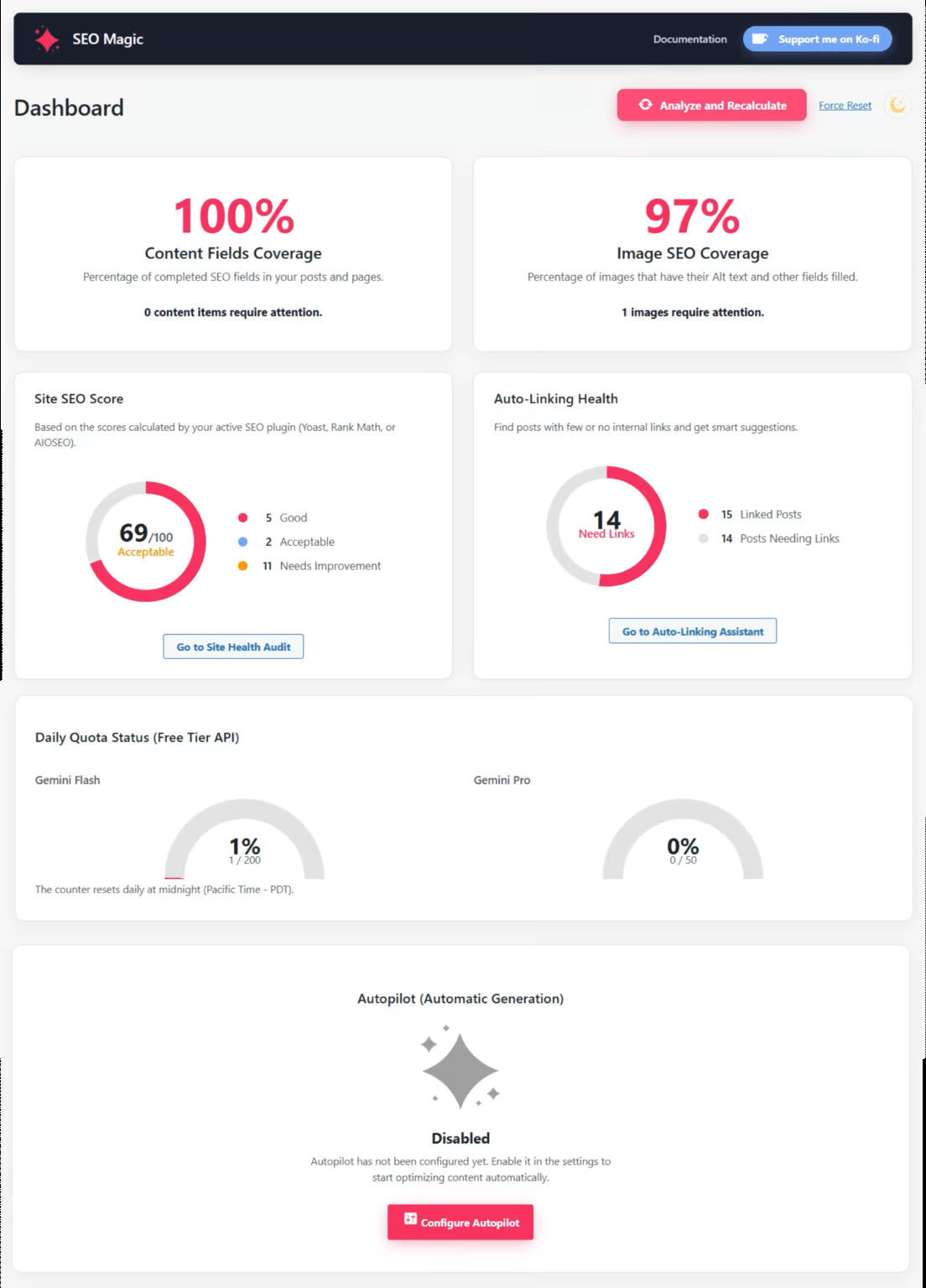
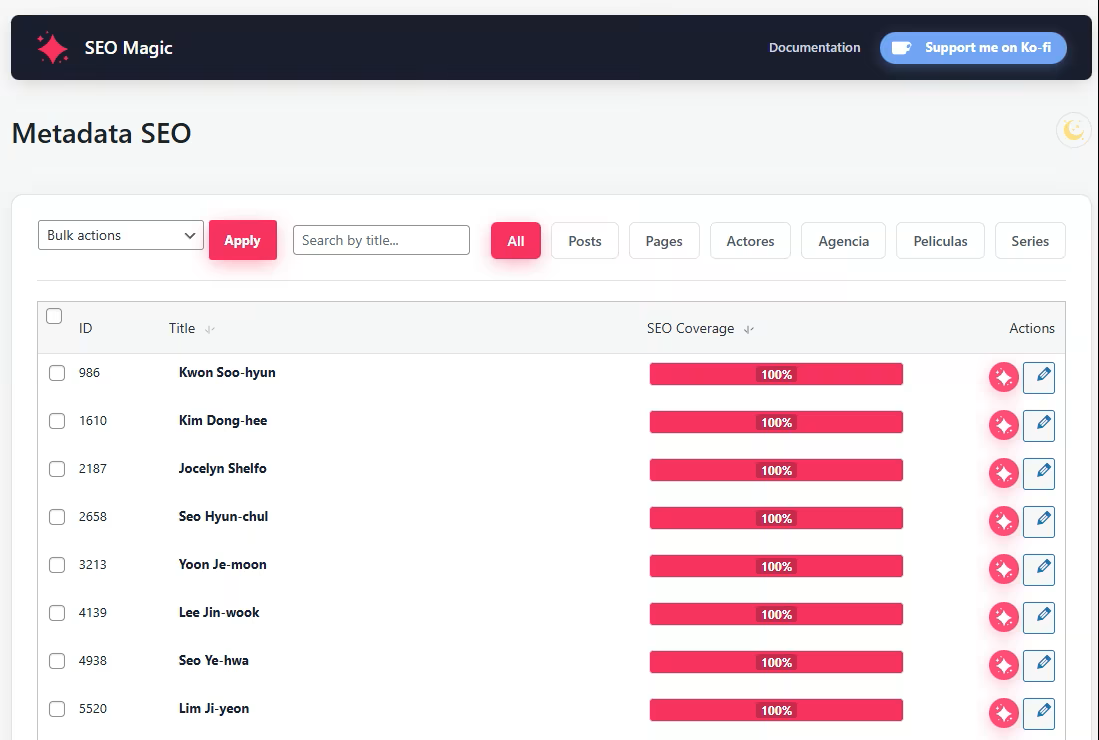
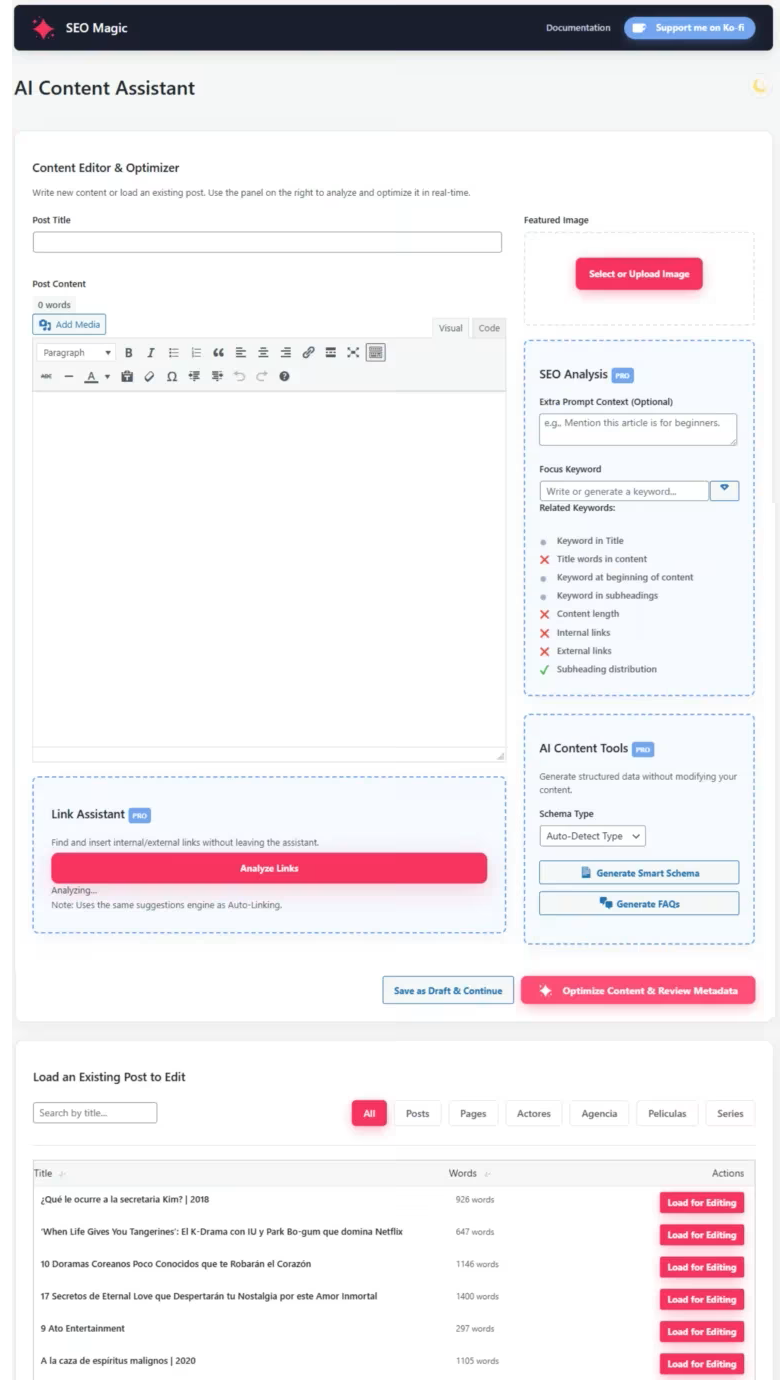
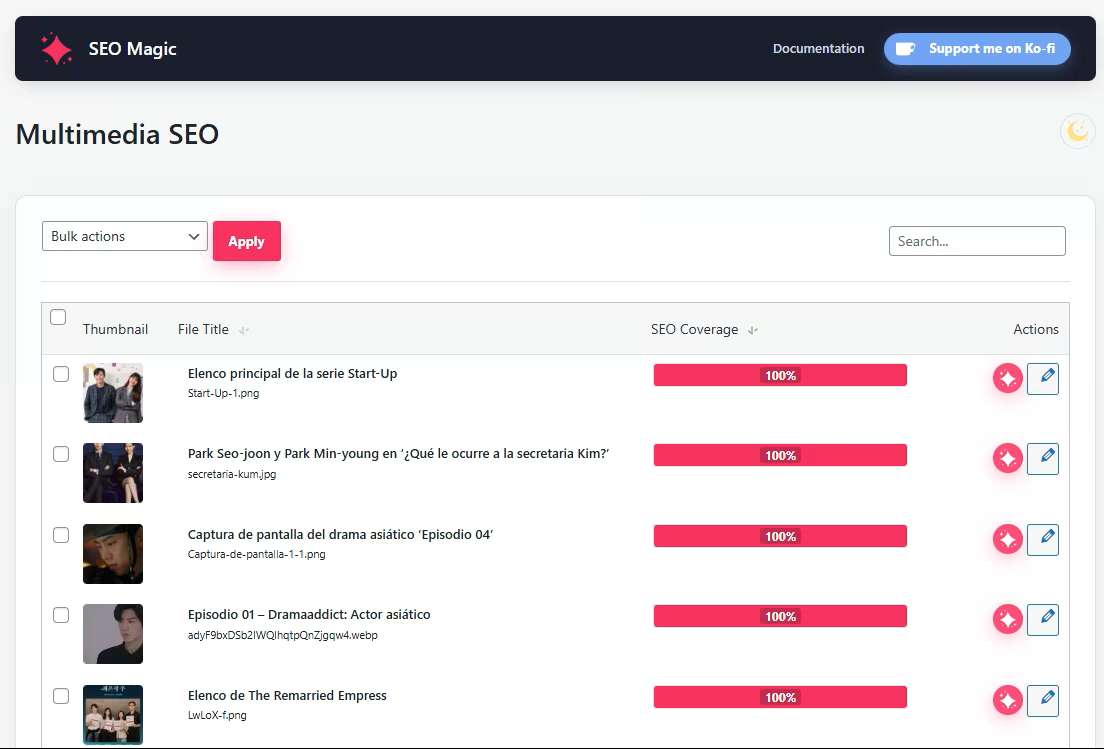
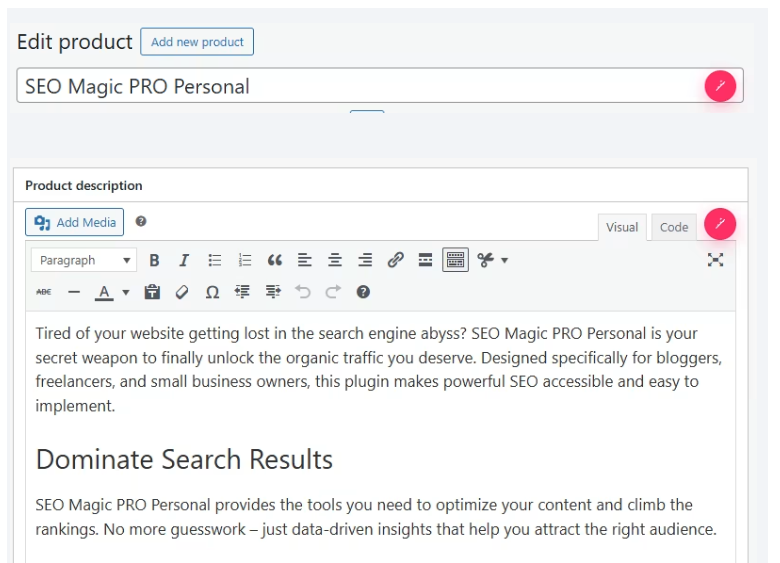
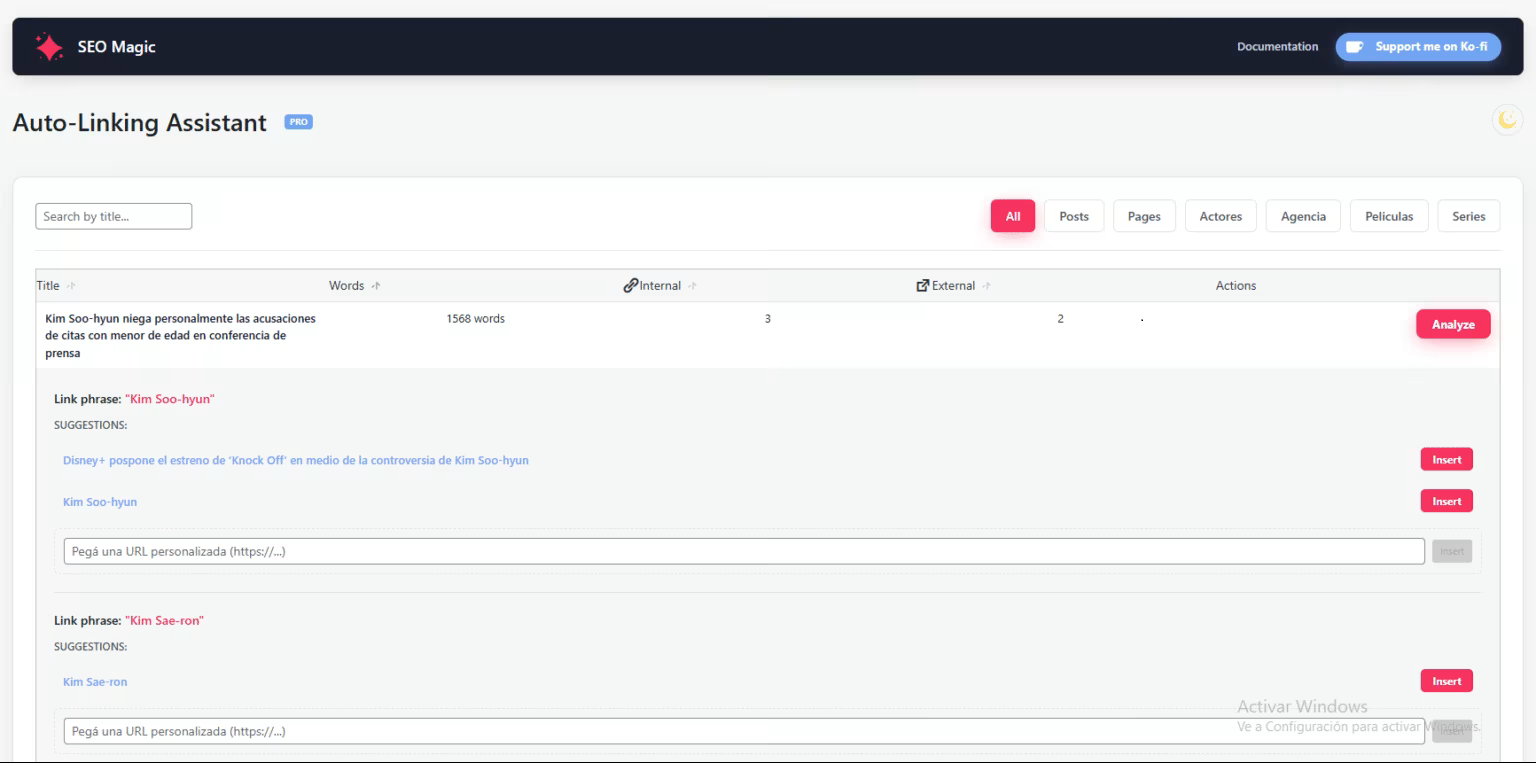
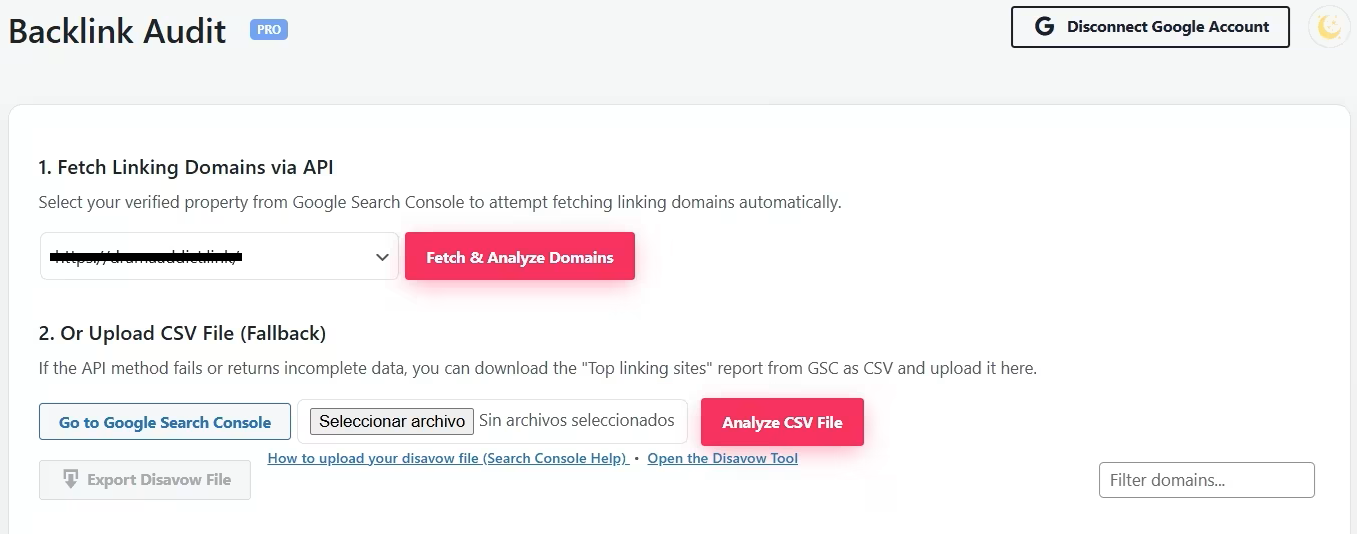
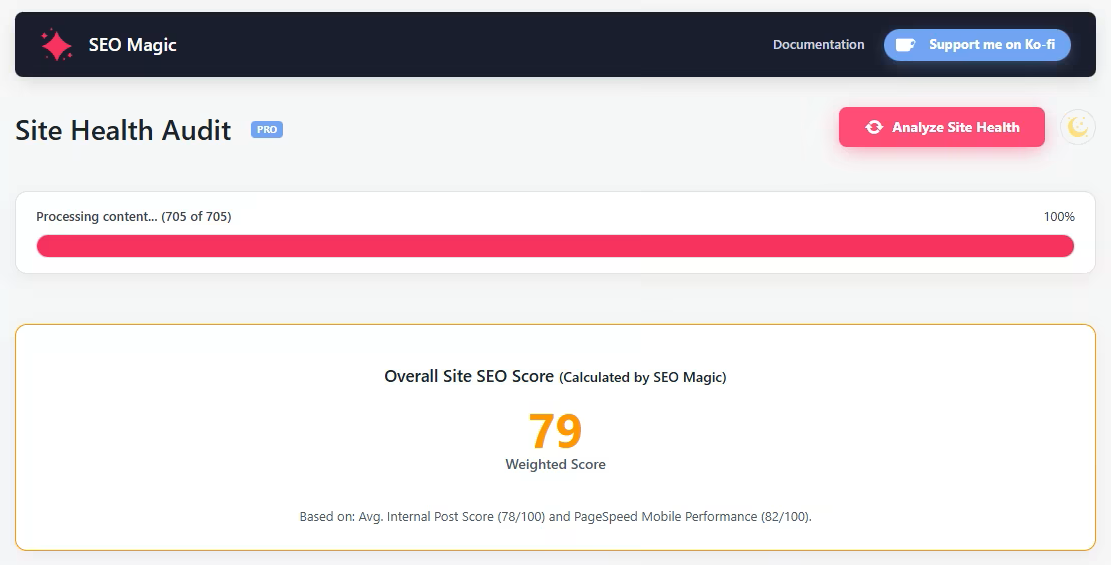
Installation
- Install SEO Magic – Free AI SEO Assistant from the WordPress Plugins screen, or upload the
seo-magicofolder to/wp-content/plugins/. - Activate the plugin.
- Open SEO Magic Settings.
- Add your Google Gemini API key.
- Select your active SEO provider when applicable.
- Open Metadata SEO, Multimedia SEO or Content Assistant.
- Choose one incomplete item, generate a suggestion, review it and save your first improvement.
The setup video is near the top of this page so you can follow the complete process visually.
For the optional Pro features, install and activate the separate SEO Magic Pro add-on, then enter your Pro license under SEO Magic License.
FAQ
-
Is SEO Magic really free?
-
Yes. The Free plugin and all features listed in the Free section work without an SEO Magic license key or credit card. AI generation uses your own Google Gemini API key, and provider usage limits or charges are separate from the plugin.
-
Why was SEO Magic created?
-
SEO Magic was created to make practical WordPress SEO assistance accessible without forcing users into an expensive plugin subscription just to generate and review essential metadata, image text and content improvements.
-
Do I need a Google Gemini API key?
-
Yes. SEO Magic uses your own Gemini API key for AI-assisted generation. The plugin does not sell or bundle Gemini usage.
-
Is Google Gemini free?
-
Google may offer free and paid tiers. Availability, limits and pricing are managed by Google and may change.
-
Will SEO Magic automatically overwrite my work?
-
No. Manual suggestions remain editable until you save them. Autopilot must be enabled and configured by you. Existing values are preserved unless regeneration is requested.
-
Does SEO Magic replace Yoast SEO, Rank Math or All in One SEO?
-
No. SEO Magic can write supported metadata for the SEO provider you select. Avoid having multiple SEO plugins manage the same fields at the same time.
-
Can I edit the generated result before saving it?
-
Yes. Control is a core part of SEO Magic. Review the suggestion, change any wording you want and save only the final version you approve.
-
Does the AI analyze the actual image pixels?
-
Yes. Image metadata generation reads the attachment and sends image data, plus available WordPress context, through the SEO Magic proxy to Gemini. Large images may be resized or compressed before transmission.
-
What is the difference between Generate and Regenerate?
-
Generate is used for empty fields. Regenerate sends the current values as context and asks for a genuine alternative. Identical suggestions are reported without making a second automatic request.
-
Can I use SEO Magic on a large WooCommerce catalog?
-
Yes. Admin lists use real database pagination and AI bulk operations run sequentially. Your hosting resources and API limits still affect processing speed.
-
What happens when I deactivate or update the plugin?
-
Deactivation, updates and ZIP replacement preserve settings and generated metadata. Cleanup runs only during uninstall after explicit opt-in.
-
What does the Pro add-on change?
-
Pro adds specialized WooCommerce content tools, schema and FAQ workflows, link suggestions, backlink risk signals, site health analysis and advanced integrations. The Free plugin continues working without Pro.
-
How does the Pro license work?
-
Free needs no license. Pro validates its license key and site activation with the SEO Magic license server.
-
Where can I get support?
-
Use the WordPress.org support forum for SEO Magic Free. Pro support is handled through https://seomagic.click/.
Reviews

Contributors & Developers
“SEO Magic – Free AI SEO Assistant” is open source software. The following people have contributed to this plugin.
Contributors
Translate “SEO Magic – Free AI SEO Assistant” into your language.
Interested in development?
Browse the code, check out the SVN repository, or subscribe to the development log by RSS.
Changelog
1.8
- Fix: Replaced TinyMCE-dependent Gutenberg marker attributes with an out-of-band block map generated from the canonical
post_contentthroughparse_blocks(). - Safety: Content Assistant and the AI now receive only a text projection of editable paragraphs, headings and list items; all layout, media, button, embed and third-party blocks remain server-side.
- Safety: The backend validates the source hash, editable block paths and normalized structural outline before reinserting text into the original Gutenberg tree.
- Compatibility: TinyMCE quote, whitespace and wrapper-attribute normalization no longer counts as a structural block change.
- Compatibility: Gutenberg
core/html, Classic and legacy core blocks expose only safe paragraph, heading and list-item text while their original HTML layout remains server-side and unchanged. - Fix: AI optimization now identifies each editable Gutenberg text segment with provider-only boundary tokens, so added wrappers, Markdown or reordered output cannot invalidate or alter the canonical block tree.
- Fix: Content Assistant now accepts a complete, structurally valid AI response even when its visible text remains unchanged; empty or unsafe responses are still rejected and generated metadata remains available for review.
1.7.13
- Fix: Gutenberg Content Assistant no longer false-blocks unchanged posts when TinyMCE normalizes only the temporary safety-map markup.
- Fix: Structural recovery now handles partially preserved safety markers instead of attempting recovery only when every marker disappeared.
- Compatibility: Assistant projections add a temporary standard HTML id marker that TinyMCE preserves more reliably; original Gutenberg ids remain canonical and are never overwritten in saved post content.
- Safety: If editable text actually changed and the map cannot be proven safe, SEO Magic still aborts without modifying the post.
1.7.12
- Fix: Content Assistant can safely recover the Gutenberg editable map when TinyMCE strips every projection marker, by matching the unchanged server-side paragraph/heading/list-item structure.
- Safety: Structural recovery fails closed if the meaningful editable sequence changes; canonical Gutenberg containers, attributes and third-party blocks remain server-side and untouched.
- Compatibility: The original
data-smg-block-indexandsmg-block-map-Nmarkers remain the primary path; structural recovery is used only when no marker survives.
1.7.11
- Fix: Gutenberg Content Assistant projections now include a standard CSS-class safety marker fallback when TinyMCE strips custom
data-smg-block-indexattributes. - Safety: The original Gutenberg block tree is still preserved; only marked paragraph, heading and list-item inner content can be merged back.
- Compatibility: Existing
data-smg-block-indexprojections remain accepted, so the change is backward compatible with already loaded Assistant content.
1.7.10
- Fix: Content Assistant binds the primary Optimize action before the auxiliary post-list AJAX request, preventing unrelated admin AJAX failures from leaving the button inert.
- UX: Optimize now reports HTTP, timeout and malformed-response failures instead of silently returning to the editor.
- Compatibility: Assistant action buttons are explicit
type="button"controls so third-party admin forms cannot turn them into unintended submit buttons.
1.7.9
- Security: Encrypts the Google Search API key and Google OAuth Client Secret at rest with transparent migration for existing installs.
- Security: Secret inputs no longer print saved credentials into the Settings page HTML; saved keys appear only as masked placeholders and blank submissions preserve them.
- Security: Link Assistant now escapes AJAX error text consistently before inserting dynamic HTML.
- Performance: Primes the post meta cache before calculating dashboard content coverage to avoid N+1 metadata queries.
- Maintenance: Removed the unused duplicate
includes/uninstall.php; WordPress continues to use the canonical rootuninstall.php.
1.7.8
- Fix: Empty post metadata fields no longer appear as the literal text
undefinedin the editor modal. - UX: Metadata actions now explain when Yoast SEO, Rank Math or AIOSEO must be activated or selected instead of reporting a false successful save.
1.7.5
- Fix: Content Assistant now preserves the original Gutenberg block tree instead of rebuilding existing block posts from TinyMCE HTML.
- Compatibility: Added safe rich-text merging for paragraphs, headings and list items while preserving Columns, Groups, Rows, layout attributes, media, buttons, embeds and third-party blocks.
- Safety: If the editable Gutenberg block map is missing or changed, SEO Magic aborts the save instead of risking layout corruption.
- Compatibility: Tested for the WordPress 7.1 always-iframed Post Editor workflow; editor integrations continue through WordPress data APIs rather than iframe DOM access.
1.7.4
- Fix: Added support for AVIF media in AI image analysis. SEO Magic now creates a temporary JPEG copy for the request, preserves the original WordPress attachment and removes the temporary file afterward.
- UX: Shows a clear compatibility message when the server image library cannot decode AVIF instead of returning a generic AI proxy error.
1.7.3
- Security: Aligned admin-only AJAX endpoints with the
manage_optionscapability while preserving the post-editor Link Assistant behind its dedicated nonce and per-post permission check. - Security: Hardened Content Assistant admin rendering by replacing dynamic image template literals with safe DOM construction and escaping AJAX-driven preview, table, schema and FAQ values.
- Security: Encrypts the Gemini API key at rest using authenticated encryption derived from WordPress security keys, with automatic migration from plaintext storage.
- Security: Hardened custom JSON-LD storage and frontend output against stored XSS by stripping HTML from schema text, explicitly recording the Free schema state and keeping forward slashes safely escaped.
- Maintenance: Replaced the 4,277-line core-functions.php monolith with a 21-module core organized by security, licensing, archives, SEO integrations, metadata, schema, meta tags, statistics and media workflows.
- Rebuilt the WordPress.org presentation around the free value, visible results and user control.
- Moved all three video tutorials near the beginning so visitors can see SEO Magic in action immediately.
- Simplified the opening message and moved provider details lower while keeping API and privacy disclosures clear.
- Expanded the FAQ to answer the main questions about free usage, editing, overwriting and compatibility.
1.7.2
- Docs: Changed the tutorial videos in the WordPress.org readme to standalone YouTube URLs so they render as embedded videos instead of long wrapped links.
- Version: Bumped release metadata to 1.7.2.
1.7.1
- UX: Added video tutorial links for Gemini API setup, Multimedia SEO and Metadata SEO in the admin screens.
- Docs: Added the three SEO Magic tutorial videos to the plugin readme.
1.7.0
- Consolidated the stability, scalability and interface improvements introduced across the 1.6.x releases.
- Added server-side AI locks, cross-tab coordination, double-click protection and structured HTTP errors to reduce overlapping requests and duplicate AI usage.
- Added real database pagination for larger post and product catalogs.
- Improved Generate / Regenerate workflows for posts, archives and media, including comparison against the existing metadata.
- Fixed immediate saving and coverage refresh for generated taxonomy, tag and author archive metadata.
- Preserved settings and generated metadata during deactivation, updates and ZIP replacement; uninstall cleanup is now explicit opt-in.
- Refined Metadata, Multimedia, Content Assistant, WooCommerce and Site Health admin layouts and actions.
- Improved AIOSEO Lite / Pro detection and safer handling when multiple SEO providers are active.
For the complete version history, see changelog.txt included with the plugin.