
Description
“semiauto-invoicing” operates as a Tax standards-aligned document generation suite and compliance assistant for WooCommerce stores. Designed for flexibility, speed, and reliability, it assists merchants with formatting continuous thermal receipts (44mm – 80mm), professional A4 PDF invoices, and logistics packing slips directly from WooCommerce orders.
Compliance Disclaimer
No plugin can provide complete legal, tax, or regulatory compliance. SemiAuto Invoicing operates as a software compliance assistant to help merchants format and generate store documents aligned with technical specifications. Store owners remain responsible for ensuring their accounting records satisfy applicable local, national, and international laws. This software does not provide legal or tax advice.
This plugin uses the Freemius SDK for license management and optional account services subject to the Freemius Terms and Privacy Policy. Data sharing occurs strictly upon administrative opt-in.
Key Features (Free Core):
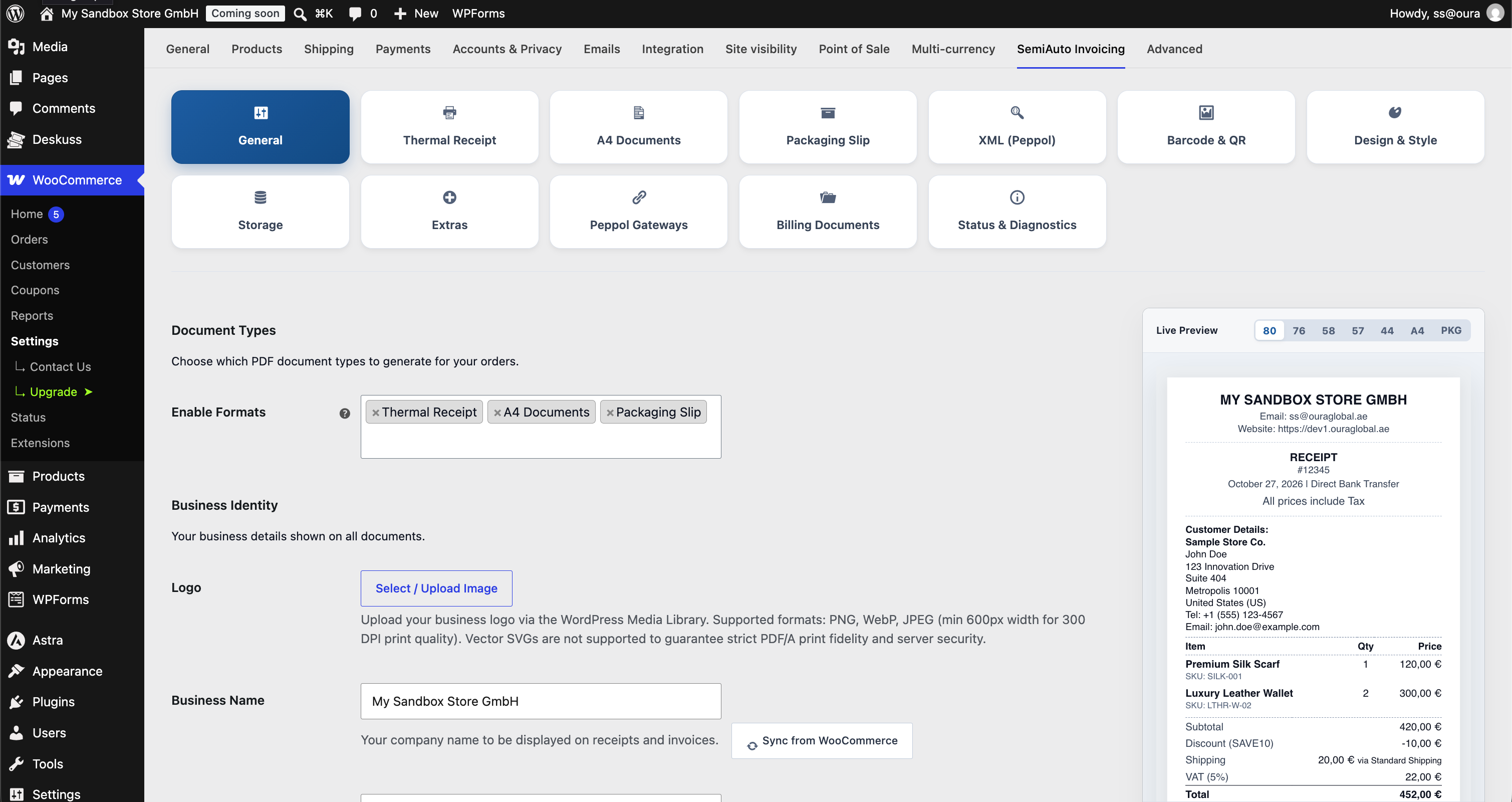
- Continuous Thermal Receipts: Optimized for 44mm, 57mm, 58mm, 76mm, and 80mm POS printers with automated “cut-line” formatting.
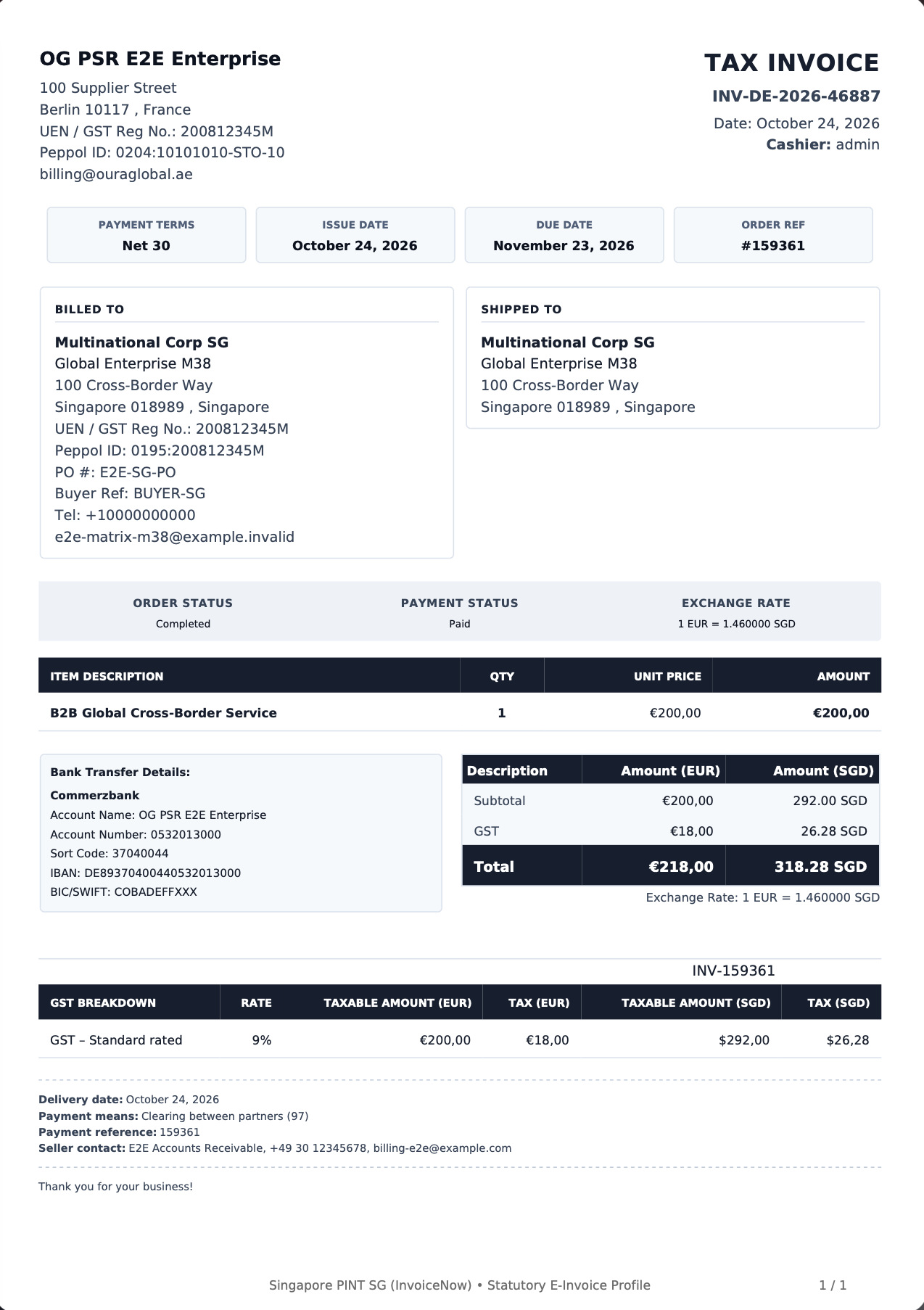
- Professional A4 PDF Invoices: Clean 2-column header layouts with localized “Bill To”, store branding, BACS direct bank transfer details, and order breakdown.
- Packaging Slips: High-density logistics slips for picking and packing operations.
- Centralized Security Barrier: Strict authorization checks for document downloads and defense against directory traversal.
- Local Rendering Engine: High-speed, offline-first PDF generation without external API dependencies or remote tracking.
- Live Preview Studio: Real-time canvas rendering with responsive device viewport switcher.
- Seamless Email Delivery: Attach PDF invoices, packaging slips, or receipts directly to WooCommerce transactional customer emails.
Source Code & Build Process
- Public Source Repository: SemiAuto Invoicing – GitHub
- Build Process: All JavaScript and CSS source files in the
assets/directory are unminified, human-readable Vanilla JavaScript and CSS written directly for native browser execution. No compilation or transpilation build step is required.
Premium Global E-Invoicing (Paid):
- International E-Invoicing Standard Engine: UBL 2.1 and UN/CEFACT CII XML generation for 9 profiles aligned with their official rules (Peppol BIS Billing 3.0 with the 3.0.21 code lists and Norwegian EHF rules, PINT EU, Singapore PINT SG, Malaysia PINT MY, UAE PINT AE, Australia / New Zealand PINT A-NZ, Japan PINT JP, German XRechnung 3.0.2, and Factur-X / ZUGFeRD 2.5 with Chorus Pro).
- PDF/A-3 Hybrid Invoicing: Embeds validated Factur-X XML directly into PDF/A-3 compliant archives passing veraPDF conformance checks.
- Cross-Border Dynamic Routing: Automated 81-transition cross-border tax rate matrix with Saxon-C Schematron verification.
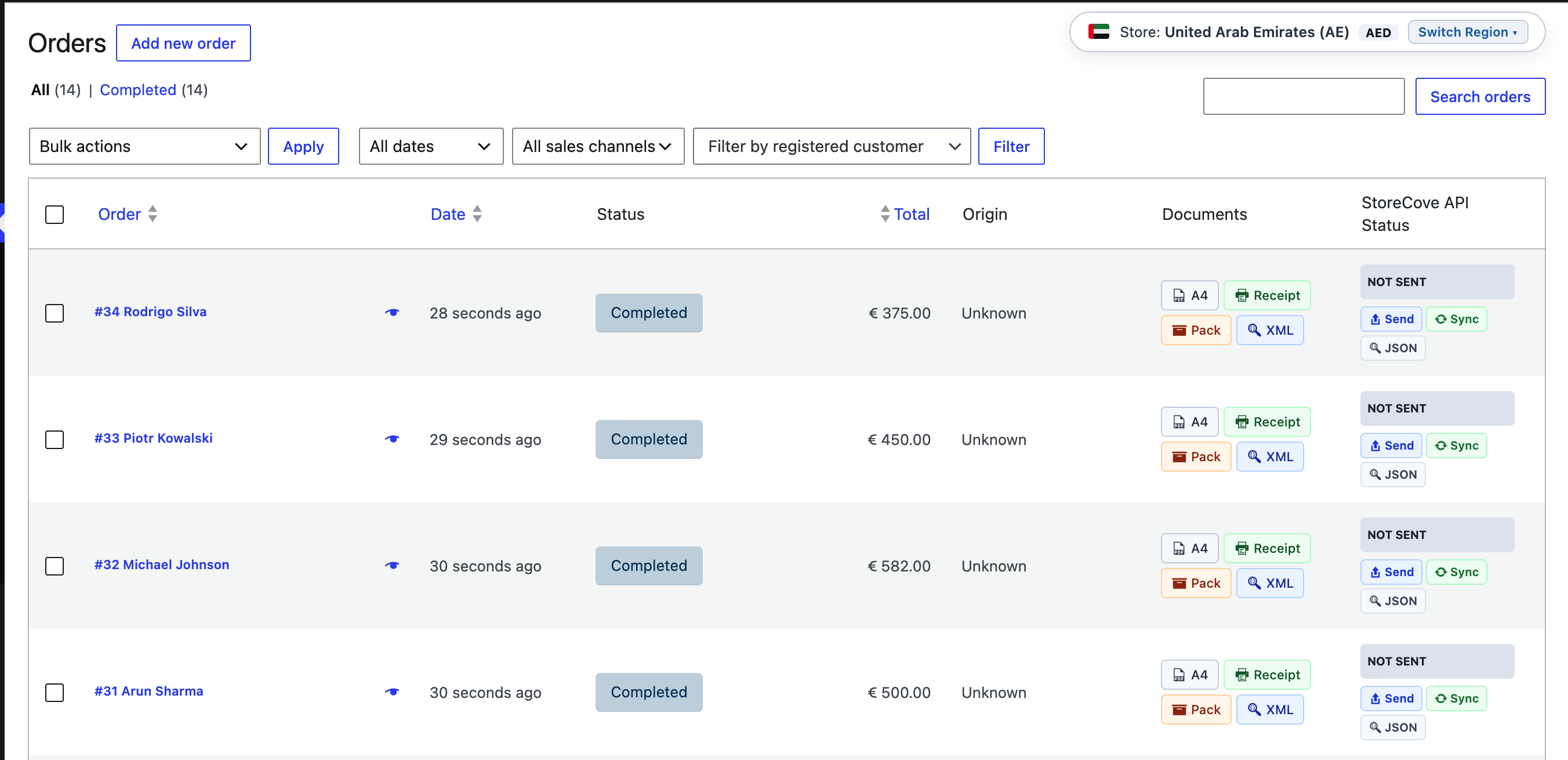
- Peppol Access Point Gateways: Automated outbound transmission and status sync via StoreCove API and A-Cube Peppol API, one gateway per document with an optional fallback.
- StoreCove Delivery Networks: Optional national networks next to Peppol, switched on per network: Italy SDI, Spain FACe and FACeB2B, Poland KSeF, India IRP (GST e-invoice) and e-mail delivery for business buyers without a Peppol ID.
- Adaptive Checkout: Country-specific buyer fields (classic and block checkout) shown only for the countries and networks that use them, with national format and check-digit validation.
- High-Precision Math Engine: 6-decimal tax reconciliation and dual-currency conversion accounting tables.
- Sequential Numbering & Roster: Custom sequence generator for invoices/credit notes and POS staff roster integration.
Upgrade to Premium: SemiAuto Invoicing
External services
This plugin connects to the Freemius API, provided by Freemius, Inc., for license management and optional account services. Data is only sent after an administrator opts in on the Freemius opt-in screen or account page; skipping the opt-in sends no data. When opted in, the administrator’s name and email, site URL and language, WordPress and PHP versions, and plugin version are shared (plus the list of active plugins and themes only if separately permitted). Customer and order data is never sent. Terms: https://freemius.com/terms/ – Privacy Policy: https://freemius.com/privacy/
Third-Party Libraries & Copyright
This plugin bundles the following third-party software and open-source libraries:
-
Dompdf (HTML to PDF rendering engine)
License: LGPL-2.1-or-later
Source: https://github.com/dompdf/dompdf -
php-font-lib (TrueType font parsing and subsetting)
License: LGPL-2.1-or-later
Source: https://github.com/dompdf/php-font-lib -
php-svg-lib (SVG image parser for PDF generation)
License: LGPL-3.0-or-later
Source: https://github.com/dompdf/php-svg-lib -
Masterminds HTML5-PHP (Standards-compliant HTML5 parser)
License: MIT
Source: https://github.com/Masterminds/html5-php -
Sabberworm PHP CSS Parser (CSS stylesheet parser)
License: MIT
Source: https://github.com/MyIntervals/PHP-CSS-Parser -
Freemius WordPress SDK (Freemius integration and software licensing)
License: GPL-3.0-or-later
Source: https://github.com/Freemius/wordpress-sdk
Screenshots

Installation
- Upload the plugin files to the
/wp-content/plugins/semiauto-invoicingdirectory, or install the plugin through the WordPress plugins screen directly. - Activate the plugin through the ‘Plugins’ screen in WordPress.
- Navigate to WooCommerce -> Settings -> SemiAuto Invoicing to configure store branding, template designs, and document options.
FAQ
-
How do I customize my store logo on invoices and receipts?
-
Navigate to WooCommerce -> Settings -> SemiAuto Invoicing -> General (Business Identity section), click Select / Upload Image, and select your store logo from the WordPress Media Library. The logo is resolved locally and embedded securely.
-
Where are generated PDF documents stored?
-
Documents are generated locally and stored inside your WordPress uploads directory (
wp-content/uploads/semiauto-invoicing/). The plugin automatically generates defensive.htaccess(for Apache / LiteSpeed),web.config(for Microsoft IIS), andindex.phpsilence files to block direct HTTP directory browsing and serves downloads through authenticated endpoints. -
How do I secure stored documents on Nginx servers?
-
Because Nginx does not read runtime
.htaccessfiles, add the following location block to your site’s Nginx server configuration:location ^~ /wp-content/uploads/semiauto-invoicing/ { deny all; return 403; }This blocks direct web access to the physical storage folder while authenticated customer and admin downloads continue to function seamlessly through the plugin’s secure PHP endpoints.
-
Can developers filter the document storage root path?
-
Yes, developers can customize the storage directory using the
ogpsr_document_storage_rootfilter. The filter includes fail-safe sanitization and validation to ensure compatibility with your host environment. -
Can customers download their invoices from My Account?
-
Yes, authenticated customers can download their PDF invoices directly from the WooCommerce My Account orders screen.
-
What global e-invoicing formats and gateways are supported in Pro?
-
Our premium engine supports server-side PEPPOL BIS Billing 3.0, PINT EU (V1.1.1), Singapore PINT (SG V1.4.1), Malaysia PINT (MY V1.3.1), UAE PINT (PINT-AE), Australia/New Zealand PINT (AUNZ-PINT V1.1.3), Japan PINT (PINT-JP), Factur-X 1.09.2 / ZUGFeRD 2.5.2 (PDF/A-3), and German XRechnung (3.0.2) XML generation.
Additionally, Pro features native Peppol Access Point transmission via StoreCove API v2 and A-Cube Peppol API across international jurisdictions. It operates on a transparent Bring Your Own Key (BYOK) model—merchants connect directly using their own gateway credentials without recurring gateway markups or middleware lock-in.
-
Is this plugin compatible with High-Performance Order Storage (HPOS)?
-
Yes, SemiAuto Invoicing is declared and tested for WooCommerce High-Performance Order Storage (HPOS / Custom Order Tables).
-
How does the plugin handle GDPR, Erasure, and Document Retention?
-
SemiAuto integrates natively with the WordPress Personal Data Exporter and Eraser. Non-statutory caches and tokens are purged upon request. Invoices and receipts may be retained locally for statutory accounting requirements (customizable via the
ogpsr_privacy_retain_financial_recordsfilter).Data Inventory:
* Customer details: Formatted inside generated documents from order data.
* Order identifiers: Stored in standard order metadata.
* Generated documents: Saved locally in protected upload directories.
* Diagnostic logs: Stored locally; sensitive credentials are never logged.
* Licensing metadata (Opt-in only): Handled by Freemius; never tracks customer transactional data. -
Which image formats are supported for store logos?
-
SemiAuto Invoicing supports PNG, WebP, and JPEG images. For optimal print clarity on continuous thermal rolls and high-resolution A4 prints, we recommend a PNG with a transparent background (at least 600px wide). Vector SVGs are excluded by design to prevent document rendering distortion and safeguard server security against XML and SSRF vulnerabilities.
Reviews
There are no reviews for this plugin.
Contributors & Developers
“SemiAuto Invoicing” is open source software. The following people have contributed to this plugin.
Contributors

Translate “SemiAuto Invoicing” into your language.
Interested in development?
Browse the code, check out the SVN repository, or subscribe to the development log by RSS.
Changelog
8.5.3
- Custom Terms & Conditions (thermal and A4): every new line typed with Enter now starts a new line on the document and in the live preview. The field is plain text only: HTML, scripts and code are removed when it is saved and when it is printed, and shortcodes print as typed text.
- Tax rows on receipts and invoices show the rate charged on the order, e.g. “VAT (5%)”; the rows, their order and the amounts stay exactly as on the WooCommerce order and e-mails. Rates edited or deleted later do not change existing documents.
- Address lines no longer show a comma before the country when city, state and postcode are empty, nor a space before the comma; the shipping country and state print by name instead of their codes.
- PDFs keep the space before WooCommerce’s “(includes … tax)” note when prices are shown including tax.
- Admin: button icons line up with the button text again on WordPress 7 (its button styles pushed smaller icons below the text).
[See changelog.txt for full release history prior to v8.5.3]