

Description
Section Separator Block is the ultimate design tool for WordPress users who want to break free from boring, flat layouts. This lightweight and high-performance Gutenberg block allows you to add professional, eye-catching section dividers that improve user engagement and site aesthetics in seconds.
Whether you’re building a landing page, a portfolio, or a high-converting marketing site, our separators help you guide the visitor’s eye and create a premium feel without touching a single line of code.
✨ Why settle for standard dividers?
Traditional dividers are static and dull. Section Separator Block brings your site to life with dynamic wave motion, scrolling marquee pills, and the unique Emoji Stack effect that makes your content pop.
🚀 Key Features
🌊 Multi-Layer Wave Separators
Create beautiful, fluid transitions between sections.
- Layered Waves: Stack multiple wave layers with different colors and opacities.
- Custom Motion: Control speed, amplitude (height), and shape.
- Advanced Directions: Choose from Left-to-Right, Right-to-Left, Bounce, or Static.
- Vertical Flip: Easily invert waves for top or bottom placement.
💊 Animated Pill Marquee (Pro)
Highlight your features or selling points with scrolling pill labels.
- Infinite Marquee: Smooth, high-performance scrolling animation.
- Fully Customizable: Edit text, colors, rotation, and shadows for every single pill.
- Global Styling: Control track padding, background, and item spacing.
🌟 Playful Emoji Stacks
A unique way to separate sections using your favorite emojis.
- Custom Emoji Selection: Use any emoji to create a patterned stack.
- Density & Randomness: Control how tightly emojis are packed and how “scattered” they look.
- Hover Animations: Make your emojis react when users move their mouse.
- Deterministic Layout: Stays consistent across all page loads.
🎨 Bold Gradient & Patterns
Geometric designs for a modern, tech-forward look.
- Pattern Overlays: Add stripes or organic shapes to your gradients.
- RichText Editing: Edit item text directly inside the block editor.
- Dynamic Gradients: Combine solid colors with stunning CSS gradients.
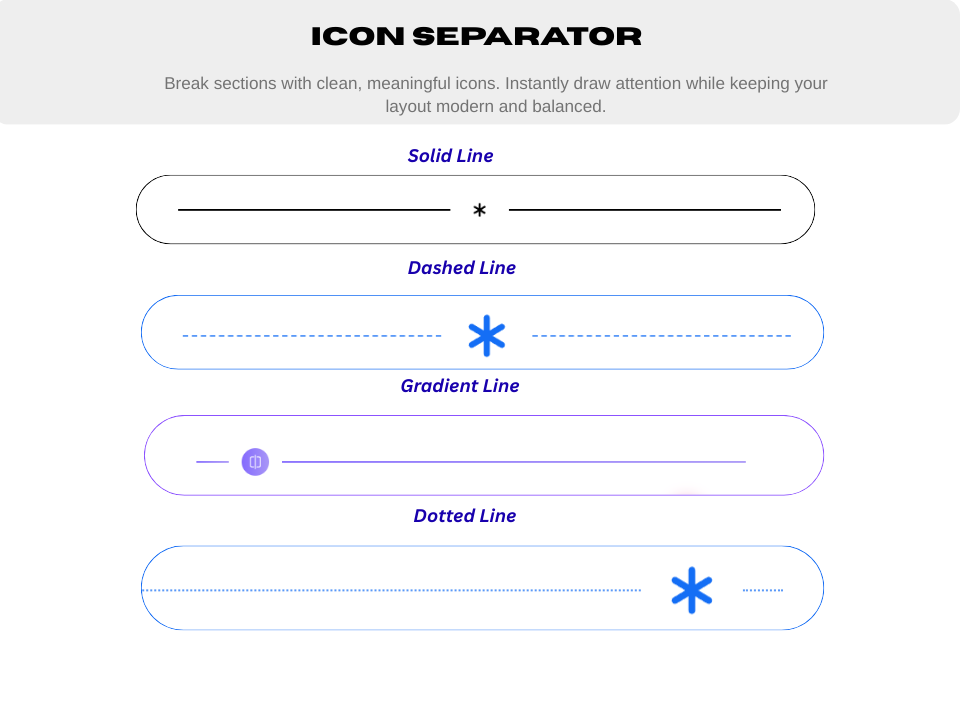
🛠️ Icon Separator
Classic dividers with a modern twist.
- SVG Support: Choose from a library or use your own custom icons.
- Line Styles: Solid, Dashed, or Dotted lines with adjustable thickness.
- Smart Alignment: Perfect positioning for Left, Center, or Right layouts.
✅ Perfect For
- Landing Pages: Create “sticky” designs that keep users scrolling.
- Portfolios: Showcase your work with creative, modern separators.
- E-commerce: Highlight trust badges or features using the Pill Marquee.
- Blogs: Add a touch of personality to your long-form content.
💎 Free vs Pro
Free Version Includes:
- Standard Wave Separator with core controls.
- Fully featured Icon Separator (All options included!).
- Basic Bold Gradient Separator.
- Responsive controls for Desktop, Tablet, and Mobile.
- Centralized management via the “Section Separator” post type.
Pro Version Unlocks:
- Premium Wave Presets: Ocean, Neon Glow, Fire, and Sunset.
- Animated Pill Separator: The infinite marquee effect for features.
- Advanced Wave Motion: Bounce, Invert, and custom directions.
- Complex Patterns: High-end geometric overlays for gradients.
- Priority Support: Direct help from our expert developers.
How to use
- Install and activate the Section Separator plugin.
- Open the Gutenberg editor.
- Add the Section Separator block from the Widgets category.
- Customize settings from the right-side block panel.
- Enjoy beautiful section dividers 🎉
For installation help click on Installation Tab
Feedback
Did you find a bug or have a feature request? Please share your feedback with us
Check out the Parent Plugin of this plugin-
B Blocks – A blocks collection and page building tool for Gutenberg.
Check out our other WordPress Plugins-
Html5 Video Player – Display videos as single and playlist in multiple skins.
PDF Poster – Display/Embed PDF files with different styles.
Html5 Audio Player – Listen audios with awesome visuals.
StreamCast – Customizable radio player with different skins.
3D Viewer – Embed 3D models and 3D products with interaction.
Advanced Post Block – Show posts and custom posts in different layouts.
Screenshots




Blocks
This plugin provides 1 block.
- Section Separator Separate the section in beautiful way.
Installation
From Gutenberg Editor:
- Go to the WordPress Block/Gutenberg Editor
- Search For Section Separator
- Click on the Section Separator to add the block
Download & Upload:
- Download the Section Separator plugin (.zip file)
- In your admin area, go to the Plugins menu and click on Add New
- Click on Upload Plugin and choose the
separator.zipfile and click on Install Now - Activate the plugin and Enjoy!
Manually Installation:
- Download and upload the Section Separator plugin to the
/wp-content/plugins/directory - Activate the plugin through the Plugins menu in WordPress
FAQ
-
Is it fast?
-
Yes! We use optimized SVG rendering and CSS-driven animations to ensure zero impact on your site’s PageSpeed scores.
-
Does it work with Elementor or Divi?
-
This is a native Gutenberg block. However, you can create your separator as a “Shortcode” in our plugin dashboard and then paste that shortcode into ANY page builder (Elementor, Divi, Beaver Builder, etc.).
-
Can I use my own icons?
-
Absolutely! The Icon Separator supports custom SVG code, giving you unlimited design freedom.
-
Is it responsive?
-
Every single separator type has built-in controls for Desktop, Tablet, and Mobile to ensure your site looks perfect on every screen.
Reviews
There are no reviews for this plugin.
Contributors & Developers
“Section Separator Block – Modern Waves, Icons, Pills & Emoji Stacks” is open source software. The following people have contributed to this plugin.
Contributors


Translate “Section Separator Block – Modern Waves, Icons, Pills & Emoji Stacks” into your language.
Interested in development?
Browse the code, check out the SVN repository, or subscribe to the development log by RSS.
Changelog
2.0.7 – 30 September 2026
- Fix: Block settings (separator type, colors, icons, etc.) were being reset to default every time the block was saved, caused by the new server-side validation added in 2.0.6 mishandling WordPress’s slashed post content.
- Fix: Removed a call to a non-existent WordPress function that could crash the site with a fatal error after updating to 2.0.6.
- Fix: Corrected an invalid block attribute schema that caused “type” schema keyword required notices/warnings to appear on the site.
2.0.6 – 21 September 2026
- Security: Sanitized icon separator markup (attributes.iconSep.ele) on both the frontend and the server before it is rendered, closing a stored XSS vector reported by the WordPress.org plugin review team.
- Security: Hardened the separator’s dynamic
<style>tag output against markup breakout from free-text style values. - Improvement: Lazy-load the emoji picker in the block editor instead of bundling it into the main editor script, significantly reducing the editor bundle size.
2.0.5 – 09 June 2026
- Fix: Removed static imports of block editor packages from frontend scripts which caused 401 unauthorized errors.
2.0.4 – 02 June 2026
- Fix: Fixes emoji settings UI spacing
- Improvement: Load pill typography styles and Google Font links only when separator is
pill
2.0.3 – 11 May 2026
- New: Introduced the Emoji Stack separator – fully free and customizable!
- Improvement: Refined block metadata and improved performance.
2.0.2 – 23 Feb 2026
- Update: Redesigned and modernized admin dashboard interface.
2.0.0 – 23 Dec 2025
- Added four new aesthetic wave presets: Ocean, NeonGlow, Fire, and Sunset.
- Added support for controlling wave amplitude (height/intensity).
- Added Wave Direction options: Left-to-Right (ltr), Right-to-Left (rtl), Invert, Static, Bounce.
- Added vertical flip option to invert wave direction vertically.
- Added a brand-new Separator Type: Pill, featuring colorful floating pill labels.
- Pill separator includes smooth infinite marquee animation with customizable duration/speed.
- Each pill supports individual customization: Background color, Text color, Label text, Rotation angle.
- Global style controls for the pill track: Padding, Margin, Background, spacing/gap.
- Individual pill item styling controls: Padding, Shadow, Typography, Border, Border Radius.
- Added a brand-new BoldGradient Separator combining editable pill-style items with pattern and wave overlays.
- Background Type control: Both, Pattern, Organic, or None.
- Organic Waves Controls: Enable/disable, Top & Bottom Opacity, Wave Height, Color Mode (Solid/Gradient), Gradient Options (Start Color, End Color, Direction: Horizontal, Vertical, Diagonal).
- Pattern Controls: Toggle visibility, Opacity, Configure Angle, Transparent Gap, Stripe Colors, and Distances.
- Dynamic Gradient Items: Inline RichText editing, Add/Duplicate/Remove items, Per-item color control.
- Gradient Item Styling Controls: Padding, Border, Border Radius, Shadow.
1.0.5 – 27 Nov 2025
- Improve Optimization.
1.0.4
- Add translate feature
1.0.3
- Fix Render Issue
1.0.2
- Reduce PHP Code
- Performance Improvements
1.0.1
- Reduce PHP Code
1.0.0
- Initial Release.