

Description
Search Analytics for WP logs what visitors search for on your WordPress site and how many results each search returned. You see which search terms are popular and which came up empty. Everything is stored in your own database.
Your site search shows what people came for, in their words rather than yours. Say “opening hours” got 41 searches last month and zero results every time. Either the page is missing or it says “business hours”. The no-results filter lists every gap like that.
What your search log tells you
What to write next. Searches with no results are topics people expect to find on your site. Sorted by number of searches, they become a to-do list with the most requested topics on top. On a blog, that’s your next post. In a help center, it’s the answer people keep missing.
Which pages people can’t find. Sometimes the page exists and visitors still search for it. If “contact” or “shipping” shows up week after week, the link is probably too hard to spot.
In a WooCommerce shop, every product search is saved with the number of products it found. A run of searches for a brand or size you don’t carry is demand you’d otherwise never hear about.
Often the lesson is simply vocabulary. Visitors type “couch” when your store says “sofa”. Their search terms are the words to use in your titles and menus.
Key features
- Records searches from your normal WordPress search, including theme search boxes and the WooCommerce product search.
- Also covers wpForo forum searches and custom URL parameters you add, such as Toolset’s
wpv_post_search, including REST API requests that use them. - AJAX live search can be recorded too, with one line of code (see For developers).
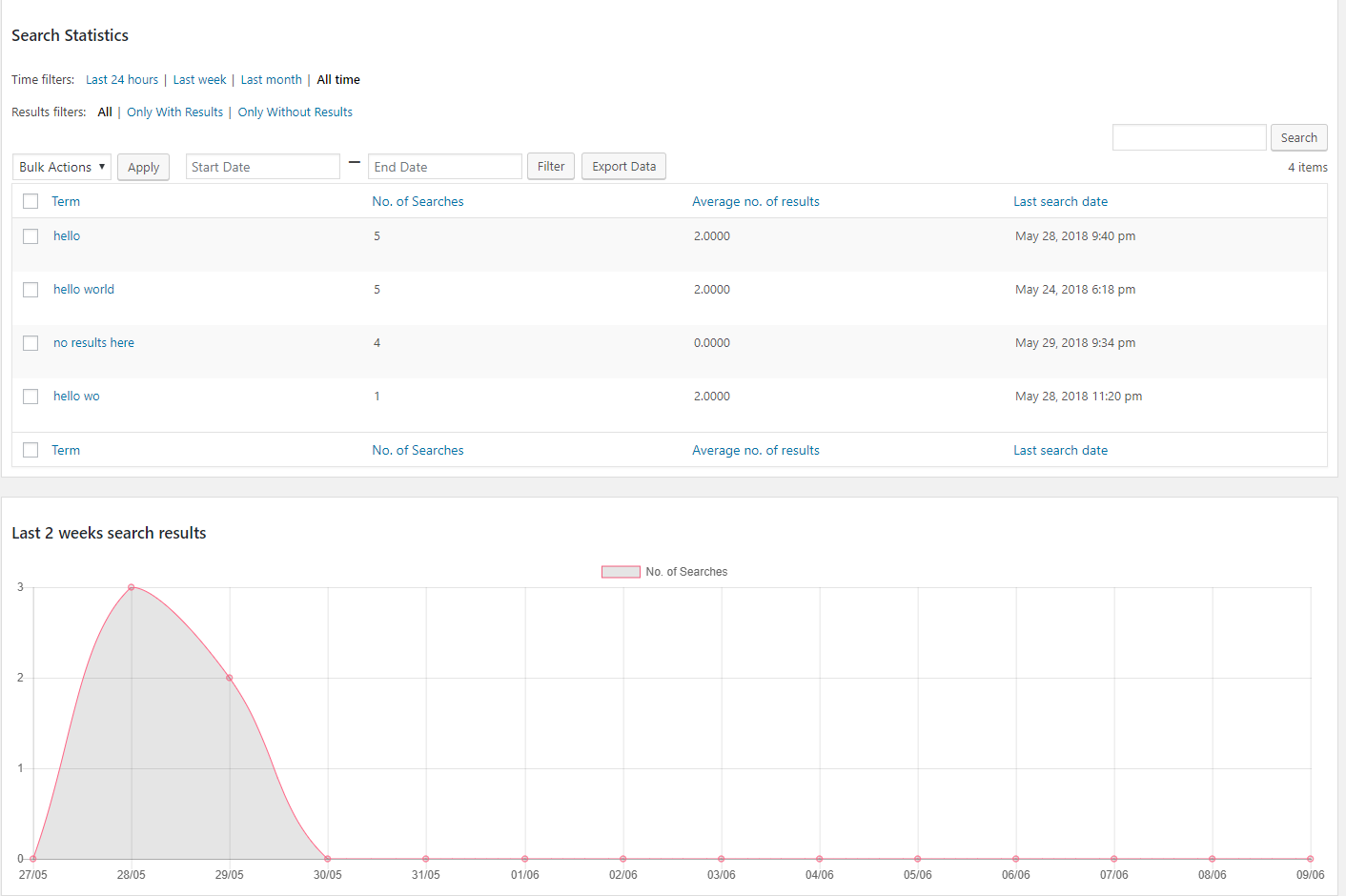
- Every search term in a sortable table, with the number of searches, average results and last search date.
- Time filters from the last 24 hours to all time, or any date range you pick.
- A no-results filter that shows only the searches that found nothing.
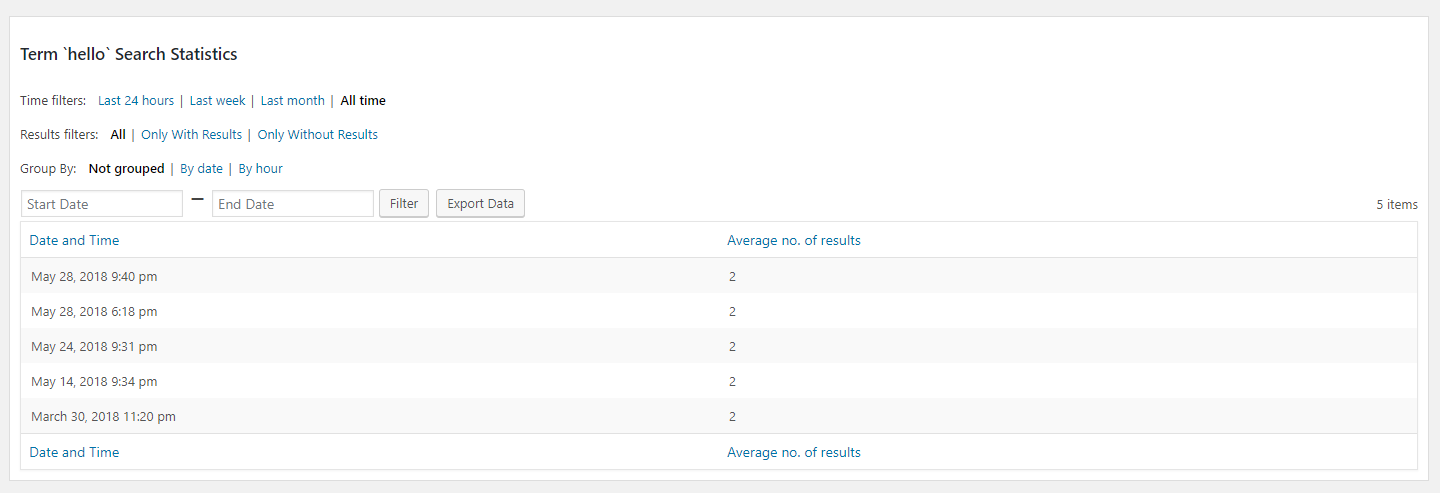
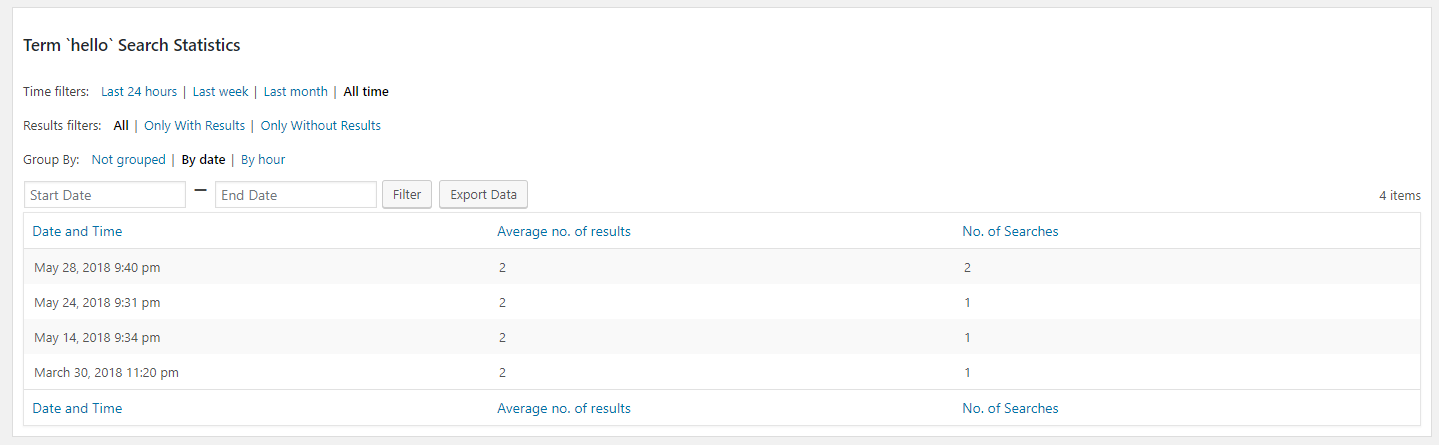
- Each term’s history by date or by hour, plus a “No Group” view that lists every search in order.
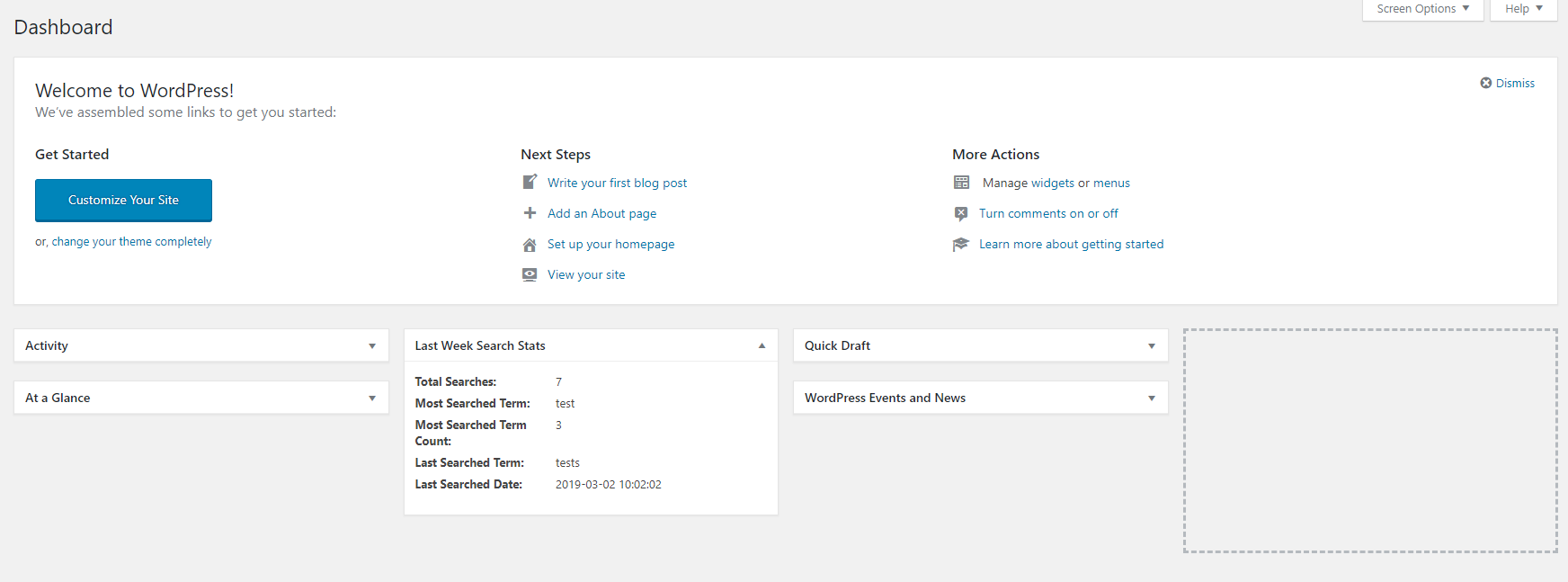
- A daily chart compared with the previous period, and a dashboard widget with last week’s numbers.
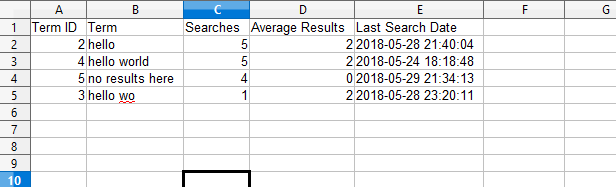
- CSV export of whatever view you’re on.
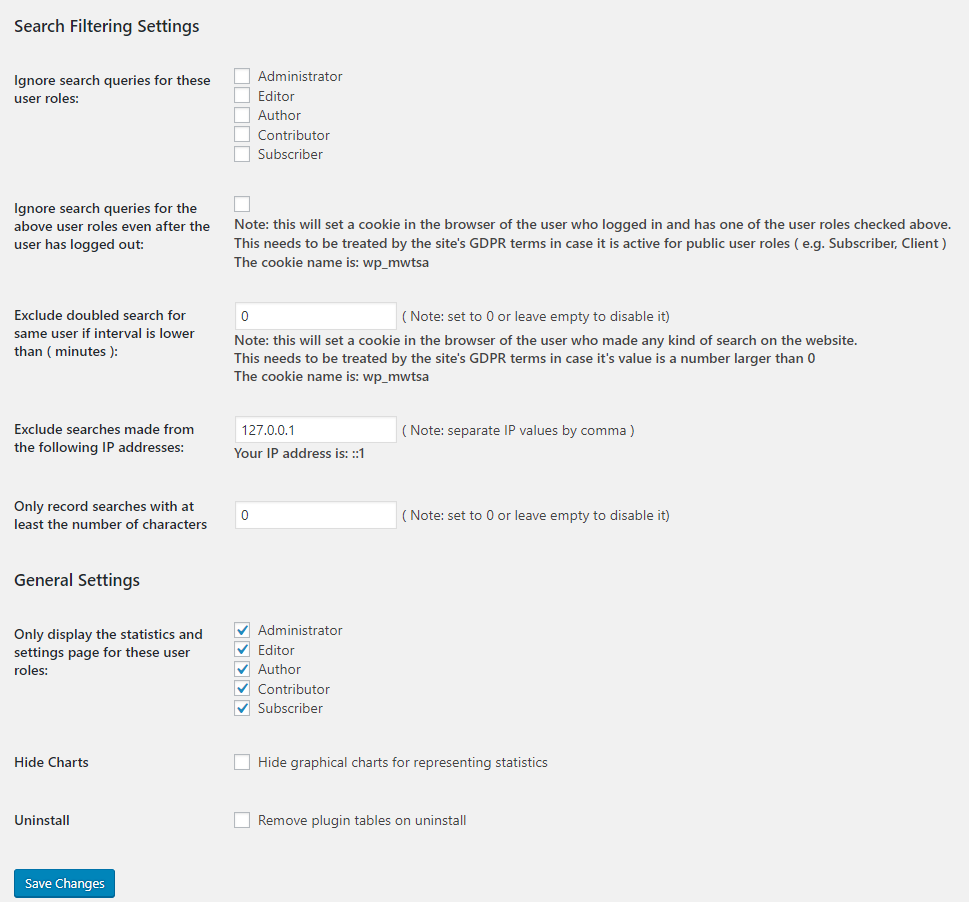
- Keep your own searches out, even after you log out. You can also skip repeat searches, listed IP addresses, very short terms and words you block.
- Optional country and logged-in user for each search, both off by default.
- Two shortcodes to show popular or recent searches on your site.
- Separate role access for viewing the statistics and changing the settings.
- Works on multisite, with separate data for each site, and is translation-ready.
Getting started
Recording starts as soon as you activate the plugin. Run a search on your site, then open Search Analytics in the admin menu to see it.
One setting is worth changing on day one: exclude your own role, so your test searches don’t count. The FAQ below covers the rest, from WooCommerce to live search.
Privacy
There’s no account to create and no API key. Nothing is sent anywhere unless you turn on “Save Search Country”, which is off by default. It sends visitors’ IP addresses to ip-api.com or ip2c.org to look up the country (see External services below).
IP addresses are never saved with the searches, and no cookies are set unless you use one of two optional settings. The FAQ lists exactly what is stored.
For developers
To record searches from your own code, such as an AJAX live search, call mwtsa_process_search_term( $term, $result_count ). It runs the same exclusion checks as a normal search and returns whether the search was saved.
Filters: mwtsa_do_not_save_search, mwtsa_exclude_term, mwtsa_extra_exclude_conditions, mwtsa_result_count, mwtsa_export_filename, plus filters on the shortcode output. Actions: mwtsa_after_term_save, mwtsa_after_history_term_save. The code is on GitHub.
Support
Questions and ideas are welcome in the support forum. If the plugin is useful to you, a review helps other site owners find it.
External services
Search Analytics for WP can look up the country each search was made from. This only happens when the “Save Search Country” setting is enabled; it is off by default.
When a search is recorded, the visitor’s IP address is sent to the service chosen in the “Country lookup service” setting. Each IP address is looked up at most once per day, and private or reserved addresses are never sent.
IP-API (ip-api.com)
The default service. The IP address is sent over HTTP, as the free service does not support HTTPS. The free service only allows non-commercial use and 45 requests per minute.
Terms of service and privacy policy: https://ip-api.com/docs/legal
ip2c.org
The IP address is sent over HTTPS. The service is free (LGPL) and allows around 10 requests per second. It only supports IPv4 addresses, so searches from IPv6 addresses are saved without a country.
Service terms and privacy policy: https://about.ip2c.org
Credits
Country flags on Windows use the “Twemoji Country Flags” font from country-flag-emoji-polyfill by TalkJS (MIT license). The flag artwork comes from Twemoji and is licensed under CC-BY 4.0. The font and polyfill are bundled with the plugin and loaded from your own site.
Screenshots
Installation
Search Analytics for WP can be installed via the WordPress Automatic Plugin Install page in the admin panel. It can also be downloaded from the WordPress Plugin Directory and installed manually.
After the installation and activation is complete you should visit the plugin’s settings page ( Search Analytics -> Settings ) to make sure it is properly configured for your needs.
FAQ
-
Does it work with WooCommerce product search?
-
Yes. WooCommerce’s product search box opens the normal search results page, so each product search is recorded with the number of products it found, just like a blog search. A live search that only shows results in a dropdown needs a line of code (see “Why aren’t some searches being recorded?” below).
-
How do I find searches that returned no results?
-
On the Search Analytics page, click “Only Without Results” and pick a time range. Then sort by “No. of Searches” to put the most common dead ends first.
-
Can I keep my own searches out of the statistics?
-
Yes. In the settings, choose the roles to ignore under “Ignore search queries for these user roles”, for example Administrator and Editor. To keep ignoring those users after they log out, also tick “Ignore search queries for the above user roles even after the user has logged out”. This sets a cookie in their browser when they log in. You can list IP addresses to ignore too, like your office’s.
-
Why aren’t some searches being recorded?
-
The plugin records searches that load your site’s search results page (the
?s=address). If one is missing, check these:- Ignored roles, IP addresses, the minimum length, blocked words and the repeat-search interval all skip searches on purpose. If your own role is ignored, test in a private browser window.
- Opening page 2 of the results or the search feed doesn’t count as a new search.
- If your search form uses its own URL parameter instead of
s, add it under “Add custom search parameters for recording the searches”. -
A live search that shows results without loading the search results page has to record its searches itself. Call this from the code that handles it, once per finished search rather than on every keystroke:
if ( function_exists( ‘mwtsa_process_search_term’ ) ) { mwtsa_process_search_term( $term, $result_count ); }
mwtsa_process_search_term() applies the same settings as a normal search. For anything else, ask on the Support Forum.
-
Will it slow down my site?
-
Only searches do any work. Each search is saved with a few small database queries. Other pages only check whether they are a search, and the plugin loads no scripts or styles on the front end.
With “Save Search Country” on, the first search from a new IP address waits for the country lookup, which gives up after 2 seconds. The result is then cached for a day.
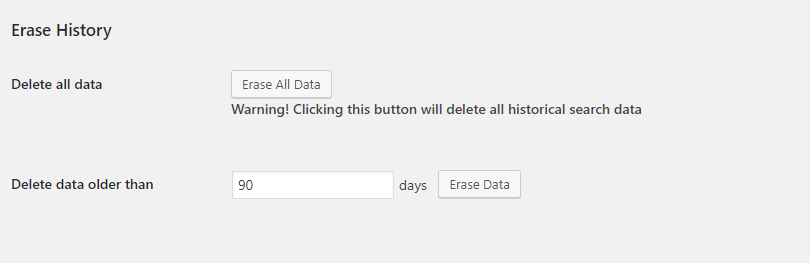
The history table grows with every search and nothing is deleted automatically. To trim it, use “Delete data older than” in the Erase History section of the settings.
-
Does it store personal data or send it anywhere?
-
Here is everything it keeps and shares, so you can check it against the GDPR or your local rules:
- Each search is saved with the term, the date and time, and the number of results. IP addresses are not saved.
- Search terms are whatever visitors type, which now and then includes a name or an email address. You can delete any term from the statistics page.
- “Save Search Country” (off by default) adds the visitor’s country. To find it, the visitor’s IP address is sent to ip-api.com or ip2c.org (see External services), and the country is cached for a day under a hash of the IP address.
- “Save Search By User” (off by default) links logged-in users’ searches to their accounts.
- A cookie is only set if you use the repeat-search interval or the “even after the user has logged out” option. It holds the IDs of recently searched terms and when they were searched, or a flag that the user’s role is ignored.
- You can erase all data, or everything older than a number of days, from the settings at any time.
-
Can I export the search data?
-
Yes. The “Export Data” button on the statistics page downloads what you’re looking at as a CSV file, with the same time range, filters and grouping.
-
Can I show popular searches on my site?
-
Yes, with two shortcodes:
[mwtsa_display_search_stats]lists the most searched terms, plus the visitor’s own recent searches if they’re logged in and “Save Search By User” is on.[mwtsa_display_latest_searches]lists the most recent search terms.
Both hide terms with no results by default and take options for the period, the number of terms and the labels. For example,
[mwtsa_display_latest_searches unit="month" count="5"]shows the five most recent terms from the past month.In a widget area, use the Shortcode block, or the Text widget on WordPress 4.9 and later. On 4.7 and 4.8, add
add_filter( 'widget_text', 'do_shortcode' );to your child theme’sfunctions.php. -
Does deactivating the plugin delete my search data?
-
No. Deactivating the plugin always keeps the search history. To remove it, check “Delete all search data and settings when the plugin is deleted” on the plugin’s settings page, then delete the plugin from the Plugins screen. On multisite, each site’s data is only removed if that site has the setting checked.
-
You can use the Support Forum or open new issues on the GitHub repository: Search Analytics for WP.
-
Where do I report security bugs?
-
Please report security bugs found in the source code of the Search Analytics for WP plugin through the Patchstack Vulnerability Disclosure Program. The Patchstack team will assist you with verification, CVE assignment, and notify me, the developer of Search Analytics for WP.
Reviews


Contributors & Developers
“Search Analytics for WP – Site Search Tracking” is open source software. The following people have contributed to this plugin.
Contributors
Translate “Search Analytics for WP – Site Search Tracking” into your language.
Interested in development?
Browse the code, check out the SVN repository, or subscribe to the development log by RSS.
Changelog
1.6.0
Structure:
- Search data is now only removed when the plugin is deleted and the setting is checked, never on deactivation. The setting is now called “Delete all search data and settings when the plugin is deleted”
- The minimum WordPress version is now 4.7 (1.5.0 already needed it)
Features:
- The country lookup can use ip2c.org (HTTPS, IPv4 only) instead of ip-api.com. Choose it under “Country lookup service”; ip-api.com stays the default
- The new
mwtsa_process_search_term()function records searches from your own code, such as an AJAX live search, with the same checks as a normal search
Bugfixes:
- The statistics charts were not loading since 1.5.0
- The charts and the “By date” view grouped searches by day of the month, merging e.g. 26 August with 26 September. Comparison periods overlapped by a day and the charts showed an extra day
- On multisite, deactivating the plugin on one site with “Remove plugin tables on deactivate” checked removed the search data of every site in the network. New sites now get their tables reliably, and deleting a site removes its search data
- A trailing comma in “Exclude search in case it contains certain substring” excluded every search. Matching now also works for non-English text
- “Last 24 hours”, “Last week” and “Last month” now cover exactly that period instead of starting at midnight
- Loading the second page of search results or the search feed no longer counts as a new search
- Terms with leading or repeated spaces, or longer than 100 characters, got a new row on every search
- The minimum characters setting now counts characters instead of bytes
- The CSV export headers were wrong in the “No Group” view
- Saving the settings reset the chart defaults
- Deleting terms, and the old Dashboard and Settings menu entries, left a half-rendered page instead of redirecting
- The roles allowed on the settings page could not save it, and the roles allowed on the statistics page could not export
- The erase confirmation was skipped in translations containing an apostrophe
Security:
- CSV exports no longer let search terms run as spreadsheet formulas
- The tracking cookie is validated (a malformed cookie made every request fail) and is now HttpOnly and SameSite
- Every action now checks the user’s role, including the chart requests and erasing the history
Optimizations:
- Countries are shown with flag emoji instead of 249 bundled flag images (about 1 MB). Browsers that can’t draw flag emoji, such as Chrome and Edge on Windows, load a small flag font bundled with the plugin
- Added database indexes to the search history and search terms tables. Database upgrades now run from the admin, never during a visitor’s search
- The country lookup only runs for recorded searches, is cached per IP for a day and times out after 2 seconds
- The tracking cookie is no longer re-sent on every page, which kept pages out of full-page caches
- Searches through the REST API are counted without loading every matching post
- The plugin’s stylesheet only loads on its own screens
Deprecations:
- The
mwtsa_stats_table_*andmwtsa_term_stats_table_*filters are deprecated. Search Analytics 2.0 replaces the statistics screens and they will no longer run there
1.5.0
- Structure: Changed the main page from
wp-admin/index.php?page=search-analytics%2Fadmin%2Fincludes%2Fclass.stats.phptowp-admin/admin.php?page=mwtsa-search-analytics. A proper redirect was added to the old route - Structure: Changed the settings page from
wp-admin/options-general.php?page=search-analyticstowp-admin/admin.php?page=mwtsa-search-analytics-settings. A proper redirect was added to the old route - Structure: Added a new way to access the plugin main page as a section on the sidebar.
- Bugfix: Fix a possible crash in case ip-api.com did not return a valid response
- Bugfix: Fix potential IP spoofing when running a search with save country on
- Feature: Added
mwtsa_run_terms_history_data_query_argsfilter for changing the args before history data gets queried - Feature: Added a link to the statistics page on the dashboard widget
- Optimization: Security improvements and general code optimization. Fixed Cross-Site Request Forgery (CSRF) vulnerability
- Optimization: Performance improvements
- Optimization: Added the select2 and jQuery UI Smoothness theme as assets in the plugin
- Optimization: Deprecated the global
$mwtsa. It will be removed in a later version. Use theMWTSAI()to get the instance - Deprecations: Deprecated the helper functions with
mwt_prefix and renamed them to the proper prefixmwtsa_to prevent possible collisions - Deprecations: Deprecated the
mwtsa_run_terms_history_data_queryfilter. It could be used by bad actors to modify the query and pass a not sanitized query through
1.4.16
- Bugfix: Fix bug related to exclude keywords setting, reported here. Thank you @luislu for the report!
1.4.15
- Bugfix: Fix country not being saved, reported here. Thank you @mikeeiler for the report!
1.4.14
- Bugfix: Fix bulk deletion not working.
1.4.13
- Optimization: Security improvements and general code optimization.
1.4.12
- Others: Rename plugin to “Search Analytics for WP”
1.4.11
- Optimization: Security improvements and general code optimization. Fixed Reflected Cross-Site Scripting vulnerability reported by vgo0
1.4.10
- Optimization: Security improvements and general code optimization. Fixed Broken Access Control vulnerability reported by Abdi Pranata. Thank you for the responsible disclosure!
- Optimization: Compatibility with WP 6.6.x
1.4.9
- Bugfix: Fixed warnings showing on specific combination of filters and grouping. Reported here. Thank you @sadesades for the detailed report!
1.4.8
- Optimization: (ENCORE) Security improvements and general code optimization. Fixed this vulnerability
- Optimization: adjust some translations
1.4.7
- Optimization: Security improvements and general code optimization. Fixed this vulnerability
1.4.6
- Optimization: Security improvements and general code optimization. Fixed this vulnerability
- Bugfix: Charts not working after changing interval or chart type
1.4.5
- Bugfix: Fix PHP Compatibility issue: PHP 5.6 – 7.2
1.4.4
- Bugfix: Date filters not working if the browser is set in a language different from English
- Feature: Add setting: “Show results dates as UTC”, default: true
- Feature: Make dates in the results list show as UTC by default.
- Feature: Add 6 more filters and 2 actions for developers to be able to extend the plugin. An overview post will be published here: Search Analytics for WP: Filters Reference
- Optimization: Security improvements and general code optimization
- Optimization: Updates to the settings page
- Deprecations: Deprecated the
mwt_wp_date_format_to_js_datepicker_format()helper function
1.4.3
- Bugfix: Make sure that shortcode mwtsa_display_latest_searches displays unique terms
- Feature: Add more parameters to some filters. An overview post will be published here: Search Analytics for WP: Filters Reference
1.4.2 Hotfix
- Bugfix: fix default filters in the results view
1.4.1
- Feature: Add shortcode mwtsa_display_latest_searches for displaying the latest searches on the frontend of the website
- Feature: Add 3 more filters for developers to be able to extend the plugin. An overview post will be published here: Search Analytics for WP: Filters Reference
- Optimization: Security improvements and general code optimization
- Others: Add link to the complete changelog
1.4.0
- Feature: Add REST API search support
- Feature: Add 9 filters for developers to be able to extend the plugin. An overview post will be published here: Search Analytics for WP: Filters Reference
- Optimization: Add the search term to the mwtsa_extra_exclude_conditions filter
- Optimization: Check for minimum PHP and WP versions when activating the plugin
- Optimization: Compatibility with WP versions up to 6.0.1
- Optimization: Compatibility with PHP v8.1
- Optimization: Security improvements and general code optimization
- Bugfix: Fix styling on WP 4.4.0 – 4.9.20
- Bugfix: Fix broken settings page URL from the results page
- Others: Rename the plugin to “WP Search Analytics”
1.3.6
- Bugfix: Users can not see the statistics page in some cases. Bug report
- Bugfix: Database error on term delete success page
- Optimization: Compatibility with WP versions up to 5.8
- Optimization: Compatibility with PHP versions between 5.6 – 8.0
- Optimization: Security improvements and general code optimization
- Optimization: Remove filters and groups on the term delete success page
- Others: Add more “Useful Links”
- Others: Add quick rate tool
1.3.5
- Bugfix: Fix dates filter not allowing you to select the current day in certain timezones
- Bugfix: Deleting multiple entries with the bulk action would trigger 2 notices
- Feature: Add support for WpForo
- Feature: Add mwtsa_export_filename filter to allow control over the filename generated when exporting data
- Feature: Add shortcode mwtsa_display_search_stats for displaying search statistics on the frontend of the website
- Optimization: Prepare the plugin for community translation
- Optimization: Security improvements and general code optimization
1.3.4 Hotfix
- Bugfix: Fix fatal error for missing
wp_timezone()in WP < 5.3.0
1.3.3
- Bugfix: Times displayed in UTC time instead of the website’s timezone
- Feature: allow filtering searches by user
- Experimental Feature: prevent terms from being saved if they contain certain substrings
- Experimental Feature: allow the plugin to capture search strings from custom search parameters
- Optimization: hook load_plugin_textdomain on the init action instead of the plugins_loaded one
- Optimization: prefix helper functions create_date_range and get_current_user_ip with mwt_ to avoid eventual naming conflicts
1.3.2
- Bugfix: “Only display the statistics and settings page for these user roles” not working correctly
- Bugfix: Fix missing script error if charts disabled
- Bugfix: Add prefix to the option setting group to prevent conflicts
- Bugfix: Database error if search-term URL param is empty
- Feature: Split the “Only display the statistics and settings page for these user roles” in 2 different settings
- Optimization: compatibility with WP versions up to 5.4
- Optimization: Add prefix to the option setting group to prevent conflicts
- Optimization: Review and patch the plugin from a security perspective
- Optimization: Made sure administrator display rights can not be taken away by making the field disabled
1.3.1 Hotfix
- Bugfix: database not being updated correctly in case of plugin update. It only worked for manual plugin activation
- Bugfix: search country locked to Canada.
1.3.0
- Feature: add save_search_term() method to allow external search saving
- Feature: add mwtsa_extra_exclude_conditions filter to allow more control over the conditions in which a search is processed
- Feature: add mwtsa_exclude_term filter to allow more control over the conditions in which terms are saved
- Feature: save searches by user so the user can see his search history
- Feature: add country geolocation for the searches
- Feature: add more options for the chart
- Feature: add period comparison in the chart
- Optimization: compatibility with version 5.2.2
- Optimization: Add multisite support
- Optimization: Build separate methods for displaying charts to be able to easily integrate it in other views
- Optimization: Make chart include “today”
- Optimization: general code optimizations
- Optimization: general code optimizations
1.2.3
- Feature: add ability to delete all search history older than a selected number of days
- Feature: add setting: “Exclude searches from IPs list”
- Feature: add setting: “Only record searches with at least the number of characters”
- Feature: add “Ungroup” view for the list of terms for having a chronological data view
- Optimization: compatibility with version 5.1
- Optimization: change default sort to last search date
- Optimization: average number of results column to only 2 decimals
- Optimization: update the singleton pattern
1.2.2
- Bugfix: fix bug in the database version update
- Bugfix: “By Hour” group is not working correctly
- Bugfix: “Hide graphical charts” setting not working correctly
- Feature: Add a setting for using a cookie for previously logged in user for not counting searches made by users having a user role in the excluded roles list
- Feature: Add a setting for not counting duplicate searches over a period of time
- Feature: add role visibility for the dashboard widget
- Optimization: update the way Group By works on the term details view
- Optimization: use function_exists() and class_exists() for all function/class declarations
- Optimization: add javascript graph compatibility with older IE versions
- Optimization: show fewer points on the Y axis on the graphical chart if search count gets high
1.2.1
- Bugfix: fix “Unknown column ‘average_posts’ in ‘where clause’” error on single term view ( introduced in v1.2.0 )
- Bugfix: remove bulk actions on single term view ( introduced in v1.2.0 )
- Bugfix: fix “Last 24 hours” time filter ( introduced in v1.2.0 )
- Feature: add admin dashboard widget with last week stats
- Feature: add possibility to group single term view results by day and hour
- Feature: add charts for graphical data representation
- Optimization: add link on searched term for faster navigation
- Optimization: make custom views and filters language variables ( introduced in v1.2.0 )
- Optimization: make all date and time columns use WP date and time format settings
- Optimization: code updates to better comply to the WP coding standards
1.2.0
- Bugfix: fix PHP notice on the settings page ( introduced in v1.0.3 )
- Bugfix: fix search resetting time and result filters ( introduced in v1.1.2 )
- Bugfix: fix notice “Undefined index: date_from” ( introduced in v1.1.2 )
- Bugfix: fix notice “Undefined index: date_to” ( introduced in v1.1.2 )
- Feature: ability to download history in a CSV file
- Feature: add single term view with detailed search historical stats
- Feature: ability to choose which user roles can see the search history stats
- Optimization: set table names in plugin constants for cleaner calls
- Optimization: move history data return from db function to independent static class.
- Optimization: change time filter default to “All Time”
1.1.3
- Bugfix: fix jquery.ui load over https ( introduced in v1.1.2 )
1.1.2
- Bugfix: make stats page full responsive ( introduced in v1.1 )
- Feature: add filters: all, only successful, only unsuccessful ( 0 posts ) results
- Feature: Time range filters
- Optimization: make bulk action “Delete” use language variable ( introduced in v1.1.1 )
- Optimization: add screen option to allow selection of number of results per page
- Optimization: last search date – sortable column
- Optimization: add “clear” option to the date pickers
- Optimization: add 2 months view on the calendars
1.1.1
- Bugfix: remove limit of results on the table ( introduced in v1.1 )
- Feature: ability to delete terms from the results
- Feature: bulk terms delete action
- Optimization: results per page reduced from 30 to 20
1.1
- Bugfix: exclude empty search strings ( introduced in v1.0 )
- Design: display tables using the WordPress Admin Tables
- Feature: pagination for better data analysis
- Feature: custom sorting on all columns
- Feature: filter results by string
1.0.4
- fix a warning occurring in certain cases on search
1.0.3
- Add ability to delete all history
- Add ability to remove the tables on plugin deactivate
- Stats page restyling
1.0.2
- Update results sorting for better viewing the data
- Minimum styling on the stats page
- Add link to the settings page
1.0.1
- Fix deprecated notice
1.0
- Initial Release