

Description
SanBar EXPress Fiscal Check-BR checks the fiscal data of your WooCommerce products before the invoice is issued, to avoid SEFAZ rejections. Made for store owners who are not tax specialists: every problem is explained in plain Portuguese, with a button to fix it.
Focused on MEI (CRT 4) and Simples Nacional (CRT 1). It never blocks product editing — it only shows colors and tells you what to fix.
This is the free edition. Features marked (Plus Only) below are part of the Plus edition and are listed so you know what it adds.
Features
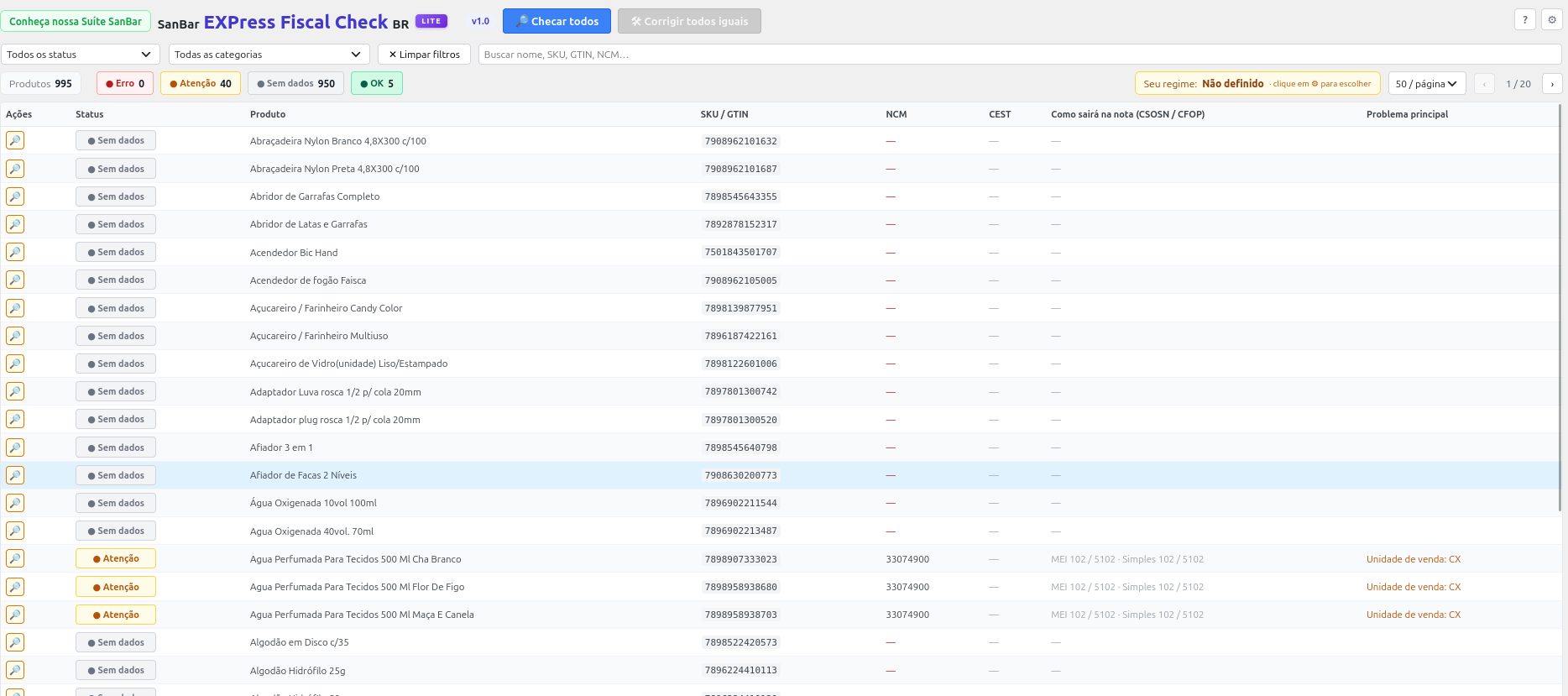
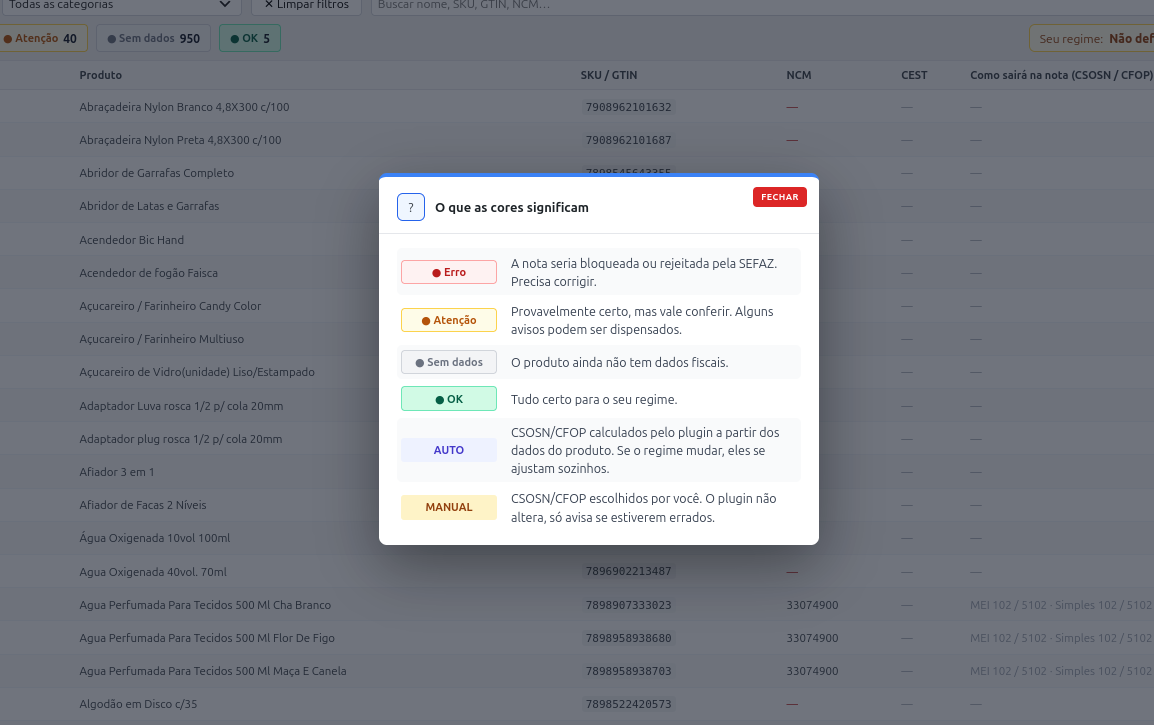
- Color status per product — ⚪ no data, 🔴 error, 🟡 attention, 🟢 ok
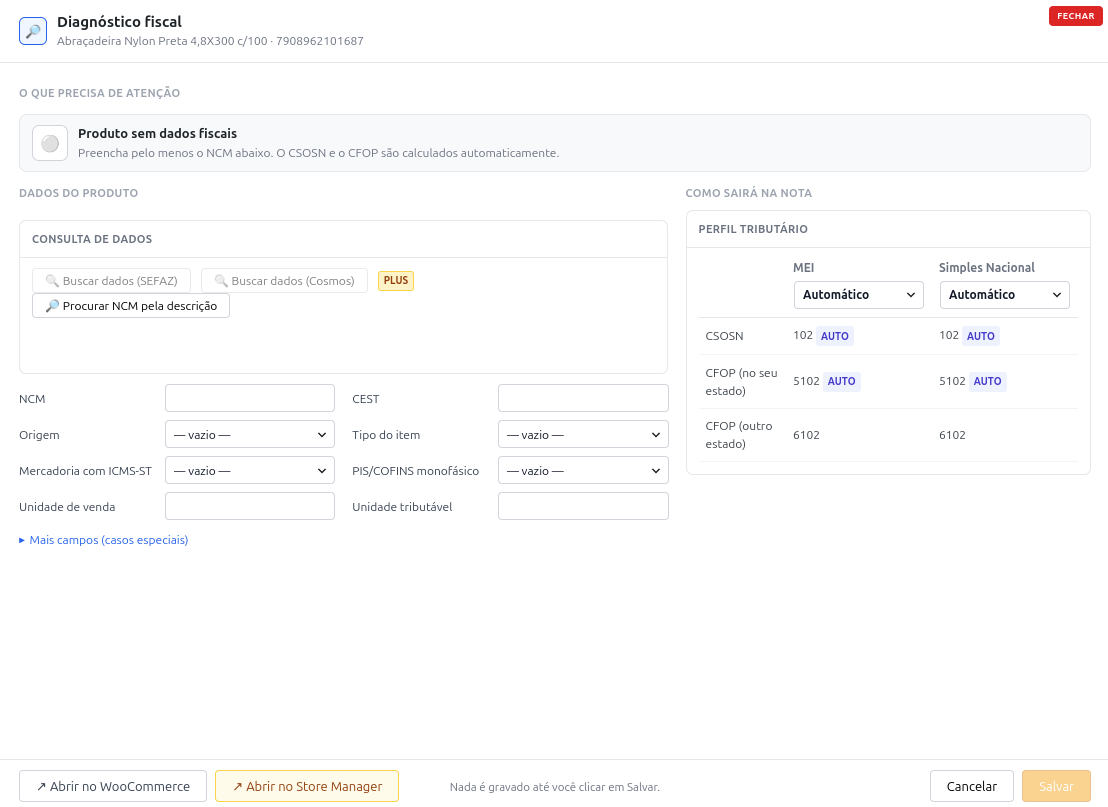
- Diagnosis per product — what is wrong, why, and how to fix it, with one-click fixes
- “Como sairá na nota” (how it will appear on the invoice) — the CSOSN and CFOP the product gets as MEI and as Simples Nacional
- Automatic or manual — CSOSN/CFOP for each regime calculated from the product data, or set by you; when the store changes regime, automatic products adjust by themselves
- Catalog check in batches — checks the whole catalog, 50 products at a time, with a background first check and progress indicator
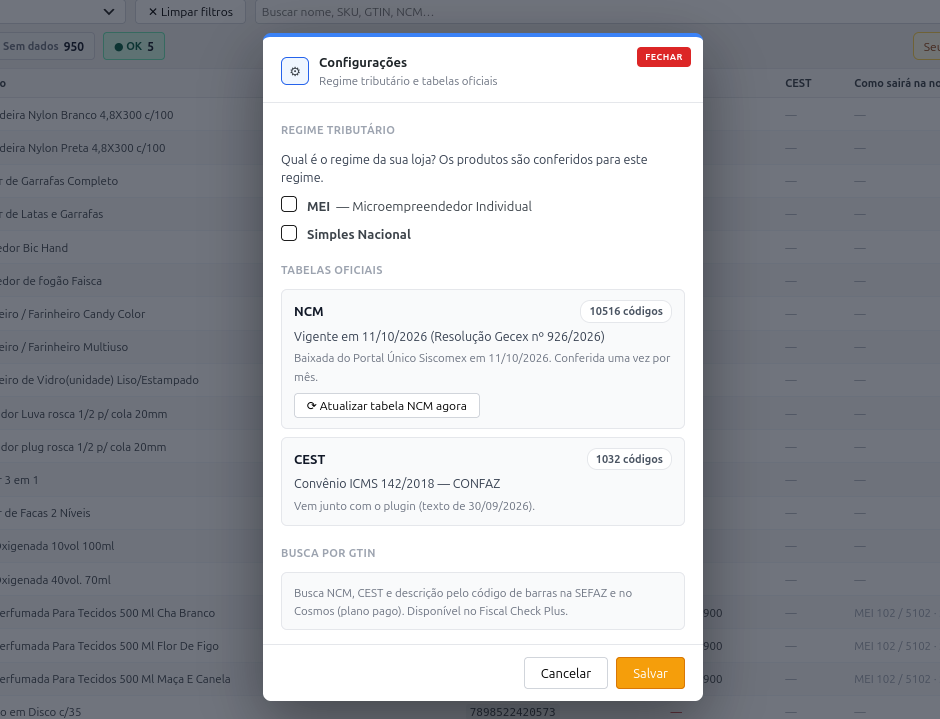
- Official tables — checks that the NCM exists and is current (Siscomex table, refreshed monthly) and suggests the CEST of the NCM (ICMS Agreement 142/2018); revoked CEST codes are flagged with what to do
- NCM search by description (“Procurar NCM pela descrição”) — suggests NCMs already used by similar products in your catalog and searches the official NCM table
- Filters — by status, category (parent › child tree), search, 25 or 50 products per page
- Works on its own — writes to the standard product fiscal fields, so any invoicing plugin can use them
- “Corrigir todos iguais” (fix all alike) — solves repeated problems in many products at once, in batches (Plus Only)
- GTIN lookup — by barcode (GTIN field, or SKU when it is a valid barcode): SEFAZ Centralized GTIN Registry (official, with your A1 certificate, saved once for the site: sent here or in SanBar EXPress NF-e & PDV) and Cosmos (optional, paid API), cross-checked, with the NCM checked against the official table (Plus Only)
- XML Import ⇄ Fiscal Check tabs and “Conferir fiscal” right after creating drafts — see Integration below (Plus Only)
Integration with the SanBar Suite
Works on its own, and connects (without depending on them) with:
- SanBar EXPress NF-e & PDV — uses the tax regime (CRT) configured in the invoicing plugin, and the site certificate (shared vault) for the SEFAZ GTIN lookup. If no certificate is saved yet, the Plus edition lets you send it here.
- SanBar EXPress NF-e XML Import — re-checks a product whenever purchase-invoice data is applied to it. With both plugins in Plus: tabs to switch between the two screens, and a “🔎 Conferir fiscal (N)” button right after creating drafts that opens Fiscal Check filtered to those products, then “Abrir no Store Manager” with the same products (Plus Only)
- SanBar EXPress Store Manager (Plus) — Fiscal Check button in the Integrations menu, colored fiscal buttons in the grid and in the variations window, fiscal data carried in its backup/sync. Inside the Store Manager window the whole flow XML Import Fiscal Check grid filter happens without leaving the screen
- Cosmos token — the same token is shared with the Store Manager image search
More from sanbazar
Other plugins and tools by the author are listed at software.sanbazar.com.br.
Permissions
- Viewing and checking products requires the
edit_productscapability. - Saving corrections to a product requires
edit_productfor that product. - Settings (regime, tables, Cosmos token) require
manage_woocommerce.
External services
- Portal Único Siscomex (Brazilian federal government) —
https://portalunico.siscomex.gov.br/classif/api/publico/nomenclatura/download/json— downloads the public current NCM table once a month (WP-Cron) and when you click “Atualizar tabela NCM agora”. No store or product data is sent. Terms: https://www.gov.br/pt-br/termos-de-uso - SEFAZ Centralized GTIN Registry (SVRS) (Plus Only) —
https://dfe-servico.svrs.rs.gov.br/ws/ccgConsGTIN/ccgConsGTIN.asmx— only when you click “Buscar dados (SEFAZ)” in a diagnosis. The query is signed with your A1 certificate (the site certificate, sent here or in SanBar EXPress NF-e & PDV) and sends the barcode and the CNPJ of the certificate. No product data other than the barcode is sent. Results are cached for up to 30 days. - Cosmos (Bluesoft) (Plus Only) — optional, requires a paid Cosmos API plan. Only when you click “Buscar dados (Cosmos)” and a token is saved: sends the barcode and your token to
https://cosmos.bluesoft.com.br/api/gtins/. Terms: https://cosmos.bluesoft.com.br
Screenshots
Installation
- Upload the
sanbar-express-fiscal-check-brfolder to/wp-content/plugins/, or install via Plugins Add New Upload. - Activate the plugin (WooCommerce must be active).
- Go to SB Softwares EXP Fiscal Check-Br (or SB EXP Fiscal Check, without the SB Softwares Hub).
- Without SanBar EXPress NF-e & PDV, choose your regime (MEI or Simples Nacional) in ⚙ Settings.
FAQ
-
Which tax regimes are supported?
-
MEI (CRT 4) and Simples Nacional (CRT 1). The Normal regime is not checked in this version.
-
Does it change my products by itself?
-
Only the CSOSN/CFOP of products in automatic mode, following your regime. Everything else changes only when you click a fix and save.
-
Where do the NCM and CEST tables come from?
-
- NCM — the current official table, downloaded from Portal Único Siscomex (Receita Federal) and refreshed once a month.
- CEST — built from the official text of ICMS Agreement 142/2018 (CONFAZ) and shipped with the plugin.
-
Does the plugin modify my data on uninstall?
-
Only its own data: its settings and its own
_sbfcbr_*product meta (per-regime profiles and check status). The standard fiscal fields of your products (NCM, CEST, CSOSN, CFOP…) are never touched on uninstall. The digital certificate (Plus edition) is not removed either: see the next question. -
Where is my digital certificate kept, and what happens to it when I delete a plugin?
-
Plus edition. There is one A1 certificate per site, kept in the site vault (the option
sanbar_certificado) and shared with SanBar EXPress NF-e & PDV. Both plugins read and write the same one:- If the vault is empty, you can send the certificate here (⚙ Settings GTIN search) or in NF-e & PDV. If it already has a certificate, this plugin shows it and does not offer the upload. To replace it, remove the current one first (“Remover certificado”) and send the new one.
- It is stored in the database, encrypted: the .pfx file and its password are sealed together with libsodium (authenticated encryption), using a key derived from your site’s security keys (the salts in
wp-config.php). Anything altered in the database is refused. They are never shown, logged or sent anywhere except to SEFAZ in the GTIN lookup. If you change the site’s security keys the certificate can no longer be opened: the plugin says so and you send it again. - It works with NF-e & PDV active, deactivated or not installed.
- Deleting this plugin does not remove the certificate: it stays in the vault, because NF-e & PDV may still use it and whether to remove it is your choice. To remove it, click “Remover certificado” before deleting the plugin, or remove the option
sanbar_certificado(andnfbr_certificadoorsbfcbr_cert, if they still exist) from the{prefix}optionstable of the database. - Fiscal documents are not involved: this plugin does not store invoices. NF-e & PDV keeps those on purpose, as explained in its own readme (Ajuste SINIEF 07/05, cláusula décima; Código Tributário Nacional, art. 195, parágrafo único).
-
My certificate is old or the upload fails. What can I do?
-
Plus edition. Some older A1 certificates (.pfx) use RC2/3DES encryption that current servers (OpenSSL 3) cannot read. This plugin then tries to convert the file by itself (see the next question). If the server does not allow it, convert it on your computer and upload the new file. There is also a “?” help next to the upload with these steps:
openssl pkcs12 -legacy -in old.pfx -nodes -out temp.pemopenssl pkcs12 -export -in temp.pem -out new.pfxrm temp.pem
Run them in this order. The first asks for the old file’s password; the second asks you to choose a password for the new file (type it twice; it can be the same).
temp.pemholds your private key without protection, so delete it right away (on the Windows Command Prompt usedel temp.pem). If you get “unknown option -legacy”, your OpenSSL is old: remove-legacy. On Windows, Git for Windows includes OpenSSL in Git Bash. You can also ask your certificate authority to re-issue or export the A1 in the new format. Keep the original file, and never send the certificate or its password by e-mail or chat. -
Does the plugin run commands on my server?
-
Plus edition. Only one, and only in the case above: when you upload an old-format certificate, this plugin runs the server’s
opensslprogram (PHPexec) to re-encode the file you just sent.- The program is looked up in fixed, standard paths; nothing from the request goes into the command, and every argument goes through
escapeshellarg. - The password is passed through a file, never on the command line.
- The four temporary files are created with permission 0600 (owner only) before any content is written, and are always deleted afterwards. One of them holds the private key unprotected, which is why this matters.
- It never runs at any other time. If
execis disabled oropensslis missing, nothing runs and you are told how to convert the file yourself.
- The program is looked up in fixed, standard paths; nothing from the request goes into the command, and every argument goes through
-
Which libraries are bundled?
-
The Plus edition bundles NFePHP
sped-common5.1.17 andsped-gtin1.1.2 (LGPL-3.0-or-later / GPL-3.0-or-later / MIT) andpsr/log3.0.2 (MIT), inplus/lib/, only to query the GTIN registry and read the certificate. If NF-e & PDV is active, its own copy of the same libraries is used instead.
Reviews
There are no reviews for this plugin.
Contributors & Developers
“SanBar EXPress Fiscal Check-BR” is open source software. The following people have contributed to this plugin.
Contributors
Translate “SanBar EXPress Fiscal Check-BR” into your language.
Interested in development?
Browse the code, check out the SVN repository, or subscribe to the development log by RSS.
Changelog
1.0
- Initial release.