

Description
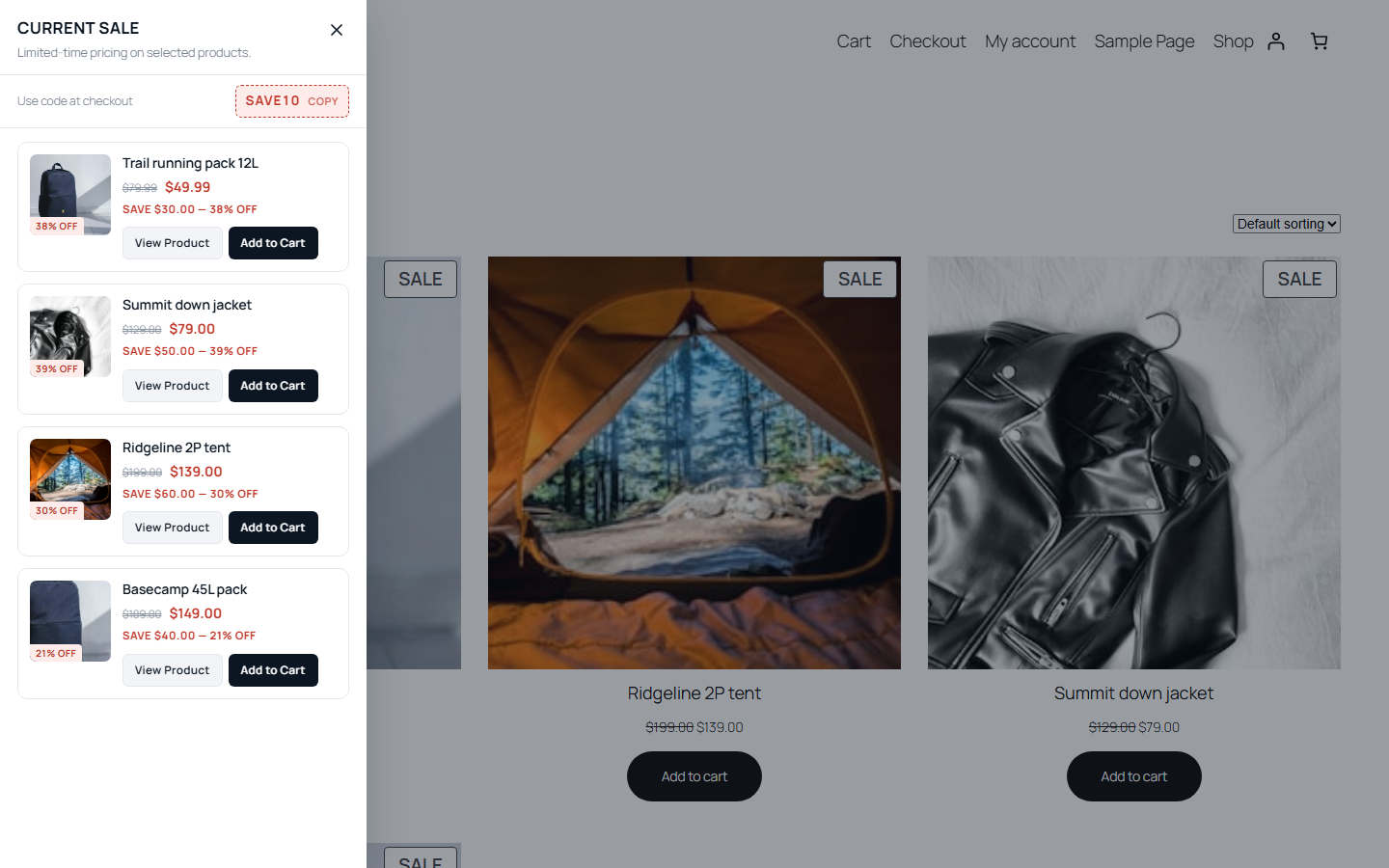
SalesDrawer finds every product your store currently has on sale and promotes it inside a slide-out drawer. The drawer opens on the schedule you choose, closes into a persistent sale tab, and reopens whenever a shopper taps it.
The plugin never stores prices, sale windows or stock levels. It reads them live from WooCommerce behind a short cache, so the drawer can never advertise a price that is no longer available.
Works on activation
- Every eligible sale product is promoted automatically — nothing to sync, nothing to configure
- Simple and variable products, including scheduled WooCommerce sales with start and end dates
- Products leave the drawer on their own when the sale ends, the price is removed, or the product is unpublished, deleted or out of stock
Merchandising
- Promote every eligible sale product, or hand-pick exactly which ones with a per-product switch
- Pin products to the top
- Sort by sale price, dollar savings, percentage discount, name or newest
- Cap how many products appear
- A Drawer Order view showing exactly which products made the cut, in order
The drawer
- Slides from the left, the right, or up from the bottom as a sheet; independent widths for desktop, tablet and mobile
- Three product layouts — list, two-column grid, or compact rows
- Auto-open rules: every page load, once per session, daily, every X days, first visit only, or never
- Launcher as a classic edge tab or a floating bubble, with nine built-in icons, your own icon, and live text tokens like {count} and {max_percent}
- A
[saledrawer_tab]shortcode to place a “see the deals” button anywhere - Add to cart from the drawer for simple products; variable products get Choose Options
- Cart awareness — a product already in the cart shows View Cart instead
- A tap-to-copy coupon code in the drawer header — read live from WooCommerce, so an expired or used-up coupon removes itself
- Keyboard and screen-reader accessible; works with any WooCommerce-compatible theme
- Full appearance control: colours, radius, spacing and shadow
- One-click seasonal presets — Black Friday, Flash Sale, Clearance and Holiday looks, applied before you save
Built for speed
Assets load only when the drawer has something to show. Every derived list is cached and invalidated automatically when product or campaign data changes. A deferred rendering mode keeps the drawer accurate on sites behind a full-page cache.
Extending
Every part of the drawer can be extended through documented action and filter hooks (all prefixed saledrawer_), and the drawer fires DOM events such as saledrawer:open, saledrawer:close and saledrawer:add_to_cart that themes and tag managers can listen for.
SalesDrawer Pro
SalesDrawer Pro is a separate add-on plugin, sold and hosted outside WordPress.org, that adds features of its own: scheduled campaigns, product rules by category/tag/brand, countdown timers, custom ordering, advanced targeting and analytics. This plugin contains none of that code, has no licence checks, and is complete on its own.
Screenshots


Installation
- Upload the plugin folder to
/wp-content/plugins/, or install it through the Plugins screen. - Activate the plugin.
- Go to WooCommerce SalesDrawer.
A starter campaign is created on activation and begins promoting your sale products straight away.
FAQ
-
Do I need to sync products?
-
No. The plugin reads WooCommerce’s own sale data on every request, behind a short cache that is invalidated whenever a product, variation, price, stock level or campaign changes.
-
Does the Promote switch change the sale?
-
No. It only controls whether a product appears in the drawer. Prices, sale schedules and stock are managed entirely in WooCommerce.
-
How are variable products handled?
-
If every variation shares the same sale price, that price is shown. If prices differ, the drawer shows “From $XX.XX” using the lowest on-sale variation. Variable products always link through to the product page with a Choose Options button so nothing is added to the cart incorrectly.
-
I use a page caching plugin. Will the drawer go stale?
-
Switch Settings General Rendering to “Deferred”. The cached page then carries only a mount point and the drawer contents are fetched fresh after load.
-
What happens when nothing is on sale?
-
By default the drawer and the sale tab disappear completely. You can switch to showing a short message instead.
-
Does the plugin phone home or track my shoppers?
-
No. The plugin contacts no external service and sets no cookies (the drawer remembers when it last auto-opened in the browser’s local storage). It keeps one anonymous counter on your own site, how many times the drawer was opened, to decide when to ask for a review.
-
Can I add custom CSS?
-
Use the Additional CSS panel in the WordPress Customizer or the Site Editor’s Styles panel. The drawer’s markup lives under
#wsd-root. -
Is there a credit link?
-
Only if you turn it on. Settings Spread the word adds a small link to salesdrawer.com at the foot of the drawer; it is off by default.
-
Is this an official WooCommerce product?
-
No. This plugin is developed independently and is not affiliated with, endorsed by, or sponsored by Woo or Automattic. WooCommerce is a trademark of WooCommerce, Inc.
Reviews
There are no reviews for this plugin.
Contributors & Developers
“SalesDrawer – Sale Products Drawer for WooCommerce” is open source software. The following people have contributed to this plugin.
Contributors
Translate “SalesDrawer – Sale Products Drawer for WooCommerce” into your language.
Interested in development?
Browse the code, check out the SVN repository, or subscribe to the development log by RSS.
Changelog
1.0.0
- Initial release.
- Automatic sale detection for simple and variable products, including scheduled sales.
- Sale Products screen with search, filtering, per-product promotion and pinning.
- Slide-out drawer with a persistent sale tab, configurable auto-open rules and full keyboard support.
- Left, right and bottom-sheet placement; tab or floating-bubble launcher; list, grid and compact product layouts.
- Tap-to-copy coupon codes, read live from WooCommerce so they can never advertise a dead coupon.
- Seasonal appearance presets: Black Friday, Flash Sale, Clearance and Holiday.
- Live preview, page targeting, device controls and full appearance settings.